Fast TCP sockets on Erlang
Processing TCP connections can easily turn out to be a bottleneck when the speed approaches 10 thousand requests per second: efficient reading and writing becomes a separate problem, and most of the processing cores are idle.
In this article, I propose optimizations that improve three components of working with TCP: receiving connections, receiving messages, and responding to them.
The article is addressed to both Erlang programmers and anyone who is simply interested in Erlang. Deep knowledge of the language is not required.
I divide “Working with TCP” into three parts:
Depending on the task, any of these parts may be the bottleneck.
I will consider two approaches to writing TCP services - directly through gen_tcp and using ranch , the most popular Erlang connection pool library. Some of the proposed optimizations will be applicable only in one of the cases.
In order to evaluate the performance change, I use MZBenchwith tcp_worker, which implements connect and request functions plus synchronization functions. Two scripts “fast_connect” and “fast_receive” will be used. The first opens connections with a ramp-up speed, and the second tries to send as many packets as possible over already open connections. Each of the scripts ran on the c4.2xlarge Amazon node. Erlang version is 18.
Scripts and function code for MZBench are available on GitHub .
Accepting connections quickly is important if you have many clients that constantly reconnect, for example, if client processes are very time-limited or do not support persistent connections.
TCP services using ranch are pretty simple. I will change the code for the example echo service that comes with ranch so that it answers “ok” to any incoming packet, below the difference:
I will start by running the “fast_connect” script (with increasing connection opening speed): The

graph on the left shows an outlier of 214ms in size, the remaining lines correspond to the percentiles of time delays, divided into five-second intervals. The graph on the right is the opening speed of the compounds, for example, in the discharge region, it was about 3.5 thousand compounds per second. In this scenario, one message is sent each time, so the number of messages corresponds to the number of open connections.
A further increase in speed gives the following results:
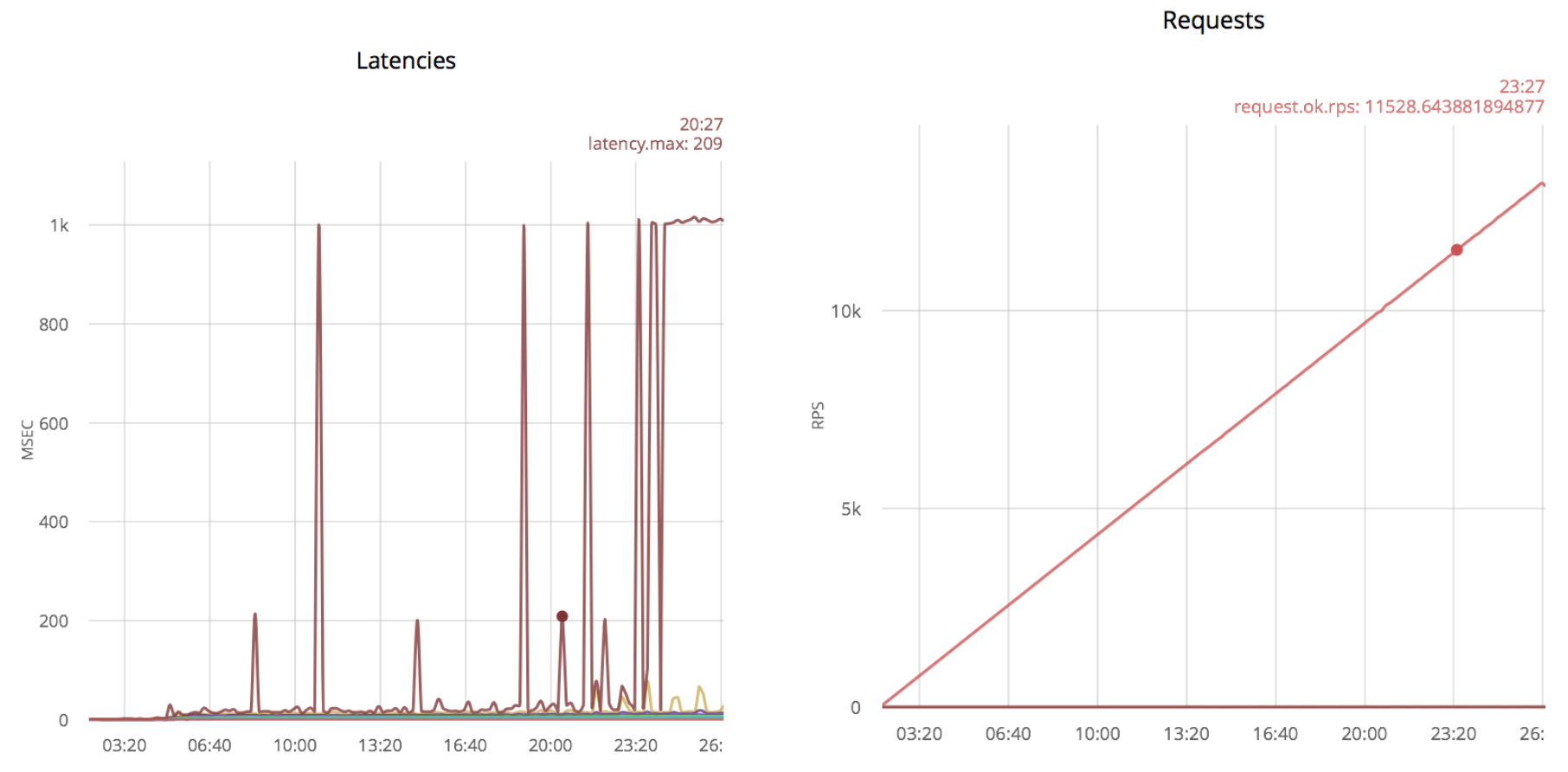
Emissions of 1000 msec correspond to exceeding the waiting time. If you continue to increase the speed of opening compounds, emissions will become more frequent. The first spikes appear at 5k rps and are constantly present at 11k rps.
I found that a simple exception to the timeout parameter when receiving a message greatly increases the speed of connection establishment. In order not to poll the socket at maximum speed, I added timer: sleep (20):
With this optimization, the ranch application can take more updates, the first surge appears only at 11k rps: There

are even more surges if you try to increase the speed further. Thus, the maximum number is 24k rps.
Conclusion
With the proposed optimization, I got about double the gain in connection reception speed, from 11k to 24k rps.
Below is a clean implementation using gen_tcp, similar to what I did with ranch (the text is available as simple.erl in the repository with examples):
By running the same scenario, I got the results:

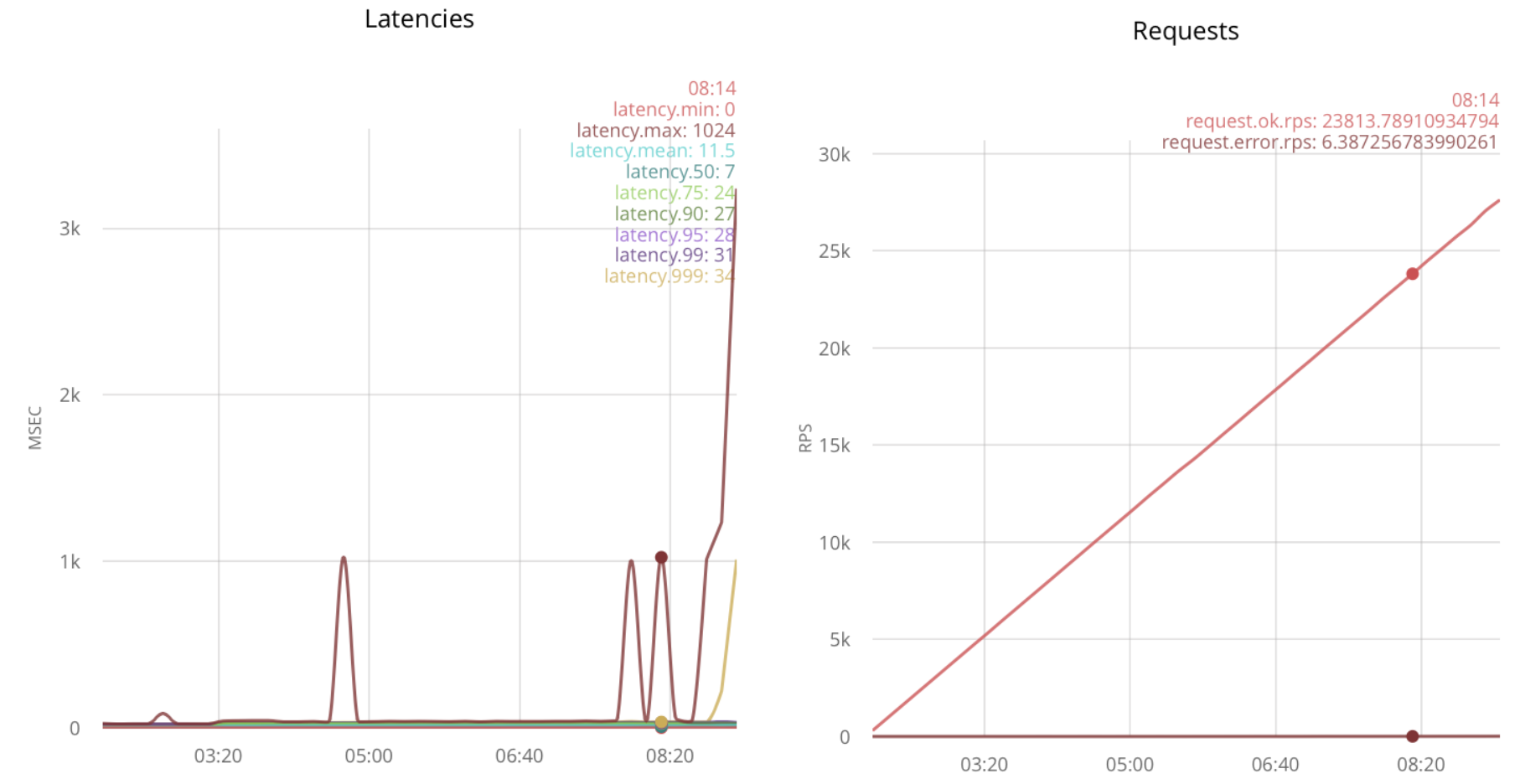
As you can see, around 18k rps, the connection reception becomes unreliable. We assume that it turns out to take 18k.
I just apply the same optimization as for ranch:
In this case, it turns out to process 23k rps:
The second idea is to increase the number of processes that accept the connection. This can be achieved by calling gen_tcp: accept from several processes:
Testing under load gives 32k rps:
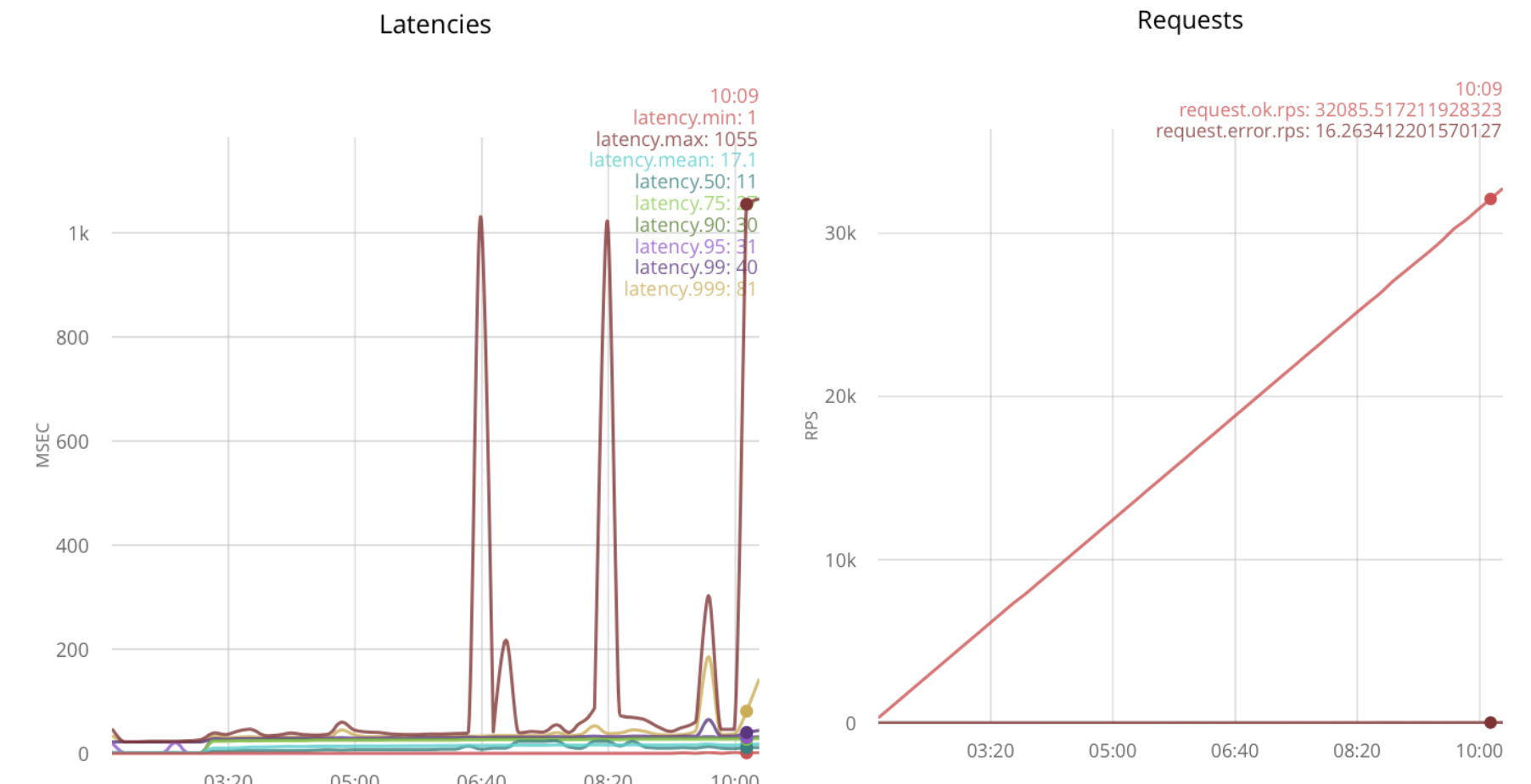
With a further increase in load, delays increase.
Conclusion The
optimization of timeout for gen_tcp increases the reception speed by 5k rps, from 18k to 23k.
With multiple host processes, gen_tcp handles 32k rps, which is 1.8 times more than without optimizations.
This is part of how to receive a large number of short messages on already established connections. New connections rarely open, you need to read and reply to messages as quickly as possible. This scenario is implemented in loaded web socket applications.
I open 25k connections from several nodes and gradually increase the speed of sending messages.
Below are the results for non-optimized code using ranch (time delays on the left, message processing speed on the right):

Without optimizations, ranch processes 70k rps with a maximum time delay of 800ms.
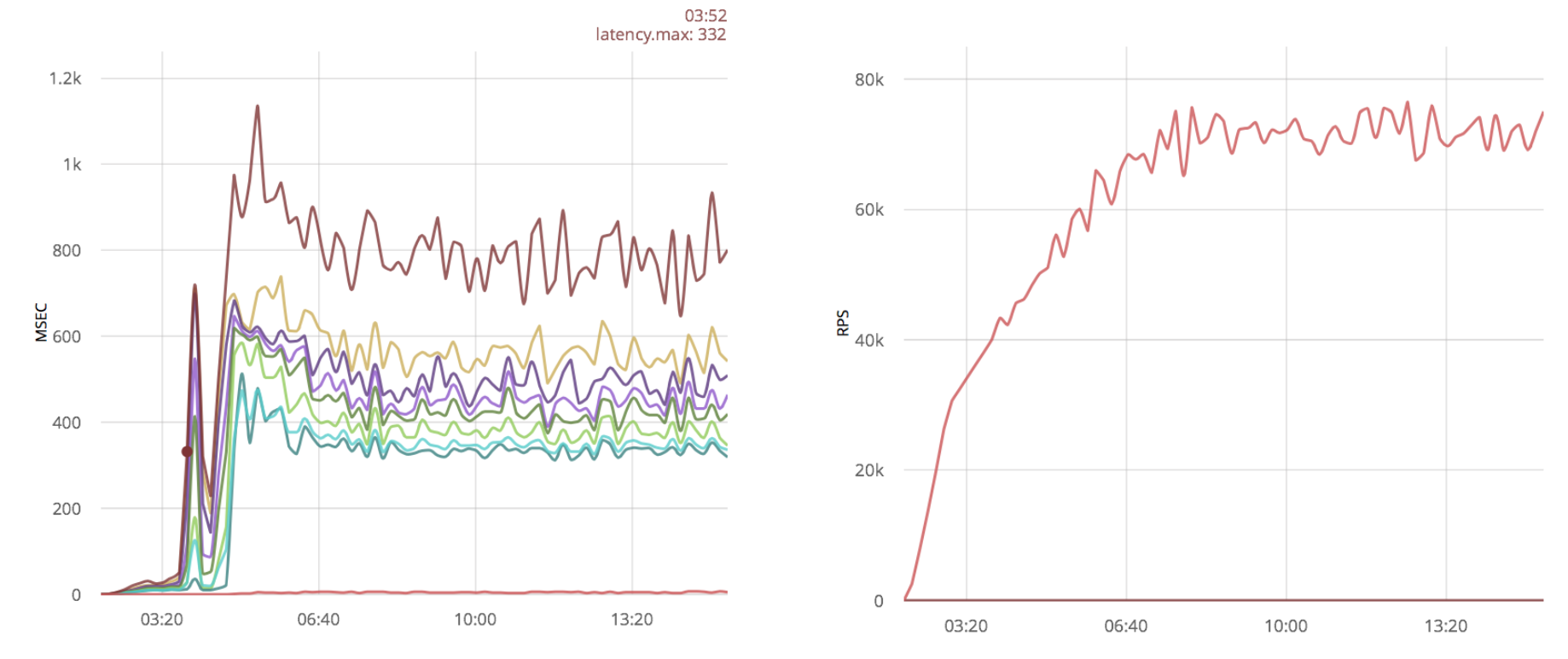
A fairly popular optimization is to increase linux socket buffers . Let's see how this optimization will affect the results:
Conclusion
In this case, increasing the buffers does not give a big gain.
Below I checked the packet processing speed with the gen_tcp solution from the previous part of the article:

70k rps, just like ranch.
In the previous case, I have 25k processes read from sockets - one process per connection. Now I will try to reduce this number and check the results.
I will create 100 processes and will distribute new sockets between them:
This optimization gives a significant performance boost:
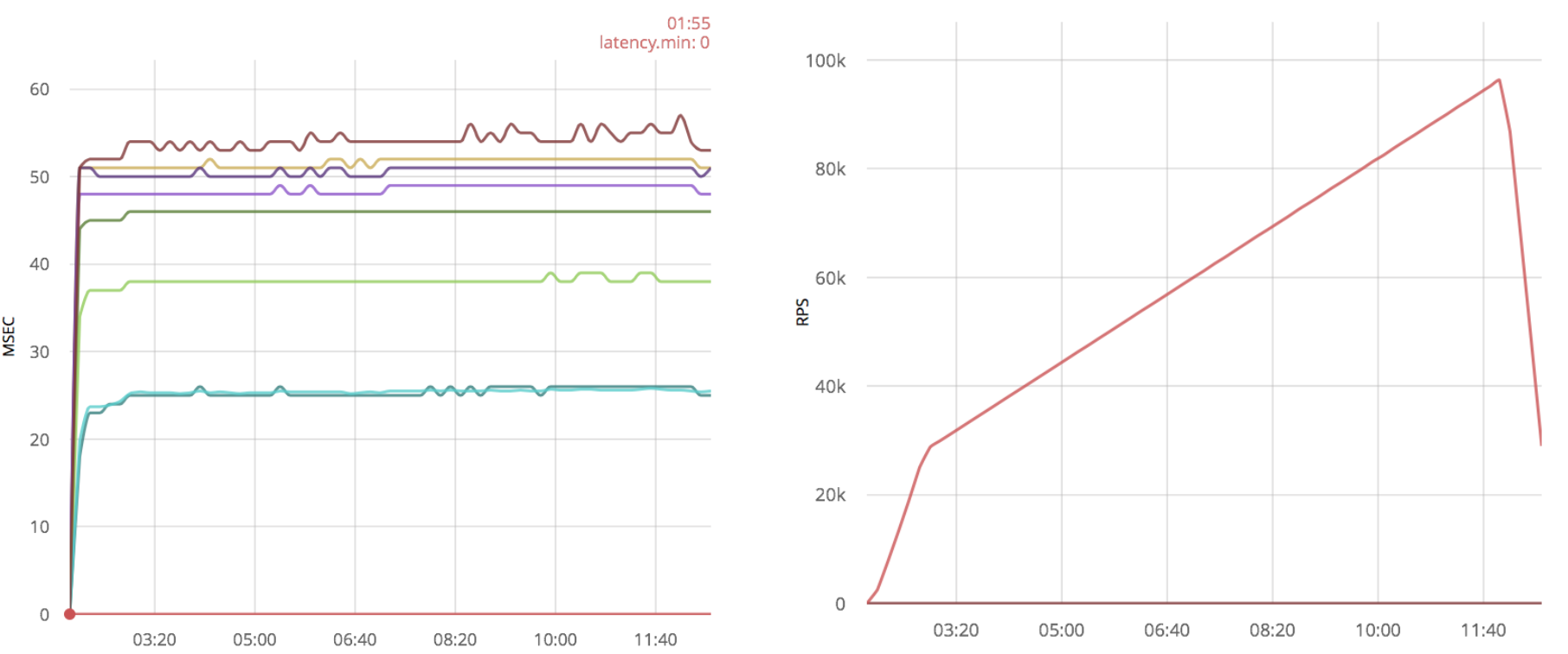
In addition to increasing speed, time delays look much better, and the number of processed packets is about 100k, in addition, even 120k messages can be processed, but with large time delays. While without optimization this could not be done.
Conclusion
Processing several connections from one process gives at least a 50% increase in performance for a pure gen_tcp server.
I will apply the same optimization to the system with the vanilla gen_tcp script:
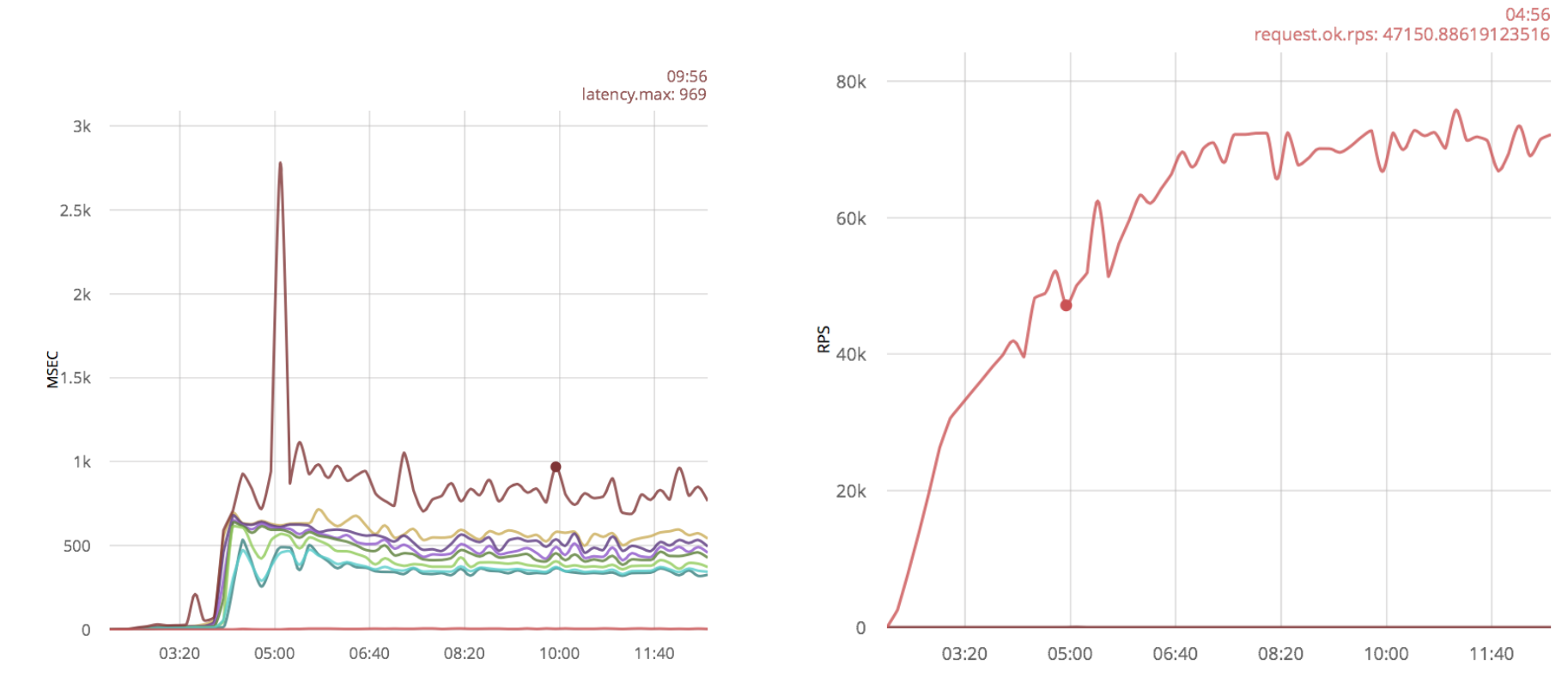
As in the case of ranch, no significant results are visible, only additional outliers appeared in the form of large time delays.
Applying the optimization to the already optimized gen_tcp, I get a lot of outliers of time delays:
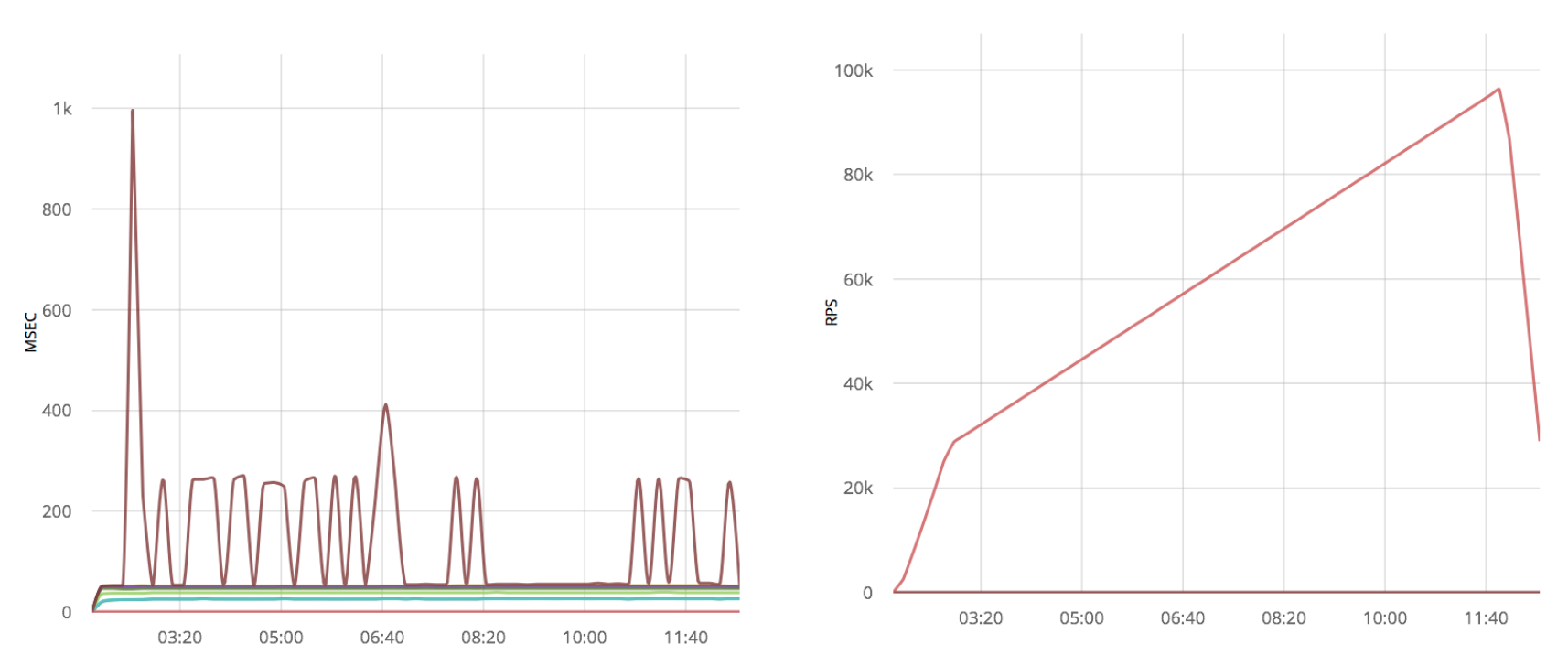
Conclusion
Solutions on pure gen_tcp also do not benefit from the increase in Linux buffers. Reducing the number of processes reading from sockets gives a 50% gain in processing speed.
Formally, in the previous chapters, the message processing cycle assumed an answer to it, but I did not do something to optimize this part. I will try to apply the same ideas to the message sending functions. Here I use the script from the previous chapter, in which packets go through already established connections.
The same ideas that I used in previous chapters can be applied to the send function: remove timeout and respond from fewer processes. There is no such parameter as timeout in the send function, you need to set the {send_timeout, 0} option when opening the connection.
Unfortunately, this optimization practically does not change anything, and changing the code comes down to simply adding an option, for this reason I decided not to bother the reader with diff and the graph.
To check how the number of processes affects, I used the following script:
Here, the responding processes are shared with the readers; I have 25,000 readers and 200 respondents.
But again, this optimization does not show a significant performance gain in comparison with the gen_tcp solution from the previous section:

If one process is used to work with several sockets, one slow client can slow down all the others. In order to avoid this situation, you can set {send_timeout, 0} when opening the socket and, in case of failure, repeat sending with the next loop.
Unfortunately, the send function does not return the number of bytes sent. Only a POSIX error is returned, or the atom is ok. This makes it impossible to send from the last byte sent successfully. In addition, knowing this amount, you can use the network more efficiently, which becomes especially important if customers have poor channels.
Next, I give an example of how this can be fixed:
And that’s it, now the function gen_tcp: send will return {ok, Number} if successful. The above code fragment will output “9”:
Conclusion
If you are processing several connections from one process, you must use the {send_timeout, 0} option when creating a socket, otherwise one slow client may slow down sending to all the others.
If your protocol can handle partial messages, it is best to patch OTP and consider the number of bytes sent.
In this article, I propose optimizations that improve three components of working with TCP: receiving connections, receiving messages, and responding to them.
The article is addressed to both Erlang programmers and anyone who is simply interested in Erlang. Deep knowledge of the language is not required.
I divide “Working with TCP” into three parts:
- Connection Acceptance
- Receiving Messages
- Reply to Messages
Depending on the task, any of these parts may be the bottleneck.
I will consider two approaches to writing TCP services - directly through gen_tcp and using ranch , the most popular Erlang connection pool library. Some of the proposed optimizations will be applicable only in one of the cases.
In order to evaluate the performance change, I use MZBenchwith tcp_worker, which implements connect and request functions plus synchronization functions. Two scripts “fast_connect” and “fast_receive” will be used. The first opens connections with a ramp-up speed, and the second tries to send as many packets as possible over already open connections. Each of the scripts ran on the c4.2xlarge Amazon node. Erlang version is 18.
Scripts and function code for MZBench are available on GitHub .
Connection Acceptance
Accepting connections quickly is important if you have many clients that constantly reconnect, for example, if client processes are very time-limited or do not support persistent connections.
RANCH OPTIMIZATIONS
TCP services using ranch are pretty simple. I will change the code for the example echo service that comes with ranch so that it answers “ok” to any incoming packet, below the difference:
--- a/examples/tcp_echo/src/echo_protocol.erl
+++ b/examples/tcp_echo/src/echo_protocol.erl
@@ -16,8 +16,8 @@ init(Ref, Socket, Transport, _Opts = []) ->
 loop(Socket, Transport) ->
        case Transport:recv(Socket, 0, 5000) of
-               {ok, Data} ->
-                       Transport:send(Socket, Data),
+               {ok, _Data} ->
+                       Transport:send(Socket, <<"ok">>),
                        loop(Socket, Transport);
                _ ->
                        ok = Transport:close(Socket)
--- a/examples/tcp_echo/src/tcp_echo_app.erl
+++ b/examples/tcp_echo/src/tcp_echo_app.erl
@@ -11,8 +11,8 @@
 %% API.
 start(_Type, _Args) ->
-       {ok, _} = ranch:start_listener(tcp_echo, 1,
-               ranch_tcp, [{port, 5555}], echo_protocol, []),
+       {ok, _} = ranch:start_listener(tcp_echo, 100,
+               ranch_tcp, [{port, 5555}, {max_connections, infinity}], echo_protocol, []),
        tcp_echo_sup:start_link().
I will start by running the “fast_connect” script (with increasing connection opening speed): The
graph on the left shows an outlier of 214ms in size, the remaining lines correspond to the percentiles of time delays, divided into five-second intervals. The graph on the right is the opening speed of the compounds, for example, in the discharge region, it was about 3.5 thousand compounds per second. In this scenario, one message is sent each time, so the number of messages corresponds to the number of open connections.
A further increase in speed gives the following results:
Emissions of 1000 msec correspond to exceeding the waiting time. If you continue to increase the speed of opening compounds, emissions will become more frequent. The first spikes appear at 5k rps and are constantly present at 11k rps.
Replacing timeout when receiving a packet with timer: sleep ()
I found that a simple exception to the timeout parameter when receiving a message greatly increases the speed of connection establishment. In order not to poll the socket at maximum speed, I added timer: sleep (20):
--- a/examples/tcp_echo/src/echo_protocol.erl
+++ b/examples/tcp_echo/src/echo_protocol.erl
@@ -15,10 +15,11 @@ init(Ref, Socket, Transport, _Opts = []) ->
        loop(Socket, Transport).
 loop(Socket, Transport) ->
-       case Transport:recv(Socket, 0, 5000) of
-               {ok, Data} ->
-                       Transport:send(Socket, Data),
+       case Transport:recv(Socket, 0, 0) of
+               {ok, _Data} ->
+                       Transport:send(Socket, <<"ok">>),
                        loop(Socket, Transport);
+                {error, timeout} -> timer:sleep(20), loop(Socket, Transport);
                _ ->
                        ok = Transport:close(Socket)
        end.
With this optimization, the ranch application can take more updates, the first surge appears only at 11k rps: There
are even more surges if you try to increase the speed further. Thus, the maximum number is 24k rps.
Conclusion
With the proposed optimization, I got about double the gain in connection reception speed, from 11k to 24k rps.
Gen_tcp optimization
Below is a clean implementation using gen_tcp, similar to what I did with ranch (the text is available as simple.erl in the repository with examples):
-export([service/1]).
-define(Options, [
    binary,
    {backlog, 128},
    {active, false},
    {buffer, 65536},
    {keepalive, true},
    {reuseaddr, true}
]).
-define(Timeout, 5000).
main([Port]) ->
    {ok, ListenSocket} = gen_tcp:listen(list_to_integer(Port), ?Options),
    accept(ListenSocket).
accept(ListenSocket) ->
    case gen_tcp:accept(ListenSocket) of
        {ok, Socket} -> erlang:spawn(?MODULE, service, [Socket]), accept(ListenSocket);
        {error, closed} -> ok
    end.
service(Socket) ->
    case gen_tcp:recv(Socket, 0, ?Timeout) of
        {ok, _Binary} -> gen_tcp:send(Socket, <<"ok">>), service(Socket);
        _ -> gen_tcp:close(Socket)
    end.
By running the same scenario, I got the results:
As you can see, around 18k rps, the connection reception becomes unreliable. We assume that it turns out to take 18k.
Replacing timeout when receiving a packet with timer: sleep ()
I just apply the same optimization as for ranch:
service(Socket) ->
    case gen_tcp:recv(Socket, 0, 0) of
        {ok, _Binary} -> gen_tcp:send(Socket, <<"ok">>), service(Socket);
        {error, timeout} -> timer:sleep(20), service(Socket);
        _ -> gen_tcp:close(Socket)
    end.
In this case, it turns out to process 23k rps:
Adding Host Processes
The second idea is to increase the number of processes that accept the connection. This can be achieved by calling gen_tcp: accept from several processes:
main([Port]) ->
    {ok, ListenSocket} = gen_tcp:listen(list_to_integer(Port), ?Options),
    erlang:spawn(?MODULE, accept, [ListenSocket]),
    erlang:spawn(?MODULE, accept, [ListenSocket]),
    accept(ListenSocket).
Testing under load gives 32k rps:
With a further increase in load, delays increase.
Conclusion The
optimization of timeout for gen_tcp increases the reception speed by 5k rps, from 18k to 23k.
With multiple host processes, gen_tcp handles 32k rps, which is 1.8 times more than without optimizations.
Summary
- It is better not to use the timeout parameter in the call function, timer: sleep is better. This applies to both ranch and pure gen_tcp. For ranch, this doubles the speed at which connections are received.
- Of several processes, connections are accepted faster. This applies only to pure gen_tcp. In my case, this gave a 40% improvement in the speed of receiving connections, together with the replacement of timeout with timer: sleep ().
Receiving Messages
This is part of how to receive a large number of short messages on already established connections. New connections rarely open, you need to read and reply to messages as quickly as possible. This scenario is implemented in loaded web socket applications.
I open 25k connections from several nodes and gradually increase the speed of sending messages.
RANCH OPTIMIZATION
Below are the results for non-optimized code using ranch (time delays on the left, message processing speed on the right):
Without optimizations, ranch processes 70k rps with a maximum time delay of 800ms.
Increase linux buffers
A fairly popular optimization is to increase linux socket buffers . Let's see how this optimization will affect the results:
Conclusion
In this case, increasing the buffers does not give a big gain.
Get_tcp optimization
Below I checked the packet processing speed with the gen_tcp solution from the previous part of the article:
70k rps, just like ranch.
Reduce the number of reading processes.
In the previous case, I have 25k processes read from sockets - one process per connection. Now I will try to reduce this number and check the results.
I will create 100 processes and will distribute new sockets between them:
main([Port]) ->
    {ok, ListenSocket} = gen_tcp:listen(list_to_integer(Port), ?Options),
    Readers = [erlang:spawn(?MODULE, reader, []) || _X <- lists:seq(1, ?Readers)],
    accept(ListenSocket, Readers, []).
accept(ListenSocket, [], Reversed) -> accept(ListenSocket, lists:reverse(Reversed), []);
accept(ListenSocket, [Reader | Rest], Reversed) ->
    case gen_tcp:accept(ListenSocket) of
        {ok, Socket} -> Reader ! Socket, accept(ListenSocket, Rest, [Reader | Reversed]);
        {error, closed} -> ok
    end.
reader() -> reader([]).
read_socket(S) ->
    case gen_tcp:recv(S, 0, 0) of
        {ok, _Binary} -> gen_tcp:send(S, <<"ok">>), true;
        {error, timeout} -> true;
        _ -> gen_tcp:close(S), false
    end.
reader(Sockets) ->
    Sockets2 = lists:filter(fun read_socket/1, Sockets),
    receive
        S -> reader([S | Sockets2])
    after ?SmallTimeout -> reader(Sockets)
    end.
This optimization gives a significant performance boost:
In addition to increasing speed, time delays look much better, and the number of processed packets is about 100k, in addition, even 120k messages can be processed, but with large time delays. While without optimization this could not be done.
Conclusion
Processing several connections from one process gives at least a 50% increase in performance for a pure gen_tcp server.
Increase Linux Buffers
I will apply the same optimization to the system with the vanilla gen_tcp script:
As in the case of ranch, no significant results are visible, only additional outliers appeared in the form of large time delays.
Applying the optimization to the already optimized gen_tcp, I get a lot of outliers of time delays:
Conclusion
Solutions on pure gen_tcp also do not benefit from the increase in Linux buffers. Reducing the number of processes reading from sockets gives a 50% gain in processing speed.
Summary
- Initially, both solutions allow you to process approximately the same number of messages, about 70k rps.
- The increase in buffers does not allow a significant increase in processing speed, and in the case of pure gen_tcp, it adds samples in the form of large time delays.
- A Gen_tcp solution with several sockets per process works at least 1.5 times faster than non-optimized one and has much better time delays. Unfortunately, this optimization is not applicable to ranch without changing its architecture.
Reply to Messages
Formally, in the previous chapters, the message processing cycle assumed an answer to it, but I did not do something to optimize this part. I will try to apply the same ideas to the message sending functions. Here I use the script from the previous chapter, in which packets go through already established connections.
Timeout and process optimization
The same ideas that I used in previous chapters can be applied to the send function: remove timeout and respond from fewer processes. There is no such parameter as timeout in the send function, you need to set the {send_timeout, 0} option when opening the connection.
Unfortunately, this optimization practically does not change anything, and changing the code comes down to simply adding an option, for this reason I decided not to bother the reader with diff and the graph.
To check how the number of processes affects, I used the following script:
-export([responder/0, service/2]).
-define(Options, [
    binary,
    {backlog, 128},
    {active, false},
    {buffer, 65536},
    {keepalive, true},
    {send_timeout, 0},
    {reuseaddr, true}
]).
-define(SmallTimeout, 50).
-define(Timeout, 5000).
-define(Responders, 200).
main([Port]) ->
    {ok, ListenSocket} = gen_tcp:listen(list_to_integer(Port), ?Options),
    Responders = [erlang:spawn(?MODULE, responder, []) || _X <- lists:seq(1, ?Responders)],
    accept(ListenSocket, Responders, []).
accept(ListenSocket, [], Reversed) -> accept(ListenSocket, lists:reverse(Reversed), []);
accept(ListenSocket, [Responder | Rest], Reversed) ->
    case gen_tcp:accept(ListenSocket) of
        {ok, Socket} -> erlang:spawn(?MODULE, service, [Socket, Responder]), accept(ListenSocket, Rest, [Responder | Reversed]);
        {error, closed} -> ok
    end.
responder() ->
    receive
        S -> gen_tcp:send(S, <<"ok">>), responder()
    after ?SmallTimeout -> responder()
    end.
service(Socket, Responder) ->
    case gen_tcp:recv(Socket, 0, ?Timeout) of
        {ok, _Binary} -> Responder ! Socket, service(Socket, Responder);
        _ -> gen_tcp:close(Socket)
    end.
Here, the responding processes are shared with the readers; I have 25,000 readers and 200 respondents.
But again, this optimization does not show a significant performance gain in comparison with the gen_tcp solution from the previous section:
Tuning Erlang
If one process is used to work with several sockets, one slow client can slow down all the others. In order to avoid this situation, you can set {send_timeout, 0} when opening the socket and, in case of failure, repeat sending with the next loop.
Unfortunately, the send function does not return the number of bytes sent. Only a POSIX error is returned, or the atom is ok. This makes it impossible to send from the last byte sent successfully. In addition, knowing this amount, you can use the network more efficiently, which becomes especially important if customers have poor channels.
Next, I give an example of how this can be fixed:
- Download Erlang sources from the official website:
$ wget http://erlang.org/download/otp_src_18.2.1.tar.gz $ tar -xf otp_src_18.2.1.tar.gz $ cd otp_src_18.2.1 - Update the inet erts / emulator / drivers / common / inet_drv.c driver function:
- Add the ability to respond with a number:
static int inet_reply_ok_int(inet_descriptor* desc, int Val) { ErlDrvTermData spec[2*LOAD_ATOM_CNT + 2*LOAD_PORT_CNT + 2*LOAD_TUPLE_CNT]; ErlDrvTermData caller = desc->caller; int i = 0; i = LOAD_ATOM(spec, i, am_inet_reply); i = LOAD_PORT(spec, i, desc->dport); i = LOAD_ATOM(spec, i, am_ok); i = LOAD_INT(spec, i, Val); i = LOAD_TUPLE(spec, i, 2); i = LOAD_TUPLE(spec, i, 3); ASSERT(i == sizeof(spec)/sizeof(*spec)); desc->caller = 0; return erl_drv_send_term(desc->dport, caller, spec, i); } - Let’s remove the “ok” atom from the tcp_inet_commandv function:
else inet_reply_error(INETP(desc), ENOTCONN); } else if (desc->tcp_add_flags & TCP_ADDF_PENDING_SHUTDOWN) tcp_shutdown_error(desc, EPIPE); >> else tcp_sendv(desc, ev); DEBUGF(("tcp_inet_commandv(%ld) }\r\n", (long)desc->inet.port)); } - Add an int send instead of returning 0 in in the tcp_sendv function:
    default:
         if (len == 0)
>>             return inet_reply_ok_int(desc, 0);
         h_len = 0;
         break;
     }
-----------------------------------
       else if (n == ev->size) {
            ASSERT(NO_SUBSCRIBERS(&INETP(desc)->empty_out_q_subs));
>>            return inet_reply_ok_int(desc, n);
        }
        else {
            DEBUGF(("tcp_sendv(%ld): s=%d, only sent "
                    LLU"/%d of "LLU"/%d bytes/items\r\n",
                    (long)desc->inet.port, desc->inet.s,
                    (llu_t)n, vsize, (llu_t)ev->size, ev->vsize));
        }
        DEBUGF(("tcp_sendv(%ld): s=%d, Send failed, queuing\r\n",
                (long)desc->inet.port, desc->inet.s));
        driver_enqv(ix, ev, n);
        if (!INETP(desc)->is_ignored)
            sock_select(INETP(desc),(FD_WRITE|FD_CLOSE), 1);
    }
>>    return inet_reply_ok_int(desc, n);
- Add the ability to respond with a number:
- Run / configure && make && make install.
And that’s it, now the function gen_tcp: send will return {ok, Number} if successful. The above code fragment will output “9”:
   {ok, Sock} = gen_tcp:connect(SomeHostInNet, 5555,
                                 [binary, {packet, 0}]),
    {ok, N} = gen_tcp:send(Sock, "Some Data"),
    io:format("~p", [N])
Conclusion
If you are processing several connections from one process, you must use the {send_timeout, 0} option when creating a socket, otherwise one slow client may slow down sending to all the others.
If your protocol can handle partial messages, it is best to patch OTP and consider the number of bytes sent.
Briefly
- If you need to quickly accept connections, you need to accept them from several processes.
- If you need to quickly read from sockets, you need to process several sockets from one process and not use ranch.
- Increasing linux buffers reduces system stability and does not give a significant performance benefit.
- When using multiple sockets from one process, you must remove the send timeout.
- If you need to know the exact number of bytes sent, you can patch OTP.
References
- A library that allows you to process sockets according to the script described above: https://github.com/parsifal-47/socketpool
- Examples from the article: https://github.com/parsifal-47/server-examples