Networks For The Smallest. Micro issue number 6. MPLS L3VPN and Internet Access
- Tutorial
All issues
11. Сети для самых маленьких. Часть одиннадцатая. MPLS L3VPN
10. Сети для самых маленьких. Часть десятая. Базовый MPLS
9. Сети для самых маленьких. Часть девятая. Мультикаст
8.1 Сети для Самых Маленьких. Микровыпуск №3. IBGP
8. Сети для самых маленьких. Часть восьмая. BGP и IP SLA
7. Сети для самых маленьких. Часть седьмая. VPN
6. Сети для самых маленьких. Часть шестая. Динамическая маршрутизация
5. Сети для самых маленьких: Часть пятая. NAT и ACL
4. Сети для самых маленьких: Часть четвёртая. STP
3. Сети для самых маленьких: Часть третья. Статическая маршрутизация
2. Сети для самых маленьких. Часть вторая. Коммутация
1. Сети для самых маленьких. Часть первая. Подключение к оборудованию cisco
0. Сети для самых маленьких. Часть нулевая. Планирование
10. Сети для самых маленьких. Часть десятая. Базовый MPLS
9. Сети для самых маленьких. Часть девятая. Мультикаст
8.1 Сети для Самых Маленьких. Микровыпуск №3. IBGP
8. Сети для самых маленьких. Часть восьмая. BGP и IP SLA
7. Сети для самых маленьких. Часть седьмая. VPN
6. Сети для самых маленьких. Часть шестая. Динамическая маршрутизация
5. Сети для самых маленьких: Часть пятая. NAT и ACL
4. Сети для самых маленьких: Часть четвёртая. STP
3. Сети для самых маленьких: Часть третья. Статическая маршрутизация
2. Сети для самых маленьких. Часть вторая. Коммутация
1. Сети для самых маленьких. Часть первая. Подключение к оборудованию cisco
0. Сети для самых маленьких. Часть нулевая. Планирование
The article about L3VPN turned out to be large - no less than 130,000 characters.
Considering that not everyone has read it yet, we have put this part about Internet access into a separate publication.
This is especially important, because in RuNet, and indeed on the Internet, there is no accessible analysis of this topic.
It is likely that you are now reading exclusive material.
So, there is a telecom operator that provides its client with L3VPN. For no reason, from the bay and floundering, he also needed the Internet.
The most obvious solution is to route another cable - in one VPN, in another Internet.
Let's say it's complicated. Then you can raise the subinterface and transfer photos to the contact in a separate VLAN.
Suppose there is a complex leased channel where you can only get 1 VLAN or the client equipment does not know how to VLAN (there is a regular computer), then what?
About it the following 36,000 letters of your life.
Release Content
- NAT on CE
- VRF Aware NAT
- Common services
So, the provider in the same VPN also sells access to the Internet, through the same connection, through the same addresses. This means that the provider’s network will have to configure access from the private network to the public one somewhere, and therefore ensure the intersection of routing information.
All this indecency has its own name - Route Leaking - routes flow from VRF to the global table. The name of the functional is saying that you should resort to Route Leaking especially through static routes only in extreme cases, for an eerie crutch.
There are two approaches to implementing this functionality:
- Configure static routes from VRF to the public network and vice versa.
- Juggling Route Targets.
Both have the right to life.
Let's start with statics.
Of course, we need NAT to hide private networks.
Scenarios differ only in the place of application:
- On the client network is CE NAT.
- The network provider at the extreme PE is PE NAT.
- At the provider's network, the Internet access point is VRF Aware NAT.
NAT on CE
The provider issues to the client a pool of public addresses to which it broadcasts its internal addresses. All that remains to be done by the provider is to configure the routing between VRF and the global table.
Given that the broadcast will be on CE, you need to select only one branch, let it be TARS_2 - there we have a public link network - 100.0.1.0/30.
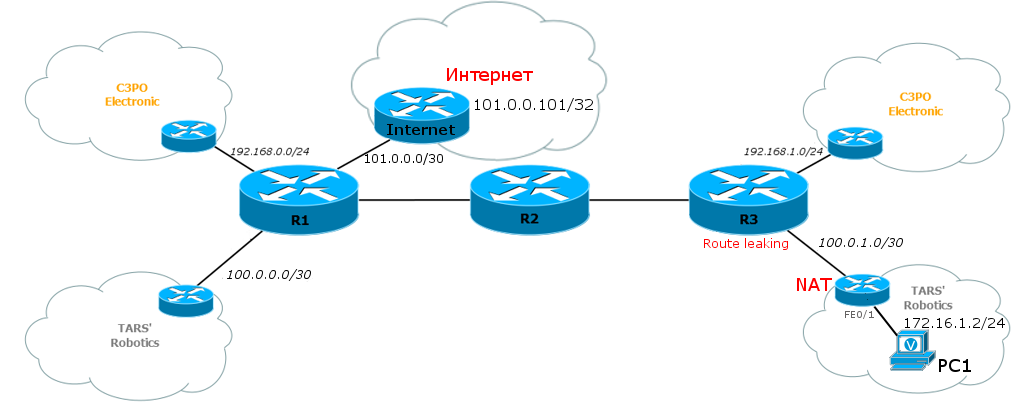
As you can see, for this test we need something as the Internet and a computer that needs access there.
GNS has such a marvelous object as VPCS, which is great for this role. NAT needs to be configured
on TARS_2 , its configuration is below:
TARS_2(config)#interface Loopback0

TARS_2(config-if)#ip address 172.16.255.2 255.255.255.255


TARS_2(config)#interface FastEthernet0/0

TARS_2(config-if)#description To Linkmeup

TARS_2(config-if)#ip address 100.0.1.2 255.255.255.252

TARS_2(config-if)#ip nat outside


TARS_2(config)#interface FastEthernet0/1

TARS_2(config-if)#description To LAN

TARS_2(config-if)#ip address 172.16.1.1 255.255.255.0

TARS_2(config-if)#ip nat inside


TARS_2(config)#router bgp 64502

TARS_2(config-router)#network 172.16.1.0 mask 255.255.255.0

TARS_2(config-router)#network 172.16.255.2 mask 255.255.255.255

TARS_2(config-router)#neighbor 100.0.1.1 remote-as 64500


TARS_2(config)#ip nat inside source list 100 interface FastEthernet0/0 overload


TARS_2(config)#access-list 100 deny ip 172.16.0.0 0.0.255.255 172.16.0.0 0.0.255.255

TARS_2(config)#access-list 100 permit ip 172.16.0.0 0.0.255.255 any
access-list 100 consists of two lines - the first prohibits the translation of addresses for packets that go from their network to their own network, located at the other end of the provider.
The second line allows broadcasting only for the addresses of its network. If suddenly you write permit ip any any, then the BGP session with Linkmeup_R3 will immediately drop .
Details on configuring NAT were covered in the fifth part of the SDSM .
Internet configuration: The BGP settings on the Internet are exactly the same as they were in Balagan Telecom in the eighth edition , we only allowed ourselves some liberties with IP addresses. Loopback 0 interface on a host named Internet
Internet(config)#interface Loopback0

Internet(config-if)#ip address 101.0.0.101 255.255.255.255


Internet(config)#interface FastEthernet0/0

Internet(config-if)#description To linkmeup

Internet(config-if)#ip address 101.0.0.1 255.255.255.252


Internet(config)#router bgp 64501

Internet(config-router)#network 101.0.0.0 mask 255.255.240.0

Internet(config-router)#neighbor 101.0.0.2 remote-as 64500


Internet(config)#ip route 101.0.0.0 255.255.240.0 Null0
personifies the entire Internet. Ping before him and we will check. Linkmeup_R1 is
configured accordingly for communication with the Internet : As for access to the Internet from a VPN, in this case, the configuration needs to be changed only at the closest to CE PE - in our case Linkmeup_R3 . 1. Create a default route for VRF TARS. This is to ensure that packets arriving from TARS_2 are not discarded and know where to go. There are two things to pay attention to: The global keyword . It says that Next Hop (101.0.0.2) needs to be searched in the global routing table.
Internet(config)#interface FastEthernet1/1

Internet(config-if)#description To Balagan-Telecom

Internet(config-if)#ip address 101.0.0.2 255.255.255.252


Internet(config)#router bgp 64500

Internet(config-router)#network 100.0.0.0 mask 255.255.254.0

Internet(config-router)#network 101.0.0.0 mask 255.255.255.252

Internet(config-router)#neighbor 101.0.0.1 remote-as 64501


Internet(config)#ip route 100.0.0.0 255.255.254.0 Null0
Linkmeup_R3(config)#ip route vrf TARS 0.0.0.0 0.0.0.0 101.0.0.2 global
As the Next-Hop address, the Linkmeup_R1 link address to the Internet is selected . Why not loopback as we love? This avoids the so-called blackholing. The fact is that loopback is always available, and if the channel between our gateway ( Linkmeup_R1 ) and the Internet TARS_2 falls , it will not notice it in any way and will continue to send traffic to Linkmeup_R3 , and that, without suspecting anything, to Linkmeup_R1 . If we provide a link address, then it will disappear from the routing tables as soon as the line falls.
As a result of the previous operation, the default route appears on Linkmeup_3:

2.Now he needs to be informed to the client so that he also has a default route (although he could configure it himself). Result: So, we already have routes there , that is, to the Internet, now as for the return . 3. On Linkmeup_R3, configure a static route for the network 100.0.1.0/30: Why do we need this? That there was a route, it is logical after all. If a packet arrives from the Internet to Linkmeup_R3 , and there is no route to 100.0.1.0/30 in the global routing table ( in VRF, of course, it will ), the packet will be discarded. It was: There is a route, but just not there. The packet will not be discarded, but it will not reach the addressee either.
address-family ipv4 vrf TARS

neighbor 100.0.1.2 default-originate

ip route 100.0.1.0 255.255.255.252 FastEthernet1/0

It became:

4. Next, BGP neighbors should be informed about this network - everyone should know about it. In particular, we are interested in Linkmeup_R1 . Result:
router bgp 64500

network 100.0.1.0 mask 255.255.255.252

BGP basically knew about this network before, but only in the address-family ipv4 vrf TARS, where it got with the redistribute connected command . In the global routing table, it was not there.
So, everything is ready, we check:

This indicates that Route Leaking has earned, that is, access from VRF to the global routing table and vice versa works.
Checking the availability of the Internet from a computer is a formality that shows that we configured NAT correctly. In fact, all the magic happens on Linkmeup_R3 , and the broadcast we are familiar with on TARS_2 , that is, things are by and large unrelated, and if the Internet is available with TARS_2 , it will be available with PC1 .
However, we will check:

Internet is available. Hooray!
If you're interested, let's see what happens with the package along the way from PC1 to the Internet.
1) Обычным образом пакет попадает на шлюз по умолчанию — TARS_2
2) TARS_2 видит, что адрес назначения подпадает только под маршрут по умолчанию, передаёт пакет в интерфейс FE0/0 на Linkmeup_R3.

В последний момент он замечает, что заголовок пакета полностью удовлетворяет списку доступа (access-list 100) и транслирует локальный адрес 172.16.1.2 в 100.0.1.2
3) Пакет приходит в VRF TARS на Linkmeup_R3, где снова подпадает под маршрут по умолчанию, который указывает на адрес 101.0.0.2 из глобальной таблицы маршрутизации. Уже из глобальной ТМ Linkmeup_R3 знает, что 101.0.0.2 доступен через 1.1.1.1 и рекурсивно через 10.0.23.2. Причём пакету выдаётся метка 16. То есть после Linkmeup_R3 пакет уже пойдёт по MPLS LSP.


Пакет между Linkmeup_R3 и Provier_R2
Заметьте, что метки VPN здесь нет — пакет перекочевал из VPN в публичную сеть.
4) На Linkmeup_R2 с пакета снимается транспортная метка MPLS (происходит PHP) и на Linkmeup_R1 уже передаётся чистый IP-пакет.
5) Этот чистый IP-пакет уходит с Linkmeup_R1 в Internet (BGP сообщил маршрут до сети 101.0.0.0/20)
6) Internet знает маршрут до 100.0.0.0/23 так же по BGP и передаёт пакет обратно.
7) Linkmeup_R1 знает, что адресат находится за 3.3.3.3 — помните, мы объявляли эту сеть в BGP?
Соответственно, по MPLS он доходит до Linkmeup_R3.

8) Сеть 100.0.1.0/30 находится в VRF TARS, но мы ведь прописывали её статически в интерфейс FE1/0. Так что пакет передаётся благополучно на интерфейс.
9) Ну а дальше обратная трансляция на TARS_2 и последняя миля до родного дома.
2) TARS_2 видит, что адрес назначения подпадает только под маршрут по умолчанию, передаёт пакет в интерфейс FE0/0 на Linkmeup_R3.
В последний момент он замечает, что заголовок пакета полностью удовлетворяет списку доступа (access-list 100) и транслирует локальный адрес 172.16.1.2 в 100.0.1.2
3) Пакет приходит в VRF TARS на Linkmeup_R3, где снова подпадает под маршрут по умолчанию, который указывает на адрес 101.0.0.2 из глобальной таблицы маршрутизации. Уже из глобальной ТМ Linkmeup_R3 знает, что 101.0.0.2 доступен через 1.1.1.1 и рекурсивно через 10.0.23.2. Причём пакету выдаётся метка 16. То есть после Linkmeup_R3 пакет уже пойдёт по MPLS LSP.
Пакет между Linkmeup_R3 и Provier_R2
Заметьте, что метки VPN здесь нет — пакет перекочевал из VPN в публичную сеть.
4) На Linkmeup_R2 с пакета снимается транспортная метка MPLS (происходит PHP) и на Linkmeup_R1 уже передаётся чистый IP-пакет.
5) Этот чистый IP-пакет уходит с Linkmeup_R1 в Internet (BGP сообщил маршрут до сети 101.0.0.0/20)
6) Internet знает маршрут до 100.0.0.0/23 так же по BGP и передаёт пакет обратно.
7) Linkmeup_R1 знает, что адресат находится за 3.3.3.3 — помните, мы объявляли эту сеть в BGP?
Соответственно, по MPLS он доходит до Linkmeup_R3.
8) Сеть 100.0.1.0/30 находится в VRF TARS, но мы ведь прописывали её статически в интерфейс FE1/0. Так что пакет передаётся благополучно на интерфейс.
9) Ну а дальше обратная трансляция на TARS_2 и последняя миля до родного дома.
Repeat the setup steps:
- Configure NAT. On CE .
- Set the default route to the Internet for VRF with Next Hop and the Global keyword. On PE .
- Force PE to advertise this default route to the client. On PE .
- Configure the route in the global TM to the client side with the output interface. On PE .
- Tell this route to the MBGP neighbors, or rather to the site that is watching the Internet. On CE .
Full configuration of nodes interesting to us.
The described configuration is Route Leaking .
Here we will omit the script with NAT on the extreme PE, because it is uninteresting.
VRF-Aware NAT
A more correct and slightly more scalable option is to configure the broadcast on Egress PE - on the Internet. In this case, we have a central node where all operations are performed, and the client does not need to do anything.

The only inconvenience: although it is possible that not a single client is directly connected to Egress PE, this router will have to support all VRFs from which you need to access the Internet. Actually, that's why he is VRF-Aware.
Egress PE in our case - Linkmeup_R1 , which is the Internet gateway for the entire linkmeup network - no absolutely additional settings on other nodes.
Let PC2 from the C3PO Electronic network ( C3PO_2 ) want to access the Internet.
We do not touch PC1 from TARS 'Robotics and leave it unchanged - they with their white addresses are a separate story, although they can also be worn in the same way.
1) So, firstly on Linkmeup_R1 there should be VRF C3PO. It already exists, but if it weren’t, it would have to be.
The VRF configuration is typical and it has not changed: 2) Configure NAT Turn ip nat inside in the direction where we get the packets for translation from, that is, towards the Linkmeup_R2 P-router : Turn on the ip nat outside towards the Internet : Create an ACL where we allow access from C3PO networks on the Internet: And actually NAT itself: 3)
Linkmeup_R1(config)#ip vrf C3PO

Linkmeup_R1(config-vrf)#rd 64500:100

Linkmeup_R1(config-vrf)#route-target export 64500:100

Linkmeup_R1(config-vrf)#route-target import 64500:100
Linkmeup_R1(config)#interface FastEthernet 0/1

Linkmeup_R1(config-if)#ip nat inside
Linkmeup_R1(config)#interface FastEthernet 1/1

Linkmeup_R1(config-if)#ip nat outside
Linkmeup_R1(config)#access-list 100 permit ip 192.168.0.0 0.0.255.255 any
Linkmeup_R1(config)#$ip nat inside source list 100 interface FastEthernet 1/1 overload
In BGP, as well as last time, we prescribe sending the default route to this VRF:
Linkmeup_R1(config)#router bgp 64500

Linkmeup_R1(config-router)#address-family ipv4 vrf C3PO

Linkmeup_R1(config-router-af)#redistribute static

Linkmeup_R1(config-router-af)#default-information originate
Be careful with redistribution in production. Use only with filtration.
Note that the redistribute static command alone is not enough to pick up and announce the default route. To do this, you will additionally have to execute the default-information originate command explicitly .
In order for this route to be announced by BGP, it must be in the routing table: Now it won’t work right away, because I was a little cunning, saying that no settings except the Internet gateway will be needed. The fact is that we generated the default route for VRF C3PO on Linkmeup_R1 and transferred it to Linkmeup_R3 via BGP , but here it got stuck before reaching C3PO_2 - you need to force OSPF to announce the default route. Like the previous time without an explicit command
Linkmeup_R1(config)#ip route vrf C3PO 0.0.0.0 0.0.0.0 101.0.0.1 global
default-information originate it will not do this: Check: It would be strange if it did not work.
Linkmeup_R3(config)#router ospf 2 vrf C3PO

Linkmeup_R3(config-router)# default-information originate

What happens with the package?
1) От PC2 до Linkmeup_R3 он доходит без видимых изменений (только заголовок MAC меняется). На PC2 маршрут по умолчанию настроен вручную. На C3PO_2 он изучен по OSPF от Linkmeup_R3.
2) На интерфейсе FE0/1 пакет входит в VRF C3PO и приобретает сервисную метку.
3) Маршрут по умолчанию в VRF импортирован из BGP и он ведёт к 1.1.1.1 через 10.0.23.2:

4) От Linkmeup_R3 до Linkmeup_R2 пакет идёт по MPLS с двумя метками: внутренней сервисной — 27 и внешней транспортной — 18. Это видно из скриншота выше.
5) На Linkmeup_R1 происходит Route leaking из VRF C3PO в глобальную таблицу — так пакет покидает VRF.
Также здесь происходит трансляция. Linkmeup_R1 записывает информацию об этом факте в свою таблицу трансляций для VRF C3PO:

6) В Интернет пакет уходит уже, конечно, без меток MPLS и с публичным адресом отправителя — 101.0.0.2 в заголовке
7) Ответный пакет на Linkmeup_R1 попадает по глобальной таблице маршрутизации — Интернету известен адрес 101.0.0.2. На этом узле происходит обратная трансляция. Адрес назначения меняется на 192.168.2.2 и искать его нужно уже в VRF C3PO — так сказала таблица NAT.
8) А дальше процесс вам уже известен — две метки, долгий путь до Linkmeup_R3 и далее до PC2.
2) На интерфейсе FE0/1 пакет входит в VRF C3PO и приобретает сервисную метку.
3) Маршрут по умолчанию в VRF импортирован из BGP и он ведёт к 1.1.1.1 через 10.0.23.2:
4) От Linkmeup_R3 до Linkmeup_R2 пакет идёт по MPLS с двумя метками: внутренней сервисной — 27 и внешней транспортной — 18. Это видно из скриншота выше.
Не забывайте делать поправку на PHP — от Penultimate Router (Linkmeup_R2) — к Egress PE (Linkmeup_R1) — пакет пойдёт с одной сервисной меткой, потому что транспортная была снята в результате PHP.
5) На Linkmeup_R1 происходит Route leaking из VRF C3PO в глобальную таблицу — так пакет покидает VRF.
Также здесь происходит трансляция. Linkmeup_R1 записывает информацию об этом факте в свою таблицу трансляций для VRF C3PO:
6) В Интернет пакет уходит уже, конечно, без меток MPLS и с публичным адресом отправителя — 101.0.0.2 в заголовке
7) Ответный пакет на Linkmeup_R1 попадает по глобальной таблице маршрутизации — Интернету известен адрес 101.0.0.2. На этом узле происходит обратная трансляция. Адрес назначения меняется на 192.168.2.2 и искать его нужно уже в VRF C3PO — так сказала таблица NAT.
8) А дальше процесс вам уже известен — две метки, долгий путь до Linkmeup_R3 и далее до PC2.
Complete host configuration for VRF Aware NAT.
It was the same Route Leaking.
Common services
So far, we have discussed the task of transferring traffic from a VPN to public networks and vice versa.
Another approach to providing Internet access is to bring it to a separate VRF.
Strictly speaking, it is the most scalable, because there is no need to configure something individually for each client VRF.
An important condition is that NAT occurs on the client network and only routes to the client’s public prefixes are imported into VRF Internet.
Common Services, often referred to as Shared Services, is a continuation of the VRF interoperability issue we reviewed earlier.. The main idea is that export / import is done through a special route-target setup. Only this time you need to limit the list of transmitted prefixes to avoid crossing address spaces and allow only public routes.
Consider the task again using the TARS example, because they already have public networks.
On the gateway we create VRF Internet. Please note that the route-target for import and export is different this time and now it will become clear why. 2) Transfer the interface to the Internet in VRF: 3) Transfer the BGP-neighborhood with the router on the Internet to address-family ipv4 vrf Internet : 4) Declare the default route: 5) In the client VRF TARS, you also need to configure RT:
Linkmeup_R1(config)#ip vrf Internet

Linkmeup_R1(config-vrf)#rd 64500:1

Linkmeup_R1(config-vrf)#route-target import 64500:11

Linkmeup_R1(config-vrf)#route-target export 64500:22
Linkmeup_R1(config)#interface FastEthernet 1/1

Linkmeup_R1(config-if)#ip vrf forwarding Internet

Linkmeup_R1(config-if)#ip address 101.0.0.2 255.255.255.252
Linkmeup_R1(config-router)#router bgp 64500

Linkmeup_R1(config-router)#no neighbor 101.0.0.1 remote-as 64501

Linkmeup_R1(config-router)#address-family ipv4 vrf Internet

Linkmeup_R1(config-router-af)#neighbor 101.0.0.1 remote-as 64501

Linkmeup_R1(config-router-af)#neighbor 101.0.0.1 activate
Linkmeup_R1(config)#router bgp 64500

Linkmeup_R1(config-router-af)#network 0.0.0.0 mask 00.0.0.0

Linkmeup_R1(config-router-af)#default-information originate
Linkmeup_R1(config)#ip route vrf Internet 0.0.0.0 0.0.0.0 101.0.0.1
Linkmeup_R1(config-vrf)#ip vrf TARS

Linkmeup_R(config-vrf)# route-target both 64500:200

Linkmeup_R1(config-vrf)# route-target export 64500:11

Linkmeup_R1(config-vrf)# route-target import 64500:22
So, in addition to its own RT, which provides the exchange of routing information with other branches (64500: 200), those RTs that are configured for VRF Internet are also configured here, but vice versa:
- what was exported to VRF Internet (64500: 22) was imported to VRF TARS
- what was imported into VRF Internet (64500: 11) then exported to VRF TARS
Why is that? Why can't you just give route-target both 64500: 1, for example, on all VRFs?
The main idea of the Common Service concept is to provide access to the right VRF clients, but not to allow them to communicate with each other directly to ensure isolation, as required by the definition of VPN.
If you configure the same RT on all VRFs, then the routes will walk quietly between them.
With the above configuration, all client VRFs have RT 64500: 22 for import (everyone will receive Internet routes), and they also have RT 64500: 11 for export, but only VRF Internet has such RT 64500: 11 for import - only VRF Internet will receive client routes. They will not be able to exchange with each other. The main thing is that the InternetHe did not engage in philanthropy and did not begin to route client traffic.

So, as a result of our operations, we can see the following:

On TARS_2, everything is in order.
On Linkmeup_R1 have a route to the network 100.0.0.0/30, but there are extra routes to private networks:

In this case, we will even be intimate connectedness:

But what to do with these extra routes in the VRF Internet? After all, if we connect another VRF in the same way, we will get unnecessary gray subnets from him.
Here, as usual, filtering will help. And specifically, we’ll use prefix-list + route-map: The first three lines prohibit the announcements of all private networks. The fourth permits everyone else. In our case, it would be completely possible to do with one line:
Linkmeup_R1(config)#ip prefix-list 1 deny 172.16.0.0/12 le 32

Linkmeup_R1(config)#ip prefix-list 1 deny 192.168.0.0/16 le 32

Linkmeup_R1(config)#ip prefix-list 1 deny 10.0.0.0/8 le 32

Linkmeup_R1(config)#ip prefix-list 1 permit 0.0.0.0/0 le 32
ip prefix-list 1 permit 100.0.0.0/23 le 32 is the entire Linkmeup subnet, but the example given by us is more universal - it allows the existence of other public networks and, accordingly, one prefix-list can be applied to all VRFs.
The following construction applies the extended community to the prefixes that fell into prefix-list 1, in other words, sets RT: The only thing left is to apply the route-map to VRF: After updating the BGP routes (you can force the clear ip bgp all 64500 command ), we see that only the public route remained in VRF Internet: And, in fact, checking the availability of the Internet from PC1 (NAT is already configured for TARS_2 ):
Linkmeup_R1(config-map)#route-map To_Internet permit 10

Linkmeup_R1(config-map)#match ip address prefix-list 1

Linkmeup_R1(config-map)#set extcommunity rt 64500:11
Linkmeup_R1(config)#ip vrf TARS

Linkmeup_R1(config-vrf)#export map To_Internet


Dear readers, you just got acquainted with a different approach to Route Leaking .
Complete configuration of all nodes for Common Services.
The most accessible Common Services theme is described by Jeremy Stretch . But it has no indication that prefixes need to be filtered.
In general, they have them in theirs America, everyone knows and respects each other. Therefore, Jeremy eagerly refers to Ivan Pepelnyak, or rather his article on Common Services , and Ivan, in turn, to Jeremy. Their articles complement each other, but again, until the end, the topic is not disclosed.
And here is the third link , which, coupled with the first two, allows you to add some idea of how Common Services works.
All types of Internet access from VRF are described in this article.. But it is so confusing that this is why I decided to devote a separate micro-issue of SDSM to the issue of setting up this functionality.
In general, MPLS and its applications, including L3VPN, can be deeply read by Ina Minei, Julian Lucek. MPLS-Enabled Applications .
From the list of the best books for a signalman .
This year, wait for SDSM12. MPLS L2VPN.