 July 19, 2016 at 14:23
Using SRR in Qt-developed applications for QNX
- Tutorial
 The Qt framework is one of the most popular and used in the development of cross-platform desktop and mobile applications. This popularity could not sooner or later lead to the use of Qt in special and responsible systems. For a long time there is the possibility of developing on Qt for QNX Neutrino . The Qt library supports the QNX platform, and the Qt Creator development environment provides interoperability with QNX systems. However, QNX, as a system including for embedded solutions, incorporates technologies that are not required, and therefore not available in general-purpose systems. The key functionality for the QNX RTOS on which the system itself is built and on which user tasks often rely is message passing. I would like to talk about the features of using the SRR (Send / Receive / Reply) mechanism, as they also call messaging in QNX, and about the development of two examples of Qt applications - client and server - today.
The discovery does not make any discoveries; generally known information is offered. Nevertheless, Qt is a relatively new framework for developers of special-purpose systems, where historically there has been some inertia in the introduction of new technologies. QNX system developers may not be familiar with the intricacies of Qt, and Qt application developers often may not know the specifics of QNX. Solving the problem of using in one project both the graphic capabilities of the Qt library and QNX-specific technologies may require a lot of effort, especially in the first stages. That is why this article appeared, the purpose of which is to collect information in one place that developers may need when using Qt in QNX.
Typical use of SRR in QNX
Since I already wrote about QNX messages earlier on Habré, including about composite messages, we will assume that the theory is already known in some form and we can proceed to practice. Therefore, I quote the source code of the client application below:
////////////////////////////////////////////////////////////////////////////////
// qnx_client.c
//
// demonstrates using input/output vector (IOV) messaging
//
////////////////////////////////////////////////////////////////////////////////
#include
#include
#include
#include
#include "../iov_server.h"
int main(int argc, char* argv[])
{
    int coid; // Connection ID to server
    cksum_header_t hdr; // msg header will specify how many bytes of data will follow
    int incoming_checksum; // space for server's reply
    int status; // status return value
    iov_t siov[2]; // create a 2 part iov
    if ( 2 != argc )
    {
        printf("ERROR: This program must be started with a command-line arg, for example:\n\n");
        printf("   iov_client abcdefjhi    \n\n");
        printf(" where 1st arg(abcdefghi) is the text to be sent to the server to be checksum'd\n");
        exit(EXIT_FAILURE);
    }
    // locate the server
    coid = name_open(CKSUM_SERVER_NAME, 0);
    if ( -1 == coid ) // was there an error attaching to server?
    {
        perror("name_open"); // look up error code and print
        exit(EXIT_FAILURE);
    }
    printf("Sending the following text to checksum server: %s\n", argv[1]);
    // build the header
    hdr.msg_type = CKSUM_MSG_TYPE;
    hdr.data_size = strlen(argv[1]) + 1;
    // setup the message as a two part iov, first the header then the data
    SETIOV(&siov[0], &hdr, sizeof hdr);
    SETIOV(&siov[1], argv[1], hdr.data_size);
    // and send the message off to the server
    status = MsgSendvs(coid, siov, 2, &incoming_checksum, sizeof incoming_checksum);
    if ( -1 == status ) // was there an error sending to server?
    {
        perror("MsgSend");
        exit(EXIT_FAILURE);
    }
    printf("received checksum=%d from server\n", incoming_checksum);
    printf("MsgSend return status: %d\n", status);
    return EXIT_SUCCESS;
}
The program is quite trivial, I just took an example from the QNX courses and combed it a bit. This is a console application that takes a string as an input, sends it to the server and displays the server’s response - the checksum of the previously transmitted string. Note that the example uses compound messages — a macro SETIOV()and a function MsgSendvs()instead MsgSend()— to avoid unnecessary copying. The most interesting thing here is the use of the function name_open()to find the server and establish a connection with it.
Now is the time to look at the server source code:
////////////////////////////////////////////////////////////////////////////////
// qnx_server.c
//
// demonstrates using input/output vector (IOV) messaging
//
////////////////////////////////////////////////////////////////////////////////
#include
#include
#include "../iov_server.h"
typedef union
{
    uint16_t msg_type;
    struct _pulse pulse;
    cksum_header_t cksum_hdr;
}
msg_buf_t;
int calculate_checksum(char *text)
{
    char *c;
    int cksum = 0;
    for ( c = text; *c; c++ )
        cksum += *c;
    sleep(10); // emulate calculation delay
    return cksum;
}
int main(void)
{
    int rcvid;
    name_attach_t* attach;
    msg_buf_t msg;
    int status;
    int checksum;
    char* data;
    attach = name_attach(NULL, CKSUM_SERVER_NAME, 0);
    if ( NULL == attach )
    {
        perror("name_attach"); // look up the errno code and print
        exit(EXIT_FAILURE);
    }
    while ( 1 )
    {
        printf("Waiting for a message...\n");
        rcvid = MsgReceive(attach->chid, &msg, sizeof(msg), NULL);
        if ( -1 == rcvid ) // Was there an error receiving msg?
        {
            perror("MsgReceive"); // look up errno code and print
            break;
        }
        else if ( rcvid > 0 ) // Process received message
        {
            switch ( msg.msg_type )
            {
            case _IO_CONNECT: // name_open() within the client may send this
                printf("Received an _IO_CONNECT msg\n");
                MsgReply(rcvid, EOK, NULL, 0);
                break;
            case CKSUM_MSG_TYPE:
                printf("Received a checksum request msg, header says the data is %d bytes\n",
                        msg.cksum_hdr.data_size);
                data = malloc(msg.cksum_hdr.data_size);
                if ( NULL == data )
                {
                    MsgError(rcvid, ENOMEM );
                }
                else
                {
                    status = MsgRead(rcvid, data, msg.cksum_hdr.data_size, sizeof(cksum_header_t));
                    printf("Received the following text from client: %s\n", data);
                    checksum = calculate_checksum(data);
                    free(data);
                    status = MsgReply(rcvid, EOK, &checksum, sizeof(checksum));
                    if (-1 == status)
                    {
                        perror("MsgReply");
                    }
                }
                break;
            default:
                MsgError(rcvid, ENOSYS);
                break;
            }
        }
        else if ( 0 == rcvid ) // Process received pulse
        {
            switch ( msg.pulse.code )
            {
            case _PULSE_CODE_DISCONNECT:
                printf("Received disconnect pulse\n");
                ConnectDetach(msg.pulse.scoid);
                break;
            case _PULSE_CODE_UNBLOCK:
                printf("Received unblock pulse\n");
                break;
            default:
                printf("unknown pulse received, code = %d\n", msg.pulse.code);
            }
        }
        else
        {
            printf("Receive returned an unexpected value: %d\n", rcvid);
        }
    }
    return 0;
}
Server code is a little more interesting. The server receives and processes messages from the client. In fact, in this example, only one message is implemented CKSUM_MSG_TYPE- the calculation of the checksum of the transmitted data. Another message - - _IO_CONNECTis sent to the server when the client calls the function name_open(). In addition to messages, the server can process service pulses _PULSE_CODE_DISCONNECTand _PULSE_CODE_UNBLOCK. In this simple example, the processing of service messages is in principle not required.
The server operation algorithm is quite simple. Initialization is performed first, in this case it is a name declaration using a function name_attach(), after which clients can find the server. Further server operation is a perpetual cycle. At the very beginning of the cycle, the server is blocked on the call MsgReceive()waiting for messages from the client. When a message or heartbeat arrives, the QNX core unlocks the server, which will begin processing the received message. The example uses a union msg_buf_tto receive a message. This is a common practice for QNX when possible message types (and the message is usually described by the C language structure) are combined into a union. CKSUM_MSG_TYPEWe receive our useful message withMsgReceive()not entirely, only the header is accepted, which indicates the size of the data. Data is read using a function MsgRead(). The response to the client is sent using the function MsgReply(), and in case of an error - MsgError(). Impulses do not require an answer.
For completeness, I quote the text of the header file. This header file is used by both the server and the client, and, as we will see later, the Qt versions of our server and client also use this file. It is intended to include the necessary header files and to declare the structure of the message header CKSUM_MSG_TYPE.
#ifndef _IOV_SERVER_H_
#define _IOV_SERVER_H_
#include
#include
#include
#include
#define CKSUM_SERVER_NAME "cksum"
#define CKSUM_MSG_TYPE (_IO_MAX + 2)
typedef struct
{
    uint16_t msg_type;
    unsigned data_size;
}
cksum_header_t;
// checksum reply is an int
#endif //_IOV_SERVER_H_
The screenshot below shows an example of how the console versions of the server and client work:
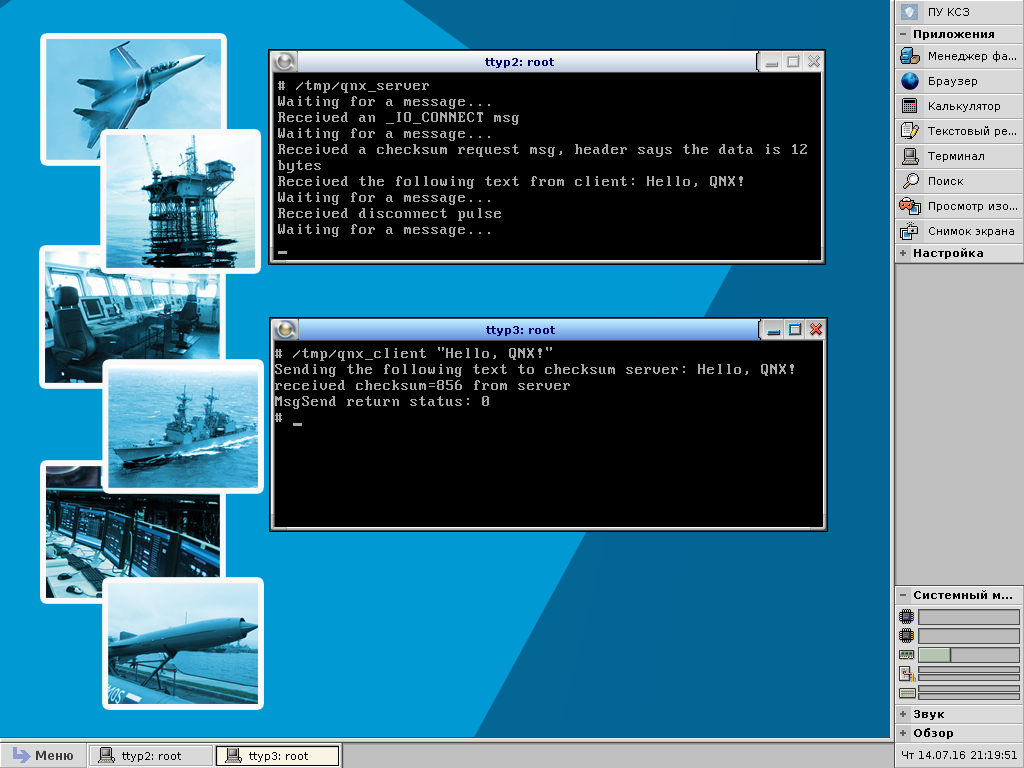
First, a server starts that expects messages from the client. Then the client is launched, the string “Hello, QNX!” Is indicated to it as an argument. During operation, the client and server print diagnostic messages to the console, which can be used to judge the operation of the programs. Programs work as expected, you can start writing graphical options in Qt. First we adapt the client application.
Qt client example
We will develop Qt applications in Qt Creator. In this case, the process of developing applications for QNX in general is no different from developing applications for other OSs. After all, Qt is a cross-platform framework. You only need to create a kit for the QNX in Qt Creator.
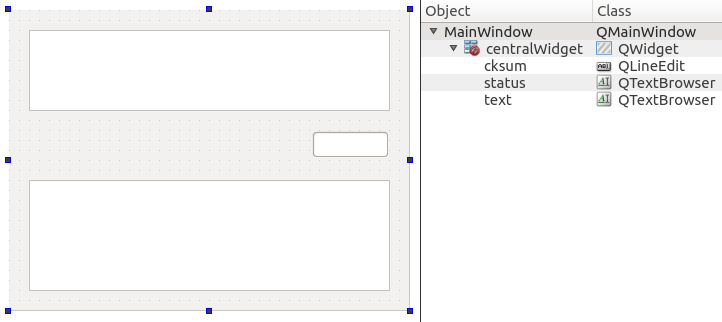
Create a new application project like Qt Widgets Application. At the same time, Qt Creator will prepare all the necessary files, including the form for the window. For the client, the window shape is reduced to the following form:

The form contains a field for entering text (text), which is transmitted to the server, buttons for connecting (connect) and disconnecting (disconnect) from the server, button (calc) for sending a message to the server, input field (cksum), which is used to display the checksum received from server, and the output area of diagnostic messages (status).
It remains only to write code to work with the server and process the logic of the graphic form. As a result, we obtain the following class MainWindow:
#ifndef MAINWINDOW_H
#define MAINWINDOW_H
#include
#include "../iov_server.h"
namespace Ui {
class MainWindow;
}
class MainWindow : public QMainWindow
{
    Q_OBJECT
public:
    explicit MainWindow(QWidget *parent = 0);
    ~MainWindow();
public slots:
    void log(QString msg);
    void showCrc(QString crc);
private slots:
    void qnxConnect();
    void qnxDisconnect();
    void calculate();
private:
    Ui::MainWindow *ui;
    int coid;       // Connection ID to server
};
#endif // MAINWINDOW_H #include "mainwindow.h"
#include "ui_mainwindow.h"
#include
MainWindow::MainWindow(QWidget *parent) :
QMainWindow(parent),
ui(new Ui::MainWindow)
{
ui->setupUi(this);
coid = -1;
connect(ui->connect, SIGNAL(clicked()), this, SLOT(qnxConnect()));
connect(ui->disconnect, SIGNAL(clicked()), this, SLOT(qnxDisconnect()));
connect(ui->calc, SIGNAL(clicked()), this, SLOT(calculate()));
}
MainWindow::~MainWindow()
{
delete ui;
}
void MainWindow::qnxConnect()
{
// check if we already connected
if ( coid >= 0 )
return;
// connect to the server
coid = name_open(CKSUM_SERVER_NAME, 0);
if ( coid < 0 )
{
log(QString(tr("Can't connect to server: ")).append(strerror(errno)));
return;
}
log(tr("Connected to server"));
ui->connect->setEnabled(false);
ui->disconnect->setEnabled(true);
ui->calc->setEnabled(true);
}
void MainWindow::qnxDisconnect()
{
// check if we already disconnected
if ( coid < 0 )
return;
// disconnect from the server
int status = name_close(coid);
if ( status < 0 )
{
log(QString(tr("Can't disconnect from server: ")).append(strerror(errno)));
return;
}
log(tr("Disconnected from server"));
coid = -1;
ui->calc->setEnabled(false);
ui->disconnect->setEnabled(false);
ui->connect->setEnabled(true);
}
void MainWindow::calculate()
{
ui->disconnect->setEnabled(false);
ui->calc->setEnabled(false);
// get the data
QString data = ui->text->toPlainText();
log(QString(tr("Sending the following text to checksum server: %1")).arg(data));
// build the header
cksum_header_t hdr; // msg header will specify how many bytes of data will follow
hdr.msg_type = CKSUM_MSG_TYPE;
hdr.data_size = data.length() + 1;
// setup the message as a two part iov, first the header then the data
iov_t siov[2]; // create a 2 part iov
SETIOV(&siov[0], &hdr, sizeof(hdr));
SETIOV(&siov[1], data.toAscii().data(), hdr.data_size);
// and send the message off to the server
int incoming_checksum; // space for server's reply
int status = MsgSendvs(coid, siov, 2, &incoming_checksum, sizeof(incoming_checksum));
if ( status < 0 )
{
log(QString(tr("Can't send message to server: ")).append(strerror(errno)));
return;
}
log(QString(tr("MsgSend return status: %1")).arg(status));
showCrc(QString::number(incoming_checksum));
}
void MainWindow::showCrc(QString crc)
{
ui->cksum->setText(crc);
ui->disconnect->setEnabled(true);
ui->calc->setEnabled(true);
}
void MainWindow::log(QString msg)
{
ui->status->append(msg.prepend(QDateTime::currentDateTime().toString("hh:mm:ss ")));
} The main.cpp file remained the same as Qt Creator created it, so I won’t cite its contents.
So, let's see what we have done here. First, as in the previous example, we start the server. Then we launch the Qt version of the client. Click the Connect button, pay attention that the server receives a notification about the client’s connection in the form of a message _IO_CONNECT. Then we write the text “Hello, QNX!” And press the Calc button, which leads to sending a message to the server. A send event is also displayed on the screen. The checksum received from the server is displayed in the client window.
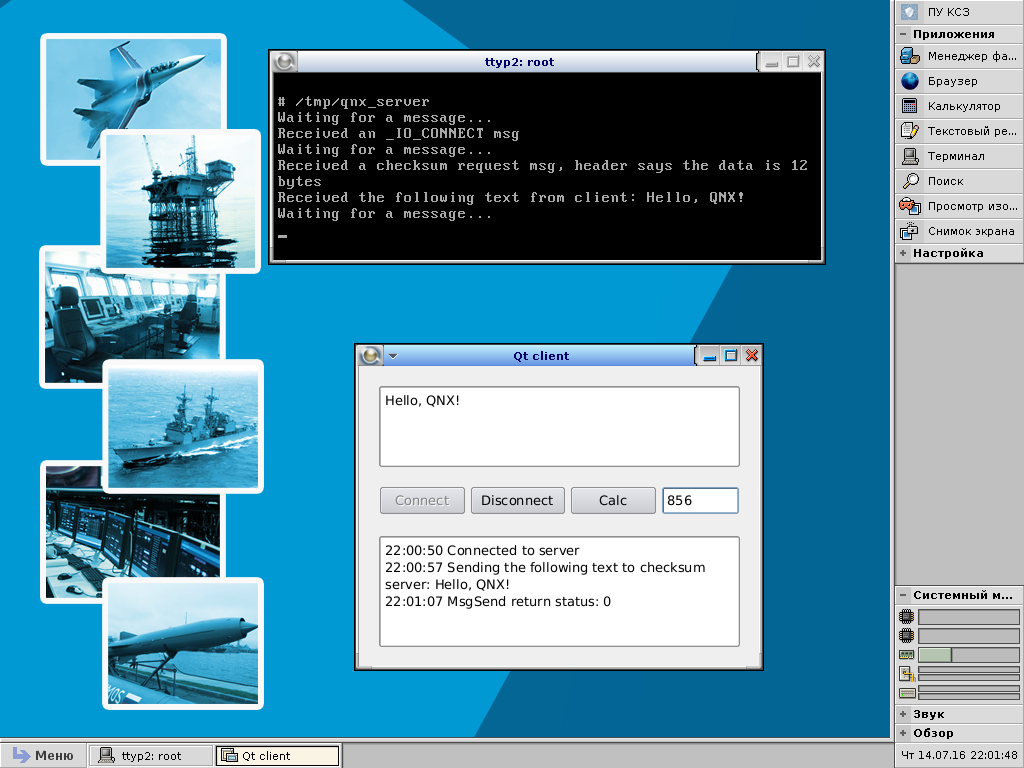
The example works, messages are sent and received, no problems were noticed. But ... But I know that everything should not work so wonderful. The fact is that after the call, the MsgSendvs()client is blocked at least until the server calls the function MsgReceive()(it may be larger if the system has more high-priority processes). To illustrate this feature calculate_checksum(), a delay in the form of a call has been added to the server function code sleep(10). With such a delay in the server, the client is blocked for 10 seconds, which leads to a noticeable “freezing” of the server’s graphical window.
In some cases, especially when the server immediately responds to the client (that is, information is always available to the server, and does not come from outside), blocking is not a problem. In other cases, the user may begin to get nervous when the graphical interface “freezes”. I would not take the risk and release programs that can make customers nervous. With the “frozen” interface, the client will not be able to continue working with the application after sending a message until a response is received from the server, because in real life the application can interact with several servers and provide other management functions. No, the current version of the client application cannot suit us. Therefore, let's look at the correct implementation of the client.
Correct Qt Client Example
How can you solve the problem with blocking the client? The client cannot but be blocked on MsgSendvs(). However, it is perfectly acceptable to separate the work with messages into a separate stream. In this case, one thread serves the graphical interface, the other implements the SRR mechanism. To work with threads in Qt, we will use the class QThread. We will implement the SRR implementation in a separate class Sender. The connection between the classes Sender(working with messages) and MainWindow(graphical interface) is organized through signals and Qt slots.
Let's see how the class has changed MainWindowtaking into account the above. For clarity, the old code has also been left behind, and a macro has been added SENDER_THREADwhen declaring it to work with messages in a separate Qt thread.
#ifndef MAINWINDOW_H
#define MAINWINDOW_H
#include
#include "../iov_server.h"
#define SENDER_THREAD
#ifdef SENDER_THREAD
#include
#endif
namespace Ui {
class MainWindow;
}
class MainWindow : public QMainWindow
{
    Q_OBJECT
public:
    explicit MainWindow(QWidget *parent = 0);
    ~MainWindow();
#ifdef SENDER_THREAD
signals:
    void calcCrc(int coid, QString data);
#endif
public slots:
    void log(QString msg);
    void showCrc(QString crc);
private slots:
    void qnxConnect();
    void qnxDisconnect();
    void calculate();
private:
    Ui::MainWindow *ui;
    int coid;       // Connection ID to server
#ifdef SENDER_THREAD
    QThread senderThread;
#endif
};
#endif // MAINWINDOW_H #include "mainwindow.h"
#include "ui_mainwindow.h"
#ifdef SENDER_THREAD
#include "sender.h"
#endif
#include
MainWindow::MainWindow(QWidget *parent) :
QMainWindow(parent),
ui(new Ui::MainWindow)
{
ui->setupUi(this);
coid = -1;
connect(ui->connect, SIGNAL(clicked()), this, SLOT(qnxConnect()));
connect(ui->disconnect, SIGNAL(clicked()), this, SLOT(qnxDisconnect()));
connect(ui->calc, SIGNAL(clicked()), this, SLOT(calculate()));
#ifdef SENDER_THREAD
Sender *sender = new Sender;
sender->moveToThread(&senderThread);
connect(&senderThread, SIGNAL(finished()), sender, SLOT(deleteLater()));
connect(this, SIGNAL(calcCrc(int, QString)), sender, SLOT(send(int, QString)));
connect(sender, SIGNAL(result(QString)), this, SLOT(showCrc(QString)));
connect(sender, SIGNAL(log(QString)), this, SLOT(log(QString)));
senderThread.start();
#endif
}
MainWindow::~MainWindow()
{
#ifdef SENDER_THREAD
senderThread.quit();
senderThread.wait();
#endif
delete ui;
}
void MainWindow::qnxConnect()
{
// check if we already connected
if ( coid >= 0 )
return;
// connect to the server
coid = name_open(CKSUM_SERVER_NAME, 0);
if ( coid < 0 )
{
log(QString(tr("Can't connect to server: ")).append(strerror(errno)));
return;
}
log(tr("Connected to server"));
ui->connect->setEnabled(false);
ui->disconnect->setEnabled(true);
ui->calc->setEnabled(true);
}
void MainWindow::qnxDisconnect()
{
// check if we already disconnected
if ( coid < 0 )
return;
// disconnect from the server
int status = name_close(coid);
if ( status < 0 )
{
log(QString(tr("Can't disconnect from server: ")).append(strerror(errno)));
return;
}
log(tr("Disconnected from server"));
coid = -1;
ui->calc->setEnabled(false);
ui->disconnect->setEnabled(false);
ui->connect->setEnabled(true);
}
void MainWindow::calculate()
{
ui->disconnect->setEnabled(false);
ui->calc->setEnabled(false);
// get the data
QString data = ui->text->toPlainText();
#ifdef SENDER_THREAD
emit calcCrc(coid, data);
#else
log(QString(tr("Sending the following text to checksum server: %1")).arg(data));
// build the header
cksum_header_t hdr; // msg header will specify how many bytes of data will follow
hdr.msg_type = CKSUM_MSG_TYPE;
hdr.data_size = data.length() + 1;
// setup the message as a two part iov, first the header then the data
iov_t siov[2]; // create a 2 part iov
SETIOV(&siov[0], &hdr, sizeof(hdr));
SETIOV(&siov[1], data.toAscii().data(), hdr.data_size);
// and send the message off to the server
int incoming_checksum; // space for server's reply
int status = MsgSendvs(coid, siov, 2, &incoming_checksum, sizeof(incoming_checksum));
if ( status < 0 )
{
log(QString(tr("Can't send message to server: ")).append(strerror(errno)));
return;
}
log(QString(tr("MsgSend return status: %1")).arg(status));
showCrc(QString::number(incoming_checksum));
#endif
}
void MainWindow::showCrc(QString crc)
{
ui->cksum->setText(crc);
ui->disconnect->setEnabled(true);
ui->calc->setEnabled(true);
}
void MainWindow::log(QString msg)
{
ui->status->append(msg.prepend(QDateTime::currentDateTime().toString("hh:mm:ss ")));
} A MainWindowsignal appeared in the class declaration calcCrc(), with the help of which we inform the class instance to Senderwhom and what message is to be sent.
The class implementation has undergone major changes MainWindow. A block of code appeared in the constructor, in which an instance of the class is created Senderand, using the method, moveToThread()is allocated to a separate thread. In the destructor, we expect the completion of the stream (methods quit()and wait()class QThread). All method code has been calculate()transferred to the class Senderand replaced with signal generation calcCrc().
After refinement MainWindow, you can go to the class Sender.
#ifndef SENDER_H
#define SENDER_H
#include
#include "../iov_server.h"
class Sender : public QObject
{
    Q_OBJECT
public:
    Sender() {}
    virtual ~Sender() {}
signals:
    void result(QString data);
    void log(QString err);
public slots:
    void send(int coid, QString data);
};
#endif // SENDER_H #include "sender.h"
void Sender::send(int coid, QString data)
{
emit log(QString(tr("Sending the following text to checksum server: %1")).arg(data));
// build the header
cksum_header_t hdr; // msg header will specify how many bytes of data will follow
hdr.msg_type = CKSUM_MSG_TYPE;
hdr.data_size = data.length() + 1;
// setup the message as a two part iov, first the header then the data
iov_t siov[2]; // create a 2 part iov
SETIOV(&siov[0], &hdr, sizeof(hdr));
SETIOV(&siov[1], data.toAscii().data(), hdr.data_size);
// and send the message off to the server
int incoming_checksum; // space for server's reply
int status = MsgSendvs(coid, siov, 2, &incoming_checksum, sizeof(incoming_checksum));
if ( status < 0 )
{
emit log(QString(tr("Can't send message to server: ")).append(strerror(errno)));
return;
}
emit log(QString(tr("MsgSend return status: %1")).arg(status));
emit result(QString::number(incoming_checksum));
}This is essentially the code that was previously in the calculate()class method MainWindow. Error and result output to the graphical window of the client application is implemented using signals log()and result().
With such improvements, the graphical client interface does not “freeze”, i.e. while the class instance is Senderlocked for 10 seconds in a separate thread, we can control the graphics window. The truth in the presented example is nothing special to manage, but the possibility is there.
Qt server example
Поэксперементировав с клиентом будем сразу разрабатывать сервер правильно. Поскольку вызов MsgReceive() приводит к блокировке, то вынесем функциональность сервера в класс Server, который будет работать в отдельном потоке. Принципы те же, что и в клиенте. Форму главного окна по-честному «скомуниздим» у клиента — скопируем mainwindow.ui, откроем в редакторе, удалим ненужные кнопки и преобразуем класс QPlainTextEdit (объект text) в QTextBrowser (редактор это позволяет).
Объявление и реализация класса MainWindow сервера приведены ниже:
#ifndef MAINWINDOW_H
#define MAINWINDOW_H
#include
#include
#include "../iov_server.h"
namespace Ui {
class MainWindow;
}
class MainWindow : public QMainWindow
{
    Q_OBJECT
public:
    explicit MainWindow(QWidget *parent = 0);
    ~MainWindow();
signals:
    void startServer(name_attach_t* attach);
public slots:
    void log(QString msg);
    void showCrc(QString crc);
    void showText(QString txt);
    void stopServer(void);
private:
    Ui::MainWindow *ui;
    name_attach_t* attach;
    QThread serverThread;
};
#endif // MAINWINDOW_H #include "mainwindow.h"
#include "ui_mainwindow.h"
#include "server.h"
#include
MainWindow::MainWindow(QWidget *parent) :
QMainWindow(parent),
ui(new Ui::MainWindow)
{
ui->setupUi(this);
Server *server = new Server;
server->moveToThread(&serverThread);
connect(&serverThread, SIGNAL(finished()), server, SLOT(deleteLater()));
connect(this, SIGNAL(startServer(name_attach_t*)), server, SLOT(process(name_attach_t*)));
connect(server, SIGNAL(result(QString)), this, SLOT(showCrc(QString)));
connect(server, SIGNAL(text(QString)), this, SLOT(showText(QString)));
connect(server, SIGNAL(log(QString)), this, SLOT(log(QString)));
attach = name_attach(NULL, CKSUM_SERVER_NAME, 0);
if ( NULL == attach )
{
log(QString(tr("Can't attach name: %1")).arg(strerror(errno)));
}
else
{
serverThread.start();
emit startServer(attach);
}
}
MainWindow::~MainWindow()
{
stopServer();
serverThread.quit();
serverThread.wait();
delete ui;
}
void MainWindow::showText(QString txt)
{
ui->text->setText(txt);
}
void MainWindow::showCrc(QString crc)
{
ui->cksum->setText(crc);
}
void MainWindow::log(QString msg)
{
ui->status->append(msg.prepend(QDateTime::currentDateTime().toString("hh:mm:ss ")));
}
void MainWindow::stopServer()
{
if ( NULL != attach )
{
name_detach(attach, 0);
}
} Для работы сервера создаём имя в MainWindow используя функцию name_attach(). При помощи сигнала передаём структуру attach в поток сервера, тем самым запуская его. Для остановки сервера удаляем имя — функция name_detach(). В остальном очень похоже на то, что было сделано в клиенте. Посмотрим на код:
#ifndef SERVER_H
#define SERVER_H
#include
#include "../iov_server.h"
typedef union
{
    uint16_t msg_type;
    struct _pulse pulse;
    cksum_header_t cksum_hdr;
}
msg_buf_t;
class Server : public QObject
{
    Q_OBJECT
public:
    Server() {}
    virtual ~Server() {}
signals:
    void result(QString data);
    void text(QString text);
    void log(QString err);
public slots:
    void process(name_attach_t* attach);
private:
    int calculate_checksum(char *text);
};
#endif // SERVER_H #include "server.h"
int Server::calculate_checksum(char *text)
{
int cksum = 0;
for ( char *c = text; *c; c++ )
cksum += *c;
sleep(10); // emulate calculation delay
return cksum;
}
void Server::process(name_attach_t* attach)
{
if ( NULL == attach )
{
return;
}
int rcvid;
msg_buf_t msg;
char *data;
while ( 1 )
{
emit log(tr("Waiting for a message..."));
rcvid = MsgReceive(attach->chid, &msg, sizeof(msg), NULL);
if ( -1 == rcvid ) // Was there an error receiving msg?
{
emit log(QString(tr("MsgReceive: %1")).arg(strerror(errno))); // look up errno code and print
break;
}
else if ( rcvid > 0 ) // Process received message
{
switch ( msg.msg_type )
{
case _IO_CONNECT: // name_open() within the client may send this
emit log(tr("Received an _IO_CONNECT msg"));
MsgReply(rcvid, EOK, NULL, 0);
break;
case CKSUM_MSG_TYPE:
emit log(QString(tr("Received a checksum request msg, header says the data is %1 bytes")).arg(msg.cksum_hdr.data_size));
data = (char *)malloc(msg.cksum_hdr.data_size);
if ( NULL == data )
{
MsgError(rcvid, ENOMEM );
}
else
{
int status = MsgRead(rcvid, data, msg.cksum_hdr.data_size, sizeof(cksum_header_t));
emit text(data);
int checksum = calculate_checksum(data);
emit result(QString::number(checksum));
free(data);
status = MsgReply(rcvid, EOK, &checksum, sizeof(checksum));
if (-1 == status)
{
emit log(tr("MsgReply"));
}
}
break;
default:
MsgError(rcvid, ENOSYS);
break;
}
}
else if ( 0 == rcvid ) // Process received pulse
{
switch ( msg.pulse.code )
{
case _PULSE_CODE_DISCONNECT:
emit log(tr("Received disconnect pulse"));
ConnectDetach(msg.pulse.scoid);
break;
case _PULSE_CODE_UNBLOCK:
emit log(tr("Received unblock pulse"));
break;
default:
emit log(QString(tr("unknown pulse received, code = %1")).arg(msg.pulse.code));
}
}
else
{
emit log(QString(tr("Receive returned an unexpected value: %1")).arg(rcvid));
}
}
}Класс Server реализует две функции консольного сервера (qnx_server), изменился только вывод сообщений (при помощи сигналов/слотов Qt) и регистрация имени выполняется в классе MainWindow. Работа графических вариантов клиента и сервера представлена на следующем скриншоте:
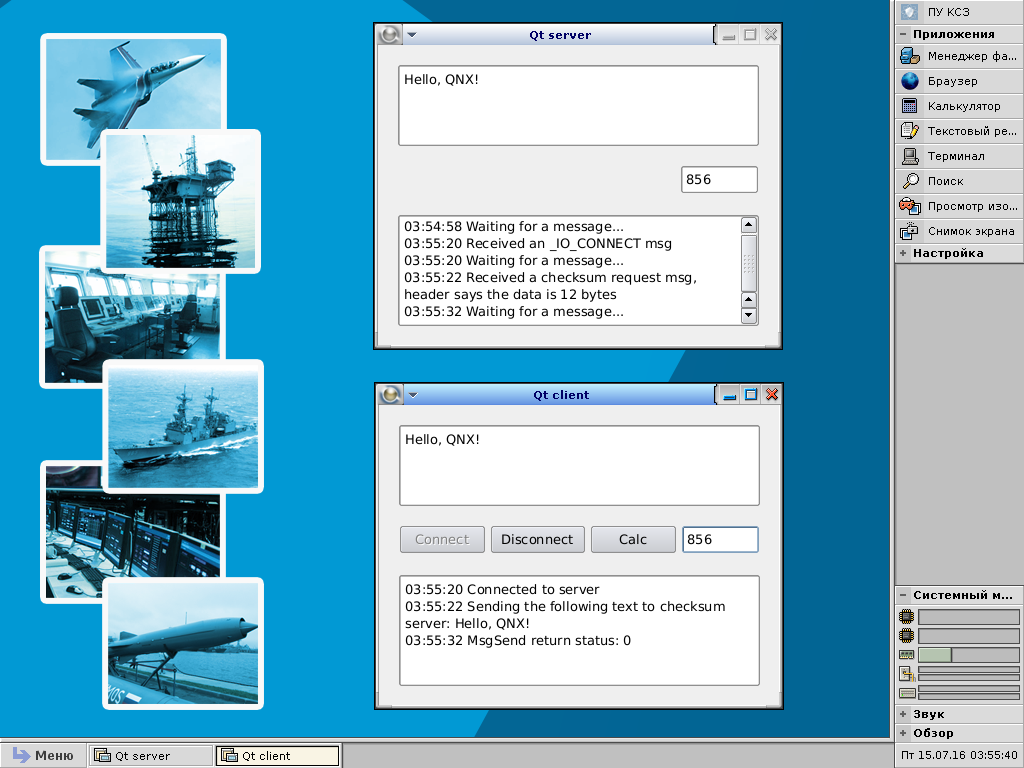
Сервер получился без элементов управления. Нет ни кнопок, ни полей ввода. Графическое окно сервера служит только для контроля за его работой.
Заключение
So this note came to an end. The code of several examples was considered, it became clear how to correctly use the QNX message mechanism in Qt applications. For those who want to reproduce examples, I published them on Bitbucket . Anticipating possible comments on the code, please note that these are only examples that illustrate the operation of SRR in Qt. I would have done something in the working system differently, but in order not to overload the examples, their code was simplified, and for some moments I closed my eyes. Nevertheless, if one of the readers has concrete suggestions for improving the code of examples or correcting errors, then I will take them into account if possible. I ask you to contact in private messages on these issues.









