 June 21, 2016 at 14:09
Successful API Monetization Practices Based on Azure API Management
Hello!
Today we want to discuss the topic of API management. When it makes sense to open your API, who has the opportunity to monetize their API and how to implement the API management system so that the costs of both the initial implementation and its operation are minimal.

We want to share our experience in developing an API management system based on Azure API Management. Let's start from the beginning.
1.1. When to open the API?
If you understand that your data, content or unique business logic may be useful to other companies and people - you can open the API.
Once you understand that your APIs are helping your users grow their businesses, you can offer access to the API for a fee.
If you have few users, you can provide access and collect fees manually. And if there is a lot, you most likely will need an API Management system. (API Management system).
1.2. Why do we need an API management system?
In short, the purpose of the system’s API Management is to turn the API into a product, i.e. to give a purely technical essence to real business content. Most API Management Systems, for now, can do the following:
Our customer is a large meteorological company, a large share of whose business is the provision of paid data received from meteorological stations. A few years ago, she was one of the first in the industry to also open and provide paid APIs. And currently offers customers 14 types of API products, differing in which API sets are included in the product, and what is the limit on the use of the product set.
To understand the scope of the project, currently 4200 developers, 2400 companies use the API of the customer.
Our joint history is the third attempt by the customer to implement the API management system for the successful monetization of their services. The first time was a solution based on Mashery, the second time Apigee, and then the Azure API Management. As usual, in the Russian tradition, from the third time, usually everything succeeds. It turned out just like that.
As a result, we essentially made a custom API management solution, within which:
2.1. And what was wrong with the first two?
We need to start with the fact that the company both times chose the market leaders - Mashery and Apigee. And after a year of use, they left each of them. It sounds kind of weird. Are these the leaders ?!

In fact, the requirements for an API management system can be reduced to two main points:
And precisely on these parameters, the leading systems were not accepted by the customer.
2.2. Cost of use
Mashery’s monetization scheme did not allow for a predictable cost estimate in advance, and they quickly became extremely high.
The cost of using Apigee with an integrated payment system was just space right away and essentially took away all the revenue from selling the API.
I must say that Azure APIM does not have an integrated payment system. At first glance, it seems that this is a huge minus, but after a negative experience with integrated payment systems that turned out to be expensive to maintain, the customer rated this as an absolute plus.
2.3. Ux
In addition, customers admitted that they found the Apigee UI too complex and confusing. For comparison, we give the logical architectures of Apigee and Azure API Management:
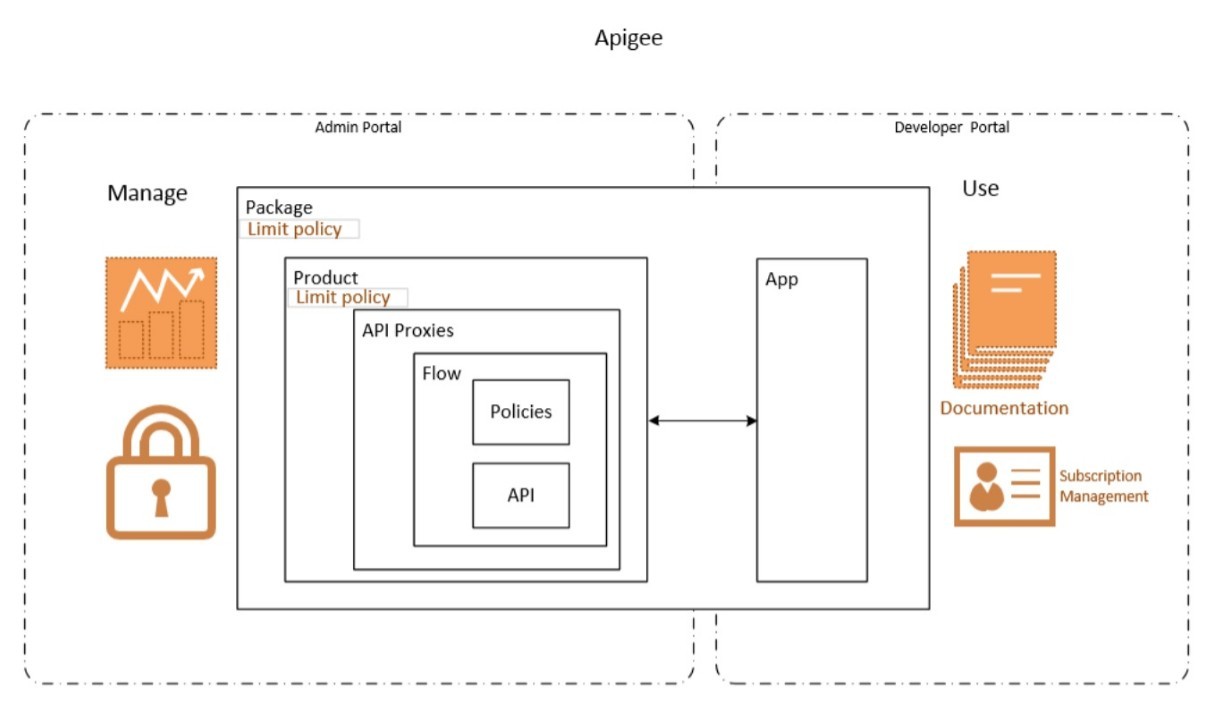
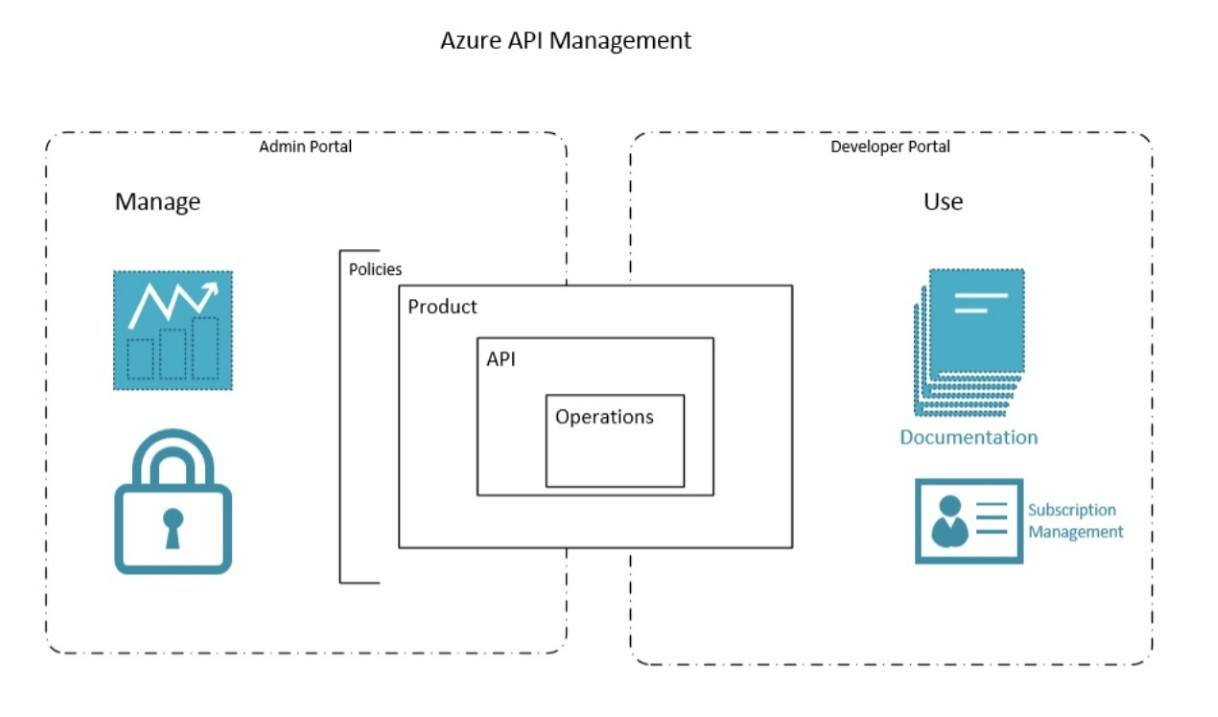
As you can see, the architecture of Azure API Management is simpler. It has fewer objects. Therefore, it is easier to understand for both administrators and users.
The architecture of our solution looks like this:
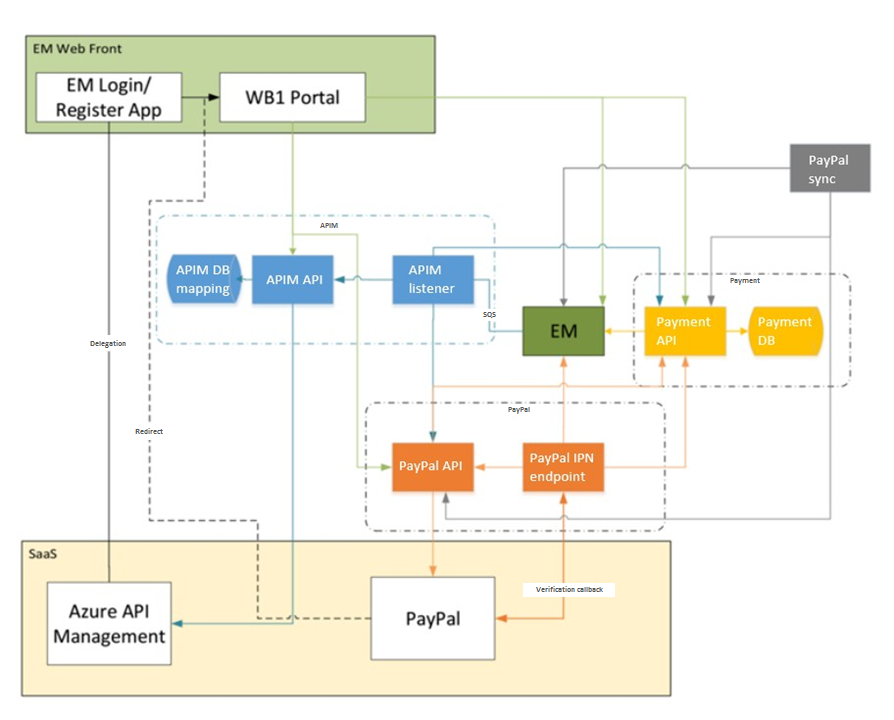
3.1. At the center of everything is an Identity and Subscription Management (EM) system.
She operates with the following objects:
3.2. The user interacts with her through the portal interface (EM Web Front). Azure API Management controls access to our API suite.
The main objects here are:
Azure Management API - on the technical side, it is a WEB-proxy, which is presented to the user and redirects calls to the corresponding API on the Backend side, taking into account the application.
3.3. The APIM block allows you to seamlessly map users from EM with users in Azure.
3.4. A universal payment processing unit, Payments, has been separately highlighted, which so far supports recurring payments (Recurring Payments). While it is integrated only with PayPal. In the future, it is planned to connect Apple Pay and Google Pay here.
As a result, the user is now at the same time on the portal:
The real-time subscription management system receives payment data and activates access.
The user and developers from his organization gain access to the Developers Portal, which has documentation and examples of using the API.

Let's be honest - any “off-the-shelf” platform when meeting with a real business usually needs refinement. Although the functionality “out of the box” provides all the necessary basic tools that can and should be used to test your business ideas.
While there are few users, you can control access to the API manually by taking the product out of the box without costume modifications.
In principle, all the steps are clear enough:
The subscription scheme for providing Azure API Management in this case is very convenient - it allows you to test the concept without significant financial investments in the API Management system and integration.
And suppose that there are more users. Our client has over 4000 active subscribers. As you understand, the amount of manual labor to synchronize and provide / disable access becomes frankly high. However, we also receive more funds from the sale of access to the API, and now you can invest in automating these steps:
If you are just thinking about whether to provide paid access to your API services, the Azure API Management subscription scheme allows you to quickly and without capital investments check your business concept.
When there is an understanding that there is sufficient demand for your API, a custom solution based on Azure API Management will allow you to provide:
Today we want to discuss the topic of API management. When it makes sense to open your API, who has the opportunity to monetize their API and how to implement the API management system so that the costs of both the initial implementation and its operation are minimal.
We want to share our experience in developing an API management system based on Azure API Management. Let's start from the beginning.
1. LIKBEZ. WHEN IT IS NECESSARY TO MANAGE
1.1. When to open the API?
If you understand that your data, content or unique business logic may be useful to other companies and people - you can open the API.
Once you understand that your APIs are helping your users grow their businesses, you can offer access to the API for a fee.
If you have few users, you can provide access and collect fees manually. And if there is a lot, you most likely will need an API Management system. (API Management system).
1.2. Why do we need an API management system?
In short, the purpose of the system’s API Management is to turn the API into a product, i.e. to give a purely technical essence to real business content. Most API Management Systems, for now, can do the following:
- Organize access to the API.
- Define API usage policies (completeness of requests, their frequency and limit per time unit).
- Provide API documentation tools.
- * Organize paid API access based on policies.
2. NOT ALL API MANAGEMENT SYSTEMS ARE EQUALLY USEFUL
Our customer is a large meteorological company, a large share of whose business is the provision of paid data received from meteorological stations. A few years ago, she was one of the first in the industry to also open and provide paid APIs. And currently offers customers 14 types of API products, differing in which API sets are included in the product, and what is the limit on the use of the product set.
To understand the scope of the project, currently 4200 developers, 2400 companies use the API of the customer.
Our joint history is the third attempt by the customer to implement the API management system for the successful monetization of their services. The first time was a solution based on Mashery, the second time Apigee, and then the Azure API Management. As usual, in the Russian tradition, from the third time, usually everything succeeds. It turned out just like that.
As a result, we essentially made a custom API management solution, within which:
- Integrated Azure API Management with customer identity and subscription management.
- Provided single sign-on for working with the customer portal and Azure API Management portals.
- We made payment via PayPal and integration with the SalesForce CRM system.
2.1. And what was wrong with the first two?
We need to start with the fact that the company both times chose the market leaders - Mashery and Apigee. And after a year of use, they left each of them. It sounds kind of weird. Are these the leaders ?!
In fact, the requirements for an API management system can be reduced to two main points:
- cost of use
- UX, and UX of both user and administrator
And precisely on these parameters, the leading systems were not accepted by the customer.
2.2. Cost of use
Mashery’s monetization scheme did not allow for a predictable cost estimate in advance, and they quickly became extremely high.
The cost of using Apigee with an integrated payment system was just space right away and essentially took away all the revenue from selling the API.
I must say that Azure APIM does not have an integrated payment system. At first glance, it seems that this is a huge minus, but after a negative experience with integrated payment systems that turned out to be expensive to maintain, the customer rated this as an absolute plus.
2.3. Ux
In addition, customers admitted that they found the Apigee UI too complex and confusing. For comparison, we give the logical architectures of Apigee and Azure API Management:
As you can see, the architecture of Azure API Management is simpler. It has fewer objects. Therefore, it is easier to understand for both administrators and users.
3. ARCHITECTURE OF OUR DECISION
The architecture of our solution looks like this:
3.1. At the center of everything is an Identity and Subscription Management (EM) system.
She operates with the following objects:
- Organization and its users (Authentication).
- Product catalog for subscription, including API products.
- Subscription (Authorization) - the relationship between the user and the product.
3.2. The user interacts with her through the portal interface (EM Web Front). Azure API Management controls access to our API suite.
The main objects here are:
- An API is a logical entity representing your API.
- Policy is a restriction on the use of the API. For example, the number of requests per month or the amount of data transferred.
- User - in the most common case, it is a developer who will use your API in his application.
- Subscription - a user’s bundle with the product.
Azure Management API - on the technical side, it is a WEB-proxy, which is presented to the user and redirects calls to the corresponding API on the Backend side, taking into account the application.
3.3. The APIM block allows you to seamlessly map users from EM with users in Azure.
3.4. A universal payment processing unit, Payments, has been separately highlighted, which so far supports recurring payments (Recurring Payments). While it is integrated only with PayPal. In the future, it is planned to connect Apple Pay and Google Pay here.
As a result, the user is now at the same time on the portal:
- makes a choice of one of three sets covering all 14 possible API products,
- selects a tariff that determines the permissible frequency of requests and the total limit of requests per month,
- proceeds to payment.
The real-time subscription management system receives payment data and activates access.
The user and developers from his organization gain access to the Developers Portal, which has documentation and examples of using the API.
4. WHEN DO I NEED CUSTOM AUTOMATION?
Let's be honest - any “off-the-shelf” platform when meeting with a real business usually needs refinement. Although the functionality “out of the box” provides all the necessary basic tools that can and should be used to test your business ideas.
While there are few users, you can control access to the API manually by taking the product out of the box without costume modifications.
In principle, all the steps are clear enough:
- We synchronize user lists in Azure API Management and EM systems.
- We synchronize products in EM and corresponding products in Azure Management API.
- On the EM portal, we make a link to PayPal to purchase a subscription.
- When you receive a message from PayPal, we start a subscription in the EM system, as well as the corresponding subscription in the Azure Management API.
- When the subscription expires, we remove the user from the subscription in the Azure API and EM systems if payment has not been made.
The subscription scheme for providing Azure API Management in this case is very convenient - it allows you to test the concept without significant financial investments in the API Management system and integration.
And suppose that there are more users. Our client has over 4000 active subscribers. As you understand, the amount of manual labor to synchronize and provide / disable access becomes frankly high. However, we also receive more funds from the sale of access to the API, and now you can invest in automating these steps:
- There is a delegation mechanism to synchronize user lists in Azure API Management. When you enter the developers portal, it allows you to redirect the user to our portal, from where he returns already authorized. More details are described in azure.microsoft.com/en-en/documentation/articles/api-management-howto-setup-delegation
- Next, we write a special service that allows you to map products in Azure API Management to products in the EM catalog of the system.
- As well as in manual mode, on the EM portal we redirect to the PayPal website to purchase a subscription. Here we configure the possibility of recurring payments.
- The next task is to get a subscription when making a payment. PayPal - can send a notification of payment confirmation in the form of a call to our service, in the EM system. This service, starts, subscribes to EM, and translates the changes in the Azure API Management. The corresponding message handler signs up using the Azure API Management Rest API: msdn.microsoft.com/en-us/library/azure/dn776325.aspx
- And finally, after the expiration of the subscription, the user must be deleted. To do this, in the EM system, we added the expiration date attribute to the subscription. And all we need to do is write a JOB that periodically checks the expiration date of the subscription in EM and blocks access to the Azure API Management.
5. TOTAL
If you are just thinking about whether to provide paid access to your API services, the Azure API Management subscription scheme allows you to quickly and without capital investments check your business concept.
When there is an understanding that there is sufficient demand for your API, a custom solution based on Azure API Management will allow you to provide:
- Ease of management. The Azure APIM platform architecture makes managing APIs as easy as possible.
- Deep integration of the server part with the portal.
- Flexible integration with external payment systems convenient for the customer.
- And of course, the cost-effectiveness of paid API provisioning. In our case, in comparison with Mashery, constant bones decreased by 10 times! Yes, there were one-time expenses for the development of the project. And the client pays a fee to the payment system for each operation. But this is the cost of profit. Which finally appeared.









