We play sound on DualShock4 from the computer
When choosing a gamepad for my computer, I settled on DualShock4, because I liked the idea that it would be possible to listen to audio through the headphones connected to it. But after the purchase, I found out that, it turns out, no one knows how to transfer sound to the gamepad via Bluetooth. Therefore, I decided to deal with this issue. If you are interested in learning how DualShock4 communicates with a game console, I’m waiting under a cat.
Unfortunately, I do not have a PlayStation 4, so I had to be content with only dumps posted on the Internet, as well as already known fragments of the exchange.
In the process of studying the topic, this page really helped me . It describes the main points of data transfer between the console and the gamepad, and also dumps this data. We are interested in a dump file namedds4_uart_hci_cap_playroom_needs_sorting.pcap.gz . We open it in Wireshark and begin to study. We sort packets by time, since, apparently, the dump was recorded separately for reception and transmission. The dump was shot directly from the UART gamepad, after which it was converted to pcap.
In the beginning, the Bluetooth module itself is configured. Next, from the 49th to the 163rd package, the connection is established and the transmission channel is set up. This process is very well described in the article Wireless Sound. Part 1. We prepare Bluetooth.
But for our task this is not particularly important.
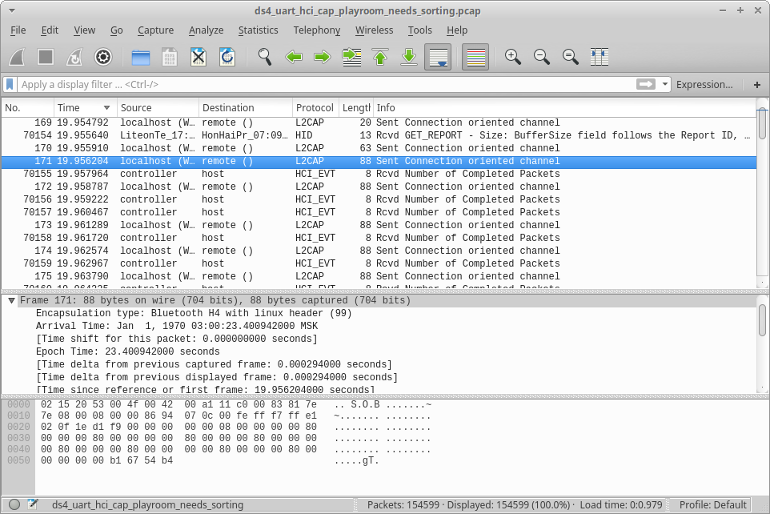
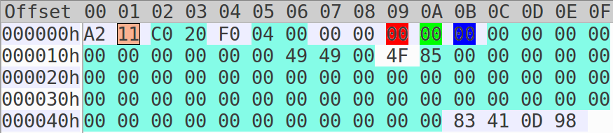
After all the "preparatory work", the gamepad starts sending the HID Report. The format of the message is described on the wiki page. The first packet of data from the console is packet number 70181. Let's make it out using the data from the wiki page..
We are only interested in data that is transmitted through the HID Profile.
Here is its content.
| Byte number | bit 7 | bit 6 | bit 5 | bit 4 | bit 3 | bit 2 | bit 1 | bit 0 |
|---|---|---|---|---|---|---|---|---|
| [0] | 0x0a - Data type | 0x00 - Reserved | 0x02 - Transfer Direction | |||||
| [1] | 0x11 - Operation Code | |||||||
| [2 - 3] | Unknown | |||||||
| [4] | 0xf0 Prevents data changes from the controller, 0xf3 Allows changes | |||||||
| [5 - 6] | Unknown | |||||||
| [7] | Rumble (right / weak) | |||||||
| [8] | Rumble (left / strong) | |||||||
| [9] | RGB color (Red) | |||||||
| [10] | RGB color (Green) | |||||||
| [eleven] | RGB color (Blue) | |||||||
| [12-24] | Unknown | |||||||
| [25] | Sound volume in% | |||||||
| [26 - 74] | Unknown | |||||||
| [75 - 78] | CRC-32 from previous data | |||||||
Although 26 bytes are marked on the page mentioned above as unknown, during my experiments I was able to find out that it is responsible for the sound volume and is set as a percentage. Also, although the crc field is present, the gamepad does not check it and you can simply send a zero value.
Since we are interested in what data the console transmits, let's filter it by the 0th byte of the HID Profile, which will help us determine the direction of the packet. The data from the controller is 0xa1, from the console 0xa2. The filter for Wireshark is: bthid [0] == 0xa2.
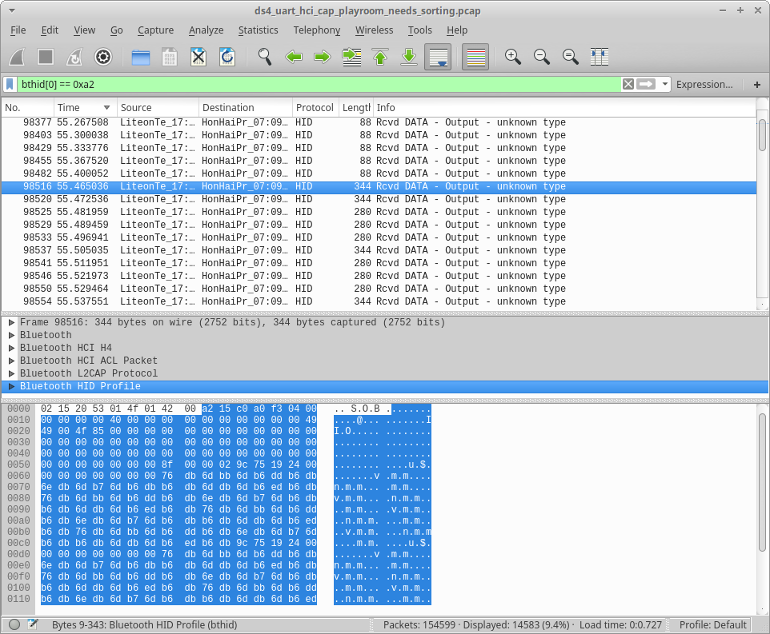
If you scroll through the packages, then, starting with package No. 98516, the data size has greatly increased. Judging by the data from the page wiki, the beginning for packets with the operation code 0x15 and 0x19 is the same as for 0x11, but without the CRC at the end.
Everything is HID
So we come to the most interesting - how to transfer sound to the gamepad. This is what the audio packet looks like.
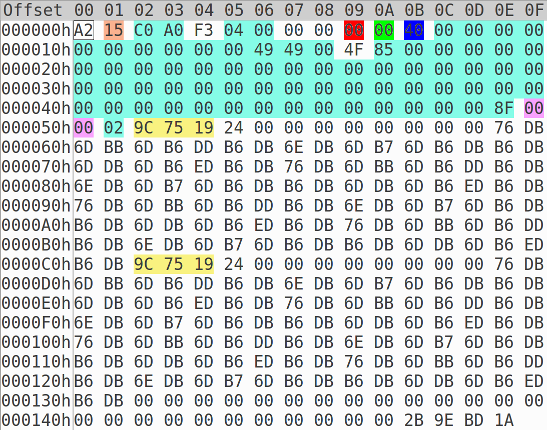
If you look closely at the packets with the operation codes 0x14, 0x15, 0x17, 0x19, you will notice some constancy, namely the successive bytes 0x9c, 0x75, 0x19. This is very similar to the Bluetooth SBC header ( SBC is one of the standard codecs for transmitting audio via Bluetooth). And although there is A2DP standard for transmitting SBC via Bluetooth, the creators of PS4 decided to go their own way and transmit sound directly to HID messages. Also, if you look at the packets further, you can see that two bytes before the Bluetooth SBC header also change, this is the frame counter. Let's check our assumption that this is a standard SBC codec. To do this, use the following Python script.
#!/usr/bin/env python3
from pcapfile import savefile
import collections
import struct
class bluetooth(object):
	def __init__(self, packet, number):
		self.direction = packet.raw()[3]
		self.payload = packet.raw()[4:]
		self.time = ((packet.timestamp_ms-444738)/1000000)+(packet.timestamp-3)
		self.number = number
pcap = savefile.load_savefile(open('ds4_uart_hci_cap_playroom_needs_sorting.pcap', 'rb'))
bluetooth_packet = []
number=1
for pkt in pcap.packets:
	bluetooth_packet.append(bluetooth(pkt, number))
	number+=1
sbc = open('test.sbc', 'wb')
bluetooth_packet.sort(key=lambda pkt: pkt.time)
count = 0
for bt in bluetooth_packet:
	count+=1
	if(bt.payload[0]==2):
		l2cap_len = struct.unpack("5):
			sony_opcode = bt.payload[10]
			if(sony_opcode == 0x19):
				sbc.write(bt.payload[0x5b:-0x12])
			if(sony_opcode == 0x17):
				sbc.write(bt.payload[0x10:-0x8])
			if(sony_opcode == 0x15):
				sbc.write(bt.payload[0x5b:-0x1D])
			if(sony_opcode == 0x14):
				sbc.write(bt.payload[0x10:-0x28])
The script works as follows: open the dump, put all the packages in a list, and then sort by time. Then we go through all the packets in order, extracting the audio data from messages with the operation code 0x19,0x17,0x15 and 0x14 and writing them to a file.
Now we ’ll try to play the resulting file, for which we ’ll use gstreamer: at the beginning of the file there will be silence (this can also be seen from the saved data). For convenience, we convert the data to wav: If we rewind the resulting wav for 41 seconds, we will hear a sound. Thus, we made sure that DualShock4 uses the usual SBC encoding for sound transmission. Now it’s interesting to try to generate data for playback on the controller yourself.
gst-launch-1.0 filesrc location=test.sbc ! sbcparse ! sbcdec ! autoaudiosink
gst-launch-1.0 filesrc location=test.sbc ! sbcparse ! sbcdec ! audioconvert ! wavenc ! filesink location=output.wav
We will use the same tools for this. Gstreamer will encode, and Python will transfer data to DualShock4.
In Linux, you can very easily work with the gamepad due to the fact that everything in it (including devices) is files.
You can find out which file corresponds to the gamepad after pairing DualShock4 with the computer. As a result of successful pairing
, the donyg output will display the line sony 0005: 054C: 05C4.0007: input, hidraw5 : BLUETOOTH HID v1.00 Gamepad [Wireless Controller]
So, our controller is present in the system as a file with the name / dev / hidraw5, and we can transfer data to the gamepad simply by writing the necessary data to this file.
Here is a script with which to do this:
#!/usr/bin/env python3
import struct
from sys import stdin
import os
from io import FileIO
hiddev = os.open("/dev/hidraw5", os.O_RDWR | os.O_NONBLOCK)
pf = FileIO(hiddev, "wb+", closefd=False)
#pf=open("ds_my.bin", "wb+")
rumble_l = 0
rumble_r = 0
r = 0
g = 0
b = 50
crc = 0
volume = 50
flash_bright = 150
flash_dark = 150
def frame_number(inc):
	res = struct.pack(" 0xffff:
		frame_number.n = 0
	return res
frame_number.n = 0
def joy_data():
	data = [0xf3,0x4,0x00]
	data.extend([rumble_l,rumble_r,r,g,b,flash_bright,flash_dark])
	data.extend([0]*8)
	data.extend([0x43,0x43,0x00,volume,0x85])
	return data
def _11_report():
	data = joy_data()
	data.extend([0]*(48))
	data.append(crc)
	return bytearray(data)
def _14_report(audo_data):
	return b'\x14\x40\xA0'+ frame_number(2) + b'\x02'+ audo_data + bytearray(40)
def _15_report(audo_data):
	data = joy_data();
	data.extend([0]*(52))
	return b'\x15\xC0\xA0' + bytearray(data)+ frame_number(2) + b'\x02' + audo_data + bytearray(29)
def _17_report(audo_data):
	return b'\x17\x40\xA0' + frame_number(4) + b'\x02' + audo_data + bytearray(8)
stdin = stdin.detach()
data = bytearray()
count = 1
while True:
#	if count % 200:
	if True:
		data = _14_report(stdin.read(224)) if count % 3 else _15_report(stdin.read(224))
	else:
		data = _17_report(stdin.read(448))
		print('big')
	count+=1
	pf.write(data)
The script reads the audio data encoded in SBC from the standard stream and generates two types of packets 0x14 and 0x15 (also by commenting / uncommenting the lines, you can enable the formation of a twice-increased packet with the 0x17 opcode) and send them to the gamepad by writing to the hidraw device.
Let's try to use this script to play a test sound.
This signal will be generated using gstreamer and sent to the standard output stream, from where the script will pick it up. And we did it
gst-launch-1.0 -q audiotestsrc is-live=true ! sbcenc ! 'audio/x-sbc,channels=2,rate=32000,channel-mode=dual,blocks=16,subbands=8,bitpool=25' ! queue ! fdsink | ./play.py
Conclusion
I would like to thank projects such as DS4Windows and ds4drv .
These projects allow you to use the gamepad on the computer. Hopefully this article will also help add sound transmission support to these projects.
Thanks for attention.
UPD: A
small addition.
If you add is-live = true to audiotestsrc then the sound goes almost without stuttering.
Here is a useful pipeline for gstreamer which allows you to capture everything that goes to the audio output and send to DualShock4. You can get the device name with the following command.
gst-launch-1.0 -q pulsesrc device="alsa_output.pci-0000_00_1b.0.analog-stereo.monitor" ! queue ! audioresample ! 'audio/x-raw,rate=32000' ! audioconvert ! sbcenc ! 'audio/x-sbc,channels=2,rate=32000,channel-mode=dual,blocks=16,subbands=8,bitpool=25' ! queue ! fdsink | ./play.py
pacmd list-sources | grep -e device.string -e 'name:'