Choosing a processor for the server: how to choose and not make a mistake?
Each server has a motherboard installed, and each motherboard has a processor. The central processing unit (CPU) determines how much data the server can manage at the same time and how it can process all this data.
What are the main points to consider when choosing a processor:
But first, let's see how desktop processors and servers differ, and whether they can replace each other.
Desktop
processors The processors used in desktop computers have been specifically designed for these tasks. Although they basically perform the same functions as server processors, the differences lie in the architecture. For example, one of the advantages of such processors is that they are easier to overclock.
Server processors Server processors are
designed primarily for high reliability. Such processors are tested under stressful conditions at high temperatures and high computing loads. They can operate at very high frequencies, providing high-quality processing of massive data.
What is the difference between server processors and desktop ones?
Now we go directly to the choice of processor.
»Cores
Less than ten years ago, all processors were released with one core. Now single-core processors have become an exception due to the ubiquity of multi-core processors. Recently, even software has been developed in such a way that applications can use multi-core technology. There are a large number of options for choosing - from 2 to 22 cores.
When processors were run on a single core, it was fully responsible for processing the data that was transferred to the processor. The more cores are built into the CPU, the more they are able to distribute its tasks. This makes the processor faster and more efficient. It is very important to understand that the processor is only responsible for the execution of tasks, as well as software running on it. All core work is done by the kernel. However, it should be borne in mind that if 3 cores of 8 are used for the correct operation of applications, then 5 cores remain unused. To minimize costs, it is worth comparing the system requirements with the number of cores .
»Cache
The processor cache can be compared with the memory of a computer. In fact, this is a small amount of very fast memory that is used for temporary storage of data. This allows the computer to recover files in the processor cache very quickly. The larger the cache, the faster the processor performs the tasks assigned to it.
»Socket Socket
compatibility is a priority when choosing a processor. A socket is a means of communication between the motherboard and the CPU. If you have already bought a motherboard, check that the installed processor is compatible with its socket. Conversely, buying processors separately, check compatibility with the motherboard. This may come in handy for further upgrades.
Graphics Processing Unit (GPU)
Many modern processors have built-in graphics processors that perform calculations related to the graphics. If the processor does not have a built-in GPU, the server will still be able to display graphics (if a separate video card is installed or the motherboard allows you to run video). However, for software and applications intensively loaded with graphics, CPUs with an integrated GPU will work much more efficiently.
»Frequency
The frequency of the CPU measured by hertz is the speed at which it operates. It used to be: high frequency = better performance. This formula is no longer valid. In some cases, a CPU operating at a low frequency can actually perform better than a processor with a high frequency. This is affected by the processor architecture. Along with the frequency, it is very important to pay attention to the number of processor instructions executed per cycle. Although the frequency is still an important indicator of processor speed, now it is not a key point affecting the actual speed of the CPU.
»Heat dissipation value (TDP)
Processors generate heat. The amount of heat dissipation assigned to the processor explains how much heat the processor can generate. This will directly affect the type of cooling required by the CPU. If the processor is supplied without a cooling system, or this system is not used, it is necessary to think over the cooling system for the correct server operation. Overheating is a major danger to server components.

When choosing a processor, some criteria will be more important than others. In order to facilitate the task of choosing a processor, we have prepared typical solutions depending on the size of your company.
Small company:
Medium-sized companies
Corporate Customers
We compiled a comparative list of processors that are relatively similar in terms of characteristics and indicated prices for servers on board which the CPU models below are installed (prices are taken from Yandex.Market and Squadra Group from 05/23/2016):
This is a visual diagram of the ratio of processor performance and prices for used and new servers:
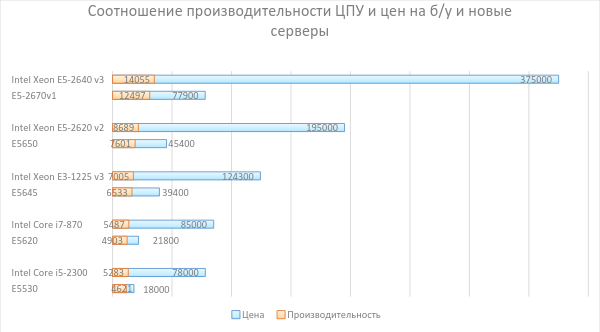
Obviously, the prices for new servers are significantly different from used ones, although the processor performance is about the same.
So, when choosing a processor, determine the following things for yourself:
This article will be useful to all future server owners who do not know the server with which processor to choose.
What are the main points to consider when choosing a processor:
- Goals for future use.
- Number of Cores.
- Compatibility with other components.
- CPU speed.
- Price.
But first, let's see how desktop processors and servers differ, and whether they can replace each other.
Desktop
processors The processors used in desktop computers have been specifically designed for these tasks. Although they basically perform the same functions as server processors, the differences lie in the architecture. For example, one of the advantages of such processors is that they are easier to overclock.
Server processors Server processors are
designed primarily for high reliability. Such processors are tested under stressful conditions at high temperatures and high computing loads. They can operate at very high frequencies, providing high-quality processing of massive data.
What is the difference between server processors and desktop ones?
- High quality control . Server processors go through all kinds of testing in the most severe conditions. The following example can be cited as an analogue: the engine of a passenger aircraft requires more rigorous testing than the engine of a car. Undoubtedly, the risk of an airplane engine malfunction is higher.
- Reliability . Server processors are fault tolerant. In a critical situation, servers can avoid shutting down or rebooting (with a 2-processor configuration). They are designed to work non-stop 24/7. Desktop options are more intended for "household" multitasking.
- The presence of a self-correcting system . Server CPUs have an algorithm that allows you to correct memory errors that can affect the stability of the equipment. This technology is called Error Checking and Correction (ECC).
Now we go directly to the choice of processor.
The main criteria for choosing a processor
»Cores
Less than ten years ago, all processors were released with one core. Now single-core processors have become an exception due to the ubiquity of multi-core processors. Recently, even software has been developed in such a way that applications can use multi-core technology. There are a large number of options for choosing - from 2 to 22 cores.
When processors were run on a single core, it was fully responsible for processing the data that was transferred to the processor. The more cores are built into the CPU, the more they are able to distribute its tasks. This makes the processor faster and more efficient. It is very important to understand that the processor is only responsible for the execution of tasks, as well as software running on it. All core work is done by the kernel. However, it should be borne in mind that if 3 cores of 8 are used for the correct operation of applications, then 5 cores remain unused. To minimize costs, it is worth comparing the system requirements with the number of cores .
»Cache
The processor cache can be compared with the memory of a computer. In fact, this is a small amount of very fast memory that is used for temporary storage of data. This allows the computer to recover files in the processor cache very quickly. The larger the cache, the faster the processor performs the tasks assigned to it.
»Socket Socket
compatibility is a priority when choosing a processor. A socket is a means of communication between the motherboard and the CPU. If you have already bought a motherboard, check that the installed processor is compatible with its socket. Conversely, buying processors separately, check compatibility with the motherboard. This may come in handy for further upgrades.
Graphics Processing Unit (GPU)
Many modern processors have built-in graphics processors that perform calculations related to the graphics. If the processor does not have a built-in GPU, the server will still be able to display graphics (if a separate video card is installed or the motherboard allows you to run video). However, for software and applications intensively loaded with graphics, CPUs with an integrated GPU will work much more efficiently.
»Frequency
The frequency of the CPU measured by hertz is the speed at which it operates. It used to be: high frequency = better performance. This formula is no longer valid. In some cases, a CPU operating at a low frequency can actually perform better than a processor with a high frequency. This is affected by the processor architecture. Along with the frequency, it is very important to pay attention to the number of processor instructions executed per cycle. Although the frequency is still an important indicator of processor speed, now it is not a key point affecting the actual speed of the CPU.
»Heat dissipation value (TDP)
Processors generate heat. The amount of heat dissipation assigned to the processor explains how much heat the processor can generate. This will directly affect the type of cooling required by the CPU. If the processor is supplied without a cooling system, or this system is not used, it is necessary to think over the cooling system for the correct server operation. Overheating is a major danger to server components.
Which specification is right for your company?
When choosing a processor, some criteria will be more important than others. In order to facilitate the task of choosing a processor, we have prepared typical solutions depending on the size of your company.
Small company:
- Kernel . For most tasks, a server with a 4-core processor is suitable. If you are facing more demanding tasks - you need to work with graphic design, find out how many cores are needed for a particular software. If you need 8 cores, it is best to invest money right away in a server based on 8-core processors.
- The memory . The amount of memory that the server supports can also play a role. The motherboard and type of operating system will help determine the necessary volume.
- Frequency . The software you plan to work with will affect the speed of the CPU. For example, the constant use of Adobe CS 6 requires a processor with a speed of at least 2 GHz.
Medium-sized companies
- Price . Most mid-sized companies should stick to the budget when it comes to buying equipment. Price relative to processor performance can be a key factor.
- Multithreading . When choosing a server processor, be sure to pay attention to Hyper-Threading technology. This technology provides a more efficient use of processor resources, allowing you to execute multiple threads on each core and increases processor throughput, improving the overall performance of multi-threaded applications.
Corporate Customers
- Kernel . When choosing a CPU, it is worth considering the number of cores. It is necessary to focus on the technical requirements of the applications. For example, if an 8-core processor is installed, but only 4 of them are needed for the application, then there is no point in overpaying. Size doesn't always matter.
- Frequency . It is also worth focusing on software here - for some companies 2 GHz is enough, and for others 4 GHz is not enough.
- The TDP . Check this figure before buying processors. Then you will be sure that the cooling system will cope with the release of heat.
Does it make sense to overpay for performance?
We compiled a comparative list of processors that are relatively similar in terms of characteristics and indicated prices for servers on board which the CPU models below are installed (prices are taken from Yandex.Market and Squadra Group from 05/23/2016):
| Squadra Group Processors | Cpu benchmark | Price per server, ₽ | New processors | Cpu benchmark | Price per server, ₽ |
| Intel Xeon E5530 (4 Core, 8M Cache, 2.40 GHz) | 4621 | 18 000 | Intel Core i5-2300 (4 Core, 6M Cache, up to 3.10 GHz) | 5283 | 78,000 |
| Intel Xeon E5620 (4 Core, 12M Cache, 2.40 GHz) | 4903 | 21 800 | Intel Core i7-870 (4 Core, 8M Cache, 2.93 GHz) | 5487 | 85,000 |
| Intel Xeon E5645 (6 Core, 12M Cache, 2.40 GHz) | 6533 | 39,400 | Intel Xeon E3-1225 v3 (4 Core, 8M Cache, 3.20 GHz) | 7005 | 124,300 |
| Intel Xeon X5650 (6 Core, 12M Cache, 2.66 GHz) | 7601 | 45,400 | Intel Xeon E5-2620 v2 (6 Core, 15M Cache, 2.10 GHz) | 8689 | 195,000 |
| Intel Xeon E5-2670 v1 (8 Core, 20M Cache, 2.60 GHz) | 12497 | 77,900 | Intel Xeon E5-2640 v3 (8 Core, 20M Cache, 2.60 GHz) | 14055 | 375,000 |
This is a visual diagram of the ratio of processor performance and prices for used and new servers:
Obviously, the prices for new servers are significantly different from used ones, although the processor performance is about the same.
Conclusion
So, when choosing a processor, determine the following things for yourself:
- The purpose of using the server.
- Technical specifications of the applications for which the server will be designed.
- Compatibility with other components (memory, OS, etc.).
- Company size.
- Price
Only registered users can participate in the survey. Please come in.
What processors in the servers do you use in your work?
- 26.3% Desktop 64
- 24.2% 55xx, 56xx 59
- 20.9% E-3 51
- 35.3% E-5 86
- 7.8% E-7 19
- 14.8% AMD 36