 May 21, 2016 at 11:08
Generating classes from a database using DataGrip
- Tutorial

This short article will show how to write a DataGrip extension for generating code (in this case, POCO (C #) classes) based on tables from almost any database (SQL Server, Oracle, DB2, Sybase, MySQL, PostgreSQL, SQLite, Apache Derby, HyperSQL, H2).
Foreword
DataGrip is a relatively new IDE from JetBrains for working with different DBMSs and has some API for expanding the functionality. The task - using it to write a generator of POCO (C #) classes.
If you don’t want to read all this, but just want to start generating classes, here is a link to the repository with a script .
Script writing
DataGrip allows you to expand its functionality using scripts (Scripted Extensions). Groovy, Clojure, and JavaScript are supported. The documentation on the site about this is quite brief, but there are examples and an archive with the API in the form of Java source code. Source code can be found at
So, for writing the script we will use Clojure, the example was taken as a basis for the POJO generator from the IDE.
The syntax and auto-completion for Clojure in DataGrip is certainly not, so you can use any other editor.
First, configure the type mappings from the database to C # types and declare some constants.
(def usings "using System;")
(def default-type "string")
(def type-mappings
    [
        [["bit"] "bool"]
        [["tinyint"] "byte"]
        [["uniqueidentifier"] "Guid"]
        [["int"] "int"]
        [["bigint"] "long"]
        [["char"] "char"]
        [["varbinary" "image"] "byte[]" true] ; cannot be null
        [["double" "float" "real"] "double"]
        [["decimal" "money" "numeric" "smallmoney"] "decimal"]
        [["datetime" "timestamp" "date" "time"] "DateTime"]
        [["datetimeoffset"] "DateTimeOffset"]
    ])
(def new-line "\r\n")
Next, we write a function that casts a string to PascalCase.
(defn- poco-name [name]
    (apply str (map clojure.string/capitalize (re-seq #"(?:[A-Z]+)?[a-z\d]*" name))))
Matching a type from a database to a type in C # based on the mapping that we defined earlier.
(defn- poco-type [data-type is-null]
    (let [spec                (.. data-type getSpecification toLowerCase)
          spec-matches?       (fn [pattern] (= (re-find #"^\w+" spec) pattern))
          mapping-matches?    (fn [[ps t n]] (when (some spec-matches? ps) [t n]))
          [type cant-be-null]  (some mapping-matches? type-mappings)
          nullable-type       (if (and type (not cant-be-null) is-null) (str type "?") type)]
        (or nullable-type default-type)))
The function that receives all the columns from the table calls the matching function and collects the object we need for further saving. Here we use methods from the API, for example com.intellij.database.util.DasUtil/getColumns, all these methods can be viewed in the archive src_database-openapi.zipmentioned above.
(defn- field-infos [table]
    (let [columns    (com.intellij.database.util.DasUtil/getColumns table)
          field-info (fn [column] {:name (poco-name (.getName column))
                                   :type (poco-type (.getDataType column) (not (.isNotNull column)))})]
        (map field-info columns)))
Generating text for properties and classes, nothing special just concatenating strings. And also the function of writing this text to a file.
(defn- property-text [field-info]
    (let [type  (:type field-info)
          name  (:name field-info)]
        (str "  public " type " " name " { get; set; } " new-line)))
(defn- poco-text [class-name fields]
    (apply str (flatten
        [usings new-line new-line
         "public class " class-name " " new-line "{" new-line
         (interpose new-line (interleave (map property-text fields)))
         "}" new-line])))
(defn- generate-poco [directory table]
    (let [class-name (poco-name (.getName table))
          fields     (field-infos table)
          file       (java.io.File. directory (str class-name ".cs"))
          text       (poco-text class-name fields)]
        (com.intellij.openapi.util.io.FileUtil/writeToFile file text)))
And finally, the function of opening the directory selection dialog for saving files and the function that determines the selected tables and starts the generation.
(defn- generate-pocos [directory]
    (let [table? (partial instance? com.intellij.database.model.DasTable)]
        (doseq [table (filter table? SELECTION)]
            (generate-poco directory table))))
(.chooseDirectoryAndSave FILES
                         "Choose directory"
                         "Choose where to generate POCOs to"
                         (proxy [com.intellij.util.Consumer] []
                            (consume [directory]
                                (generate-pocos directory)
                                (.refresh FILES directory))))
Script installation
Full script code on GitHub .
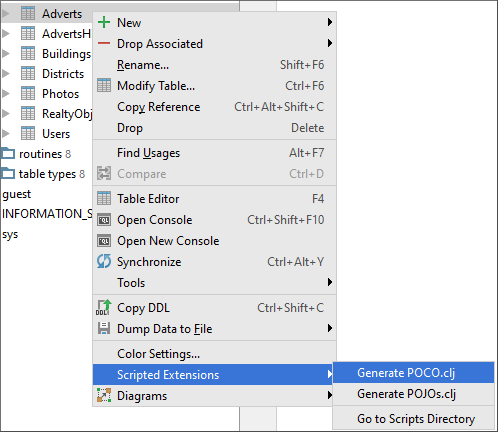
To install, just copy the fileGenerate POCO.cljGenerate POCO.groovyin IDE> Files> Scratches> Extensions> DataGrip> schema.
And in the context menu of the tables the corresponding submenu item will appear in the Scripted Extensions section.
Result
From the following table
CREATE TABLE Users
(
    Id INT PRIMARY KEY NOT NULL IDENTITY,
    first_name NVARCHAR(255),
    Last_Name NVARCHAR(255),
    Email VARCHAR(255) NOT NULL,
    UserGuid UNIQUEIDENTIFIER,
    Age TINYINT NOT NULL,
    Address NVARCHAR(MAX),
    photo IMAGE,
    Salary MONEY,
    ADDITIONAL_INFO NVARCHAR(42)
);
the following class will be generated:
using System;
public class Users
{
  public int Id { get; set; }
  public string FirstName { get; set; }
  public string LastName { get; set; }
  public string Email { get; set; }
  public Guid? UserGuid { get; set; }
  public byte Age { get; set; }
  public string Address { get; set; }
  public byte[] Photo { get; set; }
  public decimal? Salary { get; set; }
  public string AdditionalInfo { get; set; }
}
Conclusion
In such a fairly simple way, you can generate C # classes that describe your tables in the database and make life a little less routine. Of course, you are not limited only to POCO classes by C #, you can write a generator of anything for another language, framework, etc.









