May 14, 2016 at 21:40
Putting together an audiobook database for easy filtering
My telegram channel: https://t.me/winc0de .
Hello! Surely many of you are familiar with the problem of tired eyes due to the long work on the computer. Unfortunately, because of this, you have to limit yourself to other activities. One of them is reading books. In this regard, I have been listening to audio books almost every day for more than 5 years. During this time, I learned to do something at the same time and understand the essence of voice acting. Now I even listen to books in the gym! Imagine how convenient it is: an hour of walking back and forth + an hour and a half of exercises. The average book is around 10-15 hours of recording.
Over time, more and more often the problem of choosing a material appeared. After all, the reader, the genre of the book, plays a rather large role. Often there is a situation when someone advises a book (or in the same article on the hub in the reading room), but the audio version is not corny yet. I tried to solve all these problems with a separate site. Now there are a couple of rather large and well-advertised audiobooks where you can listen to them directly online. Such sites have a rather weak book filter. And, in fact, they are purely a catalog.

For all the time I noticed that rutracker is one of the largest repositories of audiobooks. If the book exists in this format, then almost certainly it is in the distribution. Many readers even manually release torrents. The first task was to fully synchronize all available audio books from the rutracker.
The next goal was to create a wide filter for selecting a book. Convenient filters will help change the approach to choosing a book. If earlier you simply found an option for yourself, and then searched for its audiobook (which might not have been), now you exclude the first paragraph and look in the database for all existing books. Specifically, I managed to make the following set of filters:
So, the first point is the analysis of the publications of the rutreker and the formation of the base. For storage I chose MongoDB. Firstly, it’s ideal for a bunch of not very related data, and secondly, it has shown itself perfectly in terms of performance. And in general, developing a site with a simple "forwarding" json from the UI to the base is very simple and takes minimal time. By the way, in MongoDB 3.2 they added a left outer join.
The main difficulty was the unification of information. Although the root tracker forces you to arrange distributions (for which I thank them), it’s all the same for 10 years (that’s how much time has passed since the publication of the first audiobook) the design is different. I had to open at random different sections and collect possible options.
The parser script is written in python, to emulate the browser mechanize library, to work with the DOM - BeautifulSoup.
A method that returns an object that maximally emulates the behavior of a normal browser. The second method receives a browser object, logs in to the root tracker and returns this very object, inside which authorization cookies are already stored.
The data collection itself looks like a set of regular expressions in different variations:
It is very important to use BULK requests in mongo so that the parser does not load the base with single inserts. Fortunately, all this is done very simply:
The slug field is generated by the slugify package (pip install slugify).
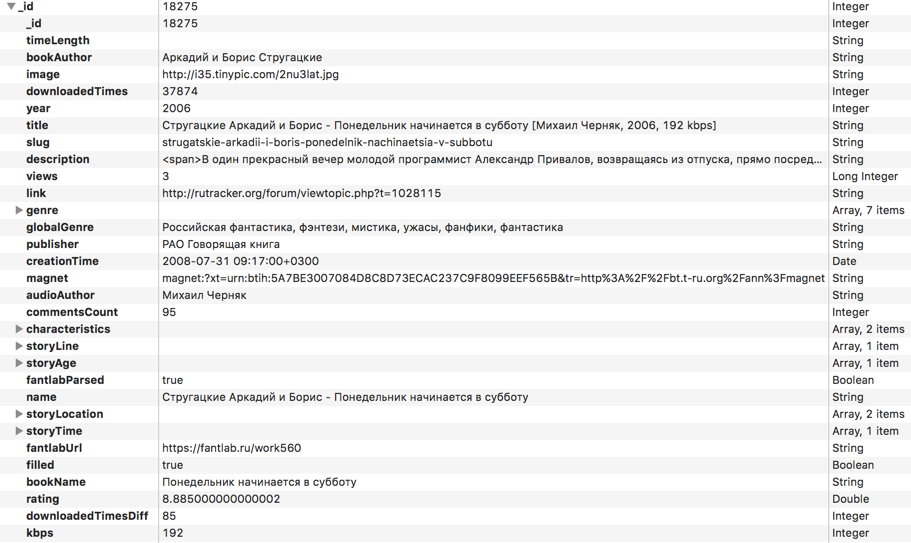
Here is a list of all the fields for each of the books that I eventually collected:
Immediately do not forget to create an index for all the fields by which sorting or filtering will go:

This will slow down the insertion time, but it will greatly speed up the selection. The database is synchronized once a day, so the second option for the site is preferable.
Data is downloaded for all sub-forums of audiobooks:
We downloaded the data, but there is a problem: there is no accuracy in the specified data. Someone will write “V. Gerasimov ”, someone“ Vyacheslav Gerasimov ”. In one place indicate the full or alternative title of the work. The question also arose in obtaining an independent evaluation of the work. Googled a couple of book titles and looked at the issuance of the first sites. One of them turned out to be fantlab.ru, which builds the rating according to the votes of users, has a rather impressive base of books, contains a complete description of the genre and subgenres of books, the exact name of the author and work.
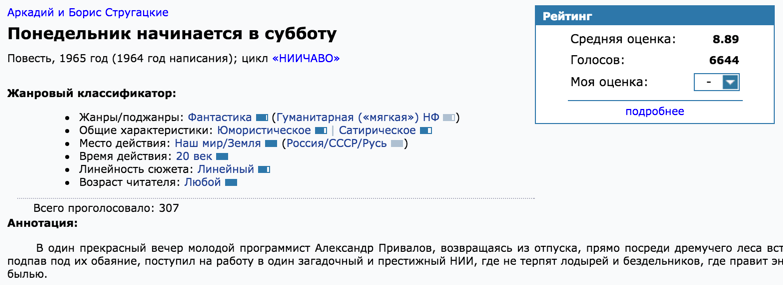
Absolutely all information from the screenshot is parsed and entered into the database. All fields are manually checked by members of the fantlab community. Everything is perfect, but there is one problem: how to connect the distribution from the rutracker and a specific record with fantlab? The distributions do not separately indicate the title of the work. Sometimes even the author is spelled incorrectly (or not indicated). In fact, the full source of information is the headline. You can see all the pain in the following screenshot of the distributions:

Needless to say, even excluding all the text in angle brackets, the built-in search on fantlab does not cope and does not find anything. I found a way out, although not quite elegant: phantomjs (selenium) + google.
I have quite a few projects using this bundle, so the configured headless browser and basic scripts for selenium were ready for use. In fact, I took the title from the rutracker, added the prefix “fantlab” to it and google it. The first result, which matched the address of the work according to the template, was parsed. I will leave a couple of remarks about phantomjs: memory is very strong. I have already made a couple of “crutches” for myself, which allow the process to live for months on the server and not fall due to lack of memory:
This function is executed at the moment of requesting some resource and checks it by the mask of media files. All pictures and videos are excluded. Those. they are not even loaded into memory. The second function forcibly flushes the cache. You need to call by timer once every ~ hour:
We open Google and drive into it in the search field any text in order to change the UI (get the result of the output). All further requests will occur on the same page.
Since the requests are all ajax, we need to manually verify the fact of loading. There are some methods in selenium for this that wait until a certain element appears on the page.
The next step: bringing to a single look all the names of authors and all genres. In some distributions they wrote “horror”, in others “horrors”. Here the pymorphy2 library came to the rescue: it allows you to get the initial form of the word.
With the authors, you could also come up with something with the pymorphy2 library: break it down into words, check the occurrences of words and their match. But then I remembered the point about the global search for everything in all fields. This will be the solution. For full-text search took sphinx. He is not directly friends with mongodb, so you need to write a script that will throw out xml with data according to the specified scheme.
Parameters in sphinx.conf:
And the command: indexer bookaudio --rotate
How can I use search to unify fields? We take a list of all authors of the books, and add the same entries. It will turn out something like:
What is used as often as possible is probably the most correct form. We take top entries and do a global search for all authors.
All similar occurrences (including V. Gerasimov, for example) will be replaced with the most used forms.
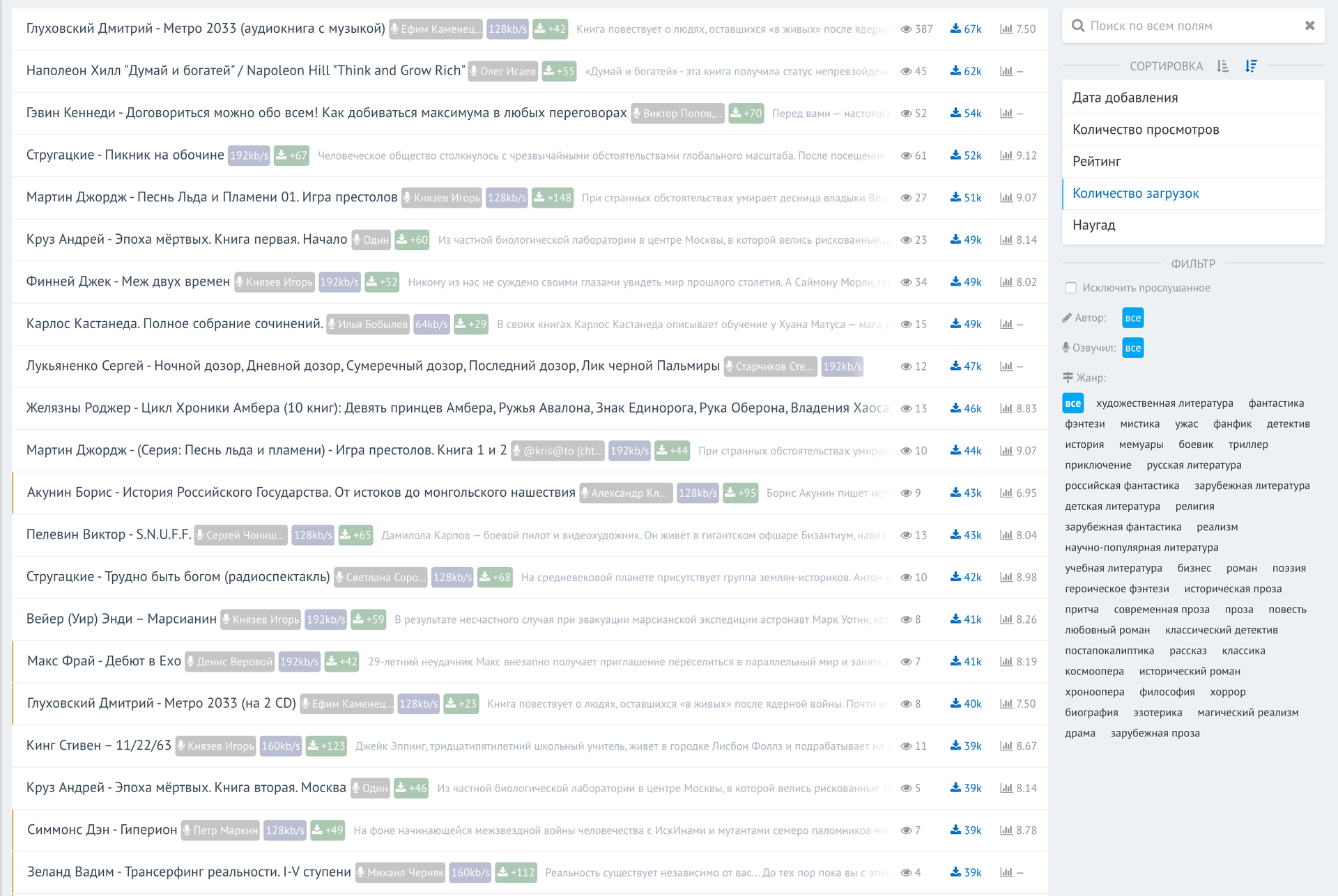
Writing a web interface for all this does not carry any technical complexity. In fact, this is an add-on for accessing the database. That's what I did. List of the most downloaded audio books in the history of the tracker:
And working with filters:
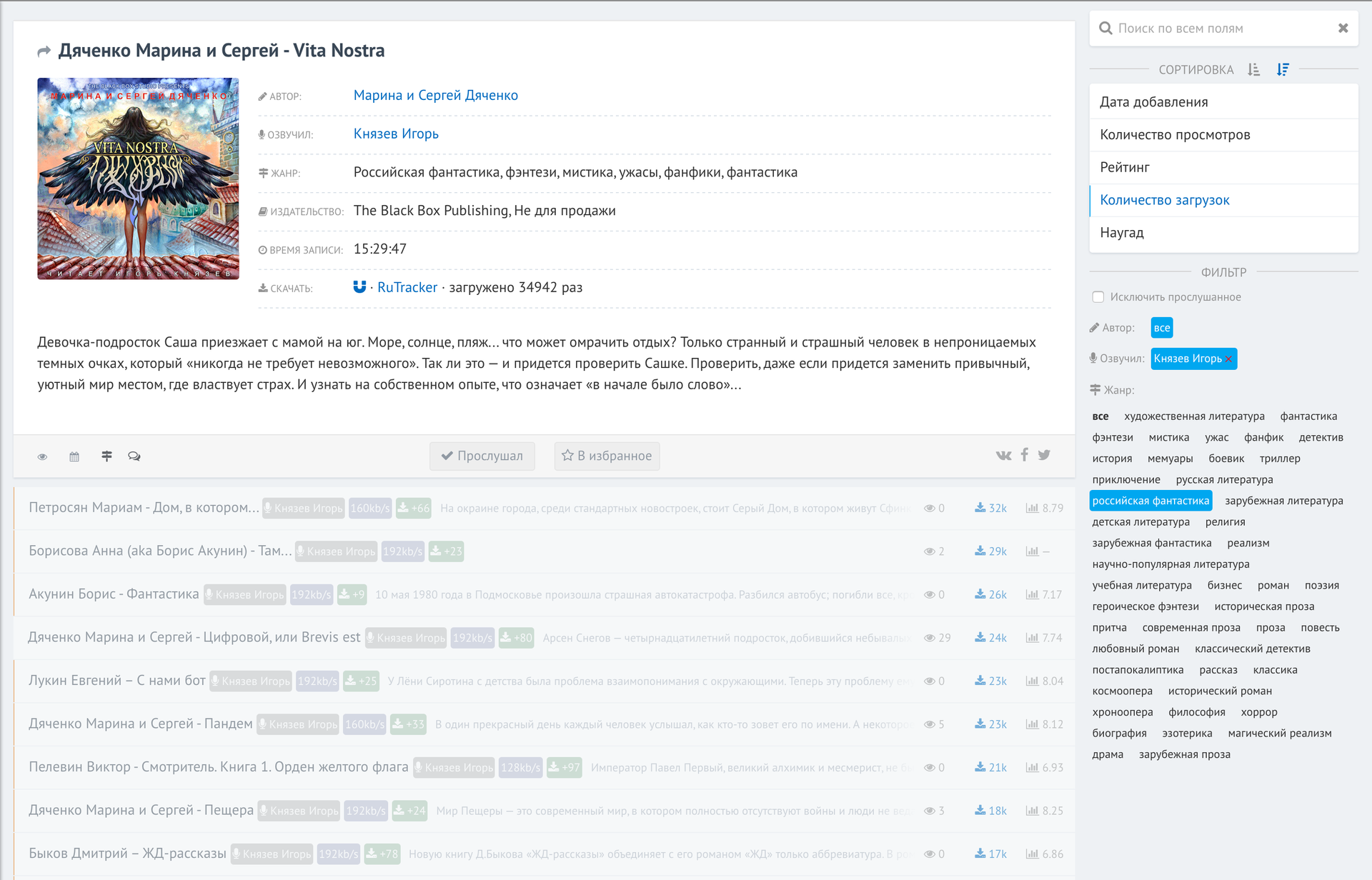
As you can see, I wanted to see all the books voiced by Igor Knyazev in the genre of “Russian science fiction”, sorted by the number of downloads on the root tracker (at the top are the most downloaded).
Space or clicking on the cards below reveals information about the book. Thanks to mongodb, all filters work out instantly on the basis of 30k books.
Not everything is perfect: the base is not always accurate, the interface can be improved. The filter by genre needs to be translated into a tree structure. All this work in 3 days and for personal use and the choice of books I have enough. Would you use such a service?
Hello! Surely many of you are familiar with the problem of tired eyes due to the long work on the computer. Unfortunately, because of this, you have to limit yourself to other activities. One of them is reading books. In this regard, I have been listening to audio books almost every day for more than 5 years. During this time, I learned to do something at the same time and understand the essence of voice acting. Now I even listen to books in the gym! Imagine how convenient it is: an hour of walking back and forth + an hour and a half of exercises. The average book is around 10-15 hours of recording.
Over time, more and more often the problem of choosing a material appeared. After all, the reader, the genre of the book, plays a rather large role. Often there is a situation when someone advises a book (or in the same article on the hub in the reading room), but the audio version is not corny yet. I tried to solve all these problems with a separate site. Now there are a couple of rather large and well-advertised audiobooks where you can listen to them directly online. Such sites have a rather weak book filter. And, in fact, they are purely a catalog.
Sourse of information
For all the time I noticed that rutracker is one of the largest repositories of audiobooks. If the book exists in this format, then almost certainly it is in the distribution. Many readers even manually release torrents. The first task was to fully synchronize all available audio books from the rutracker.
Book selection
The next goal was to create a wide filter for selecting a book. Convenient filters will help change the approach to choosing a book. If earlier you simply found an option for yourself, and then searched for its audiobook (which might not have been), now you exclude the first paragraph and look in the database for all existing books. Specifically, I managed to make the following set of filters:
- Semantic global search throughout the database for all text fields
- Sorting (asc / desc) by the date of creation of the torrent, the number of views (on the site), rating (from external sources), the number of downloads (according to the rutracker), and at random
- Filter by author of the work, voice author, genres, and the ability to exclude books that you marked as “read”
- The ability to subscribe to authors of books or voiceovers. Yes Yes! You can choose your favorite artist and subscribe to all his updates. For example, I monitor all the books of Igor Knyazev
Rutracker Base
So, the first point is the analysis of the publications of the rutreker and the formation of the base. For storage I chose MongoDB. Firstly, it’s ideal for a bunch of not very related data, and secondly, it has shown itself perfectly in terms of performance. And in general, developing a site with a simple "forwarding" json from the UI to the base is very simple and takes minimal time. By the way, in MongoDB 3.2 they added a left outer join.
The main difficulty was the unification of information. Although the root tracker forces you to arrange distributions (for which I thank them), it’s all the same for 10 years (that’s how much time has passed since the publication of the first audiobook) the design is different. I had to open at random different sections and collect possible options.
The parser script is written in python, to emulate the browser mechanize library, to work with the DOM - BeautifulSoup.
A method that returns an object that maximally emulates the behavior of a normal browser. The second method receives a browser object, logs in to the root tracker and returns this very object, inside which authorization cookies are already stored.
 def getBrowser():
    br = mechanize.Browser()
    cj = cookielib.LWPCookieJar()
    br.set_cookiejar(cj)
    br.set_handle_equiv(True)
    br.set_handle_gzip(True)
    br.set_handle_redirect(True)
    br.set_handle_referer(True)
    br.set_handle_robots(False)
    br.set_handle_refresh(mechanize._http.HTTPRefreshProcessor(), max_time=1)
    br.addheaders = [
        ('User-agent', 'Mozilla/5.0 (Macintosh; Intel Mac OS X 10_10_3) AppleWebKit/537.36 (KHTML, like Gecko) Chrome/43.0.2327.5 Safari/537.36'),
        ('Accept', 'text/html,application/xhtml+xml,application/xml;q=0.9,image/webp,*/*;q=0.8'),
        ('Accept-Encoding', 'gzip, deflate, sdch'),
        ('Accept-Language', 'ru,en;q=0.8'),
    ]
    return br
def rutrackerAuth():
    params = {u'login_username': '...', u'login_password': '...', u'login' : ''}
    data = urllib.urlencode(params)
    url = 'http://rutracker.org/forum/login.php'
    browser = getBrowser()
    browser.open(url, data)
    return browser
The data collection itself looks like a set of regular expressions in different variations:
yearRegex = r'Год .*(\d{4}?)'
result['year'] = int(re.search(yearRegex, descContent, re.IGNORECASE).group(1))
# Пример разбора даты создания торрента, где дата указана в русской локали
timeData = soupHandle.find('div', {'id' : 'tor-reged'}).find('span').encode_contents()
import locale
locale.setlocale(locale.LC_ALL, 'ru_RU.UTF-8')
result['creationTime'] = datetime.datetime.strptime(timeData, u'[ %d-%b-%y  %H:%M ]')
It is very important to use BULK requests in mongo so that the parser does not load the base with single inserts. Fortunately, all this is done very simply:
BULK = tableHandle.initialize_unordered_bulk_op()
# Цикл...
    BULK.find({'_id' : book['_id']}).upsert().update({'$set' : result})
BULK.execute()
The slug field is generated by the slugify package (pip install slugify).
Here is a list of all the fields for each of the books that I eventually collected:
Immediately do not forget to create an index for all the fields by which sorting or filtering will go:
This will slow down the insertion time, but it will greatly speed up the selection. The database is synchronized once a day, so the second option for the site is preferable.
Data is downloaded for all sub-forums of audiobooks:
forums = [
    {'id' : '1036'},  {'id' : '400'},   {'id' : '574'},
    {'id' : '2387'}, {'id' : '2388'},  {'id' : '695'},
    {'id' : '399'}, {'id' : '402'},  {'id' : '490'},
    {'id' : '499'}, {'id' : '2325'},  {'id' : '2342'},
    {'id' : '530'}, {'id' : '2152'},  {'id' : '403'},
    {'id' : '716'}, {'id' : '2165'}
]
for i in xrange(pagesCount):
    url = 'http://rutracker.org/forum/viewforum.php?f='+forum['id']+'&start=' + str(i*50) + '&sort=2&order=1'
Base normalization
We downloaded the data, but there is a problem: there is no accuracy in the specified data. Someone will write “V. Gerasimov ”, someone“ Vyacheslav Gerasimov ”. In one place indicate the full or alternative title of the work. The question also arose in obtaining an independent evaluation of the work. Googled a couple of book titles and looked at the issuance of the first sites. One of them turned out to be fantlab.ru, which builds the rating according to the votes of users, has a rather impressive base of books, contains a complete description of the genre and subgenres of books, the exact name of the author and work.
Author name, book title
Absolutely all information from the screenshot is parsed and entered into the database. All fields are manually checked by members of the fantlab community. Everything is perfect, but there is one problem: how to connect the distribution from the rutracker and a specific record with fantlab? The distributions do not separately indicate the title of the work. Sometimes even the author is spelled incorrectly (or not indicated). In fact, the full source of information is the headline. You can see all the pain in the following screenshot of the distributions:
Needless to say, even excluding all the text in angle brackets, the built-in search on fantlab does not cope and does not find anything. I found a way out, although not quite elegant: phantomjs (selenium) + google.
I have quite a few projects using this bundle, so the configured headless browser and basic scripts for selenium were ready for use. In fact, I took the title from the rutracker, added the prefix “fantlab” to it and google it. The first result, which matched the address of the work according to the template, was parsed. I will leave a couple of remarks about phantomjs: memory is very strong. I have already made a couple of “crutches” for myself, which allow the process to live for months on the server and not fall due to lack of memory:
    def resourceRequestedLogic(self):
        driver.execute('executePhantomScript', {'script': '''
            var page = this;
            page.onResourceRequested = function(request, networkRequest) {
                if (/\.(jpg|jpeg|png|gif|tif|tiff|mov|css)/i.test(request.url))
                {
                    //console.log('Final with css! Suppressing image: ' + request.url);
                    networkRequest.abort();
                    return;
                }
            }
        ''', 'args': []})
This function is executed at the moment of requesting some resource and checks it by the mask of media files. All pictures and videos are excluded. Those. they are not even loaded into memory. The second function forcibly flushes the cache. You need to call by timer once every ~ hour:
    def clearDriverCache(self):
        driver.execute('executePhantomScript', {'script': '''
            var page = this;
            page.clearMemoryCache();
        ''', 'args': []})
We open Google and drive into it in the search field any text in order to change the UI (get the result of the output). All further requests will occur on the same page.
driver.get('http://google.ru')
driver.find_element_by_css_selector('input[type="text"]').send_keys(u"Имя книги fantlab")
driver.find_element_by_css_selector('button').click()
Since the requests are all ajax, we need to manually verify the fact of loading. There are some methods in selenium for this that wait until a certain element appears on the page.
count = 0
while True:
    count += 1
    time.sleep(0.25)
    if count >= 3:
        break
    try:
        link = driver.find_element_by_css_selector('a[href*="fantlab.ru/work"]')
        if link:
            return link.get_attribute('href')
    except:
        continue
Genres
The next step: bringing to a single look all the names of authors and all genres. In some distributions they wrote “horror”, in others “horrors”. Here the pymorphy2 library came to the rescue: it allows you to get the initial form of the word.
# Убираем все спец символы из строки жанров
fullGenre = fullGenre.replace('/', ',').replace(';', ',').replace('--', '-').replace(u'ё', u'е')
fullGenre = re.sub(r'[\.|"«»]', '',fullGenre)
fullGenre = re.sub(r'\[.*?\]', '',fullGenre)
# Разбиваем жанры по запятой, убираем пустые поля и начальные/конечные пробелы
allGenres = filter(None, fullGenre.split(','))
allGenres = [item.strip() for item in allGenres]
# Делаем список уникальным (убираем дубликаты)
allGenres = list(set(allGenres))
insertGenresList = []
for genre in allGenres:
    # Проходим по каждому жанру, получаем его начальную форму
    morphology = morph.parse(genre)[0]
    genre = morphology.normal_form
    insertGenresList.append(genre)
Authors Names
With the authors, you could also come up with something with the pymorphy2 library: break it down into words, check the occurrences of words and their match. But then I remembered the point about the global search for everything in all fields. This will be the solution. For full-text search took sphinx. He is not directly friends with mongodb, so you need to write a script that will throw out xml with data according to the specified scheme.
docset = ET.Element("sphinx:docset")
schema = ET.SubElement(docset, "sphinx:schema")
# Храним ID записи в базе, чтобы потом вытаскивать информацию
idAttribute = ET.SubElement(schema, "sphinx:attr")
idAttribute.set("name", "mongoid")
idAttribute.set("type", "int")
# Дальше перечисляем все поля, которые должны индексироваться
text = ET.SubElement(schema, "sphinx:field")
text.set("name", "audioauthor")
text = ET.SubElement(schema, "sphinx:field")
text.set("name", "bookauthor")
text = ET.SubElement(schema, "sphinx:field")
text.set("name", "title")
text = ET.SubElement(schema, "sphinx:field")
text.set("name", "publisher")
text = ET.SubElement(schema, "sphinx:field")
text.set("name", "description")
# Мы должны вручную генерировать индекс для каждой записи книги и это обязательно должен быть атрибут с имением id
globalIterator = 0
all = bookTable.find()
# Убираем то, что может сломать xml разметку
def safeText(data):
    data = re.sub('<[^<]+?>', ' ', data)
    data = "".join([c for c in data if c.isalpha() or c.isdigit() or c==' ']).rstrip()
    return data
for card in all:
    document = ET.SubElement(docset, "sphinx:document")
    globalIterator += 1
    # Этот самый обязательный id
    document.set("id", str(globalIterator))
    mongoid = ET.SubElement(document, "mongoid")
    mongoid.text = str(card["_id"])
    title = ET.SubElement(document, "audioauthor")
    title.text = safeText(card["audioAuthor"])
    # И далее все то же для всех полей...
Parameters in sphinx.conf:
source src_bookaudio
{
   type = xmlpipe2
   xmlpipe_command = python /path/to/sphinx.py
   sql_attr_uint = mongoid
}
index bookaudio
{
   morphology              = stem_enru
   charset_type            = utf-8
   source                  = src_bookaudio
   path                    = /var/lib/sphinxsearch/data/bookaudio.main
}
And the command: indexer bookaudio --rotate
How can I use search to unify fields? We take a list of all authors of the books, and add the same entries. It will turn out something like:
Vyacheslav Gerasimov - 1324
Igor Knyazev - 432
...
authors = {}
for book in allBooks:
    author = book['audioAuthor']
    if author in authors:
        authors[author] += 1
    else:
        authors[author] = 1
What is used as often as possible is probably the most correct form. We take top entries and do a global search for all authors.
import sphinxapi
client = sphinxapi.SphinxClient()
client.SetServer('localhost', 9312)
client.SetMatchMode(sphinxapi.SPH_MATCH_ALL)
client.SetLimits(0, 10000, 10000)
import operator
sorted_x = reversed(sorted(authors.items(), key=operator.itemgetter(1)))
counter = 0
for i in sorted_x:
    print i[0].encode('utf-8'),
    print ' - ' + str(i[1])
    searchData = client.Query(i[0], 'bookaudio')
    for match in searchData['matches']:
        mongoId = int(match['attrs']['mongoid'])
        BULK.find({'_id' : mongoId}).upsert().update({'$set' : {'audioAuthor' : i[0]}})
All similar occurrences (including V. Gerasimov, for example) will be replaced with the most used forms.
Interface
Writing a web interface for all this does not carry any technical complexity. In fact, this is an add-on for accessing the database. That's what I did. List of the most downloaded audio books in the history of the tracker:
And working with filters:
As you can see, I wanted to see all the books voiced by Igor Knyazev in the genre of “Russian science fiction”, sorted by the number of downloads on the root tracker (at the top are the most downloaded).
Space or clicking on the cards below reveals information about the book. Thanks to mongodb, all filters work out instantly on the basis of 30k books.
Completion
Not everything is perfect: the base is not always accurate, the interface can be improved. The filter by genre needs to be translated into a tree structure. All this work in 3 days and for personal use and the choice of books I have enough. Would you use such a service?