 January 17, 2017 at 12:15
NetApp ONTAP and NAS Antivirus Protection
NetApp storage systems with ONTAP firmware support NAS integration with antivirus so that files are checked before reading / writing, this function is called Off-box Anti-Virus Scanning. It allows you to increase the level of protection of corporate environments and unload the extra load from workstations. Since maintaining anti-virus databases of all workstations in the current state may not be an feasible task. Supported products from:
In addition, it supports the advanced functionality of file screening (FPolicy), which allows you to restrict working with files not only based on their extension, but also on the type of file based on the header inside this file.
Today I would like to dwell in more detail on the integration of ONTAP with the CIFS (SMB) sphere and the McAfee antivirus system. Which, in principle, is similarly arranged with other anti-virus systems.
See the compatibility matrix for more details .

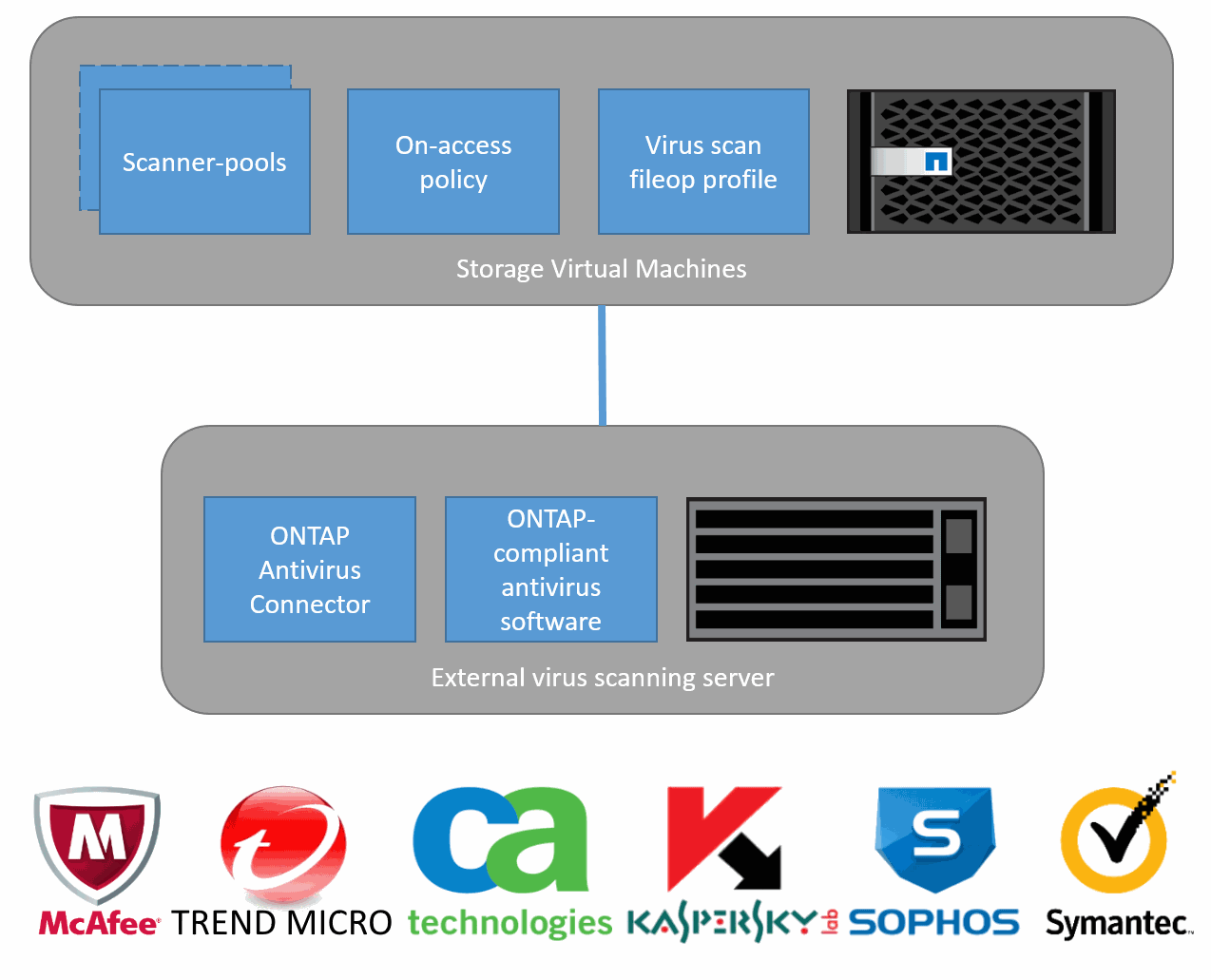
Scheme of interaction between the antivirus and the request from the SMB client to the NAS.
In accordance with the scheme below, you need to install and configure all software components for integration with NAS.

Install McAfee VSEfS, which can operate in two modes: as a standalone product or as a product managed by McAfee ePolicy Orchestrator (McAfee ePO). In this article I will consider the mode of operation "stand-alone product". To install McAfee VSEfS, you will need already installed and configured:
First, create some SCAN servers to balance the load of the anti-virus scan between them. Each SCAN server will be installed on Windows Server and will include the following components: McAfee VSE, McAfee VSEfS and ONTAP AV Connector. For example, we’ll prepare three such servers: SCAN1, SCAN2, SCAN3.
We create the user scanuser in the domain (in our example, the “NetApp” domain) with administrative rights on the SCAN1, SCAN2, SCAN3 servers.
Set up ONTAP, create a Cluster Management LIF and one VSM Management LIF. We enable CIFS protocol support and start integration with AD, create data-LIFs for end-user access to file balls. Create a file ball. Create a scanuser user for the cluster and VSM, which will authenticate in the same AD domain as the SCANx server. Let the Cluster be accessible by management IP address with the name NCluster-mgmt, and management VSM IP address with the name VSM01-mgmt.
install the ONTAP AV Connector on each SCAN server and start the configuration, at the end of the installer drive in the username and password:

If the application says “Access is denied”, check that UAC (Use Account Control) is turned off, restart the computer.
Start → All Programs → NetApp → ONTAP AV Connector → Configure ONTAP Management LIFs
In the “Management LIF” field, drive in the IP or DNS name of the VSM or cluster: NCluster-mgmt or VSM01-mgmt.
In the “Account” field, drive the user name and password of the AD domain user: NetApp \ scanuser. Click the “Test” button, then “Update” and “Save”, if the test was successful.

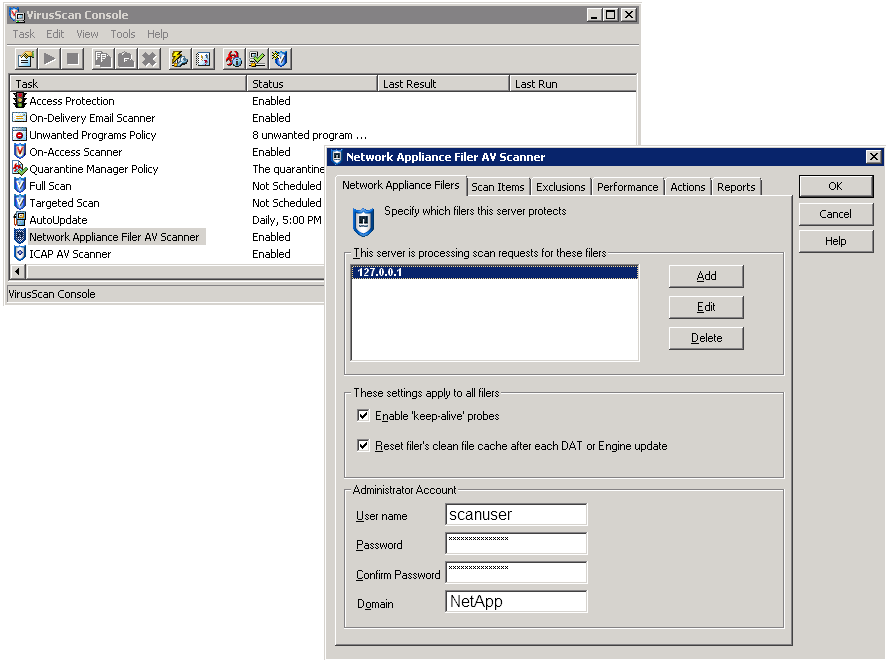
on each SCAN server, go as Administrator and launch: Windows taskbar - right-click the mouse on the “McAfee menulet → Choose VirusScan console”, in the VirusScan console - open the “Network Appliance Filer AV Scanner”, then go to the “Network Appliance Filer AV Scanner” tab and Network Appliance Filers. " In the field “This Server is processing scan request for these filers” we create the server using the “Add” button, in the field “server name” drive the value “127.0.0.1” (not ONTAP!). Next, fill in the “Administrator Account” fields, where we enter the same AD user “scanuser”, and in the “Domain” field, separately from the user name, enter the domain, in our case, “NetApp”.
And we configure integration: we configure off-box scanning, we include it, we create and we apply scanning policy:
For the operation of FPolicy and Off-box Anti-Virus Scanning, no additional Licenses are required from the storage side, this functionality is present in the ONTAP base package. On the part of anti-virus protection software and software for advanced work with FPolicy, additional licenses may be required, which can be clarified by the respective vendors and their partner representatives.
The ability to integrate the NAS with the anti-virus system allows on the one hand to unload the load of end clients, but also eliminates the potential threat of infection due to the inability to keep the anti-virus databases of all clients up to date. And FPolicy restricts writing files that are not intended for storage in a corporate environment.
PS
Also, pay attention to the document describing the ONTAP security settings for enhanced protection (Security Hardening Guide for NetApp ONTAP 9) .
Translation into English:
ONTAP & Antivirus NAS protection
This may contain links to Habra articles that will be published later .
Please send messages about errors in the text to the LAN .
Comments, additions and questions on the opposite article, please comment .
- Kaspersky
- Symantec
- Trend micro
- Computer associates
- Mcafee
- Sophos
In addition, it supports the advanced functionality of file screening (FPolicy), which allows you to restrict working with files not only based on their extension, but also on the type of file based on the header inside this file.
Today I would like to dwell in more detail on the integration of ONTAP with the CIFS (SMB) sphere and the McAfee antivirus system. Which, in principle, is similarly arranged with other anti-virus systems.
- To configure the integration, we need several components:
- Microsoft Windows Server 2008 and later
- Storage with ONTAP firmware (based on the NetApp FAS hardware platform or as a ONTAP Select or ONTAP Cloud virtual machine in the Amazone / Azure cloud)
- McAfee VirusScan Enterprise for Storage. Download VSEfS here
- For scanning, SMB 2 and older is used; version 1.0 is not supported.
- NetApp ONTAP AV Connector. Download AV Connecor here
See the compatibility matrix for more details .
Scheme of interaction between the antivirus and the request from the SMB client to the NAS.
Training
In accordance with the scheme below, you need to install and configure all software components for integration with NAS.
Vsefs
Install McAfee VSEfS, which can operate in two modes: as a standalone product or as a product managed by McAfee ePolicy Orchestrator (McAfee ePO). In this article I will consider the mode of operation "stand-alone product". To install McAfee VSEfS, you will need already installed and configured:
- McAfee VirusScan Enterprise (VSE). Download VSE here
- McAfee ePolicy Orchestrator (ePO), not needed if VirusScan is used as a standalone product
SCAN server
First, create some SCAN servers to balance the load of the anti-virus scan between them. Each SCAN server will be installed on Windows Server and will include the following components: McAfee VSE, McAfee VSEfS and ONTAP AV Connector. For example, we’ll prepare three such servers: SCAN1, SCAN2, SCAN3.
AD
We create the user scanuser in the domain (in our example, the “NetApp” domain) with administrative rights on the SCAN1, SCAN2, SCAN3 servers.
ONTAP
Set up ONTAP, create a Cluster Management LIF and one VSM Management LIF. We enable CIFS protocol support and start integration with AD, create data-LIFs for end-user access to file balls. Create a file ball. Create a scanuser user for the cluster and VSM, which will authenticate in the same AD domain as the SCANx server. Let the Cluster be accessible by management IP address with the name NCluster-mgmt, and management VSM IP address with the name VSM01-mgmt.
NCluster::> network interface create -vserver NCluster  -home-node NCluster-01 -home-port e0M -role data -protocols none -lif NCluster-mgmt -address 10.0.0.100 -netmask 255.0.0.0
NCluster::> network interface create -vserver VSM01 -home-node NCluster-01 -home-port e0M -role data -protocols none -lif VSM01-mgmt -address 10.0.0.105 -netmask 255.0.0.0
NCluster::> domain-tunnel create -vserver VSM01
NCluster::> security login create -username netApp\scanuser -application ontapi -authmethod domain -role readonly -vserver NCluster
NCluster::> security login create -username netApp\scanuser -application ontapi -authmethod domain -role readonly -vserver VSM01
ONTAP AV Connector
install the ONTAP AV Connector on each SCAN server and start the configuration, at the end of the installer drive in the username and password:
If the application says “Access is denied”, check that UAC (Use Account Control) is turned off, restart the computer.
Start → All Programs → NetApp → ONTAP AV Connector → Configure ONTAP Management LIFs
In the “Management LIF” field, drive in the IP or DNS name of the VSM or cluster: NCluster-mgmt or VSM01-mgmt.
In the “Account” field, drive the user name and password of the AD domain user: NetApp \ scanuser. Click the “Test” button, then “Update” and “Save”, if the test was successful.
McAfee Network Appliance Filer AV Scanner Administrator Account
on each SCAN server, go as Administrator and launch: Windows taskbar - right-click the mouse on the “McAfee menulet → Choose VirusScan console”, in the VirusScan console - open the “Network Appliance Filer AV Scanner”, then go to the “Network Appliance Filer AV Scanner” tab and Network Appliance Filers. " In the field “This Server is processing scan request for these filers” we create the server using the “Add” button, in the field “server name” drive the value “127.0.0.1” (not ONTAP!). Next, fill in the “Administrator Account” fields, where we enter the same AD user “scanuser”, and in the “Domain” field, separately from the user name, enter the domain, in our case, “NetApp”.
Back to ONTAP
And we configure integration: we configure off-box scanning, we include it, we create and we apply scanning policy:
NCluster::> vserver vscan scanner-pool create -vserver VSM01 -scanner-pool POOL1 -servers SCAN1,SCAN2,SCAN3 -privileged-users NetApp\scanuser
NCluster::> vserver vscan scanner-pool show
          Scanner    Pool                 Privileged   Scanner
Vserver   Pool       Owner   Servers      Users        Policy
--------  ---------- ------- ------------ ------------ -------
VSM01    POOL1      vserver SCAN1, NetApp\scanuser    idle
                             SCAN2,SCAN3
NCluster::> vserver vscan scanner-pool show -instance
                             Vserver: VSM01
                        Scanner Pool: POOL1
                      Applied Policy: idle
                      Current Status: off
           Scanner Pool Config Owner: vserver
List of IPs of Allowed Vscan Servers: SCAN1, SCAN2, SCAN3
            List of Privileged Users: NetApp\scanuser
NCluster::> vserver vscan scanner-pool apply-policy -vserver VSM01 -scanner-pool POOL1 -scanner-policy primary
NCluster::> vserver vscan enable -vserver VSM01
NCluster::> vserver vscan connection-status show
                      Connected Connected
Vserver   Node     Server-Count Servers
--------- -------- ------------ ------------------------
VSM01    NClusterN1            3 SCAN1, SCAN2, SCAN3
NCluster::> vserver vscan on-access-policy show
          Policy    Policy                            File-Ext   Policy
Vserver   Name      Owner   Protocol Paths Excluded   Excluded   Status
--------- --------- ------- -------- ---------------- ---------- ------
NCluster    default_  cluster CIFS     -                -          off
          CIFS
VSM01    default_  cluster CIFS     -                -          on
          CIFS
Licenses
For the operation of FPolicy and Off-box Anti-Virus Scanning, no additional Licenses are required from the storage side, this functionality is present in the ONTAP base package. On the part of anti-virus protection software and software for advanced work with FPolicy, additional licenses may be required, which can be clarified by the respective vendors and their partner representatives.
conclusions
The ability to integrate the NAS with the anti-virus system allows on the one hand to unload the load of end clients, but also eliminates the potential threat of infection due to the inability to keep the anti-virus databases of all clients up to date. And FPolicy restricts writing files that are not intended for storage in a corporate environment.
PS
Also, pay attention to the document describing the ONTAP security settings for enhanced protection (Security Hardening Guide for NetApp ONTAP 9) .
Translation into English:
ONTAP & Antivirus NAS protection
This may contain links to Habra articles that will be published later .
Please send messages about errors in the text to the LAN .
Comments, additions and questions on the opposite article, please comment .









