Saving the state of fragments (Fragment)
- From the sandbox
- Tutorial
A common problem is the incorrect behavior of the application when turning the device. The fact is that when you turn the Activity-host (the Activity that is the parent for the fragment) is destroyed. At that moment when this process occurs, the FragmentManager is responsible for destroying the child fragment. FragmentManager starts the methods of the dying fragment life cycle: onPause () , onStop () and onDestroy () .
If, in the controller of our child fragment, for example, there is a Media-Player object , then in the fragment method Fragment.onDestroy ()a copy of our loudly playing Media-Player will interrupt media playback. The first thing that comes to mind is to save the state of the Media-Player object by calling Fragment.onSaveInstanceState (Bundle) , which will save the data, and the new Activity will load it. However, saving the state of the MediaPlayer object and its subsequent restoration, anyway, interrupts playback and makes sharks of hatred scurry around in the heads of users.
Fortunately, Fragment has a mechanism by which an instance of Media-Player can “ survive ” a configuration change. Overriding the Fragment.onCreate (...) method and setting the fragment property.
The retainInstance property of a fragment, by default , is false. This means that when turning the device Fragment is not saved, but destroyed and created in a new way along with the Activity-host. When setRetainInstance (true) is called, the fragment is not destroyed along with its host and is passed to the new Activity in unchanged form. When saving a fragment, you can rely on the fact that all its fields (including View) will retain their previous values. We turn to them, and they already have it. Using this approach, you can make sure that when you turn the device, our MediaPlayer object will not interrupt its playback and the user will not freak out.
Now it’s worth taking a closer look at how saved fragments work. Fragment is guided by the fact that the representation of a fragment can be destroyed and recreated without the need to destroy Fragment itself. When the configuration is changed, the FragmentManager destroys and reassembles the fragment view. Activity behaves similarly. This is due to considerations that new resources may be required in the new configuration. In case there are more suitable resources for the new version, the presentation is built from scratch .
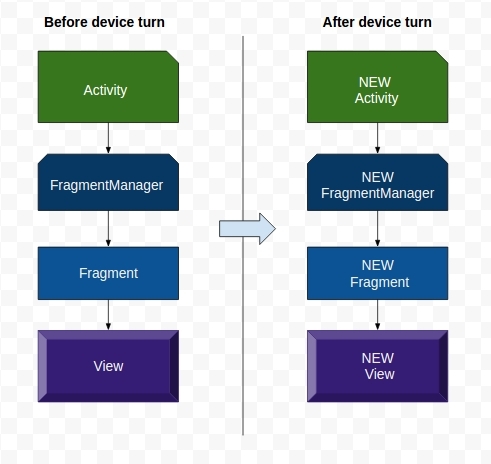
FragmentManager checks the retainInstance property of each fragment. If it is default(false), FragmentManager destroys the instance of the fragment. Fragment and its view will be recreated with a new instance of the FragmentManager belonging to the new activity.
What happens if retainInstance is true . The representation of the fragment is destroyed but the fragment itself remains. A new instance of Activity will be created, and then a new FragmentManager that will find the saved Fragment and recreate its View.
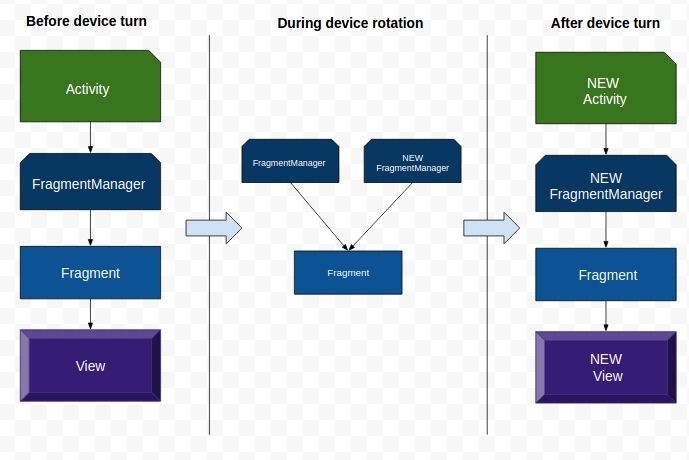
Our saved fragment is detached from the previous Activity and continues to live but no longer has an Activity-host.
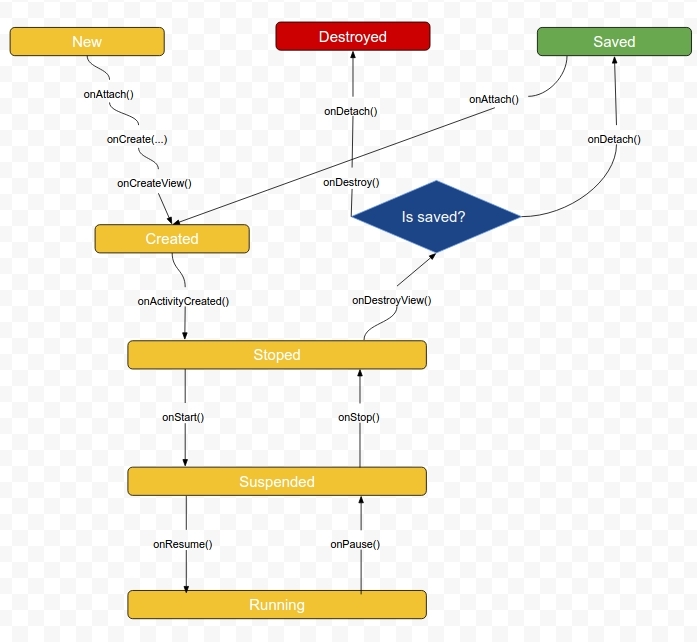
Accordingly, the transition to the saved state occurs when the following conditions are met:
In this case, Fragment does not live long from the moment of disconnection from its first Activity until its transfer to use to the immediately created new Acticvity .
Saved fragments: is it really convenient? Yes! Really comfortable. At first glance, they solve all the problems that arise with the destruction of Activity and fragments during turns. When you change the configuration of the device to select the most suitable resources, a new view is created, and you have at your disposal a simple way to save data and objects.
In this case, the question arises, why not save all fragments in a row and why fragments are not saved by default? One might feel that Android is not enthusiastic about saving fragments in the UI. It’s not clear to me why this is so.
It is worth noting that the saved Fragment continues to exist only when the Activity is destroyed - when the configuration is changed. If Activity is destroyed due to the OS needing to free memory, then all saved fragments will also be destroyed.
This approach is more common in dealing with the problem of data loss during bends. If your proposal easily fulfills this situation, then all is due to the default behavior of onSaveInstanceState (...) .
The onSaveInstanceState (...) method was designed to solve saving and restoring the state of the application user interface. As I think, you guessed it - there is a fundamental difference between these approaches. The main difference between overriding Fragment.onSaveInstanceState (...) and saving Fragment is the duration of the stored data.
In that case, if you aim to save data for a moment while the configuration is changing, saving a fragment will require significantly less work. This is especially true when saving an object; the developer does not need to worry about whether the object implements Serializable.
But in the event that the data should exist longer, saving the fragment will not help. If Activity is destroyed to free memory after user inactivity , all saved fragments are destroyed in the same way as their unsaved relatives.
So, if the Activity or Fragment contains data that must exist for a long time, it should be tied to the lifetime of the activity, overriding the onSaveInstanceState (Bundle) method to save the state and restore it later.
If, in the controller of our child fragment, for example, there is a Media-Player object , then in the fragment method Fragment.onDestroy ()a copy of our loudly playing Media-Player will interrupt media playback. The first thing that comes to mind is to save the state of the Media-Player object by calling Fragment.onSaveInstanceState (Bundle) , which will save the data, and the new Activity will load it. However, saving the state of the MediaPlayer object and its subsequent restoration, anyway, interrupts playback and makes sharks of hatred scurry around in the heads of users.
Saving Fragments
Fortunately, Fragment has a mechanism by which an instance of Media-Player can “ survive ” a configuration change. Overriding the Fragment.onCreate (...) method and setting the fragment property.
@Override
public void onCreate(Bundle savedInstanceState) {
super.onCreate(savedInstanceState);
setRetainInstance(true);
}
The retainInstance property of a fragment, by default , is false. This means that when turning the device Fragment is not saved, but destroyed and created in a new way along with the Activity-host. When setRetainInstance (true) is called, the fragment is not destroyed along with its host and is passed to the new Activity in unchanged form. When saving a fragment, you can rely on the fact that all its fields (including View) will retain their previous values. We turn to them, and they already have it. Using this approach, you can make sure that when you turn the device, our MediaPlayer object will not interrupt its playback and the user will not freak out.
Turns and Saved Fragments
Now it’s worth taking a closer look at how saved fragments work. Fragment is guided by the fact that the representation of a fragment can be destroyed and recreated without the need to destroy Fragment itself. When the configuration is changed, the FragmentManager destroys and reassembles the fragment view. Activity behaves similarly. This is due to considerations that new resources may be required in the new configuration. In case there are more suitable resources for the new version, the presentation is built from scratch .
FragmentManager checks the retainInstance property of each fragment. If it is default(false), FragmentManager destroys the instance of the fragment. Fragment and its view will be recreated with a new instance of the FragmentManager belonging to the new activity.
What happens if retainInstance is true . The representation of the fragment is destroyed but the fragment itself remains. A new instance of Activity will be created, and then a new FragmentManager that will find the saved Fragment and recreate its View.
Our saved fragment is detached from the previous Activity and continues to live but no longer has an Activity-host.
Accordingly, the transition to the saved state occurs when the following conditions are met:
- setRetainInstance (true) was called for the fragment
- Activity-host is destroyed to change the configuration (usually this is a device rotation )
In this case, Fragment does not live long from the moment of disconnection from its first Activity until its transfer to use to the immediately created new Acticvity .
Saving Fragments: Really So Good?
Saved fragments: is it really convenient? Yes! Really comfortable. At first glance, they solve all the problems that arise with the destruction of Activity and fragments during turns. When you change the configuration of the device to select the most suitable resources, a new view is created, and you have at your disposal a simple way to save data and objects.
In this case, the question arises, why not save all fragments in a row and why fragments are not saved by default? One might feel that Android is not enthusiastic about saving fragments in the UI. It’s not clear to me why this is so.
It is worth noting that the saved Fragment continues to exist only when the Activity is destroyed - when the configuration is changed. If Activity is destroyed due to the OS needing to free memory, then all saved fragments will also be destroyed.
It's time to talk about onSaveInstanceState (Bundle)
This approach is more common in dealing with the problem of data loss during bends. If your proposal easily fulfills this situation, then all is due to the default behavior of onSaveInstanceState (...) .
The onSaveInstanceState (...) method was designed to solve saving and restoring the state of the application user interface. As I think, you guessed it - there is a fundamental difference between these approaches. The main difference between overriding Fragment.onSaveInstanceState (...) and saving Fragment is the duration of the stored data.
In that case, if you aim to save data for a moment while the configuration is changing, saving a fragment will require significantly less work. This is especially true when saving an object; the developer does not need to worry about whether the object implements Serializable.
But in the event that the data should exist longer, saving the fragment will not help. If Activity is destroyed to free memory after user inactivity , all saved fragments are destroyed in the same way as their unsaved relatives.
Finally
So, if the Activity or Fragment contains data that must exist for a long time, it should be tied to the lifetime of the activity, overriding the onSaveInstanceState (Bundle) method to save the state and restore it later.