KubeDirector - an easy way to run complex stateful applications in Kubernetes
- Transfer
Note trans. : The original article was written by representatives of BlueData, a company founded by people from VMware. She specializes in making more accessible (simpler, faster, cheaper) the deployment of solutions for Big Data-analytics and machine learning in various environments. This is also due to the recent initiative of the company called BlueK8s.in which authors want to compile a galaxy of open source tools “for deploying stateful applications and managing them in Kubernetes”. The article is devoted to the first of them - KubeDirector, which, according to the authors' idea, helps the enthusiast in the field of Big Data, who does not have special training in Kubernetes, to deploy applications like Spark, Cassandra or Hadoop in K8s. Brief instructions on how to do this are given in the article. However, keep in mind that the project has an early status of readiness - pre-alpha.

KubeDirector is an open source project created to simplify the launch of clusters from complex, scalable stateful applications in Kubernetes. KubeDirector is implemented using the Custom Resource Definition framework(CRD), uses the Kubernetes API native extension capabilities and relies on their philosophy. This approach provides transparent integration with the management of users and resources in Kubernetes, as well as with existing clients and utilities.
The recently announced KubeDirector project is part of a larger Open Source initiative for Kubernetes called BlueK8s. Now I am pleased to announce the availability of KubeDirector's early (pre-alpha) code . This post will show how it works.
KubeDirector offers the following features:
KubeDirector allows data scientists who are used to distributed data-intensive applications such as Hadoop, Spark, Cassandra, TensorFlow, Caffe2, etc., to run Kubernetes with a minimal learning curve and no need to write Go code. When these applications are monitored by KubeDirector, they are defined by simple metadata and the associated set of configurations. Application metadata is defined as a resource
To understand the components of KubeDirector, clone the repository on GitHub with a command like the following:
The definition
An application cluster configuration is defined as a resource
The definition
Running Spark clusters in Kubernetes with KubeDirector is easy.
First, make sure that Kubernetes (version 1.9 or higher) is running - with the command
Deploy KubeDirector service and sample resource definitions
As a result, it will launch under KubeDirector:
View the list of applications installed in KubeDirector by running
You can now start a Spark 2.2.1 cluster using the sample file for
Spark also appeared in the list of running services:
If you access port 31533 in your browser, you can see Spark Master UI:
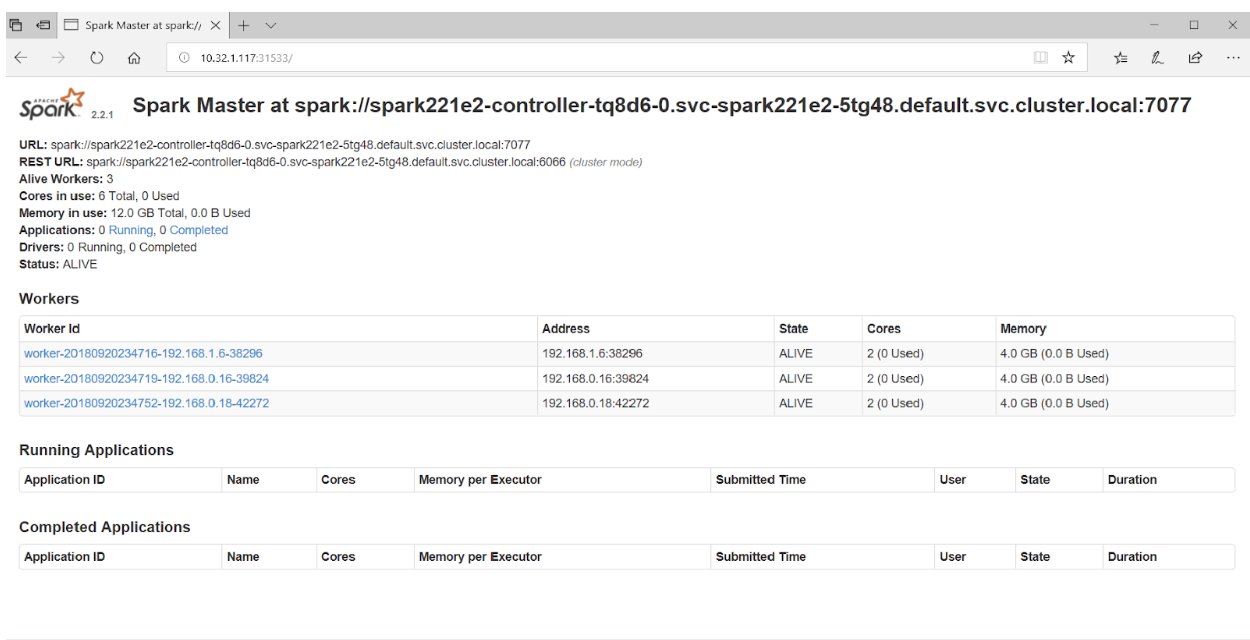
That's it! In the example above, in addition to the Spark cluster, we also deployed Jupyter Notebook .
To launch another application (for example, Cassandra) simply specify another file with
Verify that the Cassandra cluster has started:
Now Kubernetes runs the Spark cluster (with Jupyter Notebook) and the Cassandra cluster. The list of services can be seen with the command
If you are interested in the KubeDirector project, you should also pay attention to its wiki . Unfortunately, it was not possible to find a public roadmap, but issues in GitHub shed light on the development of the project and the views of its main developers. In addition, for those interested in KubeDirector, the authors provide links to Slack-chat and Twitter .
Read also in our blog:
KubeDirector is an open source project created to simplify the launch of clusters from complex, scalable stateful applications in Kubernetes. KubeDirector is implemented using the Custom Resource Definition framework(CRD), uses the Kubernetes API native extension capabilities and relies on their philosophy. This approach provides transparent integration with the management of users and resources in Kubernetes, as well as with existing clients and utilities.
The recently announced KubeDirector project is part of a larger Open Source initiative for Kubernetes called BlueK8s. Now I am pleased to announce the availability of KubeDirector's early (pre-alpha) code . This post will show how it works.
KubeDirector offers the following features:
- No need to modify the code to run in Kubernetes stateful-apps not from the category of cloud native. In other words, there is no need for decomposition of already existing applications to match the pattern of the microservice architecture.
- Native support for storage-specific application configuration and state (state) .
- An application-independent deployment pattern that minimizes the time it takes to launch new stateful applications in Kubernetes.
KubeDirector allows data scientists who are used to distributed data-intensive applications such as Hadoop, Spark, Cassandra, TensorFlow, Caffe2, etc., to run Kubernetes with a minimal learning curve and no need to write Go code. When these applications are monitored by KubeDirector, they are defined by simple metadata and the associated set of configurations. Application metadata is defined as a resource
KubeDirectorApp. To understand the components of KubeDirector, clone the repository on GitHub with a command like the following:
git clone http://<userid>@github.com/bluek8s/kubedirector.The definition
KubeDirectorAppfor the Spark 2.2.1 application is located in the file kubedirector/deploy/example_catalog/cr-app-spark221e2.json: ~> cat kubedirector/deploy/example_catalog/cr-app-spark221e2.json {
"apiVersion": "kubedirector.bluedata.io/v1alpha1",
"kind": "KubeDirectorApp",
"metadata": {
"name" : "spark221e2"
},
"spec" : {
"systemctlMounts": true,
"config": {
"node_services": [
{
"service_ids": [
"ssh",
"spark",
"spark_master",
"spark_worker"
],
…An application cluster configuration is defined as a resource
KubeDirectorCluster. The definition
KubeDirectorClusterfor the Spark 2.2.1 cluster example is available at kubedirector/deploy/example_clusters/cr-cluster-spark221.e1.yaml:~> cat kubedirector/deploy/example_clusters/cr-cluster-spark221.e1.yamlapiVersion: "kubedirector.bluedata.io/v1alpha1"
kind: "KubeDirectorCluster"
metadata:
name: "spark221e2"
spec:
app: spark221e2
roles:
- name: controller
replicas: 1
resources:
requests:
memory: "4Gi"
cpu: "2"
limits:
memory: "4Gi"
cpu: "2"
- name: worker
replicas: 2
resources:
requests:
memory: "4Gi"
cpu: "2"
limits:
memory: "4Gi"
cpu: "2"
- name: jupyter
…Running Spark in Kubernetes with KubeDirector
Running Spark clusters in Kubernetes with KubeDirector is easy.
First, make sure that Kubernetes (version 1.9 or higher) is running - with the command
kubectl version:~> kubectl version
Client Version: version.Info{Major:"1", Minor:"11", GitVersion:"v1.11.3", GitCommit:"a4529464e4629c21224b3d52edfe0ea91b072862", GitTreeState:"clean", BuildDate:"2018-09-09T18:02:47Z", GoVersion:"go1.10.3", Compiler:"gc", Platform:"linux/amd64"}
Server Version: version.Info{Major:"1", Minor:"11", GitVersion:"v1.11.3", GitCommit:"a4529464e4629c21224b3d52edfe0ea91b072862", GitTreeState:"clean", BuildDate:"2018-09-09T17:53:03Z", GoVersion:"go1.10.3", Compiler:"gc", Platform:"linux/amd64"}Deploy KubeDirector service and sample resource definitions
KubeDirectorAppusing the following commands:cd kubedirector
make deployAs a result, it will launch under KubeDirector:
~> kubectl get pods
NAME                           READY     STATUS     RESTARTS     AGE
kubedirector-58cf59869-qd9hb   1/1       Running    0            1m
View the list of applications installed in KubeDirector by running
kubectl get KubeDirectorApp:~> kubectl get KubeDirectorApp
NAME AGE
cassandra311 30m
spark211up 30m
spark221e2 30mYou can now start a Spark 2.2.1 cluster using the sample file for
KubeDirectorClusterand the command kubectl create -f deploy/example_clusters/cr-cluster-spark211up.yaml. Check that it has started:~> kubectl get pods
NAME READY STATUS RESTARTS AGE
kubedirector-58cf59869-djdwl 1/1 Running 0 19m
spark221e2-controller-zbg4d-0 1/1 Running 0 23m
spark221e2-jupyter-2km7q-0 1/1 Running 0 23m
spark221e2-worker-4gzbz-0 1/1 Running 0 23m
spark221e2-worker-4gzbz-1 1/1 Running 0 23mSpark also appeared in the list of running services:
~> kubectl get service
NAME                                TYPE         CLUSTER-IP        EXTERNAL-IP    PORT(S)                                                    AGE
kubedirector                        ClusterIP    10.98.234.194     <none>         60000/TCP                                                  1d
kubernetes                          ClusterIP    10.96.0.1         <none>         443/TCP                                                    1d
svc-spark221e2-5tg48                ClusterIP    None              <none>         8888/TCP                                                   21s
svc-spark221e2-controller-tq8d6-0   NodePort     10.104.181.123    <none>         22:30534/TCP,8080:31533/TCP,7077:32506/TCP,8081:32099/TCP  20s
svc-spark221e2-jupyter-6989v-0      NodePort     10.105.227.249    <none>         22:30632/TCP,8888:30355/TCP                                20s
svc-spark221e2-worker-d9892-0       NodePort     10.107.131.165    <none>         22:30358/TCP,8081:32144/TCP                                20s
svc-spark221e2-worker-d9892-1       NodePort     10.110.88.221     <none>         22:30294/TCP,8081:31436/TCP                                20s
If you access port 31533 in your browser, you can see Spark Master UI:
That's it! In the example above, in addition to the Spark cluster, we also deployed Jupyter Notebook .
To launch another application (for example, Cassandra) simply specify another file with
KubeDirectorApp:kubectl create -f deploy/example_clusters/cr-cluster-cassandra311.yamlVerify that the Cassandra cluster has started:
~> kubectl get pods
NAME                              READY     STATUS    RESTARTS   AGE
cassandra311-seed-v24r6-0         1/1       Running   0          1m
cassandra311-seed-v24r6-1         1/1       Running   0          1m
cassandra311-worker-rqrhl-0       1/1       Running   0          1m
cassandra311-worker-rqrhl-1       1/1       Running   0          1m
kubedirector-58cf59869-djdwl      1/1       Running   0          1d
spark221e2-controller-tq8d6-0     1/1       Running   0          22m
spark221e2-jupyter-6989v-0        1/1       Running   0          22m
spark221e2-worker-d9892-0         1/1       Running   0          22m
spark221e2-worker-d9892-1         1/1       Running   0          22m
Now Kubernetes runs the Spark cluster (with Jupyter Notebook) and the Cassandra cluster. The list of services can be seen with the command
kubectl get service:~> kubectl get service
NAME TYPE CLUSTER-IP EXTERNAL-IP PORT(S) AGE
kubedirector ClusterIP 10.98.234.194 <none> 60000/TCP 1d
kubernetes ClusterIP 10.96.0.1 <none> 443/TCP 1d
svc-cassandra311-seed-v24r6-0 NodePort 10.96.94.204 <none> 22:31131/TCP,9042:30739/TCP 3m
svc-cassandra311-seed-v24r6-1 NodePort 10.106.144.52 <none> 22:30373/TCP,9042:32662/TCP 3m
svc-cassandra311-vhh29 ClusterIP None <none> 8888/TCP 3m
svc-cassandra311-worker-rqrhl-0 NodePort 10.109.61.194 <none> 22:31832/TCP,9042:31962/TCP 3m
svc-cassandra311-worker-rqrhl-1 NodePort 10.97.147.131 <none> 22:31454/TCP,9042:31170/TCP 3m
svc-spark221e2-5tg48 ClusterIP None <none> 8888/TCP 24m
svc-spark221e2-controller-tq8d6-0 NodePort 10.104.181.123 <none> 22:30534/TCP,8080:31533/TCP,7077:32506/TCP,8081:32099/TCP 24m
svc-spark221e2-jupyter-6989v-0 NodePort 10.105.227.249 <none> 22:30632/TCP,8888:30355/TCP 24m
svc-spark221e2-worker-d9892-0 NodePort 10.107.131.165 <none> 22:30358/TCP,8081:32144/TCP 24m
svc-spark221e2-worker-d9892-1 NodePort 10.110.88.221 <none> 22:30294/TCP,8081:31436/TCP 24mPS from translator
If you are interested in the KubeDirector project, you should also pay attention to its wiki . Unfortunately, it was not possible to find a public roadmap, but issues in GitHub shed light on the development of the project and the views of its main developers. In addition, for those interested in KubeDirector, the authors provide links to Slack-chat and Twitter .
Read also in our blog:
- “ Operators for Kubernetes: how to run stateful applications ”;
- “ Rook is a“ self-service ”data store for Kubernetes ”;
- “ Kubernetes tips & tricks: speeding up large database bootstrap ”;
- “ Useful utilities when working with Kubernetes ”;
- “ Useful commands and tips when working with Kubernetes through the kubectl console utility ”;
- “We are acquainted with the alpha version of the snapshot volumes in Kubernetes ”;
- “ Introducing loghouse - an open source system for working with logs in Kubernetes .”









