March 18, 2016 at 18:17
CLion 2016.1 release: new tools and new languages
Hello, Habr!
We have great news today - the next release of our cross-platform development environment for developing in C and C ++, CLion 2016.1, has been released.

You are probably a little surprised by the version number. The next releases of our other desktop tools, by the way, have the same version, starting with IntelliJ IDEA 2016.1. What is the point? In short, now all products within the JetBrains All Products package (that is, all desktop tools) receive updates at about the same time several times a year. Thus, the version is just a year and the sequential number of the “bundle” of releases. The main features implemented in the platform fall into all IDEs at the same time, and this unification of versions makes it easier to navigate platform changes.
In addition, we decided to abandon the scheme for issuing major-minor releases. Now, each release aims to benefit from both new features and constant bug fixes and performance improvements. Details about the reasons for the transition and the newest scheme can be found in the article on the English-language blog of the company.
And now - directly about the new features!
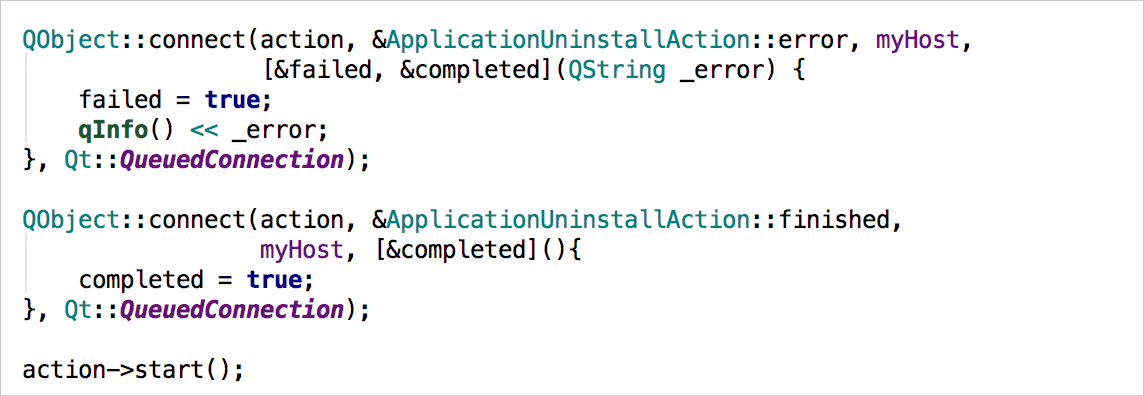
For a long time, CLion supported C ++ 11 with limitations: variadic templates , constexpr , user-defined literals were not processed correctly . In this version, we took up what seemed to us to “interfere” with most of our users - variadic templates . Code underlined in red, incorrect notifications from the code analyzer, incorrect auto-completion, and other problems were often associated with this particular feature of C ++ 11. Implementation of variadic templates allowed to close about a hundred bugs in our tracker! In particular, we are in a hurry to please the users of the Qt library - connect calls are now processed correctly, and the built-in code analyzer does not warn about incorrect types:
There are still some related problems, but they are already much smaller. And if suddenly we still don’t know about anything, be sure to add reports to our tracker .
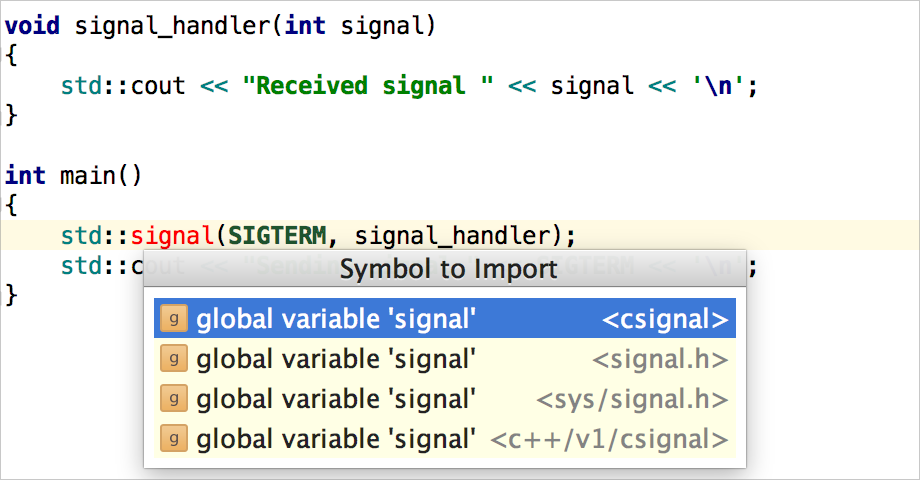
Among other things, we finally achieved the correct operation of automatic import for characters from STL (unfortunately, there are still problems when working with MinGW-w64 ). Now, if the corresponding header file is not connected, and the symbol is already in use, CLion suggests adding the necessary directive
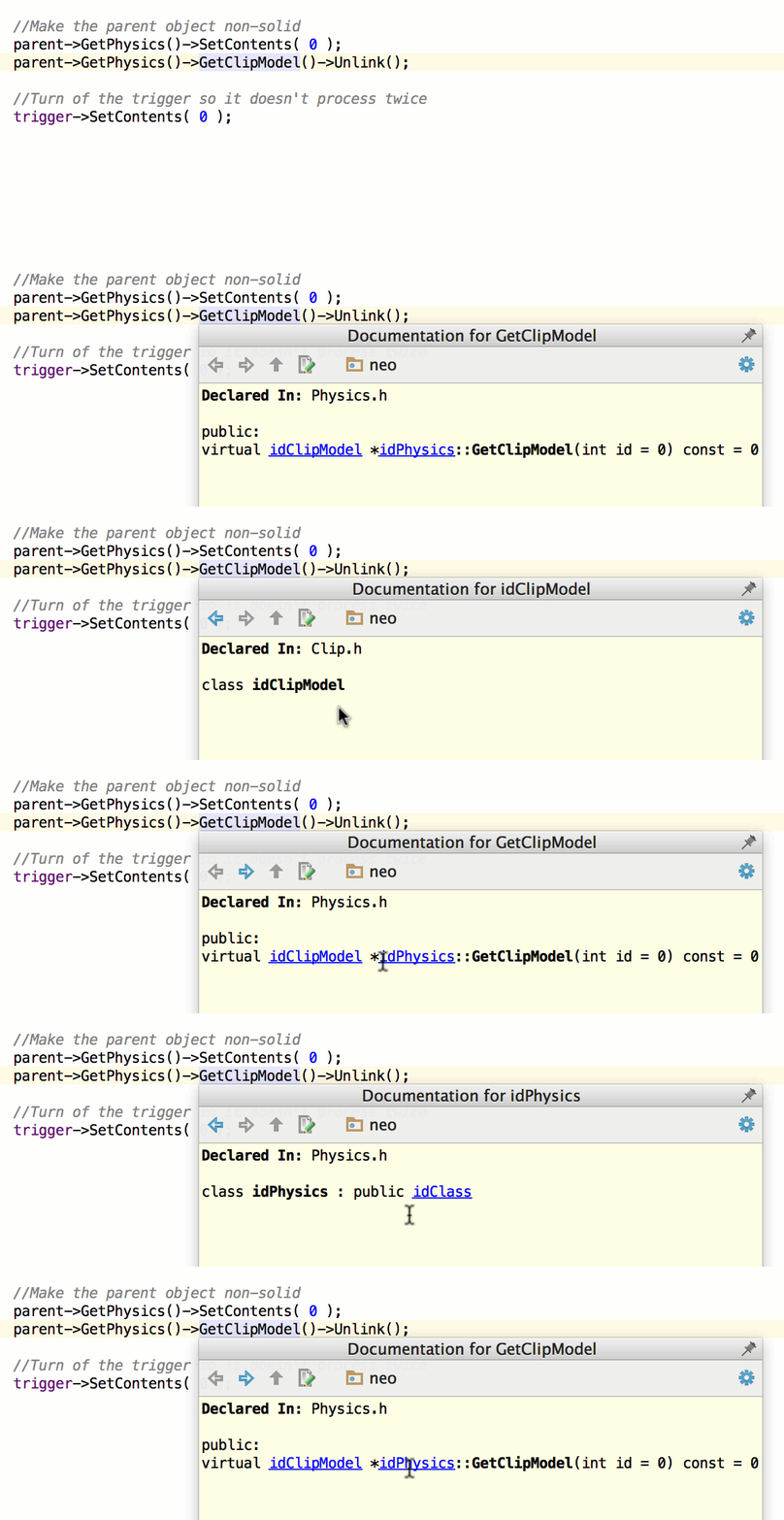
If you put the cursor on some symbol in CLion and call up the documentation window (
Separately, we mention the new features of code generation in C ++ code. Previously, there were two possibilities for creating new features - Override and Implement. Now there is also Generate Definitions. How do they differ? In fact, we isolated the implementation of the creation of the function body from Implement, and in Implement we left only the possibility of generating a definition for purely virtual functions of base classes. The new function is available from the generation menu (
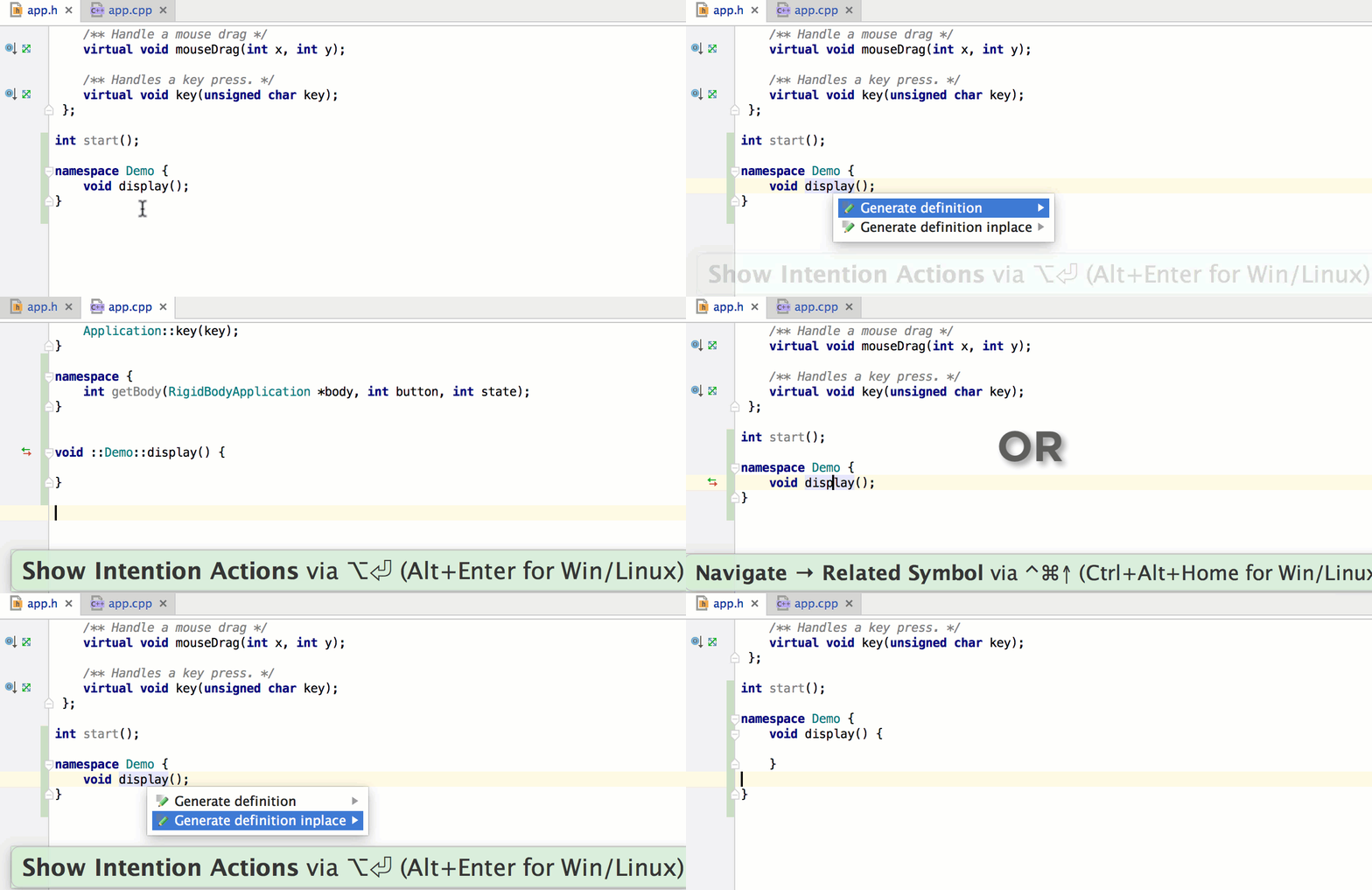
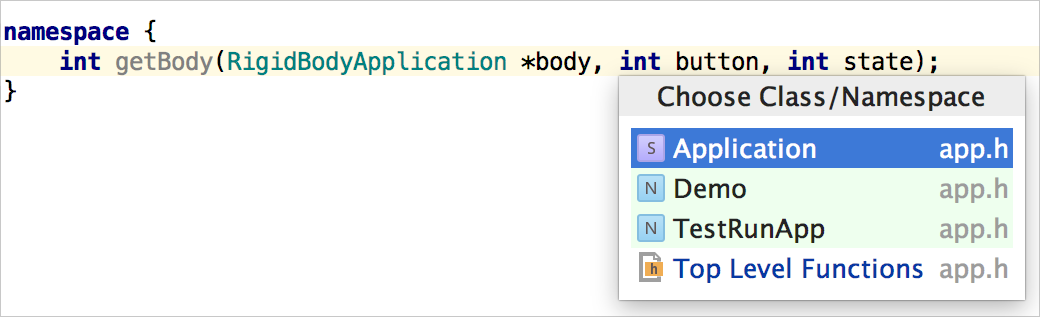
But the main thing is not even that. The most important improvement is the ability to generate in-place functions (no matter through Override / Implement or through Generate Definitions), that is, where the cursor is. If you want to get the body of the function in the header file - call the function in the corresponding class in this header file, if you want in the .cpp file - go there and call the generation there. If there are several options, CLion will specify exactly where you want to get the function definition:
CLion relies on the project structure that CMake defines. That is, files are included or not included in the project, where to look for files from
For all these purposes, a new Mark directory as feature has been implemented :
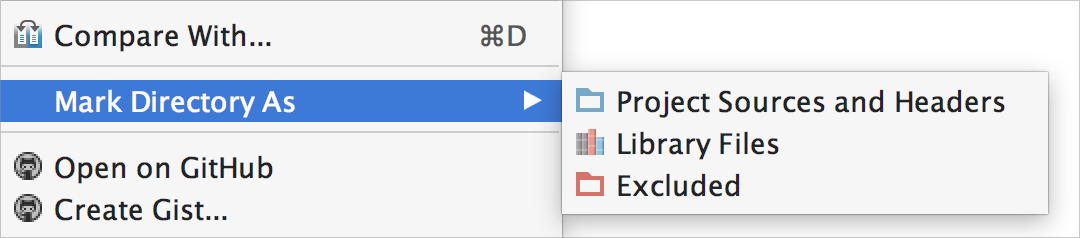
It provides the ability to manually mark directories accordingly. The choice will affect the work:
For example, refactoring and code generation will not work in excluded directories (Excluded) or in libraries (Library Files). And navigation and search have special options for displaying search results in libraries.
This is described in more detail in a separate post on our English-language blog.
In addition to this, if you are developing a project on one machine and building / launching on another, in CLion 2016.1 you can now configure automatic file synchronization via FTP, FTPS or SFTP.
One of the most anticipated features is debugging a process running on a local machine from the IDE. Of course, many will ask, but what about remote debugging ? Not yet, but we'll get to her too!
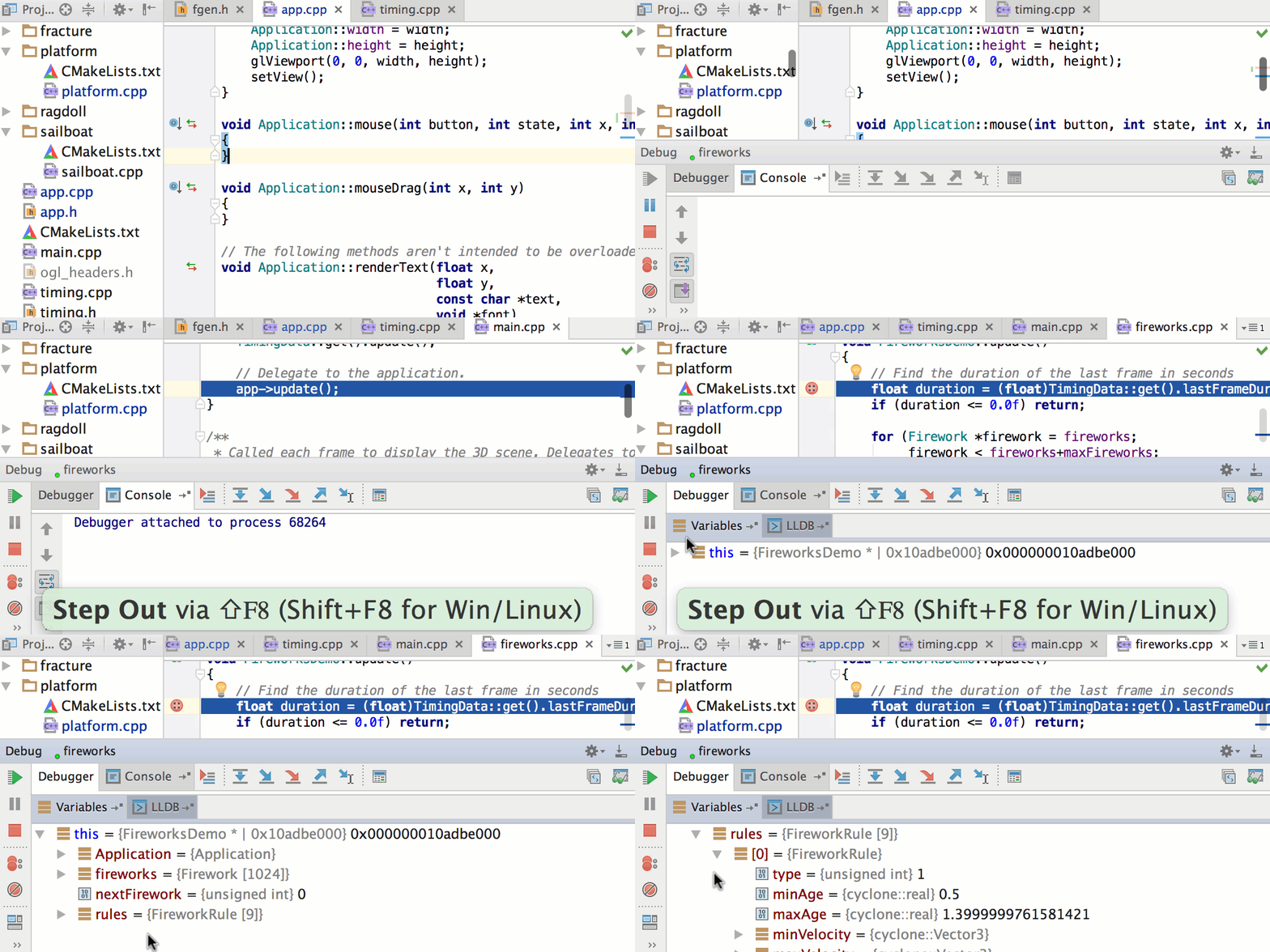
You can connect to a process by specifying its name or identifier (pid). After the connection is established and if you have the source code open in CLion, you will have access to all the features of the built-in debugger - breakpoints, viewing variable values, evaluating expressions, etc.
CLion 2016.1 introduced native Python support, and a plug-in for Swift support is also available for installation. If you have a mixed Python / C / C ++ project or are interested in the Swift IDE on Linux, then you are welcome! The plugins support:
For more information about the capabilities of plugins, see our blog: Python , Swift . And for a short introduction, we offer two videos:
This release also includes the following changes:
And finally, a short video demonstrating the new features of CLion 2016.1:
You can read about these and other features of the new version on the product website . Stay tuned for articles on our English-language blog . As usual, there is a 30-day free trial , and in the price section you can find out about the cost. We will be happy to answer any of your questions in the comments.
Your JetBrains CLion
The Drive to Develop Team
We have great news today - the next release of our cross-platform development environment for developing in C and C ++, CLion 2016.1, has been released.
Version 2016.1
You are probably a little surprised by the version number. The next releases of our other desktop tools, by the way, have the same version, starting with IntelliJ IDEA 2016.1. What is the point? In short, now all products within the JetBrains All Products package (that is, all desktop tools) receive updates at about the same time several times a year. Thus, the version is just a year and the sequential number of the “bundle” of releases. The main features implemented in the platform fall into all IDEs at the same time, and this unification of versions makes it easier to navigate platform changes.
In addition, we decided to abandon the scheme for issuing major-minor releases. Now, each release aims to benefit from both new features and constant bug fixes and performance improvements. Details about the reasons for the transition and the newest scheme can be found in the article on the English-language blog of the company.
And now - directly about the new features!
C ++ parser and improvements for working with C ++ code
For a long time, CLion supported C ++ 11 with limitations: variadic templates , constexpr , user-defined literals were not processed correctly . In this version, we took up what seemed to us to “interfere” with most of our users - variadic templates . Code underlined in red, incorrect notifications from the code analyzer, incorrect auto-completion, and other problems were often associated with this particular feature of C ++ 11. Implementation of variadic templates allowed to close about a hundred bugs in our tracker! In particular, we are in a hurry to please the users of the Qt library - connect calls are now processed correctly, and the built-in code analyzer does not warn about incorrect types:
There are still some related problems, but they are already much smaller. And if suddenly we still don’t know about anything, be sure to add reports to our tracker .
Among other things, we finally achieved the correct operation of automatic import for characters from STL (unfortunately, there are still problems when working with MinGW-w64 ). Now, if the corresponding header file is not connected, and the symbol is already in use, CLion suggests adding the necessary directive
#include: If you put the cursor on some symbol in CLion and call up the documentation window (
Ctrl+Qfor Linux / Windows, F1for OS X), you can see the definition of the corresponding symbol and the place where it is defined. In the new version, the documentation windowsupports hyperlinks to related topics, which greatly facilitates the process of reading and understanding the code: Separately, we mention the new features of code generation in C ++ code. Previously, there were two possibilities for creating new features - Override and Implement. Now there is also Generate Definitions. How do they differ? In fact, we isolated the implementation of the creation of the function body from Implement, and in Implement we left only the possibility of generating a definition for purely virtual functions of base classes. The new function is available from the generation menu (
Alt+Inserton Windows / Linux, ⌘Non OS X), directly ( Shift+Ctrl+Don Windows / Linux, ⇧⌘Don OS X) and through intention actions ( Alt+Enter):But the main thing is not even that. The most important improvement is the ability to generate in-place functions (no matter through Override / Implement or through Generate Definitions), that is, where the cursor is. If you want to get the body of the function in the header file - call the function in the corresponding class in this header file, if you want in the .cpp file - go there and call the generation there. If there are several options, CLion will specify exactly where you want to get the function definition:
Directory Management
CLion relies on the project structure that CMake defines. That is, files are included or not included in the project, where to look for files from
#includedirectives, etc. And what if, among the files that should be included in the project, there are also log files or assembly artifacts? How to explain to CLion that you don’t have to spend time indexing such directories? Or how to exclude a library from the context in which refactorings work (you hardly want refactorings to affect the library code, which, although it lies inside your project, is still third-party)? For all these purposes, a new Mark directory as feature has been implemented :
It provides the ability to manually mark directories accordingly. The choice will affect the work:
- auto completion and auto import
- code generation
- navigate to a file / class / symbol by its name
- search the specified path
- refactoring
For example, refactoring and code generation will not work in excluded directories (Excluded) or in libraries (Library Files). And navigation and search have special options for displaying search results in libraries.
This is described in more detail in a separate post on our English-language blog.
In addition to this, if you are developing a project on one machine and building / launching on another, in CLion 2016.1 you can now configure automatic file synchronization via FTP, FTPS or SFTP.
Debugger
One of the most anticipated features is debugging a process running on a local machine from the IDE. Of course, many will ask, but what about remote debugging ? Not yet, but we'll get to her too!
You can connect to a process by specifying its name or identifier (pid). After the connection is established and if you have the source code open in CLion, you will have access to all the features of the built-in debugger - breakpoints, viewing variable values, evaluating expressions, etc.
New languages
CLion 2016.1 introduced native Python support, and a plug-in for Swift support is also available for installation. If you have a mixed Python / C / C ++ project or are interested in the Swift IDE on Linux, then you are welcome! The plugins support:
- standard editor features for our IDEs (highlighting, auto-completion, formatting)
- code navigation and search
- code analyzer (for Python)
- refactoring
- debugging
For more information about the capabilities of plugins, see our blog: Python , Swift . And for a short introduction, we offer two videos:
And much more
This release also includes the following changes:
- New command to reset CMake Cache. Allows you to clean CMake Cache and do not flush the caches and indexes of the IDE itself.
- Support for multiple working trees for Git.
- Automatically create Google Test configurations when loading a project when there is a target in the CMake project linked to the gtest library.
- Custom JRE build on Linux with fixes from the JetBrains team.
And finally, a short video demonstrating the new features of CLion 2016.1:
You can read about these and other features of the new version on the product website . Stay tuned for articles on our English-language blog . As usual, there is a 30-day free trial , and in the price section you can find out about the cost. We will be happy to answer any of your questions in the comments.
Your JetBrains CLion
The Drive to Develop Team