March 9, 2016 at 10:36
How the transfer of financial data on the Nasdaq American Exchange is organized: ITCH and OUCH protocols
In our blog, we have already talked about the protocols for transferring financial information used on world exchanges . These were protocols such as FIX and FAST , which are widely used by stock exchanges around the world, as well as the proprietary protocols Plaza II and ASTS Bridge , which were created by specialists from the Russian exchanges RTS and MICEX, which later merged into the Moscow Exchange.
Today we continue the cycle of materials and talk about the proprietary protocols of the Nasdaq ITCH and OUCH exchanges.
Introduction: Two Sides of a Transaction
When making each transaction on the exchange during electronic trading, two types of data are always involved in the process - incoming and outgoing. For the transmission of information each has its own protocols. Today we will talk about the two most popular of them that are used, for example, on the Nasdaq - these are the protocols and ITCH and OUCH.
The ITCH protocol is a data transfer protocol that transfers information related to an order sent to the exchange, as well as service messages. Using this protocol, you can only exchange information, and not make trading operations.
ITCH was created in the late 90s of the last century - at that time it was one of the most advanced financial data transfer protocols. Since then, it has established itself as a standard in the financial industry.
In turn, the OUCH protocol allows Nasdaq traders to perform operations on the market - it can be used to place, execute or cancel trading orders. Since its inception, the protocol has been refined several times and has become a truly powerful tool.
OUCH was created in 1997 so that traders can quickly integrate their trading software with Nasdaq and trade at high speeds. For the sake of the increase, some flexibility of the protocol was sacrificed.
How OUCH Works
The OUCH protocol transmits messages of a specific length between the trader and the exchange, in addition, there is the possibility of re-sending data in the event of a software or hardware failure. At the same time, messages from clients are processed by the exchange engine in the sequence in which they were received - the priority of the time of receipt is strictly respected.
OUCH messages do not have a delivery guarantee - that’s why the resubmission feature was introduced, but to obtain such a guarantee, you can use lower-level protocols like SoupBinTCP and UFO. There are several types of data transmitted using the protocol, for which digital or alphanumeric representations are used.
To create a trade order, the Enter Order Message is used - each order must have a token unique to each day. Below is an example of a message format - in this case, to enter a trade order:
| Enter Order Message | ||||
|---|---|---|---|---|
| Name | Offset | Len | Value | Notes |
| A type | 0 | 1 | "O" | Enter Order Message Type Identifier |
| Order Token | 1 | 14 | Token | Any information can act as a token, but every day for each OUCH account it must be unique. |
| Buy / sell indicator | fifteen | 1 | Characters | “B” - order to buy “S” - order to sell “T” - short sale, the client confirms the possibility of borrowing shares for their sale and subsequent repurchase within three working days |
| Number of shares | 16 | 4 | Integer | The total number of shares to be sold or bought must be greater than 1 and less than 1,000,000 |
| Stock | 20 | 8 | Characters | Ticker of a financial instrument |
| Price | 28 | 4 | Integer | The price at which to conduct the transaction. |
| Lifetime | 32 | 4 | Integer | The number of seconds that an order must “live” before being automatically canceled. |
| Trader id | 36 | 4 | Characters | The field should contain only capital letters. The identifier of the trader under whose account the order was sent. One logical OUCH account can be used to enter orders from many traders |
| Display | 40 | 1 | Characters | This field displays the order display settings (Attributalbe-Price to Display, Anonymous-Price to Comply, etc.) |
| Capacity | 41 | 1 | Characters | There are 4 possible field values: “A” = agency “P” = principal “R” = riskless “O” = other |
| Ability to transfer applications between Nasdaq markets (intermarket sweep eligibility) | 42 | 1 | Characters | “Y” - yes “N” - no |
| Minimal amount | 43 | 4 | Integer | The minimum acceptable number of shares to buy or sell |
| Cross Request Type | 47 | 1 | Characters | Types of cross-orders are described (Opening cross, Closing cross, Supplemental Order, etc.) |
| Customer type | 48 | 1 | Characters | An optional field indicating that the order is intended for execution on the general market. |
There are also messages for:
- Replace Orders (Replace Order Message);
- Cancel Order Message;
- Changing order parameters (Modify Order Message);
In addition, there are a number of system messages. Here is some of them:
- Message about events in the Nasdaq system (System Event Message) - in particular, they transmit information about the start of trading and closing of the trading day;
- Notification of acceptance of the message - with its help, the fact that the order was accepted by the exchange trading system is confirmed;
- Order replacement notification - reaction to the corresponding message from the trader;
- Notification of the cancellation of an order - likewise, a reaction to a trader's team;
- Notification of the execution of an order - information about the execution of an order;
- Notification of a performance error - indicates the reason why the transaction could not be completed;
- Notification of refusal to execute an order - the reasons for refusing to execute are indicated here.
Nasdaq also has more flexible protocols like FIX, but alternatives outperform OUCH in performance and speed.
How ITCH Works
In turn, ITCH displays quotes and order information at all price levels for all securities and financial instruments traded on Nasdaq. In addition, ITCH messages contain information about which financial instruments will be traded on the current day, trading on which shares are suspended and other important official information.
In addition to transmitting dynamic information about the order queue and quotes, the ITCH also contains information on market opening and closing prices, and even data on applications for participation in IPOs - for such orders, the message Net Order Imbalance Indicator is used.
Among the existing types of ITCH messages:
- System events - the beginning of trading, the closing of the market, the beginning and end of the work of the data feed, etc .;
- Information about shares - trading status of financial instruments, etc.
- Data market makers;
- Information on stocks of securities on IPO;
- etc.
The following is an example of a message about adding new anonymized orders to the general order queue:
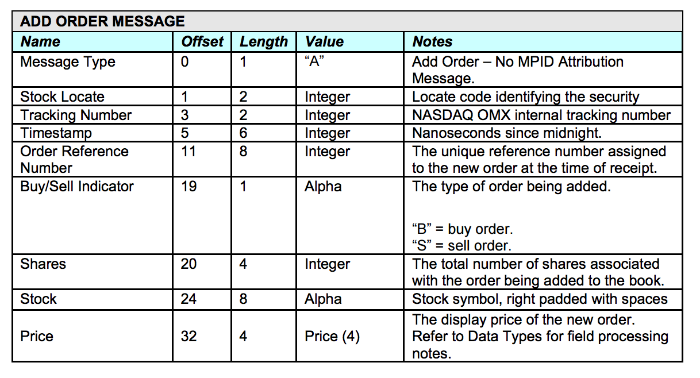
In addition, information about canceling, changing or replacing orders is also transmitted using ITCH.
There is an ITCH implementation specifically for FPGA-based trading systems - this data stream is distributed from a dedicated Nasdaq data center in New Jersey. In this case, the requirements for client connections is 10 or 40 gigabits, otherwise the data feed is not provided.
As with OUCH, the Nasdaq exchange offers ITCH alternatives - for example, TotalView Aggregate, but other protocols do not allow you to receive such an extensive range of data.
Conclusion
The ITCH and OUCH protocols were created for use in the Nasdaq-OMX markets, however even this exchange provides other options for connecting clients. For example, to obtain market information (Market Data) and transmit trade data, the FIX and FAST protocols are used. At the same time, the ITCH and OUCH protocols are also applied on other exchange platforms - for example, exchanges in Austria , Turkey and Switzerland .
In our next articles, we will continue to talk about existing exchange technologies, in particular, we will talk about the Simple Binary Encoding protocol, which, to some extent, is a continuation of the FIX business.
PS ITinvest allows its customers to organize a connectionnot only to Russian, but also to foreign exchanges (for example, CME Group).
Other materials about exchange technologies:
- Methods of transferring financial data: FIX protocol
- Ways to Transfer Financial Data # 2: FAST Protocol
- Ways to Transfer Financial Data # 3: Plaza II Protocol
- Ways to Transfer Financial Data # 4: ASTS Bridge Protocol
- How Chicago's World's Biggest Exchange Works: Infrastructure and Technology
- Trading and hardware: how exchange data centers look like