Removing embedded Windows 10 applications after a failed Get-AppXPackage command
#include "standard_disclamer.h"
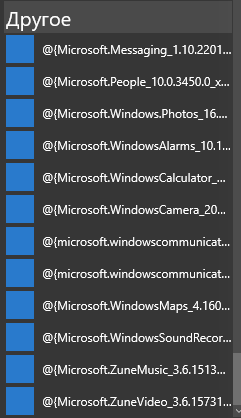
Once, the start menu (or whatever was in place instead of it in Windows 10) ceased to open for me. On the Internet, it is recommended to execute the command in the powershell console open with administrator rights: However, as it turned out later, after one of the updates (November?), By executing such a command it is possible to open the menu back, but the trouble is that all these applications take the following form: “ Well, all the same, they are not needed, I will delete it, ”I think. There it was. We perform , for example: And we get a footcloth: What to do? Garbage in the start menu, you have to remove it! Reinstalling the system is barbaric; everything can be fixed by hands. We look at the log, as recommended in the footcloth (copy the command that is indicated in the "NOTE" to the same console):
Among other things, the answer will be a line of this kind: Here it is of interest to us. The file specified here is called “file 1”. We go to the folder C: \ ProgramData \ Microsoft \ Windows \ (I won’t tell you how to configure the display of hidden folders) But I won’t let it into the AppRepository folder. But this is not a problem, go to the right mouse button over this folder - Properties - Security - Advanced. There they will most likely tell us that it was not possible to determine the owner - in any case, click to change the owner - Advanced - Search (this is the one between the Columns and Stop) - select your user - OK - OK - OK.
If after that it doesn’t let it go, then where we clicked on “change”, there is a table “Permission Elements” - you need to add your user there in the same way, with Full Access rights. Changing the rights to everything enclosed is not necessary.
Now back to the "file 1". He will not be in this folder. If it is, this manual does not suit you. No file - let's do it! I say this quite seriously - we create a file that Windows is looking for, because it is looking for it to delete. To do this, open any other file from this folder (does not give it - change the owner and / or access rights to it), whose name ends with neutral_split.language-ru_kakietobukva.xml, take all the contents, create a new file, insert it there and change a couple of places . In my case, the Microsoft.WindowsCamera_2016.128.10.0_neutral_split.language-ru_8wekyb3d8bbwe.xml file turned up with the contents:
See Name = "Microsoft.WindowsCamera"? Here it must be replaced by Name = "Microsoft.Messaging", or whatever you delete there. See Version = "2016.128.10.0"? Change the value to 1.10.22012.0 (it is in the name of "file 1").
Save with the name "file 1" in this same folder. I generally pressed the right button to create a text file and renamed it along with the txt extension, and then inserted the code.
OK! Now again execute the delete command. Again we get a footcloth: And we ask: “Author, why did you force us to do so many things, nothing works?” I, too, was first upset. But the logs came up with very smart people. Therefore, we open the logs (again, the line from the note).
The file is different! Microsoft.Messaging_1.10.22012.0_neutral_split.scale-150_8wekyb3d8bbwe.xml. Do you know what to do? That's right, let's go to the ill-fated folder and create! Next, we look for a similar existing one, in my case it was Microsoft.WindowsStore_2015.7.1.0_neutral_split.scale-125_8wekyb3d8bbwe.xml.
Copy the contents:
Here we are changing not only the name and version, but also the scale number. Although I'm not sure that it is necessary, but I changed 125 to 150. And, once again, PS C: \ WINDOWS \ system32> Get-AppxPackage * messaging * | Remove-AppxPackage. And the answer: PS C: \ WINDOWS \ system32>
That's it, there are no errors! And in the start menu now:

See? No Messaging, People first line.
In conclusion, I want to say that such manipulations will have to be done with the whole list of garbage from the "Other" section. But he will not be. It will not be so that perhaps it will not even turn back.
PS disclaimer content provided in first comment
Once, the start menu (or whatever was in place instead of it in Windows 10) ceased to open for me. On the Internet, it is recommended to execute the command in the powershell console open with administrator rights: However, as it turned out later, after one of the updates (November?), By executing such a command it is possible to open the menu back, but the trouble is that all these applications take the following form: “ Well, all the same, they are not needed, I will delete it, ”I think. There it was. We perform , for example: And we get a footcloth: What to do? Garbage in the start menu, you have to remove it! Reinstalling the system is barbaric; everything can be fixed by hands. We look at the log, as recommended in the footcloth (copy the command that is indicated in the "NOTE" to the same console):
Get-AppXPackage -AllUsers | Foreach {Add-AppxPackage -DisableDevelopmentMode -Register “$($_.InstallLocation)\AppXManifest.xml”}
Get-AppxPackage *messaging* | Remove-AppxPackage
Remove-AppxPackage : Сбой развертывания с HRESULT: 0x80073CF6, Не удалось зарегистрировать пакет. Ошибка 0x80070003: не удалось прочесть манифест из расположения AppxManifest.xml. Сбой: Системе не удается найти указанный путь.


ПРИМЕЧАНИЕ. Чтобы получить дополнительные сведения, найдите [ActivityId] 24a44cdb-6261-0001-eabb-a4246162d101 в журнале событий или введите в командной строке Get-AppxLog -ActivityID 24a44cdb-6261-0001-eabb-a4246162d101.


строка 1 знак 31:


+ Get-AppxPackage *messaging* | Remove-AppxPackage

+ ~~~~~~~~~~~~~~~~~~

 + CategoryInfo : WriteError: (Microsoft.Messa...__8wekyb3d8bbwe:String) [Remove-AppxPackage], IOException

 + FullyQualifiedErrorId : DeploymentError,Microsoft.Windows.Appx.PackageManager.Commands.RemoveAppxPackageCommand
Get-AppxLog -ActivityID 24a44cdb-6261-0001-eabb-a4246162d101
Among other things, the answer will be a line of this kind: Here it is of interest to us. The file specified here is called “file 1”. We go to the folder C: \ ProgramData \ Microsoft \ Windows \ (I won’t tell you how to configure the display of hidden folders) But I won’t let it into the AppRepository folder. But this is not a problem, go to the right mouse button over this folder - Properties - Security - Advanced. There they will most likely tell us that it was not possible to determine the owner - in any case, click to change the owner - Advanced - Search (this is the one between the Columns and Stop) - select your user - OK - OK - OK.
Ошибка 0x80070002: не удалось прочесть манифест из расположения C:\ProgramData\Microsoft\Windows\AppRepository\Microsoft.Messaging_1.10.22012.0_neutral_split.language-ru_8wekyb3d8bbwe.xml. Сбой: Не удается найти указанный файл.
If after that it doesn’t let it go, then where we clicked on “change”, there is a table “Permission Elements” - you need to add your user there in the same way, with Full Access rights. Changing the rights to everything enclosed is not necessary.
Now back to the "file 1". He will not be in this folder. If it is, this manual does not suit you. No file - let's do it! I say this quite seriously - we create a file that Windows is looking for, because it is looking for it to delete. To do this, open any other file from this folder (does not give it - change the owner and / or access rights to it), whose name ends with neutral_split.language-ru_kakietobukva.xml, take all the contents, create a new file, insert it there and change a couple of places . In my case, the Microsoft.WindowsCamera_2016.128.10.0_neutral_split.language-ru_8wekyb3d8bbwe.xml file turned up with the contents:
true ms-resource:///Resources/AppStoreName Microsoft Corporation Assets\WindowsIcons\StoreLogo.png See Name = "Microsoft.WindowsCamera"? Here it must be replaced by Name = "Microsoft.Messaging", or whatever you delete there. See Version = "2016.128.10.0"? Change the value to 1.10.22012.0 (it is in the name of "file 1").
Save with the name "file 1" in this same folder. I generally pressed the right button to create a text file and renamed it along with the txt extension, and then inserted the code.
OK! Now again execute the delete command. Again we get a footcloth: And we ask: “Author, why did you force us to do so many things, nothing works?” I, too, was first upset. But the logs came up with very smart people. Therefore, we open the logs (again, the line from the note).
Remove-AppxPackage : Сбой развертывания с HRESULT: 0x80073CF6, Не удалось зарегистрировать пакет.

Ошибка 0x80070003: не удалось прочесть манифест из расположения AppxManifest.xml. Сбой: Системе не удается найти указанный путь.

.

ПРИМЕЧАНИЕ. Чтобы получить дополнительные сведения, найдите [ActivityId] 24a44cdb-6261-0001-1ec1-a4246162d101 в журнале событий или введите в командной строке Get-AppxLog -ActivityID 24a44cdb-6261-0001-1ec1-a4246162d101.

строка:1 знак:31

+ Get-AppxPackage *messaging* | Remove-AppxPackage

+ ~~~~~~~~~~~~~~~~~~

 + CategoryInfo : WriteError: (Microsoft.Messa...__8wekyb3d8bbwe:String) [Remove-AppxPackage], IOException

 + FullyQualifiedErrorId : DeploymentError,Microsoft.Windows.Appx.PackageManager.Commands.RemoveAppxPackageCommand
Ошибка 0x80070002: не удалось прочесть манифест из расположения C:\ProgramData\Microsoft\Windows\AppRepository\Microsoft.Messaging_1.10.22012.0_neutral_split.scale-150_8wekyb3d8bbwe.xml. Сбой: Не удается найти указанный файл.
The file is different! Microsoft.Messaging_1.10.22012.0_neutral_split.scale-150_8wekyb3d8bbwe.xml. Do you know what to do? That's right, let's go to the ill-fated folder and create! Next, we look for a similar existing one, in my case it was Microsoft.WindowsStore_2015.7.1.0_neutral_split.scale-125_8wekyb3d8bbwe.xml.
Copy the contents:
true ms-resource:StoreTitle Microsoft Corporation Assets\Logo.png Here we are changing not only the name and version, but also the scale number. Although I'm not sure that it is necessary, but I changed 125 to 150. And, once again, PS C: \ WINDOWS \ system32> Get-AppxPackage * messaging * | Remove-AppxPackage. And the answer: PS C: \ WINDOWS \ system32>
That's it, there are no errors! And in the start menu now:
See? No Messaging, People first line.
In conclusion, I want to say that such manipulations will have to be done with the whole list of garbage from the "Other" section. But he will not be. It will not be so that perhaps it will not even turn back.
PS disclaimer content provided in first comment









