February 3, 2016 at 09:59
Some areas of file system development
The history of data management systems dates back to the advent of magnetic tapes, but they acquired a modern look with the advent of magnetic disks. Today we decided to look at the direction of further development of file systems.
In traditional data storage systems, actions are performed both on small blocks of information of a certain size and on metadata. To date, storage systems for objects are being developed, where instead of blocks with data, objects with various parameters are operated on. Object storage systems are based on the T-10 Object Storage Devices (OSD) standard.
The fundamental difference between block and object storage systems is that in the first case you create objects from sets of blocks containing data and metadata, and in the second you operate directly with objects and their corresponding metadata.
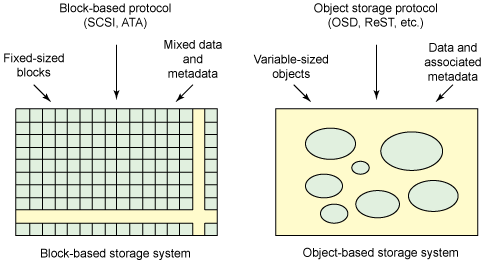
Figure 1 - Block and object storage systems
One example of file systems built on an object storage system is exofs (Extended Object File System).
The exofs diagram can be represented as follows:
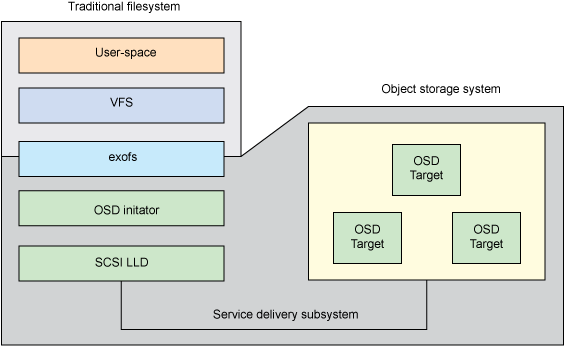
Figure 2 - The exofs diagram The
Virtual File System Switch (VFS) provides access to exofs, and exofs already interacts with the object storage system through the local OSD initiator.
Although storing objects is an interesting idea, Ravi Tandon, a graduate of the computer science department, believes that the future lies with log-structured file systems. “This is my opinion, as flash and SSD technology will play a big role in the further development of storage systems,” says Ravi. Log-structured file systems are ideal for SSDs, since in this case the write operations are distributed evenly throughout the device, which leads to a decrease in the number of data erase cycles - this can significantly extend the life of the SSD.
The idea of a log-structured file system was proposed back in 1988 by John Ousterhout and Fred Douglis, and was implemented in 1992 in the Sprite operating system. The bottom line is this: the file system is presented in the form of a circular log, where new data and metadata are written, and free space is always taken from the end. This means that the journal may contain many copies of one file, but the most current of them will always be considered active. This interesting feature provides several advantages.
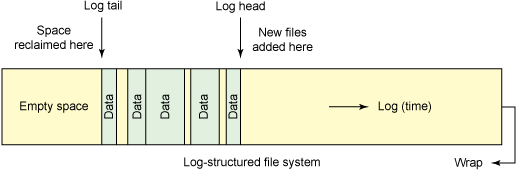
Figure 3 - Log-structured file system
This approach to data storage leads to a reduction in recording overhead - recording is done sequentially, data is faster on disk, so the file system is faster. Ravi Tandon also writes that log-structured systems support functions such as version control and data recovery, actually allowing you to “travel in time”.
An example of a log-structured file system is NILFS2.. NILFS2 really knows how to take snapshots of the state of the file system. This is very convenient if you needed to recover previously deleted or lost files. However, you have to pay for everything, the log-structured file system is also not without drawbacks - here you have to use the garbage collector to delete old data and metadata. At these points, there may be a significant decrease in performance.
The two types of file systems considered are certainly good (although they are not without drawbacks), but there are other worthwhile ideas. In particular, Jeff Darcy, a programmer and blogger, believesthat within a few years there will be a division into local and distributed file systems, where the latter will be built on the basis of the former. As for the first case, recently the ZFS and Btrfs file systems have become increasingly popular.
ZFS (Zettabyte File System) is a 128-bit file system that supports files of ridiculously huge sizes (16 exabytes) and is capable of working with disk volumes of up to 256 zettabytes. ZFS project leader Jeff Bonwick said that "populating 128-bit file systems will exceed the quantum capabilities of storing data on Earth." “You cannot fill and store a 128-bit volume without boiling the oceans, ” Bonvik said .
An example of how large these numbers are: if you create a thousand files every second, it will take about 9000 years to reach the file limit in ZFS. In general, the ZFS file system is designed in such a way that it is impossible to encounter any restrictions in the foreseeable future.
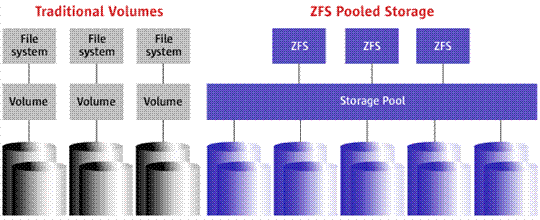
Figure 4 - Traditional file systems and ZFS
ZFS is built on top of virtual data pools (zpool). It turns out that all the connected drives are part of one giant partition. Moreover, disks can communicate with each other in virtual RAID arrays, which have the ability to "self-healing." This file system also allows you to make snapshots to restore data in case of damage. Learn more about ZFS here .
The Btrfs file system is a direct competitor to ZFS and has almost the same features. As a pair of examples of comparative analysis, you can see these two articles: 1 and 2 .
www.diva-portal.org/smash/get/diva2 : 822493 / FULLTEXT01.pdf
As for distributed file systems, according to Jeff Darcy, who is involved in the development of GlusterFS , the future lies with them. However, in this case a lot of attention has to be paid to reliability. In general, a distributed file system is a collection of independent computers that look like a single, integrated system to the user.
The concept has several advantages. As an example, it has great potential for scaling. Traditional file systems work as follows: when a user sends a file to the server, its contents and metadata are separated and stored in the relevant storage.
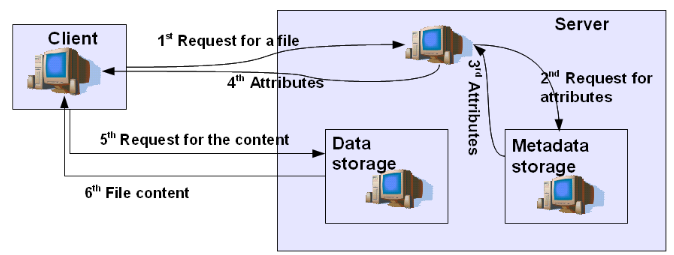
Figure 5 - Upload for DFS
When a user wants to get his file back, he turns to the file system, which extracts metadata with file attributes and determines its location in the data warehouse. The file is sent to the client, which, in turn, sends a receipt message. In principle, such a scheme has both advantages and disadvantages.
The advantages, of course, include the fact that when working on a network, you can save disk space. But, on the other hand, you have to work with remote files, which is much slower than working with local files. In addition, the real ability to access the remote file is critically dependent on the server and network performance.
By the way, more recently, we talked about how to check the reliability of a data center ( here and here ). In addition, we gave examples of our cases and prepared a calendar of events for 2016 on the topic of IT infrastructure, information security and telecom.