 February 11, 2016 at 14:55
Genemba - code generator for iOS development
TL; DR
We wrote a cool code generator for iOS development with the following advantages:
- Support for Swift and Objective-C ,
- Using liquid markup language to create templates,
- Flexible template management system ,
- Integration with Cocoapods dependency manager .
More details - under the cut.
Serious decisions regarding the architecture of the project entail the need to make a certain compromise. We adhere to the n-tier structure - we get a number of empty information flows between the layers. We parallelize tasks into several threads - we spend a huge amount of time solving unobvious bugs. We faced a similar situation requiring a compromise at Rambler & Co , deciding to use VIPER as the standard architecture for all of our mobile applications. Having received excellent modularity and a clear separation of responsibilities between the components, we acquired a headache in the form of complexity and monotony in the process of creating new modules.
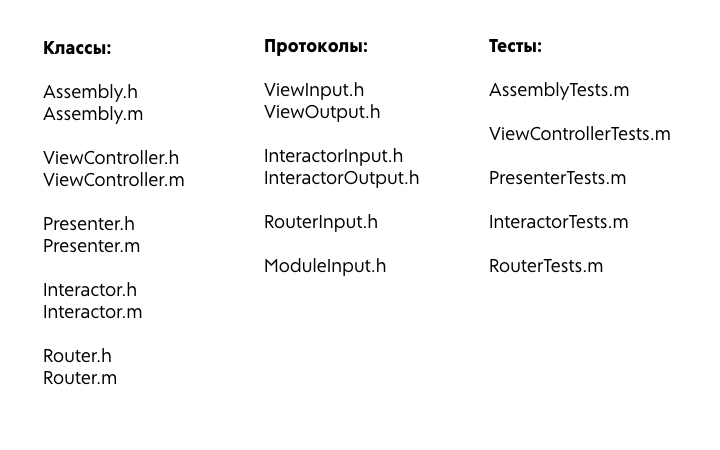
The average iOS developer at the beginning of work on a new screen simply creates one class. Anyone who made a strong-willed decision to switch to VIPER, at this moment begins to suffer. In most cases, he needs to create five classes, six protocols and write five test cases . Let's say that to create new modules, our poor fellow will hire a professional secretary with a huge print speed - but even in this case, he is unlikely to be able to go beyond 30 seconds to create and fill out one file. We apply the little knowledge of mathematics that the nature of mobile developers has endowed, we multiply these numbers and get an answer in the region of 10 minutes. The same average developer during this time will manage to throw a couple of hundred lines of UITableViewDataSource, send several network requests and paint all view's in a beautiful azure color. It is somehow unfair to the work of our VIPER guru.
But hard and tedious manual labor is not the only problem. Not less headaches are brought by typos multiplying with each module, which every day drag the project to the muddy bottom of the deadlines more and more.
One way to solve these problems, which we have been using for a long time, is to create our own templates for Xcode. In addition to the fact that this approach is simply not sports, for ourselves we have identified a number of relatively serious shortcomings.
- Xcode is not the most stable IDE , and from time to time with its updates, templates, plugins and other kit can successfully fly.
- There is no convenient mechanism for adding new templates, not to mention getting updates.
- Fundamentally there is no possibility of adding generated files to different project targets .
- The syntax is infinitely inconvenient and complex , especially for someone who needs to just throw a template for a project in ten minutes.
But, of course, everyone understands that he was most upset by yet another fatal flaw - the solution was not written by us. There is too little control over it, and extensibility for more specific tasks tends to zero. Therefore, we decided to write our own code generator - Generalambu . Immediately I’ll clarify a very important thesis - although we started the project in order to simplify the process of creating VIPER modules, but as a result we got a much more flexible utility that can help in automating a wide range of tasks for generating and standardizing code.
From the moment you install Genemba ( gem install generamba ) to create your first module, you need to go through three steps:
- generamba setup starts the Genemba setup process for working with a specific project. At this point, standard paths are set for files, test setups, dependency managers, and other infrastructure. As a result of the command, we get the project configuration file - Rambafile .
- generamba template install starts the installation process specified in the Rambafile templates.
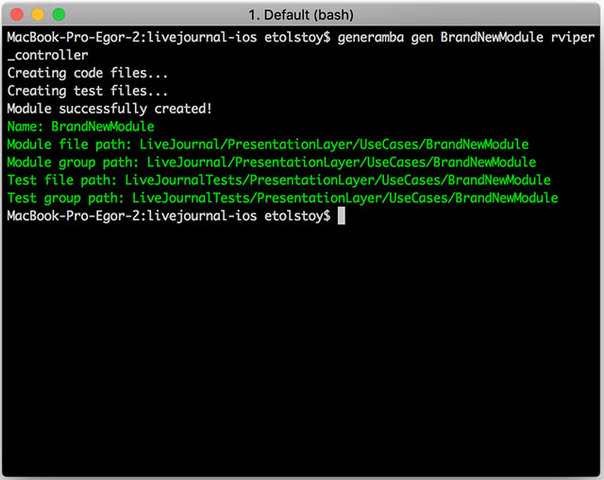
- generamba gen HabrahabrModule rviper_controller already directly creates a new HabrahabrModule module using the rviper_controller template .
For work, Generalba uses several resources:
- Rambafile - a configuration file containing everything that the user specified during the setup command, as well as links to templates and their directories,
- One or more templates that can be specified when creating a new module,
- Custom settings (for example, author name).
The first two points boldly fall under Git, and the settings tied to the user are in a project-independent directory.
Rambafile example
### Headers settings
company: Rambler&Co
### Xcode project settings
project_name: GenerambaSandbox
prefix: RDS
xcodeproj_path: GenerambaSandbox.xcodeproj
### Code generation settings section
# The main project target name
project_target: GenerambaSandbox
# The file path for new modules
project_file_path: GenerambaSandbox/Classes/Modules
# The Xcode group path to new modules
project_group_path: GenerambaSandbox/Classes/Modules
### Tests generation settings section
# The tests target name
test_target: GenerambaSandboxTests
# The file path for new tests
test_file_path: GenerambaSandboxTests/Classes/Modules
# The Xcode group path to new tests
test_group_path: GenerambaSandboxTests/Classes/Modules
### Dependencies settings section
podfile_path: Podfile
cartfile_path: Cartfile
### Templates
catalogs:
- 'https://github.com/rambler-ios/generamba-catalog'
- 'https://github.com/igrekde/my-own-catalog'
templates:
- {name: rviper_controller}
- {name: local_template_name, local: 'absolute/file/path'}
- {name: remote_template_name, git: 'https://github.com/igrekde/remote_template'}
Special mention is worth working with templates. Unlike many other generators, we do not sew templates into the utility itself - instead, we built in a more flexible system, peeped from dependency managers (read, Cocoapods). New templates can be installed using one of the following paths:
- Local template (copied from the specified folder)
- Remote template (cloned from the specified repository)
- A template from a directory (in the repositories with the directories used, a suitable template is searched for by name).
After several months of using Genemba on our projects, the most commonly used pattern took shape - a project template directory is created for which all, even the least used templates are stored. Over time, some of these decisions, sharpened for a specific project, after certain improvements fall into our public spec .
As I already mentioned, we were confused by the complexity of marking up standard Xcode templates, and the template engine liquid was chosen as a tool to deal with this problem - not only that with simple, convenient and clear syntax, but also with a bunch of additional bonuses that you can find application not only in front-end, but also in code generation.
For comparison, the Xcode template:
InteractorTemplate.h
//
//  ___VARIABLE_viperModuleName______FILENAME___
//  ___PROJECTNAME___
//
//  Created by ___FULLUSERNAME___ on ___DATE___
//  Copyright ___YEAR___ ___ORGANIZATIONNAME___. All rights reserved.
//
#import "___VARIABLE_viperModuleName:identifier___Interactor.h"
#import "___VARIABLE_viperModuleName:identifier___InteractorOutput.h"
@implementation ___VARIABLE_viperModuleName:identifier___Interactor
#pragma mark - ___VARIABLE_viperModuleName:identifier___InteractorInput
@end
Liquid template for the same file:
InteractorTemplate.liquid
//
//  {{ module_info.name }}{{ module_info.file_name }}
//  {{ module_info.project_name }}
//
//  Created by {{ developer.name }} on {{ date }}.
//  Copyright {{ year }} {{ developer.company }}. All rights reserved.
//
#import "{{module_info.name}}Interactor.h"
#import "{{module_info.name}}InteractorOutput.h"
@implementation {{module_info.name}}Interactor
#pragma mark - {{module_info.name}}InteractorInput
@end
We continue to actively develop the General Directorate. In addition to relatively everyday tasks, we look at other areas:
- adding a GUI , including as plugins for the IDE,
- Support for Android projects
- science fiction that requires working with the AST tree - for example, auto- generation of test cases according to the described protocols or mocks for swift classes.
As a conclusion, I would like to add that Genemba served as an excellent graphic example of the benefits of automating completely trivial tasks - we will transfer our experience to other areas of the department’s activities, which would not hurt to get rid of manual labor.
Decided to start using the Generalambu? Ask your questions and write about the problems found in issues - our community, although small, but quite active.
Useful links:
- liftoff, for generating Xcode projects ,
- VIPER book ,
- Documentation Generamby ,
- Speech on Rambler.iOS V about Generalambu: slides , video









