Processing of temporary or permanent password replacement for Authentication 1C: Enterprise 8.2-8.3
A simple processing on managed and regular forms for the platform 8.2-8.3, which allows you to change the password of 1C: Enterprise authentication and return it back. It will be useful to administrators, programmers associated with 1C.
Recently I ran into a problem that required a simple solution. Actually, the problem can be fit into one question: how to help the user without knowing and without resetting his password?
In many offices, to reproduce the error, administrators, programmers and other technical specialists used 1C: Enterprise Authentication. That is, the user "complained" about the error, specialists came under it and tried to reproduce the error. We got an error and corrected it in the code.
With the development of the mobile platform and mobile clients, 1C: Enterprise authentication becomes "busy" by the user, since synchronization takes place precisely along it. That is, not every user wants to divulge their passwords or use the password that he was “assigned”. Our office is also becoming more and more connected with mobile clients. This is where the previously mentioned question arose.
I searched the Internet, found a bunch of descriptions of how to break passwords in the file database or in server versions.
In the case of the file version, you do not need any rights; just install the * .1CD database file viewerand change the passwords in the V8USERS table. It is worth noting that passwords are not stored there in their pure form, but a password hash is stored. Actually, the hash of the unknown password changes to the hash of the known password. In the case of server databases, you need to know the DBA username and there it’s not tricky to change the password. But how to explain to the user an authentication error after such hacks? And why such difficulties?
I also found a processing that selects passwords while requiring the same rights as my processing. Well, it picks up the password 123 or even 123456 she quickly, but what if the password is real? She writes about 90 days I will pick up. This is not a gate! This situation may come out, while choosing a password, the user changed the password. Yes, and not one time can change.
In general, I offer a little processing, which changes the hash of an unknown password to the hash of the desired password, and then replaces it back. It works both in managed forms and in regular forms. It can be integrated through “additional processing and reports”, a procedure has been added to the object module with a description of the processing.

Well, or you can embed it through "Configuration Extensions" - a very useful feature, at the moment it allows you to add processing and reports to the configuration without removing it from support. That is, the typical configuration remains typical even when processing is added.
How it works:
By user we get a password hash.
// User directory element Users User
ИБ = Users of the Information Base . FindUniqueIdentifier (User.Identifier of User ИБ);
//
StoredPasswordValue stores the password hash PasswordUser = UserI.B StoredValue Password;
// Name stores the username of the user. User
Login = User ID. Name;
Enter the desired password and get its hash.

Change the hash of the user to the hash of the desired password.
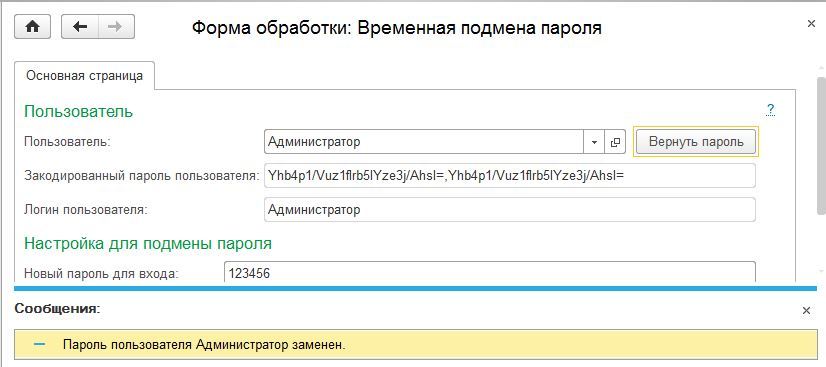
Log in with a new password. We change everything back.

Processing Download Link
Recently I ran into a problem that required a simple solution. Actually, the problem can be fit into one question: how to help the user without knowing and without resetting his password?
In many offices, to reproduce the error, administrators, programmers and other technical specialists used 1C: Enterprise Authentication. That is, the user "complained" about the error, specialists came under it and tried to reproduce the error. We got an error and corrected it in the code.
With the development of the mobile platform and mobile clients, 1C: Enterprise authentication becomes "busy" by the user, since synchronization takes place precisely along it. That is, not every user wants to divulge their passwords or use the password that he was “assigned”. Our office is also becoming more and more connected with mobile clients. This is where the previously mentioned question arose.
I searched the Internet, found a bunch of descriptions of how to break passwords in the file database or in server versions.
In the case of the file version, you do not need any rights; just install the * .1CD database file viewerand change the passwords in the V8USERS table. It is worth noting that passwords are not stored there in their pure form, but a password hash is stored. Actually, the hash of the unknown password changes to the hash of the known password. In the case of server databases, you need to know the DBA username and there it’s not tricky to change the password. But how to explain to the user an authentication error after such hacks? And why such difficulties?
I also found a processing that selects passwords while requiring the same rights as my processing. Well, it picks up the password 123 or even 123456 she quickly, but what if the password is real? She writes about 90 days I will pick up. This is not a gate! This situation may come out, while choosing a password, the user changed the password. Yes, and not one time can change.
In general, I offer a little processing, which changes the hash of an unknown password to the hash of the desired password, and then replaces it back. It works both in managed forms and in regular forms. It can be integrated through “additional processing and reports”, a procedure has been added to the object module with a description of the processing.
Well, or you can embed it through "Configuration Extensions" - a very useful feature, at the moment it allows you to add processing and reports to the configuration without removing it from support. That is, the typical configuration remains typical even when processing is added.
How it works:
By user we get a password hash.
// User directory element Users User
ИБ = Users of the Information Base . FindUniqueIdentifier (User.Identifier of User ИБ);
//
StoredPasswordValue stores the password hash PasswordUser = UserI.B StoredValue Password;
// Name stores the username of the user. User
Login = User ID. Name;
Enter the desired password and get its hash.
Change the hash of the user to the hash of the desired password.
Log in with a new password. We change everything back.
Processing Download Link