Using Apache Spark as a SQL Engine
Hello, Habr! We, Wrike , face daily data flow from hundreds of thousands of users. All this information needs to be stored, processed and value extracted from them. Apache Spark helps us cope with this enormous amount of data .
We will not make an introduction to Spark or describe its positive and negative sides. You can read about it here , here or in the official documentation . In this article, we focus on the Spark SQL library and its practical application for analyzing big data.
SQL? Didn’t it seem to me?
Historically, the analytics department of almost any IT company was built on the basis of specialists who are well versed in the intricacies of business and SQL. The work of BI or the analytical department almost never does without an ETL . It, in turn, most often works with data sources, which are most easily accessed using SQL.
Wrike is no exception. For a long time, the main source of data for us was the shards of our database in combination with ETL and Google Analytics , until we faced the task of analyzing user behavior based on server logs.
One solution to this problem could be to hire programmers who will write Map-Reduce for Hadoop and provide data for decision making in the company. Why do this if we already have a whole group of qualified specialists who are fluent in SQL and versed in the intricacies of the business? An alternative solution would be to store everything in a relational database. In this case, your main headache will be to support the schema of both your tables and input logs. We think you can not even talk about the performance of a DBMS with tables of several hundred million records.
The solution for us was Spark SQL.
Ok, what's next?
The main abstraction of Spark SQL, unlike Spark RDD , is a DataFrame.
A DataFrame is a distributed collection of data organized in the form of named columns. A DataFrame is conceptually similar to a table in a database, a data frame in R or Python Pandas , but, of course, optimized for distributed computing.
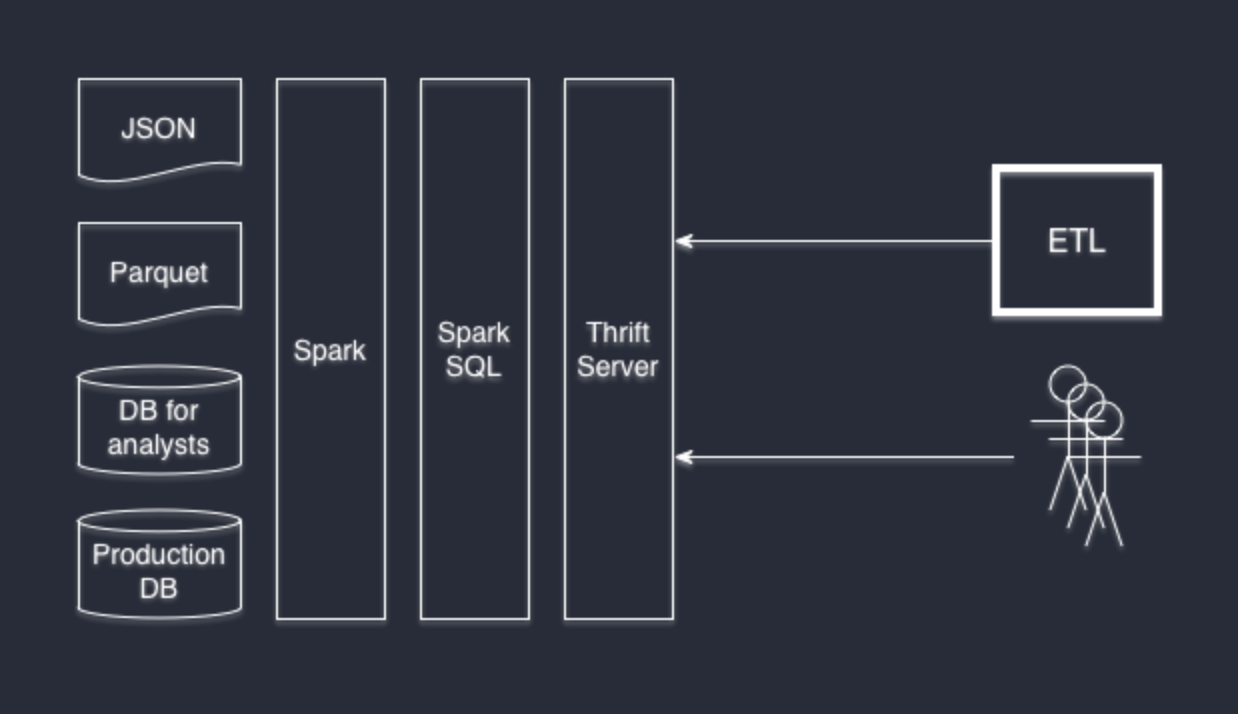
You can initialize a DataFrame based on a variety of data sources: structured or weakly structured files, such as JSON and Parquet, regular databases through JDBC / ODBC, and in many other ways through third-party connectors (for example, Cassandra ).
DataFrame APIs are available from Scala, Java, Python and R. And from the point of view of SQL, you can access them like regular SQL tables with full support for all the features of the Hive dialect . Spark SQL implements the Hive interface, so you can replace your Hive with Spark SQL without rewriting the system. If you have not worked with Hive before but are familiar with SQL, then most likely you will not need to study anything further.
Can I connect to Spark SQL with% my-favorite-software%?
If your favorite software supports the use of arbitrary JDBC connectors, then the answer is yes. We like DBeaver , and our developers like IntelliJ IDEA . And both of them are perfectly connected to Thrift Server.
Thrift Server is part of the standard Spark SQL installation, which turns Spark into a data provider. Raising it is very simple:
./sbin/start-thriftserver.sh
Thrift JDBC / ODBC server is fully compatible with HiveServer2 and can transparently replace it with itself.
This is how, for example, the DBeaver to SparkSQL connection window looks like:

I want different data providers in one request
Easy. Spark SQL partially extends the Hive dialect so that you can create data sources directly using SQL.
Let's create a “table” based on the logs in json format:
CREATE TEMPORARY TABLE table_form_json
USING org.apache.spark.sql.json
OPTIONS (path '/mnt/ssd1/logs/2015/09/*/*-client.json.log.gz')
Please note that we are using not just one file, but using the mask we get the data available for the month.
We will do the same, but with our PostgreSQL database. As the data, we’ll take not the entire table, but only the result of a specific query:
CREATE TEMPORARY TABLE table_from_jdbc
USING org.apache.spark.sql.jdbc
OPTIONS (
  url "jdbc:postgresql://localhost/mydb?user=[username]&password=[password]&ssl=true",
  dbtable "(SELECT * FROM profiles where profile_id = 5) tmp"
)
Now we are completely free to execute the query with JOIN, and Spark SQL Engine will do the rest of the work for us:
SELECT * FROM table_form_json tjson JOIN table_from_jdbc tjdbc ON tjson.userid = tjdbc.user_id;
Combining data sources is possible in random order. At Wrike, we use PostgreSQL databases, json logs and parquet files.
Anything else?
If you, like us, are interested not only in using Spark, but also in understanding how it works under the hood, we recommend that you pay attention to the following publications:
- Spark SQL: Relational Data Processing in Spark. Michael Armbrust, Reynold S. Xin, Cheng Lian, Yin Huai, Davies Liu, Joseph K. Bradley, Xiangrui Meng, Tomer Kaftan, Michael J. Franklin, Ali Ghodsi, Matei Zaharia. SIGMOD 2015. June 2015
- Resilient Distributed Datasets: A Fault-Tolerant Abstraction for In-Memory Cluster Computing. Matei Zaharia, Mosharaf Chowdhury, Tathagata Das, Ankur Dave, Justin Ma, Murphy McCauley, Michael J. Franklin, Scott Shenker, Ion Stoica. NSDI 2012. April 2012. Best Paper Award
- Spark: Cluster Computing with Working Sets. Matei Zaharia, Mosharaf Chowdhury, Michael J. Franklin, Scott Shenker, Ion Stoica. HotCloud 2010. June 2010









