Monitoring the uninterruptible power supply unit ippon winner 3000 using apcupsd + Zabbix in Ubuntu
- Tutorial
- Recovery mode
What prompted me to write this article? Searching the Internet for “monitoring ippon winner 3000”. The Internet usually provided articles about setting up NUT . The project is really interesting, has many features. But there is one small BUT! Not supported by ippon winner 3000 via USB. On the COM port, everything works great. I saw USB connection configs, but it seems to me that copy-paste without practical verification. Although maybe I'm wrong. At least I killed half a day on trying to get this to work, but in vain.
Found an alternative project apcupsd, wound up everything out of the box with small settings. I have one ippon winner 3000 UPS connected to one computer, the task of which is responsible for monitoring, via USB. Zabbix is also located on it. We will not go into the details of Zabbix, I will only say that it is worthy of a separate article and not one. I do not see the point in writing the process; there are plenty of such articles. Just bring ready-made configs. Install the package itself:
All default configuration files and scripts are located by default in / etc / acpupsd / I ask you to pay special attention to the status and configuration file names.
I use a simple script to run
It launches the apcupsd daemon with each configuration file “apcupsd * conf”. We go to the directory / var / log / apcupsd and examine its contents, if everything went well, its contents should look like this:
From the names it is clear that files with the events extension are responsible for daemon events, ala start-stop, etc. For us, files with the status extensions are of great interest. I will give the contents with explanations of one of them. Looking ahead, I’ll say that external processing of zabbi will take information from these files.
More complete information can be found here
. Details on apcupsd configuration can also be found there .
We edit the script files, enter your email address: I
will briefly describe the purpose of the scripts:
This completes the apcupsd configuration. If in short, the process goes like this: the daemon polls UPS devices, calls the appropriate script when the state changes, and generates status files. Now it remains to bind all this to Zabbix.
The only logical way, in my opinion, is to fill in the data using an external check .
To do this, use a script that will parse the status file and get the values of the specified parameters. In my case, both the agent and the zabbix server will be located on the same computer. The agent listens on port 10050 to server 10051. We need to find out the directory where the external verification files are located. To do this, look for the line in the server configuration file /etc/zabbix/zabbix_server.conf lineExternalScripts = / usr / lib / zabbix / externalscripts . In this directory and put the check file. Do not in any case use dots in the file name, even if it is a bash script! First I wrote a script like this:
In the catalog /etc/zabbix/zabbix_agentd.d create a file userparameter_apcupsd.conf the contents Restart the agent:
However, there is a warning on the offsite Zabbix
And since I am not only the administrator but also a sling ink, it was decided to rewrite the external review on the C . And who knows when we hit this performance.
Create the apcups.c file with the contents:
We compile as follows:
Put the compiled file in / usr / lib / zabbix / externalscripts.
All that remains is to import the template for Zabbix .
I did not set myself the goal of doing something universal, just the opposite, I was trying to make the necessary minimum.
Present in the template ( description of the parameters see above ):
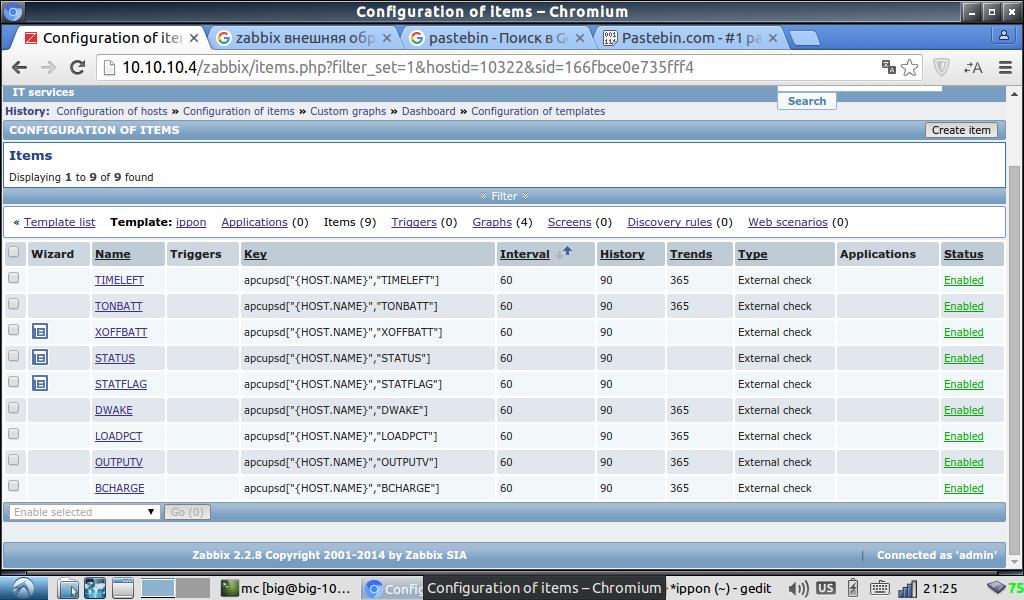
For the graphs, I made only 4 parameters:

battery charge, current load, output voltage and remaining battery life.
Triggers do not see any reason to start, because the scripts of the apcupsd daemon themselves send a notification to the mail. A phone with the Internet is always with you. That's all, I will be glad to answer your questions.
After a few more days, I found out very interesting things that I will share with you. Perhaps this will save you from many days of creative torment.
As for the apcupsd project, it is essentially narrow-minded and is mainly focused on APC UPSs. With it, you are more likely to have devices with a combined USB + COM connection when connected via USB. In my case, it was an ippon winner 3000. Of the minuses: it does not display battery power and temperature. Apparently, these parameters are not in APC.
As for the NUT project, it is more universal and with it you are more likely to pick up your rare UPS. The most important minus with a combined USB + COM connection is supported only by COM!
Found an alternative project apcupsd, wound up everything out of the box with small settings. I have one ippon winner 3000 UPS connected to one computer, the task of which is responsible for monitoring, via USB. Zabbix is also located on it. We will not go into the details of Zabbix, I will only say that it is worthy of a separate article and not one. I do not see the point in writing the process; there are plenty of such articles. Just bring ready-made configs. Install the package itself:
$sudo apt-get install apcupsdAll default configuration files and scripts are located by default in / etc / acpupsd / I ask you to pay special attention to the status and configuration file names.
apcupsd-ippon0.conf
UPSCABLE usb
UPSTYPE usb
DEVICE / dev / usb / hiddev0
LOCKFILE / var / lock
SCRIPTDIR / etc / apcupsd
PWRFAILDIR / etc / apcupsd
NOLOGINDIR / etc
ONBATTERYDELAY 6
BATTERYLEVEL 5
MINUTES 3
TIMEOUT 0
ANNOY 300
ANNOYDELAY 60
NOLOGON disable
KILLDELAY 0
NETSERVER on
NISIP 127.0. 0.1
NISPORT 3551
EVENTSFILE /var/log/apcupsd/apcupsd-ippon0.events
EVENTSFILEMAX 10
UPSCLASS standalone
UPSMODE disable
STATTIME 60
STATFILE /var/log/apcupsd/apcupsd-ippon0.status
LOGSTATS off
DATATIME 0
UPSTYPE usb
DEVICE / dev / usb / hiddev0
LOCKFILE / var / lock
SCRIPTDIR / etc / apcupsd
PWRFAILDIR / etc / apcupsd
NOLOGINDIR / etc
ONBATTERYDELAY 6
BATTERYLEVEL 5
MINUTES 3
TIMEOUT 0
ANNOY 300
ANNOYDELAY 60
NOLOGON disable
KILLDELAY 0
NETSERVER on
NISIP 127.0. 0.1
NISPORT 3551
EVENTSFILE /var/log/apcupsd/apcupsd-ippon0.events
EVENTSFILEMAX 10
UPSCLASS standalone
UPSMODE disable
STATTIME 60
STATFILE /var/log/apcupsd/apcupsd-ippon0.status
LOGSTATS off
DATATIME 0
apcupsd-ippon1.conf
UPSCABLE usb
UPSTYPE usb
DEVICE / dev / usb / hiddev1
LOCKFILE / var / lock
SCRIPTDIR / etc / apcupsd
PWRFAILDIR / etc / apcupsd
NOLOGINDIR / etc
ONBATTERYDELAY 6
BATTERYLEVEL 5
MINUTES 3
TIMEOUT 0
ANNOY 300
ANNOYDELAY 60
NOLOGON disable
KILLDELAY 0
NETSERVER on
NISIP 127.0. 0.1
NISPORT 3552
EVENTSFILE /var/log/apcupsd/apcupsd-ippon1.events
EVENTSFILEMAX 10
UPSCLASS standalone
UPSMODE disable
STATTIME 60
STATFILE /var/log/apcupsd/apcupsd-ippon1.status
LOGSTATE off
DAT
UPSTYPE usb
DEVICE / dev / usb / hiddev1
LOCKFILE / var / lock
SCRIPTDIR / etc / apcupsd
PWRFAILDIR / etc / apcupsd
NOLOGINDIR / etc
ONBATTERYDELAY 6
BATTERYLEVEL 5
MINUTES 3
TIMEOUT 0
ANNOY 300
ANNOYDELAY 60
NOLOGON disable
KILLDELAY 0
NETSERVER on
NISIP 127.0. 0.1
NISPORT 3552
EVENTSFILE /var/log/apcupsd/apcupsd-ippon1.events
EVENTSFILEMAX 10
UPSCLASS standalone
UPSMODE disable
STATTIME 60
STATFILE /var/log/apcupsd/apcupsd-ippon1.status
LOGSTATE off
DAT
I use a simple script to run
apcups-start.sh
#!/bin/bash
[ -n "`pgrep apcupsd`" ] && killall apcupsd ;
sleep 5 ;
UPS_DAEMON="/sbin/apcupsd"
for CONF_FILE in /etc/apcupsd/apcupsd*conf
do
    $UPS_DAEMON -f $CONF_FILE
    echo $UPS_DAEMON -f $CONF_FILE
done
It launches the apcupsd daemon with each configuration file “apcupsd * conf”. We go to the directory / var / log / apcupsd and examine its contents, if everything went well, its contents should look like this:
apcupsd-ippon0.events
apcupsd-ippon0.status
apcupsd-ippon1.events
apcupsd-ippon1.status
From the names it is clear that files with the events extension are responsible for daemon events, ala start-stop, etc. For us, files with the status extensions are of great interest. I will give the contents with explanations of one of them. Looking ahead, I’ll say that external processing of zabbi will take information from these files.
/var/log/apcupsd/apcupsd-ippon0.status
APC: 001,031,0762 - version number, number of rows, number of bytes
DATE: 2016-01-19 20:25:01 +0300 - time for receiving information from the UPS
HOSTNAME: zavdiag - DNS server name
VERSION: 3.14.10 (September 13, 2011) debian - apcupsd build version
UPSNAME: zavdiag - name from apcupsd.conf
CABLE: USB Cable - type of control cable
DRIVER: USB UPS Driver - driver name
UPSMODE: Stand Alone
STARTTIME: 2016-01-19 14:40:36 +0300 - When the daemon apcupsd started
MODEL: HID UPS - Model
STATUS: ONLINE - current status (ONLINE, ONBATT, NOBATT, etc.), removed from the UPS
LOADPCT: 12.0 Percent Load Capacity - load level as a percentage of VA, removed from the UPS
BCHARGE: 100.0 Percent - percentage of battery charge removed from UPS
TIMELEFT: 62.4 Minutes - estimated battery life, removed from the UPS
MBATTCHG: 5 Percent - BATTERYLEVEL value in apcupsd.conf
MINTIMEL: 3 Minutes - MINUTES value in apcupsd.conf
MAXTIME: 0 Seconds - TIMEOUT value in apcupsd.conf
OUTPUTV: 216.0 Volts - output voltage, extracted from the UPS
DWAKE: -01 Seconds - how many seconds the UPS will wait after power is restored until the load is turned on, it is removed from the UPS (I think that it is displayed incorrectly)
LOTRANS: 176.0 Volts - lower limit of permissible voltage, removed from the UPS
HITRANS: 264.0 Volts - upper limit of permissible voltage, removed from the UPS
ALARMDEL: 30 seconds - the period of the delay in signaling when the power fails, it is removed from the UPS
LINEFREQ: 50.0 Hz - input voltage frequency, extracted from the UPS
NUMXFERS: 0 - number of state changes, retrieved from the UPS
TONBATT: 0 seconds - current battery life, removed from the UPS
CUMONBATT: 0 seconds - total battery life, removed from the UPS
XOFFBATT: N / A - time of the last transition to work from the battery to the network
SELFTEST: NO - result of the UPS self-test (OK, BT - low charge, BG - overload, NO - the last 5 minutes did not start), is removed from the UPS
STATFLAG: 0x07000008 Status Flag - status bit string, retrieved from the UPS
SERIALNO: S42140618978 - UPS serial number, retrieved from the UPS
NOMPOWER: 2700 Watts - rated power in watts (active?), Extracted from the UPS
END APC: 2016-01-19 20:25:02 +0300 - state output time
More complete information can be found here
. Details on apcupsd configuration can also be found there .
We edit the script files, enter your email address: I
will briefly describe the purpose of the scripts:
changeme - called when the battery needs to be replaced
commfailure - called when the connection with the unit is lost
commok - called when the connection with the unit is restored
onbatter y - called when switching to battery
power offbattery - called when switching from battery
killpower - called before shutting down
This completes the apcupsd configuration. If in short, the process goes like this: the daemon polls UPS devices, calls the appropriate script when the state changes, and generates status files. Now it remains to bind all this to Zabbix.
The only logical way, in my opinion, is to fill in the data using an external check .
To do this, use a script that will parse the status file and get the values of the specified parameters. In my case, both the agent and the zabbix server will be located on the same computer. The agent listens on port 10050 to server 10051. We need to find out the directory where the external verification files are located. To do this, look for the line in the server configuration file /etc/zabbix/zabbix_server.conf lineExternalScripts = / usr / lib / zabbix / externalscripts . In this directory and put the check file. Do not in any case use dots in the file name, even if it is a bash script! First I wrote a script like this:
apcupsd - bash script
#!/bin/bash
if [[ $1 == ippon? ]] && [ -f "/var/log/apcupsd/apcupsd-$1.status" ] ;
then
    case $2 in
	BCHARGE)
		cat /var/log/apcupsd/apcupsd-$1.status | grep 'BCHARGE' | awk '{print $3}'
	;;
	OUTPUTV)
		cat /var/log/apcupsd/apcupsd-$1.status | grep 'OUTPUTV' | awk '{print $3}'
	;;
	LOADPCT)
		cat /var/log/apcupsd/apcupsd-$1.status | grep 'LOADPCT' | awk '{print $3}'
	;;
	DWAKE)
		cat /var/log/apcupsd/apcupsd-$1.status | grep 'DWAKE' | awk '{print $3}'
	;;
	STATFLAG)
		cat /var/log/apcupsd/apcupsd-$1.status | grep 'STATFLAG' | awk '{print $3}'
	;;
	STATUS)
		cat /var/log/apcupsd/apcupsd-$1.status | grep 'STATUS' | awk '{print $3}'
	;;
	XOFFBATT)
		cat /var/log/apcupsd/apcupsd-$1.status | grep 'XOFFBATT' | awk '{print $3}'
	;;
	TONBATT)
		cat /var/log/apcupsd/apcupsd-$1.status | grep 'TONBATT' | awk '{print $3}'
	;;
	TIMELEFT)
		cat /var/log/apcupsd/apcupsd-$1.status | grep 'TIMELEFT' | awk '{print $3}'
	;;
    esac
fi
In the catalog /etc/zabbix/zabbix_agentd.d create a file userparameter_apcupsd.conf the contents Restart the agent:
UserParameter=apcupsd[*],/usr/lib/zabbix/externalscripts/apcupsd $1 $2
$sudo service zabbix-server restart
However, there is a warning on the offsite Zabbix
Do not abuse external checks! They can lead to a significant decrease in the performance of Zabbix systems.
And since I am not only the administrator but also a sling ink, it was decided to rewrite the external review on the C . And who knows when we hit this performance.
Create the apcups.c file with the contents:
apcupsd.c
#include
#include
#include
char ValueParam[30];
char *GetValue(char *NameVar, char *FileName)
{
FILE *fconfig=fopen(FileName,"r");
char fileline[255];
unsigned char FLAGDDOT=0,FLAGSPACEB=0;
    memset(ValueParam,0,sizeof(ValueParam));
    while(!feof(fconfig))
    {
	fgets (fileline, 255, fconfig);
	if(strncmp(fileline,NameVar,strlen(NameVar))==0)
	{
	    for(int i=0;i0) break;
	}
    }
fclose(fconfig);
return ValueParam;
}
void main(int argc, char* argv[])
{
//argv[1] - hostname argv[2] - param
char fname[255];
    //Проверяем начинается ли имя хоста с "ippon" и предано ли 2 аргумента
    if((argc==3) && (strncmp(argv[1],"ippon",5)==0) )
    {
	memset(fname,0,sizeof(fname));
	strcpy(fname,"/var/log/apcupsd/apcupsd-");
	strcat(fname,argv[1]);
	strcat(fname,".status");
	//Проверяем есть ли соответствующий конфигурационный файл
	// /var/log/apcupsd/apcupsd-ipponX.status
	if(access( fname, F_OK ) != -1)
	{
	    puts(GetValue(argv[2],fname));
	}
    }
return;
}
We compile as follows:
gcc apcupsd.c -o apcupsd -std=c99Put the compiled file in / usr / lib / zabbix / externalscripts.
All that remains is to import the template for Zabbix .
I did not set myself the goal of doing something universal, just the opposite, I was trying to make the necessary minimum.
Present in the template ( description of the parameters see above ):
For the graphs, I made only 4 parameters:
battery charge, current load, output voltage and remaining battery life.
Triggers do not see any reason to start, because the scripts of the apcupsd daemon themselves send a notification to the mail. A phone with the Internet is always with you. That's all, I will be glad to answer your questions.
After a few more days, I found out very interesting things that I will share with you. Perhaps this will save you from many days of creative torment.
As for the apcupsd project, it is essentially narrow-minded and is mainly focused on APC UPSs. With it, you are more likely to have devices with a combined USB + COM connection when connected via USB. In my case, it was an ippon winner 3000. Of the minuses: it does not display battery power and temperature. Apparently, these parameters are not in APC.
As for the NUT project, it is more universal and with it you are more likely to pick up your rare UPS. The most important minus with a combined USB + COM connection is supported only by COM!









