 January 8, 2016 at 16:35
Defuse the bomb with Radare2
Good day,% username%! Today we will go to explore the countless possibilities of the framework for the reverser - radare2. In the form of a test subject, I took the first bomb that hit, it was from the website of Carnegie Mellon University.
Hashes
Because I can change the binary, just in case the hashs are:
md5sum: 1f38d04188a1d08f95d8c302f5361e9f
sha1sum: 31022a4baa524f6275209f7424c616226bc9814b
sha256sum: 8849e033691d626bfd26
md5sum: 1f38d04188a1d08f95d8c302f5361e9f
sha1sum: 31022a4baa524f6275209f7424c616226bc9814b
sha256sum: 8849e033691d626bfd26
What is it all about?
Radare2 (aka r2) is an open source cross-platform framework for exploring binary files (initially, by the way, a hex editor). The main competitor of this is the notorious Ilfak IDA, but, alas, it is a little expensive for a student, and the free version with x86-64 is not friendly. And the radar seems to be cooler .
A binary bomb or just a bomb is an executable file for training, which receives a certain number of lines, and, if all lines pass checks, congratulates the young analyst on this. These are the so-called levels or phases, we have 6 of them.
A little more about the framework
Radare2, as already mentioned, is a framework, and not just a disassembler. It includes a bunch of different tools like debugger, hex editor, compiler, search for ROP gadgets and much more. For non-console enthusiasts, it also has two raw frontends, WebUI (
$ r2 -c "=H" file) and Bokken . The manual is as usual in man, as well as for each command by adding a "?" After it. For example, "pd?" will give descriptions of commands starting with pd.
A few related links:
- Off. website
- Free book
- Github
- The blog
- Cheatsheet . UPD: and one more in pdf
- Migration guide for inveterate iders
- IRC Channel on Freenode
Here we go!
In addition to the executable itself, we were kindly provided with a source file. However, all that is there is input initialization, phase invocation, and funny comments. The remaining functions are pulled from the corresponding headers, which we do not have.
The same file and it is big enough
/***************************************************************************
 * Dr. Evil's Insidious Bomb, Version 1.1
 * Copyright 2011, Dr. Evil Incorporated. All rights reserved.
 *
 * LICENSE:
 *
 * Dr. Evil Incorporated (the PERPETRATOR) hereby grants you (the
 * VICTIM) explicit permission to use this bomb (the BOMB).  This is a
 * time limited license, which expires on the death of the VICTIM.
 * The PERPETRATOR takes no responsibility for damage, frustration,
 * insanity, bug-eyes, carpal-tunnel syndrome, loss of sleep, or other
 * harm to the VICTIM.  Unless the PERPETRATOR wants to take credit,
 * that is.  The VICTIM may not distribute this bomb source code to
 * any enemies of the PERPETRATOR.  No VICTIM may debug,
 * reverse-engineer, run "strings" on, decompile, decrypt, or use any
 * other technique to gain knowledge of and defuse the BOMB.  BOMB
 * proof clothing may not be worn when handling this program.  The
 * PERPETRATOR will not apologize for the PERPETRATOR's poor sense of
 * humor.  This license is null and void where the BOMB is prohibited
 * by law.
 ***************************************************************************/
#include
#include
#include "support.h"
#include "phases.h"
/*
 * Note to self: Remember to erase this file so my victims will have no
 * idea what is going on, and so they will all blow up in a
 * spectaculary fiendish explosion. -- Dr. Evil
 */
FILE *infile;
int main(int argc, char *argv[])
{
    char *input;
    /* Note to self: remember to port this bomb to Windows and put a
     * fantastic GUI on it. */
    /* When run with no arguments, the bomb reads its input lines
     * from standard input. */
    if (argc == 1) {
    infile = stdin;
    }
    /* When run with one argument , the bomb reads from
     * until EOF, and then switches to standard input. Thus, as you
     * defuse each phase, you can add its defusing string to  and
     * avoid having to retype it. */
    else if (argc == 2) {
    if (!(infile = fopen(argv[1], "r"))) {
        printf("%s: Error: Couldn't open %s\n", argv[0], argv[1]);
        exit(8);
    }
    }
    /* You can't call the bomb with more than 1 command line argument. */
    else {
    printf("Usage: %s []\n", argv[0]);
    exit(8);
    }
    /* Do all sorts of secret stuff that makes the bomb harder to defuse. */
    initialize_bomb();
    printf("Welcome to my fiendish little bomb. You have 6 phases with\n");
    printf("which to blow yourself up. Have a nice day!\n");
    /* Hmm...  Six phases must be more secure than one phase! */
    input = read_line();             /* Get input                   */
    phase_1(input);                  /* Run the phase               */
    phase_defused();                 /* Drat!  They figured it out!
                      * Let me know how they did it. */
    printf("Phase 1 defused. How about the next one?\n");
    /* The second phase is harder.  No one will ever figure out
     * how to defuse this... */
    input = read_line();
    phase_2(input);
    phase_defused();
    printf("That's number 2.  Keep going!\n");
    /* I guess this is too easy so far.  Some more complex code will
     * confuse people. */
    input = read_line();
    phase_3(input);
    phase_defused();
    printf("Halfway there!\n");
    /* Oh yeah?  Well, how good is your math?  Try on this saucy problem! */
    input = read_line();
    phase_4(input);
    phase_defused();
    printf("So you got that one.  Try this one.\n");
    /* Round and 'round in memory we go, where we stop, the bomb blows! */
    input = read_line();
    phase_5(input);
    phase_defused();
    printf("Good work!  On to the next...\n");
    /* This phase will never be used, since no one will get past the
     * earlier ones.  But just in case, make this one extra hard. */
    input = read_line();
    phase_6(input);
    phase_defused();
    /* Wow, they got it!  But isn't something... missing?  Perhaps
     * something they overlooked?  Mua ha ha ha ha! */
    return 0;
}
After starting r2, he meets us with a random phrase. Then it sets the current pointer to entry-point and waits for the command. The -A flag when you open the file immediately analyzes it.
The same can be done with a block of commands starting on a ), for example afl - it extracts a list of functions from the binary. ~ - analog of grep-a (filter). Let's look at him for our functions.
$ r2 -A bomb
 -- In soviet Afghanistan, you debug radare2!
[0x00400c90]> afl~phase
0x00400ee0  28  3  sym.phase_1
0x004015c4  149  8  sym.phase_defused
0x00400efc  71  8  sym.phase_2
0x00400f43  139  8  sym.phase_3
0x0040100c  86  7  sym.phase_4
0x00401062  146  9  sym.phase_5
0x004010f4  272  26  sym.phase_6
0x00401242  81  5  sym.secret_phase
Level 1
Miraculously, all the functions from the source are in place, but at the same time they also found the secret phase. Let's finally see the contents of the first level. You can do this by moving the pointer to a specific address of the function, and then display the desired number of opcodes for disassembling.
[0x00400c90]> s 0x00400ee0 # В данном случае 's' - не обязательно
[0x00400ee0]> pd 8 # дизассемблировать 8 опкодов от текущего смещения
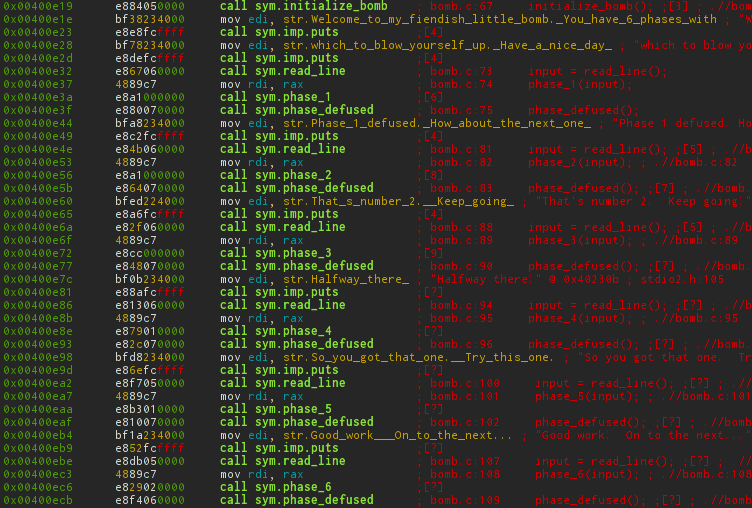
Because Since the output of r2 from the box is just fine, for the sake of clarity I will post assembler listings in the form of pictures.

Please note that the radar supplied us with XREFs (from where control can be transferred) with jump mnemonics. In addition, I substituted a string at the specified address and, most importantly, showed transitions in the block as ascii arrows.
For comparison, output with objdump
0000000000400ee0 :
  400ee0:   48 83 ec 08             sub    rsp,0x8
  400ee4:   be 00 24 40 00          mov    esi,0x402400
  400ee9:   e8 4a 04 00 00          call   401338
  400eee:   85 c0                   test   eax,eax
  400ef0:   74 05                   je     400ef7
  400ef2:   e8 43 05 00 00          call   40143a
  400ef7:   48 83 c4 08             add    rsp,0x8
  400efb:   c3                      ret                    retq
Without even delving into it, it becomes clear that the first line we need is “Border relations with Canada have never been better.” And by itself, when feeding her bomb, she lets us into the second phase.
$ ./bomb
Welcome to my fiendish little bomb. You have 6 phases with
which to blow yourself up. Have a nice day!
Border relations with Canada have never been better.
Phase 1 defused. How about the next one?
Level 2
The second option to output a disassembled function is using absolute addressing / labels. In the example of the second phase, it will look like this:
[0x00400ee0]> pdf @ 0x00400efc
or if the address is not known:
[0x00400ee0]> pdf @ sym.phase_2
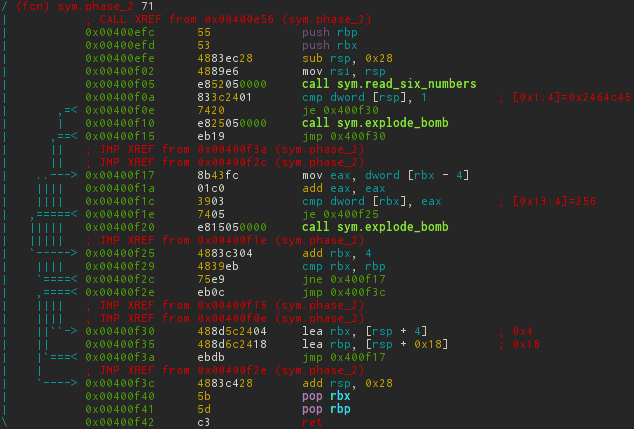
Конечная цель у нас — не взорвать бомбу, т.е. не делать вызовов call sym.explode_bomb, так что от этого и будем отталкиваться. Следовательно, у нас всегда должны срабатывать оба прыжка je.
Первое, что стоит у нас на пути — вызов call sym.read_six_numbers. Соответственно после этого вызова на верху стека должна быть единица. Посмотрим, что происходит в этой функции.
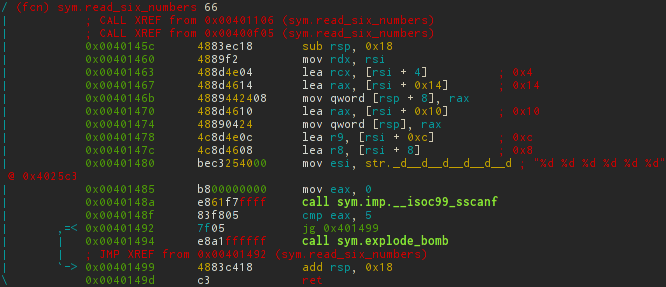
Раньше r2 разбирал файлы на функции основываясь на опкоде ret, что нередко приводило к выводу нескольких функций(например, при наличии системных вызовов exit()). В подобных случаях, когда радар неправильно определяет функции можно сделать это вручную.
[0x00400ee0]> s 0x0040149e # двигаем указатель на опкод после конца
[0x0040149e]> af+ sym.read_six_numbers `?vi $$-sym.read_six_numbers` rsn # Определение функции rsn, начинающейся с метки sym.read_six_numbers до текущего указателя.
By the way, in this example, another command was used as an argument of the first using pair brackets `` .
Nothing interesting happens in the function itself; it takes 6 numbers from a read line and writes them in order to the passed pointer. Then he is convinced that the numbers are greater than 5.
In C, it would look something like this:
void read_six_numbers(char *str, long long *p) {
    if (sscanf(str, "%d %d %d %d %d %d", p, p+1, p+2, p+3, p+4, p+5) <= 5)
        explode_bomb();
}
Back to our phase_2 function . A pointer to the array is passed a pointer to the top of the stack ( mov rsi, rsp ). Therefore, the first number in the line should be - 1.
As you can see there are quite a lot of transitions. An IDA user would likely press the space bar and look at the jump graph. You won’t believe it, but here they are. Like vim, there is visual-mode ( V command ) and it contains the same transition graph, also by V command (or VV right away ). Exit from each mod - q
The output will be such a cute ASCII graph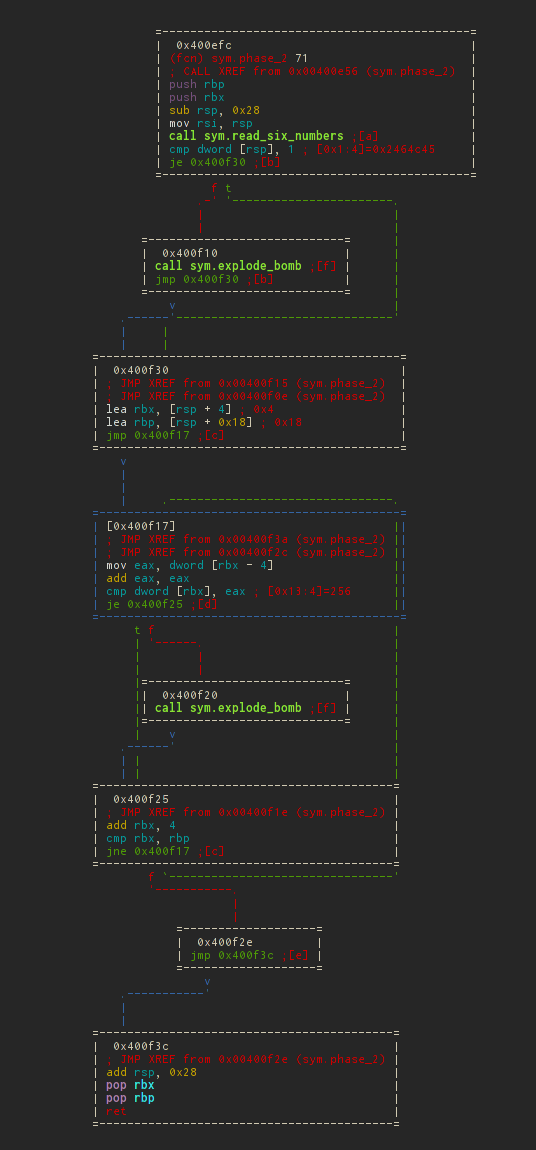
It is displayed perfectly, with a minimum of intersections (compared to previous versions). You can move this miracle with arrows, or vim-like 'hjkl' . If you don’t like the arrangement of the blocks, you can also move them with the Shift + 'hjkl' hotkeys . At the same time, the selected block moves (blue), you can select it Tab / Shift-Tab .
In the first block, a pointer to the second number is written to rbx , and to the end of the array of numbers in rbp . And the control spills over into a cycle in which neighboring numbers are compared in pairs.
mov eax, dword [rbx - 4] ; Положить предыдущее число в eax
add eax, eax             ; Удвоить его
cmp dword [rbx], eax     ; Сравнить с текущим
je 0x400f25              ; Продолжить цикл, если равны
call sym.explode_bomb    ; Взорвать бомбу, если не равны
add rbx, 4               ; Сдвинуть указатель на следующее число
cmp rbx, rbp             ; Проверить, в конце ли мы массива
jne 0x400f17             ; Если нет, то вернутся в начало
jmp 0x400f3c             ; Завершить цикл
It turns out that we need to introduce a sequence of powers of two from 1 to 32. Excellent, but still check that this is what we need.
$ ./bomb
...
Phase 1 defused. How about the next one?
1 2 4 8 16 32
That's number 2.  Keep going!
Level 3
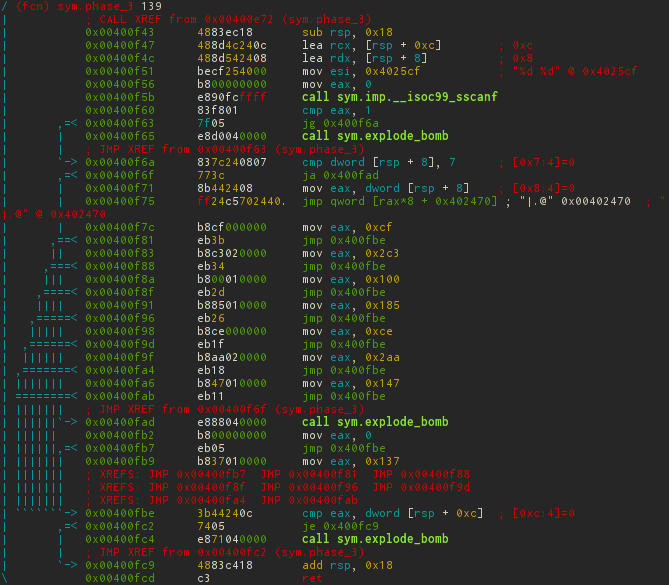
Probably now a person, far from assembler, in epileptic seizures is trying to get on the cross at the edge of the window. In fact, there is nothing to be afraid of, it just looks like the most ordinary switch-case block.
Numbers are read in the same way as in the previous case, only without a function call, and only two. They are stored in [rsp + 8] and [rsp + 0xc] respectively.
Then there are checks that both numbers were read successfully, and also the first argument is no more than 7. Then the switch goes to the address 0x402470 with an offset (entered number) * 8.
It’s not hard to guess that case label addresses are there. In order not to be unfounded, let's see what really lies there. This can be done using px command groups.. In this case, we are interested in 8-byte words ( Q uad-word).
[0x0040149e]> pxQ 72 @ 0x402470
0x00402470 0x0000000000400f7c sym.phase_3+57
0x00402478 0x0000000000400fb9 sym.phase_3+118
0x00402480 0x0000000000400f83 sym.phase_3+64
0x00402488 0x0000000000400f8a sym.phase_3+71
0x00402490 0x0000000000400f91 sym.phase_3+78
0x00402498 0x0000000000400f98 sym.phase_3+85
0x004024a0 0x0000000000400f9f sym.phase_3+92
0x004024a8 0x0000000000400fa6 sym.phase_3+99
Actually, as expected, although not quite consistently. Next is checking our second number with the magic that was recorded in eax during the switch. Since the input in decimal base will have to be converted from hex. You can calculate this using rax2 (an analogue of the calculator) through a shell call, and also directly, through the built-in calculator (hotkey - ? ), Without creating new programs. And in order not to press constantly enter, you can group the teams just like in a bash.
[0x0040149e]> !rax2 0xcf
207
[0x0040149e]> ?vi 0x2c3; ?vi 0x100; ?vi 0x185; ?vi 0xce; ?vi 0x2aa; ?vi 0x147; ?vi 0x137
707
256
389
206
682
327
311
Total possible solutions will be:
- 0 207
- 1,311
- 2 707
- 3,256
- 4 389
- 5 206
- 6,682
- 7 327
And once again make sure, on an arbitrary option, that everything works:
$ ./bomb
...
That's number 2.  Keep going!
4 389
Halfway there!
Level 4
sym.phase_4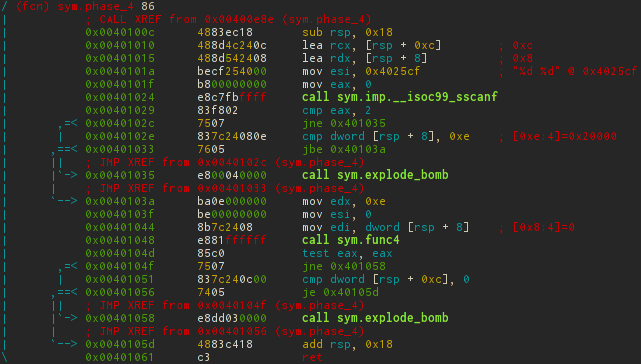
sym.func4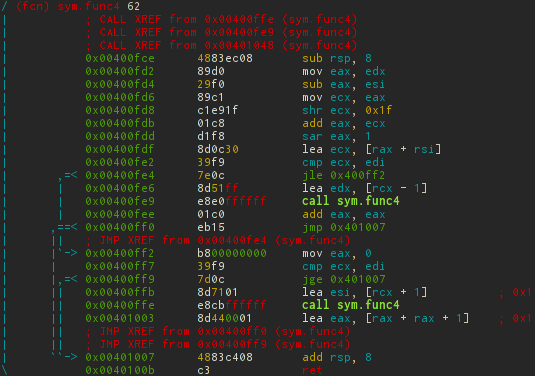
At this level, recursion appears. In addition to the built-in ASCII graphs, it is also possible to obtain graphs in the form of files for dot utilities, and then, for example, convert them to png.
[0x0040149e]> ag sym.func4 > func4.dot
[0x0040149e]> dot -Tpng -o func4.png func4.dot

If you translate all this into C, it will look almost not so scary.
void phase_4(char *str) {
    int x, y;
    if (sscanf(str, "%d %d", &x, &y) != 2 ||
            x > 14 ||
            func4(x, 0, 14) ||
            y != 0)
        explode_bomb();
}
int func4(int x, int y, int z) {
    unsigned diff = (z - y)/2;
    int p = y + diff;
    if (p > x) {
        func4(x, y, p-1);
        return diff * 2;
    } else if (p < x) {
        func4(x, p + 1, z);
        return diff * 2 + 1;
    }
    return 0;
}
The simplest and most obvious solution is that the func4 function returns 0 when it does not go inside the else-if. User input controls only x , and p = 7 on the first call. Accordingly, for x = 7, the function simply returns 0, without recursive calls. The second variable is strictly set to zero. We will verify this.
$ ./bomb in.tmp
...
Halfway there!
7 0
So you got that one.  Try this one.
Level 5
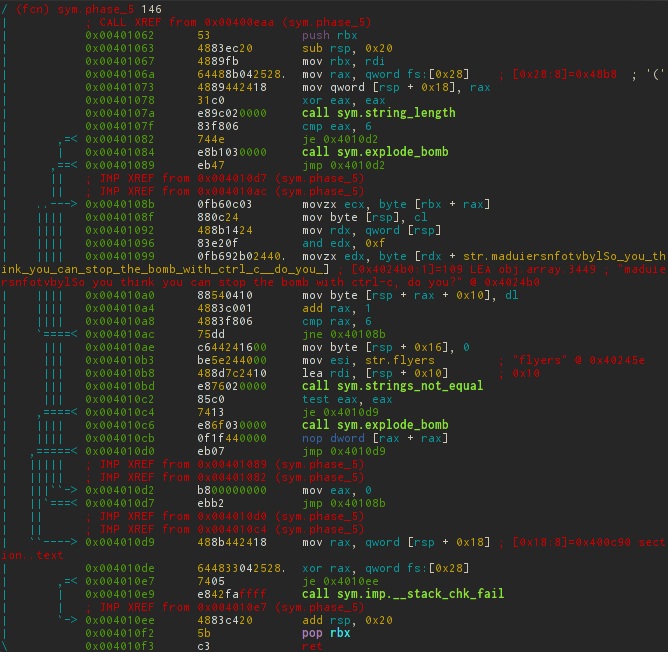
It will be more difficult with this, a lot of code is piled up here.
At 0x00401073 a canary is written to the stack. Similar information about the binary can be obtained using the i command . For example, i ~ canary will return true in this case .
After that, the return value of string_length is compared with 6 and the hard-to-analyze spaghetti code begins. Dealing with this without a debugger is long and difficult, so it will be a sin not to use it. To do this, open the file with the debug flag either at startup:
$ r2 -Ad bomb
or simply rediscovering the file:
[0x0040149e]> ood
The pointer address will automatically change to the first opcode in entry-point, which is already loaded into memory. As usual, set breakpoints and continue execution to them.
[0x7f2960b99d80]> db sym.phase_5 # либо s sym.phase_5; db $$
[0x7f2960b99d80]> dc             # продолжить выполнение до 1 брейкпоинта
Then there are 2 methods of analysis: the first is to use the d / db command block , the second is to switch to Visual-mode. The first method is not so obvious, so let's focus on the second.
As before we pass Visual-mode, and then select the desired debug-layout for the default keyboard bindings debugging p / P .
You can move around the code using n / N - the next / previous function; j / k is the next previous opcode.
And the most interesting: b / F2 - set a breakpoint, s / F7 - a step of 1 opcode, S /F8 - step in 1 opcode without going into a call, F9 - continue until the breakpoint.
That's how it all looks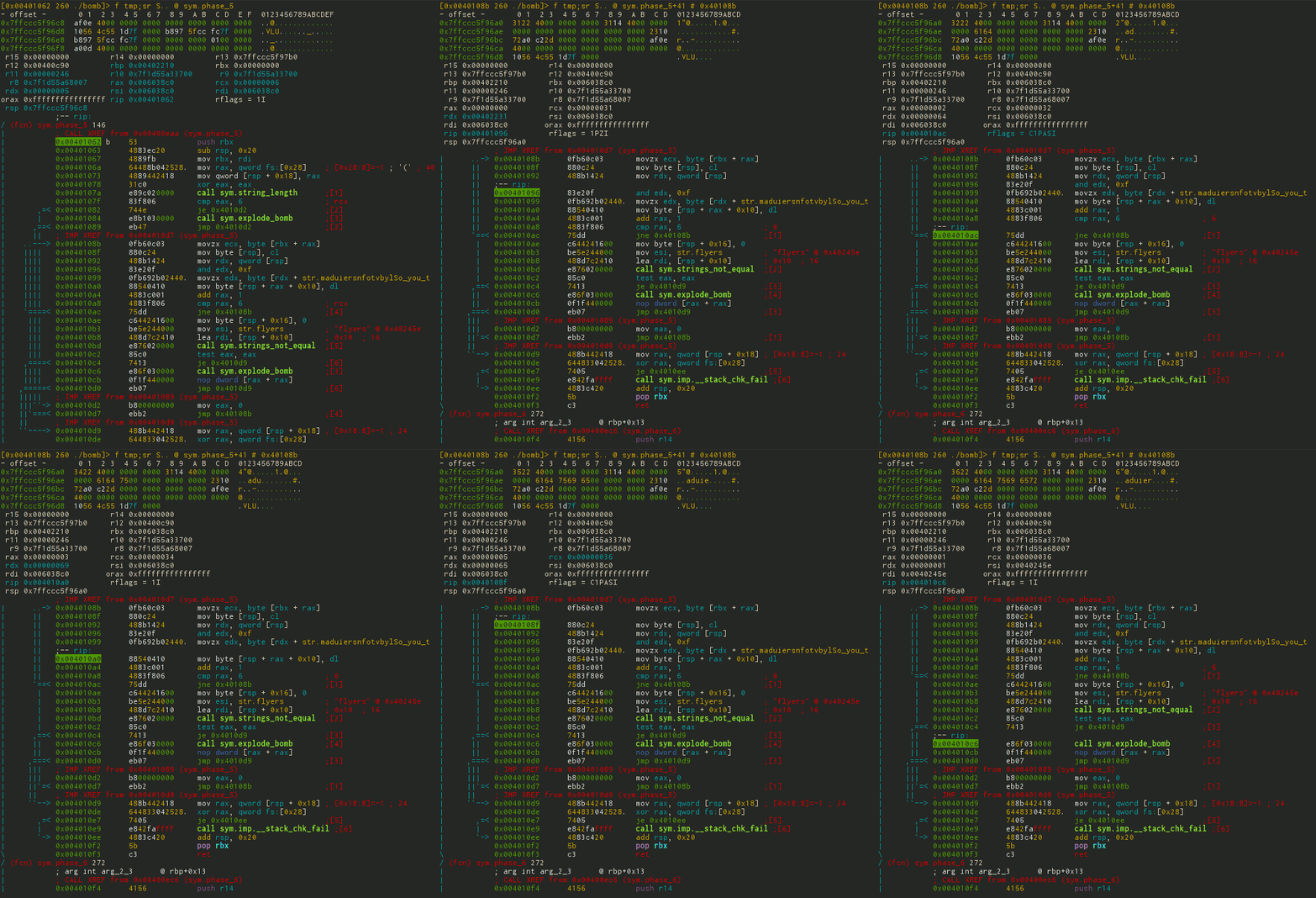
Total feeding the debugger a few lines, it is not difficult to guess what is happening there.
For each character from our string modulo 16, the corresponding character from the string is taken
char *s = "maduiersnfotvbyl"and the resulting string is compared to "flyers". Actually, our task is to find such characters whose indices in str give the desired string.
The flyers line can be obtained uniquely: {s [0x9], s [0xe], s [0xf], s [0x5], s [0x6], s [0x7]}. I think that not everyone stores an ASCII table in his head, so you can again turn to the rax2 utility for help. With the -s switch, it converts from hex to string. Because characters are taken modulo 16, then for aesthetics you can choose the printed values.
$ rax2 -s 49 4e 4f 45 46 47
INOEFG
$ ./bomb
...
So you got that one.  Try this one.
INOEFG
Good work!  On to the next...
Digression about the line
I thought for a very long time and still think that some meaningful word might come out there. So if someone suddenly finds I will be extremely grateful :)
The last one
Since the article came out too large, I will not consider all phases. In particular, I will omit phase 6, because there is a lot of painstaking understanding without the direct involvement of the framework. Let it remain the most curious homework.
It’s not so easy to get into the secret phase, so we’ll simplify our life by patching the binary. We will have to open the file again, giving write permissions with the -w flag , or rediscover using oo + without leaving r2.
$ r2 -Aw bomb
 -- Did you ever ordered a pizza using radare2?
[0x00400c90]> s 0x00400ec6 # call sym.phase_6
[0x00400ec6]> wa call sym.secret_phase # запись нужных опкодов
[0x00400ec6]> pdf @ sym.secret_phase; pdf @ sym.fun7
secret_phase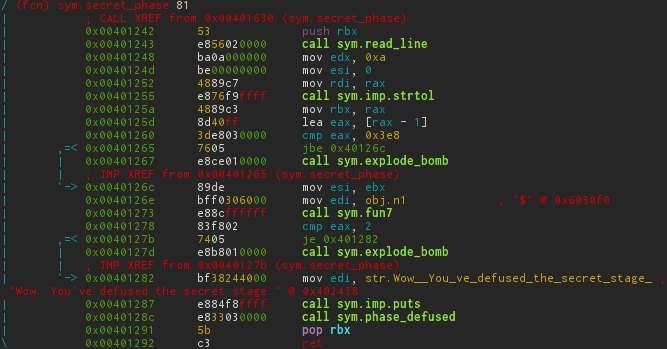
fun7
Once again, a recursive function appears, and this time it is not so easy to get around it, because without recursive calls, the desired value is as simple as it was the last time, not getting it. An ASCII graph can simplify life again.

The analysis gives something like this in C:
void secret_phase() {
    long num = strtol(read_line()) - 1;
    if (num > 0x3e8 ||
            fun7((long*)(0x6030f0), num) != 2)
        explode_bomb();
    puts("Wow! You've defused the secret stage!");
    phase_defused();
}
int fun7(long *array, int num) {
    if (array == 0)
        return -1;
    if (*array <= num) {
        if (*array == num)
            return 0;                        // 1
        else {
            return 2 * fun7(array + 1, num); // 2
        }
    } else {
        return 2 * fun7(array + 2, num) + 1; // 3
    }
}
So, to get exactly two at the output of fun7 , we first need to call ret on line 2 , then on 3 and finally on 1 . Only one mystery remains - what is stored at 0x6030f0 .
480 bytes
[0x00401204]> px 480 @ 0x6030f0
- offset -   0 1  2 3  4 5  6 7  8 9  A B  C D  E F  0123456789ABCDEF
0x006030f0  2400 0000 0000 0000 1031 6000 0000 0000  $........1`.....
0x00603100  3031 6000 0000 0000 0000 0000 0000 0000  01`.............
0x00603110  0800 0000 0000 0000 9031 6000 0000 0000  .........1`.....
0x00603120  5031 6000 0000 0000 0000 0000 0000 0000  P1`.............
0x00603130  3200 0000 0000 0000 7031 6000 0000 0000  2.......p1`.....
0x00603140  b031 6000 0000 0000 0000 0000 0000 0000  .1`.............
0x00603150  1600 0000 0000 0000 7032 6000 0000 0000  ........p2`.....
0x00603160  3032 6000 0000 0000 0000 0000 0000 0000  02`.............
0x00603170  2d00 0000 0000 0000 d031 6000 0000 0000  -........1`.....
0x00603180  9032 6000 0000 0000 0000 0000 0000 0000  .2`.............
0x00603190  0600 0000 0000 0000 f031 6000 0000 0000  .........1`.....
0x006031a0  5032 6000 0000 0000 0000 0000 0000 0000  P2`.............
0x006031b0  6b00 0000 0000 0000 1032 6000 0000 0000  k........2`.....
0x006031c0  b032 6000 0000 0000 0000 0000 0000 0000  .2`.............
0x006031d0  2800 0000 0000 0000 0000 0000 0000 0000  (...............
0x006031e0  0000 0000 0000 0000 0000 0000 0000 0000  ................
0x006031f0  0100 0000 0000 0000 0000 0000 0000 0000  ................
0x00603200  0000 0000 0000 0000 0000 0000 0000 0000  ................
0x00603210  6300 0000 0000 0000 0000 0000 0000 0000  c...............
0x00603220  0000 0000 0000 0000 0000 0000 0000 0000  ................
0x00603230  2300 0000 0000 0000 0000 0000 0000 0000  #...............
0x00603240  0000 0000 0000 0000 0000 0000 0000 0000  ................
0x00603250  0700 0000 0000 0000 0000 0000 0000 0000  ................
0x00603260  0000 0000 0000 0000 0000 0000 0000 0000  ................
0x00603270  1400 0000 0000 0000 0000 0000 0000 0000  ................
0x00603280  0000 0000 0000 0000 0000 0000 0000 0000  ................
0x00603290  2f00 0000 0000 0000 0000 0000 0000 0000  /...............
0x006032a0  0000 0000 0000 0000 0000 0000 0000 0000  ................
0x006032b0  e903 0000 0000 0000 0000 0000 0000 0000  ................
0x006032c0  0000 0000 0000 0000 0000 0000 0000 0000  ................
Here 8-byte variables are stored in blocks of 4. The first is used to compare with our number; the second and third are pointers to the following characters for comparison; the fourth is just padding, not used.
Now you can expand all the conditions and find the variable to be found.
- 2 ret : num <0x24
- 3 ret : num> 0x08
- 1 ret : num == 0x16
$ ./bombSec in.tmp
...
Good work!  On to the next...
22
Wow! You've defused the secret stage!
Congratulations! You've defused the bomb!
Ehu, we did it!









