December 16, 2015 at 11:24
We study the graph-oriented DBMS Neo4j on the example of the lexical database Wordnet
- Tutorial
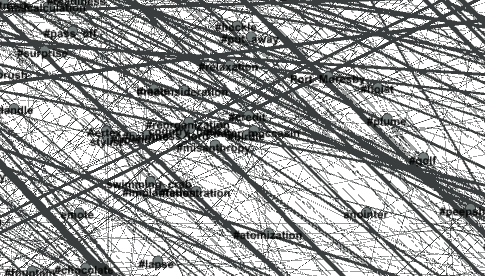 Neo4j DBMS is a NoSQL database focused on graph storage. The highlight of the product is the declarative query language Cypher.
 Cypher borrowed keywords such as WHERE, ORDER BY from SQL; syntax from such different languages as Python, Haskell, SPARQL; and as a result, a language appeared that allows you to make graph queries in a visual form like ASCII art . For example, I would present the title of this article as a graph (Neo4j) - [learning] -> (Wordnet) . And this is almost a ready-made database query!
To study a graph-oriented database, you need some kind of graph. This can be a social network, a Wikipedia dump, or a railroad map. We will go the simple way and use the huge public graph of the Wordnet lexical database . Linguists from Princeton did a tremendous job of organizing the vocabulary of the English language, and enthusiasts translated the database into many languages, including Russian. For example, in this database there are over 80 thousand nouns connected by lexical relations, such as “synonym”, “part of the larger”, “material for”, etc. This database is a natural graph, and we import it into Neo4j.
Install Neo4j
The installation process for different operating systems is described on the site . All of the software described here is platform independent, but for definiteness, all instructions will be for Debian / Ubuntu.
1. Add repository
wget -O - https://debian.neo4j.org/neotechnology.gpg.key | sudo apt-key add -
echo 'deb http://debian.neo4j.org/repo stable/' >/tmp/neo4j.list
sudo mv /tmp/neo4j.list /etc/apt/sources.list.d
sudo apt-get update
2. Install Neo4j (community edition)
sudo apt-get install neo4j
This command installs the software in your home directory and starts the service, which will work on behalf of the neo4j user.
3. Allow remote access
If you installed Neo4j on your computer, skip this step. If you need access to the server from other computers on the local network, edit the file /var/lib/neo4j/conf/neo4j-server.properties
To access from any computer on the local network, set the parameters:
org.neo4j.server.webserver.address=0.0.0.0
dbms.security.auth_enabled=false
By default, port 7474 is used; you can change the port by adding a line to the same file:
org.neo4j.server.webserver.port=7474
Please note that we have not configured the DBMS security! Read the instructions in more detail .
You can verify the installation by typing the address and port of the server in the browser. Neo4j implements a luxurious graphical console through a browser. REST requests to the database from the client software, which we install in the next step, go through the same port.
Client Installation (Python)
In order to import the Wordnet database into Neo4j, we will use a Python script.
1. First you need to install the py2neo library
pip install py2neo
2. Download my script from github
mkdir habrawordnet2neo4j
cd habrawordnet2neo4j
git clone https://github.com/sergey-zarealye-com/wordnet2neo4j.git
The script hardly claims to be industrial-quality code, but if you want to experiment with Neo4j from Python, then look at the code, this will help you get started programming faster.
Getting a Wordnet Lexical Database
On the Download page of the Wordnet project, it is proposed to download the database along with the software for viewing it. But we want to use Neo4j for viewing! Therefore, it is enough to download only data files:
- The latest version of the English Wordnet database is available at the link
- Previous versions (e.g. for compatibility with ImageNet)
- I suggest downloading the Russian version from wordnet.ru
Unzip the files to an accessible location.
Import data into Neo4j
The lexical data in Wordnet lies in files in parts of speech. For example, nouns are in the data.noun file; verbs in data.verb; and with other parts of speech I have not tried.
1. Import of nouns
To import nouns, go to the directory where my scripts were placed (we just called it habrawordnet2neo4j) and run the command in the console:
python wordnet2neo4j.py -i rwn3/data.noun --neo4j http://127.0.0.1:7474 --nodelabel Ruswordnet --reltype Pointer --encoding cp1251 --limit 1000
Let's analyze the parameters in more detail.
-i path to Wordnet data file
--neo4j URL of the Neo4j database server
--nodelabel Label nodes matching Wordnet words
		in the created graph (in Neo4j the graph nodes supply
		text labels it's just an identifier)
--reltype Type of graph edges matching Wordnet pointers
		(in Neo4j, the edges of the graph can be of type; it's just
		identifier)
--encoding The encoding of the data file; Russian database recorded
		encoded cp1251; for English files this
		parameter does not need to be specified
--limit The maximum number of processed lines of the file;
		the fact is that my script is quite slow,
		and to try, you can limit the amount of imported
		data, for example, the first 1000 lines of a file; for import
		full file, this parameter does not need to be specified,
		and get ready to wait an hour and a half.
2. Import of verbs
To import verbs, run the command in the console:
python wordnet2neo4j.py -i rwn3/data.verb --neo4j http://127.0.0.1:7474 --nodelabel Ruswordnet --reltype Pointer --encoding cp1251 --limit 1000
Importing verbs is optional, although some are related to nouns, and this is interesting to learn.
3. Verify that the data is imported.
To do this, open the Neo4j console in the browser (enter the address and port of the DBMS server) and enter the following query:
MATCH (node)-[relation]-() RETURN node, relation LIMIT 100
If you received a graph image on the screen, then everything went well.
We perform simple queries
All further actions will be performed in the browser, in the Neo4j console. I will assume that you used Ruswordnet as the node labels, and Pointer as the edge type (as indicated in the previous section). And that you imported the entire Russian Wordnet database .
1. Hello World
As indicated on the website of the Russian Wordnet database , about half of the semantic units containing the most common words are translated. Therefore, we will try to find in the database the first thing that came to mind:
MATCH (n:Ruswordnet {name: "выкапывание_трупа"}) RETURN n
Fulfill the request, make sure that this concept is found, which means, according to Russian linguists, it is one of the most commonly used. Let's look at this simple query.
The MATCH keyword means roughly the same as SELECT in SQL. Roughly speaking, "find the elements of the graph that are suitable for the template."
Parentheses denote the nodes of the graph. The pattern (n: Ruswordnet) would indicate that we want to find all nodes labeled “Ruswordnet”. Here n is an identifier, we can say "variable".
Nodes of the graph (and edges too) can be supplied with arbitrary attributes. To find a specific node, we specified in the request a condition for the attributes in a format similar to JSON: {name: "digging out a corpse"} . So the phrase
MATCH (n:Ruswordnet {name: "выкапывание_трупа"})
means that all nodes with the label Ruswordnet and the attribute name equal to the concept indicated there will be selected from the entire graph.
The RETURN keyword tells us which variables interest us. In this case, we just wanted to see the node (s) that meet the given conditions, so we write RETURN n . It is important to understand that n is a collection of nodes that satisfy the query. To verify this, simply replace the concept in the query:
MATCH (n:Ruswordnet {name: "лев"}) RETURN n
If you imported the entire Wordnet database, you will see six nodes of the “lion” concepts. Let's see why.
2. Variables = collections
We execute the following request:
match (n:Ruswordnet {name: "лев"})--(m) return n,m
Here we have set a more complex search template. We want to find all nodes (n) corresponding to the concept of “lion”, as well as all nodes (m) associated with lions. The connection, i.e., the edge of the graph is denoted by two hyphens. You can explicitly indicate the direction of interest to us with the symbol -> (this is what I called ASCII art).

If you don’t see the names of semantic units, click on the Ruswordnet button (23) in the upper left corner of the graph, and in the status bar at the bottom of the console, select “name” in the Caption field. So it will be clearer.
Now we realized that the lion is not only the Bulgarian currency (bulgarian_money), the penny for which is stotinka, but also the big cat, and the constellation, astrological sign, and something related to pride.
3. Connect the ribs
In a Wordnet database, edges are called pointers, and a large number of linguistic types of pointers are used. They are indicated by symbols, some of which I give in the table:
| Symbol | English name of linguistic relationship | Linguistic attitude |
|---|---|---|
| ! | Anonym | Antonym |
| @ | Hypernym | Generalization |
| @i | Instance Hypernym | Generalization instance |
| ~ | Hyponym | Clarification |
| ~ i | Instance Hyponym | Refinement Instance |
| #m | Member holonym | The concept that includes this concept |
| #s | Substance holonym | The substance of which the item is composed |
| #p | Part holonym | Subject, which includes as part of this subject |
| % m | Member meronym | Part of a more general concept |
| % s | Substance meronym | What substance is the subject of? |
| % p | Part meronym | Item Part |
| = | Attribute | Attribute |
| + | Derivationally related form | Derivative form |
During the import process, we assigned the pointer_symbol attribute to the edges of the graph, and now we can make queries taking into account the attributes of the edges. Let's see what a generalization (hypernum) is:
MATCH (n:Ruswordnet {name: "лев"})-[p:Pointer {pointer_symbol: "@"}]->(m)
RETURN n,m
Square brackets indicate the specifications of the edges. In this query, we want to find edges of type Pointer whose attribute pointer_symbol is “@”, that is, a generic character. By the way, the refinement symbol “~” is the opposite of generalization.
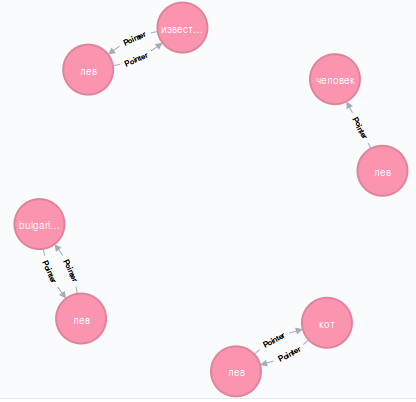
Now it’s clear that the generalization for a lion is a cat, as well as a person. Of course, we are talking about different semantic units: the lion (cat) is one node of the graph, and the lion (man) is another node corresponding to the zodiac sign. Leo (fame) is the result of poor translation into Russian; I mean the lion (celebrity), i.e., celebrity, secular lion.
Let's see what part holonym is:
MATCH (n:Ruswordnet {name: "лев"})-[p:Pointer {pointer_symbol: "#p"}]->(m)
RETURN n,m
And now it’s clear: the lion enters the zodiac as an integral part, which means the zodiac is part holonym for the lion.
It can be seen from the table that Wordnet contains many interesting relationships, for example, what substances are made of. Unfortunately, there is no information that the lion is made from meat, so we will pose the question differently: find such nodes of the graph that are related by the relation “from what substance is made”.
MATCH (n)-[p:Pointer {pointer_symbol: "#s"}]->(m)
RETURN n,m LIMIT 10
In this query, we do not impose any conditions on nodes (n) and (m) . We just want to be connected by edges with the attribute "#s". Notice the LIMIT keyword that we know from SQL. If it were not here, the server would return a lot of results to us, and it would be bad for our browser.
As a result of the request, we found out that cigarettes consist of marijuana, and cowhide soup consists of cowhide.
4. Chains of arbitrary length
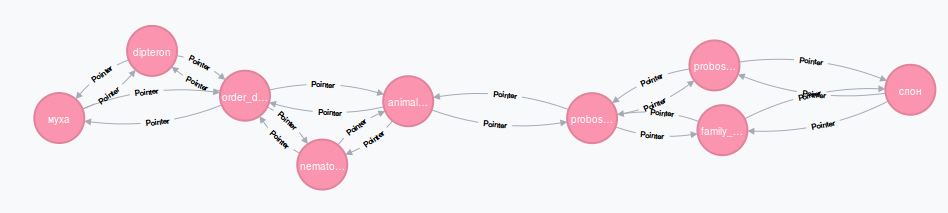
In childhood, everyone played the following game: turn a fly into an elephant. To do this, it was necessary to change one letter in a word, until the word MUHA turned into the word ELEPHANT. Let's find out in the lexical column whether LEO and OVCA are related.
MATCH (n:Ruswordnet {name: "лев"})-[p:Pointer*1..3]-(m:Ruswordnet {name: "овца"})
RETURN n,m,p
The construction [p: Pointer * 1..3] says that it is required to find a chain of ribs of type Pointer from one to three in length connecting the “lion” node with the “sheep” node.

This differs from the classic children's game, but it’s also interesting: SHEEP - PROSTAK - MAN - LION ... it sounds proudly. By the way, you can try to find a connection between the fly and the elephant, only slightly increase the maximum length of the chain. I used the value 6. By the way, do not try to immediately put 100 - the search process is likely to fail because the number of options for enumerating paths in the graph will be too large. So, this is how the elephant and the fly are connected lexically:
I think at this stage you understood a lot about the Neo4j database, and you are able to independently discover a lot of interesting things in the Wordnet database, and you can use Neo4j in your projects. We use a bunch of Neo4j with Wordnet in the movie archive search system. If you want to do research in the field of machine learning, I invite you to an internship or a permanent job at NIKFI - Scientific and Research Film and Photo Institute.