December 15, 2015 at 17:15
Testing the theory of six handshakes
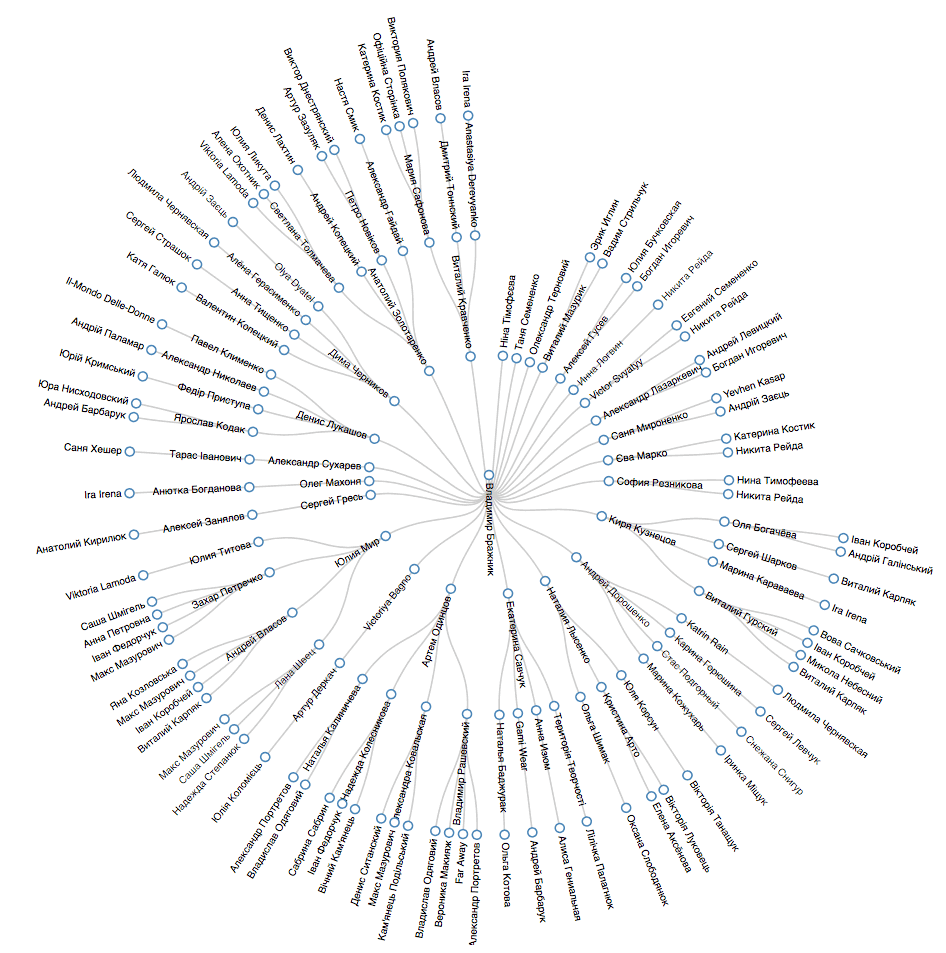
I want to talk about my experiment to test the Theory of Six Handshakes . I was inspired to write this material by the article “Analysis of VK VK's friendly relations using Python” (to avoid repetition, I will refer to it in the future). Since in general I set the task differently, and the methods used are also different, I decided that it might be interesting.
The statement of the problem: to visualize all the connections between two users within the same social network. In this connection should not be duplicated, for example, if Vanya knows Petya through Olya, then Olya is not involved in further iterations to find common friends. To practice the API, I chose Vkontakte.
Based on the limitations of the API and the functionality of the methods, it was decided that the optimal number of “handshakes” from the position of the time of receipt of information would be 3. So, we will still check the “Three Handshake Theory”, for now. Thus, with an average number of friends of 200, we get a sample of 8 million people. For example, on the scale of Ukraine, I almost always found connections. Structurally, the task can be divided into the following stages:
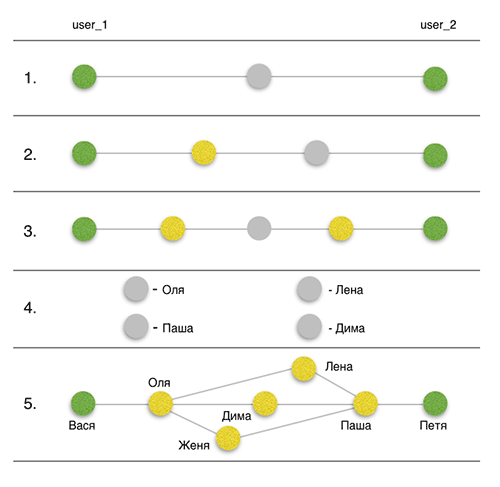
- Search for common friends between source user 1 (user_1) and source user 2 (user_2).
- Search for mutual friends between user_2 and friends user_1.
- Search for mutual friends between friends user_2 and friends user_1.
- Getting detailed information about the found relationships.
- Visualization.
So what we need:
import requests
import time
from threading import Thread
from tokens import *
Requests is a common HTTP library for Python, described in the article "Library to simplify HTTP requests . "
Time is a basic module, the name of which speaks for itself. We will use to introduce time delays.
Threading - the basic module for working with threads. It is well described in the article “Learning to write multi-threaded and multi-process applications in Python” .
Tokens - the tokens.py file will contain OAuth tokens for authorization in the API. How to get a token is described in the original article , as well as on the Vkontakte API page .
Before proceeding to the first stage, I will briefly dwell on the functionality of the API and some limitations:
- To access the API method, a POST or GET request is used.
- The list of methods used by me: users.get , friends.get , friends.getMutual , execute .
- The execute method allows you to run up to 25 methods in one request.
- No more than 3 requests can be made per second (using one token).
- Limiting parameter target_uids method friends.getMutual - 300. It will focus in more detail below.
Thus, globally, the scheme boils down to sending GET requests to the Vkontakte server and analyzing responses from the server in json format. At the same time, to optimize the time, we use the execute method and multithreading.
A remark to the original article that inspired me. The author STLEON uses a method friends.getMutualin one-to-one mode using the target_uid parameter. I believe this was due to the absence of the target_uids parameter in a previous version of the API. I use this method in a “one to many” mode, which saves a lot of time. The target_uids parameter has a limit on the length of the string, about which I did not find anything in the documentation. It was experimentally established that the maximum length is about 310-330 UID, depending on the length of each identifier. I have rounded this figure to 300.
All of the above will be summarized by the declaration of the following constants:
f_1_max = 300
f_2_max = 24
t = 0.35
Why f_2_max = 24, and not 25, will be clear later.
Step 1. Finding mutual friends between user_1 and user_2
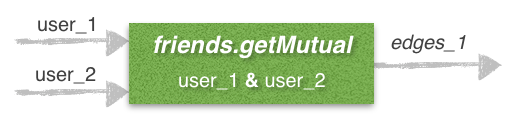
We will write a function with which we will communicate with the Vkontakte server using a GET request:
def vk (method, parameters, token):
	return requests.get('https://api.vk.com/method/%s?%s&access_token=%s' % (method, '&'.join(parameters), token)).json()
This function has three arguments:
- method - the name of the method that we access through the API.
- parameters - parameters of this method (can be found in the description of each method).
- token - a string that authorizes you on the server. I repeat that obtaining a token is described in detail here and here .
Further, we will use sets to save all the information collected. We initialize the sets for each of the three “handshakes”.
edges_1, edges_2, edges_3 = set(), set(), set()
To fulfill the condition that the connections are not duplicated and Olya does not appear as a common friend of Petya and Vani in all three “handshakes”, but only in the first, it is necessary to introduce filters. Immediately add to the filter the first “handshake” of the original users.
filter_1, filter_2 = set(), set()
filter_1.update([user_1, user_2])
Find friends user_1 by calling friends.get . After completing the call to the API method, we introduce the necessary time delay t = 0.35. Note that one of the parameters is the API version (v = 5.4 in my case). It is very important to indicate it everywhere, because inconsistencies may appear. The parameters of the order and count method are optional.
friends_1 = set(vk('friends.get', ['user_id=%s' % user_1, 'order=hints', 'count=900', 'v=5.4'], token_1)['response']['items'])
time.sleep(t)
Next, we go directly to finding common friends between user_1 and user_2 by calling the friends.getMutual method .
mutual_friends = vk('friends.getMutual', ['source_uid=%s' % user_1, 'order=hints', 'target_uid=%s' % user_2, 'v=5.4'], token_1)['response']
time.sleep(t)
And the last point of the first stage is saving information to the set edges_1, updating filtr_1 and deleting found common friends from the list of friends user_1 to avoid repetitions in the future.
for user in mutual_friends:
	edges_1.update([(user_1, user), (user, user_2)])
	friends_1.remove(user)
	filter_1.update([user])
Step 2. Finding mutual friends between user_2 and friends user_1 (friends_1)
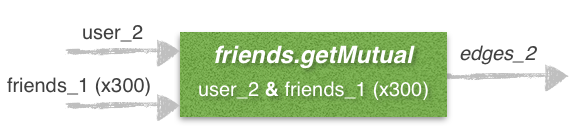
Globally, the second stage repeats the first, the whole difference is that instead of looking for common friends in the one-to-one mode, we use the one-to-many mode, which requires several extra lines of code.
We initialize the list into which we will save the friends we’ve got, as well as some variables that we will need in the intermediate calculations.
user_1_mutual_friends, temp_users, j = [], [], 0
Further, the counting portion (not the right word) of user_1 friends UID 300, we in turn sends a request to the server about mutual friends between user_2 UID and a portion of which is recorded in the parameter target_uids method friends.getMutual .
for i, friend in enumerate(friends_1):
		temp_users += [friend]
		j += 1
		if j == f_1_max:
			user_1_mutual_friends += vk('friends.getMutual', ['source_uid=%s' % user_2, 'order=hints', 'target_uids=%s' % str(temp_users)[1:-1], 'v=5.4'], token_1)['response']
			temp_users, j = [], 0
			time.sleep(t)
		if i == len(friends_1) - 1 and len(friends_1) % f_1_max != 0:
			user_1_mutual_friends += vk('friends.getMutual', ['source_uid=%s' % user_2, 'order=hints', 'target_uids=%s' % str(temp_users)[1:-1], 'v=5.4'], token_1)['response']
			time.sleep(t)
We save the received information in the set edges_2 and update the information in the filter, as it was in the previous step. There may be exceptions, for example, if the UID has closed access to shared friends or the user’s page has been deleted, so we use the try-except construct .
for friend in user_1_mutual_friends:
	if friend['id'] != user_2 and friend['id'] not in filter_1:
		try:
			if friend['common_count'] > 0:
				for common_friend in friend['common_friends']:
					if common_friend != user_1 and common_friend not in filter_1:
						edges_2.update([(user_1, friend['id']), (friend['id'], common_friend), (common_friend, user_2)])
						friends_1.remove(friend['id'])
						filter_2.update([friend['id'], common_friend])
		except:
			continue
Step 3. Search for mutual friends between friends user_2 and friends user_1
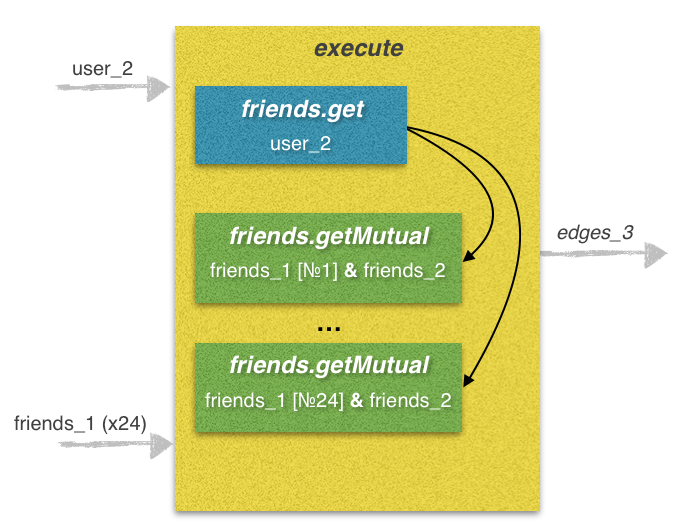
This stage is the most time-consuming, since there are a lot of requests to send. This is where it is impossible to do without using the execute method. From practice, I will say that without the use of multithreading, the time to complete this stage according to this algorithm is 50 - 120 seconds, and in some cases even more. By using multiple threads, it is possible to reduce the time before executing a single execute request, which takes 5 to 12 seconds to process.
We declare filter_3 combining the filter_1 and filter_2 sets. Convert a lot of friends user_1 (friends_1) to a list.
filter_3 = filter_1.union(filter_2)
friends_1 = list(friends_1)
This will be followed by a monstrous block of code in which we declare a function to search for mutual friends between friends user_1 and friends user_2 and save information to the set edges_3. Here, again, the whole algorithm is the same as in the previous stages, only the many-to-many principle is used, which complicates the code even more, especially in my implementation it is clearly redundant, so you have something to work on. Below I will provide some explanations for this multibit.
def get_edges_3 (friends_1, token):
	prefix_code = 'code=var friends = API.friends.get({"v": "5.4", "user_id":"%s", "count":"500", "order": "hints"}).items; ' % user_2
	lines, j, k = [], 0, -1
	for i, friend in enumerate(friends_1):
		lines += ['API.friends.getMutual({"v": "5.4", "source_uid": "%s", "count":"500", "target_uids": friends})' % friend] # Generating string for 'execute' request.
		j += 1
		if j == f_2_max:
			code = prefix_code + 'return [' + ','.join(str(x) for x in lines) + '];'
			response = vk('execute', [code, 'v=5.4'], token_1)
			for friends in response['response']:
				k += 1
				if len(edges_3) < max_edges_3:
					try:
						for one_friend in friends:
							if one_friend['common_count'] > 0:
								for common_friend in one_friend['common_friends']:
									if common_friend not in filter_3 and one_friend['id'] not in filter_3:
										edges_3.update([(user_1, friends_1[k]), (friends_1[k], common_friend), (common_friend, one_friend['id']), (one_friend['id'], user_2)])
					except:
						continue
			lines, j = [], 0
			time.sleep(t)
		if i == len(friends_1) - 1 and len(friends_1) % f_2_max != 0 :
			code = prefix_code + 'return [' + ','.join(str(x) for x in lines) + '];'
			response = vk('execute', [code, 'v=5.4'], token_1)
			for friends in response['response']:
				k += 1
				if len(edges_3) < max_edges_3:
					try:
						for one_friend in friends:
							if one_friend['common_count'] > 0:
								for common_friend in one_friend['common_friends']:
									if common_friend not in filter_3 and one_friend['id'] not in filter_3:
										edges_3.update([(user_1, friends_1[k]), (friends_1[k], common_friend), (common_friend, one_friend['id']), (one_friend['id'], user_2)])
					except:
						continue
			time.sleep(t)
The sum of the prefix_code and lines lines represents the code in the VKScript format and is the only parameter for the execute method . This script contains 25 calls to API methods.
prefix_code - part of the line containing call No. 1 to the friends.get method . Here we get the list of friends user_2 and assign it to the friends variable.
lines - the second part of the line containing calls No. 2-25 to the friends.getMutual method . Here we get a list of mutual friends between each of the 24 friends of user_1 and the list of friends of user_2. In the loop, we add the prefix_code and 24 lines of lines, thus obtaining the line code, which we use as a parameter to the execute method .
I will give an example using several threads, but I will not dwell on it in detail. All information can be found in the article "Learning to write multi-threaded and multi-process applications in Python . "
t1 = Thread(target=get_edges_3, args=(friends_1[ : len(friends_1) * 1/3], token_1))
t2 = Thread(target=get_edges_3, args=(friends_1[len(friends_1) * 1/3 : len(friends_1) * 2/3], token_2))
t3 = Thread(target=get_edges_3, args=(friends_1[len(friends_1) * 2/3 : ], token_3))
t1.start()
t2.start()
t3.start()
t1.join()
t2.join()
t3.join()
Stage 4. Obtaining detailed information about the found relationships
Now we need to add all the edges of our still-unfinished graph of friends and extract a list of vertices from them. Further, according to the template described above, using the users.get method, in portions of 300 UID, we send requests for data on the user's last name and first name. At the output we get a list, in each cell of which there will be a UID and a dictionary with information about this UID. We will use this data in conjunction with many edges for visualization.
edges = list(edges_1) + list(edges_2) + list(edges_3)
	nodes = []
	for edge in edges:
		nodes += [edge[0], edge[1]]
	nodes = list(set(nodes))
	nodes_info, temp_nodes, j = [], [], 0
	for i, node in enumerate(nodes):
		temp_nodes += [node]
		j += 1
		if j == f_1_max:
			nodes_info += vk('users.get', ['user_ids=%s' % str(temp_nodes)[1:-1], 'fields=first_name, last_name', 'v=5.4'], token_1)['response']
			temp_nodes, j = [], 0
			time.sleep(t)
		if i == len(nodes) - 1 and len(nodes) % f_1_max != 0:
			nodes_info += vk('users.get', ['user_ids=%s' % str(temp_nodes)[1:-1], 'fields=first_name, last_name', 'v=5.4'], token_1)['response']
			time.sleep(t)
	for i, node in enumerate(nodes_info):
		try:
			nodes[i] = (nodes[i], {'first_name': node['first_name'], 'last_name': node['last_name']})
		except:
			continue
Stage 5. Visualization
I will not dwell on the technical implementation of this stage. I will only briefly describe my experience.
As in the original article, I tried using the networkx library to build the graph. I changed the diameter and color of the vertices depending on the gender or the number of connections, tried many visualization methods that are available in this library, but I did not like the result. An erratic graph was not informative with an average and a large number of edges and vertices. Information was lost.
I came to the conclusion that some kind of interactive solution is needed. The first thing I found was the D3.js library. But here, in the format of a regular graph, despite the interactivity, the result was unsatisfactory. Then, in the same library, an example of the tree structure “Radial Reingold – Tilford Tree” was found , which seemed to me suitable. With this construction, user_1 is in the center, and user_2 is on the edge of each branch of the tree.
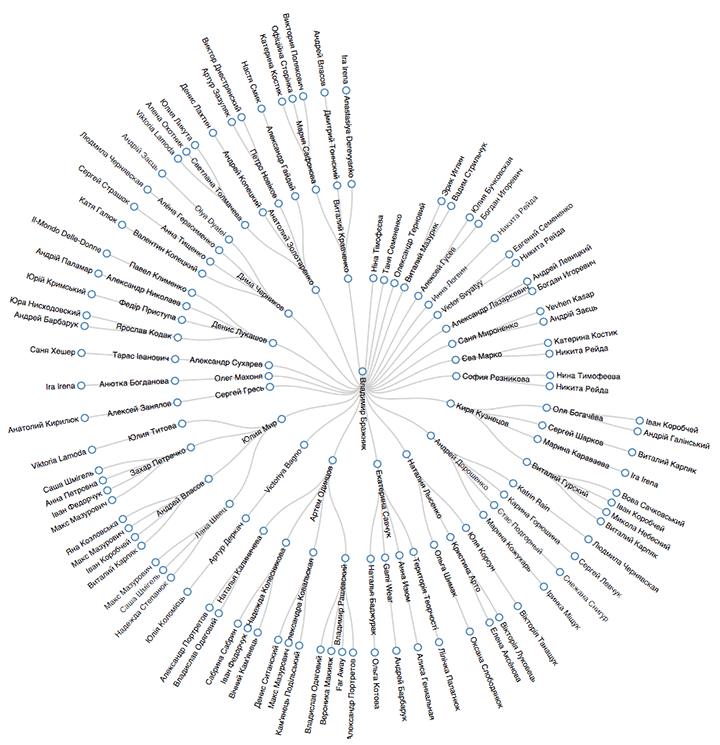
I modeled the whole bunch using the CherryPy web framework and I was satisfied with the result, although I still had to introduce restrictions on the data displayed (depending on the type and number of links found). I intentionally omitted the preparation of data for visualization, since this procedure is not of interest and differs depending on the method chosen. My version of the code is available on the GitHub repository, which also describes the preparation of data for use with the D3.js library using the example of the “Radial Reingold – Tilford Tree” template .
It would also be interesting to display the relationships between the friends list in this way (see the figure below), so you can experiment. This example is also taken from D3.js and it is called D3 Dependencies .
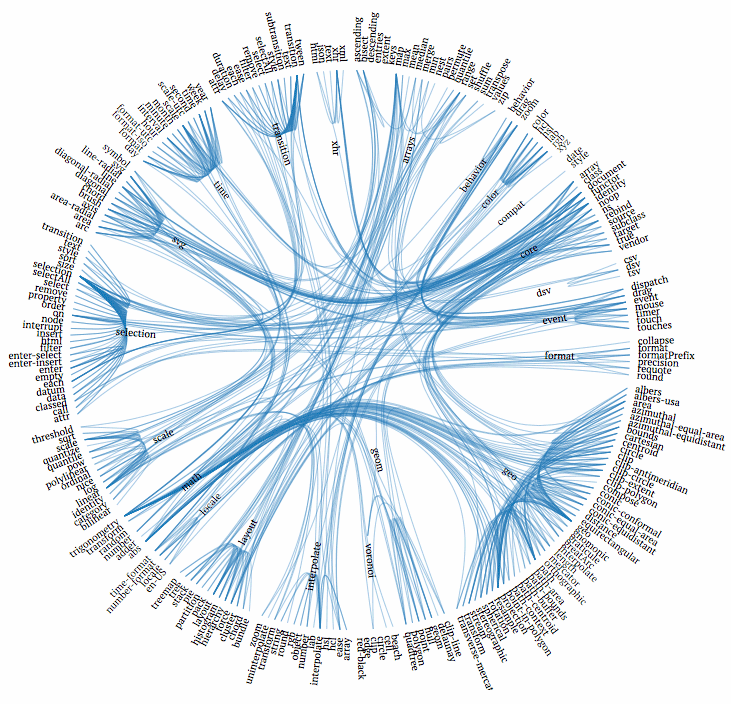
As for the verification of the theory, on a Ukrainian scale, the scheme with three handshakes works in 90% of cases. Exceptions are users with a very small number of friends.
Thanks for attention.