 December 13, 2015 at 22:00
Audio and video in the Tox messenger
While some people are thinking about regulating instant messengers, other people are developing distributed instant messengers. In a previous publication , the use of the Tox messenger kernel API was considered using the example of creating a simple echo bot. The development of Tox does not stand still and on November 3, the Tox core was enriched with a new subsystem of audio and video calls - ToxAV , which I would like to talk about in this publication.
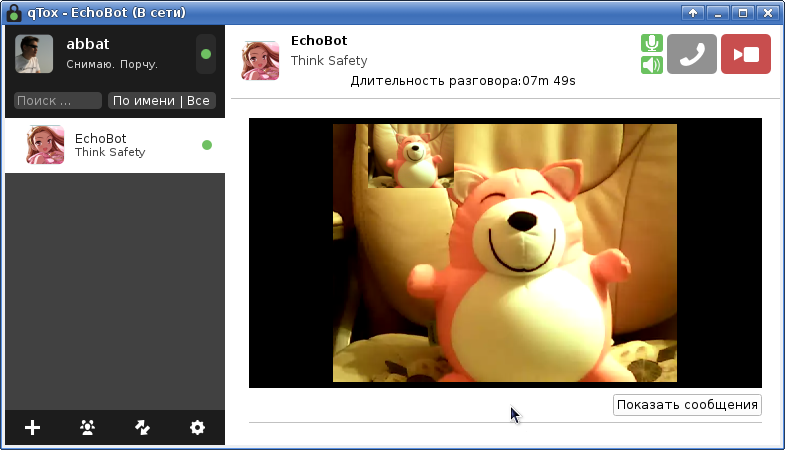
ToxAV is based on the Opus codecs for audio and VP8 for video and their implementations in the libopus and libvpx libraries, respectively.
As the input and output format for audio, the ToxAV API uses the PCM format with 16-bit sampling, support for 1 or 2 channels and a sampling frequency of 8, 12, 16, 24 and 48KHz. The duration of one data frame should be 2.5, 5, 10, 20, 40 or 60 ms (opus codec requirement).
As the input and output format for video, the ToxAV API uses frames in the YUV420 format (aka IYUV and I420), which can be relatively easily converted to a more familiar RGB color space.
ToxAV does not provide any methods for capturing data from audio and video devices or playing them - all this is left to the discretion of the application developer. So, for example, the µTox client uses OpenAL for working with audio and v4l (video4Linux) for working with video devices. QTox client uses FFmpeg to work with video . In python (which will be discussed indirectly below) we can use PyAudio for audio and OpenCV for video.
The general cycle of work with ToxAV can be represented sequentially in the form:
Because the main way to gain knowledge of the Tox API is to read the source code (written in C), to simplify further presentation, I will use a wrapper for the python language ( pytoxcore on github ). For those who do not want to engage in self-assembly of the library from the source, there are also links to ready-made binary packages for common distributions.
When using the python wrapper, you can get help for the library in the following way:
Below we will dwell on each step of working with the API in a little more detail.
To initialize the ToxAV subsystem , an instance of the previously initialized ToxCore kernel is used as a call parameter toxav_new. Only one ToxAV instance can be created for a single ToxCore instance. In the python wrapper, the toxav_new call is hidden inside the constructor and the initialization looks like:
To destroy the ToxAV instance, use the toxav_kill call or destroy the class instance in the python wrapper, where the toxav_kill call is hidden in the destructor.
In the python wrapper, connection to supported callback functions is done automatically. Handlers themselves can be methods of the ToxAV descendant and have the suffix * _cb . In all handlers, one of the parameters is friend_number - the integer identifier of a friend from similar ToxCore methods.
toxav_call_cb (friend_number, audio_enabled, video_enabled) - incoming call. As arguments, flags for supporting audio and video from the contact side are additionally passed. In the future, contact with muted audio or video streams can turn them on, which will cause an event to change the call status. A call can be received by a call toxav_answer , or rejected by a call toxav_call_control.
toxav_call_state_cb (friend_number, state) - change the call state. The state, which is a bitmask of constants, is passed as an argument:
toxav_bit_rate_status_cb (friend_number, audio_bit_rate, video_bit_rate) - network congestion event when the kernel does not manage to send data with the required bitrate. As parameters, the kernel offers new bitrates for audio and video stream. Moreover, the kernel first tries to reduce the bitrate of the video stream, as it occupies the main lane, and only after disconnecting the video stream is an attempt to reduce the bitrate for audio. An application can ignore these recommendations or use the call toxav_bit_rate_set (friend_number, audio_bit_rate, video_bit_rate) to set new bitrates. Bitrates are set in Kb / s (kilobits per second), a value of 0 signals the shutdown of the corresponding data stream, a value of -1 leaves the previous set bitrate unchanged.
For the opus audio codec, the minimum bitrate is 6, and the values above 16-32 in my ear are no longer distinguishable for sound from a webcam.
For the V8 video codec, I could not find the recommended bandwidth values depending on the frame size and FPS. In general, the following basic bit rates are recommended for various video resolutions :
toxav_audio_receive_frame_cb (friend_number, pcm, sample_count, channels, sampling_rate) - receiving a frame of audio data. The data buffer, the number of samples, the number of channels and the sampling frequency (Hz) are transmitted as parameters. For stereo sound, 16-bit samples go sequentially one after another for the left and right channels. The size of the buffer in bytes is defined as sample_count * channels * 2 byte , and the duration of the buffer in milliseconds is defined as sampling_rate / sample_count .
Since PCM is a conventional pulse-code modulation format , the buffer data can be transferred practically without conversion to any DAC or saved to a WAV file by adding the appropriate headerwith a description of the format, however, you should be prepared for the fact that during the conversation any parameters of the audio stream can be changed by the caller.
toxav_video_receive_frame_cb (friend_number, width, height, y, u, v, ystride, ustride, vstride) - receiving a frame of video data in YUV420 format. This is the original callback from ToxAV. An example of the implementation of the conversion from YUV420 to BGR can be found, for example, in the μTox source code ( yuv420tobgr ).
toxav_video_receive_frame_cb (friend_number, width, height, rgb)- receiving a frame in RGB or BGR format is an additional callback of the python wrapper, which is absent in ToxAV. This option is used to speed up the necessary transformations inside the library instead of converting them to pyhon (in fact, yuv420tobgr from the µTox code is used). The RGB or BGR format is set by calling toxav_video_frame_format_set with the parameter:
Hereinafter, RGB / BGR refers to a 24-bit format without an alpha channel, where each of the components of red, green and blue is allocated 8 bits. Sometimes this format is referred to as RGB24 / BGR24 depending on the order of the color components of red and blue.
As with an audio stream, the format of the video stream can be changed at any time by the caller (for example, the frame size will change).
Toxav events are processed by periodically calling the toxav_iterate method (similar to calling the tox_iterate kernel method ) with the recommended interval between calls equal to the value that will return the toxav_iteration_interval call (similar to calling the tox_iteration_interval kernel ).
The duty cycle for ToxAV is recommended to be served in a separate thread, as in the absence of audio / video calls, the value of toxav_iteration_interval will be 200 ms and the stream will sleep most of the time:
Since GIL (Global Interpreter Lock) exists for python, we should not worry about the need for synchronization between threads, however, in other languages there may be “unexpected” surprises when tox av _ * _ cb events can be called from a thread serving tox_iterate instead flow serving tox av _iterate. Such an event, for example, is the toxav_call_state_cb call completion event - use the appropriate synchronization primitives, taking into account the possibility of deadlock inside the Tox kernel.
To create an outgoing call, use the toxav_call method (friend_number, audio_bit_rate, video_bit_rate) , where the contact identifier from the contact list and the outgoing audio and video bitrate (Kb / s) are specified as arguments. The bitrate value of 0 blocks the sending of the corresponding stream, which can be enabled later by calling toxav_bit_rate_set .
ToxAV does not have the usual control of making a call - an outgoing call that is not accepted will last until the call is canceled by any internal timeout of the application itself (the application hangs up), or the contact does not go offline (network breakdown and the toxav_call_state_cb event with parameter TOXAV_FRIEND_CALL_STATE_FINISHED) By default, the reception of audio and video data from a contact is enabled and can be changed by calling toxav_call_control .
An incoming call is determined by the toxav_call_cb event , after which the call can be either completely ignored or processed by answering a call or changing its state through toxav_call_control .
To answer the call, the toxav_answer call (friend_number, audio_bit_rate, video_bit_rate) is used , where the contact identifier from the contact list making the incoming call and the outgoing audio and video bitrate (Kb / s) are specified as arguments. The bitrate value of 0 blocks the sending of the corresponding stream, which can be enabled later by calling toxav_bit_rate_set .
To control the call status, the toxav_call_control (friend_number, control) call is used , where the following constants can be used as a control parameter:
To transmit the audio stream, the call toxav_audio_send_frame (friend_number, pcm, sample_count, channels, sampling_rate) is used , where the contact identifier from the contact list, the PCM data buffer, the number of samples, the number of samples and the sampling frequency are specified. By analogy with toxav_audio_receive_frame_cb for a stereo stream, 16-bit samples for the left and right channels should go sequentially one after another.
It should be recalled that the maximum number of channels is 2 (stereo), the sampling frequency can take values of 8, 12, 16, 24 and 48 KHz and due to the features of the opus codec, the number of samples should correspond to a frame duration of 2.5, 5, 10, 20, 40 or 60 ms.
A call is used to transmit a frame of a video stream.toxav_video_send_frame , which in python wrapper is renamed toxav_video_send_yuv420_frame (friend_number, width, height, y, u, v) , where the contact id from the contact list, the width and height of the frame in pixels, the Y buffers (brightness) and color-difference UV .
An example of the implementation of the conversion from BGR to YUV420 can be found, for example, in the μTox source code ( bgrtoyuv420 ). In the python wrapper, for convenience, the methods toxav_video_send_bgr_frame (friend_number, width, height, bgr) and toxav_video_send_rgb_frame (friend_number, width, height, rgb) are implemented, which perform these transformations independently (in fact, bgrtoyuv420 from the µTox code is used).
Python is a fairly convenient language for prototyping and learning how to work. To clearly demonstrate all of the above, I wrote several examples :
echobot.py is a regular text echo bot that responds with text sent to it. Additionally demonstrates the management of contacts, statuses, avatars, files. It is the basis for the implementation of the remaining examples.
echoavbot.py - audio and video echo-bot that transmits audio and video streams sent back to the caller. It can be convenient for studying the effect of the network on the quality of data transfer, delays that occur, and testing your own equipment.
avbot.py- A bot to simulate the respondent, transmits audio and video data from their own devices. It can be convenient for observing pets during their absence :)
The Tox project is alive and actively developing. The severance of relations with the Tox Foundation did not hinder the development of the project at all and, it seems, gave it a second wind - PR began to be accepted, tickets were sorted out, a new site was being actively filled, and work was ongoing on documentation. I hope that soon the branch for working with group chats will be poured into the kernel and the kernel will take on a complete pre-release look.
Introduction
ToxAV is based on the Opus codecs for audio and VP8 for video and their implementations in the libopus and libvpx libraries, respectively.
As the input and output format for audio, the ToxAV API uses the PCM format with 16-bit sampling, support for 1 or 2 channels and a sampling frequency of 8, 12, 16, 24 and 48KHz. The duration of one data frame should be 2.5, 5, 10, 20, 40 or 60 ms (opus codec requirement).
As the input and output format for video, the ToxAV API uses frames in the YUV420 format (aka IYUV and I420), which can be relatively easily converted to a more familiar RGB color space.
ToxAV does not provide any methods for capturing data from audio and video devices or playing them - all this is left to the discretion of the application developer. So, for example, the µTox client uses OpenAL for working with audio and v4l (video4Linux) for working with video devices. QTox client uses FFmpeg to work with video . In python (which will be discussed indirectly below) we can use PyAudio for audio and OpenCV for video.
The general cycle of work with ToxAV can be represented sequentially in the form:
- Initialization of the ToxCore kernel (described in detail in a previous publication ).
- Initialization of the ToxAV subsystem ( toxav_new ).
- Setting callback functions for event processing ( toxav_callback_ * ) - event handlers are called from the main loop (4) and the main logic of the application is usually concentrated in them.
- The main duty cycle ( toxav_iterate ) and event handling.
- Pause toxav_iteration_interval and return to the previous step.
Because the main way to gain knowledge of the Tox API is to read the source code (written in C), to simplify further presentation, I will use a wrapper for the python language ( pytoxcore on github ). For those who do not want to engage in self-assembly of the library from the source, there are also links to ready-made binary packages for common distributions.
When using the python wrapper, you can get help for the library in the following way:
$ python
>>> from pytoxcore import ToxAV
>>> help(ToxAV)
class ToxAV(object)
 |  ToxAV object
...
 |  toxav_answer(...)
 |      toxav_answer(friend_number, audio_bit_rate, video_bit_rate)
 |      Accept an incoming call.
 |      If answering fails for any reason, the call will still be pending and it is possible to try and answer it later. Audio and video receiving are both enabled by default.
 |
 |  toxav_audio_receive_frame_cb(...)
 |      toxav_audio_receive_frame_cb(friend_number, pcm, sample_count, channels, sampling_rate)
 |      This event is triggered when a audio data received.
...
Below we will dwell on each step of working with the API in a little more detail.
ToxAV Initialization
To initialize the ToxAV subsystem , an instance of the previously initialized ToxCore kernel is used as a call parameter toxav_new. Only one ToxAV instance can be created for a single ToxCore instance. In the python wrapper, the toxav_new call is hidden inside the constructor and the initialization looks like:
from pytoxcore import ToxCore, ToxAV
class EchoBot(ToxCore):
...
class EchoAVBot(ToxAV):
    def __init__(self, core):
        super(EchoAVBot, self).__init__(core)
...
bot = EchoBot(options)
botav = EchoAVBot(bot)
To destroy the ToxAV instance, use the toxav_kill call or destroy the class instance in the python wrapper, where the toxav_kill call is hidden in the destructor.
Setting callback functions
In the python wrapper, connection to supported callback functions is done automatically. Handlers themselves can be methods of the ToxAV descendant and have the suffix * _cb . In all handlers, one of the parameters is friend_number - the integer identifier of a friend from similar ToxCore methods.
toxav_call_cb (friend_number, audio_enabled, video_enabled) - incoming call. As arguments, flags for supporting audio and video from the contact side are additionally passed. In the future, contact with muted audio or video streams can turn them on, which will cause an event to change the call status. A call can be received by a call toxav_answer , or rejected by a call toxav_call_control.
toxav_call_state_cb (friend_number, state) - change the call state. The state, which is a bitmask of constants, is passed as an argument:
- TOXAV_FRIEND_CALL_STATE_ERROR - timeout for transferring data to a contact. This state is the last state for the call (at this point the call is completed) and cannot be combined with other conditions.
- TOXAV_FRIEND_CALL_STATE_FINISHED - Normal call termination. This state is the last state for the call (at this point the call is completed) and cannot be combined with other conditions.
- TOXAV_FRIEND_CALL_STATE_SENDING_A - the contact has begun transmitting the audio stream.
- TOXAV_FRIEND_CALL_STATE_SENDING_V - the contact has begun transmitting the video stream.
- TOXAV_FRIEND_CALL_STATE_ACCEPTING_A - the contact began receiving the audio stream.
- TOXAV_FRIEND_CALL_STATE_ACCEPTING_V - the contact began receiving a video stream
toxav_bit_rate_status_cb (friend_number, audio_bit_rate, video_bit_rate) - network congestion event when the kernel does not manage to send data with the required bitrate. As parameters, the kernel offers new bitrates for audio and video stream. Moreover, the kernel first tries to reduce the bitrate of the video stream, as it occupies the main lane, and only after disconnecting the video stream is an attempt to reduce the bitrate for audio. An application can ignore these recommendations or use the call toxav_bit_rate_set (friend_number, audio_bit_rate, video_bit_rate) to set new bitrates. Bitrates are set in Kb / s (kilobits per second), a value of 0 signals the shutdown of the corresponding data stream, a value of -1 leaves the previous set bitrate unchanged.
For the opus audio codec, the minimum bitrate is 6, and the values above 16-32 in my ear are no longer distinguishable for sound from a webcam.
For the V8 video codec, I could not find the recommended bandwidth values depending on the frame size and FPS. In general, the following basic bit rates are recommended for various video resolutions :
| frame size, px | bit rate, Kb / s |
|---|---|
| 320x240 | 400 |
| 480x270 | 700 |
| 1024x576 | 1500 |
| 1280x720 | 2500 |
| 1920x1080 | 4000 |
toxav_audio_receive_frame_cb (friend_number, pcm, sample_count, channels, sampling_rate) - receiving a frame of audio data. The data buffer, the number of samples, the number of channels and the sampling frequency (Hz) are transmitted as parameters. For stereo sound, 16-bit samples go sequentially one after another for the left and right channels. The size of the buffer in bytes is defined as sample_count * channels * 2 byte , and the duration of the buffer in milliseconds is defined as sampling_rate / sample_count .
Since PCM is a conventional pulse-code modulation format , the buffer data can be transferred practically without conversion to any DAC or saved to a WAV file by adding the appropriate headerwith a description of the format, however, you should be prepared for the fact that during the conversation any parameters of the audio stream can be changed by the caller.
toxav_video_receive_frame_cb (friend_number, width, height, y, u, v, ystride, ustride, vstride) - receiving a frame of video data in YUV420 format. This is the original callback from ToxAV. An example of the implementation of the conversion from YUV420 to BGR can be found, for example, in the μTox source code ( yuv420tobgr ).
toxav_video_receive_frame_cb (friend_number, width, height, rgb)- receiving a frame in RGB or BGR format is an additional callback of the python wrapper, which is absent in ToxAV. This option is used to speed up the necessary transformations inside the library instead of converting them to pyhon (in fact, yuv420tobgr from the µTox code is used). The RGB or BGR format is set by calling toxav_video_frame_format_set with the parameter:
- TOXAV_VIDEO_FRAME_FORMAT_BGR - BGR format (used in OpenCV).
- TOXAV_VIDEO_FRAME_FORMAT_RGB - RGB format.
- TOXAV_VIDEO_FRAME_FORMAT_YUV420 is the original callback from ToxAV with the YUV420 format.
Hereinafter, RGB / BGR refers to a 24-bit format without an alpha channel, where each of the components of red, green and blue is allocated 8 bits. Sometimes this format is referred to as RGB24 / BGR24 depending on the order of the color components of red and blue.
As with an audio stream, the format of the video stream can be changed at any time by the caller (for example, the frame size will change).
Event handling
Toxav events are processed by periodically calling the toxav_iterate method (similar to calling the tox_iterate kernel method ) with the recommended interval between calls equal to the value that will return the toxav_iteration_interval call (similar to calling the tox_iteration_interval kernel ).
The duty cycle for ToxAV is recommended to be served in a separate thread, as in the absence of audio / video calls, the value of toxav_iteration_interval will be 200 ms and the stream will sleep most of the time:
import threading
class EchoAVBot(ToxAV):
    def __init__(self, core):
        ...
        self.running = True
        self.iterate_thread = threading.Thread(target = self.iterate_cb)
        self.iterate_thread.start()
    def iterate_cb(self):
        while self.running:
            self.toxav_iterate()
            interval = self.toxav_iteration_interval()
            time.sleep(float(interval) / 1000.0)
    def stop(self):
        self.running = False
        self.iterate_thread.join()
        self.toxav_kill();
Since GIL (Global Interpreter Lock) exists for python, we should not worry about the need for synchronization between threads, however, in other languages there may be “unexpected” surprises when tox av _ * _ cb events can be called from a thread serving tox_iterate instead flow serving tox av _iterate. Such an event, for example, is the toxav_call_state_cb call completion event - use the appropriate synchronization primitives, taking into account the possibility of deadlock inside the Tox kernel.
Call management
To create an outgoing call, use the toxav_call method (friend_number, audio_bit_rate, video_bit_rate) , where the contact identifier from the contact list and the outgoing audio and video bitrate (Kb / s) are specified as arguments. The bitrate value of 0 blocks the sending of the corresponding stream, which can be enabled later by calling toxav_bit_rate_set .
ToxAV does not have the usual control of making a call - an outgoing call that is not accepted will last until the call is canceled by any internal timeout of the application itself (the application hangs up), or the contact does not go offline (network breakdown and the toxav_call_state_cb event with parameter TOXAV_FRIEND_CALL_STATE_FINISHED) By default, the reception of audio and video data from a contact is enabled and can be changed by calling toxav_call_control .
An incoming call is determined by the toxav_call_cb event , after which the call can be either completely ignored or processed by answering a call or changing its state through toxav_call_control .
To answer the call, the toxav_answer call (friend_number, audio_bit_rate, video_bit_rate) is used , where the contact identifier from the contact list making the incoming call and the outgoing audio and video bitrate (Kb / s) are specified as arguments. The bitrate value of 0 blocks the sending of the corresponding stream, which can be enabled later by calling toxav_bit_rate_set .
To control the call status, the toxav_call_control (friend_number, control) call is used , where the following constants can be used as a control parameter:
- TOXAV_CALL_CONTROL_RESUME - Resuming a call that was previously paused cannot be used until the call is answered.
- TOXAV_CALL_CONTROL_PAUSE - setting the call to pause (hold the call, hold), cannot be used until the call is answered.
- TOXAV_CALL_CONTROL_CANCEL - reset an incoming call or end an active call.
- TOXAV_CALL_CONTROL_MUTE_AUDIO - sending to the respondent a request to stop the transmission of audio data (the respondent can ignore this request).
- TOXAV_CALL_CONTROL_UNMUTE_AUDIO - sending a request to the respondent to resume the transmission of audio data.
- TOXAV_CALL_CONTROL_HIDE_VIDEO - sending to the respondent a request to stop the transmission of video data (the respondent can ignore this request).
- TOXAV_CALL_CONTROL_SHOW_VIDEO - sending a request to the respondent to resume the transmission of video data.
Audio and video streaming
To transmit the audio stream, the call toxav_audio_send_frame (friend_number, pcm, sample_count, channels, sampling_rate) is used , where the contact identifier from the contact list, the PCM data buffer, the number of samples, the number of samples and the sampling frequency are specified. By analogy with toxav_audio_receive_frame_cb for a stereo stream, 16-bit samples for the left and right channels should go sequentially one after another.
It should be recalled that the maximum number of channels is 2 (stereo), the sampling frequency can take values of 8, 12, 16, 24 and 48 KHz and due to the features of the opus codec, the number of samples should correspond to a frame duration of 2.5, 5, 10, 20, 40 or 60 ms.
A call is used to transmit a frame of a video stream.toxav_video_send_frame , which in python wrapper is renamed toxav_video_send_yuv420_frame (friend_number, width, height, y, u, v) , where the contact id from the contact list, the width and height of the frame in pixels, the Y buffers (brightness) and color-difference UV .
An example of the implementation of the conversion from BGR to YUV420 can be found, for example, in the μTox source code ( bgrtoyuv420 ). In the python wrapper, for convenience, the methods toxav_video_send_bgr_frame (friend_number, width, height, bgr) and toxav_video_send_rgb_frame (friend_number, width, height, rgb) are implemented, which perform these transformations independently (in fact, bgrtoyuv420 from the µTox code is used).
Examples
Python is a fairly convenient language for prototyping and learning how to work. To clearly demonstrate all of the above, I wrote several examples :
echobot.py is a regular text echo bot that responds with text sent to it. Additionally demonstrates the management of contacts, statuses, avatars, files. It is the basis for the implementation of the remaining examples.
echoavbot.py - audio and video echo-bot that transmits audio and video streams sent back to the caller. It can be convenient for studying the effect of the network on the quality of data transfer, delays that occur, and testing your own equipment.
avbot.py- A bot to simulate the respondent, transmits audio and video data from their own devices. It can be convenient for observing pets during their absence :)
Conclusion
The Tox project is alive and actively developing. The severance of relations with the Tox Foundation did not hinder the development of the project at all and, it seems, gave it a second wind - PR began to be accepted, tickets were sorted out, a new site was being actively filled, and work was ongoing on documentation. I hope that soon the branch for working with group chats will be poured into the kernel and the kernel will take on a complete pre-release look.
References
- tox.chat - official site of the Tox project.
- The toxcore kernel project on github .
- Pytoxcore python wrapper project on github .
- A project for building binary versions of tox.pkg clients and libraries on github including oldstable distributions such as Debian Wheezy, Ubuntu Precise, and CentOS 6, on which the “official” client builds may not run.









