
 December 4, 2015 at 19:09
30 years of work as a system administrator
 Sandra Henry-Stocker (Unix Dweeb, currently working for TeleCommunication Systems, an innovative technology company).
Looking back into the past, after more than 30 years of working as a Unix system administrator, I can say that this was a long and interesting way. In these years, of course, I did not do the same thing. The development of technology has led to incredible changes in my work. These were impressive improvements in the hardware that I served, and the invention of new software tools that I studied and put into practice. Over the years, I have been incredibly delighted with how much work I could do on the command line to identify and fix various problems and understand how to best protect the data of my employers. For 30 years I worked with amazing people, while I was fired once, and also learned a lot about what works and doesn't work, as from a technical point of view,
The profession and everything connected with it changes dramatically, but it has always brought and will bring me a lot of pleasure.Here are my thoughts on the changes that I saw and those that I will still see.
How technology has changed
At the beginning of my career, I used a punch (EOM) , with which I processed the salary sheets of client companies of a large New York bank, continuing to study in college, after the first programming lessons. At the bank, I created a punch card processing program , which greatly facilitated the work of information processing operators. The college introductory lesson was a Fortran based programming lesson. In the next semester, the perforator (EOM) was no longer there and large bulky terminals took its place.

In college, I learned programming languages like Fortran , Lisp , Algol and Pascal. In one of the lessons, I created a simple operating system on a PDP system using the Assembler programming language . I remember how to “read” the indicators on the front of the systems and how exciting it was when the connected printer “spat out” the instruction sheets. Since then, I have used many other languages, such as C , Java , but mainly worked with scripting languages such as sh, csh, bash, ksh, Python, and Perl. But one of the most amazing discoveries for me was the number of languages that was introduced from the moment I started working in this area. The number of available languages has increased 20-30 times. In 2013, there were already 256 programming languages.
256 programming languages.
- 4th Dimension / 4D
- Abap
- Abc
- ActionScript
- Ada
- Agilent VEE
- Algol
- Alice
- Angelscript
- Apex
- APL
- AppleScript
- Arc
- Arduino
- ASP
- Aspectj
- Assembly
- ATLAS
- Augeas
- Autohotkey
- AutoIt
- AutoLISP
- Automator
- Avenue
- Awk
- Bash
- (Visual) Basic
- bc
- Bcpl
- Beta
- Blitzmax
- Boo
- Bourne shell
- Bro
- C
- C shell
- C #
- C ++
- C ++ / CLI
- C-omega
- Caml
- Ceylon
- CFML
- cg
- Ch
- Chill
- Cil
- CL (OS / 400)
- Clarion
- Clean
- Clipper
- Clojure
- CLU
- COBOL
- Cobra
- CoffeeScript
- Coldfusion
- Comal
- Common lisp
- Coq
- cT
- Curl
- D
- Dart
- DCL
- DCPU-16 ASM
- Delphi / Object Pascal
- DiBOL
- Dylan
- E
- eC
- Ecl
- ECMAScript
- Egl
- Eiffel
- Elixir
- Emacs lisp
- Erlang
- Etoys
- Euphoria
- EXEC
- F #
- Factor
- Falcon
- Fancy
- Fantasy
- Felix
- Forth
- Fortran
- Fortress
- (Visual) FoxPro
- Gambas
- GNU Octave
- Go
- Google AppsScript
- Gosu
- Groovy
- Haskell
- haXe
- Heron
- HPL
- Hypertalk
- Icon
- IDL
- Inform
- Informix-4gl
- INTERCAL
- Io
- Oke
- J
- J #
- Jade
- Java
- Java FX Script
- Javascript
- Jscript
- JScript.NET
- Julia
- Korn shell
- Kotlin
- Labview
- Ladder logic
- Lasso
- Limbo
- Lingo
- Lisp
- Logo
- Logtalk
- Lotuscript
- Lpc
- Lua
- Luster
- M4
- Mad
- Magic
- Magik
- Malbolge
- Mantis
- Maple
- Mathematica
- MATLAB
- Max / MSP
- MAXScript
- MEL
- Mercury
- Mirah
- Miva
- ML
- Monkey
- Modula-2
- Modula-3
- MOO
- Moto
- MS-DOS Batch
- MUMPS
- NATURAL
- Nemerle
- Nimrod
- NQC
- NSIS
- Nu
- NXT-G
- Oberon
- Object rexx
- Objective-c
- Objective-j
- OCaml
- Occam
- ooc
- Opa
- Opencl
- Openedge abl
- Opl
- Oz
- Paradox
- Parrot
- Pascal
- Perl
- Php
- Pike
- Pilot
- PL / I
- PL / SQL
- Pliant
- PostScript
- Pov ray
- Powerbasic
- PowerScript
- Powerhell
- Processing
- Prolog
- Puppet
- Pure data
- Python
- Q
- R
- Racket
- REALBasic
- Rebol
- Revolution
- Rexx
- RPG (OS / 400)
- Ruby
- Rust
- S
- S-plus
- SAS
- Sather
- Scala
- Scheme
- Scilab
- Scratch
- sed
- Seed7
- Self
- Shell
- SIGNAL
- Simula
- Simulink
- Slate
- Smalltalk
- Smarty
- SPARK
- SPSS
- SQR
- Squeak
- Squirrel
- Standard ML
- Suneido
- Supercollider
- Tacl
- Tcl
- Tex
- thinBasic
- Tom
- Transact-sql
- Turing
- TypeScript
- Vala / genie
- Vbscript
- Verilog
- Vhdl
- Viml
- Visual Basic .NET
- Webdna
- Whitespace
- X10
- xBase
- XBase ++
- Xen
- XPL
- XSLT
- Xquery
- yacc
- Yorick
- Z shell
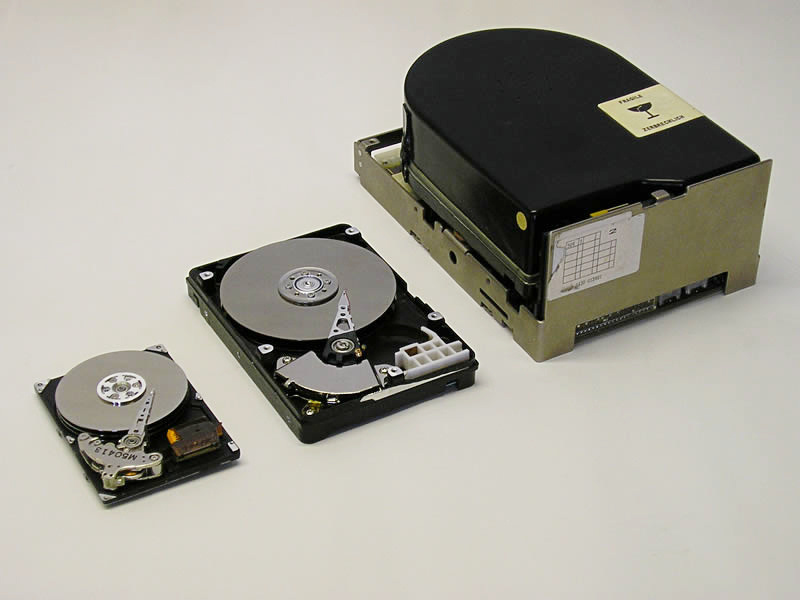
I remember that in the 80s it was necessary to know the topology of hard drives in order to add them to my system. Today, systems are able to identify peripherals with virtually no involvement from me. The number of cylinders, heads and sectors ... I had to describe the disk and its components for the system, make it available for use.

The downward trend in drive sizes is striking. And if in the early 90s, I still used 300 megabytes of disks (yes, exactly megabytes!), The size of which corresponded to the size of a shoe box, now, looking at my usb-drive, containing about a terabyte of data, I conclude that soon even smaller data storage devices will be created, perhaps such that dropping the drive to the floor will make it difficult to find it. What an incredible comparison!

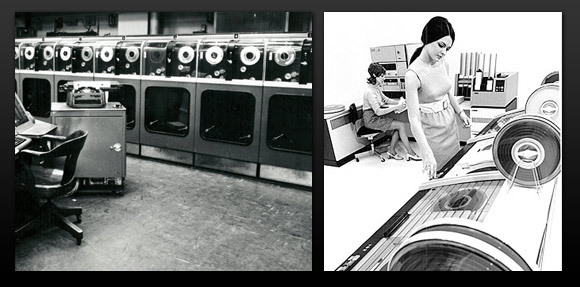
I also remember backing up my server using a reel and tape drive. The cassettes were very large and they could not contain all the necessary data. For some of my data 3-4 such cassettes were needed. Today we use robotic tape storages and tools that automate the backup process and track the position of the file for quick recovery when it is needed. Moreover, the clever technology of data deduplication is used to reduce the size of the dump by eliminating similar information from the backup, which sometimes allows you to reduce the backup size by several times.
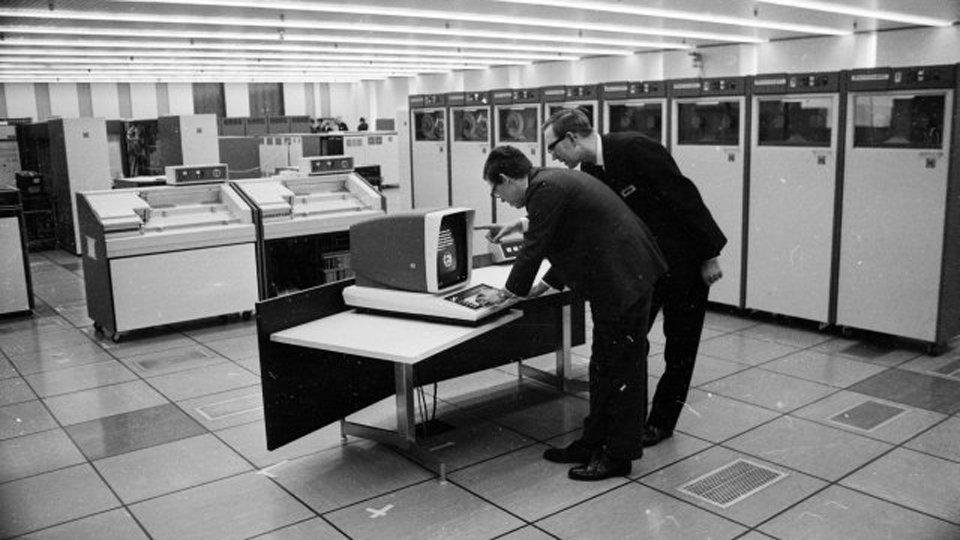
Of course, the most significant changes in the field in which I have been working for over 30 years have occurred with the advent of networks and the Internet. When I worked for the federal courts, the district courts connected to the system in Washington using the Tymnet service, which used packet switching technology . My project made available for use in ships not only “mini-computers” (systems the size of a refrigerator), but also provided direct communication without the need to send data to and from Washington.
The growth of the Internet has made it possible to connect to systems around the world in an arbitrary way. On the World Wide Web, I was able to find answers to all my technical questions without making any more effort to get the book off the shelf. Today, I often wonder how I can find answers to my technical questions until Google or another search engine provides them.
What changes have occurred in the work
In general, the networks we managed became more and more diverse. We cannot see all segments of the AppleTalk network , but I remember how they developed it in the early 80s, we launched various systems on our work computers and the support in our data centers was amazingly diverse. Much of the work that we have done centrally performed over the network using the network services such as the NFS , an NIS , the DNS and others.
Virtualization has become a fundamental factor in the development of our data centers. Most of our servers at the moment are just part of a much larger infrastructure, which we can expand or reduce at any time on demand, and also, if necessary, quickly and efficiently migrate to an alternative data center. Despite the fact that virtualization would seem to have reached its limit, we are moving more and more complex systems and even entire data centers to the “clouds” - significant changes in what we, as system administrators should manage and for which we should be responsible .
Most of us rely on universal ticket systems in their work, in which you can track the entire history of problems, monitor tasks in the process of solving and discover new ones. The responsibilities of a system administrator have expanded significantly in recent years, now it’s not “just” system administration, but also tracking security problems, controlling access to a wide range of resources, analyzing network traffic, logs, identifying and fixing vulnerabilities in our “cyber armor” .
Security
At the beginning of my career (perhaps for the first 10 years or so), security was pretty weak. We recommended that our customers change their passwords once a year. I remember how I once wrote a program to generate passwords by gluing two short words randomly, but this is nothing compared to what I have to do now. The security issue in those days was not very critical and most of the people I worked with then cared for it even less than I did. And when one of the speakers at the Sun User Group conference, which I helped organize in the 1990s, suggested that we should all think like crackers, the idea seemed revolutionary.
This aspect in the work of the system administrator provoked much greater changes than any other. Today you are irresponsible if you do not relate to the issue of security with the responsibility that might seem paranoid 20 years ago. The tools and measures that we use in order to ensure the security of our systems today are far beyond what we could consider then.
Passwords have become longer and the systems we manage allow us to set up more complex security measures. The recommended password length is now from 7-8 to 12-14 characters, and the replacement time is at least once a year, but in recent years it is recommended to change passwords every 3-4 months.
In addition, the tools we use in recent years have become incredibly complex. To some extent, we ourselves become hackers, using solutions such as Nessus and Nexpose to identify vulnerabilities . We also monitor systems for detecting signs of malicious activity and preventing data loss, and prevent the leakage of “jewelry” from our organization. I could not even think that after yesterday’s briefing at Palo Alto, I would again have to use the old proven method - firewalls. They penetrated everything we do, became smarter, faster and track everything that happens, and not just traffic passing through the network.
How our society has changed
In the 1980s, Apple II was located in the corner of my dining room, which is why my neighbors often looked at me like a freak. Upon hearing their conversation, I realized that they thought that I had a centrifuge on the table. And not because the computer was in the dining room, not because it was Apple, but because it was the first home computer that they had ever seen in their life and they had no idea what it was. It was rather funny to watch their reaction. Not so much time passed as everyone who did not have a computer at home was considered strange. Nowadays, we all use wireless networks to connect to the Internet, and probably every house, or even every family member, has its own computer. These are big changes, even without mentioning all the other electronics that completely changed our lifestyle.
Choice of profession
Disadvantages:
Compared to most IT professions, the work of a system administrator does not provide great career opportunities. As a system administrator, you will rarely be in the spotlight. You can easily remain in the “lower classes” (no one reports to you), even after 30 years. It is sometimes difficult to recognize the level of importance. You are almost invisible when everything goes smoothly. But when big problems arise, most people remember you very often, and not just on the day of the system administrator.
System administrators rarely communicate with clients, unless they provide support for the systems they work with. And even when you are doing your job well and you will be lucky after long attempts to solve the problem, at a time when most employees are not on duty and drink beer in some local pub or relax on the weekend, you are unlikely to be remembered.
Benefits:
Work is rarely boring, there is always the opportunity to learn something new, especially when something breaks and this “something new” comes through the door or “breaks” the phone. Even after 30+ years of work in administration, it is still not monotonous and paid pretty well. Much has changed in what needs to be done and what one has to understand. You could automate all your tasks or manage a huge data center, but there is always something that will challenge you, it will require your attention.
There are advantages, depending on the type of organization in which you work. I worked for a company in which there were only three employees and two independent contractors, and in a large organization with a team of several tens of thousands of people. In small organizations, you have the opportunity to test yourself in all aspects and be aware of everything that happens. In large ones, there is the opportunity to find a place and gradually climb the career ladder, to develop a specific direction.
The number of changes in your work depends on many factors, but I prefer to have enough freedom to solve both easy simple tasks and something else - new and exciting. This mix allows me to feel that I am working out my bread and preparing myself for new challenges and opportunities.
Best job
The best job for me is when I felt that I was doing something important and it was beneficial. Working for the federal government was just such a job because I knew that I supported analysts who made important decisions at the national level. It was very nice to be part of it.
At another job, at the University. John Hopkins, I managed systems and networks at the Department of Astronomy and Physics. A huge plus was that I worked with the most outstanding people I have ever known - some of them mapped the Universe, while others peered into nature to the level of the smallest subatomic particles. And the students who helped me from time to time were surprisingly qualified specialists. I lived in a beautiful campus, which not only made it easy to get to work, but also provided the opportunity to attend various classes for free.
I also liked being a “jack of all trades” in all the computer industries of Web Publishing (parts of IDG), where I serviced networks, servers, backup systems, a website and even acquired a very capable assistant who made the job even more enjoyable and fruitful . Our publications have come to the fore in online publications such as SunWorld and JavaWorld, which provide excellent information and tips for users of this technology.
And finally, no less important, but still working in several branches of E * Trade, in which I was engaged in the administration of everything. It was always a pleasure to work with bright and creative people. Our office was located at the berth of San Francisco, which allowed us to get to work on the ferry and get a lot of pleasure from such a daily cruise.
Some of the posts that I have held in recent years have been associated with the best coworking opportunities, when I had the opportunity to train colleagues and learn from them even more than I could have expected. Nevertheless, office politics made it difficult to understand that we should work for a common goal - to make the organization successful, and not fight for a place in the sun.
In general, if:
- You enjoy working;
- Feel that you are doing something important;
- You can live the life you want;
- You have the opportunity to learn, contribute and get rewarded for it;
You are in a good place.
Money is not everything. Even living on a yacht in the San Francisco Bay that I had for several years can be heavenly for some and hell for others. Take the time to think about what is really important to you. Noticeability? Confession? Sense of achievement? Big paycheck? Flexible working hours? A ton of job performance? What is your contribution to the common cause?
Whatever you do, do not stop learning! Computer skills are aging very quickly and this trend will not change in the near future. Devote some time to training every day to be able to work with the tools that will be in your career in the future. Check the list of vacancies from time to time, even if you have no plans to change jobs, just to know what skills are in high demand.
And fasten your seat belts. You can’t even imagine how this direction will look in 30 years.