Calendar for open source JIRA
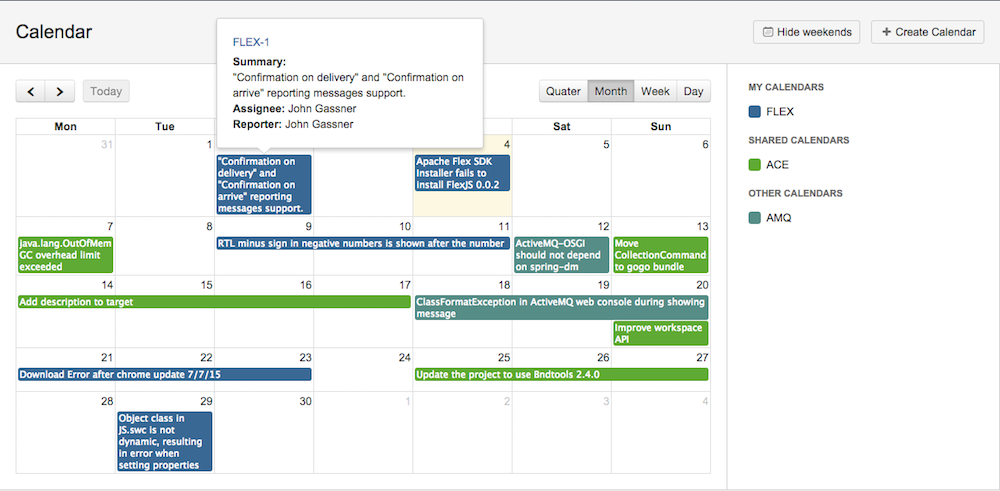
Hello dear hawkers! Today we would like to talk about the calendar that we use in JIRA. Not so long ago we updated it, and since there has never been an article about it, we decided to write about it as a whole, and not just about the changes. Details under the cut.
What did you want?
- Viewers of our issues, which can be selected either by project or by filter
- User friendly interface
- The ability to set as the start and end dates for issuе not only standard fields, such as Due Date or created, but any Custom Fields
- The ability to fumble calendars on groups and project roles
Plus, I would like to add new features as needed, and all the more or less suitable solutions were closed source.
What did you get?
On the calendar page you will see 2 blocks, not counting the header. In the left - events, in the right - the calendars themselves. Calendars are divided into 3 groups: My calendars, Shared calendars, and Others. The last group is visible only to JIRA administrators. The first group speaks for itself, the second includes calendars shared by you, either through the group or through the project role. In the third group, administrators see all calendars that are not included in the first 2 groups. Administrators are free to do almost everything with all calendars: delete, edit any field, change groups and design roles for balls.
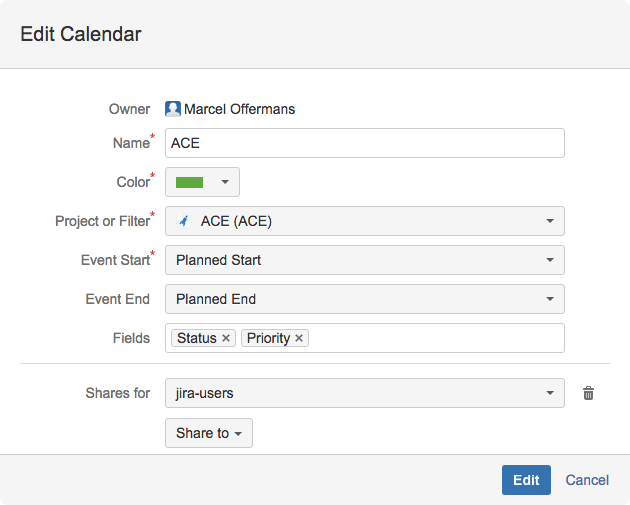
The create / edit window is a simple set of fields, obvious for creating a calendar. Mandatory there are only the name, source of requests and the beginning of the event. Here you can also share the calendar with any group or project role available to you. In the right panel, you can also control the visibility of calendars shared by you. By default, a calendar shared with you will first be displayed as hidden. You can change this by clicking on it. The colored square means the visible calendar, the colored frame - invisible.
In the left panel, the events themselves are located. As a basis for rendering issues, we decided to use the jQuery plugin Full Calendar. In the event-s themselves we see only the issue summary, but if you click on each, then in a separate popup information on the issue will open with the possibility of switching to this issue.
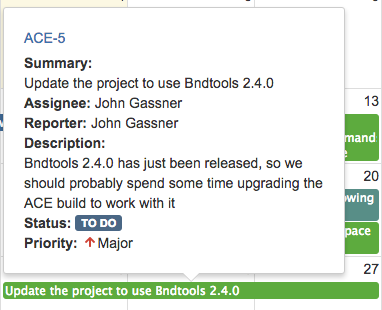
There are fields that are displayed in this popup by default: artist, author and issue description. You, as the author of the calendar, can configure the remaining fields in the "Fields" field of the calendar creation / editing window. Events can be moved and stretched if you have the right to change the corresponding issue in JIRA, and the fields “Start of event” and “End of event” are not set to “Created”, “Updated” and “Resolved”, which corresponds to the date of creation, the date of the last editing and the date of the solution of the issue, respectively.
Technical part
At the frontend, we used one of the latest AUI, which was described in one of the previous posts. On the one hand, it’s quite convenient to use all the latest components from the AUI library, on the other hand, it’s quite troublesome to provide good backward compatibility. Let's say Inline Dialog 2 appeared not so long ago and is not available in versions of JIRA earlier than 6.2. FullCalendar is used to render the issue itself. On the backend-e JIRA API + data storage in Active Objects. The JIRA API allows us to build jql based on events, the beginning and end of events, checking access to issues, etc. Active Objects allows you to conveniently store data both about the calendars themselves and about preferred user settings, such as which of the shared calendars should be hidden and which are visible. For a long time, we extracted and saved this information using the PluginSetting class, before serializing it into XML. At the last calendar change we decided to use Active Objects. Firstly, there is no need for serialization, and secondly, it is easier to work with Active Objects.
Conclusion
We look forward to further developing this plugin. In particular, we want to add the ability to view any Custom Field in the popup event. Source code can be viewed on github. An updated calendar is available for JIRA 6.3+ versions.
Link to github - github.com/mailru/jira-plugins-mailrucal
Link to marketplace - marketplace.atlassian.com/plugins/ru.mail.jira.plugins.mailrucal









