 September 10, 2015 at 03:27
ViaLatM GPS Service - Scripting Language (Part 2)
In this part of the article, I will continue to describe the ViaLatM scripting language. We will consider functions that allow access to the attributes of other objects, the conditional assignment function, and others. The first part of the description in the publication ViaLatM GPS service is a scripting language , an updated description of the language is available on the website in the ViaLatM Scripting Language section .
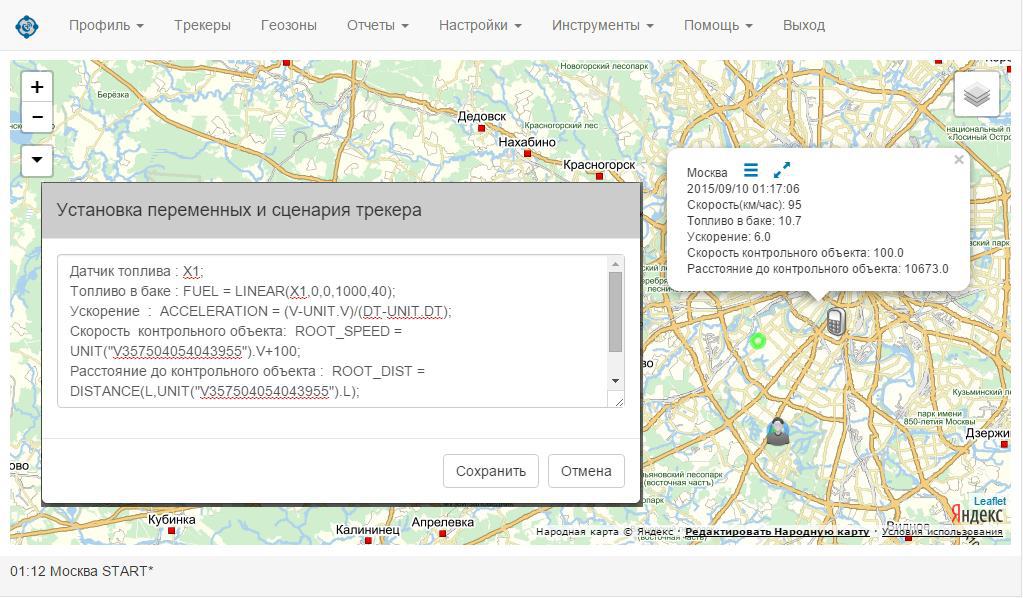
Setting variables and defining a work scenario are done in the “Variable and script settings panel” in the context menu for each device.
Operators are separated by ";".
If the line begins with the symbol "#", then it is not processed (comment). If the character "#" occurs inside a line, then the contents from this character to the end of the line are ignored.
Examples:
If a value is used in several operators, it is reasonable to separate it separately and define it as a constant. As a rule, constants are defined at the beginning of the script. The constant identifier is preceded by the keyword “CONST”.
Examples:
Local variables are only available during script execution after they are defined. Unlike global variables, they cannot be displayed in the application interface and are not stored in the constant attributes of objects. The local variable has no name, that is, the prefix "Name:".
Examples:
Syntax: IFSET (condit, value1, value2);
The function checks the condition specified in the pen argument. If it is true, returns the value specified by the second argument. Otherwise, the value of the third argument is returned. format of the first argument: val1 relational val2. Where one of the relations can act as relational: "==", "<=", "> =", "! =", "<", ">".
Examples:
The UNIT function is used to select the attributes of another tracker. The IMEI of the tracker is passed to it as a parameter: UNIT ("01234567890"). Attr. After the closing bracket, the name of the attribute to be selected is indicated through the dot (this attribute parameter must exist for this tracker). The selected tracker must be in the same group (folders play the role of groups in the service) as the tracker for which the script is executed. Otherwise, the function returns “ERROR”. Using the additional parameter "OWNER" you can access trackers that are in another group, but they must be created by the user who owns the current tracker: UNIT (OWNER, "01234567890"). H.
Examples:
In the following parts of the article, language operators will be considered: FOR (OBJ IN SET) - iteration of objects in a given set; IF ... THEN ... ELSE; SWITCH; CALL - call procedures.
Setting variables and defining a work scenario are done in the “Variable and script settings panel” in the context menu for each device.
Operators are separated by ";".
Comments
If the line begins with the symbol "#", then it is not processed (comment). If the character "#" occurs inside a line, then the contents from this character to the end of the line are ignored.
Examples:
- # Tracker mileage processing unit
- Distance: DIST = DISTANCE (L, UNIT.L); # run in the aftermath. message
Constants
If a value is used in several operators, it is reasonable to separate it separately and define it as a constant. As a rule, constants are defined at the beginning of the script. The constant identifier is preceded by the keyword “CONST”.
Examples:
- CONST RATE_PER_100KM = 8.5;
- CONST MAX_DELAY = 3600;
Local variables
Local variables are only available during script execution after they are defined. Unlike global variables, they cannot be displayed in the application interface and are not stored in the constant attributes of objects. The local variable has no name, that is, the prefix "Name:".
Examples:
- DIST = DISTANCE (L, UNIT.L); # local variable
- Mileage: ODOM = VARDEF (UNIT.ODOM, 0) + DIST;
- Average speed: DIST / (DT-UNIT.DT); # m / s
Condition return function
Syntax: IFSET (condit, value1, value2);
The function checks the condition specified in the pen argument. If it is true, returns the value specified by the second argument. Otherwise, the value of the third argument is returned. format of the first argument: val1 relational val2. Where one of the relations can act as relational: "==", "<=", "> =", "! =", "<", ">".
Examples:
- MaxSpeed: MAX_SPEED = IFSET (V> = UNIT (OWNER, "5678"). V, V, UNIT (OWNER, "5678"). V);
- Load at height: ALT_FACTOR = IFSET (H <500,2.3,5.7);
Access to attribute parameters of other trackers
The UNIT function is used to select the attributes of another tracker. The IMEI of the tracker is passed to it as a parameter: UNIT ("01234567890"). Attr. After the closing bracket, the name of the attribute to be selected is indicated through the dot (this attribute parameter must exist for this tracker). The selected tracker must be in the same group (folders play the role of groups in the service) as the tracker for which the script is executed. Otherwise, the function returns “ERROR”. Using the additional parameter "OWNER" you can access trackers that are in another group, but they must be created by the user who owns the current tracker: UNIT (OWNER, "01234567890"). H.
Examples:
- # Information about the control object
- Speed of control object: ROOT_SPEED = UNIT ("V357504054043955"). V;
- Distance to the control object: ROOT_DIST = DISTANCE (L, UNIT ("V357504054043955"). L);
- # Customer Information
- Distance to the customer: CUSTOM_DIST = DISTANCE (L, UNIT (OWNER, "V12345123451234"). L);
In the following parts of the article, language operators will be considered: FOR (OBJ IN SET) - iteration of objects in a given set; IF ... THEN ... ELSE; SWITCH; CALL - call procedures.









