 September 1, 2015 at 14:00
Habr shell: we embed a cross-platform ssh server in java application
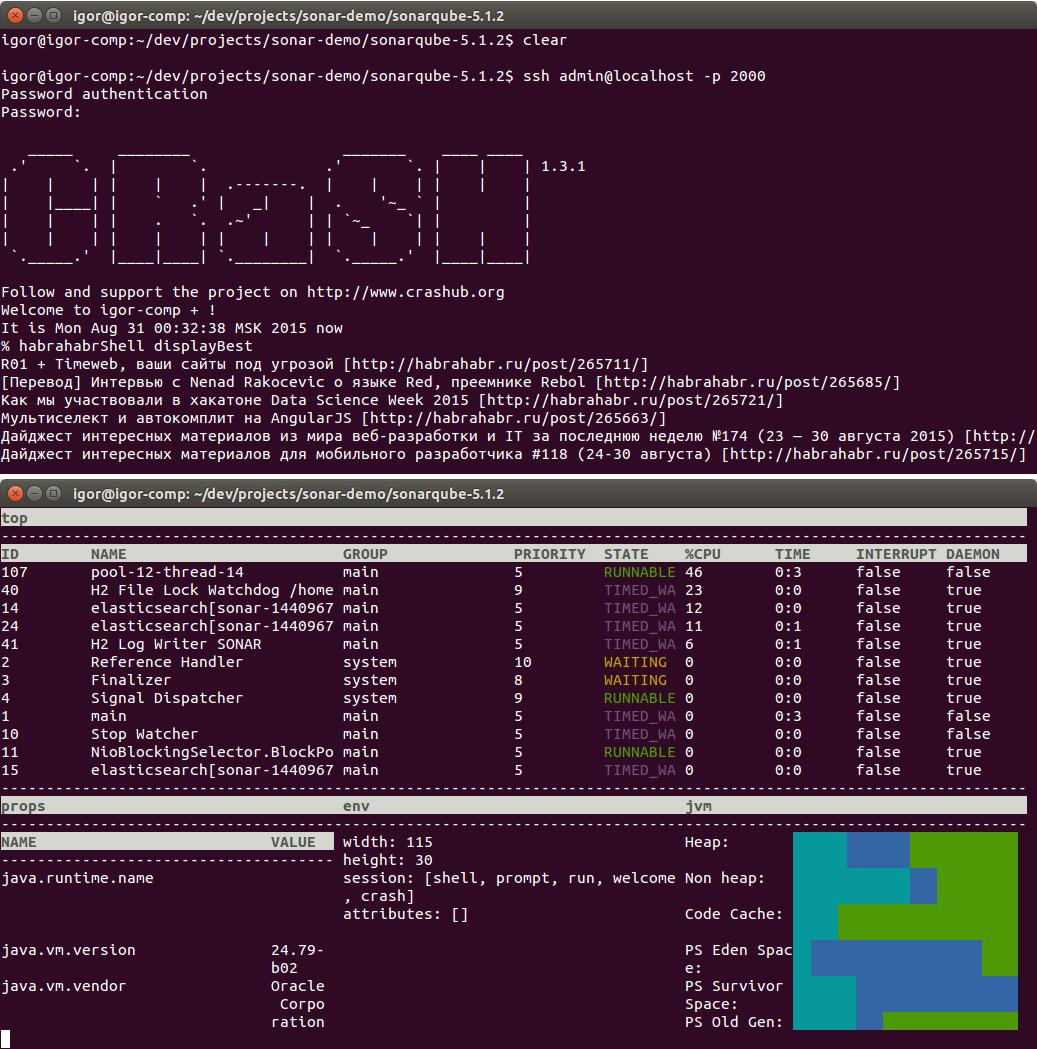
I’ll tell you how to embed an ssh server in an existing java application, which can display the best articles with habrahabr in the terminal. This is just an example, but on its basis you can get an additional tool for administering your program and expand the behavior with any commands, without changing the source code and rebuilding the application.
You can see the screencast of the work at the end of the article.
As an ssh server we use СRaSH- This is one of the implementations of the shell in java. It allows you to create a server in the java process that runs commands using the ssh / telnet protocols and includes a set of ready-made commands with the ability to write new ones on groovy. Out of the box there are ready-made commands for working with JMX, access to the database, java streams, monitoring heap, changing the level of logging.
This project may be familiar if you used Spring Boot, Mulesoft Enterprise Service Bus, Play Framework, Vert.x. Now you can even embed it in a corporate java legacy!
So, let's start with the implementation of the command An implementation is written in groovy. For those who are familiar with java, writing a new implementation will not be difficult.
We will save our command for Habr in the file sonarqube-5.1.2 / cmd / habrahabrShell.groovy:
import org.crsh.cli.Usage
import org.crsh.cli.Command
import org.crsh.cli.Argument
import org.crsh.cli.Required
@Usage("Example for habrahabr")
class habrahabrShell {
  @Usage("Display best topics from habrahabr")
  @Command
  public void displayBest() {
	def feedContent = "http://habrahabr.ru/rss/best/".toURL().text
	def rss = new XmlSlurper().parseText(feedContent)
	rss.channel.item.each{
	    out << "$it.title [$it.link]\n"
   	}
  }
  @Usage("Say hello")
  @Command
  public void sayHello(@Required @Argument String message) {
    out << "Hello habrahabr $message"
  }
}
Note that the shell will use the command name based on the file name, not the class name. @Usage annotations allow CRaSH to print help for the command and its parameters. This command, which displays Hello habrahabr with your parameter on the console, is not particularly useful and has a rather motivating effect and shows that writing commands is quite simple. The displayBest command is more difficult to implement: we get the contents of the rss feed using toURL (). Text, parse it with XmlSlurper (). ParseText () and print to the console a list of the best articles of the day and links to them, iterating over the channel.item elements from the feed .
Our experimental CRaSH application remains SonarQube. How to download it, configure and stuff aspectj with an agent told in detail and showed in a previous article. We leave the -javaagent configuration unchanged, and in org.aspectj.weaver.loadtime.configuration we specify the new config script file: file: /home/igor/dev/projects/sonar-demo/scripts/shell-console.xml The
contents of the shell- console.xml:
com.github.igorsuhorukov.СrashubSsh AFTER execution(* org.sonar.server.app.WebServer.start(..)) org.crashub:crash.connectors.ssh:1.3.1 Bootstrap org.crsh.standalone.Bootstrap Builder org.crsh.vfs.FS$Builder ClassPathMountFactory org.crsh.vfs.spi.url.ClassPathMountFactory FileMountFactory org.crsh.vfs.spi.file.FileMountFactory
classLoader = Bootstrap.getClassLoader();
classpathDriver = new ClassPathMountFactory(classLoader);
otherCmd = new FileMountFactory(new java.io.File(System.getProperty("user.dir")));
cmdFS = new Builder().register("classpath", classpathDriver).register("file", otherCmd).mount("classpath:/crash/commands/").mount("file:cmd/").build();
confFS = new Builder().register("classpath", classpathDriver).mount("classpath:/crash/").build();
bootstrap = new Bootstrap(classLoader, confFS, cmdFS);
config = new java.util.Properties();
config.put("crash.ssh.port", "2000");
config.put("crash.ssh.auth_timeout", "300000");
config.put("crash.ssh.idle_timeout", "300000");
config.put("crash.auth", "simple");
config.put("crash.auth.simple.username", "admin");
config.put("crash.auth.simple.password", "admin");
bootstrap.setConfig(config);
bootstrap.bootstrap();
//bootstrap.shutdown();
This configuration allows the agent, after executing the start () method of the org.sonar.server.app.WebServer class, to download the org.crashub: crash.connectors.ssh: 1.3.1 artifact from the maven repository, configure the server and start it by calling bootstrap.bootstrap (). The server will find our command in the cmd directory, which we specified when initializing with mount ("file: cmd /"). Well, authentication will be using the admin / admin username and password that we set, the ssh server will listen to port 2000 - put ("crash.ssh.port", "2000") This is
implemented on a MVEL - java-like script using AspectJ-scripting agent and corresponding configuration. Agent available in central maven repository
September 9 in Moscow will host my open session on aspect-oriented programming. Admission is free, after I publish the report materials on the hub Registration openevent9sept2015.questionpro.com
All the magic of this article is implemented using aspect-oriented programming and consists of only 2 files: habrahabrShell.groovy and shell-console.xml and the parameter specifying jvm agent. Isn't that easy !?









