Windows Volume Ordering Algorithm, Part 2
Algorithm for ordering logical volumes in the Windows environment, part 2
In the first part of the publication, the principles of the algorithm implementation were described, the adversarial results of the sequential execution of the prototype code and diskpart.exe are presented.
This part provides a brief description of each of the four steps of the algorithm, demonstrates strict adherence to the principles proclaimed in the first part. The sources of information used are provided.
How an algorithm stores data.
In the process of performing the four steps of the algorithm, three collections are created containing objects representing the Storage Devices, DevicesCollection, created the very first, in step 1, and is constantly used in all subsequent steps to refer to the parent object. In step 2, a StorageVolumesCollection is created, and in step 3, a LogicalVolumesCollection. All collections are organized on a single principle: all stored objects are indexed and in order to access the stored object directly, you just need to refer to XXXXXCollection [index], where XXXXX: {Devices, StorageVolumes, LogicalVolumes}, and the index is any integer in the range [0, XXXXXCollection.Count]. The Count property contains the number of objects of the corresponding type in the collection.
The device description lines stored in the binary Data blob do not contain DeviceGUID not only for DVD-ROM, but also for Removables. The mentioned binary blob contains detailed characteristics of the logical volume and is addressed by the Registry by:
HKU \ SID \ Software \ Microsoft \ Windows \ CurrentVersion \ Explorer \ MountPoints2 \ CPC \ Volume \ GUID, where GUID is VolumeGUID, SID - Security Identifier of the current user. In this regard, the DevicesCollection and LogicalVolumesCollection collection contain “direct access keys” both in the form of short 8-character DeviceGUID.F1, as well as long, unpredictable lengths for DVD-ROM and Removables. Direct access keys return the index of the object corresponding to the specified key. Thus, using the long key, PnPDeviceID to access the DevicesCollection, you can get the index of the parent device. This index is immediately assigned as the value of the ParentIndex property to that object of type StorageVolume or LogicalVolume, which must be placed in its own collection.
Description of the first step of the algorithm: creating a DevicesCollection.
Sources of information:
1. Enumerations created by cdrom and partmgr services. The hard worker partmgr not only receives information from several device drivers and performs its main task - creating an enumeration of memory volumes, additionally creates an enumeration of all devices except those served by the cdrom service. It is clear that we are talking about reading all REG_SZ values along the paths:
HKLM \ SYSTEM \ CurrentControlSet \ Services \ cdrom and
HKLM \ SYSTEM \ CurrentControlSet \ Services \ partmrg.
2. Extracting detailed information about devices based on PnPDeviceID. The time has come to supplement the description of PnPDeviceID, presented in the first part, by mentioning that PnPDeviceID necessarily contains a prefix to the device description line, also a prefix indicating the interface according to which the device is connected. Moreover, I can’t say for sure whether this Windows prefix attributes to the description of the device provided by the manufacturer or the manufacturer itself. In any case, PnPDeviceID provides accurate information on which path to read the detailed data from
HKLM \ SYSTEM \ CurrentControlSet \ Enum. Demonstrate this most important source of information about devices, a screenshot.
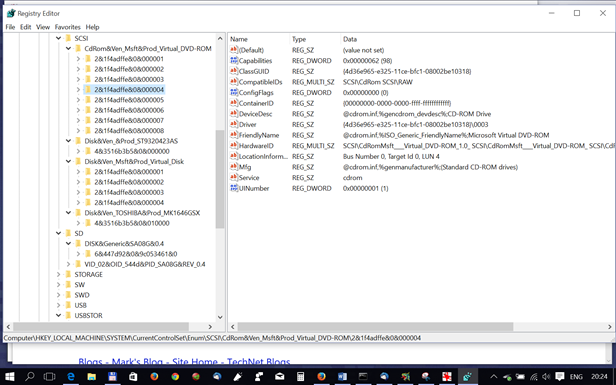
Figure 4
In addition to HKLM \ SYSTEM \ CurrentControlSet \ Enum \ PnPDeviceID, two additional paths are additionally used:
HKLM \ SYSTEM \ CurrentControlSet \ Enum \ PnPDeviceID \ Device Parameters \ Partmgr, which contains the value of the most important DiskId property, which was previously mentioned as DevGUID.
Once again, we don’t create DiskId for devices serviced by cdrom and therefore the algorithm sets the DevID property to PnPDeviceID with the “\” characters replaced by the “#” character.
HKLM \ SYSTEM \ CurrentControlSet \ Enum \ PnPDeviceID \ Device Parameters \ Storport contains InitialTimestamp, the manufacturer’s release date for the device in REG_QWORD format.
Additional sources of information exclusively for internal drives are the following:
HKLM \ HARDWARE \ DESCRIPTION \ System \ MultifunctionAdapter \ 0 \ DiskController \ 0 \ DiskPeripheral
HKLM \ HARDWARE \ DEVICEMAP \ Scsi \ Scsi Port 1 \ Scsi Bus 0 \ Target Id 0 \ Logical Unit Id M.
The identifier property REG_SZ is read on the first path. , which represents the signature of the disk for Mbr-formatted disks, and contains zeros for Gpt-formatted disks, which indicates that the disk contains Gpt-formatted partitions. This is very important information for the algorithm, but, unfortunately, this information is only available for internal drives.
After the object representing the storage device is fully endowed with all the properties read from the Registry and additional properties needed by the algorithm, the object is endowed with the most important property OrderIndex, the value of which is set to DevicesCollection.Count. After that, the object is placed in the collection by index equal to the value of the collection property Count and Count is incremented.
Additionally, direct access keys are created for all Removables and DVD-ROMs, as well as group properties are initialized, the real values of which are set in the second and third steps. We list these properties here:
LVGroupStyle - formatting style, possible values are Mbr, Gpt.
NumberOfLV - the number of logical volumes hosted on device partitions.
LVGroup - a list of offsets of logical volumes
NumberOfSV - the number of partitions, Storage # Volume located on the device
SVGroup - a list of offsets of partitions
Description of the second step of the algorithm: creating StorageVolumesCollection
Sources of information:
1. Enumeration HKLM \ SYSTEM \ CurrentControlSet \ services \ volsnap \ Enum
MUST provide an ordered list Storage # Volume, memory volumes. However, incidents happen even in a licked system like Windows 8.1. It's time to demonstrate the saved Registry fragment stored with the file name BecameCrazy-volsnap.reg. Here is a snippet from this file.
[HKEY_LOCAL_MACHINE \ SYSTEM \ CurrentControlSet \ Services \ volsnap \ Enum]
«0»=«STORAGE\\Volume\\_??_SD#DISK&Generic&SA08G&0.4#6&447d92&0&9c053461#{53f56307-b6bf-11d0-94f2-00a0c91efb8b}»
«Count»=dword:00000011
«NextInstance»=dword:00000011
«1»=«STORAGE\\Volume\\{714ce426-d2a2-11e4-824f-806e6f6e6963}#0000000000007E00»
«2»=«STORAGE\\Volume\\{714ce426-d2a2-11e4-824f-806e6f6e6963}#0000000016260000»
Pay attention to the line “0” corresponding to the SD card. How this index was assigned to this card can be explained by the fact that there was a failure while reading the second partition of the first internal disk, the system handled the failure, set the Dirty bit for the partition, and therefore the partmgr report on the memory volume on the SD card was ahead of the volume reports memory on internal drives. To the credit of the system, I must clarify that this happened only once, I can even name the exact date - 07/01/2015.
But it’s easier not to complain about unexpected glitches, but to create algorithms that allow you to work correctly regardless of surprises. Therefore, the incident forced us to immediately revise the algorithm: if earlier the algorithm completely trusted the order of the lines read along the specified path, then after what happened the algorithm was laid out with the principle of independent ordering in accordance with the parent index and its own offset.
The same principle is applied at step 3 when creating a collection of logical volumes, and it guarantees that the ordering will be correct, unless the “partmgr” service and the offsets stop coming in ascending order. It was this (disruption of the sequence of offsets) that happened under Windows 10 RTM TH1, in which, as already mentioned, the Volume GUID ordering algorithm was changed. Naturally, in the beginning it caused me stormy emotions and all kinds of unfriendly words addressed to MS programmers: it’s not that the used algorithm stopped working, but the disordered list of offsets for LVGroup really hurt my eyes. And only after a couple of hours I realized what caused this change in the algorithm, what it brought and from that moment only sing praises to the author of the idea of a new sequencing algorithm.
2. HKLM\SYSTEM\CurrentControlSet\Enum\STORAGE\Volume\_??_SD#DISK&Generic&SA08G&0.4#6&447d92&0&9c053461&0#{53f56307-b6bf-11d0-94f2-00a0c91efb8b}
Содержит следующие свойства:
«Capabilities»=dword:000000b0
«ContainerID»="{33b560f6-21b5-11e5-b2ff-806e6f6e6963}"
«HardwareID»=hex(7):530054004f0052004100470045005c0056006f006c0075006d00650000000000
«ClassGUID»="{71a27cdd-812a-11d0-bec7-08002be2092f}"
«Service»=«volsnap»
«DeviceDesc»="@volume.inf,%storage\\volume.devicedesc%;Generic volume"
«Driver»="{71a27cdd-812a-11d0-bec7-08002be2092f}\\0000"
«Mfg»="@volume.inf,%msft%;Microsoft"
«ConfigFlags»=dword:00000000
Most of these properties can be pre-inscribed with pens. Of interest was only ContainerID, a unique property, but it was too lazy to waste time searching for the application of this GUID, most likely representing the GUID of the driver. So I'm not sure that it generally makes sense to spend precious milliseconds reading these properties. It is much more important to immediately link the object represented by the description line of the memory volume to the parent device. Therefore, even before the information from HKLM \ SYSTEM \ CurrentControlSet \ Enum \ STORAGE \ Volume \ is read, a text string describing the memory volume is parsed in order to determine the values of the following properties:
Type = {“Partition”, “Removable”},
Subtype = {“SD”, “Flash”, “Virtual”},
Offset, DevID
The last of the properties is set equal to the F1 GUID field preceding the offset for Type = "Partition". Otherwise, the prefix “STORAGE \ Volume \” and the suffix “# {53f56307-b6bf-11d0-94f2-00a0c91efb8b}” are truncated so that the above line from the file named “crazy” for the SD card turns into:
_ ?? _ SD # DISK & Generic & SA08G & 0.4 # 6 & 447d92 & 0 & 9c053461 & 0
This string is assigned as the DevID property. Well, then the most important property for any of the “children” is calculated, the definition of the parent device:
obj.ParentIndex = DevicesCollection [obj.DevID]
Having learned the index of the parent device, you can find the DevGUID of the parent for Removables, more precisely, the algorithm does not need the DevGUID, but only the F1 field value from DevGUID is needed. The parent stores this value as the value of the DCUniqueID native property. Knowing the parent DCUniqueID, you can form the value of your own unique identifier:
obj.SVUniqueID = DevicesCollection [obj.ParentIndex] .DCUniqueID + obj.Offset
For memory volumes of the "Partition" type, the real offset is used, and for memory volumes hosted on Removables, the offset is set to “00000000”.
Now you can update the properties of the parent object describing the SVGroup and the number of memory volumes allocated on the parent device. That is, increment the DevicesCollection [obj.parentIndex] .NumberOfSV counter and include the offset of the current object in the DevicesCollection [obj.parentIndex] .SVGroup counter.
Exactly the same actions are performed in step three, as applied to logical volumes.
Now let me remind you that we are in a cycle of processing strings read from an enumeration. We have already determined all the necessary properties of an object of the StorageVolumesCollection class, but bearing in mind that you cannot trust the correctness of the enumeration, we will save the object not in the target collection, but in a simple, temporary one. But the current object, generally speaking, is a member of the group, and therefore by the parent index in the temporary collection is not the object itself, but a group of objects, each of which has the same parent.
Upon completion of the enumeration reading cycle, we are able to create a properly ordered target collection StorageVolemesCollection. To do this, we will run a loop through the parent collection, DevicesCollection, and several short nested loops through groups that have the same parent. Inside the loop, we place objects from the temporary collection in the StorageVolumesCollection, using StorageVolumesCollection.Count as an index to place them and increment this property after placing the object. StorageVolumesCollection is the simplest according to the principles of formation; it does not need to create additional direct access keys.
Description of the third step of the algorithm: creating a LogicalVolumesCollection
Sources of information:
Enumeration
HKU \ SID \ Software \ Microsoft \ Windows \ CurrentVersion \ Explorer \ MountPoints2 \ CPC \ Volume \ GUID
where the GUID is VolumeGUID, the SID is the Security Identifier of the current user, provides a list of VolumeGUIDs, and the content of the binary blob named Data, addressed by the specified key, contains detailed data. The Blob Data has a rather complex structure containing both UTF-16 text strings and binary data. In addition, the size and offsets of text fields inside this blob depend on the version of Windows younger than build 9600 or older. In the prototype code, the GetBlobs function performs the sorting of the content of this blob. The algorithm used is constructed so that there is no dependence on the version of Windows, the already known offsets of text fields are not used. To the above, when describing step two, I will only add that in this case, devices such as DVD-ROM are not ignored, since they contain a logical volume.
In step three, the creation of direct access keys of the following form is of utmost importance:
for Mbr-formatted: disk signature + offset
for Mbr-formatted: VolGUID.F1 + offset
for Gpt-formatted: VolumeGUID.F1
However, at the moment when the object processing cycle is running for included in the LogicalVolumesCollection, the signatures for USB disks are not yet known and, in addition, the Mbr / Gpt formatting STYLES is unknown for both VHD partitions and external disks.
Therefore, it is worth mentioning a special type of VolumeGUID, which originally appeared in the WMI class MSFT_Volume in the Path field, where along with the real VolumeGUID, there was also a fictitious one having the format {1036c1c4-0000-0000-007e-000000000000}. Then in one of the assemblies, maybe even 9926, such a GUID format appeared and existed in all assemblies from 9879 to 10166, but in 10240 it disappeared again due to a change in the VolumeGUID generation algorithm.
I mention this format because the field F1 of this GUID is the signature of the disk, and the fields F4, F5 are the offset of the logical volume. So having discovered such a VolumeGUID in the system, it became possible to assign unique keys for direct access to the LogicalVolumesCollection objects to all LVGroup members. Another reason why I mention the VolumeGUID format given here is that despite the undeniable revolutionary idea of organizing VolumeGUID according to the order of mounting logical volumes, first introduced in assembly 10240, the GUID generation algorithm was unsuccessful nevertheless in the sense that for Mbr-disks having four partitions and four logical volumes, respectively, the last two arrive in WRONG ORDER: the latter has a LESS offset than the penultimate one.
Such a serious accusation must be proved by facts, therefore the content of the Data blob for the penultimate “child” is listed below, Offset = 000020789000000
Windows Registry Editor Version 5.00
[HKEY_USERS \ S-1-5-21-1478854878-1022661374-1075113013-1004 \ SOFTWARE \ Microsoft \ the Windows \ CurrentVersion \ Explorer
\ MountPoints2 \ CPC \ the Volume \ {714ce432-d2a2-11e4-824f-806e6f6e6963}]
«the Data» = hex: 000000000df0adba0100000008000000000000800000 \
0000000000300000000000000000ff00e703ff000000160000 \
0026980b421f00000004000000000000000000000000000000 \
0000000000005c005c003f005c00530054004f005200410047 \ \\ \ Storag?
004500230056006f006c0075006d00650023007b0037003100 \ E # # the Volume { 71
3400630065003400320036002d0064003200610032002d0031 \ 4ce426-d2a2-1
003100650034002d0038003200340066002d00380030003600\ 1e4-824f-806
6500360066003600650036003900360033007d002300300030\ f6e6963}#00
00300030003000300032003000370038003900300030003000\ 0000207890000
3000300023007b00350033006600350036003300300064002d\ 00#{5
0062003600620066002d0031003100640030002d0039003400\
660032002d0030003000610030006300390031006500660062\
А теперь контент блоба Data для последнего “ребенка”, Offset = 000000001620000
Windows Registry Editor Version 5.00
[HKEY_USERS\S-1-5-21-1478854878-1022661374-1075113013-1004\SOFTWARE\Microsoft\Windows\CurrentVersion\Explorer\
MountPoints2\CPC\Volume\{f0fd3322-2d89-11e5-82e0-806e6f6e6963}]
«Data»=hex:000000000df0adba0100000008000000000000800000\
0000000000300000000000000000ff00e703ff000000160000 \
00cd14ff0e1f00000004000000000000000000000000000000 \
0000000000005c005c003f005c00530054004f005200410047 \ \\? \ Storag
004500230056006f006c0075006d00650023007b0037003100 \ E {# the Volume # 71
3400630065003400320036002d0064003200610032002d0031 \ 4ce426-d2a2-1
003100650034002d0038003200340066002d00380030003600 \ 1e4-824a-806
6500360066003600650036003900360033007d002300300030 \ e6f6e963} # 00
00300030003000300030003000310036003200360030003000 \ 000,000,162,600
3000300023007b00350033006600350036003300300064002d \ # 00 {5
0062003600620066002d0031003100640030002d0039003400 \
660032002d0030003000610030006300390031006500660062 \
00380062007d00000000000000000000000000000000000000 \
And, finally, a snapshot of the Registry branch containing the above VolumeGUIDs to prove that I was not mistaken in the ORDER OF FOLLOWING children.
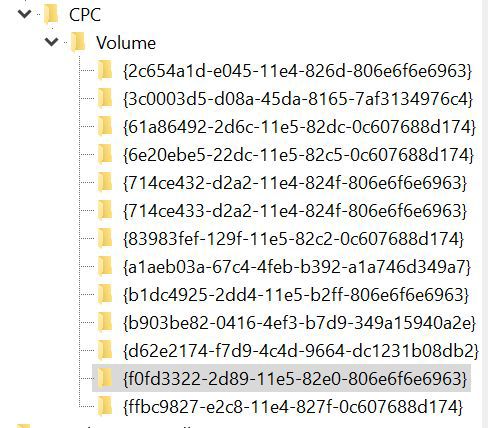
In conclusion, it is worth noting that at the end of the cycle on objects intended for placement in the collection of logical volumes, we have the opportunity to finally deal with the formatting styles of partitions on external disks and on VHD. To do this, just compare the values of the NumberOfSV and NumberOfLV properties. The coincidence of values unambiguously indicates that the partitions on the disk have the Mbr formatting style, while NumberOfLV <NumberOfSV unambiguously indicates the Gpt formatting style, since the first of the Gpt-partitions, MSR, cannot contain a logical volume.
Description of the fourth step of the algorithm: assigning letters to logical volumes
Source of information: HKLM \ SYSTEM \ MountedDevices
Even novice users of Windows are well aware of this way of storing, but along with the necessary information there is also a lot of completely unnecessary. This is especially true for USB-flash drives, as well as phones, most of which are now equipped with micro-SD. Information about all such devices quickly clogs MountedDevices. It should be borne in mind that there are two entries for each of these devices in MountedDevices: one in which the name field has the value \ ?? \ Volume \ VolumeGUID and the second in which the name field has the format value \ DosDevices \ Q :. The value field for both entries has a very long hexadecimal text, representing in UTF-16 the PnPDeviceID already familiar to us, and in the format with “\” replaced by “#”.
All of the above applies to disk partitions, both internal and external: you changed one of your internal disks, but information about all its partitions continues to be stored in MountedDevices until you install, for example, Windows from scratch, then there is not to destroy the existing Registry, but with all updates, the MountedDevices content will move from the updated system to the updated one.
Now, how to distinguish logical volumes corresponding to Mbr-formatted disks and Gpt-formatted ones by the values of the value field in MountedDevices records. Extremely simple: if the value field is 24 characters long, then it represents Signature, the signature of the parent disk, 8 characters and the offset, 16 characters.
But it’s still impossible to use as a key to access the LogicalVolumesCollection, first you need to invert both the Signature field and the Offset field, since for some reason I still do not understand, these fields store information that is inverted in byte order. So, having performed the inversion, we can check the availability of the direct access key in the collection of logical volumes and, if we are lucky, then assign the letter to the object from the LogicalVolumesCollection.
But if we were not lucky with the MountedDevices entry from the subset \ DosDevices \ x: then we might be lucky with the key made up of VolumeGUID.F1 + the offset from the value field. And if we are lucky with the VolumeGUID.F1 key + offset, then we need to immediately create additional direct access keys in the collection of logical volumes composed of the disk signature + offset.
And finally about logical volumes on Gpt-formatted disks. The value field for such logical volumes is 48 bytes long, of which the first 16 contain fixed information, represented by 8 utf-16 characters and 32 hexadecimal characters in the form of a string representing QWORD, formed on the basis of information from the VolumeGUID fields. Here is the reverse conversion algorithm:
String.prototype.ConvertQWORD = function () // converts 32-bytes heximal string
{
// .... xxyyzztttttt
// 00 02 04 06 08 10 12 14 16 18 20 22 24 26 28 30
// 3ab0aea1c467eb4fb392a1a746d349a7 3a b0 ae a1 c4 67 eb 4f b3 92 a1 a7 46 d3 49 a7
var t = this. toLowerCase ();
return t.substr (06, 02) + t.substr (04, 02) + t.substr (02, 02) + t.substr (00, 02) +
t.substr (10, 02) + t.substr ( 08, 02) + // 4 xx
t.substr (14, 02) + t.substr (12, 02) + // 4 yy
t.substr (16, 02) + t.substr (18, 02) + / / 4 zz
t.substr (20, 12); // 12 }
Unlike logical volumes for Mbr-formatted disks, only one record is created for each volume on a Gpt-formatted disk in MountedDevices. Moreover, volumes of Gpt-formatted disks that do not have letters are not represented in MountedDevices. Therefore, after calculating VolumeGUID according to the algorithm described above, you should select the F1 field and use it as a direct access key to the collection of logical volumes.
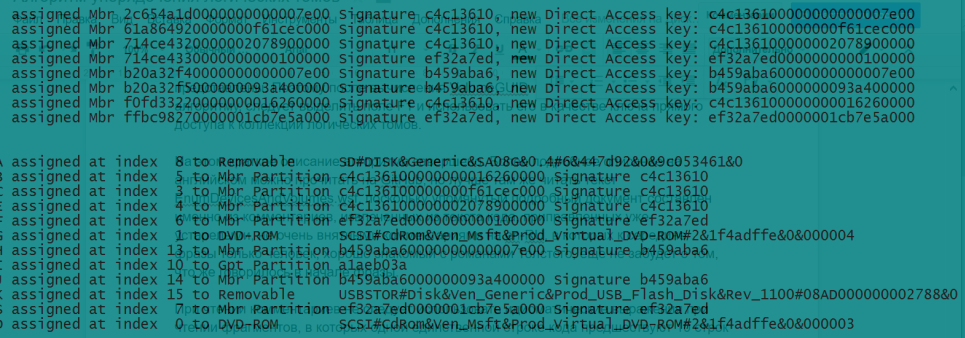
Figure 5.
Figure 5 demonstrates the logic of step 4: first, when processing a subset of MountedDevices containing VolumeGUID, new direct access keys are created based on Signature + Offset, and then when processing a subset of DosDevices, these new keys allow “SetMountNameForMountPoint”.
This concludes the short description of the algorithm. An updated version of the English-language document, EnumerateVolumes-LLD.docx, EnumerateVolumes-LLD.pdf, was posted on Github yesterday. In some places, this version of the document is more detailed than the Russian-language versions of documents. In particular, this applies to historical excursions on the origin of the concepts of Section and the letter of the volume. But still, the best document is undoubtedly the source code itself and the increase in the number of views and full downloads from Github cannot but rejoice, because it demonstrates that even such a highly specialized topic finds its readers. After all, there is no doubt that 99.5% of JS programmers use this language for Web programming, but not for extracting system information. For this, it is customary to use PShell or vbs.
When reading comments, do not rush to use idiomatic expressions when reading fragments in which 10 lines of explanatory comments precede one single line of code: this means that some code is very important for the algorithm. As well as markup tags at the end of the lines, denoting the name of the class to which this fragment belongs. Since the three classes DevicesCollection, StorageVolumesCollection and LogicalVolumesCollection are very similar both in execution logic and in the composition of the code, such tags make it easy to navigate a fairly long text. The methods and functions common to all classes are naturally taken up, but for example, the parsing of text lines of device descriptions varies from class to class and is present at all four steps of the algorithm.
Comment on the adversarial results given in the first part
I hope that those who read the first part, fully realized that the competition was held according to the rules of the TopGear formula, and not according to the rules of Formula 1 in conditions of heavy traffic. In the latter case, the code executed by the interpreter is initially doomed to lose, no matter how efficient the algorithm would be. And this is due to the system rules for allocating time quanta to each of the parallel processes according to their priorities. Obviously, the priority of diskpart.exe is always higher than that of the code executed by the interpreter. It would be ideal to evaluate the results of the competition not in calendar seconds and milliseconds, but in the number of time slices used. But Windows does not provide such an opportunity. But, MAYBE, it is permissible to specify the SAME priorities in the command line when starting diskpart and EnumDevicesAndVolumes.wsf.
About defining a formatting style based on the content of GUID fields
An echidic reader who has looked at Github in the English version of the document, where the classification of various GUIDs is given at the very beginning, might ask: if you can just quickly glance at the Volume GUID for a Gpt-formatted disk from the Volume GUID for Mbr-formatted, why so many words and an extra cycle to set the formatting style at the end of step 3? The answer is simple: yes, on the basis of the absence of the Field 3 Volume GUID in the field “11e4” or “11e5”, I can draw this conclusion, but I did not read the MS documentation and even the description of the GUID class I still can’t bother to read and therefore I’m not ready to take courage to invest in code UNproven knowledge.
About the instrumental class StdRegWrapperClass, used by all classes and functions for retrieving data from the Registry.
Now I call it so, “instrumental”, but when I wrote it, I was very proud, but the code for retrieving data from the Registry contemptuously called TestCase. But now it’s more profitable for me to call it instrumental for the simple reason that I just didn’t have time to include Set, Delete methods and therefore the name instrumental easily justifies this name - SET / Delete methods are NOT REQUIRED to solve the problem described above. But I'm going to support this class and will certainly include all methods from StdRegProv. Hopefully even during August.
About errors and shortcomings in the algorithm and code
There is an error in the code in step 4 in the cycle of processing lines read from MountedDevices: unexpectedly during debugging it was discovered that a line with VolumeGUID and, accordingly, without a letter, was read later than all DosDevices records were processed. He didn’t waste time, the error is not clear where he is hiding, it is quite possible that in the instrumental class. Therefore, it only increased the complexity of the algorithm by scattering read strings in two arrays, the first of which stores only the VolumeGUID of the string, and the second only DosDevices of the string. Then, in another cycle of length N, the rows are first sequentially read and processed first from the first array, and then from the second. I’ll certainly figure it out and fix it.
In a tool class, a date interpretation method in the REG_QWORD format does not work correctly. Spent several hours debugging, but could not figure it out. I would be very grateful if someone would send me a well-known interpretation of at least one of the dates in the Registry, stored in REG_QWORD format. This “sore spot”, I really want to fix it.
It is completely incomprehensible to me what is stored in the first eight bytes of the Identifier property, HKLM \ HARDWARE \ DESCRIPTION \ System \ MultifunctionAdapter \ 0 \ DiskController \ 0 \ DiskPeripheral, "Identifier" = "9cb5ff90-00000000-A". There are no own ideas on this subject, searches in the Registry give the only result. If someone can tell, I will be very grateful.
I did not fully understand the structure of the Data blob from MountPoints2 \ CPC \ Volume. But I don’t see any particular reason to spend time on this. Yes, it would be nice to extract the size of the volumes from there, but I did not find a suitable field among those that I have not yet identified. But still spend a couple of hours.
A commented list of useful links on the publication topic
www.script-coding.com/WMI.html is an excellent article about WMI coding, an excellent Russian site dedicated to Scripting, contains a lot of similar articles.
It was thanks to the publications on this site that I began to use structured WSF code instead of “sheets” on pure JS. Wonderful site.
www.microsoft.com/en-us/download/details.aspx?id=12028- loading the best in my opinion “textbook” on WMI methods, ScriptomaticV2.hta. MUST HAVE for JS, VBS, Perl programmers using WMI methods. Displays the source code for extracting the results of the work selected from a huge tree of WMI classes in one of the selected languages.
A series of several articles on the portal www.forensicmag.com
www.forensicmag.com/articles/2011/12/windows-7-registry-forensics-part-2
www.forensicmag.com/articles/2012/02/windows-7- registry-forensics-part-3
www.forensicmag.com/articles/2012/06/retrieving-digital-evidence-methods-techniques-and-issues-part-3
www.forensicmag.com/articles/2012/04/windows- 7-registry-forensics-part-4
In principle, an interesting portal, spent several hours reading publications on this portal. But I’ll note right away that, to my happiness, I found it too late when I already managed to figure out exactly where the lists of relevant information are stored in the Registry, and where there are “garbage collection” that stores information about what I’ve visited at least once in system. So, the author of the above publications dumps so many paths into the Registry on an unprepared reader that it will take a lot of time to figure out most of the garbage heaps addressed by these links.
winintro.ru/diskmgt.ru/html/ebd2bd6e-8b1e-43b6-a2e3-483def6ad763.htm - an intelligible article about Spanned Volumes and dynamic disks.
xp-7.ru/blog/2011-01-13-101- one more and also distinct, but saw contradictions with the first.
www.webtropy.com/articles/art14-2.asp?Interop=WbemScripting is a good WbemScripting Reference for C # and VB.NET The
list would be much longer if I included all references to well-known, as I hope, reference from Microsoft. I think that this is not necessary.
“Wastes of production”
As often happens, when searching for the right information, you come across one that is not needed at the moment, but is interesting and therefore scratching your turnips, you immediately begin to sculpt the code. Here is an example, the update history of my system, represented by code written in a couple of hours.
2015.03.24 22:10:19 - 2015.03.31 15:45:14 Windows 8.1 Pro 9600
2015.03.31 16:26:15 - 2015.04.23 02:56:17 Windows 10 Pro Technical Preview 10049
2015.04.23 03:44:13 - 2015.04.29 06:36:13 Windows 10 Pro Technical Preview 10061
2015.04.29 07 : 25: 43 - 2015.05.21 11:32:07 Windows 10 Pro Insider Preview 10074
2015.05.21 14:21:40 - 2015.05.28 21:13:37 Windows 10 Pro Insider Preview 10122
2015.05.28 22:04:16 - 2015.05.30 19:11:22 Windows 10 Pro Insider Preview 10125
2015.05.30 20:16:43 - 2015.07.01 11:17:37 Windows 10 Pro Insider Preview 10130
2015.07.01 12:11:53 - 2015.07.01 13:25:29 Windows 10 Pro Insider Preview 10158
2015.07.01 23:22:08 - 2015.07.03 22:25:40 Windows 10 Pro Insider Preview 10159
2015.07.03 23:21:16 - 2015.07.09 24:24: 29 Windows 10 Pro Insider Preview 10162
2015.07.10 01:21:50 - Windows 10 Pro Insider Preview 10166
And finally , a link to github:
github.com/sysprg-46/EnumerateDevicesAndVolumes/tree/master
Thank you for your patience.
In the first part of the publication, the principles of the algorithm implementation were described, the adversarial results of the sequential execution of the prototype code and diskpart.exe are presented.
This part provides a brief description of each of the four steps of the algorithm, demonstrates strict adherence to the principles proclaimed in the first part. The sources of information used are provided.
How an algorithm stores data.
In the process of performing the four steps of the algorithm, three collections are created containing objects representing the Storage Devices, DevicesCollection, created the very first, in step 1, and is constantly used in all subsequent steps to refer to the parent object. In step 2, a StorageVolumesCollection is created, and in step 3, a LogicalVolumesCollection. All collections are organized on a single principle: all stored objects are indexed and in order to access the stored object directly, you just need to refer to XXXXXCollection [index], where XXXXX: {Devices, StorageVolumes, LogicalVolumes}, and the index is any integer in the range [0, XXXXXCollection.Count]. The Count property contains the number of objects of the corresponding type in the collection.
The device description lines stored in the binary Data blob do not contain DeviceGUID not only for DVD-ROM, but also for Removables. The mentioned binary blob contains detailed characteristics of the logical volume and is addressed by the Registry by:
HKU \ SID \ Software \ Microsoft \ Windows \ CurrentVersion \ Explorer \ MountPoints2 \ CPC \ Volume \ GUID, where GUID is VolumeGUID, SID - Security Identifier of the current user. In this regard, the DevicesCollection and LogicalVolumesCollection collection contain “direct access keys” both in the form of short 8-character DeviceGUID.F1, as well as long, unpredictable lengths for DVD-ROM and Removables. Direct access keys return the index of the object corresponding to the specified key. Thus, using the long key, PnPDeviceID to access the DevicesCollection, you can get the index of the parent device. This index is immediately assigned as the value of the ParentIndex property to that object of type StorageVolume or LogicalVolume, which must be placed in its own collection.
Description of the first step of the algorithm: creating a DevicesCollection.
Sources of information:
1. Enumerations created by cdrom and partmgr services. The hard worker partmgr not only receives information from several device drivers and performs its main task - creating an enumeration of memory volumes, additionally creates an enumeration of all devices except those served by the cdrom service. It is clear that we are talking about reading all REG_SZ values along the paths:
HKLM \ SYSTEM \ CurrentControlSet \ Services \ cdrom and
HKLM \ SYSTEM \ CurrentControlSet \ Services \ partmrg.
2. Extracting detailed information about devices based on PnPDeviceID. The time has come to supplement the description of PnPDeviceID, presented in the first part, by mentioning that PnPDeviceID necessarily contains a prefix to the device description line, also a prefix indicating the interface according to which the device is connected. Moreover, I can’t say for sure whether this Windows prefix attributes to the description of the device provided by the manufacturer or the manufacturer itself. In any case, PnPDeviceID provides accurate information on which path to read the detailed data from
HKLM \ SYSTEM \ CurrentControlSet \ Enum. Demonstrate this most important source of information about devices, a screenshot.
Figure 4
In addition to HKLM \ SYSTEM \ CurrentControlSet \ Enum \ PnPDeviceID, two additional paths are additionally used:
HKLM \ SYSTEM \ CurrentControlSet \ Enum \ PnPDeviceID \ Device Parameters \ Partmgr, which contains the value of the most important DiskId property, which was previously mentioned as DevGUID.
Once again, we don’t create DiskId for devices serviced by cdrom and therefore the algorithm sets the DevID property to PnPDeviceID with the “\” characters replaced by the “#” character.
HKLM \ SYSTEM \ CurrentControlSet \ Enum \ PnPDeviceID \ Device Parameters \ Storport contains InitialTimestamp, the manufacturer’s release date for the device in REG_QWORD format.
Additional sources of information exclusively for internal drives are the following:
HKLM \ HARDWARE \ DESCRIPTION \ System \ MultifunctionAdapter \ 0 \ DiskController \ 0 \ DiskPeripheral
HKLM \ HARDWARE \ DEVICEMAP \ Scsi \ Scsi Port 1 \ Scsi Bus 0 \ Target Id 0 \ Logical Unit Id M.
The identifier property REG_SZ is read on the first path. , which represents the signature of the disk for Mbr-formatted disks, and contains zeros for Gpt-formatted disks, which indicates that the disk contains Gpt-formatted partitions. This is very important information for the algorithm, but, unfortunately, this information is only available for internal drives.
After the object representing the storage device is fully endowed with all the properties read from the Registry and additional properties needed by the algorithm, the object is endowed with the most important property OrderIndex, the value of which is set to DevicesCollection.Count. After that, the object is placed in the collection by index equal to the value of the collection property Count and Count is incremented.
Additionally, direct access keys are created for all Removables and DVD-ROMs, as well as group properties are initialized, the real values of which are set in the second and third steps. We list these properties here:
LVGroupStyle - formatting style, possible values are Mbr, Gpt.
NumberOfLV - the number of logical volumes hosted on device partitions.
LVGroup - a list of offsets of logical volumes
NumberOfSV - the number of partitions, Storage # Volume located on the device
SVGroup - a list of offsets of partitions
Description of the second step of the algorithm: creating StorageVolumesCollection
Sources of information:
1. Enumeration HKLM \ SYSTEM \ CurrentControlSet \ services \ volsnap \ Enum
MUST provide an ordered list Storage # Volume, memory volumes. However, incidents happen even in a licked system like Windows 8.1. It's time to demonstrate the saved Registry fragment stored with the file name BecameCrazy-volsnap.reg. Here is a snippet from this file.
[HKEY_LOCAL_MACHINE \ SYSTEM \ CurrentControlSet \ Services \ volsnap \ Enum]
«0»=«STORAGE\\Volume\\_??_SD#DISK&Generic&SA08G&0.4#6&447d92&0&9c053461#{53f56307-b6bf-11d0-94f2-00a0c91efb8b}»
«Count»=dword:00000011
«NextInstance»=dword:00000011
«1»=«STORAGE\\Volume\\{714ce426-d2a2-11e4-824f-806e6f6e6963}#0000000000007E00»
«2»=«STORAGE\\Volume\\{714ce426-d2a2-11e4-824f-806e6f6e6963}#0000000016260000»
Pay attention to the line “0” corresponding to the SD card. How this index was assigned to this card can be explained by the fact that there was a failure while reading the second partition of the first internal disk, the system handled the failure, set the Dirty bit for the partition, and therefore the partmgr report on the memory volume on the SD card was ahead of the volume reports memory on internal drives. To the credit of the system, I must clarify that this happened only once, I can even name the exact date - 07/01/2015.
But it’s easier not to complain about unexpected glitches, but to create algorithms that allow you to work correctly regardless of surprises. Therefore, the incident forced us to immediately revise the algorithm: if earlier the algorithm completely trusted the order of the lines read along the specified path, then after what happened the algorithm was laid out with the principle of independent ordering in accordance with the parent index and its own offset.
The same principle is applied at step 3 when creating a collection of logical volumes, and it guarantees that the ordering will be correct, unless the “partmgr” service and the offsets stop coming in ascending order. It was this (disruption of the sequence of offsets) that happened under Windows 10 RTM TH1, in which, as already mentioned, the Volume GUID ordering algorithm was changed. Naturally, in the beginning it caused me stormy emotions and all kinds of unfriendly words addressed to MS programmers: it’s not that the used algorithm stopped working, but the disordered list of offsets for LVGroup really hurt my eyes. And only after a couple of hours I realized what caused this change in the algorithm, what it brought and from that moment only sing praises to the author of the idea of a new sequencing algorithm.
2. HKLM\SYSTEM\CurrentControlSet\Enum\STORAGE\Volume\_??_SD#DISK&Generic&SA08G&0.4#6&447d92&0&9c053461&0#{53f56307-b6bf-11d0-94f2-00a0c91efb8b}
Содержит следующие свойства:
«Capabilities»=dword:000000b0
«ContainerID»="{33b560f6-21b5-11e5-b2ff-806e6f6e6963}"
«HardwareID»=hex(7):530054004f0052004100470045005c0056006f006c0075006d00650000000000
«ClassGUID»="{71a27cdd-812a-11d0-bec7-08002be2092f}"
«Service»=«volsnap»
«DeviceDesc»="@volume.inf,%storage\\volume.devicedesc%;Generic volume"
«Driver»="{71a27cdd-812a-11d0-bec7-08002be2092f}\\0000"
«Mfg»="@volume.inf,%msft%;Microsoft"
«ConfigFlags»=dword:00000000
Most of these properties can be pre-inscribed with pens. Of interest was only ContainerID, a unique property, but it was too lazy to waste time searching for the application of this GUID, most likely representing the GUID of the driver. So I'm not sure that it generally makes sense to spend precious milliseconds reading these properties. It is much more important to immediately link the object represented by the description line of the memory volume to the parent device. Therefore, even before the information from HKLM \ SYSTEM \ CurrentControlSet \ Enum \ STORAGE \ Volume \ is read, a text string describing the memory volume is parsed in order to determine the values of the following properties:
Type = {“Partition”, “Removable”},
Subtype = {“SD”, “Flash”, “Virtual”},
Offset, DevID
The last of the properties is set equal to the F1 GUID field preceding the offset for Type = "Partition". Otherwise, the prefix “STORAGE \ Volume \” and the suffix “# {53f56307-b6bf-11d0-94f2-00a0c91efb8b}” are truncated so that the above line from the file named “crazy” for the SD card turns into:
_ ?? _ SD # DISK & Generic & SA08G & 0.4 # 6 & 447d92 & 0 & 9c053461 & 0
This string is assigned as the DevID property. Well, then the most important property for any of the “children” is calculated, the definition of the parent device:
obj.ParentIndex = DevicesCollection [obj.DevID]
Having learned the index of the parent device, you can find the DevGUID of the parent for Removables, more precisely, the algorithm does not need the DevGUID, but only the F1 field value from DevGUID is needed. The parent stores this value as the value of the DCUniqueID native property. Knowing the parent DCUniqueID, you can form the value of your own unique identifier:
obj.SVUniqueID = DevicesCollection [obj.ParentIndex] .DCUniqueID + obj.Offset
For memory volumes of the "Partition" type, the real offset is used, and for memory volumes hosted on Removables, the offset is set to “00000000”.
Now you can update the properties of the parent object describing the SVGroup and the number of memory volumes allocated on the parent device. That is, increment the DevicesCollection [obj.parentIndex] .NumberOfSV counter and include the offset of the current object in the DevicesCollection [obj.parentIndex] .SVGroup counter.
Exactly the same actions are performed in step three, as applied to logical volumes.
Now let me remind you that we are in a cycle of processing strings read from an enumeration. We have already determined all the necessary properties of an object of the StorageVolumesCollection class, but bearing in mind that you cannot trust the correctness of the enumeration, we will save the object not in the target collection, but in a simple, temporary one. But the current object, generally speaking, is a member of the group, and therefore by the parent index in the temporary collection is not the object itself, but a group of objects, each of which has the same parent.
Upon completion of the enumeration reading cycle, we are able to create a properly ordered target collection StorageVolemesCollection. To do this, we will run a loop through the parent collection, DevicesCollection, and several short nested loops through groups that have the same parent. Inside the loop, we place objects from the temporary collection in the StorageVolumesCollection, using StorageVolumesCollection.Count as an index to place them and increment this property after placing the object. StorageVolumesCollection is the simplest according to the principles of formation; it does not need to create additional direct access keys.
Description of the third step of the algorithm: creating a LogicalVolumesCollection
Sources of information:
Enumeration
HKU \ SID \ Software \ Microsoft \ Windows \ CurrentVersion \ Explorer \ MountPoints2 \ CPC \ Volume \ GUID
where the GUID is VolumeGUID, the SID is the Security Identifier of the current user, provides a list of VolumeGUIDs, and the content of the binary blob named Data, addressed by the specified key, contains detailed data. The Blob Data has a rather complex structure containing both UTF-16 text strings and binary data. In addition, the size and offsets of text fields inside this blob depend on the version of Windows younger than build 9600 or older. In the prototype code, the GetBlobs function performs the sorting of the content of this blob. The algorithm used is constructed so that there is no dependence on the version of Windows, the already known offsets of text fields are not used. To the above, when describing step two, I will only add that in this case, devices such as DVD-ROM are not ignored, since they contain a logical volume.
In step three, the creation of direct access keys of the following form is of utmost importance:
for Mbr-formatted: disk signature + offset
for Mbr-formatted: VolGUID.F1 + offset
for Gpt-formatted: VolumeGUID.F1
However, at the moment when the object processing cycle is running for included in the LogicalVolumesCollection, the signatures for USB disks are not yet known and, in addition, the Mbr / Gpt formatting STYLES is unknown for both VHD partitions and external disks.
Therefore, it is worth mentioning a special type of VolumeGUID, which originally appeared in the WMI class MSFT_Volume in the Path field, where along with the real VolumeGUID, there was also a fictitious one having the format {1036c1c4-0000-0000-007e-000000000000}. Then in one of the assemblies, maybe even 9926, such a GUID format appeared and existed in all assemblies from 9879 to 10166, but in 10240 it disappeared again due to a change in the VolumeGUID generation algorithm.
I mention this format because the field F1 of this GUID is the signature of the disk, and the fields F4, F5 are the offset of the logical volume. So having discovered such a VolumeGUID in the system, it became possible to assign unique keys for direct access to the LogicalVolumesCollection objects to all LVGroup members. Another reason why I mention the VolumeGUID format given here is that despite the undeniable revolutionary idea of organizing VolumeGUID according to the order of mounting logical volumes, first introduced in assembly 10240, the GUID generation algorithm was unsuccessful nevertheless in the sense that for Mbr-disks having four partitions and four logical volumes, respectively, the last two arrive in WRONG ORDER: the latter has a LESS offset than the penultimate one.
Such a serious accusation must be proved by facts, therefore the content of the Data blob for the penultimate “child” is listed below, Offset = 000020789000000
Windows Registry Editor Version 5.00
[HKEY_USERS \ S-1-5-21-1478854878-1022661374-1075113013-1004 \ SOFTWARE \ Microsoft \ the Windows \ CurrentVersion \ Explorer
\ MountPoints2 \ CPC \ the Volume \ {714ce432-d2a2-11e4-824f-806e6f6e6963}]
«the Data» = hex: 000000000df0adba0100000008000000000000800000 \
0000000000300000000000000000ff00e703ff000000160000 \
0026980b421f00000004000000000000000000000000000000 \
0000000000005c005c003f005c00530054004f005200410047 \ \\ \ Storag?
004500230056006f006c0075006d00650023007b0037003100 \ E # # the Volume { 71
3400630065003400320036002d0064003200610032002d0031 \ 4ce426-d2a2-1
003100650034002d0038003200340066002d00380030003600\ 1e4-824f-806
6500360066003600650036003900360033007d002300300030\ f6e6963}#00
00300030003000300032003000370038003900300030003000\ 0000207890000
3000300023007b00350033006600350036003300300064002d\ 00#{5
0062003600620066002d0031003100640030002d0039003400\
660032002d0030003000610030006300390031006500660062\
А теперь контент блоба Data для последнего “ребенка”, Offset = 000000001620000
Windows Registry Editor Version 5.00
[HKEY_USERS\S-1-5-21-1478854878-1022661374-1075113013-1004\SOFTWARE\Microsoft\Windows\CurrentVersion\Explorer\
MountPoints2\CPC\Volume\{f0fd3322-2d89-11e5-82e0-806e6f6e6963}]
«Data»=hex:000000000df0adba0100000008000000000000800000\
0000000000300000000000000000ff00e703ff000000160000 \
00cd14ff0e1f00000004000000000000000000000000000000 \
0000000000005c005c003f005c00530054004f005200410047 \ \\? \ Storag
004500230056006f006c0075006d00650023007b0037003100 \ E {# the Volume # 71
3400630065003400320036002d0064003200610032002d0031 \ 4ce426-d2a2-1
003100650034002d0038003200340066002d00380030003600 \ 1e4-824a-806
6500360066003600650036003900360033007d002300300030 \ e6f6e963} # 00
00300030003000300030003000310036003200360030003000 \ 000,000,162,600
3000300023007b00350033006600350036003300300064002d \ # 00 {5
0062003600620066002d0031003100640030002d0039003400 \
660032002d0030003000610030006300390031006500660062 \
00380062007d00000000000000000000000000000000000000 \
And, finally, a snapshot of the Registry branch containing the above VolumeGUIDs to prove that I was not mistaken in the ORDER OF FOLLOWING children.
In conclusion, it is worth noting that at the end of the cycle on objects intended for placement in the collection of logical volumes, we have the opportunity to finally deal with the formatting styles of partitions on external disks and on VHD. To do this, just compare the values of the NumberOfSV and NumberOfLV properties. The coincidence of values unambiguously indicates that the partitions on the disk have the Mbr formatting style, while NumberOfLV <NumberOfSV unambiguously indicates the Gpt formatting style, since the first of the Gpt-partitions, MSR, cannot contain a logical volume.
Description of the fourth step of the algorithm: assigning letters to logical volumes
Source of information: HKLM \ SYSTEM \ MountedDevices
Even novice users of Windows are well aware of this way of storing, but along with the necessary information there is also a lot of completely unnecessary. This is especially true for USB-flash drives, as well as phones, most of which are now equipped with micro-SD. Information about all such devices quickly clogs MountedDevices. It should be borne in mind that there are two entries for each of these devices in MountedDevices: one in which the name field has the value \ ?? \ Volume \ VolumeGUID and the second in which the name field has the format value \ DosDevices \ Q :. The value field for both entries has a very long hexadecimal text, representing in UTF-16 the PnPDeviceID already familiar to us, and in the format with “\” replaced by “#”.
All of the above applies to disk partitions, both internal and external: you changed one of your internal disks, but information about all its partitions continues to be stored in MountedDevices until you install, for example, Windows from scratch, then there is not to destroy the existing Registry, but with all updates, the MountedDevices content will move from the updated system to the updated one.
Now, how to distinguish logical volumes corresponding to Mbr-formatted disks and Gpt-formatted ones by the values of the value field in MountedDevices records. Extremely simple: if the value field is 24 characters long, then it represents Signature, the signature of the parent disk, 8 characters and the offset, 16 characters.
But it’s still impossible to use as a key to access the LogicalVolumesCollection, first you need to invert both the Signature field and the Offset field, since for some reason I still do not understand, these fields store information that is inverted in byte order. So, having performed the inversion, we can check the availability of the direct access key in the collection of logical volumes and, if we are lucky, then assign the letter to the object from the LogicalVolumesCollection.
But if we were not lucky with the MountedDevices entry from the subset \ DosDevices \ x: then we might be lucky with the key made up of VolumeGUID.F1 + the offset from the value field. And if we are lucky with the VolumeGUID.F1 key + offset, then we need to immediately create additional direct access keys in the collection of logical volumes composed of the disk signature + offset.
And finally about logical volumes on Gpt-formatted disks. The value field for such logical volumes is 48 bytes long, of which the first 16 contain fixed information, represented by 8 utf-16 characters and 32 hexadecimal characters in the form of a string representing QWORD, formed on the basis of information from the VolumeGUID fields. Here is the reverse conversion algorithm:
String.prototype.ConvertQWORD = function () // converts 32-bytes heximal string
{
// .... xxyyzztttttt
// 00 02 04 06 08 10 12 14 16 18 20 22 24 26 28 30
// 3ab0aea1c467eb4fb392a1a746d349a7 3a b0 ae a1 c4 67 eb 4f b3 92 a1 a7 46 d3 49 a7
var t = this. toLowerCase ();
return t.substr (06, 02) + t.substr (04, 02) + t.substr (02, 02) + t.substr (00, 02) +
t.substr (10, 02) + t.substr ( 08, 02) + // 4 xx
t.substr (14, 02) + t.substr (12, 02) + // 4 yy
t.substr (16, 02) + t.substr (18, 02) + / / 4 zz
t.substr (20, 12); // 12 }
Unlike logical volumes for Mbr-formatted disks, only one record is created for each volume on a Gpt-formatted disk in MountedDevices. Moreover, volumes of Gpt-formatted disks that do not have letters are not represented in MountedDevices. Therefore, after calculating VolumeGUID according to the algorithm described above, you should select the F1 field and use it as a direct access key to the collection of logical volumes.
Figure 5.
Figure 5 demonstrates the logic of step 4: first, when processing a subset of MountedDevices containing VolumeGUID, new direct access keys are created based on Signature + Offset, and then when processing a subset of DosDevices, these new keys allow “SetMountNameForMountPoint”.
This concludes the short description of the algorithm. An updated version of the English-language document, EnumerateVolumes-LLD.docx, EnumerateVolumes-LLD.pdf, was posted on Github yesterday. In some places, this version of the document is more detailed than the Russian-language versions of documents. In particular, this applies to historical excursions on the origin of the concepts of Section and the letter of the volume. But still, the best document is undoubtedly the source code itself and the increase in the number of views and full downloads from Github cannot but rejoice, because it demonstrates that even such a highly specialized topic finds its readers. After all, there is no doubt that 99.5% of JS programmers use this language for Web programming, but not for extracting system information. For this, it is customary to use PShell or vbs.
When reading comments, do not rush to use idiomatic expressions when reading fragments in which 10 lines of explanatory comments precede one single line of code: this means that some code is very important for the algorithm. As well as markup tags at the end of the lines, denoting the name of the class to which this fragment belongs. Since the three classes DevicesCollection, StorageVolumesCollection and LogicalVolumesCollection are very similar both in execution logic and in the composition of the code, such tags make it easy to navigate a fairly long text. The methods and functions common to all classes are naturally taken up, but for example, the parsing of text lines of device descriptions varies from class to class and is present at all four steps of the algorithm.
Comment on the adversarial results given in the first part
I hope that those who read the first part, fully realized that the competition was held according to the rules of the TopGear formula, and not according to the rules of Formula 1 in conditions of heavy traffic. In the latter case, the code executed by the interpreter is initially doomed to lose, no matter how efficient the algorithm would be. And this is due to the system rules for allocating time quanta to each of the parallel processes according to their priorities. Obviously, the priority of diskpart.exe is always higher than that of the code executed by the interpreter. It would be ideal to evaluate the results of the competition not in calendar seconds and milliseconds, but in the number of time slices used. But Windows does not provide such an opportunity. But, MAYBE, it is permissible to specify the SAME priorities in the command line when starting diskpart and EnumDevicesAndVolumes.wsf.
About defining a formatting style based on the content of GUID fields
An echidic reader who has looked at Github in the English version of the document, where the classification of various GUIDs is given at the very beginning, might ask: if you can just quickly glance at the Volume GUID for a Gpt-formatted disk from the Volume GUID for Mbr-formatted, why so many words and an extra cycle to set the formatting style at the end of step 3? The answer is simple: yes, on the basis of the absence of the Field 3 Volume GUID in the field “11e4” or “11e5”, I can draw this conclusion, but I did not read the MS documentation and even the description of the GUID class I still can’t bother to read and therefore I’m not ready to take courage to invest in code UNproven knowledge.
About the instrumental class StdRegWrapperClass, used by all classes and functions for retrieving data from the Registry.
Now I call it so, “instrumental”, but when I wrote it, I was very proud, but the code for retrieving data from the Registry contemptuously called TestCase. But now it’s more profitable for me to call it instrumental for the simple reason that I just didn’t have time to include Set, Delete methods and therefore the name instrumental easily justifies this name - SET / Delete methods are NOT REQUIRED to solve the problem described above. But I'm going to support this class and will certainly include all methods from StdRegProv. Hopefully even during August.
About errors and shortcomings in the algorithm and code
There is an error in the code in step 4 in the cycle of processing lines read from MountedDevices: unexpectedly during debugging it was discovered that a line with VolumeGUID and, accordingly, without a letter, was read later than all DosDevices records were processed. He didn’t waste time, the error is not clear where he is hiding, it is quite possible that in the instrumental class. Therefore, it only increased the complexity of the algorithm by scattering read strings in two arrays, the first of which stores only the VolumeGUID of the string, and the second only DosDevices of the string. Then, in another cycle of length N, the rows are first sequentially read and processed first from the first array, and then from the second. I’ll certainly figure it out and fix it.
In a tool class, a date interpretation method in the REG_QWORD format does not work correctly. Spent several hours debugging, but could not figure it out. I would be very grateful if someone would send me a well-known interpretation of at least one of the dates in the Registry, stored in REG_QWORD format. This “sore spot”, I really want to fix it.
It is completely incomprehensible to me what is stored in the first eight bytes of the Identifier property, HKLM \ HARDWARE \ DESCRIPTION \ System \ MultifunctionAdapter \ 0 \ DiskController \ 0 \ DiskPeripheral, "Identifier" = "9cb5ff90-00000000-A". There are no own ideas on this subject, searches in the Registry give the only result. If someone can tell, I will be very grateful.
I did not fully understand the structure of the Data blob from MountPoints2 \ CPC \ Volume. But I don’t see any particular reason to spend time on this. Yes, it would be nice to extract the size of the volumes from there, but I did not find a suitable field among those that I have not yet identified. But still spend a couple of hours.
A commented list of useful links on the publication topic
www.script-coding.com/WMI.html is an excellent article about WMI coding, an excellent Russian site dedicated to Scripting, contains a lot of similar articles.
It was thanks to the publications on this site that I began to use structured WSF code instead of “sheets” on pure JS. Wonderful site.
www.microsoft.com/en-us/download/details.aspx?id=12028- loading the best in my opinion “textbook” on WMI methods, ScriptomaticV2.hta. MUST HAVE for JS, VBS, Perl programmers using WMI methods. Displays the source code for extracting the results of the work selected from a huge tree of WMI classes in one of the selected languages.
A series of several articles on the portal www.forensicmag.com
www.forensicmag.com/articles/2011/12/windows-7-registry-forensics-part-2
www.forensicmag.com/articles/2012/02/windows-7- registry-forensics-part-3
www.forensicmag.com/articles/2012/06/retrieving-digital-evidence-methods-techniques-and-issues-part-3
www.forensicmag.com/articles/2012/04/windows- 7-registry-forensics-part-4
In principle, an interesting portal, spent several hours reading publications on this portal. But I’ll note right away that, to my happiness, I found it too late when I already managed to figure out exactly where the lists of relevant information are stored in the Registry, and where there are “garbage collection” that stores information about what I’ve visited at least once in system. So, the author of the above publications dumps so many paths into the Registry on an unprepared reader that it will take a lot of time to figure out most of the garbage heaps addressed by these links.
winintro.ru/diskmgt.ru/html/ebd2bd6e-8b1e-43b6-a2e3-483def6ad763.htm - an intelligible article about Spanned Volumes and dynamic disks.
xp-7.ru/blog/2011-01-13-101- one more and also distinct, but saw contradictions with the first.
www.webtropy.com/articles/art14-2.asp?Interop=WbemScripting is a good WbemScripting Reference for C # and VB.NET The
list would be much longer if I included all references to well-known, as I hope, reference from Microsoft. I think that this is not necessary.
“Wastes of production”
As often happens, when searching for the right information, you come across one that is not needed at the moment, but is interesting and therefore scratching your turnips, you immediately begin to sculpt the code. Here is an example, the update history of my system, represented by code written in a couple of hours.
2015.03.24 22:10:19 - 2015.03.31 15:45:14 Windows 8.1 Pro 9600
2015.03.31 16:26:15 - 2015.04.23 02:56:17 Windows 10 Pro Technical Preview 10049
2015.04.23 03:44:13 - 2015.04.29 06:36:13 Windows 10 Pro Technical Preview 10061
2015.04.29 07 : 25: 43 - 2015.05.21 11:32:07 Windows 10 Pro Insider Preview 10074
2015.05.21 14:21:40 - 2015.05.28 21:13:37 Windows 10 Pro Insider Preview 10122
2015.05.28 22:04:16 - 2015.05.30 19:11:22 Windows 10 Pro Insider Preview 10125
2015.05.30 20:16:43 - 2015.07.01 11:17:37 Windows 10 Pro Insider Preview 10130
2015.07.01 12:11:53 - 2015.07.01 13:25:29 Windows 10 Pro Insider Preview 10158
2015.07.01 23:22:08 - 2015.07.03 22:25:40 Windows 10 Pro Insider Preview 10159
2015.07.03 23:21:16 - 2015.07.09 24:24: 29 Windows 10 Pro Insider Preview 10162
2015.07.10 01:21:50 - Windows 10 Pro Insider Preview 10166
And finally , a link to github:
github.com/sysprg-46/EnumerateDevicesAndVolumes/tree/master
Thank you for your patience.