The third redundant: how we implemented mail collection using OAuth 2.0

“Maybe you also have the key to the apartment where the money is?” - something like this looks like a normal reaction of a person whose outside service requires a password from the main mail. However, most of us regularly have to provide a password to third-party services. Today I want to talk about how we implemented the authorization procedure when collecting letters from our mailboxes through OAuth 2.0, thereby relieving Mail.Ru users of the need to trust “keys” from their mail to a third party.
Typically, when setting up a mail collector, mail client, or third-party mobile application, you need to enter a name, mailbox address, and password. The most unpleasant thing in this procedure is entering the password. If you care about security, you specially came up with a complex password for this mailbox and entered it only on the service website. And now you have to trust the password to a third party, which will store and transmit it over the network. If the transfer is not so bad (Mail.Ru Mail supports SSL data transfer for the IMAP protocol), then storing a password can be dangerous. In what form is the password stored? Can they steal it? Can someone outsider read mail? And is only a third-party service accessing mail? Will he accidentally delete, say, files from the cloud? Users often ask similar questions.
You can avoid storing the password on a third-party resource server. The solution is obvious: to provide everyone with the opportunity to work through OAuth 2.0 when collecting mail from Mail.Ru via IMAP to mailboxes of other mail providers, as well as when interacting with email clients and third-party mobile applications. And we took this step. And now, first things first.
OAuth at a Glance
What is OAuth in general? The full protocol specification is described in RFC 6749 . There is more than one authorization option. For example, a mobile application accesses a resource in a slightly different way than a web application or device. For simplicity of presentation, we restrict ourselves to a particular case of a web application.
There are several roles in OAuth.
Resource owner is a user who wants your application to be able to perform actions on his behalf.
Resource server - a server that serves what the resource owner owns (for example, the resource server can be the mail server where the user box is located).
Authorization server- a server that is authorized by the OAuth provider. In the simplest case, authorization server and resource server are one and the same, at least from the point of view of the outside world.
Client- In OAuth terminology, this is a web application that gains access to a resource from a user. Each client must be registered on the authorization server; in doing so, it receives client_id and client_secret. In fact, this is the username and password by which the OAuth provider can identify the client application. It is important that this username + password pair is used exclusively for identification and does not in any way coincide with the username and password of the user. Thus, the user does not, under any circumstances, transfer his password to third parties: he exchanges this data only with the authorization server - it is as safe as entering your mailbox.
How it works
So, the user (resource owner) of a certain site (OAuth provider) wants to transfer to another site (client) the right to work with part of the functions on his own behalf. This procedure is called an OAuth authorization grant. For its implementation, the client asks the user to go to the server of the OAuth provider and get the access code there, passing certain parameters, which will be discussed below. Technically, this looks like a browser redirect to a previously known URL. When a user clicks on this URL, the OAuth provider asks the user to log in and asks him if it is really worth granting the requested access to this application. If the user agrees, the OAuth provider redirects the user's browser back to the client server and passes the access code there. After that, the client generates a special HTTP request for exchanging the authorization code for the access token, using its client_id, client_secret for authenticating the client and the received code for exchanging it for the access token (access_token). The request is executed from the server side. This token will act as a password for the application to enter the OAuth provider API.
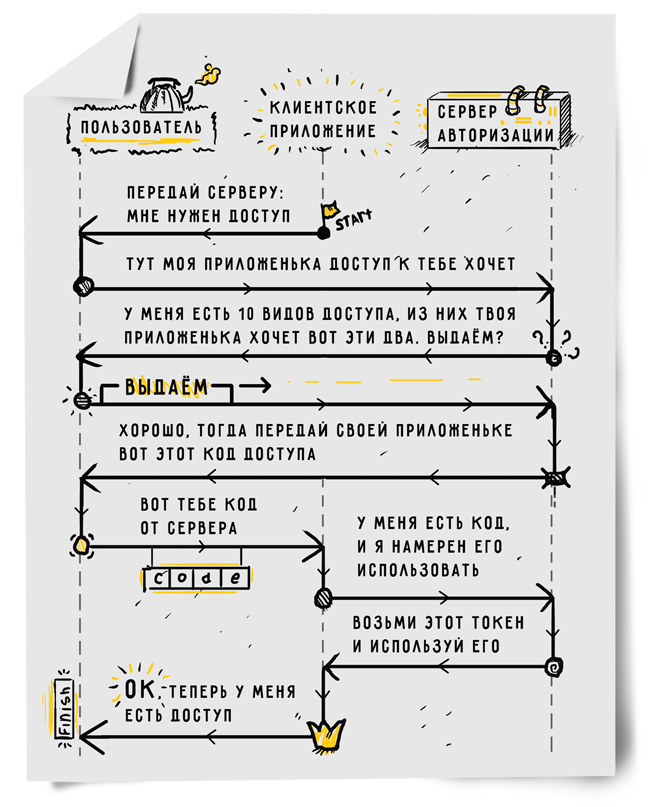
OAuth passwords are exchanged only between the user who owns the password and the only server that can verify this password. The user enters the password only on the server of the OAuth provider. The client application sends client_secret only to the OAuth provider. At the same time, the provider has the opportunity to make sure that this user gave exactly this level of access to this particular application. The application gets the access that it needs to work, but does not know the user password. The user is sure that his password is known only to him, since he does not transfer his password to any third party.
Scope is passed as one of the parameters in the authorization grant stage. This parameter determines which rights the application wants to receive. The parameters are a string consisting of space-separated sequences that are understandable to the OAuth provider. It is noteworthy here that access_token will allow the client application to perform only the actions that were listed in the scope parameter. The OAuth provider will show the same list of permissions to the user before he confirms his consent to the transfer of rights data to the application.
Another interesting parameter of the authorization grant stage is called state and avoids an unobvious security problem. The application, redirecting the user to the site of the OAuth provider, generates a random token (CSRF token) and passes it in the state parameter. The OAuth provider does nothing with it, but returns it back along with the access code. The application checks the received state with what was sent, and aborts the authorization grant stage if state is incorrect. If this did not happen, a potential attacker could authorize our application to access his mailbox and transfer his authorization code to our application.
Let's say the binding of an external account is used for authorization by an external mailbox. In this case, the attacker will be able to log into your account to gain access to the victim’s account in our application. Therefore, we recommend using state to anyone who implements OAuth, although this parameter is optional.
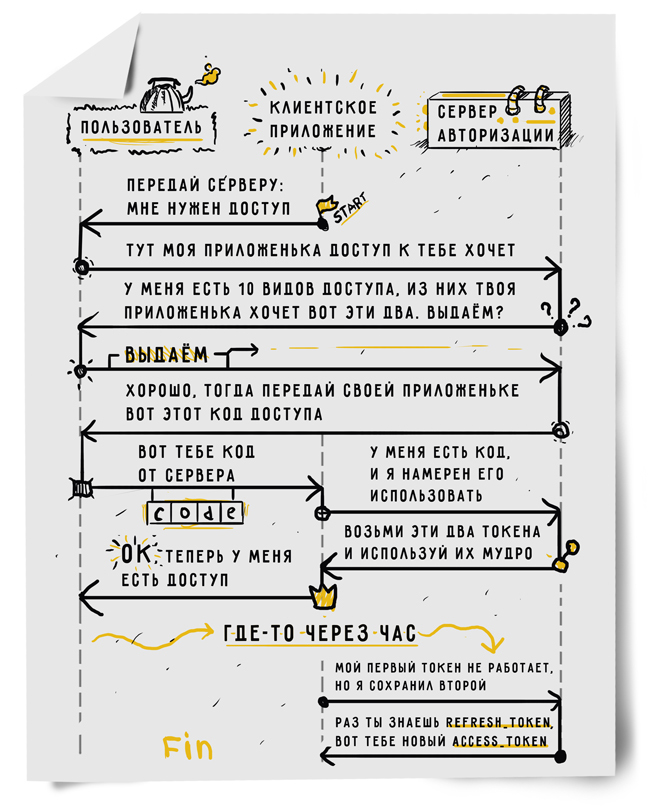
In some cases, together with access_token, the OAuth provider issues a refresh_token to the client. This token allows you to get a new access_token or even several. In the simplest case, the user gives permission to the application one-time. For example, your application wants to add some event to the user's calendar. Each time this happens, the user receives a request: whether to allow the application to perform the agreed action? If he agrees, access_token is issued for a short period of time, for example, for an hour. If tomorrow your application tries to add another event, access will be requested from the user again. This is how the App Store works on Apple devices. To install the application, you must enter a password, but in the next 15 minutes when installing other applications this will not be required.
In some cases, the user wants to give the application the right to work on his behalf always. A striking example is just mail collectors. Regardless of whether the user online or went hiking in the Altai mountains for a month, the collector must pick up mail from one or more mailboxes. It is in this situation that refresh_token is required. The client application can request the so-called offline access and get a refresh_token in the response, and with it the ability to authorize in the service of the OAuth provider without user intervention, receiving more and more access_token.
How we do it: client
Recently, we have included support for the work of our mail collectors using OAuth. Now we do not force the user to enter the password for the mailbox, and even collecting mail from the mailbox in Mail.Ru, the collector acts as an OAuth client in relation to the mail server. We support OAuth for those services that allow you to work on this protocol, namely Google and Microsoft. To store tokens, we wrote the internal Fluor service. In addition to storing the token database, his tasks include issuing them to collectors and other domestic consumers upon request with minimal delay. A separate daemon is responsible for exchanging user consent for a token from an external service, which is responsible for authorization. It guides the user through the process of issuing the necessary rights to the application (stage authorization grant) and stores the received tokens in Fluor.
For services that support refresh_token and limit access_token lifetime, it is necessary to update tokens in the database in a timely manner. At the same time, you must not fall under the restrictions of OAuth providers by the number of requests per day from one application or from one IP. The fluor-refresh daemon deals with this task. The Fluor daemon family is written in Perl. Requests to them are processed asynchronously using the AnyEvent library. Our own IPROTO protocol is used to interact with the OAuth daemon and collectors. We also have our own HTTP server in Perl, but due to the need for parsing headers, IPROTO request processing performance is five times higher. The most critical tasks from a processor point of view are from Perl to XS. XS allows you to write part of the code in C and transfer the results of its work to Perl.
At one point in time, multiple copies of Fluor and fluor-refresh can be started. We organize the storage of tokens and the interaction between daemons through Tarantool (also developed in Mail.Ru, an open-source project about which more than once was written on Habré). Tarantool is a NoSQL database located entirely in the server’s memory, but allowing data to be written to disk. Tarantool has replication and the ability to write fairly complex procedures in the Lua language, which helps a lot in organizing our specific queue for updating tokens.
The specifics of the queue is that, firstly, it is endless (tokens must be updated all the time), and secondly, the tasks of the queue must be completed before a certain deadline, deadline. In this case, it is necessary to ensure that one task in the queue is not taken by two refreshers at once, otherwise useless work will be done and the frequency of requests to third-party services will be exceeded. We implemented all the relevant logic on Lua.
Fluor-refresh simply calls the function in Tarantool and gets a list of tokens for updating. For tasks, it receives a fresh access_token and saves it to Tarantool through another Lua function. Lua-functions guarantee that updating one token will not be entrusted to several refreshers, and that tokens will always be selected, the expiration of which will occur within the specified interval. Thus, we save a few queries to the database that would have to be done if instead of Tarantool there was, say, memcached.
If it still happens that the token for this email has not been updated and has expired, the collector may ask Fluor to receive a new access_token immediately, bypassing the queue. There are also situations where the user revokes access to the application from the OAuth provider. The OAuth protocol does not provide applications with a mechanism to report this situation. We will find out about the problem when refresh_token stops working. In this case, you have to delete the token, and the collector at the same time enters the extra_auth state, which means that the user must request access again.
Currently, 4.8 million tokens for various services are stored in the Fluor database, occupying 7 GB in memory. About 100 million token updates occur per day. However, Fluor processes 125 million requests from collectors per day. Physically, one server can handle this, if you do not take into account redundancy in case of failures.
How we do it: server
In the simplest case, the OAuth server should be able to:
- Have the ability to verify authorization.
- Generate access and refresh tokens, as well as an authorization code.
- Check, store, disable and remove tokens.
- By refresh_token, update access_token, by authorization code, issue refresh_token and access_token.
Authorization checks are usually performed by a separate service. It authorizes the user for a pair of login + password, or for more complex combinations (for example, when it comes to two-factor authentication). If you write OAuth, you already have this service.
Token generation. General advice: tokens should be as random as possible, the random should be cryptographically strong.
Token Management Each of the tokens has a lifetime and is tied to the user. A simple table in the database will allow storing tokens, binding to the user and lifetime. There is not much data, and the work speed is high, so a database that stores data in RAM is desirable. You will also need a daemon that will bypass the database and delete obsolete tokens.
The issuance of new access tokens by refresh-token is a rather banal procedure, we will not focus on it. We use Tarantool for this. It stores data in memory, ensures its integrity. And most importantly, it encapsulates the logic of removing obsolete tokens. This can be implemented on the internal Lua procedure. Another interesting point is the removal of tokens in case the user has changed the password. To do this, you will have to get all the tokens that are tied to the user. This requires a secondary index, which is built according to the user - Tarantool, unlike many other databases, has such an opportunity.
Features of the system configuration.Three points are important here: speed, utilization of iron, fault tolerance. Tarantool provides us with the speed of work by interacting only with RAM and secondary index. For iron utilization, we shard Tarantool, which allows maximum use of the processor core of the server. Fault tolerance is achieved through replication in different DCs. Replication allows you to restart both individual daemons and the entire machine.
So, today we announced the ability to connect to the IMAP protocol of the Mail.Ru mail service using OAuth authentication. We urge developers and clients for desktop and mobile devices to implement it when collecting mail from our mailboxes.
Connection documentation is available on our website.. At the moment, for our part, we also collect mail in a more secure way from services that provide this opportunity, and we want their number to increase. We hope that soon work on OAuth 2.0 will become the same gold standard for email services as work on HTTPS.