 August 3, 2015 at 13:23
Chat assistant to the site using Telegram in 15 minutes
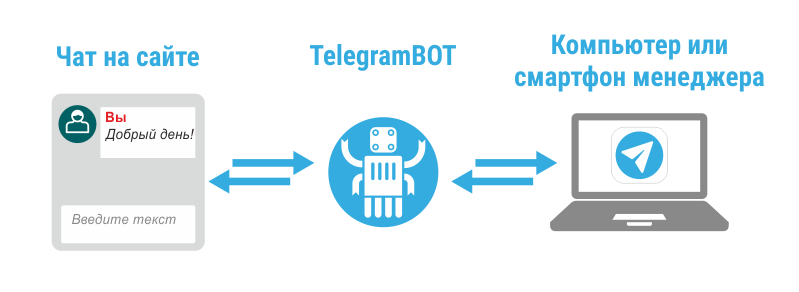
About helper chats
Many people sell goods and services online. More people are buying something online.
During the selection of purchases, often questions arise that can be solved by calling and talking with the manager.
Most likely I am not the only person on the hub who prefers correspondence to talking with managers on the phone.
And here helpers come up to the aid of pop-up chats, which seem to increase conversion, but many get nervous.
(For those who are not in the know: a window pops up in the corner of the site where you can chat with a consultant online).
There are about a dozen of such services and they all work on the principle of " trial version for free, and then for the money ."
There are several articles on the Habr, here is one of them (http://habrahabr.ru/company/tuthost/blog/165365/ ), but I'm sure the audience of Habrahabr knows what it is about.
Most people will use the free version of any such service: you just need to register and insert a piece of JS code on the site. For those who have many managers, you will have to pay: for example, a redhelper for 10 operators will cost you:
115200 rub. for 1 year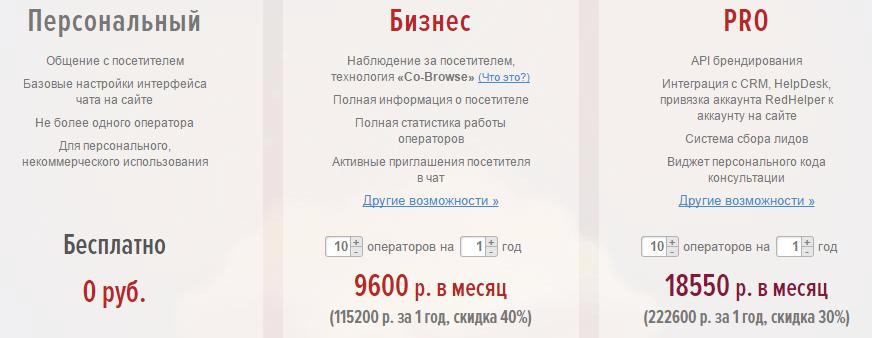
Most likely - the price is adequate for those who pay salaries to ten managers.
But I decided to invent a free "bike" from improvised materials.
Running on your server will take 15 minutes. To all who are interested in the idea - I ask for a cat.
Telegram bot
The growing popularity abroad, the Telegram messenger recently introduced a new API for developing bots . The thing is interesting, it can find many uses. Now you can create a bot (write a program) that will answer your questions, execute certain commands and all this in the window of correspondence of the Telegram messenger.
It is on the basis of the Telegram messenger and its bots API that our free , unlimited chat-assistant-on-site will work .
The general scheme of the idea is in the picture:
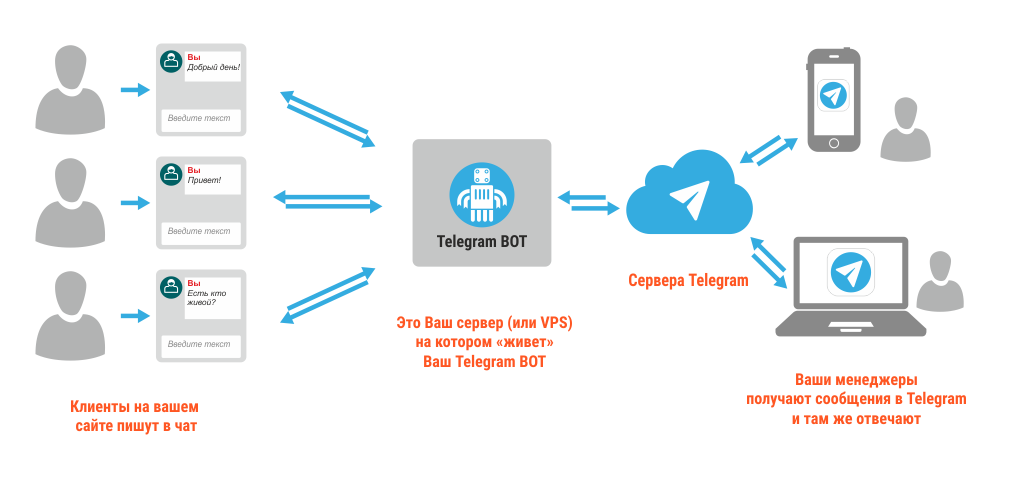
This is how it happens:
- Users on the site write chat
- This message flies to your server
- From there, the Telegram bot sends it to the right manager.
- Manager is responsible through Telegram
- The bot sends a message back to chat_on_site
Implementation
So, to run "at home" you will need:
- A server, VPS or hosting that has actual PHP, SQLite support and the ability to set_time_limit (0) (i.e. make the php script work unlimited in time)
- Telegram application (on smartphone or computer)
- Basic PHP knowledge
Attention! You run this code at your own risk! I spent several hours on it and maybe there are a lot of mistakes!
The action plan is this:
0) Download the sources from the Github:
https://github.com/Surzhikov/TelegramSiteHelper
1) Register the new bot in Telegram.
All you need is a smartphone and 2 minutes.
We go to Telegram, add the user @BotFather and send him the "/ newbot" command. Follow the
instructions: we come up with a name, username, write about and upload a photo.
The result should be the API Key with which we will work with BotAPI.
I got it like this:

(I deleted the message in which my API Key appears)
2) Insert the received key into TelegramBotConfig.php.
We also indicate any password you invented to register new managers.
3) Pour everything onto your server
4) Run our bot - the background process getUpdates.php
It should work endlessly, so I recommend putting it in the server startup.
For reliability, you can put the script in crontab every minute.
The script will be run in a single instance, all restarts will immediately end.
5) We register a new manager
From the manager’s smartphone, we go into telegram and add our new bot (the one you just created).
We write him the command: “/ newmanager password_for_managers”. In response, we receive a greeting.

The operation is repeated as many times as necessary for each manager.
If at this stage you have not received a response from Bot, then something is not working!
6) Check
We go to the index.html page (that is, go to mysite.ru/index.php , and do not open it locally).
There is a small whipped up chat.
If you send a message to this chat, the bot will select a random manager and send him this message.

Here is an interesting point: There
can be many customers (buyers), but one manager.
The manager communicates with clients through the Telegram bot.
If at the same time two (or more) clients wrote a message, and the manager answers them in turn, the Telegram bot needs to somehow indicate which of the clients to send a response to.
To do this, I made the command "/ answer_№ chat." After sending this command, all the manager’s letters go to the desired web chat.

Cons, pros, what can be done
Minuses
- Now the chat has been made in haste so as to launch it as soon as possible in your project. There are many loopholes with which, for example, you can write in someone else's chat and spy on someone else's correspondence.
- Now these problems do not bother me, because in the chat assistant on the site it’s not customary to transfer important and secret information to us.
- When there is only one manager and there are many clients, you can get confused who you answer to.
- ... I will supplement from the comments
Pros:
- It works!
- Free forever and for any number of managers
- No unnecessary applications, only telegrams, which are for all popular platforms
- You can rewrite and style the chat the way you want.
- Telegram is very fast
- ... I will supplement from the comments
What can be done:
- Foolproof and Security
- Smart system for distributing messages between managers (now the bot sends a message to a random manager)
- Automatic responses from the bot when the manager is silent for a long time
- Add the name and photo of the manager who answers in the chat
- ... I will supplement from the comments
Thank you for attention.
UPDATE 08/23/2015 —I completely rewrote the bot, now it works more stable, now you can choose between sqlite and mysql
Plans:
- admin panel with statistics
- work through webhook
https://github.com/Surzhikov/TelegramSiteHelper









