 July 13, 2015 at 09:16
Introduction to Octopus Deploy
Continuous Integration and Continuous Delivery are de facto an integral part of modern project development. For CI automation, there are many programs from various vendors, but things are more modest with the automation of application deployment. One of the deployment assistants is Octopus Deploy.

Let's look at a common approach during the development process. Developers write code, run unit tests on the affected code, and commit. And they do it as often as possible, according to the ideology of CI . Next, the CI application (TeamCity, TFS, Jenkins, Bamboo, or another favorite in your team) collects the application and runs automatic tests.
There comes a time when it is time to hand over the application for manual testing and a member of the team ( DevOps ) deploys the application for testers.
And here is the next point, it's time to give it to the customer for testing (User Acceptance Test or Staging).
Well, after the green signal from the customer, the most important moment comes, the publication of the application in production. And often the customer expects that if something goes wrong in production'e, then your team will be able to roll back all the changes with the click of a finger, for a maximum of half an hour. Octopus Deploy
comes to help deploy .NET applications . Octopus picks up the application package and deploys it to the server. Usually the first is the Dev Environment server. Then you can easily promote the application to Test, UAT / Staging, and then to the Production environment of the server. But first things first.
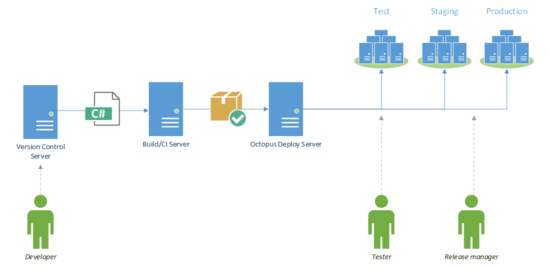
Octopus uses Octopus Server, which picks up NuGet application packages. They can be picked up automatically from the NuGet repository by subscribing to the NuGet Feed CI server via http / https, or from a regular folder on the server. As a rule, a NuGet package should contain a complete application, for example, your full ASP.NET Web site, or all the files necessary for installing Windows Service.
Reaches Octopus to publishing servers with tentacles. Tentacle agentis a lightweight program that runs as a Windows Service, picks up a Nuget package from Octopus Server, and deploys the application. There is a mode of communication pull and push, i.e. Tentacle periodically polls the server for new packages, or Tentacle waits for a signal from the server and the server pushes. Octopus Server also starts as a Windows service, and communicates with its tentacles through secure HTTPS (TLS and X.509 certificate). For greater security, when installing Octopus, you need to configure which Tentacle agents the server trusts and vice versa.
In the current version 2.0, the RavenDB built-in database is used to store all data, but for a number of reasonsin the new version 3.0 will switch to MS SQL Server. By the way, the new version will be released in the coming months, although according to the company’s policy you will have the opportunity to upgrade to the new version in the next year after purchase, after a year you will not be completely abandoned and critical updates will be downloaded for free, but, of course, without new features.
Let us dwell in more detail on the structure that can work out.
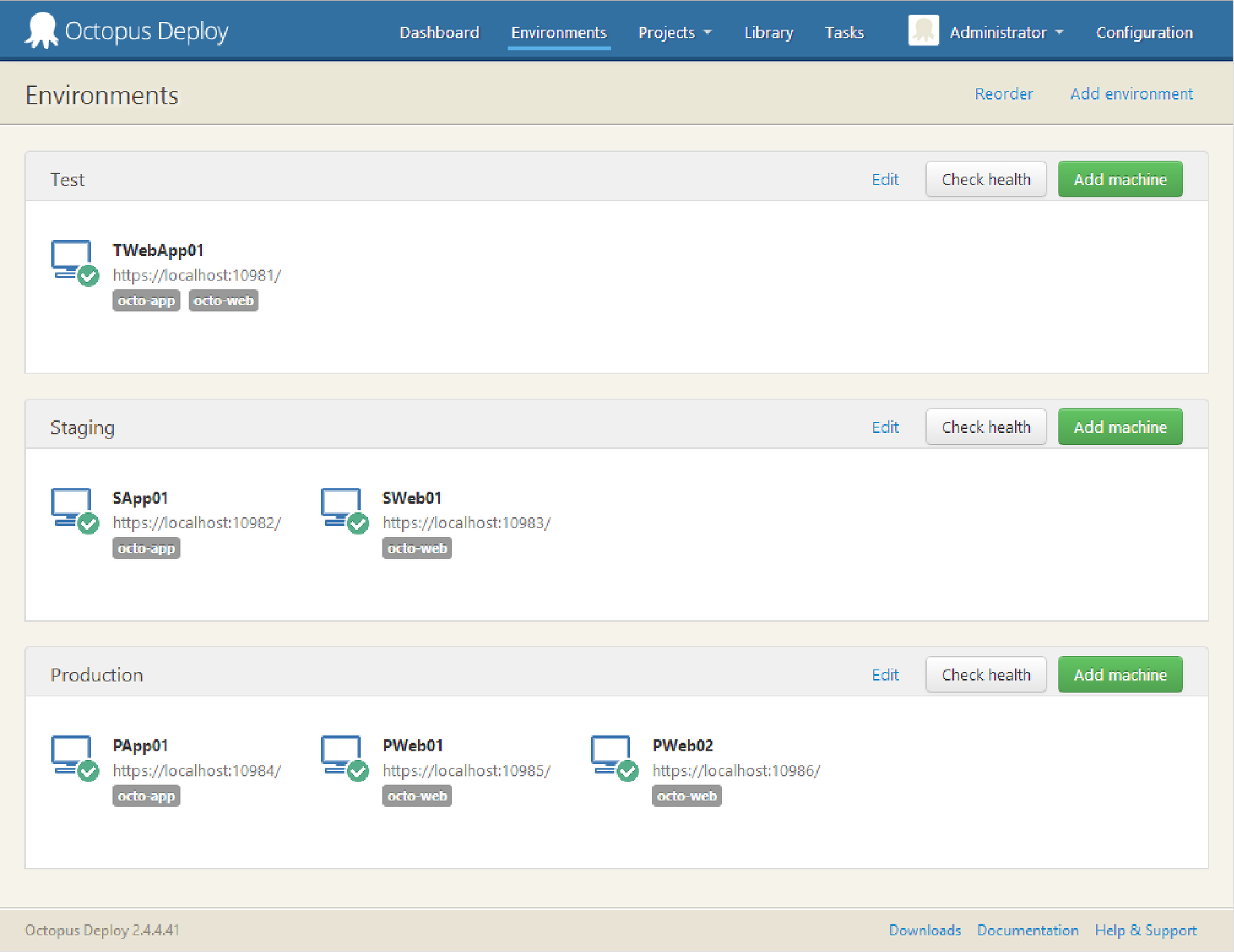
We have three environment'a (Test, Staging and Production). Six servers on which Tentacles are installed and where the application will be installed. And two roles: octo-web and octo-app. Creating roles is very convenient, for example, you can specify: install the site only on machines that have the octo-web role, and the application only on machines with the octo-app role. Note that for testing one server is allocated, on which both the site and the application will be located. And on production there are three servers, one for the application, and two for the site. This is a very realistic scenario with the deployment of two copies of the site (without a database) and the subsequent launch of the balancer.
An OctoFX application with the octo-app role will look like this:

The life cycle of the application will consist of passing the Test environment, then Staging, and then launching it on Production.
The settings are very wide and you can choose the available environments for different applications.
Each deployment is done step by step. And in every step there is an opportunity:

The variables are placed in a separate block and allow you to modify the value depending on the environment, role or server name.
Consider the Habr example, if we need different values for the address of our site and we want to change the variable in web config, then just add it to the block
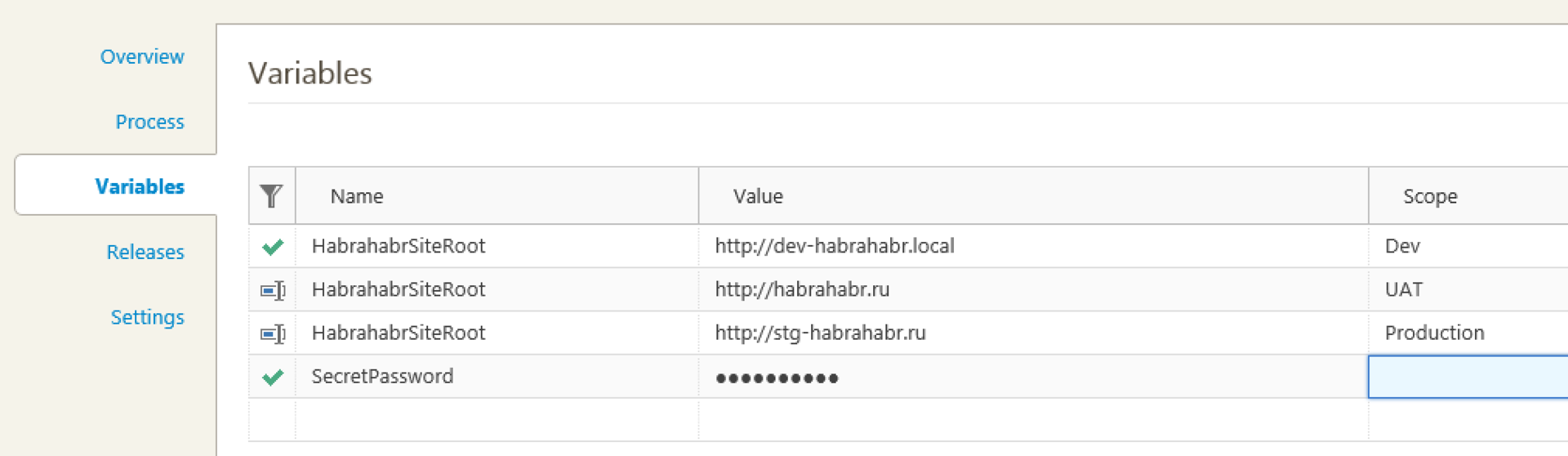
Then the config file
can be automatically transformed into dev environment in
It is most convenient to store passwords in variables, since Octopus encrypts them and does not allow you to copy or see them later in the Variables panel. It is possible to create users and restrict access to environments. Thus, by using a variable block and restricting access to users, it is possible to make it so that only the administrator or Release manager can deploy the application in Production and accordingly see the passwords in the final version of the config file.
Special system variables are also available.. They can be used in the same way as user variables, i.e. in PowerShell scripts or Config files. For example, one of our customers uses the Umbraco website. Of course, in the NuGet package it makes sense to add only the executable part of the site, and not Gigabytes of media content. When updating the site, Octopus creates a new folder, i.e. in fact, the new site, for example, puts it in the \ Octopus \ Applications \ UmracoSite \ 1.20.0 \ folder. And we use the PowerShell script and the Octopus.Deployment.PreviousSuccessful.Id variable to copy all media content from the old version of the site to the new one.
Until now, I have come across a manual backup of the database before deploying the application, manually changing the config files, many variants of self-written scripts that are stored locally and differ by programmers and system administrators, and even manually copying the application folder to production and test environment.
Try to minimize the human factor and routine in this process. And a successful deployment!
Project
Video Tutorials
Documentation
Introduction
Let's look at a common approach during the development process. Developers write code, run unit tests on the affected code, and commit. And they do it as often as possible, according to the ideology of CI . Next, the CI application (TeamCity, TFS, Jenkins, Bamboo, or another favorite in your team) collects the application and runs automatic tests.
There comes a time when it is time to hand over the application for manual testing and a member of the team ( DevOps ) deploys the application for testers.
And here is the next point, it's time to give it to the customer for testing (User Acceptance Test or Staging).
Well, after the green signal from the customer, the most important moment comes, the publication of the application in production. And often the customer expects that if something goes wrong in production'e, then your team will be able to roll back all the changes with the click of a finger, for a maximum of half an hour. Octopus Deploy
comes to help deploy .NET applications . Octopus picks up the application package and deploys it to the server. Usually the first is the Dev Environment server. Then you can easily promote the application to Test, UAT / Staging, and then to the Production environment of the server. But first things first.
Octopus device
Octopus uses Octopus Server, which picks up NuGet application packages. They can be picked up automatically from the NuGet repository by subscribing to the NuGet Feed CI server via http / https, or from a regular folder on the server. As a rule, a NuGet package should contain a complete application, for example, your full ASP.NET Web site, or all the files necessary for installing Windows Service.
Reaches Octopus to publishing servers with tentacles. Tentacle agentis a lightweight program that runs as a Windows Service, picks up a Nuget package from Octopus Server, and deploys the application. There is a mode of communication pull and push, i.e. Tentacle periodically polls the server for new packages, or Tentacle waits for a signal from the server and the server pushes. Octopus Server also starts as a Windows service, and communicates with its tentacles through secure HTTPS (TLS and X.509 certificate). For greater security, when installing Octopus, you need to configure which Tentacle agents the server trusts and vice versa.
In the current version 2.0, the RavenDB built-in database is used to store all data, but for a number of reasonsin the new version 3.0 will switch to MS SQL Server. By the way, the new version will be released in the coming months, although according to the company’s policy you will have the opportunity to upgrade to the new version in the next year after purchase, after a year you will not be completely abandoned and critical updates will be downloaded for free, but, of course, without new features.
Environment, Roles, and Applications
Let us dwell in more detail on the structure that can work out.
We have three environment'a (Test, Staging and Production). Six servers on which Tentacles are installed and where the application will be installed. And two roles: octo-web and octo-app. Creating roles is very convenient, for example, you can specify: install the site only on machines that have the octo-web role, and the application only on machines with the octo-app role. Note that for testing one server is allocated, on which both the site and the application will be located. And on production there are three servers, one for the application, and two for the site. This is a very realistic scenario with the deployment of two copies of the site (without a database) and the subsequent launch of the balancer.
An OctoFX application with the octo-app role will look like this:
The life cycle of the application will consist of passing the Test environment, then Staging, and then launching it on Production.
The settings are very wide and you can choose the available environments for different applications.
Steps and Variables
Steps
Each deployment is done step by step. And in every step there is an opportunity:
- Download and place the contents of the NuGet package in a folder, FTP or MS Azure server
- Run a Power Shell script, pass variables to the script
- Update config files using special variables
- Transform config files. As a rule, config.Release will start during assembly, but you can add another XML transformation on top, for example config.Staging
- Send Email
- Stop the deployment process and request user actions.
- Run a special step for convenient deployment of the Windows service
- Run a special step to deploy the site, including updating bindings and ports
Variables
The variables are placed in a separate block and allow you to modify the value depending on the environment, role or server name.
Consider the Habr example, if we need different values for the address of our site and we want to change the variable in web config, then just add it to the block
Then the config file
can be automatically transformed into dev environment in
It is most convenient to store passwords in variables, since Octopus encrypts them and does not allow you to copy or see them later in the Variables panel. It is possible to create users and restrict access to environments. Thus, by using a variable block and restricting access to users, it is possible to make it so that only the administrator or Release manager can deploy the application in Production and accordingly see the passwords in the final version of the config file.
Special system variables are also available.. They can be used in the same way as user variables, i.e. in PowerShell scripts or Config files. For example, one of our customers uses the Umbraco website. Of course, in the NuGet package it makes sense to add only the executable part of the site, and not Gigabytes of media content. When updating the site, Octopus creates a new folder, i.e. in fact, the new site, for example, puts it in the \ Octopus \ Applications \ UmracoSite \ 1.20.0 \ folder. And we use the PowerShell script and the Octopus.Deployment.PreviousSuccessful.Id variable to copy all media content from the old version of the site to the new one.
Conclusion
Until now, I have come across a manual backup of the database before deploying the application, manually changing the config files, many variants of self-written scripts that are stored locally and differ by programmers and system administrators, and even manually copying the application folder to production and test environment.
Try to minimize the human factor and routine in this process. And a successful deployment!
Useful links:
Project
Video Tutorials
Documentation









