 July 14, 2015 at 12:09
Under the Hood Postgres Indexes
- Transfer

Captain Nemo at the helm of the Nautilus
Indexes is one of the most powerful tools in relational databases. We use them when you need to quickly find some values, when we combine databases, when you need to speed up the work of SQL statements, etc. But what are indices? And how do they help speed up database searches? To answer these questions, I studied the PostgreSQL source code, tracking how the index is searched for a simple string value. I expected to find complex algorithms and efficient data structures. And found.
Here I will talk about how indexes are arranged and how they work. However, I did not expect that they are based on computer science. Understanding the ins and outs of the indexes was also helped by comments in the code explaining not only how Postgres works, but why it works that way.
Sequence Search
The sequence search algorithm in Postgres shows oddities: for some reason, it looks through all the values in the table. In my last post, I used this simple SQL statement to search for the value “Captain Nemo”:

Postgres parsed, analyzed and planned the query. Then ExecSeqScan (a built-in function in C that implements SEQSCAN sequence search) quickly found the desired value:

But then, for some unexplained reason, Postgres continued to scan the entire database, comparing each value with the searched one, although it had already been found!

If the table contained millions of values, then the search would take a very long time. Of course, this can be avoided by removing the sorting and rewriting the query so that it stops at the first match found. But the problem is deeper, and it lies in the inefficiency of the search engine in Postgres itself. Using sequence lookups to compare each value in a table is a slow, inefficient, process that depends on the order in which records are placed. There must be another way!
The solution is simple: you need to create an index.
Index creation
To do this is simple, just run the command:

Ruby developers would prefer to use add_index migration with ActiveRecord, which would execute the same CREATE INDEX command. Usually, when we restart select, Postgres creates a planning tree. But in this case, it will be slightly different:

Note that at the bottom, INDEXSCAN is used instead of SEQSCAN. INDEXSCAN will not scan the entire database unlike SEQSCAN. Instead, it uses the index you just created to quickly and efficiently find the record you want.
Creating an index allows you to solve the performance problem, but does not provide answers to a number of questions:
- What exactly is an index in Postgres?
- What exactly does it look like, what is its structure?
- How does the index speed up the search?
Let's answer these questions by looking at the source in C.
What is an index in Postgres
Let's start with the documentation for the CREATE INDEX command :
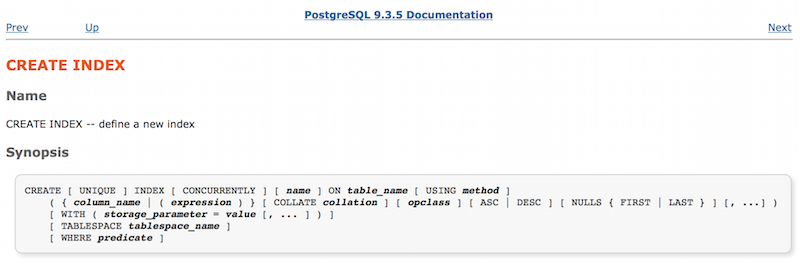
Here, all the parameters that can be used to create the index are displayed. Pay attention to the USING method parameter: it describes what kind of index we need. The same page provides information about method, the argument of the USING keyword:

It turns out that Postgres implements four different kinds of indexes. They can be used for different types of data or depending on the situation. Since we did not define the USING parameter, index_users_on_name by default is an index of the form “btree” (B-Tree).
What is a B-Tree and where can I find information about it? To do this, we’ll examine the corresponding Postgres source file:

Here’s what README says about it:

By the way, README itself is a 12-page document. That is, not only useful comments in C code are available to us, but also all the necessary information about the theory and specific implementation of the database server. Reading and parsing code in opensource projects is often a daunting task, but not Postgres. The developers have tried to facilitate the process of understanding the design of their offspring.
Please note that in the first sentence there is a link to a scientific publication explaining what a B-Tree is (and therefore how indexes work in Postgres): Efficient Locking for Concurrent Operations on B-Trees by Lehman and Yao.
What is a B-Tree?
The article describes the improvement that the authors made to the B-Tree algorithm in 1981. We will talk about this a bit later. The algorithm itself was developed in 1972, it looks like an example of a simple B-Tree:

The name is short for English. “Balanced tree". The algorithm allows you to speed up the search operation. For example, we need to find the value 53. Let's start with the root node containing the value 40:

It is compared with the desired value. Since 53> 40, then we follow the right branch of the tree. And if we were looking, for example, the value 29, we would go along the left branch, because 29 <40. Following the right branch, we get to the child node containing two values:

This time we compare 53 with values 47 and 62: 47 <53 <62. Notice that the values inside the nodes are sorted. Since the desired value is less than one and more than the other, then we follow the central branch and get to the child node containing three values:

Compare with the list of sorted values (51 <53 <56), go along the second of the four branches and finally get into the child node with the desired value:

Due to what this algorithm speeds up the search:
- The values (keys) inside each node are sorted.
- The algorithm is balanced : the keys are evenly distributed over the nodes, which minimizes the number of transitions. Each branch leads to a child node containing approximately the same number of keys as all other child nodes.
What an index looks like in Postgres
Lehman and Yao drew their diagram more than 30 years ago, what does it have to do with modern Postgres? It turns out that the index_users_on_name we created is very similar to this very diagram. When the CREATE INDEX command is executed, Postgres saves all values from the user table as keys of the B-Tree tree. This is how the index node looks:

Each entry in the index consists of a structure in C called IndexTupleData, and also contains a value and a bitmap. The latter is used to save space; information is written about whether the attributes of the index in the key are NULL. The values themselves follow the bitmap in the index.
Here's what the IndexTupleData structure looks like:

t_tid: this is a pointer to some other index or record in the database. Note that this is not a pointer to physical memory from C. It contains data by which Postgres searches for matching pages of memory.
t_info : This contains information about index items. For example, how many values are stored in it, are they NULL, etc.
For a better understanding, consider a few entries from index_users_on_name :

Here, instead of value, some names from the database are inserted. The top tree node contains the keys “Dr. Edna Kunde ”and“ Julius Powlowski ”, and the bottom node is“ Julius Powlowski ”and“ Juston Quitzon ”. Unlike the Lehman and Yao diagram, Postgres repeats the parent keys in each child node. For example, “Julius Powlowski” is the key in the top tree and in the child node. The t_tid pointer references Julius in the upper node to the same name in the lower node. If you want to take a deeper look at storing key values in B-Tree nodes, refer to the itup.h file:

Search for a B-Tree node containing our value
Back to our original SELECT statement:
How exactly does Postgres search for “Captain Nemo” in index_users_on_name? Why is using an index faster than a sequence search? Let's take a look at some of the names stored in our index:

This is the root node in index_users_on_name. I just unfolded the tree so that the names fit in whole. There are four names and one NULL value. Postgres automatically created this root node as soon as the index itself was created. Note that with the exception of NULL, which indicates the beginning of the index, the other four names are in alphabetical order.
As you remember, B-Tree is a balanced tree. Therefore, in this example, the tree has five child nodes:
- Names in alphabetical order before “Dr. Edna Kunde ”
- Names between “Dr. Edna Kunde ”and“ Julius Powlowski ”
- Names between “Julius Powlowski” and “Monte Nicolas”
... etc.
Since we are looking for “Captain Nemo”, Postgres goes along the first branch to the right (in alphabetical sorting, the desired value goes to “Dr. Edna Kunde”):

As can be seen from the illustration, Postgres then finds the node with the desired value. For the test, I added 1000 names to the table. This right knot contained 240 of them. So the tree significantly accelerated the search process, since the remaining 760 values were left overboard.
If you want to know more about the algorithm for finding the desired node in the B-Tree, refer to the comments on the _bt_search function.

Search for our value inside the node
So, Postgres went to a node containing 240 names, among which he needed to find the value “Captain Nemo”.
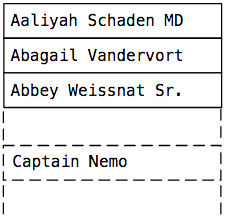
For this, not a sequence search is used, but a binary search algorithm. To begin with, the system compares the key that is in the middle of the list (position 50%): The

desired value goes alphabetically after “Breana Witting”, so Postgres jumps to the key located at 75% (three quarters of the list):
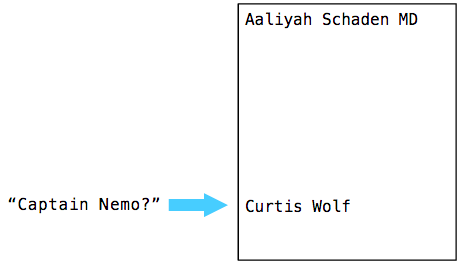
This time, our value should be higher. Then Postgres jumps some value higher. In my case, the system needed to jump eight times in the list of keys in the node until it finally found the desired value:

For more information about the algorithm for finding the value inside the node, see the comments on the _bt_binsrch function:

Other interesting things
If you wish, some of the theory about B-Trees can be gleaned from the scientific paper Efficient Locking for Concurrent Operations on B-Trees .
Adding keys to the B-Tree . The procedure for adding new keys to the tree is performed according to a very interesting algorithm. Typically, the key is written to the node in accordance with the accepted sorting. But what if the node no longer has free space? In this case, Postgres splits the node into two smaller ones and inserts a key into one of them. Also adds to the parent node the key from the "split point" and a pointer to the new child node. Of course, the parent node must also be split in order to insert this key; as a result, the procedure of adding one single key to the tree turns into a complex recursive operation.
Removing keys from a B-Tree . Also quite a curious procedure. When deleting a key from a Postgres node, if possible, it unites its child nodes. It can also be a recursive operation.
B-Link-Tree Trees . In fact, the work of Lehman and Yao describes an innovation they came up with related to parallelism and blocking, when a single tree is used by several threads. Postgres code and its algorithms must support multithreading, because multiple clients can access (or modify it) at the same time. If we add a pointer from each node to the next child node (“right arrow”), then one thread can search the tree, while the other will divide the node without blocking the entire index:

Do not be afraid to explore
Perhaps you know everything about how to use Postgres, but do you know how it is arranged inside, what is “under the hood”? The study of computer science, in addition to working on current projects, is not an idle entertainment, but part of the developer's development process. From year to year, our software tools become more complex, multifaceted, and better, making it easier for us to create sites and applications. But we must not forget that the basis of all this is the science of computer science. We, like the entire Postgres open source developer community, stand on the shoulders of our predecessors, such as Lehman and Yao. Therefore, do not blindly trust the tools that you use everyday, study their device. This will help you achieve a higher professional level, you will be able to find for yourself information and solutions that you were previously unaware of.









