Xonix on Javascript with pictures
Xonix is a popular DOS game, a Qix video game clone .
Xonix has already been ported to Javascript several times. The best and closest to the original of the existing implementations to date, perhaps this one . At first I tried to adapt it for my implementation / modification ... But, unfortunately, the code even after deobfuscation did not become clear (at least for me). In addition, as far as I could understand, the code there in places is not entirely effective, or completely outdated. So I had to write everything from scratch.
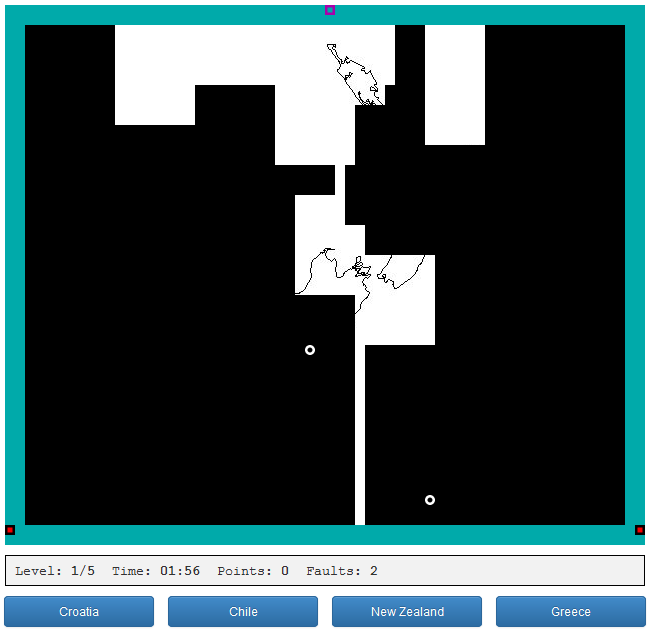
As a result, I got such “my” Xonix, with pictures and answers.
Demo | Sources
The code turned out to be quite voluminous, so here I will not explain everything, but only the most important (from my point of view) points.
As you know, the Xonix playing field is a grid of square cells. At the beginning of the game (level), most of the field is occupied by a rectangular black area (“sea”), which is surrounded by a light frame (“land”) on all sides.
The main difference between my implementation and the classic Xonix is that behind the black area is a picture unique to each level. In this way, it is like another modification of Xonix - Sexonix. But in my picture appears for a reason. This is part of the question that should be answered. And the whole game thus turns into a quiz.
The dimensions of the picture determine the size of the black area, which must be a multiple of the size of the cell. In general, pictures for different levels of the game can have different sizes, so the dimensions of the black area can vary from level to level, in contrast to the light frame, which at the beginning of the level always has a fixed width of 2 cells.
The movement of all objects ( cursor and points ) occurs strictly in cells, so that at each moment of time each object occupies exactly one cell. This structure of the playing field greatly simplifies the implementation of the game. Difficulty is only the definition of "conquered" areas formed when the cursor crosses the "sea", but more on that later.
The fact that we can take a cell for a “pixel” eliminates most of the problems with calculations that are usually found in games with many moving objects: calculation of motion, bounces and collisions, etc.
In Xonix, any object has only 4 options for the direction of movement: for the cursor - up / down / right / left, for a point (both types) - the same thing, only diagonally. We combine these options into many possible directions, which we will set in degrees. We get 8 angles of movement: from 0 to 315 degrees in increments of 45. Each angle value is associated with a pair of coordinates of the direction vector. As a result, we get a structure that we will use in calculating the movement:
The method
Collisions of points with each other can be ignored, just letting them “pass” through each other. Since all points (of the same type) look the same, from the outside it will not be any different from a collision and a rebound.
To calculate collisions of points with the cursor, the bounce of points from the border of "their" area and some other things, we need a state matrix of all cells - a two-dimensional array
where
Каждый элемент будет хранить состояние соответствующей ячейки, включающее в себя 2 признака: тип области, к которой она относится (море/суша), а также то, проходит ли по ней в данный момент «след» от движения курсора по «морю». Храниться это состояние будет в битовом поле из двух битов. Для этого нам нужно объявить две константы-маски для каждого признака соответственно:
В целях оптимизации массив состояний сделаем не двумерным, а одномерным, так что все элементы будут храниться построчно, начиная с первой (верхней) строки. Для преобразования координат ячейки в индекс массива и обратного преобразования будем использовать такие формулы:
To calculate the bounce of a point (“sea” or “land”) from the border of “our” area, we need to know the state of three cells, not counting the cell of the point itself. Below using pseudo-graphics shows the position of these cells relative to the current cell point at an angle of movement of 45 degrees.
Ячейка точки отмечена крестиком, а искомые ячейки цифрами 1, 2, 3. Нолики просто изображают соседние ячейки. Направление движения точки в данном случае получается юго-восточное, поскольку ось ординат (Y) сетки у нас направлена вниз.
Отскок от границы имеет место, если хотя бы в одной из указанных трех ячеек тип области противоположен типу точки. Т.е. если, например, точка «морская», то одна из этих ячеек должна быть «сухопутной». При этом, если данное условие выполняется только в одной из ячеек 1 или 2 (но не в обоих), то к углу движения прибавляется соответственно
При любом другом угле движения логика отскока очевидно будет точно такой же.
The collision of a point with the cursor pauses the game, after which the cursor and “land” points return to their original positions for starting the game: the cursor goes to the middle cell in the second row, “land” points, depending on their number, in the lower and side parts of the frame . The position of the "sea" points does not change.
Determining the collision of a "land" point with the cursor is trivial. Just check the contact of the point with the cursor, comparing the coordinates of the cells of the point and cursor. Determining the collision of a “sea” point with the cursor is a little more complicated: we need to check not only the contact of the point itself with the cursor, but also the touch of the trace of the cursor. To do this, we use the second bit of the state of the cells: we check it for all cells adjacent to the point.
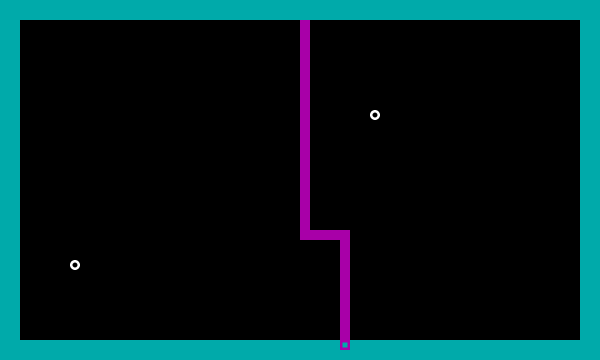
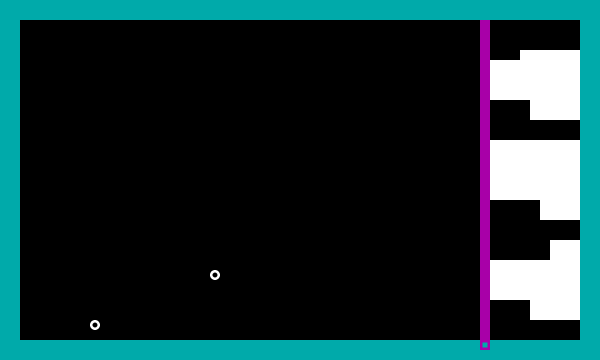
As already mentioned, the most difficult to implement is the definition of areas "conquered" from the "sea". These are closed areas formed as a result of the cursor crossing the “sea”, inside which there are no “sea” points. In most cases, this creates two closed areas, obtained by dividing (following the cursor) the available “marine” area into two parts, of which only one or none becomes “conquered” (see screenshot 1). But in some, especially complex, cases, a lot of closed ones can appear immediately (see screenshot 2), including “conquered” areas. In addition, a situation is possible when the cursor trace itself forms a closed area (see screenshot 3).
 Screenshot 1
 Screenshot 2
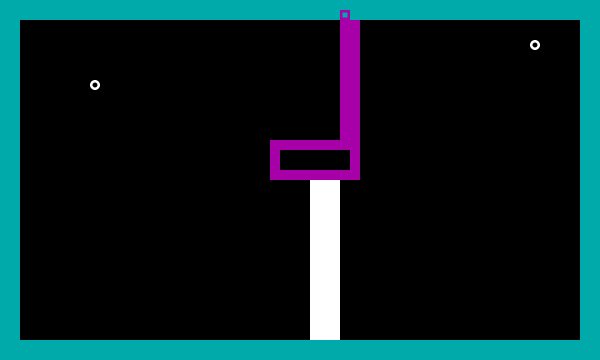 Screenshot 3
So, we need to find all such closed areas, and then determine the type of each of them (“conquered” / “non-conquered”).
To find closed areas, you can iterate over all cells using some general algorithm for comparing neighboring cells. For example, how it is implemented here .
But there is another way (which I eventually chose): use the contours of the closed areas that form when the cursor crosses the "sea". By contour we mean a closed polyline with a thickness of one cell. If the contour of the closed region is known, then it remains only to find its contents, i.e. all cells inside it. But how to find these contours?
In the general case, we only know about each desired circuit that it has a partial intersection with the trace of the cursor, i.e. contains at least one cursor trace cell. In most cases, as shown in screenshot 1, exactly two contours are formed, each of which contains the entire cursor trace (all its cells). But in some cases, as in screenshot 2, there can be many such contours, and many of them can contain only part of the cursor trace cells. In addition, cases should be taken into account when the entire cursor trace itself forms a closed loop (screenshot 3). Thus, based on the cursor trace data, it is necessary to obtain all the information about the contours of closed regions adjacent to it, while checking as few cells as possible.
Considering the various options for the distribution of contours, you can find several patterns. Firstly, the number of paths containing the entire cursor trace is always no more than 2. Secondly, if we divide all the paths into 2 groups on opposite sides of the cursor trace, then the paths of one group will not have common trace cells. In other words, each cell of the cursor trace belongs to only one contour on each side of the trace.
Based on the above, we can derive an algorithm for finding contours. In general terms, he looks like this.
We loop through all the cells that belong to the trace of the cursor, starting from the first (i.e., from the beginning of the movement). For each trace cell, we check on two sides of it two adjacent cells (left and right in the direction of movement). If the cell is “marine”, then this is part of the contour of one of the desired areas. Otherwise, we continue to search until we find a “marine” cell on this side of the track. From the found cell, you can draw the entire contour adjacent to it. To do this, you need to go from this cell first in the direction from the trace cell, and then in such a direction that there is always a “land” cell on at least one side of the current cell (in this case, the current cell must be “marine”). And so on, until there is a trace cell, which means that the circuit is closed. Add to the cells passed part of the cells of the trace,
After that, we continue the external cycle of searching through the trace cells, starting with the one on which the above procedure for finding the contour from one cell stopped.
It should be noted that the procedures for finding contours on both sides of the track should be performed independently of each other. This means that the cycle of searching through the cells of the trace needs to be wrapped in another cycle of 2 iterations - one on each side.
A situation is possible when no contour is found on either side. This means that the motion track is adjacent to the border of the “marine” region. In this case, we will have a single closed region consisting only of the trace itself.
If there is a situation from screenshot 3, you need to add a contour formed by the entire trace of the cursor movement to all found contours.
Now that the contours of the closed areas are found, it is necessary for each circuit to determine the contents of the corresponding area (all cells contained in it) and its type (“conquered” or not). Since in Xonix the cursor can only move vertically / horizontally, each closed area can be divided into several rectangles of different sizes. Thus, the task of determining the contents of a closed region is reduced to finding its constituent rectangles. By the way, by doing this we “kill” two “birds with one stone” at once: we facilitate the calculation of points inside closed areas, as well as the shading (or rather, erasing) of the “conquered” areas.
To find the rectangles, it is enough to know the vertices of the contour of the region, i.e. polygon vertices.
The main idea is to cut off a protruding rectangle with the largest width or height at each iteration. By acting here refers to a rectangle, the three vertices which belong to the original polygon. Based on this, we can derive an algorithm for splitting a closed region into rectangles. It looks as follows.
At the first iteration, we find the side (segment) of the polygon with the longest length, which is part of the protruding rectangle. If there are several such segments, select any of them. The found segment will be one of the sides of the desired rectangle. Now we need to find the rest of it. To do this, take the segments emanating from both ends of the found side perpendicular to it, and select the shortest of them. This will be the second side of the rectangle. To find the third side, you need to find the (orthogonal) projection of the second end of the given segment on the second of the segments perpendicular to the first side. We connect the found point with the corresponding end of the first side and get the third side. From here we get the entire desired protruding rectangle. Now we need to cut it off from the original polygon. To do this, remove the first and second found segments and the corresponding vertices from the polygon, then add the found projection point, connecting it to the vertex that used to be connected to the second found segment. As a result, we obtain a polygon having two vertices less than the original one.
At the next iteration, we will work with the truncated polygon in the same way as in the first iteration ... And so on, until we get a polygon of 4 vertices as a result of clipping, i.e. rectangle.
All rectangles cut off in the process under consideration will constitute the contents of the closed region.
Consider the process of breaking into rectangles on a specific example.
Suppose we have a polygon
1. Find the side of the polygon
2. Find the side of the polygon
3. Find the side of the polygon
4. Находим сторону многоугольника
В результате мы получаем 5 прямоугольников, составляющих содержимое замкнутой области:
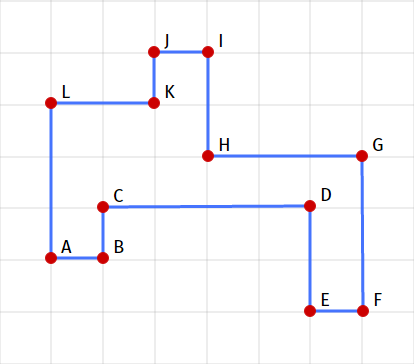 Рис. 1
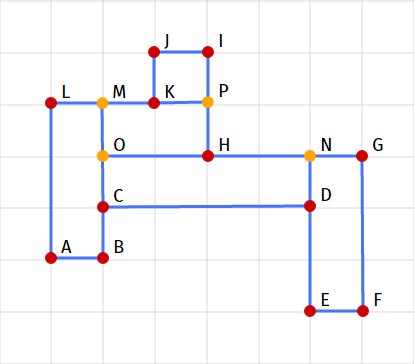 Fig. 2
After the closed areas are found, it is necessary to determine the type of each of them (whether it is “conquered” or not). The type of area is determined by counting the "sea" points inside it. It is not necessary to count all the points within the region, it is enough to find out if there is at least one point there. If there is, then this region is not “conquered” (and accordingly we do not erase it), because there should not be a single point in the “conquered” region.
Determining whether a polygon of arbitrary shape contains a point with a given position (coordinates) is generally very difficult. But for this we split the polygon into rectangles in order to facilitate this task, among other things. Unlike an arbitrary polygon, determining whether a point belongs to a rectangle is a trivial task. It is only necessary to check whether each coordinate of a given point belongs to the corresponding range of rectangle boundaries.
Thus, the task of determining the type of a closed region is reduced to searching for “sea” points inside each of the rectangles that make up this region.
All found "conquered" areas are subject to erasure, which is implemented even more trivially: just erase (using the clearRect method) all the rectangles that make up this area.
The title is a bit cheating). The article has already come to an end, so unfortunately there will be none of the above. I can only notice that the animation code I wrote on the basis of this article ( translation ), as well as this ( translation ).
For those who are interested, the following is the entire code of the game. However, its value is doubtful, because comments there - the cat cried. But I hopefully explained the basic logic.
Round off for a sim. Thanks for attention.
Xonix has already been ported to Javascript several times. The best and closest to the original of the existing implementations to date, perhaps this one . At first I tried to adapt it for my implementation / modification ... But, unfortunately, the code even after deobfuscation did not become clear (at least for me). In addition, as far as I could understand, the code there in places is not entirely effective, or completely outdated. So I had to write everything from scratch.
As a result, I got such “my” Xonix, with pictures and answers.
Demo | Sources
The code turned out to be quite voluminous, so here I will not explain everything, but only the most important (from my point of view) points.
As you know, the Xonix playing field is a grid of square cells. At the beginning of the game (level), most of the field is occupied by a rectangular black area (“sea”), which is surrounded by a light frame (“land”) on all sides.
The main difference between my implementation and the classic Xonix is that behind the black area is a picture unique to each level. In this way, it is like another modification of Xonix - Sexonix. But in my picture appears for a reason. This is part of the question that should be answered. And the whole game thus turns into a quiz.
The dimensions of the picture determine the size of the black area, which must be a multiple of the size of the cell. In general, pictures for different levels of the game can have different sizes, so the dimensions of the black area can vary from level to level, in contrast to the light frame, which at the beginning of the level always has a fixed width of 2 cells.
The movement of all objects ( cursor and points ) occurs strictly in cells, so that at each moment of time each object occupies exactly one cell. This structure of the playing field greatly simplifies the implementation of the game. Difficulty is only the definition of "conquered" areas formed when the cursor crosses the "sea", but more on that later.
Movement of objects
The fact that we can take a cell for a “pixel” eliminates most of the problems with calculations that are usually found in games with many moving objects: calculation of motion, bounces and collisions, etc.
In Xonix, any object has only 4 options for the direction of movement: for the cursor - up / down / right / left, for a point (both types) - the same thing, only diagonally. We combine these options into many possible directions, which we will set in degrees. We get 8 angles of movement: from 0 to 315 degrees in increments of 45. Each angle value is associated with a pair of coordinates of the direction vector. As a result, we get a structure that we will use in calculating the movement:
Code snippet
dirset = {
    vecs: {
        0: [1, 0], 45: [1, 1], 90: [0, 1], 135: [-1, 1],
        180: [-1, 0], 225: [-1, -1], 270: [0, -1], 315: [1, -1]
    },
    get: function(v) {
        return v in this.vecs? this.vecs[v] : [0, 0];
    },
    find: function(x, y) {
        x = x == 0? 0 : (x > 0? 1 : -1);
        y = y == 0? 0 : (y > 0? 1 : -1);
        for (var v in this.vecs) {
            var vec = this.vecs[v];
            if (vec[0] == x && vec[1] == y) return parseInt(v);
        }
        return false;
    }
};
The method
getreturns for the given angle (in degrees) the corresponding motion vector. The method finddoes the opposite: for a given motion vector (not necessarily a unit) returns the corresponding angle in degrees, or the closest available one. Collisions of points with each other can be ignored, just letting them “pass” through each other. Since all points (of the same type) look the same, from the outside it will not be any different from a collision and a rebound.
To calculate collisions of points with the cursor, the bounce of points from the border of "their" area and some other things, we need a state matrix of all cells - a two-dimensional array
(n+4) * (m+4), where
(n+4),(m+4) — соответственно ширина и высота игрового поля в ячейках, а первый элемент матрицы соответствует ячейке в левом верхнем углу игрового поля.Каждый элемент будет хранить состояние соответствующей ячейки, включающее в себя 2 признака: тип области, к которой она относится (море/суша), а также то, проходит ли по ней в данный момент «след» от движения курсора по «морю». Храниться это состояние будет в битовом поле из двух битов. Для этого нам нужно объявить две константы-маски для каждого признака соответственно:
var CA_CLEAR = 1 << 0; // ячейка очищена, т.е. относится к суше
var CA_TRAIL = 1 << 1; // ячейка - часть следа движения курсора по "морю"
В целях оптимизации массив состояний сделаем не двумерным, а одномерным, так что все элементы будут храниться построчно, начиная с первой (верхней) строки. Для преобразования координат ячейки в индекс массива и обратного преобразования будем использовать такие формулы:
i = n * (y + 2) + x + 2;
x = i % n - 2;
y = Math.floor(i / n) - 2
To calculate the bounce of a point (“sea” or “land”) from the border of “our” area, we need to know the state of three cells, not counting the cell of the point itself. Below using pseudo-graphics shows the position of these cells relative to the current cell point at an angle of movement of 45 degrees.
OOO
OX1
O23
Ячейка точки отмечена крестиком, а искомые ячейки цифрами 1, 2, 3. Нолики просто изображают соседние ячейки. Направление движения точки в данном случае получается юго-восточное, поскольку ось ординат (Y) сетки у нас направлена вниз.
Отскок от границы имеет место, если хотя бы в одной из указанных трех ячеек тип области противоположен типу точки. Т.е. если, например, точка «морская», то одна из этих ячеек должна быть «сухопутной». При этом, если данное условие выполняется только в одной из ячеек 1 или 2 (но не в обоих), то к углу движения прибавляется соответственно
+90 или -90 градусов. В противном случае угол движения изменяется на противоположный (+180 градусов).При любом другом угле движения логика отскока очевидно будет точно такой же.
The collision of a point with the cursor pauses the game, after which the cursor and “land” points return to their original positions for starting the game: the cursor goes to the middle cell in the second row, “land” points, depending on their number, in the lower and side parts of the frame . The position of the "sea" points does not change.
Determining the collision of a "land" point with the cursor is trivial. Just check the contact of the point with the cursor, comparing the coordinates of the cells of the point and cursor. Determining the collision of a “sea” point with the cursor is a little more complicated: we need to check not only the contact of the point itself with the cursor, but also the touch of the trace of the cursor. To do this, we use the second bit of the state of the cells: we check it for all cells adjacent to the point.
Identification of “conquered” areas
As already mentioned, the most difficult to implement is the definition of areas "conquered" from the "sea". These are closed areas formed as a result of the cursor crossing the “sea”, inside which there are no “sea” points. In most cases, this creates two closed areas, obtained by dividing (following the cursor) the available “marine” area into two parts, of which only one or none becomes “conquered” (see screenshot 1). But in some, especially complex, cases, a lot of closed ones can appear immediately (see screenshot 2), including “conquered” areas. In addition, a situation is possible when the cursor trace itself forms a closed area (see screenshot 3).
So, we need to find all such closed areas, and then determine the type of each of them (“conquered” / “non-conquered”).
To find closed areas, you can iterate over all cells using some general algorithm for comparing neighboring cells. For example, how it is implemented here .
But there is another way (which I eventually chose): use the contours of the closed areas that form when the cursor crosses the "sea". By contour we mean a closed polyline with a thickness of one cell. If the contour of the closed region is known, then it remains only to find its contents, i.e. all cells inside it. But how to find these contours?
Contours of closed areas
In the general case, we only know about each desired circuit that it has a partial intersection with the trace of the cursor, i.e. contains at least one cursor trace cell. In most cases, as shown in screenshot 1, exactly two contours are formed, each of which contains the entire cursor trace (all its cells). But in some cases, as in screenshot 2, there can be many such contours, and many of them can contain only part of the cursor trace cells. In addition, cases should be taken into account when the entire cursor trace itself forms a closed loop (screenshot 3). Thus, based on the cursor trace data, it is necessary to obtain all the information about the contours of closed regions adjacent to it, while checking as few cells as possible.
Considering the various options for the distribution of contours, you can find several patterns. Firstly, the number of paths containing the entire cursor trace is always no more than 2. Secondly, if we divide all the paths into 2 groups on opposite sides of the cursor trace, then the paths of one group will not have common trace cells. In other words, each cell of the cursor trace belongs to only one contour on each side of the trace.
Based on the above, we can derive an algorithm for finding contours. In general terms, he looks like this.
We loop through all the cells that belong to the trace of the cursor, starting from the first (i.e., from the beginning of the movement). For each trace cell, we check on two sides of it two adjacent cells (left and right in the direction of movement). If the cell is “marine”, then this is part of the contour of one of the desired areas. Otherwise, we continue to search until we find a “marine” cell on this side of the track. From the found cell, you can draw the entire contour adjacent to it. To do this, you need to go from this cell first in the direction from the trace cell, and then in such a direction that there is always a “land” cell on at least one side of the current cell (in this case, the current cell must be “marine”). And so on, until there is a trace cell, which means that the circuit is closed. Add to the cells passed part of the cells of the trace,
After that, we continue the external cycle of searching through the trace cells, starting with the one on which the above procedure for finding the contour from one cell stopped.
It should be noted that the procedures for finding contours on both sides of the track should be performed independently of each other. This means that the cycle of searching through the cells of the trace needs to be wrapped in another cycle of 2 iterations - one on each side.
A situation is possible when no contour is found on either side. This means that the motion track is adjacent to the border of the “marine” region. In this case, we will have a single closed region consisting only of the trace itself.
If there is a situation from screenshot 3, you need to add a contour formed by the entire trace of the cursor movement to all found contours.
Closed Area Content and Type
Now that the contours of the closed areas are found, it is necessary for each circuit to determine the contents of the corresponding area (all cells contained in it) and its type (“conquered” or not). Since in Xonix the cursor can only move vertically / horizontally, each closed area can be divided into several rectangles of different sizes. Thus, the task of determining the contents of a closed region is reduced to finding its constituent rectangles. By the way, by doing this we “kill” two “birds with one stone” at once: we facilitate the calculation of points inside closed areas, as well as the shading (or rather, erasing) of the “conquered” areas.
To find the rectangles, it is enough to know the vertices of the contour of the region, i.e. polygon vertices.
The main idea is to cut off a protruding rectangle with the largest width or height at each iteration. By acting here refers to a rectangle, the three vertices which belong to the original polygon. Based on this, we can derive an algorithm for splitting a closed region into rectangles. It looks as follows.
At the first iteration, we find the side (segment) of the polygon with the longest length, which is part of the protruding rectangle. If there are several such segments, select any of them. The found segment will be one of the sides of the desired rectangle. Now we need to find the rest of it. To do this, take the segments emanating from both ends of the found side perpendicular to it, and select the shortest of them. This will be the second side of the rectangle. To find the third side, you need to find the (orthogonal) projection of the second end of the given segment on the second of the segments perpendicular to the first side. We connect the found point with the corresponding end of the first side and get the third side. From here we get the entire desired protruding rectangle. Now we need to cut it off from the original polygon. To do this, remove the first and second found segments and the corresponding vertices from the polygon, then add the found projection point, connecting it to the vertex that used to be connected to the second found segment. As a result, we obtain a polygon having two vertices less than the original one.
At the next iteration, we will work with the truncated polygon in the same way as in the first iteration ... And so on, until we get a polygon of 4 vertices as a result of clipping, i.e. rectangle.
All rectangles cut off in the process under consideration will constitute the contents of the closed region.
Consider the process of breaking into rectangles on a specific example.
Suppose we have a polygon
ABCDEFGHIJKL(see Fig. 1), which is a contour of the region. We apply the step-by-step described partitioning algorithm. 1. Find the side of the polygon
ABCDEFGHIJKLwith the longest length. This is a segment CDwith a length of 4. But it does not suit us, because not part of a protruding rectangle. Therefore, we ignore it and look further. We find 3 segments with a length of 3:AL, FG, GH. GHdoes not suit us for the same reason as CD. So what are the segments AL, FG. Choose any of them. Let it be AL. Pieces perpendicular to it - ABand KL, of which the shortest - AB. We find the projection of a point Bonto a segment KL- this is a point M(see Fig. 2). Thus we receive the cut-off rectangle - ABML. After its clipping, a polygon remains CDEFGHIJKM. 2. Find the side of the polygon
CDEFGHIJKMwith the longest length. This is a segment FGwith a length of 3 ... The cut-off rectangle is FGNE(see Fig. 2). After its clipping, a polygon remains CDNHIJKM. 3. Find the side of the polygon
CDNHIJKM с наибольшей длиной. Это уже знакомый нам отрезок CD с длиной 4… Отсекаемый прямоугольник — CDNO. После его отсечения остается многоугольник OHIJKM.4. Находим сторону многоугольника
OHIJKM с наибольшей длиной. Таких сторон две. Это отрезки OH и HI с длиной 2. Выбираем первый из них — OH… Отсекаемый прямоугольник — OHPM. После его отсечения остается прямоугольник KPIJ. Теперь отсекать уже нечего. Так что на этом алгоритм завершается.В результате мы получаем 5 прямоугольников, составляющих содержимое замкнутой области:
ABML, FGNE, CDNO, OHPM и KPIJ (см. рис. 2).After the closed areas are found, it is necessary to determine the type of each of them (whether it is “conquered” or not). The type of area is determined by counting the "sea" points inside it. It is not necessary to count all the points within the region, it is enough to find out if there is at least one point there. If there is, then this region is not “conquered” (and accordingly we do not erase it), because there should not be a single point in the “conquered” region.
Determining whether a polygon of arbitrary shape contains a point with a given position (coordinates) is generally very difficult. But for this we split the polygon into rectangles in order to facilitate this task, among other things. Unlike an arbitrary polygon, determining whether a point belongs to a rectangle is a trivial task. It is only necessary to check whether each coordinate of a given point belongs to the corresponding range of rectangle boundaries.
Thus, the task of determining the type of a closed region is reduced to searching for “sea” points inside each of the rectangles that make up this region.
All found "conquered" areas are subject to erasure, which is implemented even more trivially: just erase (using the clearRect method) all the rectangles that make up this area.
Animation, game control and more
The title is a bit cheating). The article has already come to an end, so unfortunately there will be none of the above. I can only notice that the animation code I wrote on the basis of this article ( translation ), as well as this ( translation ).
For those who are interested, the following is the entire code of the game. However, its value is doubtful, because comments there - the cat cried. But I hopefully explained the basic logic.
Game code
// requestAnimationFrame/cancelAnimationFrame polyfill:
(function() {
var tLast = 0;
var vendors = ['webkit', 'moz'];
for(var i = 0; i < vendors.length && !window.requestAnimationFrame; ++i) {
var v = vendors[i];
window.requestAnimationFrame = window[v+'RequestAnimationFrame'];
window.cancelAnimationFrame = window[v+'CancelAnimationFrame'] ||
window[v+'CancelRequestAnimationFrame'];
}
if (!window.requestAnimationFrame)
window.requestAnimationFrame = function(callback, element) {
var tNow = Date.now();
var dt = Math.max(0, 17 - tNow + tLast);
var id = setTimeout(function() { callback(tNow + dt); }, dt);
tLast = tNow + dt;
return id;
};
if (!window.cancelAnimationFrame)
window.cancelAnimationFrame = function(id) {
clearTimeout(id);
};
}());
(function() {
window.picxonix = function(v1, v2) {
if (typeof v1 != 'string') {
return init(v1, v2);
}
switch (v1) {
case 'level': // начать новый уровень
loadLevel(v2);
break;
case 'end': // закончить уровень
endLevel(v2);
break;
case 'play': // пауза/возобновление игры
setPlayMode(v2);
break;
case 'cursorDir': // угол движения курсора
typeof v2 == 'string'? setDir(v2) : setDirToward(v2);
break;
case 'cursorSpeed': // скорость движения курсора
setCursorSpeed(v2);
break;
case 'enemySpeed': // скорость движения точек
setEnemySpeed(v2);
break;
case 'enemySpawn': // увеличить число сухопутных точек
spawn();
break;
case 'state': // текущее состояние уровня
return buildLevelState();
default:
}
return 0;
}
var cfgMain = {
width: 600,
height: 400,
sizeCell: 10,
colorFill: '#000000',
colorBorder: '#00aaaa',
colorBall: '#ffffff',
colorBallIn: '#000000',
colorWarder: '#000000',
colorWarderIn: '#f80000',
colorCursor: '#aa00aa',
colorCursorIn: '#00aaaa',
colorTrail: '#a800a8',
timeoutCollision: 1000,
callback: null,
callbackOnFrame: false
};
var cfgLevel = {
nBalls: 1,
nWarders: 1,
speedCursor: 5,
speedEnemy: 5
};
// cell attributes:
var CA_CLEAR = 1 << 0;
var CA_TRAIL = 1 << 1;
// размеры:
var sizeCell;
var width, height;
// ресурсы:
var elContainer;
var ctxPic;
var ctxMain;
var imgPic;
var imgBall;
var imgWarder;
var imgCursor;
// объекты игры:
var dirset;
var cellset;
var cursor;
var aBalls = [], aWarders = [];
var nBalls = 0, nWarders = 0;
// текущее состояние уровня:
var idFrame = 0;
var tLevel = 0;
var tLastFrame = 0;
var tLocked = 0;
var bCollision = false;
var bConquer = false;
var dirhash = {
'left': 180, 'right': 0, 'up': 270, 'down': 90, 'stop': false
};
function init(el, opts) {
if (elContainer || !el || !el.appendChild) return false;
elContainer = el;
// установка общих настроек игры:
merge(cfgMain, opts);
if (!cfgMain.sizeCell) return false;
sizeCell = cfgMain.sizeCell;
if (typeof cfgMain.callback != 'function') cfgMain.callback = null;
// установка настроек уровня:
if (opts.speedCursor ^ opts.speedEnemy) {
opts.speedCursor = opts.speedEnemy = Math.max(opts.speedCursor || 0, opts.speedEnemy || 0);
}
merge(cfgLevel, opts);
setLevelData(cfgMain.width, cfgMain.height);
var oWrap = document.createElement('div');
oWrap.style.position = 'relative';
// создаем канвас фона (картинки):
(function() {
var canvas = document.createElement('canvas');
ctxPic = canvas.getContext('2d');
canvas.width = width;
canvas.height = height;
canvas.style.position = 'absolute';
canvas.style.left = canvas.style.top = (2*sizeCell) + 'px';
ctxPic.fillStyle = cfgMain.colorTrail;
ctxPic.fillRect(0, 0, width, height);
oWrap.appendChild(canvas);
}());
// создаем канвас игрового поля:
(function() {
var canvas = document.createElement('canvas');
ctxMain = canvas.getContext('2d');
canvas.width = width+ 4*sizeCell;
canvas.height = height+ 4*sizeCell;
canvas.style.position = 'absolute';
canvas.style.left = canvas.style.top = 0;
fillCanvas();
ctxMain.fillStyle = cfgMain.colorFill;
ctxMain.fillRect(2*sizeCell, 2*sizeCell, width, height);
oWrap.appendChild(canvas);
}());
elContainer.appendChild(oWrap);
// создаем временный канвас:
var canvas = document.createElement('canvas');
var ctxTmp = canvas.getContext('2d');
canvas.width = sizeCell;
canvas.height = sizeCell;
// создаем изображение морской точки:
var r = sizeCell / 2, q = sizeCell / 4;
ctxTmp.clearRect(0, 0, sizeCell, sizeCell);
ctxTmp.beginPath();
ctxTmp.arc(r, r, r, 0, Math.PI * 2, false);
ctxTmp.fillStyle = cfgMain.colorBall;
ctxTmp.fill();
if (cfgMain.colorBallIn) {
ctxTmp.beginPath();
ctxTmp.arc(r, r, q, 0, Math.PI * 2, false);
ctxTmp.fillStyle = cfgMain.colorBallIn;
ctxTmp.fill();
}
imgBall = new Image();
imgBall.src = ctxTmp.canvas.toDataURL();
function prepareSquare(colorOut, colorIn) {
ctxTmp.clearRect(0, 0, sizeCell, sizeCell);
ctxTmp.fillStyle = colorOut;
ctxTmp.fillRect(0, 0, sizeCell, sizeCell);
if (colorIn) {
ctxTmp.fillStyle = colorIn;
ctxTmp.fillRect(q, q, sizeCell - r, sizeCell - r);
}
}
// создаем изображение сухопутной точки:
prepareSquare(cfgMain.colorWarder, cfgMain.colorWarderIn);
imgWarder = new Image();
imgWarder.src = ctxTmp.canvas.toDataURL();
// создаем изображение курсора:
prepareSquare(cfgMain.colorCursor, cfgMain.colorCursorIn);
imgCursor = new Image();
imgCursor.src = ctxTmp.canvas.toDataURL();
return {width: width+ 4*sizeCell, height: height+ 4*sizeCell};
}
function loadLevel(data) {
if (tLevel || tLastFrame || !data || !data.image) return;
if (!data.image) return;
var img = new Image();
img.onload = function() {
applyLevel(img, data);
};
img.src = data.image;
}
function applyLevel(img, data) {
imgPic = img;
merge(cfgLevel, data, true);
setLevelData(img.width, img.height);
ctxMain.canvas.width = width+ 4*sizeCell;
ctxMain.canvas.height = height+ 4*sizeCell;
fillCanvas();
cellset.reset();
ctxPic.canvas.width = width;
ctxPic.canvas.height = height;
ctxPic.drawImage(imgPic, 0, 0, width, height, 0, 0, width, height);
var pos = cellset.placeCursor();
cursor.reset(pos[0], pos[1]);
aBalls = []; aWarders = [];
var i, aPos;
aPos = cellset.placeBalls(nBalls);
for (i = 0; i < nBalls; i++)
aBalls.push(new Enemy(aPos[i][0], aPos[i][1], false));
aPos = cellset.placeWarders(nWarders);
for (i = 0; i < nWarders; i++)
aWarders.push(new Enemy(aPos[i][0], aPos[i][1], true, 45));
tLevel = Date.now();
tLastFrame = 0;
startLoop();
}
function endLevel(bClear) {
if (tLastFrame) return;
tLevel = 0;
if (!bClear) return;
fillCanvas();
ctxMain.clearRect(2*sizeCell, 2*sizeCell, width, height);
}
function setLevelData(w, h) {
if (w) width = w - w % (2*sizeCell);
if (h) height = h - h % (2*sizeCell);
if (cfgLevel.nBalls) nBalls = cfgLevel.nBalls;
if (cfgLevel.nWarders) nWarders = cfgLevel.nWarders;
}
function setPlayMode(bOn) {
if (bOn ^ !tLastFrame) return;
tLastFrame? endLoop() : startLoop();
}
function setDir(key) {
if (!tLastFrame) return;
if (key in dirhash) cursor.setDir(dirhash[key]);
}
function setDirToward(pos) {
if (!tLastFrame || !pos || pos.length < 2) return;
var xc = Math.floor(pos[0] / sizeCell) - 2,
yc = Math.floor(pos[1] / sizeCell) - 2;
var b = cellset.isPosValid(xc, yc);
if (!b) return;
var posCr = cursor.pos(), dirCr = cursor.getDir(), dir = false;
if (dirCr === false) {
var dx = xc - posCr[0], dy = yc - posCr[1],
dc = Math.abs(dx) - Math.abs(dy);
if (dc == 0) return;
dir = dirset.find(dx, dy);
if (dir % 90 != 0) {
var dir1 = dir-45, dir2 = dir+45;
dir = dir1 % 180 == 0 ^ dc < 0? dir1 : dir2;
}
}
else {
var delta = dirCr % 180? xc - posCr[0] : yc - posCr[1];
if (!delta) return;
dir = (delta > 0? 0 : 180) + (dirCr % 180? 0 : 90);
}
cursor.setDir(dir);
}
function setCursorSpeed(v) {
if (v > 0) cfgLevel.speedCursor = v;
}
function setEnemySpeed(v) {
if (v > 0) cfgLevel.speedEnemy = v;
}
function startLoop() {
if (!tLevel) return;
idFrame = requestAnimationFrame(loop);
}
function endLoop() {
if (idFrame) cancelAnimationFrame(idFrame);
tLastFrame = idFrame = 0;
}
// Главный цикл анимации
function loop(now) {
var dt = tLastFrame? (now - tLastFrame) / 1000 : 0;
bCollision = bConquer = false;
if (!tLastFrame || update(dt)) {
render();
tLastFrame = now;
}
if (bCollision) {
lock();
cfgMain.callback && cfgMain.callback(1);
return;
}
if (bConquer) {
bConquer = false;
tLastFrame = 0;
cellset.conquer();
if (cfgMain.callback && cfgMain.callback(2))
return;
}
else
cfgMain.callback && cfgMain.callbackOnFrame && cfgMain.callback(0);
startLoop();
}
function update(dt) {
var distCursor = Math.round(dt * cfgLevel.speedCursor),
distEnemy = Math.round(dt * cfgLevel.speedEnemy);
if (!(distCursor >= 1 || distEnemy >= 1)) return false;
cursor.update(distCursor);
var i;
for (i = 0; i < nBalls; i++) aBalls[i].update(distEnemy);
for (i = 0; i < nWarders; i++) aWarders[i].update(distEnemy);
return true;
}
function render() {
cellset.render();
cursor.render();
var i;
for (i = 0; i < nBalls; i++) aBalls[i].render();
for (i = 0; i < nWarders; i++) aWarders[i].render();
}
function lock() {
tLastFrame = 0;
bCollision = false;
var posCr = cursor.pos();
cellset.add2Trail(posCr[0], posCr[1], false);
setTimeout(unlock, cfgMain.timeoutCollision);
}
function unlock() {
if (!tLevel) return;
cellset.clearTrail();
var pos = cellset.placeCursor();
cursor.reset(pos[0], pos[1], true);
var aPos = cellset.placeWarders(nWarders);
for (var i = 0; i < nWarders; i++)
aWarders[i].reset(aPos[i][0], aPos[i][1]);
startLoop();
}
function spawn() {
if (!tLevel) return;
var pos = cellset.placeSpawned();
if (!pos) return;
aWarders.push(new Enemy(pos[0], pos[1], true));
nWarders++;
}
function buildLevelState() {
return {
play: Boolean(tLastFrame),
posCursor: cursor.pos(),
warders: nWarders,
speedCursor: cfgLevel.speedCursor,
speedEnemy: cfgLevel.speedEnemy,
cleared: cellset.getPercentage()
};
}
function fillCanvas() {
ctxMain.fillStyle = cfgMain.colorBorder;
ctxMain.fillRect(0, 0, width+ 4*sizeCell, height+ 4*sizeCell);
}
function drawCellImg(img, x, y) {
ctxMain.drawImage(img,
0, 0, sizeCell, sizeCell,
(x+2)*sizeCell, (y+2)*sizeCell, sizeCell, sizeCell
);
}
function clearCellArea(x, y, w, h) {
ctxMain.clearRect(
(x+2)*sizeCell, (y+2)*sizeCell, (w || 1)* sizeCell, (h || 1)* sizeCell
);
}
function fillCellArea(color, x, y, w, h) {
ctxMain.fillStyle = color;
ctxMain.fillRect(
(x+2)*sizeCell, (y+2)*sizeCell, (w || 1)* sizeCell, (h || 1)* sizeCell
);
}
// Множество доступных направлений:
dirset = {
vecs: {
0: [1, 0], 45: [1, 1], 90: [0, 1], 135: [-1, 1], 180: [-1, 0], 225: [-1, -1], 270: [0, -1], 315: [1, -1]
},
get: function(v) {
return v in this.vecs? this.vecs[v] : [0, 0];
},
find: function(x, y) {
x = x == 0? 0 : (x > 0? 1 : -1);
y = y == 0? 0 : (y > 0? 1 : -1);
for (var v in this.vecs) {
var vec = this.vecs[v];
if (vec[0] == x && vec[1] == y) return parseInt(v);
}
return false;
}
};
// Матрица ячеек игрового поля:
cellset = {
nW: 0,
nH: 0,
nWx: 0,
nCleared: 0,
dirTrail: 0,
iPreTrail: 0,
aCells: [],
aTrail: [],
aTrailNodes: [],
aTrailRects: [],
reset: function() {
var nW = this.nW = Math.floor(width / sizeCell);
var nH = this.nH = Math.floor(height / sizeCell);
var n = (this.nWx = nW+4)* (nH+4);
this.nCleared = 0;
this.aCells = [];
var aAll = [];
for (var i = 0; i < n; i++) {
var pos = this.pos(i), x = pos[0], y = pos[1];
this.aCells.push(x >= 0 && x < nW && y >= 0 && y < nH? 0 : CA_CLEAR);
aAll.push(i);
}
fillCellArea(cfgMain.colorFill, 0, 0, nW, nH);
},
render: function() {
if (this.aTrailRects.length) {
for (var i = this.aTrailRects.length-1; i >= 0; i--) {
fillCellArea.apply(null, [cfgMain.colorFill].concat(this.aTrailRects[i]));
}
this.aTrailRects = [];
}
},
isPosIn: function(x, y) {
return x >= 0 && x < this.nW && y >= 0 && y < this.nH;
},
isPosValid: function(x, y) {
return x >= -2 && x < this.nW+2 && y >= -2 && y < this.nH+2;
},
find: function(x, y) {
return this.isPosValid(x, y) ? (this.nWx)*(y+2) + x+2 : -1;
},
pos: function(i) {
return [i % this.nWx - 2, Math.floor(i / this.nWx)-2];
},
posMap: function(arr) {
var _this = this;
return arr.map(function(v) { return _this.pos(v) });
},
value: function(x, y) {
var i = this.find(x,y);
return i >= 0? this.aCells[i] : 0;
},
set: function(x, y, v) {
var i = this.find(x,y);
if (i >= 0) this.aCells[i] = v;
return i;
},
setOn: function(x, y, v) {
var i = this.find(x,y);
if (i >= 0) this.aCells[i] |= v;
return i;
},
setOff: function(x, y, v) {
var i = this.find(x,y);
if (i >= 0) this.aCells[i] &= ~v;
return i;
},
placeCursor: function() {
return [Math.floor(this.nW/2), -2];
},
placeBalls: function(n) {
var a = [], ret = [];
for (var i = 0; i < n; i++) {
var k;
do k = Math.floor(Math.random() * this.nW * this.nH);
while (a.indexOf(k) >= 0);
a.push(k);
var x = k % this.nW, y = Math.floor(k / this.nW);
ret.push([x, y]);
}
return ret;
},
placeWarders: function(n) {
var z;
var aPos = [
[Math.floor(this.nW/2), this.nH+1],
[-1, this.nH+1], [this.nW, this.nH+1], [-1, -2], [this.nW, -2],
[-1, z = Math.floor(this.nH/2)], [this.nW, z],
[z = Math.floor(this.nW/4), this.nH+1], [3*z, this.nH+1]
];
var i0 = (n+ 1)% 2;
return aPos.slice(i0, Math.min(n+ i0, 9));
},
placeSpawned: function() {
if (nWarders >= 9) return false;
function dist(pos1, pos2) {
return Math.pow(pos1[0]- pos2[0], 2) + Math.pow(pos1[1]- pos2[1], 2);
}
function find(pos0) {
var n = nWarders;
for (var l = 0; l < x0; l++) {
for (var dx = -1; dx <= 1; dx+= 2) {
var p = [pos0[0]+ l* dx, pos0[1]];
for (var i = 0; i < n && dist(aWarders[i].pos(), p) >= 4; i++) ;
if (i >= n) return p;
}
}
return pos0;
}
var x0 = Math.floor(this.nW/2);
var aPos = [[x0, this.nH+1], [x0, -2]];
var posCr = cursor.pos();
var posSt = dist(aPos[0], posCr) > dist(aPos[1], posCr)? aPos[0] : aPos[1];
var ret = find(posSt);
return ret;
},
applyRelDirs: function(x, y, dir, aDeltas) {
var ret = [];
for (var n = aDeltas.length, i = 0; i < n; i++) {
var d = (dir + aDeltas[i] + 360) % 360;
var vec = dirset.get(d), xt, yt;
ret.push([xt = x + vec[0], yt = y + vec[1], d, this.value(xt, yt)]);
}
return ret;
},
add2Trail: function(x, y, dir) {
var i = this.setOn(x, y, CA_TRAIL);
if (i < 0) return;
var n = this.aTrail.length;
if (!n || dir !== this.dirTrail) {
var iNode = n? this.aTrail[n-1] : i;
if (!n || iNode != this.aTrailNodes[this.aTrailNodes.length-1])
this.aTrailNodes.push(iNode);
if (!n) {
var aPos = this.applyRelDirs(x, y, dir, [180]);
this.iPreTrail = this.find(aPos[0][0], aPos[0][1]);
}
}
this.aTrail.push(i);
this.dirTrail = dir;
},
lastTrailLine: function() {
var pos0 = this.pos(this.aTrailNodes[this.aTrailNodes.length-1]),
pos = this.pos(this.aTrail[this.aTrail.length-1]);
return [
Math.min(pos[0], pos0[0]), Math.min(pos[1], pos0[1]),
Math.abs(pos[0] - pos0[0])+1, Math.abs(pos[1] - pos0[1])+1
];
},
clearTrail: function() {
this.aTrailRects = this._buildTrailRects();
for (var n = this.aTrail.length, i = 0; i < n; i++) {
this.aCells[this.aTrail[i]] &= ~CA_TRAIL;
}
this.aTrail = []; this.aTrailNodes = [];
},
getPreTrail: function() {
return this.iPreTrail;
},
conquer: function() {
var nTrail = this.aTrail.length;
if (!nTrail) return;
if (nTrail > 1)
this.aTrailNodes.push(this.aTrail[nTrail-1]);
var aConqRects = this._conquer() || this._buildTrailRects();
this.aTrail = []; this.aTrailNodes = [];
if (!aConqRects || !aConqRects.length) return;
for (var n = aConqRects.length, i = 0; i < n; i++) {
var rect = aConqRects[i];
var x0 = rect[0], y0 = rect[1], w = rect[2], h = rect[3];
for (var x = 0; x < w; x++) {
for (var y = 0; y < h; y++) {
if (this.value(x + x0, y + y0, CA_CLEAR) & CA_CLEAR) continue;
this.set(x + x0, y + y0, CA_CLEAR);
this.nCleared++;
}
}
}
for (i = 0; i < n; i++) {
clearCellArea.apply(null, aConqRects[i]);
}
aConqRects = [];
},
getPercentage: function() {
return this.nCleared / (this.nW * this.nH) * 100;
},
_conquer: function() {
var nTrail = this.aTrail.length, nNodes = this.aTrailNodes.length;
var dz = Math.abs(this.aTrailNodes[0] - this.aTrailNodes[nNodes-1]);
var aOutlineset = [], bClosedTrail = false;
if (bClosedTrail = nNodes >= 4 && dz == 1 || dz == this.nWx) {
aOutlineset.push([this.aTrailNodes, 1]);
}
var bAddTrail = false;
var posPre = this.pos(this.iPreTrail), posCr = cursor.pos();
var aDeltas = [-90, 90];
for (var d = 0; d < 2; d++) {
var dd = aDeltas[d];
var k = 0;
var sum = 0, bSum = false, bEndAtNode = false;
for (var l = 0; l < nTrail && sum < nTrail; l++) {
var iStart = this.aTrail[l];
var pos = this.pos(iStart);
var pos0 = l? this.pos(this.aTrail[l - 1]) : posPre;
var x = pos[0], y = pos[1];
var dir = (dirset.find(x - pos0[0], y - pos0[1]) + dd + 360) % 360;
var aDirs = bEndAtNode? [] : [dir];
if (this.aTrailNodes.indexOf(iStart) >= 0) {
var pos2 = l < nTrail - 1? this.pos(this.aTrail[l + 1]) : posCr;
dir = (dirset.find(pos2[0] - x, pos2[1] - y) + dd + 360) % 360;
if (dir != aDirs[0]) aDirs.push(dir);
}
if (this.aTrail[l] == this.aTrailNodes[k+1]) ++k;
var ret = 0;
for (var nDs = aDirs.length, j = 0; j < nDs && !ret; j++) {
dir = aDirs[j];
var vec = dirset.get(dir);
var xt = x + vec[0], yt = y + vec[1];
var v = this.value(xt, yt);
if (v & CA_CLEAR || v & CA_TRAIL) continue;
ret = this._outline(xt, yt, dir);
if (!ret || ret.length < 3) return false;
}
bEndAtNode = false;
if (!ret) continue;
var len = ret[0], aNodes = ret[1], bClosed = ret[2], iEnd = aNodes[aNodes.length-1];
if (bClosed) {
aOutlineset.push([aNodes, len]);
bSum = true;
continue;
}
var aXtra = [iStart];
for (var i = l+1; i < nTrail && this.aTrail[i] != iEnd; i++) {
if (this.aTrail[i] == this.aTrailNodes[k+1])
aXtra.push(this.aTrailNodes[++k]);
}
if (i >= nTrail) continue;
aOutlineset.push([aNodes.concat(aXtra.reverse()), len + i - l]);
sum += i - l + 1;
l = (bEndAtNode = this.aTrail[i] == this.aTrailNodes[k+1])? i-1 : i;
}
if (!sum && !bSum && !bClosedTrail) return false;
if (sum < nTrail && !bClosedTrail) bAddTrail = true;
}
if (!aOutlineset.length)
return false;
aOutlineset.sort(function (el1, el2) { return el1[1] - el2[1]; });
var aRects = [], n = aOutlineset.length, b = false;
for (i = 0; i < n; i++) {
if (i == n- 1 && !b) break;
ret = this._buildConquerRects(aOutlineset[i][0]);
if (ret)
aRects = aRects.concat(ret);
else
b = true;
}
if (!aRects.length)
return false;
return bAddTrail? aRects.concat(this._buildTrailRects()) : aRects;
},
_outline: function(x0, y0, dir) {
var aNodes = [], aUniqNodes = [], aUsedDirs = [], aBackDirs = [];
var x = x0, y = y0,
lim = 6 * (this.nW + this.nH), n = 0, bClosed = false;
function isClear(arr) {
return arr[3] & CA_CLEAR;
}
do {
bClosed = n && x == x0 && y == y0;
var iCurr = this.find(x,y), iUniq = aUniqNodes.indexOf(iCurr);
var aCurrUsed = iUniq >= 0? aUsedDirs[iUniq] : [];
var aCurrBack = iUniq >= 0? aBackDirs[iUniq] : [];
var aPosOpts = this.applyRelDirs(x,y, dir, [-90, 90, 0]);
var aTestDirs = [180+45, -45, 45, 180-45, -45, 45];
var aPassIdx = [], aPassWeight = [];
for (var i = 0; i < 3; i++) {
var d = aPosOpts[i][2];
if (aCurrUsed.indexOf(d) >= 0) continue;
if (isClear(aPosOpts[i])) continue;
var aTestOpts = this.applyRelDirs(x,y, dir, aTestDirs.slice(i*2,i*2+2));
var b1 = isClear(aTestOpts[0]), b2 = isClear(aTestOpts[1]);
var b = b1 || b2 || (i == 2? isClear(aPosOpts[0]) || isClear(aPosOpts[1]) : isClear(aPosOpts[2]));
if (!b) continue;
aPassIdx.push(i);
aPassWeight.push(
(b1 && b2? 0 : b1 || b2? 1 : 2) + (aCurrBack.indexOf(d) >= 0? 3 : 0)
);
}
var nPass = aPassIdx.length;
var min = false, idx = false;
for (i = 0; i < nPass; i++) {
if (!i || aPassWeight[i] < min) {
min = aPassWeight[i]; idx = aPassIdx[i];
}
}
var pos = nPass? aPosOpts[idx] : this.applyRelDirs(x,y, dir, [180])[0];
var dir0 = dir;
x = pos[0]; y = pos[1]; dir = pos[2];
if (pos[2] == dir0) continue;
nPass? aNodes.push(iCurr) : aNodes.push(iCurr, iCurr);
dir0 = (dir0 + 180) % 360;
if (iUniq < 0) {
aUniqNodes.push(iCurr);
aUsedDirs.push([dir]);
aBackDirs.push([dir0]);
}
else {
aUsedDirs[iUniq].push(dir);
aBackDirs[iUniq].push(dir0);
}
}
while (n++ < lim && !(this.value(x, y) & CA_TRAIL));
if (!(n < lim)) return false;
if (bClosed) {
aNodes.push(iCurr);
if (aNodes[0] != (iCurr = this.find(x0,y0))) aNodes.unshift(iCurr);
var nNodes = aNodes.length;
if (nNodes % 2 && aNodes[0] == aNodes[nNodes-1]) aNodes.pop();
}
else
aNodes.push(this.find(x,y));
return [n+1, aNodes, bClosed];
},
_buildTrailRects: function() {
if (this.aTrailNodes.length == 1)
this.aTrailNodes.push(this.aTrailNodes[0]);
var aRects = [];
for (var n = this.aTrailNodes.length, i = 0; i < n-1; i++) {
var pos1 = this.pos(this.aTrailNodes[i]), pos2 = this.pos(this.aTrailNodes[i+1]);
var x0 = Math.min(pos1[0], pos2[0]), y0 = Math.min(pos1[1], pos2[1]);
var w = Math.max(pos1[0], pos2[0]) - x0 + 1, h = Math.max(pos1[1], pos2[1]) - y0 + 1;
var rect = [x0, y0, w, h];
aRects.push(rect);
}
return aRects;
},
_buildConquerRects: function(aOutline) {
if (aOutline.length < 4) return false;
var aNodes = this.posMap(aOutline);
var n = aNodes.length;
if (n > 4 && n % 2 != 0) {
var b1 = aNodes[0][0] == aNodes[n-1][0], b2;
if (b1 ^ aNodes[0][1] == aNodes[n-1][1]) {
b2 = aNodes[n-2][0] == aNodes[n-1][0];
if (!(b2 ^ b1) && b2 ^ aNodes[n-2][1] == aNodes[n-1][1])
aNodes.pop();
b2 = aNodes[0][0] == aNodes[1][0];
if (!(b2 ^ b1) && b2 ^ aNodes[0][1] == aNodes[1][1])
aNodes.shift();
}
b1 = aNodes[0][0] == aNodes[1][0]; b2 = aNodes[1][0] == aNodes[2][0];
if (!(b1 ^ b2) && b1 ^ aNodes[0][1] == aNodes[1][1] && b2 ^ aNodes[1][1] == aNodes[2][1])
aNodes.shift();
}
if (aNodes.length % 2 != 0) return false;
var aRects = [];
for (var l = 0; l < 10 && aNodes.length > 4; l++) {
n = aNodes.length;
var dim1 = 0, dim2 = 0, iBase = 0, iCo = 0;
var posB1, posB2, posT1, posT2;
for (var i = 0; i < n; i++) {
posB1 = aNodes[i]; posB2 = aNodes[(i+1)%n];
posT1 = aNodes[(i-1+n)%n]; posT2 = aNodes[(i+2)%n];
var dir = dirset.find(posT1[0]-posB1[0], posT1[1]-posB1[1]);
if (dir != dirset.find(posT2[0]-posB2[0], posT2[1]-posB2[1])) continue;
var dirTest = Math.floor((dirset.find(posB2[0]-posB1[0], posB2[1]-posB1[1])+ dir) / 2);
var vec = dirset.get(dirTest - dirTest% 45);
if (this.value([posB1[0]+ vec[0], posB1[1]+ vec[1]]) & CA_CLEAR) continue;
var b = false, t, w, k;
if ((t = Math.abs(posB1[0]-posB2[0])) > dim1) {
b = true; k = 0; w = t;
}
if ((t = Math.abs(posB1[1]-posB2[1])) > dim1) {
b = true; k = 1; w = t;
}
if (!b) continue;
var k2 = (k+1)%2;
vec = dirset.get(dir);
var sgn = vec[k2];
var co2 = posB1[k2];
var left = Math.min(posB1[k], posB2[k]), right = Math.max(posB1[k], posB2[k]);
var min = Math.min(sgn* (posT1[k2]- co2), sgn* (posT2[k2]- co2));
for (var j = i% 2; j < n; j+= 2) {
if (j == i) continue;
var pos = aNodes[j], pos2 = aNodes[(j+1)%n], h;
if (pos[k2] == pos2[k2] && (h = sgn*(pos[k2]- co2)) >= 0 && h < min &&
pos[k] > left && pos[k] < right && pos2[k] > left && pos2[k] < right)
break;
}
if (j < n) continue;
dim1 = w; dim2 = sgn*min;
iBase = i; iCo = k;
}
var iB2 = (iBase+1)%n, iT1 = (iBase-1+n)%n, iT2 = (iBase+2)%n;
posB1 = aNodes[iBase];
posB2 = aNodes[iB2];
posT1 = aNodes[iT1];
posT2 = aNodes[iT2];
var aDim = [0, 0], pos0 = [];
var iCo2 = (iCo+1)%2;
aDim[iCo] = dim1;
aDim[iCo2] = dim2;
pos0[iCo] = Math.min(posB1[iCo], posB2[iCo]);
pos0[iCo2] = Math.min(posB1[iCo2], posB2[iCo2]) + (aDim[iCo2] < 0? aDim[iCo2]: 0);
var rect = [pos0[0], pos0[1], Math.abs(aDim[0])+1, Math.abs(aDim[1])+1];
var bC = Math.abs(posT1[iCo2] - posB1[iCo2]) == Math.abs(dim2);
if (this._containBall(rect)) return false;
aRects.push(rect);
if (bC) {
posB2[iCo2] += dim2;
aNodes.splice(iBase,1);
aNodes.splice(iT1 < iBase? iT1 : iT1-1, 1);
}
else {
posB1[iCo2] += dim2;
aNodes.splice(iT2,1);
aNodes.splice(iB2 < iT2? iB2 : iB2-1, 1);
}
}
var aX = aNodes.map(function(v) {return v[0]});
var aY = aNodes.map(function(v) {return v[1]});
var x0 = Math.min.apply(null, aX);
var y0 = Math.min.apply(null, aY);
rect = [x0, y0, Math.max.apply(null, aX)-x0+1, Math.max.apply(null, aY)-y0+1];
if (this._containBall(rect)) return false;
aRects.push(rect);
return aRects;
},
// проверяем, содержит ли прямоуг. область морскую точку:
_containBall: function(rect) {
var x1 = rect[0], x2 = x1+ rect[2] - 1;
var y1 = rect[1], y2 = y1+ rect[3] - 1;
for (var i = 0; i < nBalls; i++) {
var o = aBalls[i], x = o.x, y = o.y;
if (x >= x1 && x <= x2 && y >= y1 && y <= y2) return true;
}
return false;
}
};
// Курсор:
cursor = {
x: 0, // текущая x координата
y: 0, // текущая y координата
x0: 0, // предыдущая x координата
y0: 0, // предыдущая y координата
dir: false, // текущий угол движения (в градусах)
state: false, // текущий режим курсора (true - режим следа)
state0: false, // предыдущий режим курсора
// сброс позиции курсора:
reset: function(x, y, bUnlock) {
var bPre = bUnlock && cellset.value(this.x, this.y) & CA_CLEAR;
this.x0 = bPre? this.x : x;
this.y0 = bPre? this.y : y;
this.x = x;
this.y = y;
this.dir = this.state = this.state0 = false;
},
// обновление позиции - перемещение на заданное расстояние:
update: function(dist) {
if (this.dir === false) return;
var x = this.x, y = this.y;
var vec = dirset.get(this.dir), vecX = vec[0], vecY = vec[1];
var bEnd = false;
for (var n = 0; n < dist; n++) {
if (cellset.find(x + vecX, y + vecY) < 0) {
this.dir = false; break;
}
x += vecX; y += vecY;
if (cellset.value(x, y) & CA_TRAIL) {
bCollision = true; break;
}
var b = cellset.value(x, y) & CA_CLEAR;
if (this.state && b) {
bEnd = true; break;
}
this.state = !b;
if (this.state) cellset.add2Trail(x, y, this.dir);
}
this.x = x;
this.y = y;
if (!bEnd) return;
if (cellset.getPreTrail() == cellset.find(x,y))
bCollision = true;
else {
this.dir = this.state = false;
bConquer = true;
}
},
// рендеринг текущей позиции:
render: function() {
if (this.x0 == this.x && this.y0 == this.y) {
if (tLastFrame) return;
}
else {
if (this.state0) {
var rect = cellset.lastTrailLine();
fillCellArea.apply(null, [cfgMain.colorTrail].concat(rect));
}
else {
if (cellset.isPosIn(this.x0, this.y0))
clearCellArea(this.x0, this.y0);
else
fillCellArea(cfgMain.colorBorder, this.x0, this.y0);
}
this.x0 = this.x; this.y0 = this.y;
}
this.state0 = this.state;
drawCellImg(imgCursor, this.x, this.y);
},
// получить текущую позицию:
pos: function() {
return [this.x, this.y];
},
// получить текущий угол движения:
getDir: function() {
return this.dir;
},
// изменить угол движения:
setDir: function(dir) {
if (dir === this.dir) return;
if (this.state && this.dir !== false && Math.abs(dir - this.dir) == 180)
return;
this.dir = dir;
}
};
// Конструктор класса точки (морской и сухопутной):
function Enemy(x, y, type, dir) {
this.x = x;
this.y = y;
this.x0 = x;
this.y0 = y;
var aDirs = [45, 135, 225, 315];
this.dir = dir === undefined? aDirs[Math.floor(Math.random()*4)] : dir; // текущий угол движения
this.type = Boolean(type); // (boolean) тип точки (false - морская, true - сухопутная)
}
// Методы класса точки:
Enemy.prototype = {
// сброс позиции:
reset: function(x, y) {
this.x = x;
this.y = y;
},
// обновление позиции - перемещение на заданное расстояние:
update: function(dist) {
var ret = this._calcPath(this.x, this.y, dist, this.dir);
this.x = ret.x;
this.y = ret.y;
this.dir = ret.dir;
},
// рендеринг текущей позиции:
render: function() {
if (this.x0 == this.x && this.y0 == this.y) {
if (tLastFrame) return;
}
else {
if (this.type && cellset.isPosIn(this.x0, this.y0))
clearCellArea(this.x0, this.y0);
else
fillCellArea(this.type? cfgMain.colorBorder : cfgMain.colorFill, this.x0, this.y0);
this.x0 = this.x; this.y0 = this.y;
}
drawCellImg(this.type? imgWarder : imgBall, this.x, this.y);
},
// получить текущую позицию:
pos: function() {
return [this.x, this.y];
},
// вычислить путь движения (перемещения):
_calcPath: function(x, y, dist, dir) {
var vec = dirset.get(dir), vecX = vec[0], vecY = vec[1];
var posCr = cursor.pos();
var xC = posCr[0], yC = posCr[1],
vC = cellset.value(xC, yC), bC = !this.type ^ vC & CA_CLEAR;
if (bC && Math.abs(x - xC) <= 1 && Math.abs(y - yC) <= 1 ||
!this.type && this._isCollision(x, y, dir)) {
bCollision = true;
}
for (var n = 0; n < dist && !bCollision; n++) {
var xt = x + vecX, yt = y + vecY;
var dirB = this._calcBounce(x, y, dir, xt, yt);
if (dirB !== false)
return this._calcPath(x, y, dist - n, dirB);
if (bC && Math.abs(xt - xC) <= 1 && Math.abs(yt - yC) <= 1 ||
!this.type && this._isCollision(xt, yt, dir))
bCollision = true;
if (!this.type && !cellset.isPosIn(xt, yt))
break;
x = xt; y = yt;
}
return {x: x, y: y, dir: dir};
},
// вычислить отскок точки от границы поля (если есть):
_calcBounce: function(x, y, dir, xt, yt) {
var ret = cellset.applyRelDirs(x,y, dir, [-45, 45]);
var b1 = this.type ^ ret[0][3] & CA_CLEAR,
b2 = this.type ^ ret[1][3] & CA_CLEAR;
return b1 ^ b2?
(b1? dir + 90 : dir + 270) % 360 :
this.type ^ cellset.value(xt, yt) & CA_CLEAR || b1 && b2?
(dir+180) % 360 : false;
},
// проверить столкновение точки с курсором:
_isCollision: function(x, y, dir) {
if (cellset.value(x, y) & CA_TRAIL) return true;
var aDirs = [-45, 45, -90, 90];
for (var i = 0; i < 4; i++) {
var d = (dir + aDirs[i] + 360) % 360, vec = dirset.get(d);
if (cellset.value(x + vec[0], y + vec[1]) & CA_TRAIL) return true;
}
return false;
}
};
function merge(dest, src, bFilter) {
if (!src) return dest;
for(var key in dest) {
if (!dest.hasOwnProperty(key) || !src.hasOwnProperty(key)) continue;
var v = src[key];
if ((!bFilter || v) && (typeof v != 'number' || v >= 0))
dest[key] = v;
}
return dest;
}
})();
Round off for a sim. Thanks for attention.