 June 17, 2015 at 08:47
ECP and process management API
The technology of load balancing between several servers of relatively low power has been a standard feature of Caché DBMS for a long time. It is based on the distributed cache protocol ECP (Enterprise Cache Protocol); what is meant here is "cache" ("cache"), not "Caché" ("cacheE"). ECP offers rich opportunities for horizontal scaling of the application system, providing high performance with no less high resistance to failures, while leaving the project budget in a fairly modest framework. The advantages of the ECP network will rightly include the possibility of hiding the features of its architecture in the bowels of the DBMS configuration, so applications that were originally developed for the traditional (vertical) architecture are usually easily transferred to a horizontal ECP environment. This lightness is so mesmerizing that I want it to always be this way. For example, everyone is accustomed to the ability to control not only the current, but also “foreign” Caché processes: the $ Job system variable and the related functions and classes in skilled hands allow you to “work wonders”. Stop, but now the processes can be on different Caché servers ... Below is how we managed to achieve almost the same transparency in managing processes in the ECP environment as without it.
Before delving into the topic, let's recall the basic concepts associated with ECP.
ECP , or distributed cache protocol, is at the core of the interaction between data servers and application servers. It runs on top of TCP / IP, which provides reliable packet transport. ECP is owned by InterSystems.
Data servers (DBMSs), sometimes called ECP servers, are common Caché installations that host local application databases. The verb “located” should not be taken literally: databases can be physically located, for example, on network storage systems accessible via iSCSI or FC; it is important that the DBMS considers them local.
Application servers (SPs), sometimes referred to as ECP clients, are common Caché installations that run processes that serve application system users. In other words, application code is executed on application servers (hence their name). Since these are common Caché installations, they have a standard set of system local databases: CACHESYS, CACHELIB, CACHETEMP, etc. This is important, but not the main thing. It is much more important that application databases local to data servers are mounted as remote databases on application servers. In general, the interaction scheme is shown in the figure.
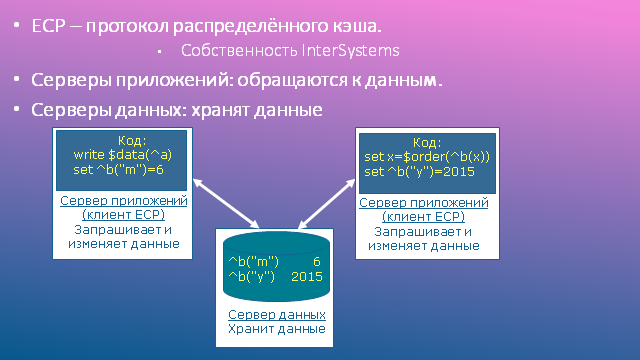
Key components of ECP
What is the data cache, I hope, no need to explain. The distributed cache that appears in the name of the ECP protocol, in general, is nothing more than a metaphor: the cache, of course, is always local. But if the remote global node is read on the application server, the corresponding block is copied from the data server cache to the application server cache, so repeated calls to neighboring nodes of the same global will occur locally, without having to re-access the network and data server. The longer the system works, the more relevant it becomes to fill the local cache on the joint venture (as they say, the better it “heats up”), and the less frequently network access operations occur. Ideally, repeated readings from the data server require only modified data; there is an illusion of the existence of a distributed (between servers) cache.
Recording is somewhat more complicated: the write request goes to the data server. The data server sends a command to erase the block from the cache in response, and only to those application servers that previously read the previous state of this block into their cache. It is important that the changed block itself is not forcibly sent, since, perhaps, nobody needs it anymore. If there is a need for it again, the block is again requested from the data server and again falls into the local cache of the application server, as described previously.
Commercial break: a little about the advantages of horizontal scaling using ECP. Imagine that you need to plan a system for 10,000 users, and it is known that for every 50 users computing resources are required in the amount of 1 CPU core and 10 GB RAM. Compare the alternatives. In the SBD & SP table, there is a traditional Caché server (data and application server “in one bottle”). For reasons of fault tolerance, two must be planned.
In the scheme with horizontal scaling, for the same reasons, we plan two data servers, but I think no one needs to be convinced of the cost advantage of this scheme over the previous one ... As a bonus, we get a wonderful feature of the joint use of ECP and Mirroring: when switching data servers - nodes of a mirror pair - users of application servers experience only a short pause in work (measured in seconds), after which their sessions continue. In the vertical diagram, client processes are connected directly to the data server, therefore, when switching servers, disconnections of user sessions are inevitable.

ECP and Mirror Sharing
Recall that on each application server there are also local databases, so the storage of intermediate data is naturally transferred to these databases. Such work can be quite intense, which means involving a large number of even inexpensive disks in it can offload the central data storage system (SHD), reducing the time it takes to wait (await) disk operations without using another expensive storage system for intermediate data.
"Normal" programs work in areas, therefore, you do not have to change constructions of the form ^ | "^^ c: \ intersystems \ cache \ mgr \ qmsperf" | QNaz to ^ | "^ PERF ^ c: \ intersystems \ cache \ mgr \ qmsperf "| QNaz. All these features are hidden in the Caché configuration in the definitions of the remote data server and the remote database. Even if you sometimes have to access globals of areas other than the current process area, the syntax of such calls (^ | "qmsperf" | QNaz) remains the same.
The semantics of working with global data also practically does not change, just working with local databases, we usually do not think about it. I will list the main points:
• All operations are divided into synchronous (all reading functions: $ Get, $ Order, etc., as well as Lock and $ Increment) and asynchronous (data recording: Set, Kill, etc.). Further execution of the program does not require waiting for the completion of the asynchronous operation. For synchronous operations, this is not the case. In the case of ECP, they may require additional access to the data server if the data block is not in the local cache.
• Synchronous operations do not wait for the completion of asynchronous operations initiated by the same application server.
• The Lock command waits for the data record started by the previous lock master to complete.
• The expiration of the Lock timeout does not guarantee that someone else owns the lock.
And here are some unusual moments:
• Lines longer than half the block size are not cached on application servers. In fact, this threshold is slightly lower, for 8 KB blocks - 3900 bytes. This decision was made by the developers in order not to clog the cache with BLOBs and CLOBs: it is known that such data is usually written once and subsequently extremely rarely read. Unfortunately, this decision negatively affected the processing of bitmap indexes, which also, as a rule, are long strings. If you use them, you will have to either reduce the size of the chunk, or increase the size of the block; the optimal choice can be made only on the basis of test results.
• Assigning
set i = $ Increment (^ a)
may be more expensive than its functionally close counterpart:
lock + ^ a set (i, ^ a) = ^ a + 1 lock - ^ a
The fact is that the $ Increment function is always executed on the data server, therefore, waiting for the completion of the round-trip packet travel is inevitable, and the lock causes a similar effect only when processes from various application servers request it.
• Handle errors. Such errors occur when the application server cannot restore the lost ECP connection during Time to wait for recovery (by default - 1200 seconds). The right way to handle this is to roll back the transaction you started and try again.
Refreshing the basic concepts of ECP, let's move on to the main topic of the article. Process management will be interpreted in a broad sense. For the real needs of the application programmers that you have to deal with, and the system tools that are available to satisfy them “right out of the box,” see below.
The answer to these “challenges” was the development of a process control API implemented in the form of the Util.Proc class.
To make it more interesting to read further, I will give a couple of simple code examples using the API.
• Display a list of processes indicating the area and user name of the medical information system (MIS), marking “*” your own (current) process:
set cnt = 0
for {
set proc = ## class (Util.Proc) .NextProc (proc ,. sc) quit: proc = "" || 'sc // the next process
write proc_ $ select (## class (Util.Proc) .ProcIsMy (proc): "*", 1: "") // mark ourselves “* "
Write" scope: "
write ## class (Util.Proc). GetProcProp (proc," NameSpace ") // process property: current scope
write" user: "
write ## class (Util.Proc) .GetProcVar (proc, $ name (qARM ("User"))) ,! // process variable: MIS username
set cnt = cnt + 1
}
write "
• Delete a process different from the current one if it is running under the same MIS user name (to prevent users from re-entering):
if '## class (Util.Proc) .ProcIsMy (proc),
## class (Util.Proc). GetProcVar (proc, $ name (qARM ("User"))) = $ name (qARM ("User")) {
set res = ## class (Util.Proc) .KillProc (proc)
}
When developing the API, it was necessary to choose a method for addressing processes in the ECP network, and I wanted to get:
• uniqueness of the address on the local network,
• the ability to directly use the address with minimal conversions,
• an easily readable format.
To address a server on the network, you can use its name (hostname) or IP address. The choice of a name as an identifier is tempting, but imposes additional requirements on the impeccability of the name service. Since such requirements are usually not imposed when configuring a Caché, I did not want to introduce new restrictions. In addition, in various operating systems, hostname can have a different format, which will complicate the subsequent analysis of the process descriptor. Based on these considerations, I preferred to use an IPv4 address.
To identify the Caché installation on the server, you can use its name ("CACHE", "CACHEQMS", etc.) or the superserver port number (1972, 56773, etc.). But you cannot connect to the Caché installation by its name, so we select the port.
As a result, as a descriptor (unique identifier) of the process, it was decided to use a string in the decimal number format: xx.yy.zz.uu.Port.PID, where
xx.yy.zz.uu is the IPv4 address of the Caché server,
Port is tcp- Caché superserver port,
PID - process number on the Caché server.
Examples of valid process descriptors:
192.168.11.19.56773.1760 - a process with PID = 1760 on a Caché installation with IP = 192.168.11.19 and Port = 56773.
192.168.11.77.1972.62801 - a process with PID = 62801 on a Caché installation with IP = 192.168.11.77 and Port = 1972.
As a result, the Util.Proc class was developed, the public methods of which are listed below. All methods are class methods (ClassMethod).
Comparing the summary of methods with the table Basic applied needs in process control , we see that we have managed to satisfy them now in the network environment. The CCM () method was added later: in the process of transferring our application (the regional medical information system qMS) to the ECP environment, it turned out that some function blocks are more convenient and correctly executed directly on the data server. The reasons may be different:
• The desire to avoid a one-time transfer of a large amount of data to the application server, typical, for example, when generating a report.
• The need to centrally service a common resource, for example, queues for exchanging messages with another system (in our case, with HealthShare).
I note that most of the API methods are designed to work in an ECP environment. Without ECP, they are still operational, but only accept / return meaningless process descriptors of the form 127.0.0.1.Port.pid. The exception is methods oriented to work with the data server: RunJob (), CheckJob (), CCM (), since they do not return / accept the process descriptor (proc), but its number (pid) on the data server. Therefore, these methods are made universal from the point of view of the application programmer: their interface is the same both in the ECP environment and without it, although they work, of course, in different ways.
It was necessary to choose a method of interaction between processes running on different servers. The following alternatives were considered:
• Class% SYSTEM.Event.
o Officially does not work on the network, so support for its network operation may be discontinued by InterSystems at any time.
• Own TCP server.
o Basically, a good idea.
o It is necessary to use an additional TCP port (except for the super server port), which inevitably entails additional installation and configuration efforts in addition to the standard Caché settings. And I wanted to get by with a minimum of settings.
• Web services.
• Class% Net.RemoteConnection. For those who have forgotten: this class provides remote code execution on other servers using the same protocol as% Service_Bindings clients. If this service is already used in the system to connect clients, then no additional settings are required, and this is just our case. The overhead of data exchange is negligible, as a rule, it is less than in the case of web services.
Based on these considerations, I chose% Net.RemoteConnection. Of its shortcomings, the most serious, in my opinion, is that it does not allow returning lines longer than 32KB, but this did not hinder much.
Another no less interesting problem that I had to face: how to determine if the code is working on the network or not? The answer to this question is necessary both for the internal needs of the API (in order to correctly formulate process descriptors) and for writing the IsECP () method, which is very popular among application programmers. The reason for this popularity is quite obvious: there were not many people who wanted to rewrite sections of their code related to the interaction between processes on some universal API (although such an API was implemented). It turned out to be much simpler and more natural to add a code branch for ECP. But how to determine in which environment the code works? The options were considered:
1. The main database of the region is remote.
2. 1 or (the main database of the region is mounted by someone as remote). Minuses:
3. 1 or (via one of the network interfaces, an application server is connected to the data server).
I stopped at option 3, since it allows you to quickly get the desired answer to the question and correctly
fill in process descriptors both on the application server and on the data server. I note that to further accelerate this check, its positive result for each server is fixed in the global.
The successful implementation of the process management API as part of the regional medical information system of the Krasnoyarsk Territory showed, if not perfect correctness, then at least the viability of the chosen approaches. Using this API, our specialists managed to solve a number of important problems. I will list only a few of them:
• Elimination of duplicate user inputs.
• Obtaining a network-wide list of working users.
• Messaging between users.
• Launch and control of background processes serving laboratory analyzers.
In conclusion, I want to thank my colleagues from SP.ARMfor help in testing the code, prompt reaction to noticed errors, and especially for fixing some of them. Some of the methods of the Util.Proc class (CCM (), RunJob (), CheckJob ()) were made independent of our application software; they can be downloaded from the github repository or from the InterSystems user code base .
Yes, I’m not an employee of InterSystems, however, I’m using the technology of this company with pleasure and pleasure, which I also wish the patient reader to read to this point.
ECP terminology
Before delving into the topic, let's recall the basic concepts associated with ECP.
ECP , or distributed cache protocol, is at the core of the interaction between data servers and application servers. It runs on top of TCP / IP, which provides reliable packet transport. ECP is owned by InterSystems.
Data servers (DBMSs), sometimes called ECP servers, are common Caché installations that host local application databases. The verb “located” should not be taken literally: databases can be physically located, for example, on network storage systems accessible via iSCSI or FC; it is important that the DBMS considers them local.
Application servers (SPs), sometimes referred to as ECP clients, are common Caché installations that run processes that serve application system users. In other words, application code is executed on application servers (hence their name). Since these are common Caché installations, they have a standard set of system local databases: CACHESYS, CACHELIB, CACHETEMP, etc. This is important, but not the main thing. It is much more important that application databases local to data servers are mounted as remote databases on application servers. In general, the interaction scheme is shown in the figure.
Key components of ECP
What is the data cache, I hope, no need to explain. The distributed cache that appears in the name of the ECP protocol, in general, is nothing more than a metaphor: the cache, of course, is always local. But if the remote global node is read on the application server, the corresponding block is copied from the data server cache to the application server cache, so repeated calls to neighboring nodes of the same global will occur locally, without having to re-access the network and data server. The longer the system works, the more relevant it becomes to fill the local cache on the joint venture (as they say, the better it “heats up”), and the less frequently network access operations occur. Ideally, repeated readings from the data server require only modified data; there is an illusion of the existence of a distributed (between servers) cache.
Recording is somewhat more complicated: the write request goes to the data server. The data server sends a command to erase the block from the cache in response, and only to those application servers that previously read the previous state of this block into their cache. It is important that the changed block itself is not forcibly sent, since, perhaps, nobody needs it anymore. If there is a need for it again, the block is again requested from the data server and again falls into the local cache of the application server, as described previously.
ECP through the eyes of an architect
Commercial break: a little about the advantages of horizontal scaling using ECP. Imagine that you need to plan a system for 10,000 users, and it is known that for every 50 users computing resources are required in the amount of 1 CPU core and 10 GB RAM. Compare the alternatives. In the SBD & SP table, there is a traditional Caché server (data and application server “in one bottle”). For reasons of fault tolerance, two must be planned.
Vertical vs. horizontal scaling
| Vertical scaling | Horizontal scaling | ||
|---|---|---|---|
| Server options | Number of servers | Server options | Number of servers |
| 200 CPU Cores, 2 TB RAM | 2 SBD & SP | 16 cores CPU, 160 GB RAM | 13 SP, 2 SBD |
In the scheme with horizontal scaling, for the same reasons, we plan two data servers, but I think no one needs to be convinced of the cost advantage of this scheme over the previous one ... As a bonus, we get a wonderful feature of the joint use of ECP and Mirroring: when switching data servers - nodes of a mirror pair - users of application servers experience only a short pause in work (measured in seconds), after which their sessions continue. In the vertical diagram, client processes are connected directly to the data server, therefore, when switching servers, disconnections of user sessions are inevitable.
ECP and Mirror Sharing
Recall that on each application server there are also local databases, so the storage of intermediate data is naturally transferred to these databases. Such work can be quite intense, which means involving a large number of even inexpensive disks in it can offload the central data storage system (SHD), reducing the time it takes to wait (await) disk operations without using another expensive storage system for intermediate data.
ECP through the eyes of a programmer
"Normal" programs work in areas, therefore, you do not have to change constructions of the form ^ | "^^ c: \ intersystems \ cache \ mgr \ qmsperf" | QNaz to ^ | "^ PERF ^ c: \ intersystems \ cache \ mgr \ qmsperf "| QNaz. All these features are hidden in the Caché configuration in the definitions of the remote data server and the remote database. Even if you sometimes have to access globals of areas other than the current process area, the syntax of such calls (^ | "qmsperf" | QNaz) remains the same.
The semantics of working with global data also practically does not change, just working with local databases, we usually do not think about it. I will list the main points:
• All operations are divided into synchronous (all reading functions: $ Get, $ Order, etc., as well as Lock and $ Increment) and asynchronous (data recording: Set, Kill, etc.). Further execution of the program does not require waiting for the completion of the asynchronous operation. For synchronous operations, this is not the case. In the case of ECP, they may require additional access to the data server if the data block is not in the local cache.
• Synchronous operations do not wait for the completion of asynchronous operations initiated by the same application server.
• The Lock command waits for the data record started by the previous lock master to complete.
• The expiration of the Lock timeout does not guarantee that someone else owns the lock.
And here are some unusual moments:
• Lines longer than half the block size are not cached on application servers. In fact, this threshold is slightly lower, for 8 KB blocks - 3900 bytes. This decision was made by the developers in order not to clog the cache with BLOBs and CLOBs: it is known that such data is usually written once and subsequently extremely rarely read. Unfortunately, this decision negatively affected the processing of bitmap indexes, which also, as a rule, are long strings. If you use them, you will have to either reduce the size of the chunk, or increase the size of the block; the optimal choice can be made only on the basis of test results.
• Assigning
set i = $ Increment (^ a)
may be more expensive than its functionally close counterpart:
lock + ^ a set (i, ^ a) = ^ a + 1 lock - ^ a
The fact is that the $ Increment function is always executed on the data server, therefore, waiting for the completion of the round-trip packet travel is inevitable, and the lock causes a similar effect only when processes from various application servers request it.
• Handle errors
ECP and process management
Refreshing the basic concepts of ECP, let's move on to the main topic of the article. Process management will be interpreted in a broad sense. For the real needs of the application programmers that you have to deal with, and the system tools that are available to satisfy them “right out of the box,” see below.
Key Application Process Management Needs
| Function | Without ECP | With ECP |
|---|---|---|
| Running background processes. | job $ job, $ zchild, $ zparent | The Job command works on the network, but without passing parameters. Process numbers are unique only within each server. |
| Tracking the liveliness of processes. | $ data (^ $ job (pid)) | There is no access to the process table of another server. |
| Getting a list of processes. | $ order (^ $ job (pid)) $ zjob (pid) | See above. |
| Access to the properties of other processes. | See above. | |
| Completion of another process. | Class SYS.Process | It is not possible to complete the process on another server. |
The answer to these “challenges” was the development of a process control API implemented in the form of the Util.Proc class.
To make it more interesting to read further, I will give a couple of simple code examples using the API.
Util.Proc API Examples
• Display a list of processes indicating the area and user name of the medical information system (MIS), marking “*” your own (current) process:
set cnt = 0
for {
set proc = ## class (Util.Proc) .NextProc (proc ,. sc) quit: proc = "" || 'sc // the next process
write proc_ $ select (## class (Util.Proc) .ProcIsMy (proc): "*", 1: "") // mark ourselves “* "
Write" scope: "
write ## class (Util.Proc). GetProcProp (proc," NameSpace ") // process property: current scope
write" user: "
write ## class (Util.Proc) .GetProcVar (proc, $ name (qARM ("User"))) ,! // process variable: MIS username
set cnt = cnt + 1
}
write "
• Delete a process different from the current one if it is running under the same MIS user name (to prevent users from re-entering):
if '## class (Util.Proc) .ProcIsMy (proc),
## class (Util.Proc). GetProcVar (proc, $ name (qARM ("User"))) = $ name (qARM ("User")) {
set res = ## class (Util.Proc) .KillProc (proc)
}
Addressing processes on the network
When developing the API, it was necessary to choose a method for addressing processes in the ECP network, and I wanted to get:
• uniqueness of the address on the local network,
• the ability to directly use the address with minimal conversions,
• an easily readable format.
To address a server on the network, you can use its name (hostname) or IP address. The choice of a name as an identifier is tempting, but imposes additional requirements on the impeccability of the name service. Since such requirements are usually not imposed when configuring a Caché, I did not want to introduce new restrictions. In addition, in various operating systems, hostname can have a different format, which will complicate the subsequent analysis of the process descriptor. Based on these considerations, I preferred to use an IPv4 address.
To identify the Caché installation on the server, you can use its name ("CACHE", "CACHEQMS", etc.) or the superserver port number (1972, 56773, etc.). But you cannot connect to the Caché installation by its name, so we select the port.
As a result, as a descriptor (unique identifier) of the process, it was decided to use a string in the decimal number format: xx.yy.zz.uu.Port.PID, where
xx.yy.zz.uu is the IPv4 address of the Caché server,
Port is tcp- Caché superserver port,
PID - process number on the Caché server.
Examples of valid process descriptors:
192.168.11.19.56773.1760 - a process with PID = 1760 on a Caché installation with IP = 192.168.11.19 and Port = 56773.
192.168.11.77.1972.62801 - a process with PID = 62801 on a Caché installation with IP = 192.168.11.77 and Port = 1972.
Util.Proc Class Methods
As a result, the Util.Proc class was developed, the public methods of which are listed below. All methods are class methods (ClassMethod).
Process Control API Method Summary
| Method | Function |
|---|---|
| IsECP () As% Bolean | On the ECP network, code is executed or not. |
| NextProc (proc, ByRef sc As% Status) As% String | The next process after the process with the proc descriptor. |
| DataProc (proc, ByRef sc As% Status) As% Integer | If ## class (Util.Proc) .DataProc (proc), a process with a proc descriptor exists. |
| Get a property named Prop of the process with the proc descriptor. The following properties can be polled (see the% SYS.ProcessQuery class): Pid, ClientNodeName, UserName, ClientIPAddress, NameSpace, MemoryUsed, State, ClientExecutableName | |
| GetProcVar (proc, var, ByRef sc As% Status) As% String | Get the value of the var variable of the process with the proc descriptor. |
| KillProc (proc, ByRef sc As% Status) As% String | End the process with the proc descriptor. |
| RunJob (EntryRef, Argv ...) As% List | Start the process on the data server from the EntryRef entry point, passing it the required number of actual parameters (Argv). Returns $ lb (% Status, pid), where pid is the process number on the data server. |
| CheckJob (pid) As% List | Check if the process with the pid number on the data server is alive. |
| CCM (ClassMethodName, Argv ...) As% String | Execute an arbitrary method of the ClassMethodName class (or $$ - function) on the data server, passing the required number of actual parameters (Argv), and receiving the result of the execution. |
Comparing the summary of methods with the table Basic applied needs in process control , we see that we have managed to satisfy them now in the network environment. The CCM () method was added later: in the process of transferring our application (the regional medical information system qMS) to the ECP environment, it turned out that some function blocks are more convenient and correctly executed directly on the data server. The reasons may be different:
• The desire to avoid a one-time transfer of a large amount of data to the application server, typical, for example, when generating a report.
• The need to centrally service a common resource, for example, queues for exchanging messages with another system (in our case, with HealthShare).
I note that most of the API methods are designed to work in an ECP environment. Without ECP, they are still operational, but only accept / return meaningless process descriptors of the form 127.0.0.1.Port.pid. The exception is methods oriented to work with the data server: RunJob (), CheckJob (), CCM (), since they do not return / accept the process descriptor (proc), but its number (pid) on the data server. Therefore, these methods are made universal from the point of view of the application programmer: their interface is the same both in the ECP environment and without it, although they work, of course, in different ways.
A bit about implementation
It was necessary to choose a method of interaction between processes running on different servers. The following alternatives were considered:
• Class% SYSTEM.Event.
o Officially does not work on the network, so support for its network operation may be discontinued by InterSystems at any time.
• Own TCP server.
o Basically, a good idea.
o It is necessary to use an additional TCP port (except for the super server port), which inevitably entails additional installation and configuration efforts in addition to the standard Caché settings. And I wanted to get by with a minimum of settings.
• Web services.
• Class% Net.RemoteConnection. For those who have forgotten: this class provides remote code execution on other servers using the same protocol as% Service_Bindings clients. If this service is already used in the system to connect clients, then no additional settings are required, and this is just our case. The overhead of data exchange is negligible, as a rule, it is less than in the case of web services.
Based on these considerations, I chose% Net.RemoteConnection. Of its shortcomings, the most serious, in my opinion, is that it does not allow returning lines longer than 32KB, but this did not hinder much.
Another no less interesting problem that I had to face: how to determine if the code is working on the network or not? The answer to this question is necessary both for the internal needs of the API (in order to correctly formulate process descriptors) and for writing the IsECP () method, which is very popular among application programmers. The reason for this popularity is quite obvious: there were not many people who wanted to rewrite sections of their code related to the interaction between processes on some universal API (although such an API was implemented). It turned out to be much simpler and more natural to add a code branch for ECP. But how to determine in which environment the code works? The options were considered:
1. The main database of the region is remote.
- Pros: it is very simple, just:
- Cons: this is true only on the application server and excludes network operation on the data server.
2. 1 or (the main database of the region is mounted by someone as remote). Minuses:
- It is expensive.
- This is unreliable due to the dynamic nature of ECP.
3. 1 or (via one of the network interfaces, an application server is connected to the data server).
I stopped at option 3, since it allows you to quickly get the desired answer to the question and correctly
fill in process descriptors both on the application server and on the data server. I note that to further accelerate this check, its positive result for each server is fixed in the global.
Some conclusions
The successful implementation of the process management API as part of the regional medical information system of the Krasnoyarsk Territory showed, if not perfect correctness, then at least the viability of the chosen approaches. Using this API, our specialists managed to solve a number of important problems. I will list only a few of them:
• Elimination of duplicate user inputs.
• Obtaining a network-wide list of working users.
• Messaging between users.
• Launch and control of background processes serving laboratory analyzers.
In conclusion, I want to thank my colleagues from SP.ARMfor help in testing the code, prompt reaction to noticed errors, and especially for fixing some of them. Some of the methods of the Util.Proc class (CCM (), RunJob (), CheckJob ()) were made independent of our application software; they can be downloaded from the github repository or from the InterSystems user code base .
Yes, I’m not an employee of InterSystems, however, I’m using the technology of this company with pleasure and pleasure, which I also wish the patient reader to read to this point.









