
 May 18, 2015 at 11:57
DLang plugin for IntelliJ IDEA (Alpha, EAP, POC)
Good afternoon. Are you among the experts in the D programming language? The first acquaintance with this language often runs into the problem of finding a suitable IDE. I also encountered this problem. And, as a typical typro programmer, I undertook to write a plug-in for supporting the D language on the IntelliJ IDEA 14 platform.
Disclaimer 1: This is version 0.0.8, while the minimum functionality is implemented, there will probably be bugs, you will probably think that the plug-in can't do anything. I realize that there is a lot of work to be done to bring the plugin to the “you can use” state.
Disclaimer 2: If you still decide to look into the source code, I want to warn you that this is my first programming experience for IntelliJ IDEA. Criticism is welcome. As well as pull requests.

What is:
What remains to be done:
So far, the “team” has one beta tester with Mac OS X and I am a Windows programmer.
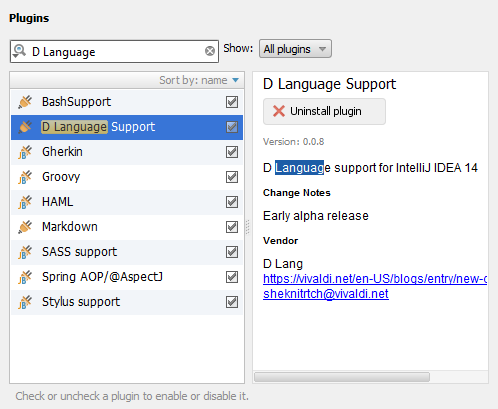
The plugin requires IntelliJ IDEA version 14 and higher. Go to Settings> Plugins. Enter “D Language” in the search field and click “Install Plugin”.
Now you can create a new DLang project.
There are two types of projects: “D Application” and “D Application with DUB”. They differ only in the build settings. In projects of the first type, by default, a configuration is created for building the project using the DMD compiler (Digital Mars D). In another type, build configuration via DUB (officially recommended build system for DLang projects).
DMD is a compiler developed by Digital Mars. It is he who is offered to download at dlang.org/download.html .
Whichever option you choose, there is always the opportunity to reconfigure assemblies from DMD to DUB and vice versa.
After creating your first project, you need to configure the DLang SDK. Open Project Structure (Strl + Alt + Shift + S) and add “Digital Mars D Compiler”

You will need to select the folder in which the executable file
now you can build and run your D projects.
A project in IntelliJ IDEA consists of modules. The DLang module has its own settings, which almost repeat the settings of the Java module:
Recommended application build system is DUB. The project is configured using a
Unfortunately, integration with DUB is incomplete so far. A plugin should be able to import a project from a
Unfortunately, I can’t devote to developing the plug-in 8 hours a day, since this is not my main work. But the development will definitely continue. The list of vital features is above . Install, use, send bugs. If you know Java and want to help, welcome to Github .
PS If you ever decide to create your own programming language, please never call it one or two letters. It is very difficult to google something with the letter “D” or the word “Go”. Let the name of your programming language be an eight-letter abbreviation, or a word from the Ndebele language, or the name of a monster from D&D, or a fictional planet from the series “Stargate”. The more unique the word, the easier it is to find information on the Web. Sorry, boiling!
Disclaimer 1: This is version 0.0.8, while the minimum functionality is implemented, there will probably be bugs, you will probably think that the plug-in can't do anything. I realize that there is a lot of work to be done to bring the plugin to the “you can use” state.
Disclaimer 2: If you still decide to look into the source code, I want to warn you that this is my first programming experience for IntelliJ IDEA. Criticism is welcome. As well as pull requests.
DLang plugin 0.0.8
- Source Code: github.com
- Where to download: plugins.jetbrains.com
- Developer Blog: Vivaldi.net
- Email: sheknitrtch@vivaldi.net
What is:
- Syntax highlighting
- Parsing and building a syntax tree;
- Class navigation
- Invoking an external dmd compiler or dub build system;
- Connection of external LIB files and source libraries;
What remains to be done:
- Code formatting;
- Parsing error handling;
- Links inside the code. That is, the ability to proceed to the declaration of a variable / function / method / class / module / template by its name.
- Hints and code completion;
- Checks, checks, checks. IDEA should be able to check the type of the variable and the values that are written into it, check the list of arguments of functions and methods, the scope of the used variables / functions / classes, the correct use of templates, constant and immutability, and many other semantic checks. All this logic needs to be written code. You can, of course, rely on the compiler to find errors, but why then an IDE?
- Launch and debug the application. Honestly, I still can’t imagine how IDEA can interact with a debugged program (analyze the stack, set breakpoints, view variable values, etc.) It’s good that there are intellij-erlang and intellij-haxe sources as an example.
- Integration with the DUB assembly system and its configuration files in JSON format.
So far, the “team” has one beta tester with Mac OS X and I am a Windows programmer.
Installation and setup
The plugin requires IntelliJ IDEA version 14 and higher. Go to Settings> Plugins. Enter “D Language” in the search field and click “Install Plugin”.
Now you can create a new DLang project.
How to create a new project
There are two types of projects: “D Application” and “D Application with DUB”. They differ only in the build settings. In projects of the first type, by default, a configuration is created for building the project using the DMD compiler (Digital Mars D). In another type, build configuration via DUB (officially recommended build system for DLang projects).
DMD is a compiler developed by Digital Mars. It is he who is offered to download at dlang.org/download.html .
Whichever option you choose, there is always the opportunity to reconfigure assemblies from DMD to DUB and vice versa.
After creating your first project, you need to configure the DLang SDK. Open Project Structure (Strl + Alt + Shift + S) and add “Digital Mars D Compiler”
You will need to select the folder in which the executable file
dmd(or dmd.exe) lies . For example, E:\dmd2\windows\bin\now you can build and run your D projects.
Module settings
A project in IntelliJ IDEA consists of modules. The DLang module has its own settings, which almost repeat the settings of the Java module:
- Source - source folder settings
- Output - settings of folders where artifacts will be added. Used when compiling with DMD. Also, the launch of the final executable file occurs along this path.
- Dependencies - dependency settings. Allows you to specify the DMD SDK and connect external libraries and LIB files.
How to start assembly using DUB
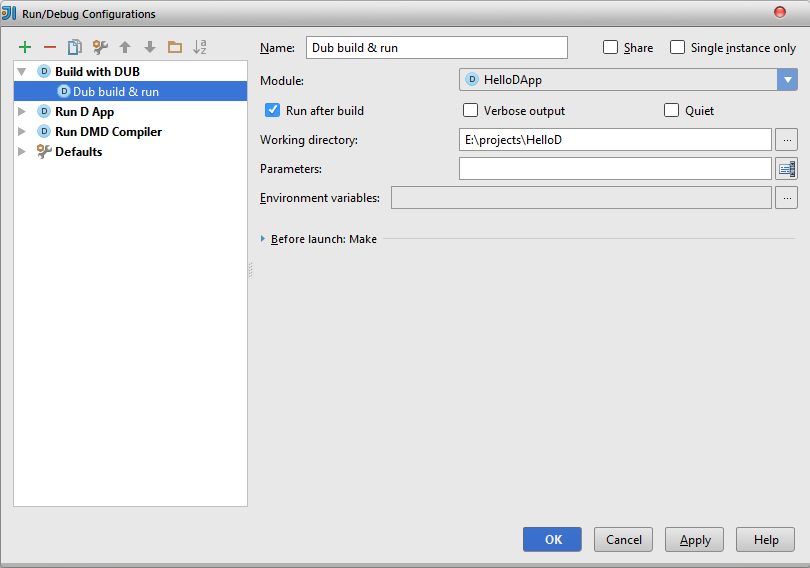
Recommended application build system is DUB. The project is configured using a
dub.jsonfile in which meta-information, submodules, external dependencies, compilation parameters are indicated. See http://code.dlang.org/package-format for details. The plugin can run the build command directly from the IDE: Unfortunately, integration with DUB is incomplete so far. A plugin should be able to import a project from a
dub.jsonfile, analyze dependencies, and many other things like the Maven plugin in IDEA. This is a challenge for the future.Development plans
Unfortunately, I can’t devote to developing the plug-in 8 hours a day, since this is not my main work. But the development will definitely continue. The list of vital features is above . Install, use, send bugs. If you know Java and want to help, welcome to Github .
PS If you ever decide to create your own programming language, please never call it one or two letters. It is very difficult to google something with the letter “D” or the word “Go”. Let the name of your programming language be an eight-letter abbreviation, or a word from the Ndebele language, or the name of a monster from D&D, or a fictional planet from the series “Stargate”. The more unique the word, the easier it is to find information on the Web. Sorry, boiling!