Using Microsoft Active Accessibility to Access Browser Content
- Tutorial
Let's come up with a solution to such a simple task.
There is : a browser (IE, Chrome or Firefox), already launched by the user.
Required : write a program that receives the URL that is currently entered in the address bar.
Let's think how to solve this simple task will NOT work:
1. FindWindow + GetWindowText
2. A browser extension that will return the URL to our program (for example, through a request to localhost)
3. Let's write a sniffer and see what the user opened there
4. Let's use Remote Debugging Protocol or some Selenium
5. Maybe hooks ?
6. Screenshot of the browser window, determining the position of the address bar, recognition of text from the picture!
7. Your option
And write in the comments what other decisions come to your mind and we will think about whether it works out or not.
And now one of the correct answers: we will use the Microsoft Active Accessibility technology , which is already old, but very stable and supported by all browsers in all operating systems from Win95 to Win10 , which will give us the opportunity to not only get the current URL ( moreover , in the same way for all browsers), but generally give access to all browser content - from the parent window with its title, menu, toolbar, tabs and to the contents of an open web page up to its very last element.
Microsoft Active Accessibility (MSAA) was invented already in 1997 and made it possible to write screen magnifiers, applications for reading text from the screen and creating other programs that improve the interaction of people with disabilities with the computer (vision problems , hearing, etc.). Technology support in IE appeared long ago, in FF and Chrome it was also added a bit later. With the release of Vista, an improvement appeared - the Windows Automation API, but the good old MSAA has not gone away, it works fine with the latest OS and browsers.
In general, there is nothing complicated in the code. The entry point for us will be the parent browser window, which can be obtained by its ClassID:
Next, you need to get a pointer to the IAccessible COM interface from this window
Yes, before that, do not forget:
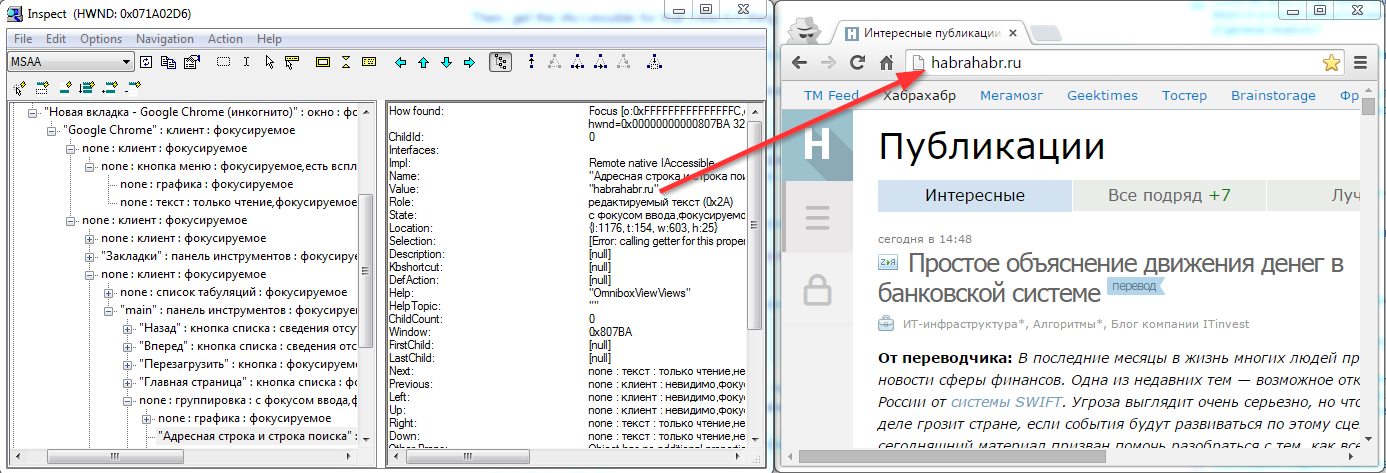
So, we have a pointer to IAccessible. What it is? This is the root node of the tree that describes the entire browser - window, title, menu, toolbars, address bar, page content, statusbar. How would you see all this in a visual form? Nothing is easier! Microsoft provides the inspect.exe utility for this (it comes with the Windows SDK, I have it in the folder C: \ Program Files (x86) \ Windows Kits \ 8.0 \ bin \ x64). Chromium developers recommend aViewer .
Let's see what the trees of available browser elements look like:
IE

Chrome
Firefox
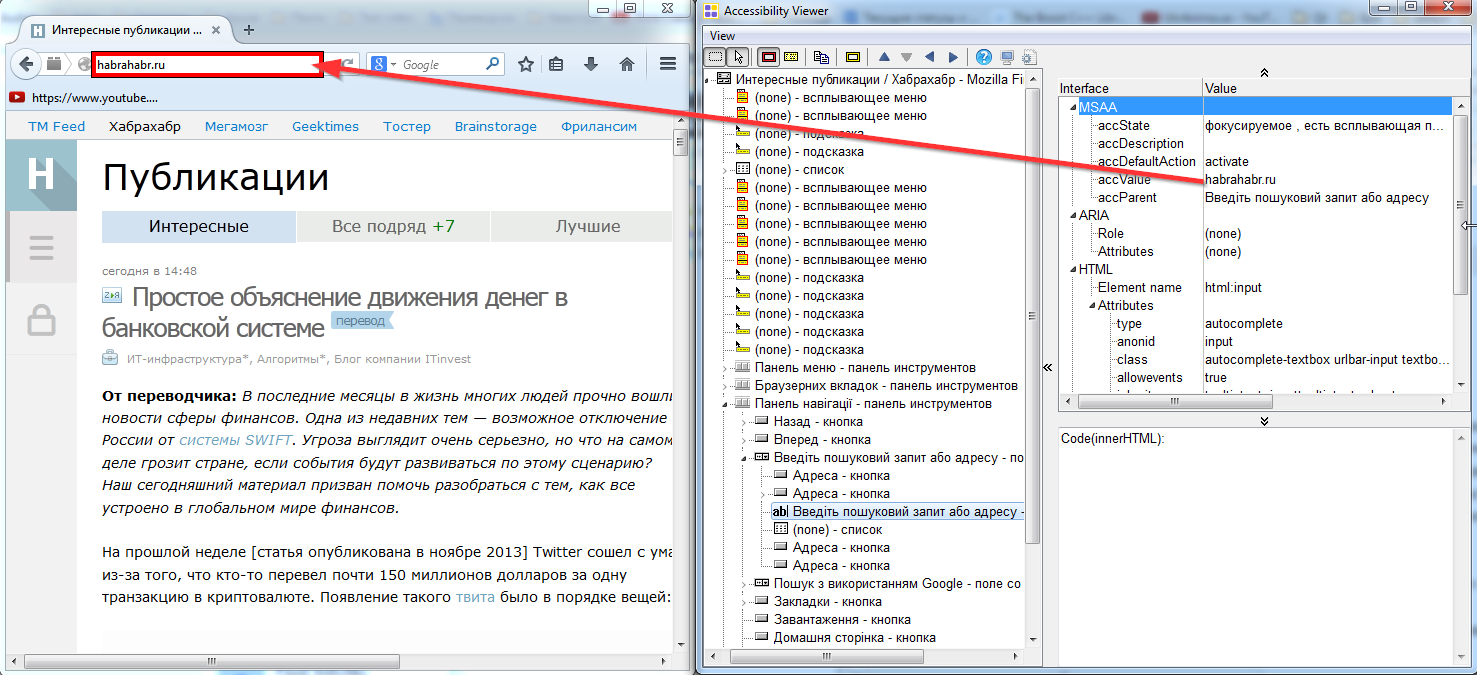
As we can see, the address bar is accessible through the IAccessible interface in all browsers. The names of the elements, the position in the tree in different browsers is different, but in general, to access the address bar, we only need a couple of functions: the ability to get the name and value of the current element and the ability to get children of the current element of the tree.
Both are easy to write, here is the final code that gets the current URL for Chrome.
Result:
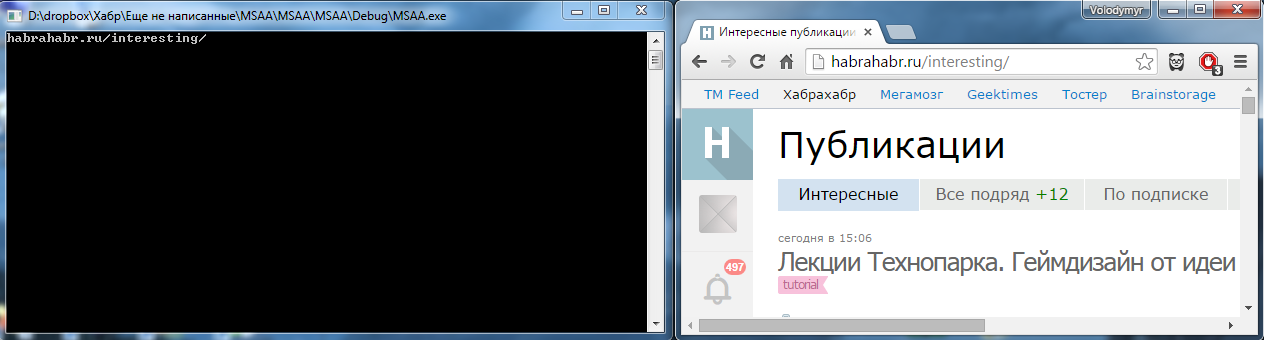
For other browsers, everything is the same.
Chrome's MSAA technology is disabled by default. This is due to the architecture of Chrome: its division into processes leads to the fact that in no one process there is information about the entire tree of elements needed by the MSAA. The developers of Chrome are not fools, and provided for the inclusion of the collection of this information and its caching in the main process. But since this is all somewhat resource-intensive, and relatively few people need MSAA technology, they turned it off by default. You can enable it in two ways:
There is : a browser (IE, Chrome or Firefox), already launched by the user.
Required : write a program that receives the URL that is currently entered in the address bar.
Let's think how to solve this simple task will NOT work:
1. FindWindow + GetWindowText
Why does not work
The first idea is to find the browser window, in it the child window of the address bar and take the URL from there. Practice shows that only IE has a separate child window for the address bar. FF and Chrome are cross-platform, so they prefer to render all their content on their own.
2. A browser extension that will return the URL to our program (for example, through a request to localhost)
Why does not work
Can. But firstly, for three browsers it will be necessary to write 3 different extensions, and secondly, for FF and Chrome we will be forced to distribute it only through their extension stores. To write a program whose performance depends on whether the moderator’s left heel is combed today - no, thank you.
3. Let's write a sniffer and see what the user opened there
Why does not work
Come on! But what's next? Even if we select the data received by the browser from the traffic stream and decrypt the HTTP protocol, we still will not recognize the current URL (there will be many links in the stream). In addition, they immediately go to the garden of HTTPS connections, HTTP / 2, links to locally open files, links to internal pages (such as chrome: // settings ), etc.
4. Let's use Remote Debugging Protocol or some Selenium
Why does not work
It is not suitable due to the limitation of the conditions of the original task: the browser is already running, we cannot start a new controlled instance, we need to interact with the existing one.
5. Maybe hooks ?
Why does not work
Well, we can infiltrate the browser. And what are hooks for? For IE, everything is clear - SetWindowText for the address bar window (but with it, an easier method number 1 went through). And in FF and Chrome, we don’t have any clearly defined objects and interfaces that we can get involved in. You can do something with a specific version of the browser, but a universal solution will not work.
6. Screenshot of the browser window, determining the position of the address bar, recognition of text from the picture!
Why does not work
Already somehow begins to look like despair, right? Let’s take a look at all the options for OS color schemes, permissions, scales, take into account the presence of plug-ins, color schemes, non-standard arrangement of elements, right-to-left language locales in the browser and finish the case when the address bar window is too narrow to accommodate the URL completely.
7. Your option
And write in the comments what other decisions come to your mind and we will think about whether it works out or not.
And now one of the correct answers: we will use the Microsoft Active Accessibility technology , which is already old, but very stable and supported by all browsers in all operating systems from Win95 to Win10 , which will give us the opportunity to not only get the current URL ( moreover , in the same way for all browsers), but generally give access to all browser content - from the parent window with its title, menu, toolbar, tabs and to the contents of an open web page up to its very last element.
Introduction
Microsoft Active Accessibility (MSAA) was invented already in 1997 and made it possible to write screen magnifiers, applications for reading text from the screen and creating other programs that improve the interaction of people with disabilities with the computer (vision problems , hearing, etc.). Technology support in IE appeared long ago, in FF and Chrome it was also added a bit later. With the release of Vista, an improvement appeared - the Windows Automation API, but the good old MSAA has not gone away, it works fine with the latest OS and browsers.
The code
In general, there is nothing complicated in the code. The entry point for us will be the parent browser window, which can be obtained by its ClassID:
FindWindow(L"IEFrame", NULL); // IE
FindWindow(L"MozillaWindowClass", NULL); // Firefox
FindWindow(L"Chrome_WidgetWin_1", NULL); // Chrome. Этот код может сработать, но вообще-то документация (http://www.chromium.org/developers/design-documents/accessibility) рекомендует перебирать все окна, класс которых начинающиеся с "Chrome", на случай, если им взбредёт в голову изменить название класса. Из практики можно добавить, что перебирать нужно окна с таким class name и непустым заголовком.
Next, you need to get a pointer to the IAccessible COM interface from this window
::AccessibleObjectFromWindow(hWndChrome, OBJID_CLIENT, IID_IAccessible, (void**)(&pAccMain));
Yes, before that, do not forget:
- Include the #include "oleacc.h" header file
- Link Oleacc.lib
- Initialize COM with function call :: CoInitialize (NULL);
It is very important not to forget! Without this, something may start to work for you, but at unforeseen moments you will get strange errors. It is also possible that there will be no errors, but you simply will not receive part of the data. All in all, a very vile and perfect debugging error.
So, we have a pointer to IAccessible. What it is? This is the root node of the tree that describes the entire browser - window, title, menu, toolbars, address bar, page content, statusbar. How would you see all this in a visual form? Nothing is easier! Microsoft provides the inspect.exe utility for this (it comes with the Windows SDK, I have it in the folder C: \ Program Files (x86) \ Windows Kits \ 8.0 \ bin \ x64). Chromium developers recommend aViewer .
Let's see what the trees of available browser elements look like:
IE
Chrome
Firefox
As we can see, the address bar is accessible through the IAccessible interface in all browsers. The names of the elements, the position in the tree in different browsers is different, but in general, to access the address bar, we only need a couple of functions: the ability to get the name and value of the current element and the ability to get children of the current element of the tree.
Both are easy to write, here is the final code that gets the current URL for Chrome.
#include "stdafx.h"
#include
#include
#include "windows.h"
#include "oleacc.h"
#include "atlbase.h"
std::wstring GetName(IAccessible *pAcc)
{
	CComBSTR bstrName;
	if (!pAcc || FAILED(pAcc->get_accName(CComVariant((int)CHILDID_SELF), &bstrName)) || !bstrName.m_str)
		return L"";
	return bstrName.m_str;
}
HRESULT WalkTreeWithAccessibleChildren(CComPtr pAcc)
{
	long childCount = 0;
	long returnCount = 0;
	HRESULT hr = pAcc->get_accChildCount(&childCount);
	if (childCount == 0)
		return S_OK;
	CComVariant* pArray = new CComVariant[childCount];
	hr = ::AccessibleChildren(pAcc, 0L, childCount, pArray, &returnCount);
	if (FAILED(hr))
		return hr;
	for (int x = 0; x < returnCount; x++)
	{
		CComVariant vtChild = pArray[x];
		if (vtChild.vt != VT_DISPATCH)
			continue;
		CComPtr pDisp = vtChild.pdispVal;
		CComQIPtr pAccChild = pDisp;
		if (!pAccChild)
			continue;
		std::wstring name = GetName(pAccChild).data();
		if (name.find(L"Адресная строка и строка поиска") != -1)
		{
			CComBSTR bstrValue;
			if (SUCCEEDED(pAccChild->get_accValue(CComVariant((int)CHILDID_SELF), &bstrValue)) && bstrValue.m_str)
				std::wcout << std::wstring(bstrValue.m_str).c_str();
			return S_FALSE;
		}
		if (WalkTreeWithAccessibleChildren(pAccChild) == S_FALSE)
			return S_FALSE;
	}
	delete[] pArray;
	return S_OK;
}
HWND hWndChrome = NULL;
BOOL CALLBACK FindChromeWindowProc(HWND hwnd, LPARAM lParam)
{
	wchar_t className[100];
	if (GetClassName(hwnd, className, 100) == 0 || wcscmp(className, L"Chrome_WidgetWin_1") != 0)
		return TRUE;
	wchar_t title[1000];
	if (GetWindowText(hwnd, title, 1000) == 0 || wcslen(title) == 0)
		return TRUE;
	hWndChrome = hwnd;
	return FALSE;
}
int _tmain(int argc, _TCHAR* argv[])
{
	::CoInitialize(NULL);
	EnumWindows(FindChromeWindowProc, 0);
	if (hWndChrome == NULL)
		return 0;
	CComPtr pAccMain;
	HRESULT hr = ::AccessibleObjectFromWindow(hWndChrome, 1, IID_IAccessible, (void**)(&pAccMain)); // 1 - захардкоженный идентификатор ловушки
	CComPtr pAccMain2;
	::AccessibleObjectFromWindow(hWndChrome, OBJID_CLIENT, IID_IAccessible, (void**)(&pAccMain2));
	WalkTreeWithAccessibleChildren(pAccMain2);
	return 0;
}
Result:
For other browsers, everything is the same.
Small nuance
Chrome's MSAA technology is disabled by default. This is due to the architecture of Chrome: its division into processes leads to the fact that in no one process there is information about the entire tree of elements needed by the MSAA. The developers of Chrome are not fools, and provided for the inclusion of the collection of this information and its caching in the main process. But since this is all somewhat resource-intensive, and relatively few people need MSAA technology, they turned it off by default. You can enable it in two ways:
- Manual: go to Chrome at the link chrome: // accessibility and enable
- Software: Chrome creates a special “trap” for sending a message that an application using MSAA is present in the system. You can send a message to this trap like this:
CComPtrpAccMain; HRESULT hr = ::AccessibleObjectFromWindow(hwnd, 1, IID_IAccessible, (void**)(&pAccMain)); // hwnd - главное окно Хрома, 1 - захардкоженный идентификатор ловушки