
Docker in production - what we learned by launching over 300 million containers
- Transfer
Docker in production on Iron.io
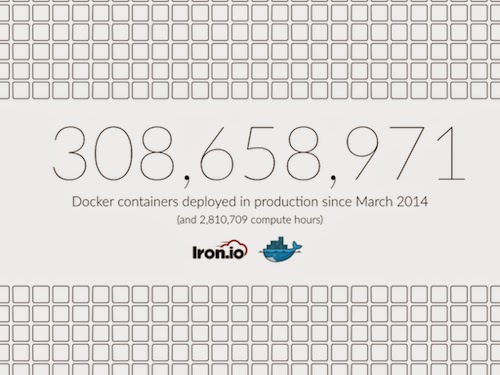
Earlier this year (approx. 2014), we decided to run each task on IronWorker inside our own Docker container. Since then, we have launched more than 300 million programs inside our own Docker containers in the cloud.
After months of use, we would like to share with the community some of the challenges we faced in building the infrastructure based on Docker, how we overcame them, and why it was worth it.
IronWorker is a task execution service that allows developers to plan, process and scale tasks without worrying about creating and maintaining infrastructure. When we launched the service more than three years ago, we used the only LXC container containing all languages and packages for launching tasks. Docker gave us the ability to easily update and manage a set of containers, which allows us to offer our customers a much wider range of language environments and installed packages.
We started working with Docker version 0.7.4 where several bugs were noticed (one of the largest - the container did not close properly, it was later corrected). We overcame almost all of them, gradually discovering that Docker not only satisfies our needs, but even exceeds our expectations, so much so that we even expanded the scope of using Docker throughout our infrastructure. Given our experience today, that made sense.
Here is a list of just some of the benefits we saw:
A few numbers
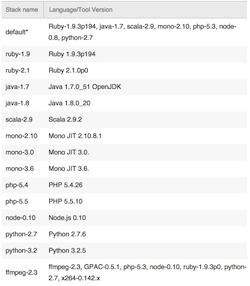
Docker’s git approach is very powerful and allows you to easily manage a large number of constantly deployed environments, and its image management system allows us to fine-tune the detail of individual images, saving disk space. Now we are able to keep up with quickly updated languages, and we can also offer special images, such as the new FFmpeg stack, designed specifically for media processing. Now we have about 15 different stacks and this list is growing rapidly.
LXC containers are a virtualization method at the operating system level and allow containers to split the core among themselves, but in such a way that each container can be limited in the use of a certain amount of resources, such as processor, memory and input / output devices. Docker provides these features, as well as many others, including the REST API, version control system, image updating and easy access to various metrics. In addition, Docker supports a more secure way to isolate data using the CoW file system . This means that all changes made to files within the task are stored separately and can be cleared with a single command. LXC is not able to track such changes.
Our teams are scattered around the world. The fact that we are able to publish a simple Dockerfile and feel calm, knowing that when we wake up, someone else will be able to collect exactly the same image as you - a huge gain for each of us and our sleep modes. Having clean images also makes deployment and testing much faster. The cycles of our development have become much faster, and all team members are much happier.
Custom environments built with Docker
Updates on Docker come out very often (even more often than on Chrome). The degree of community involvement in adding new features and fixing bugs is growing rapidly. Whether it’s supporting images, updating Docker itself, or even adding additional tools to work with Docker, there are a lot of smart people dealing with these problems, so we don’t have to. We see that the Docker community is extremely positive and participation in it brings a lot of benefits, and we are happy to be part of it.
We are still in the research process, but the combination of Docker and CoreOS promises to take serious positions in our stack. Docker provides stable image management and containerization. CoreOS provides a stripped-down cloud OS, distributed management, and configuration management. This combination allows for a more logical separation of problems and a better infrastructure stack than we have now.
Each server technology requires fine-tuning, especially when scaling , and Docker is no exception. (Imagine we run about 50 million tasks and 500,000 hours of processor time per month, while quickly updating the images that we made available.)
Here are some of the problems we encountered when using Docker on large volumes:
Docker errors are small and fixable
A fast pace of development is certainly an advantage, but it has its drawbacks. One of them is limited backward compatibility. In most cases, what we encounter is changes in the command line syntax and API methods, and therefore this is not such an important issue from the point of view of production.
In other cases, however, this has affected performance. For example, in case of any Docker errors after starting the containers, we analyze STDERR and react depending on the type of error (for example, by trying to run the task again). Unfortunately, the error output format changed from version to version, and so we decided to do debugging on the fly.
Solving these problems is relatively easy, but this means that all updates must be checked several times, and you still remain in limbo until you release it into the world of large numbers. It should be noted that we started a few months ago with version 0.7.4 and recently updated our system to version 1.2.0 and saw significant progress in this area.
While Docker had a stable release 4 months ago, many of the tools made for it still remain unstable. The use of a large number of tools in the Docker system also means the adoption of large overheads. Someone from your team will have to stay up to date with everything and tinker a lot in order to take into account new functions and fix errors. However, we like the many tools that are made for Docker, and we can't wait to see who wins these battles (looking at infrastructure management). Of particular interest to us are etcd, fleet and kubernetes.
To reveal our experience a little deeper, below are some of the problems that we encountered and their solutions.
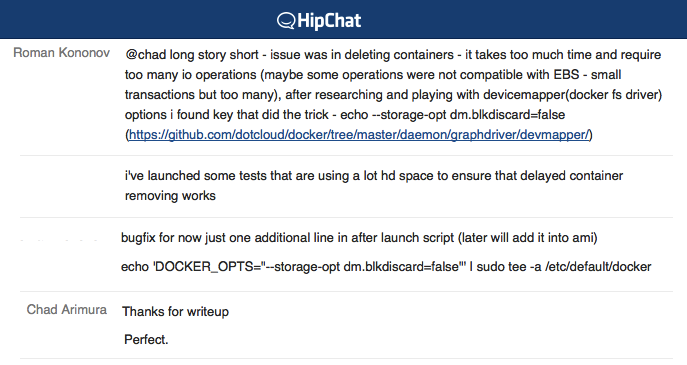
Excerpt from a debugging session
This list was provided by Roman Kononov, our lead IronWorker developer and director of infrastructure management, and Sam Ward, who also plays an important role in debugging and optimizing our work with Docker.
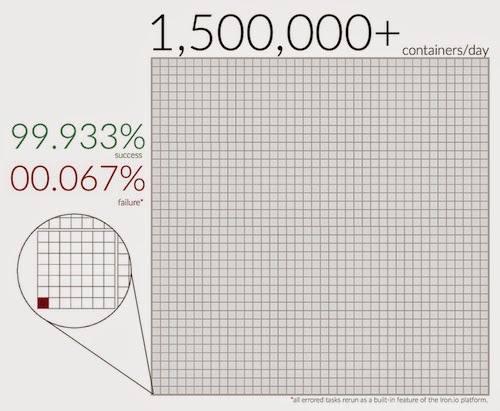
It should be noted that when it comes to errors related to Docker or other system problems, we can automatically reprocess tasks without any consequences for the user (reprocessing tasks - built-in platform functions).

Solving the problem of Slowly
Removing a Container Removing containers takes too much time and also requires a lot of read / write operations. This caused significant delays and revealed vulnerabilities in our systems. We had to increase the number of cores available to us, to a larger number, which was not necessary.
After studying and researching the devicemapper (Docker file system driver), we found the special option `--storage-opt dm.blkdiscard = false`. This option tells Docker to skip the heavy disk operation when removing containers, which greatly speeds up the process of disconnecting the container. Since then, the problem has been resolved.
Containers did not shut down correctly because Docker did not unmount the volumes properly. Because of this, the containers worked non-stop, even after the task was completed. Another way is to unmount volumes and delete folders explicitly using a set of standard scripts. Fortunately, that was a long time ago when we used Docker v0.7.6. We deleted this long script since this unmount problem was resolved in Docker version 0.9.0.
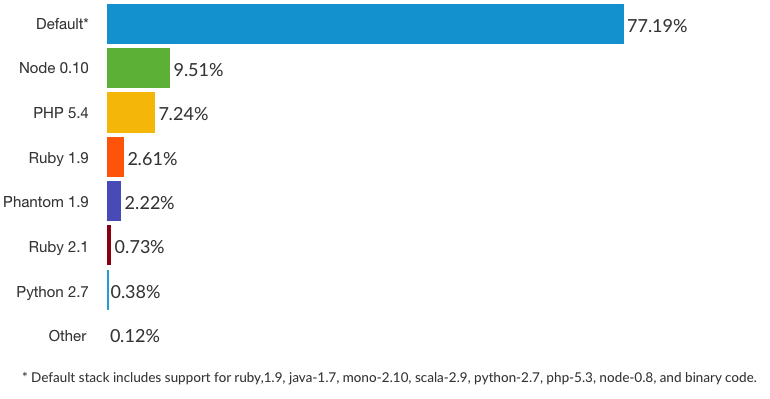
Stack usage distribution
One of the Docker releases suddenly added the ability to limit memory and removed the LXC options. As a result of this, some of the workflows exceeded memory limits, and the entire system stopped responding. This took us by surprise, because Docker never broke, even using unsupported options. It was not difficult to fix it - apply memory limits in Docker - but all the same, the changes took us by surprise.
As you already noticed, we invest quite actively in Docker and continue to do this every day. In addition to using it as a container for running custom code in IronWorker, we are in the process of introducing it into a number of other areas of our business.
These areas include:
In addition to using Docker as a container for tasks, we are in the process of introducing it as a processing management tool on each server that monitors and runs work tasks. (The main task on each artist takes the task from the queue, loads the Docker into the appropriate environment, performs the task, controls it, and then, after the task is completed, clears the environment.) Interestingly, we will have code in the container that manages other containers on those same cars. Moving our entire IronWorker infrastructure to Docker containers makes it pretty easy to run them on CoreOS.
We are no different from other development teams that don’t like to tune and deploy. Therefore, we are very pleased to be able to pack all of our services in Docker containers to create simple and predictable work environments. You no longer need to configure the server. All we need are servers on which you can run Docker containers and ... our services work! It should also be noted that we are replacing our build servers - servers that build releases of our software products in certain environments - with Docker containers. The advantages here are greater flexibility and a simpler, more reliable stack. Stay in touch.
We are also experimenting using Docker containers to create and load tasks in IronWorker. The big advantage here is that it provides users with a convenient way to customize the workload and work processes of specific tasks, load them, and then run and scale them. Another advantage here is that users can test workers locally in the same environments as our service.
Using Docker as the primary distribution method of our latest version of IronMQ Enterprise simplifies our work and provides a simple and versatile way to deploy to virtually any cloud environment. In addition to the services that we run in the cloud, all clients need servers that can run Docker containers and they can relatively easily get multi-server cloud services in a test or production environment.
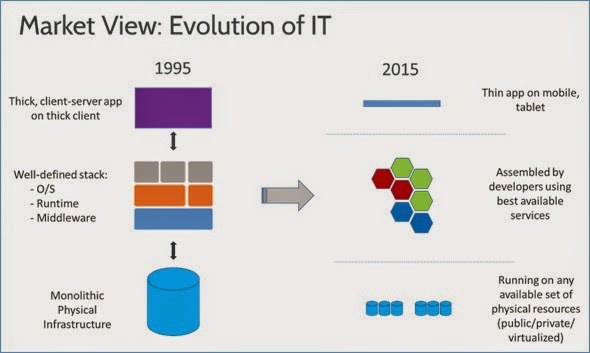
The Evolution of Technology (Taken from docker.com)
Over the past year and a half, since Solomon Hykes introduced the demo version at GoSF meetup , Docker has come a long way. Since the release of version 1.0, Docker has proven to be quite stable and really ready for production.
The development of Docker is very impressive. As you can see from the list above, we look forward to new opportunities, but we are also pleased with its current capabilities.
If only we could get a Docker-based infrastructure management tool.
Earlier this year (approx. 2014), we decided to run each task on IronWorker inside our own Docker container. Since then, we have launched more than 300 million programs inside our own Docker containers in the cloud.
After months of use, we would like to share with the community some of the challenges we faced in building the infrastructure based on Docker, how we overcame them, and why it was worth it.
IronWorker is a task execution service that allows developers to plan, process and scale tasks without worrying about creating and maintaining infrastructure. When we launched the service more than three years ago, we used the only LXC container containing all languages and packages for launching tasks. Docker gave us the ability to easily update and manage a set of containers, which allows us to offer our customers a much wider range of language environments and installed packages.
We started working with Docker version 0.7.4 where several bugs were noticed (one of the largest - the container did not close properly, it was later corrected). We overcame almost all of them, gradually discovering that Docker not only satisfies our needs, but even exceeds our expectations, so much so that we even expanded the scope of using Docker throughout our infrastructure. Given our experience today, that made sense.
Benefits
Here is a list of just some of the benefits we saw:
A few numbers
Easy to update and support images
Docker’s git approach is very powerful and allows you to easily manage a large number of constantly deployed environments, and its image management system allows us to fine-tune the detail of individual images, saving disk space. Now we are able to keep up with quickly updated languages, and we can also offer special images, such as the new FFmpeg stack, designed specifically for media processing. Now we have about 15 different stacks and this list is growing rapidly.
Resource Allocation and Analysis
LXC containers are a virtualization method at the operating system level and allow containers to split the core among themselves, but in such a way that each container can be limited in the use of a certain amount of resources, such as processor, memory and input / output devices. Docker provides these features, as well as many others, including the REST API, version control system, image updating and easy access to various metrics. In addition, Docker supports a more secure way to isolate data using the CoW file system . This means that all changes made to files within the task are stored separately and can be cleared with a single command. LXC is not able to track such changes.
Easy Dockerfiles Integration
Our teams are scattered around the world. The fact that we are able to publish a simple Dockerfile and feel calm, knowing that when we wake up, someone else will be able to collect exactly the same image as you - a huge gain for each of us and our sleep modes. Having clean images also makes deployment and testing much faster. The cycles of our development have become much faster, and all team members are much happier.
Custom environments built with Docker
Growing community
Updates on Docker come out very often (even more often than on Chrome). The degree of community involvement in adding new features and fixing bugs is growing rapidly. Whether it’s supporting images, updating Docker itself, or even adding additional tools to work with Docker, there are a lot of smart people dealing with these problems, so we don’t have to. We see that the Docker community is extremely positive and participation in it brings a lot of benefits, and we are happy to be part of it.
Docker + CoreOS
We are still in the research process, but the combination of Docker and CoreOS promises to take serious positions in our stack. Docker provides stable image management and containerization. CoreOS provides a stripped-down cloud OS, distributed management, and configuration management. This combination allows for a more logical separation of problems and a better infrastructure stack than we have now.
disadvantages
Each server technology requires fine-tuning, especially when scaling , and Docker is no exception. (Imagine we run about 50 million tasks and 500,000 hours of processor time per month, while quickly updating the images that we made available.)
Here are some of the problems we encountered when using Docker on large volumes:
Docker errors are small and fixable
Limited backward compatibility
A fast pace of development is certainly an advantage, but it has its drawbacks. One of them is limited backward compatibility. In most cases, what we encounter is changes in the command line syntax and API methods, and therefore this is not such an important issue from the point of view of production.
In other cases, however, this has affected performance. For example, in case of any Docker errors after starting the containers, we analyze STDERR and react depending on the type of error (for example, by trying to run the task again). Unfortunately, the error output format changed from version to version, and so we decided to do debugging on the fly.
Solving these problems is relatively easy, but this means that all updates must be checked several times, and you still remain in limbo until you release it into the world of large numbers. It should be noted that we started a few months ago with version 0.7.4 and recently updated our system to version 1.2.0 and saw significant progress in this area.
Limited Tools and Libraries
While Docker had a stable release 4 months ago, many of the tools made for it still remain unstable. The use of a large number of tools in the Docker system also means the adoption of large overheads. Someone from your team will have to stay up to date with everything and tinker a lot in order to take into account new functions and fix errors. However, we like the many tools that are made for Docker, and we can't wait to see who wins these battles (looking at infrastructure management). Of particular interest to us are etcd, fleet and kubernetes.
Triumphing over difficulties
To reveal our experience a little deeper, below are some of the problems that we encountered and their solutions.
Excerpt from a debugging session
This list was provided by Roman Kononov, our lead IronWorker developer and director of infrastructure management, and Sam Ward, who also plays an important role in debugging and optimizing our work with Docker.
It should be noted that when it comes to errors related to Docker or other system problems, we can automatically reprocess tasks without any consequences for the user (reprocessing tasks - built-in platform functions).
Lengthy removal process
Solving the problem of Slowly
Removing a Container Removing containers takes too much time and also requires a lot of read / write operations. This caused significant delays and revealed vulnerabilities in our systems. We had to increase the number of cores available to us, to a larger number, which was not necessary.
After studying and researching the devicemapper (Docker file system driver), we found the special option `--storage-opt dm.blkdiscard = false`. This option tells Docker to skip the heavy disk operation when removing containers, which greatly speeds up the process of disconnecting the container. Since then, the problem has been resolved.
Non-mountable volumes
Containers did not shut down correctly because Docker did not unmount the volumes properly. Because of this, the containers worked non-stop, even after the task was completed. Another way is to unmount volumes and delete folders explicitly using a set of standard scripts. Fortunately, that was a long time ago when we used Docker v0.7.6. We deleted this long script since this unmount problem was resolved in Docker version 0.9.0.
Stack usage distribution
Memory Limit Switching
One of the Docker releases suddenly added the ability to limit memory and removed the LXC options. As a result of this, some of the workflows exceeded memory limits, and the entire system stopped responding. This took us by surprise, because Docker never broke, even using unsupported options. It was not difficult to fix it - apply memory limits in Docker - but all the same, the changes took us by surprise.
Future plans
As you already noticed, we invest quite actively in Docker and continue to do this every day. In addition to using it as a container for running custom code in IronWorker, we are in the process of introducing it into a number of other areas of our business.
These areas include:
Ironwork backend
In addition to using Docker as a container for tasks, we are in the process of introducing it as a processing management tool on each server that monitors and runs work tasks. (The main task on each artist takes the task from the queue, loads the Docker into the appropriate environment, performs the task, controls it, and then, after the task is completed, clears the environment.) Interestingly, we will have code in the container that manages other containers on those same cars. Moving our entire IronWorker infrastructure to Docker containers makes it pretty easy to run them on CoreOS.
IronWorker, IronMQ, and IronCache APIs
We are no different from other development teams that don’t like to tune and deploy. Therefore, we are very pleased to be able to pack all of our services in Docker containers to create simple and predictable work environments. You no longer need to configure the server. All we need are servers on which you can run Docker containers and ... our services work! It should also be noted that we are replacing our build servers - servers that build releases of our software products in certain environments - with Docker containers. The advantages here are greater flexibility and a simpler, more reliable stack. Stay in touch.
Assembling and loading Workers
We are also experimenting using Docker containers to create and load tasks in IronWorker. The big advantage here is that it provides users with a convenient way to customize the workload and work processes of specific tasks, load them, and then run and scale them. Another advantage here is that users can test workers locally in the same environments as our service.
Implement On-Premise Builds
Using Docker as the primary distribution method of our latest version of IronMQ Enterprise simplifies our work and provides a simple and versatile way to deploy to virtually any cloud environment. In addition to the services that we run in the cloud, all clients need servers that can run Docker containers and they can relatively easily get multi-server cloud services in a test or production environment.
Production onwards
The Evolution of Technology (Taken from docker.com)
Over the past year and a half, since Solomon Hykes introduced the demo version at GoSF meetup , Docker has come a long way. Since the release of version 1.0, Docker has proven to be quite stable and really ready for production.
The development of Docker is very impressive. As you can see from the list above, we look forward to new opportunities, but we are also pleased with its current capabilities.
If only we could get a Docker-based infrastructure management tool.