Speeding up the writing of Selenium autotests in Ruby
One of the tools to automate interaction with the browser is Selenium Webdriver. In fact, automated web page tests using Selenium Webdriver look rather cumbersome. Here is a “small” example, which simultaneously opens a Google search page in two browsers, fills in the search line and submits a form:
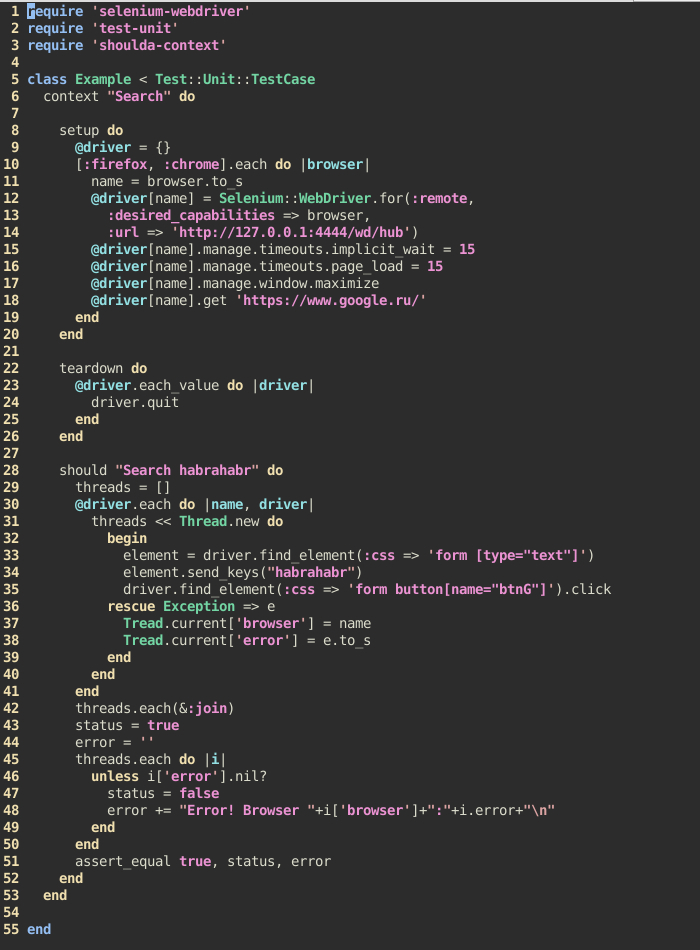
As practice has shown, with small changes in the page structure, it is often necessary to process a rather large amount of code, which again entails a large investment of time. Attempts were made to find tools to make the tests less voluminous and more readable, but they simply did not appear. It was decided to develop a gem with DSL (Domain Specific Language, DSL - “subject-specific language”), which would allow you to create intuitive tests that do not contain anything superfluous and could be easily and quickly edited. Gem was called SelWeT (Selenium Web Test).
During development, the Ruby 2.1.3 language and the selenium-webdriver, test-unit and shoulda-context gems were used. To select elements on the page, it was decided to use only CSS selectors, as they cover all the necessary needs (choosing a group or one specific element on the page). This somewhat simplified the task.
SelWeT gem allows you to:
To run the tests, you must have Selenium Server running at least 2.44 on the local or remote machine with the necessary drivers (the drivers are required for IE, Chrome).
Example of starting Selenium Server with a driver for Chrome on a Windows 7 machine:
Of course, you must first install the necessary browser on this machine.
Gemfile for the machine where the tests will be run:
An example demonstrating the functionality of a gem:
As you can see from the example, SelWeT allows you to quickly outline a clear functional test.
To install the gem, you must run
The documentation is in the repository on GitHub.
SelWeT: https://github.com/inventos/selwet.git
Selenium wiki: https://code.google.com/p/selenium/wiki/Grid2
Shoulda-context: https://github.com/thoughtbot/shoulda -context
Test-unit: https://github.com/test-unit/test-unit
As practice has shown, with small changes in the page structure, it is often necessary to process a rather large amount of code, which again entails a large investment of time. Attempts were made to find tools to make the tests less voluminous and more readable, but they simply did not appear. It was decided to develop a gem with DSL (Domain Specific Language, DSL - “subject-specific language”), which would allow you to create intuitive tests that do not contain anything superfluous and could be easily and quickly edited. Gem was called SelWeT (Selenium Web Test).
During development, the Ruby 2.1.3 language and the selenium-webdriver, test-unit and shoulda-context gems were used. To select elements on the page, it was decided to use only CSS selectors, as they cover all the necessary needs (choosing a group or one specific element on the page). This somewhat simplified the task.
SelWeT gem allows you to:
- to test both in one and several browsers (performed in parallel);
- check for the presence of one or a group of elements on the page;
- interact with page elements (click on an element, move the cursor over an element, fill in a text field, fill out and submit a form, select values in select, check the status of checkbox and radio, switch to iframe, etc.);
- interact with the browser (following the link, clearing the cache, taking a screenshot of the open page, opening the link in a new window, etc.).
To run the tests, you must have Selenium Server running at least 2.44 on the local or remote machine with the necessary drivers (the drivers are required for IE, Chrome).
Example of starting Selenium Server with a driver for Chrome on a Windows 7 machine:
java -jar selenium-server-standalone-2.44.0.jar -Dwebdriver.chrome.driver = /path/to/chromedriver.exe
Of course, you must first install the necessary browser on this machine.
Gemfile for the machine where the tests will be run:
gem 'selenium-webdriver', '~> 2.44.0'
gem 'test-unit', '~> 3.0.8'
gem 'shoulda-context', '~> 1.2.1'
gem 'selwet', '~> 0.0.2'
An example demonstrating the functionality of a gem:
require 'selwet' # подключаем гем
class SelWeT::Unit # для написания тестов используется класс Unit
  setBrowsers [:firefox, :chrome] # список браузеров, в которых будет производиться тестировние
  setSeleniumServerUrl 'http://127.0.0.1:4444/wd/hub' # адрес запущенного selenium server
    context "Habr" do
      should "1. Find habrahabr" do
        # перейти по ссылке 'https://www.google.ru/'
        Unit.followTheLink 'https://www.google.ru/'
        #заполняем и отправляем форму на странице поиска
        status, error = Unit.postForm 'form', {'[type="text"]'=>"habrahabr", 'button[name="btnG"]'=>:submit}
        # проверяем, что при заполнении и отправке формы не возникло ошибок
        assert_equal true, status, error
      end
      should "2. Open harbahabr" do
        # в новом окне открываем ссылку на хабр
        status, error = Unit.openInNewWindow '[href = "http://habrahabr.ru/"]'
        # закрываем окно с поисковиком
        Unit.closeWindow 0
        # проверяем, что при выполнении не вознилкло ошибок
        assert_equal true, status, error
        status, error = Unit.checkLocation 'http://habrahabr.ru/' # проверяем, что
        assert_equal true, status, error # текущая страница http://habrahabr.ru/
      end
      should "3. Click on first article" do
        # кликаем на заголовок первой статьи на хабре
        status, error = Unit.click "div.post:first-child a.post_title"
        # проверяем, что всё прошло успешно
        assert_equal true, status, error
      end
    end
end
As you can see from the example, SelWeT allows you to quickly outline a clear functional test.
To install the gem, you must run
gem install selwet
The documentation is in the repository on GitHub.
SelWeT: https://github.com/inventos/selwet.git
Selenium wiki: https://code.google.com/p/selenium/wiki/Grid2
Shoulda-context: https://github.com/thoughtbot/shoulda -context
Test-unit: https://github.com/test-unit/test-unit









