 September 24, 2014 at 18:52
What's new in Laravel 5?

A few months ago, in the studio where I work, the whole team decided to move to Laravel. Over the past couple of years, the popularity of this framework has grown tirelessly, and, as it turned out, not in vain!
I do not consider myself a guru in php and frameworks. Prior to this, I worked a couple of times with the first and second zend, the immortal bitrix, I came across Yii and Symfony, invented bicycles myself, but each time I had a vague feeling of dissatisfaction.
For example, Zend Framework always made me want to quickly complete the task and forget about it as a nightmare. Proponents of this framework will certainly not agree with me, and in no way do I want to criticize their choice. To each his own. My Zend Framework always made me feel like the code was written not by people and not for people.
It always seemed to me that the same tasks could be solved more simply and elegantly. I wanted to find a framework on which I would like to write. Which I could learn like the back of my hand and do what I like to do - programming, creating something new. I think every carpenter has a favorite hammer, and such a desire for a programmer is quite natural. Which of us, those who write in php, did not glance with envy at Rails in Ruby or Django in Python?
The last straw was a post from JetBrains about expanded support for the new version of PhpStorm 8 Blade templates and Source & Test directories. In this IDE, we created the first project on Laravel.
After working with Laravel, I realized that I found what I was looking for. Perhaps that is why the slogan “You have arrived” became the symbol of Laravel.
From the first day, it never ceases to amaze me pleasantly, from the documentation, from the community (when I encountered a problem when writing this article, I went into the online chat of the community, described the problem and answered me personally (!) Taylor Otwell, the creator of the framework) and tutorials, to various goodies that can and should be used after placing the project on the server.
But my article is not about that. Enough has been written about the pros of Laravel.
In this article I would like to write about the new version of Laravel, which will be officially released in November, but you can download and try it now through Composer.
Initially, the version was to be called 4.3, but the new directory structure and some significant changes in the code prompted the creators to decide to announce version 5.0.
How serious these changes were for you to judge. So, let's actually see what Laravel 5 is preparing for us.
Installation
Installing a new version is essentially no different from the old. To get started, download Laravel 5 by adding the line to the composer.json file
"require": {
    //...
    "laravel/framework": "5.0.*@dev"
    //...
}
After that, run composer update, and at the end of the operation you will have the latest version installed.

Structure
If you look at the structure of Laravel 4 and Laravel 5, you can immediately notice the difference. First of all, the Config, Tests, Storage, and Database folders were moved from the App folder to the root. A new resources directory has appeared.
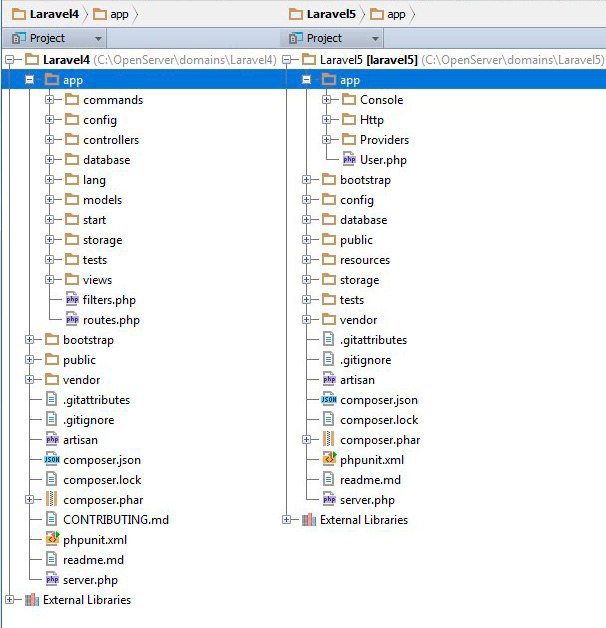
A logical question arises: what remains in the App folder?
Now in the App folder only the logic of the application itself is stored. Thus, developers legitimized what most Laravel developers had done before: delete the model folder and create a separate directory for everything related to the development of this particular project - models, teams, events, and the like. First of all, this allows you to clearly draw the line between the code of the framework itself and the code that the developer writes.
In the App folder, by default there are 3 new directories. The Console directory is intended for classes of console commands, the Service Providers folder contains classes of service providers, the Http folder contains controllers, filters, and everything related to routing.
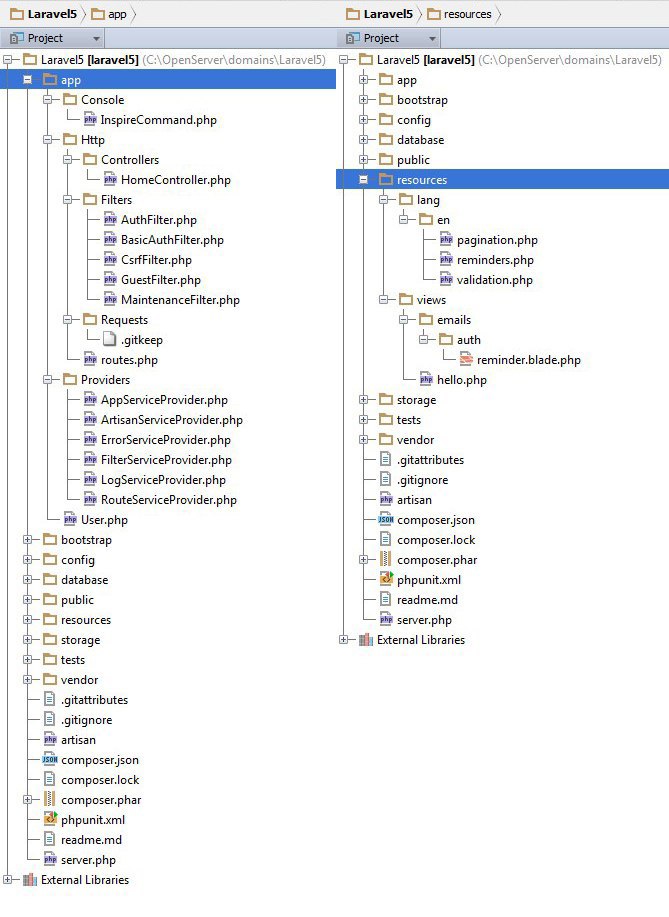
In turn, the Http directory contains 3 folders - Controllers for application controllers, Filters for route filters, which are now created as separate classes, and the Requests folder, which I will discuss in detail below.
The View folder has been moved to the Resources directory, along with the Lang localization folder.
To some, the new structure may seem unusual, but on my own I can say that after a couple of days you will realize that it is much more convenient.
The first question that you most likely will have in connection with a change in structure is: what happened to the namespaces and autoload of classes?
Namespaces
To my great joy, Laravel 5 officially uses the psr-4 standard, which means that every class in the App folder that has the correct namespace will be available for the autoloader.
Therefore, just make sure that each class in this folder starts with the App \ * directory name and forget about file upload problems forever.
On the other hand, using psr-4 means that access to the facades now requires access from the global namespace, for example \ Auth :: * method name * or \ Events :: * method name *.
In this regard, facades must now be imported with the use \ front-name command (for example, \ View) at the beginning of the file or accessed via the backslash.
In addition, you now need to specify namespaces for the controllers. So make sure your every controller contains a string
namespace App\Http\Controllers;
and uses the abstract controller namespace
use Illuminate\Routing\Controller;
If you use BaseController as the parent class of all your controllers, then you can put the last line there, so all your controllers will gain access to this namespace.
Application root folder
What if you do not want to access the main folder of your application as an App? What if you are used to calling the directory where the application logic is stored by the name of the application itself, as many did in Laravel 4?
The developers have provided for this as well. You just need to write $ php artisan app: name and the desired name of your application on the command line. Laravel will independently change the namespaces in the necessary files, as well as the settings in the configuration files.
If you want to use a subdirectory, then use two backslashes, for example like this
$ php artisan app:name MyAppName\\HabrProject
By the way, a new file namespaces.php has appeared in the Config folder, in which the namespace for the application as a whole and the path to the files are registered. Useful if there are problems with startup!
Implement method parameters
Another powerful innovation of Laravel 5 was the introduction of method parameters (Method Parameter Injection or simply Method Injection).
Previously, if in the controller we needed some model class, for example, a repository, we could use the Ioc Container Dependency Injection, that is, pass the class name to the controller constructor and assign it to the object property.
The Ioc container independently created an instance of this class and returned it to the controller property through which we accessed it. And that was cool.
For example, like this:
 class FeedController extends BaseController {
     protected $feedbackRepository;
     /**
      * @param FeedbackRepository $feedbackRepository
      */
    public function __construct(FeedbackRepository $feedbackRepository)
     {
         $this->feedbackRepository = $feedbackRepository;
     }
     public function index($id)
     {
         $feed = $this->feedbackRepository->getFeed($id);
         return View::make('feed.index', compact('feed'));
     }
However, what if we need an object in only one method? Why create an instance of an object in the constructor of an entire controller if it will be used in only one of its methods?
Therefore, in Laravel 5, the introduction of a method parameter has appeared!
Now you can specify a class in any controller method, and you will automatically get access to its methods through the Ioc container. Our example would now look like this:
 class FeedController extends BaseController {
     public function index(FeedbackRepository $feedRepo, $id){
$feed = $feedRepo->getFeed($id);
Return view(‘feed.index’, compact(‘feed’)
}
}
And that’s all! Magically, the Ioc container itself will find and connect my repository.
But the real power of this innovation can be felt in conjunction with another new feature:
Requests and form requests (FormRequests)
Remember, I was talking about the Requests folder in the App \ Http directory? So we finally got to her.
Let's recall how we validated user input when submitting a form in Laravel 4.2.
If you worked with Laravel, then you certainly know the facade of Validator.
It provides powerful functionality for validating data received from the user. However, each developer used it differently. Someone used the validator directly in the controller,
someone prescribed the validation rules in the model (array rules []) and used the isValid method.
Now you can forget about it: Laravel provides a separate level of abstraction for processing form requests.
Let's see how it works.
At the command prompt, type php artisan make: request MyRequest and the framework will generate a template for the form request for you.
This class, which inherits the FormRequest class, contains only 2 methods: authorize and rules.
Rules returns an array in which you can write validation rules for your form, just like in Laravel 4.
The authorize method returns false by default.
If now we try to submit the form associated with this class, in the browser we will get the forbidden page (forbidden).
So, the authorize method checks whether the user accessing the form has the right to submit it. For example, does the user have the right to edit an article that he did not write? Post a comment if it is not logged in? This is where the checks now need to be placed.
Suppose we have a form that publishes a status to a user’s wall. We want the status field (regular input type = 'text' name = 'status') to be required and contain, say, 20 characters. We also need to check that the user publishes the status on his wall, that is, the id of the user's page matches the id of the author of the post.
In this example, our validator class would look like this.
namespace App\Http\Requests;
use Illuminate\Foundation\Http\FormRequest;
use \Auth;
class AddFeedRequest extends FormRequest {
    public function rules()
    {
        return [
            'status' => 'required|min:20',
        ];
    }
   public function authorize()
   {
        return Auth::id() == $this->route->parameter('id');
   }
Now, with the introduction of the method parameter that we talked about above, it’s enough for us to simply specify the class name in the parameters of the controller method responsible for submitting the form.
If we use a REST controller, then this will be the store method.
 public function store(MyRequest $request)
     {
         //код отправляющий форму
     }
And that’s all! You don’t have to do anything else! Laravel itself will validate the form and execute the code contained in the controller method if validation is successful. Once again: not a single line of code from the store method will be executed if the form fails validation. In my opinion, this is insanely cool!
Generators
If we type php artisan at the command line, we will see a whole new section called make:
We have already used one of them to generate the myRequest class. In addition, the make: command will help to create a controller, console command,
filter, migration, service provider.
I especially want to highlight the php artisan make: auth command. This generator will do for you what you did again and again in each new project - the user authorization system.
If we execute it now, we will see that Laravel will create two controllers for us - one responsible for authorization, the second - for password recovery, migration of password resets, 2 validator classes for login and register requests. Just one command and the authorization template is ready!
Route Caching
The routes team has also grown into a whole section. Now to see the list of routes you need to enter php artisan route: list.
Here it’s hard not to notice the new route: cache command. It does a very simple thing - it caches your routes.
If you run this command, you will see that the routes.php file appears in the storage / meta folder. It contains a cache of your routes. Now Laravel will first of all access it, and not the main http / routes.php file.
It’s hardly useful during development, at least it’s hard for me to imagine such a situation, but during the deployment, when the project is already written and new routes are rarely added, it can be very useful.
Contracts
All Laravel 5 components now implement this or that interface from the illuminate / contracts folder. Thus, the developers tried to make your application more flexible and less dependent on Laravel itself.
Laravel 4 often had problems with type-hinting interfaces. If you specified in the parameters of the method an instance of an object that should implement a certain interface, the Ioc container considered it as dependency injection and tried to create an instance of the class, which led to errors.
To solve this problem, it was necessary to directly bind the interface to a specific implementation class of the interface using app :: bind. However, this still caused some problems, for example, during unit testing.
In Laravel 5, it’s enough to use the interface at the beginning of the file with use (for example, use Illuminate \ Contracts \ Mailer) and type-hinting will work as it should.
This allows you to write more flexible applications without being tied to specific implementation classes.
What if in the future you want to connect a different authorization module, different from the standard Laravel module? Another caching module? Sending letters? Just make sure that it implements the interface from the contracts folder and write code based on type-hinting interfaces.
New Features Assistants
A trifle that you will use again and again in your projects: the inclusion of view files is now available through the view function ('view name'). The old View :: make method also works, but now, as I said above, you need to access it through the backslash.
The same fate befell Redirect :: to - now you can simply write redirect ('route').
Among other changes in the usual work tools, it is worth mentioning that the facades of HTML and Form are no longer included in the standard Laravel package. Do not be afraid if you are used to them, you can easily connect them through composer.
Socialite
Laravel 5 has its own Socialite Beta module, which is designed to authenticate third-party services such as Twitter, Facebook, GitHub. We had to quite often add plugins for authorization under various social networks and it would be great if other frameworks had similar tools. The plugin is optional and to add it you just need to connect the dependency. Judge for yourself, you just need to create the provider config and after that all the necessary methods will be available in the form:
$this->socialite->driver('twitter')->user();
All you need to do is connect the appropriate class at the beginning of your file:
use Laravel \ Socialite \ Contracts \ Factory as SocialiteFactory;
In the near future we plan to add authorization for vk as well.
Blade
Of the changes in Blade, there is one significant one, because of which the community has created dozens of similar questions over the past couple of days. Now, both the {{link_to_route ('login_path')}} tag and the {{{link_to_route ('login_path')}}} tag will be escaped and displayed as text to reduce the risk of code injection.
Instead, you have to use a construct
{!! link_to_route('login_path') !!}
By the way, to facilitate the transition to the new version of Blade, you can replace the tags with the old ones:
Blade :: setRawTags ($ openTag, $ closeTag);
Then you do not have to rewrite all the views.

Summary
The fifth version is exactly the version with which you should now begin to get acquainted with Laravel, if you are still postponing this exciting moment. The vast majority of plugins already support the new version of the framework, and exhaustive documentation will be ready for release. Laravel in my opinion is the most interesting and promising project in the php community in recent years. It's nice to see how every day he attracts more and more supporters.
If you want to learn more about Laravel, here are some useful resources:
• laravel.com
• laravel.io
• laracasts.com
Maybe I missed something, then write in a personal letter, I'll fix it. Thanks for attention! Hope the article was helpful.









