Implementing fast import from Excel to PHP
We continue to talk about the technologies used on our email marketing service Pechkin-mail.ru . One of the key tasks of any service related to customer data is to upload this data to the service. It is very important for Pechkin to quickly and easily download the address databases containing email addresses, names, surnames and other additional data.

As the basic standard used when importing address databases, we took Microsoft Excel. The explanation is simple:
The problem of users when importing address databases was removed. But here the problem of development itself arises.
Excel is not an open-source development, but a proprietary solution. The data format, especially in new versions after 2007 (xlsx), is not trivial. PHP is used on Pechkina, so we started looking for libraries that will allow us to solve this problem. But here they encountered a problem that a number of libraries do not allow reading xlsx:
The PHPExcel library attracted our attention . We used it a few years ago in the SMS24X7.ru sms-mailing service . Petya Sokolov ( Petr_Sokolov ), our talented developer, wrote a wrapper for this library, correcting a number of its flaws and bugs.
The library is certainly interesting and developed. But for Pechkin, it became impossible to use it after a couple of years, when both we and our clients grew - its catastrophic exactingness to resources and the huge time of parsing files. For example, it is not uncommon to download address databases> 100,000 lines with a complex structure to the service. And if the file is already 500,000 lines long and “weighs” more than 30 MB?
As we searched , we stumbled upon the libxl commercial library , seeing the results of a “makeshift benchmark” on Stackoverflow.
The library is written in C ++, and thanks to the excellent object-oriented extension for PHP from Ilia Alshanetsky , it is easy to learn and integrate (for example, it took about 3 hours to re-write our current solution from PHPExcel to LibXL). Which is very cool, considering that, unfortunately, there is no documentation from the extension developer and you need to use the Reflection extension.
The installation process is very simple.
As a result of compilation, you will get the excel.so file in the / usr / lib / php5 / 20090626 / folder. Now just create the file /etc/php5/conf.d/excel.ini with the contents.
Check if the module is installed and restart the web server.
In the code, everything is also very simple. Download the file and read the necessary cells. For example, like this:
The lack of need for RAM (in the process of downloading the file and reading it) was pleasantly pleased.
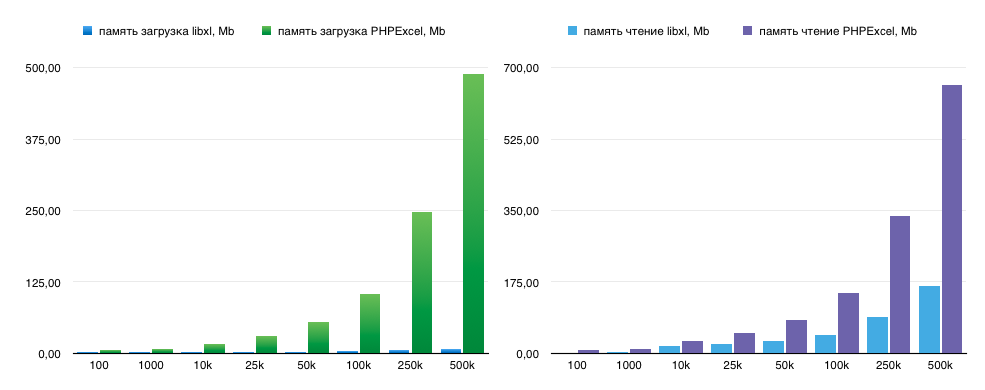
And here is the increase in the speed of loading an excel file and reading it on various sizes of address bases.

These tests were carried out on xlsx-files with N subscribers in one hundredth with email. Real address bases are even bigger and more complex and the advantage in speed and memory consumption looks even greater.
The cost of the library is $ 199 for a development license, but believe me, it's worth it. Of course we recommend to everyone who is faced with the problem of importing Excel files to their service.
What to use as a tool?
As the basic standard used when importing address databases, we took Microsoft Excel. The explanation is simple:
- it is a standard tool that at the basic level is owned by 100% of computer users. Moreover, in business it is a de facto corporate standard and is used even if on working Mac or Linux computers.
- Almost all CRM-, CMS-, cloud or desktop systems are exported to Excel or CSV, which can be converted to XLS or XLSX format by simple re-saving.
- It is also known that “90% of software errors are sitting half a meter away from the monitor”. No offense will be said to ordinary users, but we must take into account the most basic level of training and those. support for explanation is enough to say “Download the Excel file”, and not to explain the procedure for preparing the file in the desired format.
The problem of users when importing address databases was removed. But here the problem of development itself arises.
Our pain as developers
Excel is not an open-source development, but a proprietary solution. The data format, especially in new versions after 2007 (xlsx), is not trivial. PHP is used on Pechkina, so we started looking for libraries that will allow us to solve this problem. But here they encountered a problem that a number of libraries do not allow reading xlsx:
- php-spreadsheetreader reads a variety of formats (.xls, .ods AND .csv)
- PHP-ExcelReader (xls only)
- PHP_Excel_Reader (xls only)
- PHP_Excel_Reader2 (xls only)
- XLS File Reader Commercial and xls only
- SimpleXLSX From the description xlsx is able to read, however, the author refers only to xls
- PHP Excel Explorer Commercial and xls only
The PHPExcel library attracted our attention . We used it a few years ago in the SMS24X7.ru sms-mailing service . Petya Sokolov ( Petr_Sokolov ), our talented developer, wrote a wrapper for this library, correcting a number of its flaws and bugs.
The library is certainly interesting and developed. But for Pechkin, it became impossible to use it after a couple of years, when both we and our clients grew - its catastrophic exactingness to resources and the huge time of parsing files. For example, it is not uncommon to download address databases> 100,000 lines with a complex structure to the service. And if the file is already 500,000 lines long and “weighs” more than 30 MB?
And then we were let go ...
As we searched , we stumbled upon the libxl commercial library , seeing the results of a “makeshift benchmark” on Stackoverflow.
The library is written in C ++, and thanks to the excellent object-oriented extension for PHP from Ilia Alshanetsky , it is easy to learn and integrate (for example, it took about 3 hours to re-write our current solution from PHPExcel to LibXL). Which is very cool, considering that, unfortunately, there is no documentation from the extension developer and you need to use the Reflection extension.
The installation process is very simple.
cd /usr/local/src/
wget http://libxl.com/download/libxl.tar.gz
tar zxfv libxl.tar.gz
cd libxl-3.5.4.1/
ln -s include_c include
cd ../
wget https://github.com/iliaal/php_excel/archive/master.zip
unzip master.zip
cd php_excel-master/
./configure --with-excel --with-libxl-libdir=../libxl-3.5.4.1/lib64 --with-libxl-incdir=../libxl-3.5.4.1/include_c
make
make test
make install
As a result of compilation, you will get the excel.so file in the / usr / lib / php5 / 20090626 / folder. Now just create the file /etc/php5/conf.d/excel.ini with the contents.
extension=excel.soCheck if the module is installed and restart the web server.
php -m | grep excel
service lighttpd restart
In the code, everything is also very simple. Download the file and read the necessary cells. For example, like this:
$doc = new ExcelBook();
$doc->loadFile(‘example.xls’);
for($r=$sheet->firstRow();$r<=$sheet->lastRow();$r++){
	for($c=$sheet-> firstCol();$c<=$sheet-> lastCol();$c++){
		echo ‘Строка: ’.$r.’ Столбец: ’.$c.’ Значение: ’.$sheet->read($r,$c).’
’;
	}
}
Performance Results
The lack of need for RAM (in the process of downloading the file and reading it) was pleasantly pleased.
And here is the increase in the speed of loading an excel file and reading it on various sizes of address bases.
These tests were carried out on xlsx-files with N subscribers in one hundredth with email. Real address bases are even bigger and more complex and the advantage in speed and memory consumption looks even greater.
The cost of the library is $ 199 for a development license, but believe me, it's worth it. Of course we recommend to everyone who is faced with the problem of importing Excel files to their service.