
 May 27, 2014 at 19:06
Dual boot ArchLinux and Windows 8 on UEFI without GRUB using rEFInd
- Tutorial
Instructions for beginners on how to make beautiful dualboot windows and archlinux (and other OS) via efi without grub and unnecessary troubles.
Photo to attract attention:
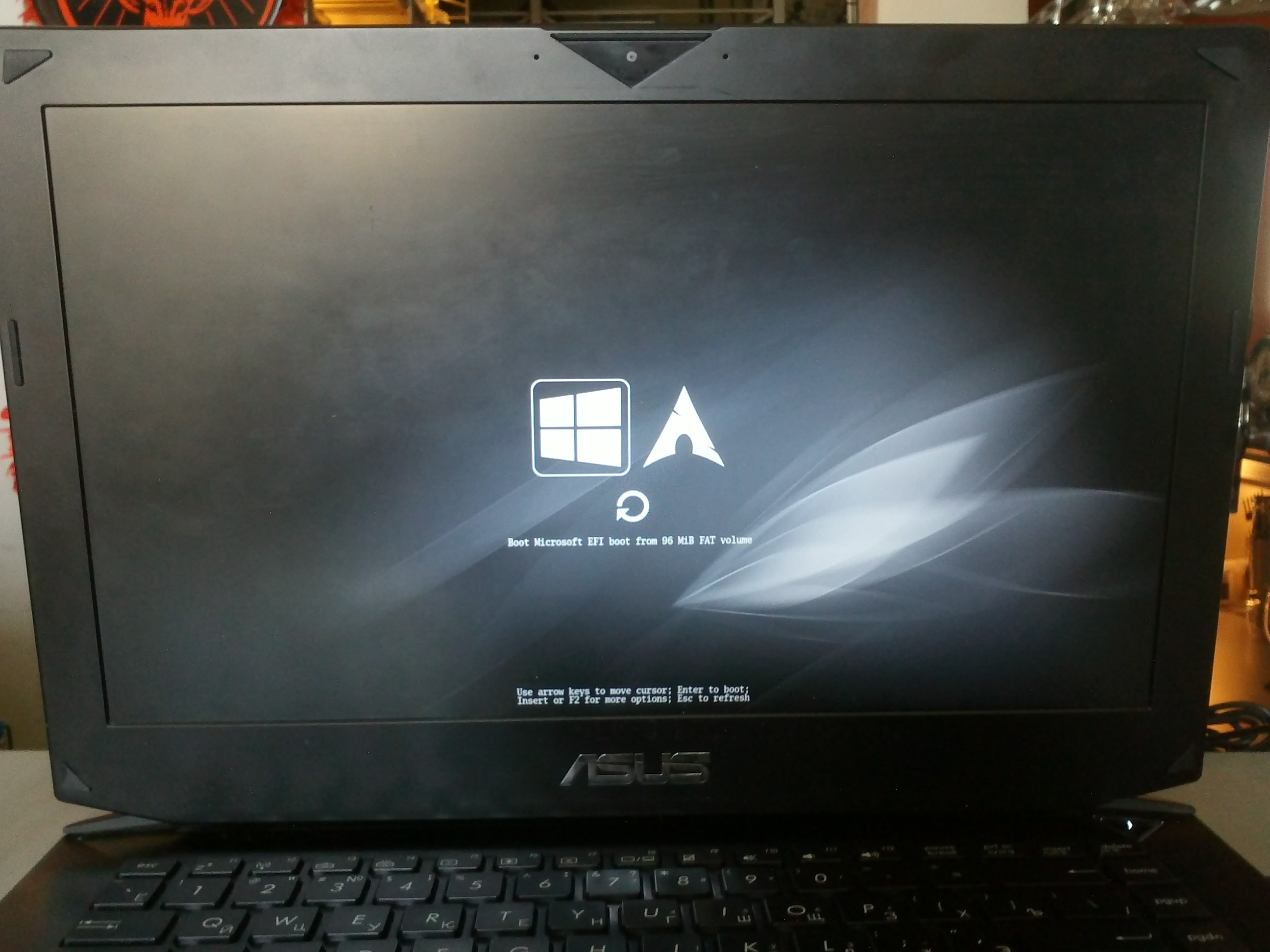
You can see in google how it might look .
I will make a reservation right away.
It is assumed that you have already installed windows and archlinux, you understand how to partition your disks and what to mount where and all you need to do is deal with the bootloader. If not, I recommend watching this video first .
I tried various options, as described here , here and here, and other tricks with efibootmgr. I tried to add options directly in the “BIOS” - I didn’t succeed, the root section doesn’t find something else. Yes, and the very approach to switching systems (press Esc when you turn on the PC to select the system) did not please me very much.
Having spent the whole weekend, I found a simple and elegant solution for myself - the refind-efi package ( ArchWiki ) .
In short, just install this package (pacman -S refind-efi) and run refind-install, that's all.
The directory refind will be created in / boot / efi / EFI / and a new item “rEFInd boot manager” will be added to the boot option.
CodeRush in the comments added an important note:
Everything that you do, you do at your own peril and risk!
First, let's check the configurations.
In my case it is:
Lsblk output:
fdisk / dev / sda
The partition with the “EFI System” type created by the windows installer is mounted in / boot / efi / (/ mnt / boot / efi / because we booted from liveiso right?)
where X is the number of your EFI partition (for example mount / dev / sda2 / mnt / boot / efi).
Next, going to the already installed arch (arch-chroot / mnt /) install refind itself:
If such a package is not found, look for yaourt:
and if there were no mistakes
After rebooting, you can put in the "BIOS" in the boot priority settings "rEFInd boot manager" in first place.
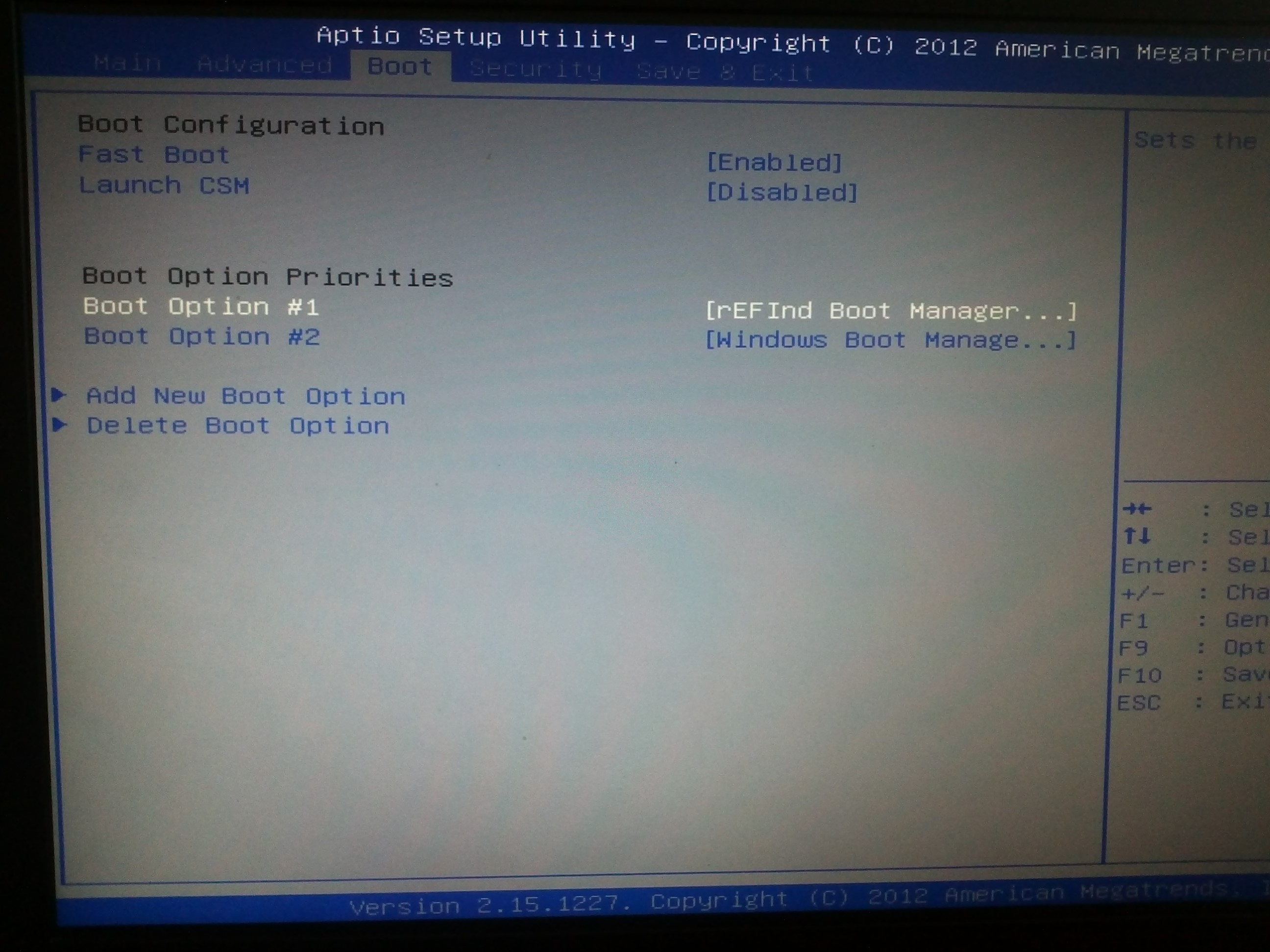
And don't forget to disable “Secure Boot”.
Profit!
A directory called refind has been created in the / boot / efi / EFI directory. It has refind.conf in which you can set the display time of the OS list and customize the appearance.
Refind itself finds the installed OS and determines the parameters for their download. I also really liked that if a bootable USB flash drive or disk is inserted, they also appear in the list.
I liked the Next-Theme theme (you can pick something up to your taste ), put it in / boot / efi / EFI / refind / next-theme and wrote it in the config:
The config is well documented and should not cause questions.
I would be grateful for the comments and additions.
Photo to attract attention:
You can see in google how it might look .
I will make a reservation right away.
It is assumed that you have already installed windows and archlinux, you understand how to partition your disks and what to mount where and all you need to do is deal with the bootloader. If not, I recommend watching this video first .
I tried various options, as described here , here and here, and other tricks with efibootmgr. I tried to add options directly in the “BIOS” - I didn’t succeed, the root section doesn’t find something else. Yes, and the very approach to switching systems (press Esc when you turn on the PC to select the system) did not please me very much.
Having spent the whole weekend, I found a simple and elegant solution for myself - the refind-efi package ( ArchWiki ) .
In short, just install this package (pacman -S refind-efi) and run refind-install, that's all.
The directory refind will be created in / boot / efi / EFI / and a new item “rEFInd boot manager” will be added to the boot option.
Warning
CodeRush in the comments added an important note:
I will add a warning to this article: writing to NVRAM from the OS is a rather dangerous operation, which can lead to a "brick" on some laptop models with BIOSes based on the Phoenix SCT platform. The author has a BIOS on the AMI Aptio platform, there are no such problems with him.
That is why I strongly do not recommend using efibootmgr itself or anything that causes it on laptops and installing any bootloaders manually, either replacing the existing bootloader by default (fs0: /EFI/BOOT/bootx64.efi) or registering a new bootloader from UEFI Shell with the command bсfg boot add 0 fs0: /path/to/bootloader.efi “My Fancy Bootloader” is much safer.
Everything that you do, you do at your own peril and risk!
Now more about installation and configuration
First, let's check the configurations.
In my case it is:
- Windows 8.1
- Arch Linux x86_64 Kernel Release: 3.14.4-1-ARCH
Lsblk output:
NAME   MAJ:MIN RM   SIZE RO TYPE MOUNTPOINT
sda      8:0    0 119.2G  0 disk
├─sda1   8:1    0   300M  0 part
├─sda2   8:2    0   100M  0 part /boot/efi
├─sda3   8:3    0   128M  0 part
├─sda4   8:4    0  59.1G  0 part
├─sda5   8:5    0     9G  0 part /
└─sda6   8:6    0    50G  0 part /home
fdisk / dev / sda
Device           Start          End   Size Type
/dev/sda1         2048       616447   300M Windows recovery environment
/dev/sda2       616448       821247   100M EFI System
/dev/sda3       821248      1083391   128M Microsoft reserved
/dev/sda4      1083392    125036543  59.1G Microsoft basic data
/dev/sda5    125036544    143910911     9G Linux filesystem
/dev/sda6    143910912    248768511    50G Linux filesystem
The partition with the “EFI System” type created by the windows installer is mounted in / boot / efi / (/ mnt / boot / efi / because we booted from liveiso right?)
mkdir -p /mnt/boot/efi
mount /dev/sdaX /mnt/boot/efi
where X is the number of your EFI partition (for example mount / dev / sda2 / mnt / boot / efi).
Next, going to the already installed arch (arch-chroot / mnt /) install refind itself:
pacman -S refind-efi
If such a package is not found, look for yaourt:
yaourt refind
1 extra/refind-efi 0.7.9-1 [installed]
    Rod Smith's fork of rEFIt UEFI Boot Manager - built with Tianocore UDK libs
refind-install
and if there were no mistakes
reboot
After rebooting, you can put in the "BIOS" in the boot priority settings "rEFInd boot manager" in first place.
And don't forget to disable “Secure Boot”.
Profit!
A directory called refind has been created in the / boot / efi / EFI directory. It has refind.conf in which you can set the display time of the OS list and customize the appearance.
Refind itself finds the installed OS and determines the parameters for their download. I also really liked that if a bootable USB flash drive or disk is inserted, they also appear in the list.
I liked the Next-Theme theme (you can pick something up to your taste ), put it in / boot / efi / EFI / refind / next-theme and wrote it in the config:
icons_dir next-theme/icons
banner next-theme/background_1200.png
The config is well documented and should not cause questions.
I would be grateful for the comments and additions.