Importing data to online stores: an algorithm that makes your life easier
In a previous article habrahabr.ru/post/209040 the general issues of importing data into online stores were discussed, the features, advantages and disadvantages of the methods associated with this. We can conclude that the only effective way in the long term is to develop your own modules for importing data into each online store (meaning direct import into a specific CMS database). Why? First of all, the code of the import modules is fully controlled, you can always make prompt changes. The second, which is also very important, is the integration of modules into the software line. What is special about import modules? This is a large number of parameters that affect the data import process. The following is a simplified diagram of the data import algorithm in the CatalogLoader modules.

The following image shows the standard dialog for uploading from CatalogLoader to OpenCart:
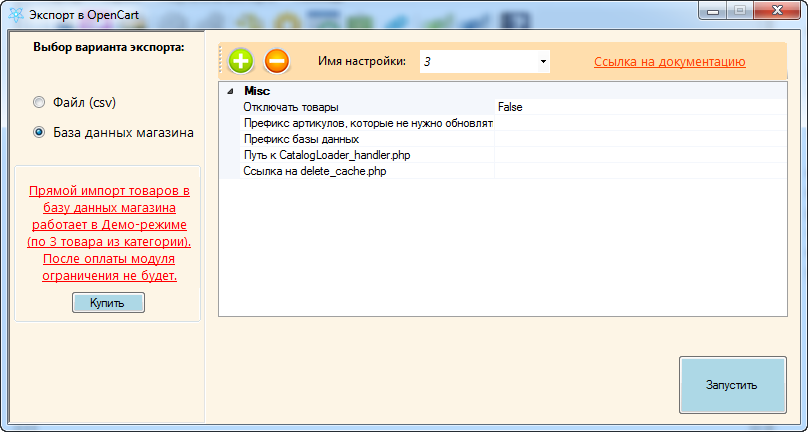
Standard parameters for OpenCart:
- Disable products (determines the ability to disable “disappeared” products).
- Prefix of articles that do not need to be updated.
- Database prefix.
- The path to the Catalogloader_handler.php file.
- The path to the file delete_cache.php (typical for OpenCart).
It is worth noting that the standard import module that is provided to users does not have the entire set of parameters available in the algorithm. This is done deliberately in order not to clutter up the interface and so that users do not have additional questions. These parameters are enough for the vast majority of projects. And only parts need special parameters that are available in a special mode.
The following image shows the standard Bitrix upload dialog via the 1C-Exchange protocol:
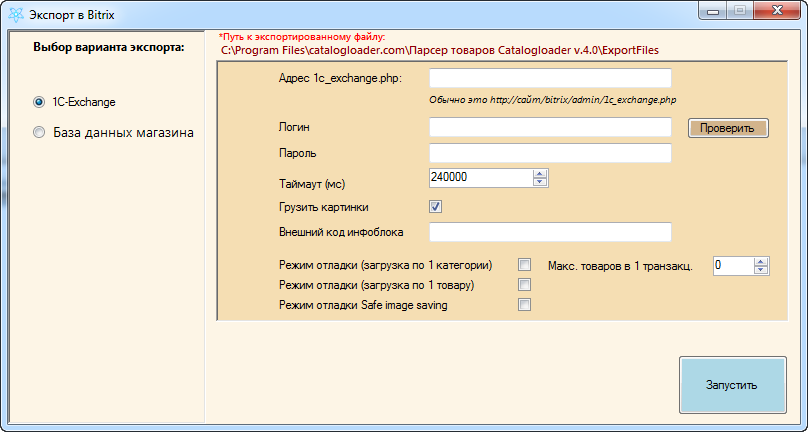
Features:
- 1C-Exchange protocol support.
- Support for debugging mode. Often this mode is the only import option into Bitrix.
The principle of the algorithm is based on the following idea. The input for the algorithm is a local database with the new state of the online store (we call this KLP database). Those. after the import process is complete, the KLP database will “flow” to the required CMS database. Completely or not, with some features or not - it already depends on the settings of the data import process itself, which the user defines.
The following are technical information that will be of interest to integrators and developers - parameters that affect the process of importing data.
CmsEngine string variable [default ("")]
Defines the CMS of an online store. Possible values: bitrix, commerceml, magento, insales, prestashop, vamshop, opencart, hostcms, shopcms, shopscript, virtuemart, joomshoping, simpla, etc.
ModeIsDisable boolean variable [default value (false)]
Enables a mode that will deactivate goods that are not in our KLP database.
DbPrefix string variable [default ("")]
Defines the prefix of the online store database.
HttpTunnelLink string variable [default ("")]
Defines a link that serves as the interface for transferring data between CatalogLoader and the online store.
Possible options: a link to the CatalogLoader_hanpler.php script, a link to the 1c_exchange.php script for transmission via the CommerceML protocol.
HttpTunnelDelay numeric variable [default value (0)]
Defines the delay between requests that go to the interface defined in HttpTunnelLink. This is necessary if the site is located on a weak hosting and active actions by the CatalogLoader (frequent calls) stop the site (CPU limit, for example).
HttpImageWebDownloaderLink string variable [default value ("")]
Defines a link to an image upload script for an online store hosting.
For cms such as Bitrix, insales are not required.
HttpImageWebDownloaderLinkSaveToFile boolean [default value (false)]
It prohibits loading images using the interface defined in HttpImageWebDownloaderLink, and saves all the parameters for calling this interface to a file in the directory with the CatalogLoader program. This is necessary when there is a need to postpone the loading of images for the future.
SqlConnectionString string variable [default ("")]
Defines the Connection string variable of the online store database. This can significantly increase the speed of downloading data.
string variable ShopUser [default value ("")]
The specific user login (usually the admin) in the target online store.
Available for: bitrix in 1c-exchange mode, insales.
ShopPassword string variable [default ("")]
A specific user password (usually an admin) in the target online store.
Available for: bitrix in 1c-exchange mode, insales.
CategoryNameForImportAll string variable [default value ("")]
Defines the category into which all “new” products for the online store will be defined. Sometimes it is required to import all new products into the “New Products” category, and old products simply update.
Note: does not work for bitrix, commerceml.
PriceUpdate boolean [default value (true)]
Defines the behavior of the product update function, in which the price of the product is not changed by CatalogLoader. This is necessary when the site administrator independently sets prices for the goods.
MissedProductIsDisabled boolean variable [default value (true)]
Defines the mode of product deactivation. If the value is “true”, then deactivating the product means real deactivation (the product remains in the database and is marked as inactive), otherwise the product will be deleted from the CatalogLoader software store. (DON'T UNDERSTAND)
MissedProductProcess boolean variable [default value (true)]
Defines the behavior of the product deactivation function. If the value is “true”, then the goods that are present in the database of the online store and are not in the KLP file will be deactivated, otherwise, the function of deactivating the goods will not be applied to any goods that are absent.
boolean variable MissedCombinationIsDisabled [default value (true)]
Defines the behavior of the function of deactivating product combinations. If the value is “true”, then combinations of products that are present in the database of the online store and are not in the KLP file will be deactivated, otherwise removal from the database should follow.
CustomParameters string variable [default value (“”)]
Parameters specific to a specific CMS are determined. For example, for prestashop, the value of this parameter may be id_lang = 7, which means that you need to import the text data of the goods into the language of the online store at number seven.
CallUrlOnStart string variable [default value (“”)]
Defines the http link that will be called from the CatalogLoader software (get request) before starting the import process. Commonly used to back up a database.
CallUrlOnFinish string variable [default value (“”)]
Defines the http link that will be called from the CatalogLoader software (get request) after the import process is completed. It is usually used to clear the cache or create a backup copy of the database.
ProductsUpdateSkip boolean [default value (false)]
Defines the behavior of the product update function. If set to false, the update function is applied to the product; otherwise, it is not.
CustomerProductSkuTemplate string variable [default value (“”)]
Defines a template (regular expression), with which you can determine the product that was manually entered into the online store, and not through the CatalogLoader software. If a template is defined, then goods whose article number fits the template are excluded from the selection of goods to which the “Deactivation” function should be applied.
For example, CustomerProductSkuTemplate = CUS_
ImagesUpdate boolean [default value (false)]
Defines the behavior of the image update function. If the value is “false”, then the images are not updated, otherwise they are completely updated, while all images of the processed product are automatically deleted beforehand. Usually this parameter needs to be set once to “true” when the photos are not of high quality in previous update iterations.
ImagesUpdateMissed boolean variable [default (false)]
Defines the behavior of the image update function. If the value is “false”, then the images are not updated, otherwise they are updated in the add mode. First, the program determines the images that the product already has and only after that adds the required “new” images to the product. Usually, this parameter needs to be set once in “true” with poor-quality photo uploads in previous update iterations.
Available for: prestashop.
MiminumProductsCountInSet numeric variable [default value (0)]
Defines the minimum quantity of goods. If the parameter value is greater than zero, then the CatalogLoader software will not start the process of importing goods, if there are fewer goods in the processed KLP file than determined by the parameter.
Of course, everywhere there are many nuances, it is not always and not for each CMS it turns out to support all the parameters of the algorithm. This may be due to the exchange protocol, the architecture of the database, or the features of the CMS implementation. The presented approach allows you to quite flexibly customize the process of importing data into online stores and copes with large volumes of data up to hundreds of thousands of positions.
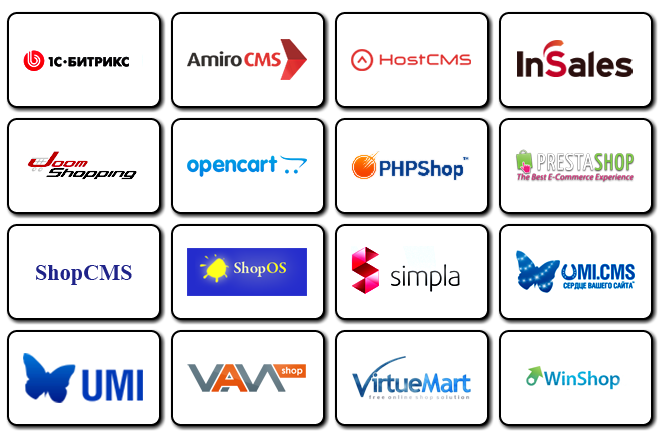
This approach was implemented to import data into the following CMS:
Nikolai Kekish,
Director of CatalogLoader
Algorithm for importing data into an online store
Implementation
The following image shows the standard dialog for uploading from CatalogLoader to OpenCart:
Standard parameters for OpenCart:
- Disable products (determines the ability to disable “disappeared” products).
- Prefix of articles that do not need to be updated.
- Database prefix.
- The path to the Catalogloader_handler.php file.
- The path to the file delete_cache.php (typical for OpenCart).
It is worth noting that the standard import module that is provided to users does not have the entire set of parameters available in the algorithm. This is done deliberately in order not to clutter up the interface and so that users do not have additional questions. These parameters are enough for the vast majority of projects. And only parts need special parameters that are available in a special mode.
The following image shows the standard Bitrix upload dialog via the 1C-Exchange protocol:
Features:
- 1C-Exchange protocol support.
- Support for debugging mode. Often this mode is the only import option into Bitrix.
Algorithm principle
The principle of the algorithm is based on the following idea. The input for the algorithm is a local database with the new state of the online store (we call this KLP database). Those. after the import process is complete, the KLP database will “flow” to the required CMS database. Completely or not, with some features or not - it already depends on the settings of the data import process itself, which the user defines.
The following are technical information that will be of interest to integrators and developers - parameters that affect the process of importing data.
CmsEngine string variable [default ("")]
Defines the CMS of an online store. Possible values: bitrix, commerceml, magento, insales, prestashop, vamshop, opencart, hostcms, shopcms, shopscript, virtuemart, joomshoping, simpla, etc.
ModeIsDisable boolean variable [default value (false)]
Enables a mode that will deactivate goods that are not in our KLP database.
DbPrefix string variable [default ("")]
Defines the prefix of the online store database.
HttpTunnelLink string variable [default ("")]
Defines a link that serves as the interface for transferring data between CatalogLoader and the online store.
Possible options: a link to the CatalogLoader_hanpler.php script, a link to the 1c_exchange.php script for transmission via the CommerceML protocol.
HttpTunnelDelay numeric variable [default value (0)]
Defines the delay between requests that go to the interface defined in HttpTunnelLink. This is necessary if the site is located on a weak hosting and active actions by the CatalogLoader (frequent calls) stop the site (CPU limit, for example).
HttpImageWebDownloaderLink string variable [default value ("")]
Defines a link to an image upload script for an online store hosting.
For cms such as Bitrix, insales are not required.
HttpImageWebDownloaderLinkSaveToFile boolean [default value (false)]
It prohibits loading images using the interface defined in HttpImageWebDownloaderLink, and saves all the parameters for calling this interface to a file in the directory with the CatalogLoader program. This is necessary when there is a need to postpone the loading of images for the future.
SqlConnectionString string variable [default ("")]
Defines the Connection string variable of the online store database. This can significantly increase the speed of downloading data.
string variable ShopUser [default value ("")]
The specific user login (usually the admin) in the target online store.
Available for: bitrix in 1c-exchange mode, insales.
ShopPassword string variable [default ("")]
A specific user password (usually an admin) in the target online store.
Available for: bitrix in 1c-exchange mode, insales.
CategoryNameForImportAll string variable [default value ("")]
Defines the category into which all “new” products for the online store will be defined. Sometimes it is required to import all new products into the “New Products” category, and old products simply update.
Note: does not work for bitrix, commerceml.
PriceUpdate boolean [default value (true)]
Defines the behavior of the product update function, in which the price of the product is not changed by CatalogLoader. This is necessary when the site administrator independently sets prices for the goods.
MissedProductIsDisabled boolean variable [default value (true)]
Defines the mode of product deactivation. If the value is “true”, then deactivating the product means real deactivation (the product remains in the database and is marked as inactive), otherwise the product will be deleted from the CatalogLoader software store. (DON'T UNDERSTAND)
MissedProductProcess boolean variable [default value (true)]
Defines the behavior of the product deactivation function. If the value is “true”, then the goods that are present in the database of the online store and are not in the KLP file will be deactivated, otherwise, the function of deactivating the goods will not be applied to any goods that are absent.
boolean variable MissedCombinationIsDisabled [default value (true)]
Defines the behavior of the function of deactivating product combinations. If the value is “true”, then combinations of products that are present in the database of the online store and are not in the KLP file will be deactivated, otherwise removal from the database should follow.
CustomParameters string variable [default value (“”)]
Parameters specific to a specific CMS are determined. For example, for prestashop, the value of this parameter may be id_lang = 7, which means that you need to import the text data of the goods into the language of the online store at number seven.
CallUrlOnStart string variable [default value (“”)]
Defines the http link that will be called from the CatalogLoader software (get request) before starting the import process. Commonly used to back up a database.
CallUrlOnFinish string variable [default value (“”)]
Defines the http link that will be called from the CatalogLoader software (get request) after the import process is completed. It is usually used to clear the cache or create a backup copy of the database.
ProductsUpdateSkip boolean [default value (false)]
Defines the behavior of the product update function. If set to false, the update function is applied to the product; otherwise, it is not.
CustomerProductSkuTemplate string variable [default value (“”)]
Defines a template (regular expression), with which you can determine the product that was manually entered into the online store, and not through the CatalogLoader software. If a template is defined, then goods whose article number fits the template are excluded from the selection of goods to which the “Deactivation” function should be applied.
For example, CustomerProductSkuTemplate = CUS_
ImagesUpdate boolean [default value (false)]
Defines the behavior of the image update function. If the value is “false”, then the images are not updated, otherwise they are completely updated, while all images of the processed product are automatically deleted beforehand. Usually this parameter needs to be set once to “true” when the photos are not of high quality in previous update iterations.
ImagesUpdateMissed boolean variable [default (false)]
Defines the behavior of the image update function. If the value is “false”, then the images are not updated, otherwise they are updated in the add mode. First, the program determines the images that the product already has and only after that adds the required “new” images to the product. Usually, this parameter needs to be set once in “true” with poor-quality photo uploads in previous update iterations.
Available for: prestashop.
MiminumProductsCountInSet numeric variable [default value (0)]
Defines the minimum quantity of goods. If the parameter value is greater than zero, then the CatalogLoader software will not start the process of importing goods, if there are fewer goods in the processed KLP file than determined by the parameter.
Of course, everywhere there are many nuances, it is not always and not for each CMS it turns out to support all the parameters of the algorithm. This may be due to the exchange protocol, the architecture of the database, or the features of the CMS implementation. The presented approach allows you to quite flexibly customize the process of importing data into online stores and copes with large volumes of data up to hundreds of thousands of positions.
This approach was implemented to import data into the following CMS:
Nikolai Kekish,
Director of CatalogLoader