 April 21, 2014 at 14:55
Flew! (ASUS Fonepad Note 6)
ASUS did not stand aside and also made its device with a screen of 6 inches.
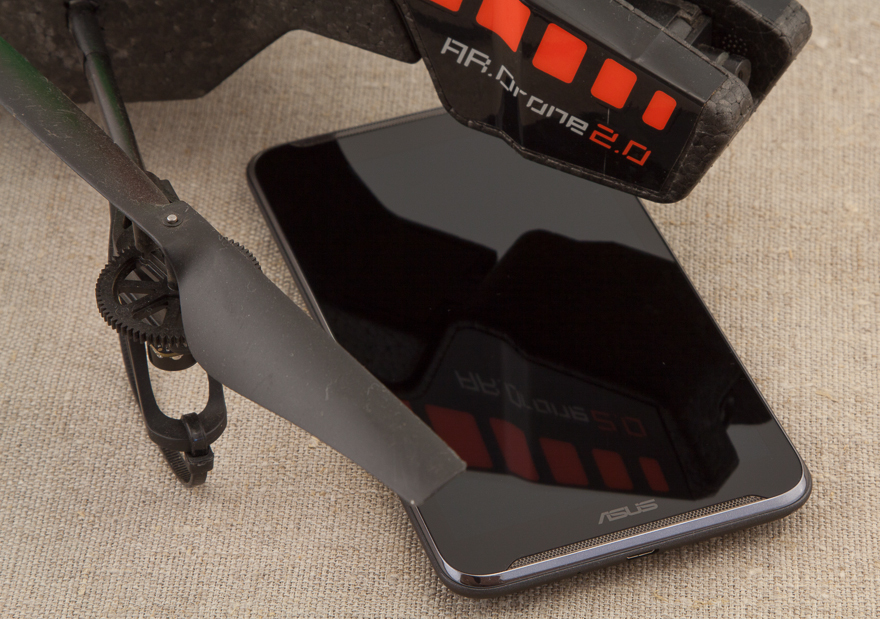
Let's see what came of it and fly to ArDrone 2.0.
From key features:
All specifications are available on the manufacturer’s website .
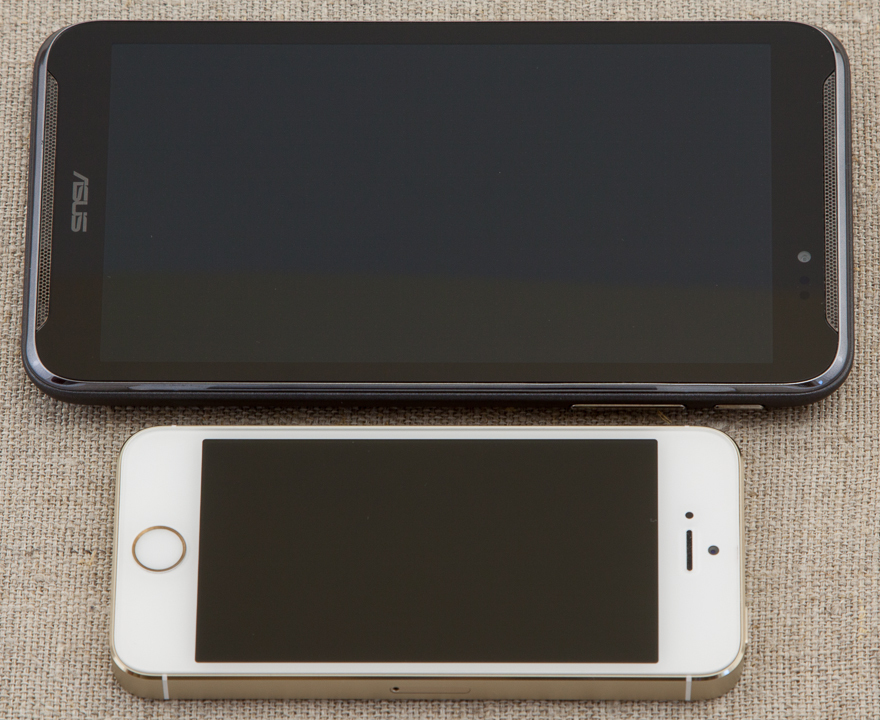
The device is positioned as a tablet with phone functions, which is understandable - ASUS Fonepad Note 6 is not very elegant and can not accommodate in any pocket. Its dimensions: 164.8 x 88.8 x 10.3 mm and weighs 210 grams.
It comes in two colors - white and black.
The delivery set is quite modest (albeit in a very stylish box):
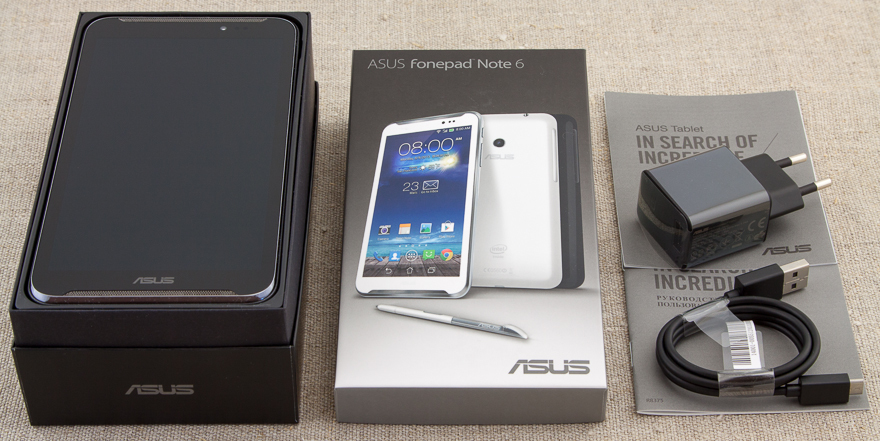
Modestly, there is nothing superfluous, but a headset could be added, but as a rule, most manufacturers save on this accessory and they (headsets) are disposable (in order to try it only once and make sure that you need to find something more decent) .
ASUS Fonepad Note 6 is a classic candy bar, the back is made of soft-touch plastic.
There is a display on the front panel (I did not find information about which glass is used for protection). The frames around the screen, in my opinion, are wide and enlarge, and so quite a rather big size.
At the top and bottom are identical stereo speakers. The sound from them is quite high-quality and loud.
Above the screen, a proximity sensor and a front camera (1.2MP) were hidden.

On the right side there are three hardware buttons: power and volume rocker. The buttons have a good tactile feedback, they are not accidentally pressed.

On the left side of the device, behind a single plug, there is a microSD and microSIM slot.
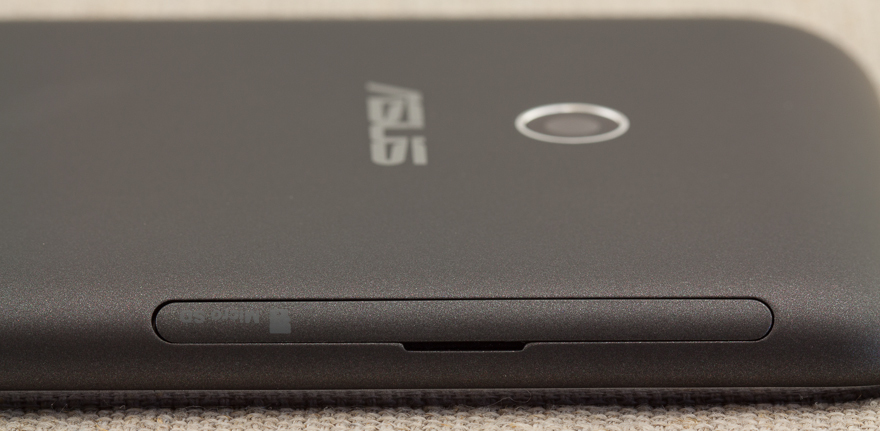
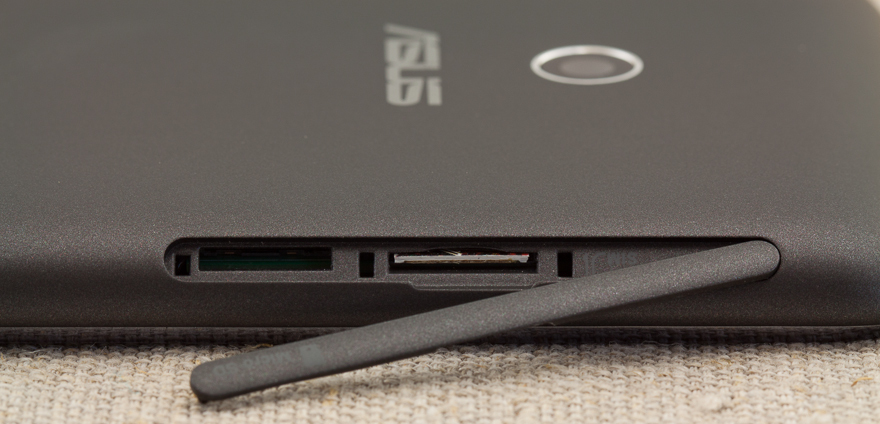
The top end contains a headphone jack (or headset).

Bottom-right (when viewed from the side of the screen) is a pencil case for the stylus.
There is only one microphone and is located next to the microUSB connector on the underside.
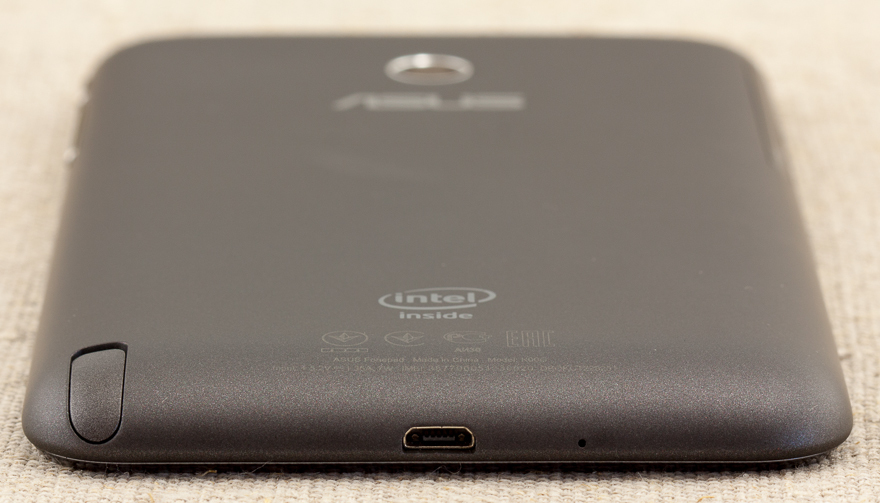
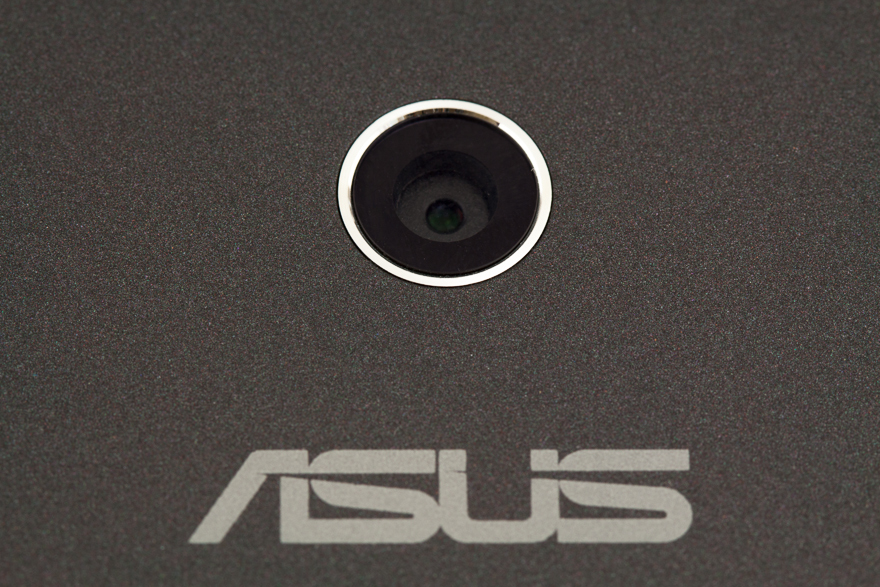
On the back of the ASUS Fonepad Note 6 is the peephole of the main camera (8MP, but for some reason without an LED flash) and the Intel Inside logo.
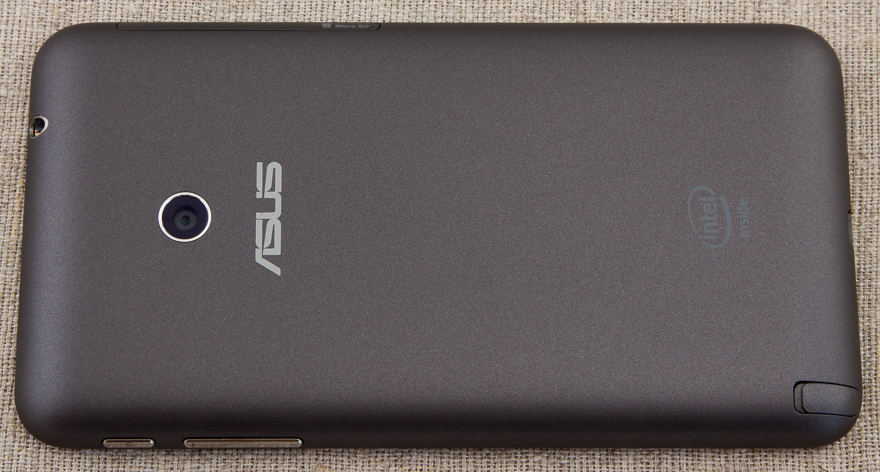
Around the screen is a plastic strip (disguised as metal).
This device cannot be described as a designer in any way - a solid "middling" with an appropriate appearance.
After the first inclusion and connection to the network, ASUS Fonepad Note 6 asked for firmware updates (which was done).
Operating System - Android 4.2.2.
Three standard buttons of the operating system are fully software and occupy part of the useful screen area.
No special decorations (which one famous Korean manufacturer is very interested in) - everything is concise and simple: each user can customize the device for themselves.
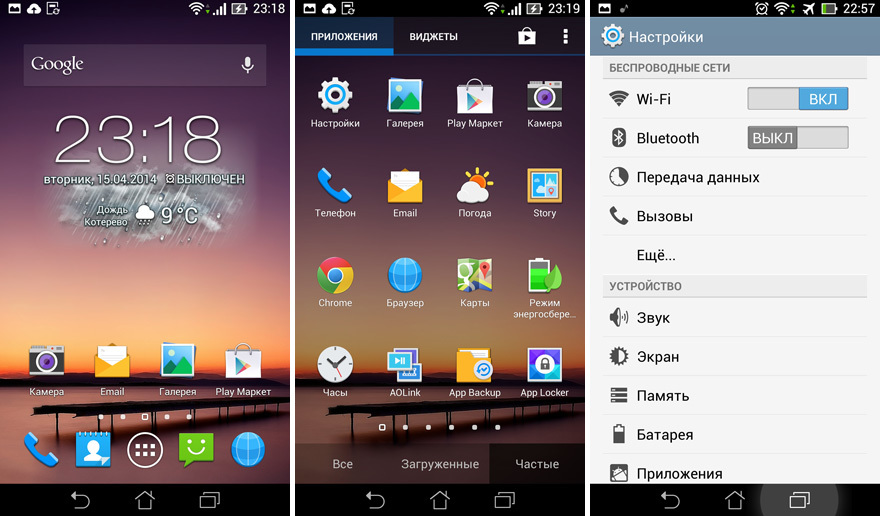
Of the noticeable changes from the "stock" Android - a light design in the settings.
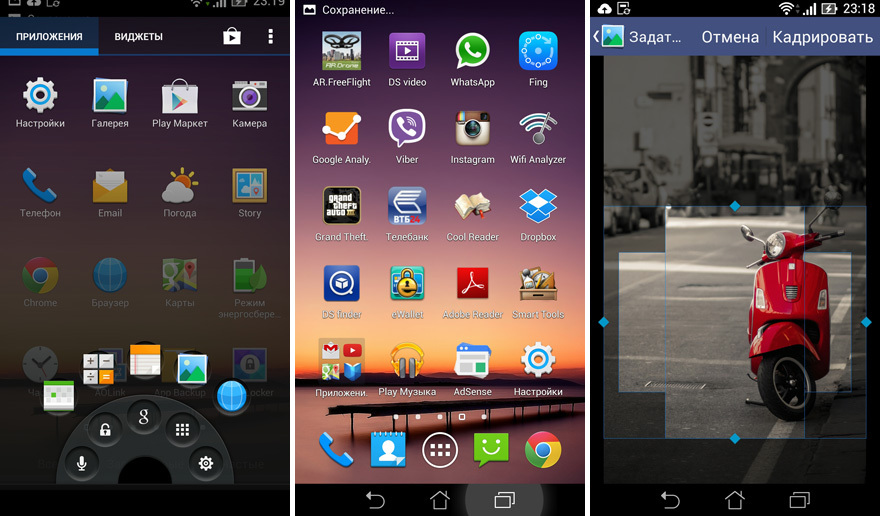
It is also striking that in each row on the desktops there are 4 icons (there were 5 icons on the Samsung Galaxy Note). In my opinion, this is very good - there is no "pile up".
Despite the lack of “deep intervention”, Android added functionality: for example, using a convenient lock screen, you can not only unlock the screen to the “desktop”, but also immediately launch one of the 5 (up to 8 available) custom applications (these applications are available from any application, if you "clamp" the on-screen button with a "house" for a couple of seconds).
All animation works smoothly - no twitching and thoughtfulness of the interface.
In principle, the device can be used as a regular phone, but at the same time you run the risk of becoming the subject of close attention of passers-by - it's still not a very “telephone” size of this gadget.
For telephone calls in this case it is much more convenient to use a bluetooth headset.
You can also use voice functions through the headset, but I could not initiate this process with its help - I had to get the device and poke the microphone icon with my finger (the headset was activated and its microphone was used).
The dialer is quite familiar (for Android devices) - all the usual functions are in place: the choice of subscribers using T9, speed dialing, call log, etc.
The manufacturer very competently approached one of the key functions - handwriting.
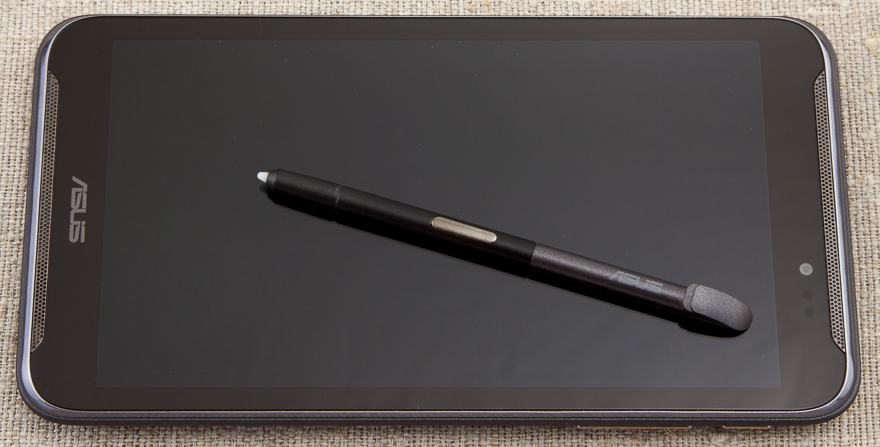
As soon as the stylus is removed from its pencil case, a small blue tab appears on the left, behind which with the tip of the stylus you can “pull out a lined sheet for notes” (at the same time you can see what was on the screen at the previous moment) and make a recording or sketch (of course, You can select the thickness, color and line style).
The “background” remains on the saved note, which then makes it very easy to understand the context when the record was created.
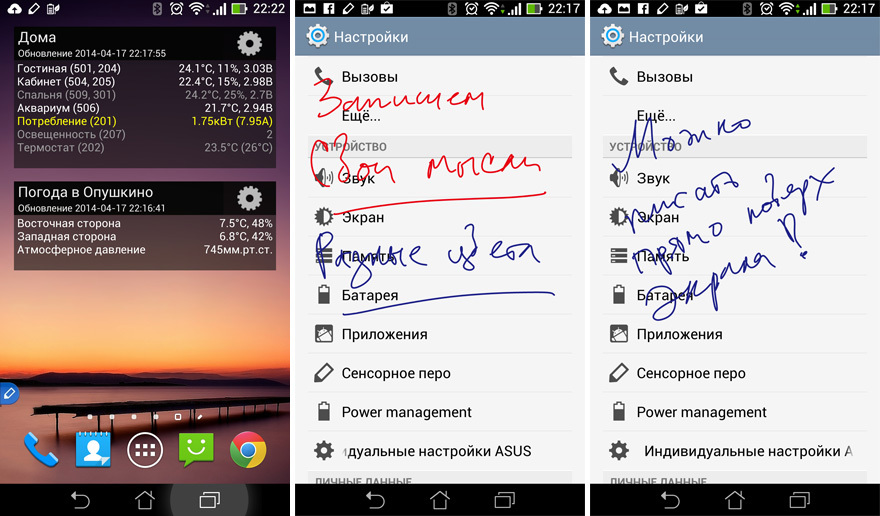
In the settings you can activate the function of "tracking" the stylus - Fonepad will report a possible loss. Very comfortably.

The stylus has a button with which you can activate various functions, for example, highlighting a screen area for saving.
ASUS Fonepad Note 6 is great for watching videos and listening to music, thanks to the excellent Super IPS screen (viewing angles - up to 178 degrees) and stereo speakers located on the front panel.
But it was not without a fly in the ointment: apparently due to the not too widespread processor, hardware acceleration is not always worked out - noticeable twitching of the image was observed on some test files (the popular program VPlayer was used as a player, turning the hardware acceleration on and off did not lead to improving this situation). We attribute this “minus” to the account of the player’s developer, and not the device.
Unfortunately, the design of the ASUS Fonepad Note 6 is not well thought out for this feature that is quite in demand.
There is only one microphone and is located in close proximity to one of the speakers (which, moreover, does not turn off during a conversation). Therefore, for example, when making a video call via Skype, self-excitation often occurs and the sound quality is very mediocre.
At the same time, the interlocutor heard me very poorly.
The front camera with its functions for video calls does well.
No problems (even with very resource-intensive) games were noticed - there was always enough speed.
The only minus is that on “complex” games the device heats up significantly (the back side is closer to the main camera) and it was not too comfortable to hold it, and the charge level simply “melted” before our eyes.
GPS works very predictably - it starts quickly and clearly leads the route. No complaints.
The main camera does its job well in good light. Autofocus rarely misses.
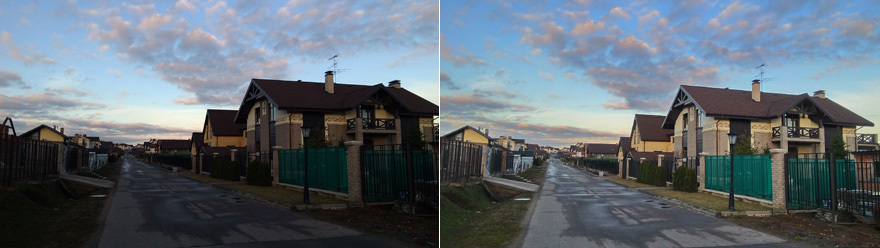
But in difficult conditions (for example, at sunset) - the camera behaves very unpredictably: strong color distortions, incorrect focusing, high noise levels are possible, moreover, in various combinations of these unpleasant effects.

You should not expect special quality from photos, but for social networks, etc. - quite enough.


Only basic settings are provided to the user: ISO, white balance, exposure, optimization, etc. (which, in my opinion, is correct - I launched the application and you can immediately take photos and videos).
Several interesting options are available:
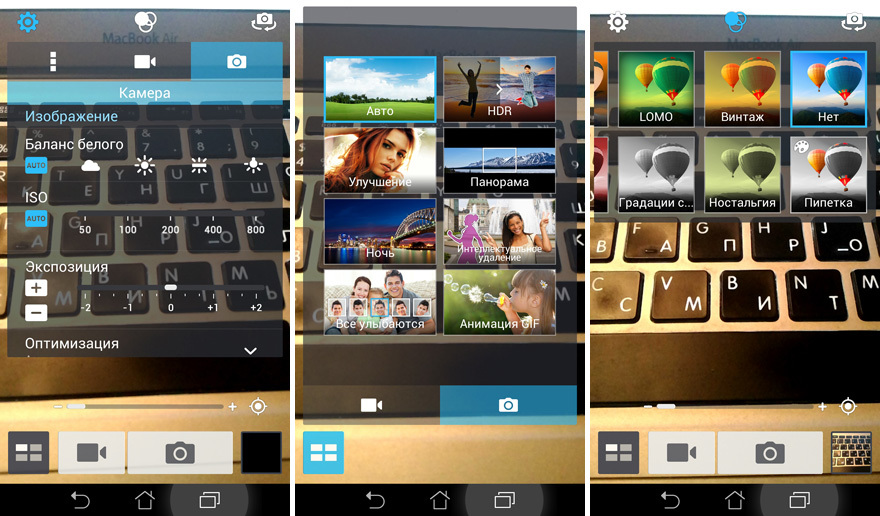
Built-in filter set - further enliven the use of ASUS Fonepad Note 6 as a camera.
An HDR mode is also available, which “draws” the camera's capabilities in difficult lighting conditions: It was
surprising that the manufacturer did not equip this device with an LED flash.
The video device shoots in FullHD resolution and does it quite qualitatively (even in difficult conditions).
During shooting, you can do the image zoom (software - with all the consequences), but sometimes the camera loses focus on the desired object and the autofocus can no longer cope with its task: you had to stop recording and start it again (the focus was restored).
During the test operation, I made this phone the main one and used it in my usual manner (no games, but quite a lot of phone calls, WiFi and bluetooth on all the time, web surfing, Yandex. Traffic, facebook, etc.).
As a result of these tests, I was pleasantly surprised that until the evening ASUS Fonepad Note 6 was quite confident.
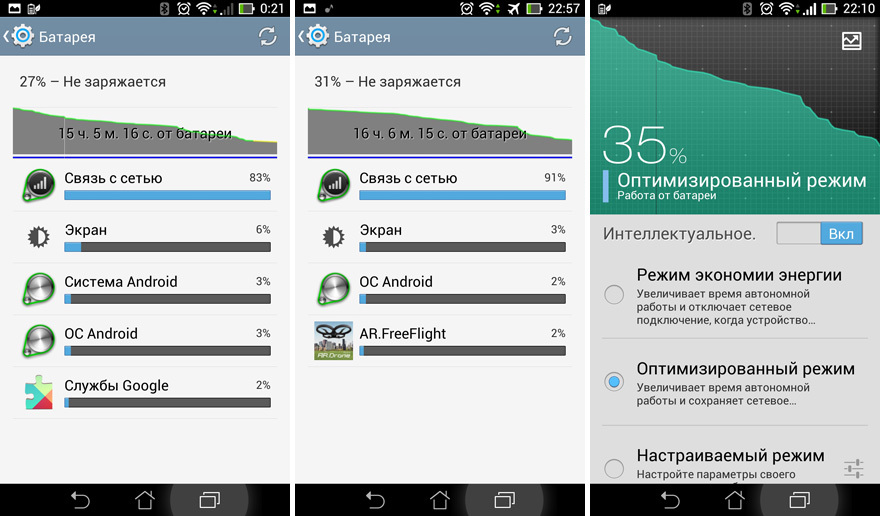
I think that with not too active use, the battery charge may last for 1.5-2 days.
Outstanding result - not every “flagship" can boast of such a result.
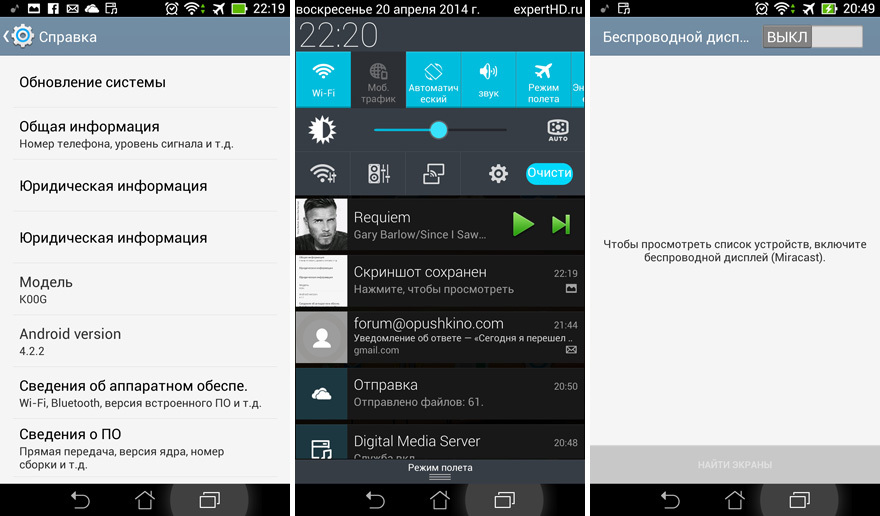
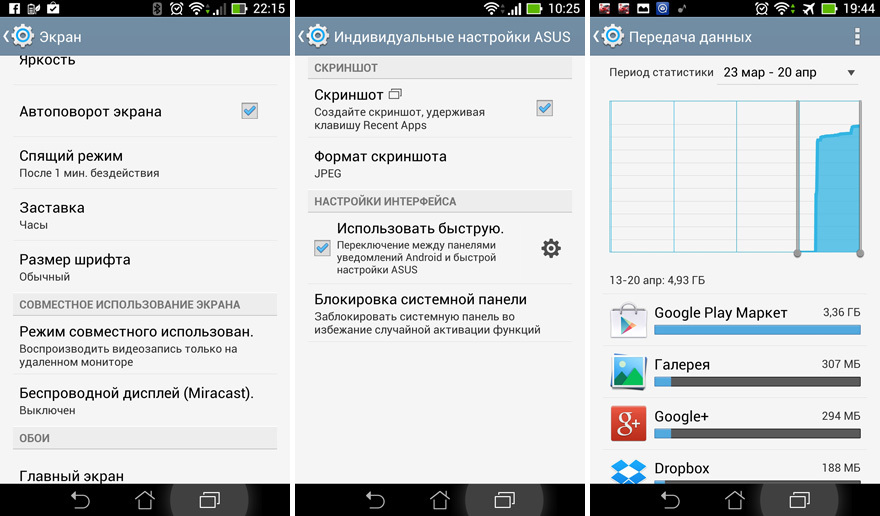
By the way, the manufacturer seriously approached the issue of energy consumption: in the settings there is a proprietary utility that allows you to configure the battery consumption plan (the rightmost screenshot is slightly higher).
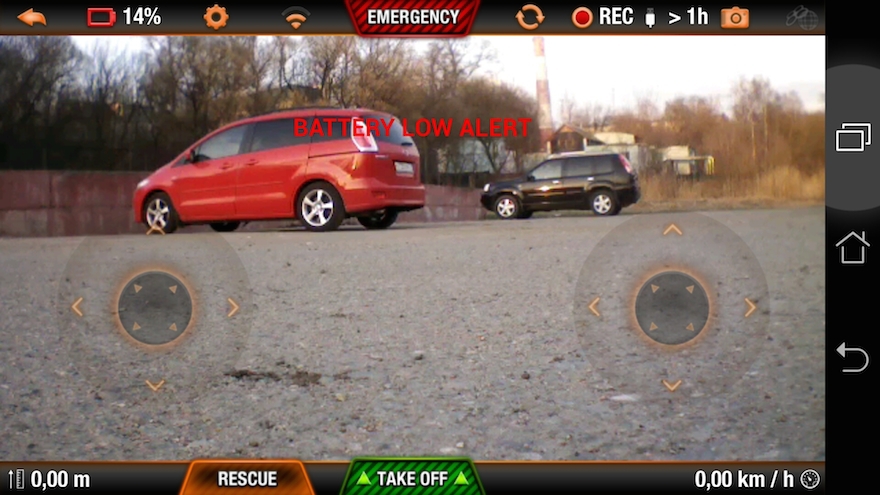
To test the wireless connection, I used another high-tech gadget: Parrot ArDrone 2.0 (AR.FreeFlight v.2.4.10 software).
For flights, I went to the outskirts of the city - to open spaces (I flew on a soccer field) and away from WiFi networks.
ASUS Fonepad Note 6 quickly found the quadrocopter network and connected to it.
Flights at a short distance showed a very good result - ArDrone listened very well to the teams, the video transmission went without interruptions.
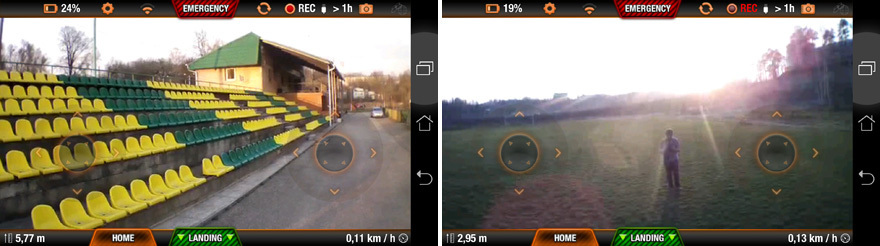
But as soon as the quadrocopter moved away to a distance of more than 25 meters, the picture on the screen began to crumble and messages about the loss of control appeared.
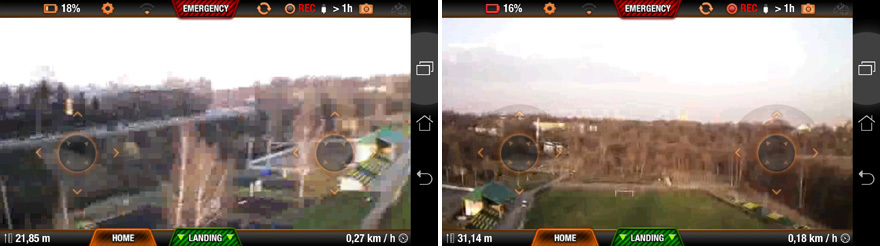
The most that was achieved was a little more than 30 meters, while the ArDrone completely lost control (and hung until the control signals appeared, and if this did not happen, it turned on the automatic landing mode after a couple of minutes).
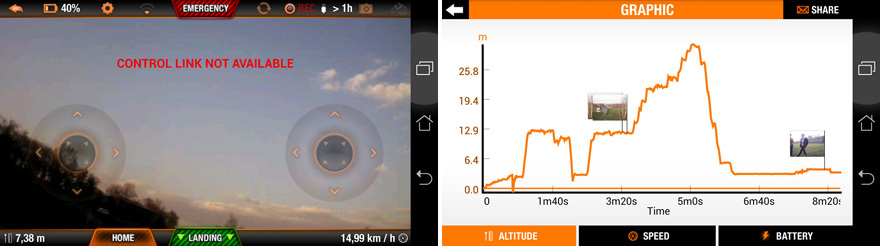
After losing the “link”, it was necessary to approach closer to the hovering quadrocopter, but, unfortunately, even this did not always lead to reconnection to its WiFi network.
For comparison: on the same “flying platform”, using the Samsung Galaxy Note, it was possible to fly to the opposite gate, fly inside them and fly back (guided only by the image from the quadrocopter camera on the phone screen).
Such a result is not at all in favor of ASUS Fonepad Note 6.
The bottom line:
Pros :
Cons :
In my opinion, the device, despite its obvious shortcomings, turned out to be quite interesting: rich functionality, a powerful platform for a very reasonable price (currently about 15 thousand rubles).
PS review prepared as part of the competition
Let's see what came of it and fly to ArDrone 2.0.
From key features:
- Intel® Atom ™ Processor Z2580 Dual-Core, 2.0 GHz
- RAM - 2GB
- Built-in memory - 16GB
- MicroSD card support
- Capacious battery
- Super IPS FullHD 6-inch screen
- Front stereo speakers
- Handwriting stylus
- ASUS Software Suite
- The main camera is 8MP.
All specifications are available on the manufacturer’s website .
The device is positioned as a tablet with phone functions, which is understandable - ASUS Fonepad Note 6 is not very elegant and can not accommodate in any pocket. Its dimensions: 164.8 x 88.8 x 10.3 mm and weighs 210 grams.
It comes in two colors - white and black.
The delivery set is quite modest (albeit in a very stylish box):
- ASUS Fonepad Note 6
- AC Charger (with USB)
- USB cable
- Thin user manual and warranty card.
Modestly, there is nothing superfluous, but a headset could be added, but as a rule, most manufacturers save on this accessory and they (headsets) are disposable (in order to try it only once and make sure that you need to find something more decent) .
Exterior
ASUS Fonepad Note 6 is a classic candy bar, the back is made of soft-touch plastic.
There is a display on the front panel (I did not find information about which glass is used for protection). The frames around the screen, in my opinion, are wide and enlarge, and so quite a rather big size.
At the top and bottom are identical stereo speakers. The sound from them is quite high-quality and loud.
Above the screen, a proximity sensor and a front camera (1.2MP) were hidden.
On the right side there are three hardware buttons: power and volume rocker. The buttons have a good tactile feedback, they are not accidentally pressed.
On the left side of the device, behind a single plug, there is a microSD and microSIM slot.
The top end contains a headphone jack (or headset).
Bottom-right (when viewed from the side of the screen) is a pencil case for the stylus.
There is only one microphone and is located next to the microUSB connector on the underside.
On the back of the ASUS Fonepad Note 6 is the peephole of the main camera (8MP, but for some reason without an LED flash) and the Intel Inside logo.
Around the screen is a plastic strip (disguised as metal).
This device cannot be described as a designer in any way - a solid "middling" with an appropriate appearance.
"Interior"
After the first inclusion and connection to the network, ASUS Fonepad Note 6 asked for firmware updates (which was done).
Operating System - Android 4.2.2.
Three standard buttons of the operating system are fully software and occupy part of the useful screen area.
No special decorations (which one famous Korean manufacturer is very interested in) - everything is concise and simple: each user can customize the device for themselves.
Of the noticeable changes from the "stock" Android - a light design in the settings.
It is also striking that in each row on the desktops there are 4 icons (there were 5 icons on the Samsung Galaxy Note). In my opinion, this is very good - there is no "pile up".
Despite the lack of “deep intervention”, Android added functionality: for example, using a convenient lock screen, you can not only unlock the screen to the “desktop”, but also immediately launch one of the 5 (up to 8 available) custom applications (these applications are available from any application, if you "clamp" the on-screen button with a "house" for a couple of seconds).
All animation works smoothly - no twitching and thoughtfulness of the interface.
Telephone
In principle, the device can be used as a regular phone, but at the same time you run the risk of becoming the subject of close attention of passers-by - it's still not a very “telephone” size of this gadget.
For telephone calls in this case it is much more convenient to use a bluetooth headset.
You can also use voice functions through the headset, but I could not initiate this process with its help - I had to get the device and poke the microphone icon with my finger (the headset was activated and its microphone was used).
The dialer is quite familiar (for Android devices) - all the usual functions are in place: the choice of subscribers using T9, speed dialing, call log, etc.
Handwriting
The manufacturer very competently approached one of the key functions - handwriting.
As soon as the stylus is removed from its pencil case, a small blue tab appears on the left, behind which with the tip of the stylus you can “pull out a lined sheet for notes” (at the same time you can see what was on the screen at the previous moment) and make a recording or sketch (of course, You can select the thickness, color and line style).
The “background” remains on the saved note, which then makes it very easy to understand the context when the record was created.
In the settings you can activate the function of "tracking" the stylus - Fonepad will report a possible loss. Very comfortably.
The stylus has a button with which you can activate various functions, for example, highlighting a screen area for saving.
Audio Video
ASUS Fonepad Note 6 is great for watching videos and listening to music, thanks to the excellent Super IPS screen (viewing angles - up to 178 degrees) and stereo speakers located on the front panel.
But it was not without a fly in the ointment: apparently due to the not too widespread processor, hardware acceleration is not always worked out - noticeable twitching of the image was observed on some test files (the popular program VPlayer was used as a player, turning the hardware acceleration on and off did not lead to improving this situation). We attribute this “minus” to the account of the player’s developer, and not the device.
Video calls
Unfortunately, the design of the ASUS Fonepad Note 6 is not well thought out for this feature that is quite in demand.
There is only one microphone and is located in close proximity to one of the speakers (which, moreover, does not turn off during a conversation). Therefore, for example, when making a video call via Skype, self-excitation often occurs and the sound quality is very mediocre.
At the same time, the interlocutor heard me very poorly.
The front camera with its functions for video calls does well.
Games
No problems (even with very resource-intensive) games were noticed - there was always enough speed.
The only minus is that on “complex” games the device heats up significantly (the back side is closer to the main camera) and it was not too comfortable to hold it, and the charge level simply “melted” before our eyes.
Navigation
GPS works very predictably - it starts quickly and clearly leads the route. No complaints.
Photo and video
The main camera does its job well in good light. Autofocus rarely misses.
But in difficult conditions (for example, at sunset) - the camera behaves very unpredictably: strong color distortions, incorrect focusing, high noise levels are possible, moreover, in various combinations of these unpleasant effects.
You should not expect special quality from photos, but for social networks, etc. - quite enough.
Only basic settings are provided to the user: ISO, white balance, exposure, optimization, etc. (which, in my opinion, is correct - I launched the application and you can immediately take photos and videos).
Several interesting options are available:
- Improvement (a kind of "filter")
- Panorama
- Night
- Intelligent deletion (the device takes several pictures, and then “collects” the resulting image from them, removing “extra people” from the frame)
- Everyone is smiling (similar to the previous version, but the faces in group photos are tracked and the result is an image where everyone is smiling)
- GIF animation (the formation of "live photos" based on a series of pictures).
Built-in filter set - further enliven the use of ASUS Fonepad Note 6 as a camera.
An HDR mode is also available, which “draws” the camera's capabilities in difficult lighting conditions: It was
surprising that the manufacturer did not equip this device with an LED flash.
The video device shoots in FullHD resolution and does it quite qualitatively (even in difficult conditions).
During shooting, you can do the image zoom (software - with all the consequences), but sometimes the camera loses focus on the desired object and the autofocus can no longer cope with its task: you had to stop recording and start it again (the focus was restored).
Battery
During the test operation, I made this phone the main one and used it in my usual manner (no games, but quite a lot of phone calls, WiFi and bluetooth on all the time, web surfing, Yandex. Traffic, facebook, etc.).
As a result of these tests, I was pleasantly surprised that until the evening ASUS Fonepad Note 6 was quite confident.
I think that with not too active use, the battery charge may last for 1.5-2 days.
Outstanding result - not every “flagship" can boast of such a result.
By the way, the manufacturer seriously approached the issue of energy consumption: in the settings there is a proprietary utility that allows you to configure the battery consumption plan (the rightmost screenshot is slightly higher).
Flights in a dream and in reality
To test the wireless connection, I used another high-tech gadget: Parrot ArDrone 2.0 (AR.FreeFlight v.2.4.10 software).
For flights, I went to the outskirts of the city - to open spaces (I flew on a soccer field) and away from WiFi networks.
ASUS Fonepad Note 6 quickly found the quadrocopter network and connected to it.
Flights at a short distance showed a very good result - ArDrone listened very well to the teams, the video transmission went without interruptions.
But as soon as the quadrocopter moved away to a distance of more than 25 meters, the picture on the screen began to crumble and messages about the loss of control appeared.
The most that was achieved was a little more than 30 meters, while the ArDrone completely lost control (and hung until the control signals appeared, and if this did not happen, it turned on the automatic landing mode after a couple of minutes).
After losing the “link”, it was necessary to approach closer to the hovering quadrocopter, but, unfortunately, even this did not always lead to reconnection to its WiFi network.
For comparison: on the same “flying platform”, using the Samsung Galaxy Note, it was possible to fly to the opposite gate, fly inside them and fly back (guided only by the image from the quadrocopter camera on the phone screen).
Such a result is not at all in favor of ASUS Fonepad Note 6.
The bottom line:
Pros :
- Great screen
- Performance processor
- Capacious battery
- Advanced audio system
- Handwriting
- Memory card support
- A set of additional applications ASUS
- Affordable price
Cons :
- Bad microphone location
- Weak wifi
- Mediocre camera (and without flash)
- No 4G support
- Large sizes (and thickness)
In my opinion, the device, despite its obvious shortcomings, turned out to be quite interesting: rich functionality, a powerful platform for a very reasonable price (currently about 15 thousand rubles).
PS review prepared as part of the competition









