Go iptv i broke
 I do not like to do what most do. Perhaps that is why I was accepted into the pioneers as one of the last in the class, along with notorious twosomes, despite my good academic performance. And what is the majority now doing, what are they doing and for which devices? Yes, of course, it’s the “custom” for the myriad army of devices based on the android platform, then the firmware for routers and modems can follow in the list, and you can close the list with firmware for TV players that are surviving. Such a hierarchy of devices with firmware is conditional here, but whether the stated material will be of any use to anyone at least will be an absolute fact, one can only answer by reading it.
The material is by no means a guide to action or inaction, moreover, its use for illegal purposes can be prosecuted by law. In the case of not well thought out manipulations, there is a risk of spoiling the equipment.
It all started around noon. The rest of the day was to be free, and it was decided to do something. My gaze fell on the IPTV set-top box named Promsvyaz, a girl named ZTE, and with the name ZXV10 B600 V4C on the sticker.
I will not hide the fact that interest in this box arose earlier, but something did not grow together: a little google, a little scan ports, a little traffic intercepted - nothing sensible. Even at that time, I saw mentions on Chinese sites about the successful unlocking of telnet, but for this I needed to disassemble the device. This option fell away, because everywhere the warranty stickers and, having torn them, would have to reimburse the cost of iron to the provider.
So this time, bothering Google with the requests “zxv10 b600”, nothing was found, except for a couple of stupid questions and numerous Chinese sites selling hardware. However, having noticed the iknow.baidu.com page , which turned out to be an analogue of otvety.google.ruwent there. No, something is wrong again - it doesn’t fit, everyone can imagine what kind of information is there. The decision was made seriously and globally to “leave” them. Some may think that I know Chinese, no, I only used ctrl + c / ctrl + v and translate.google.com to translate individual lines from Chinese to English, sometimes giving Google the ability to translate the whole page. After killing a couple of hours, I came across a service program for working with IPTV consoles, downloaded, looked - she wants a license activation. Nah, we don’t need such hockey! We go further and look for an older version, find it, and strangely enough, but without any registrations and other machinations of greedy people, download, run. Bah, she is in Chinese! Let it go. Everything is clear. Just two buttons.
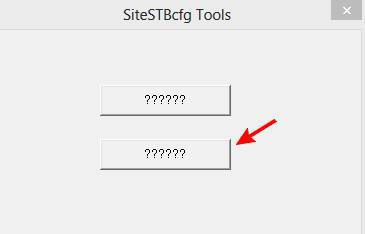
We need a second button, and looking ahead, I’ll say that further, in the second menu item, we need a second position.
In the window that opens, enter the IP address of the set-top box and, after making sure that the set-top box and the computer are on the same subnet, press the only available button. Voila, we are in contact, the truth is not the same. Therefore, we will rejoice, and think what it gives us. It's time to go over the tabs and look around. “So what is the second point and second position for?” - they will ask me. Indeed, little informative was seen among the tabs with an obscure character set. Then it was the turn of the menu. Click on the menu the second pair of characters, then again the second pair.
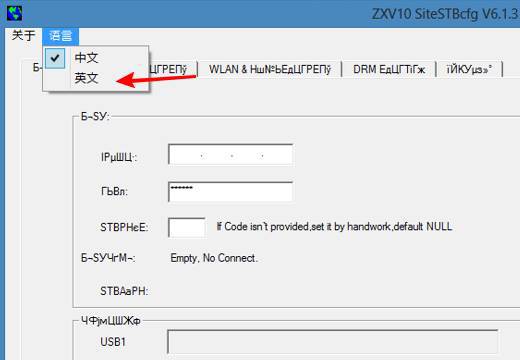
Very good, now, finally, you can see the descriptions of the settings in, understandable to some people from childhood, human language. Here we see the possibilities to read the settings from the device, write them to the device, load from a file or save the settings available for the device to a file.
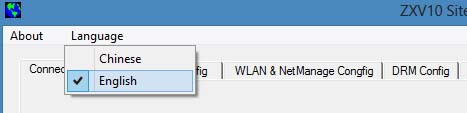
Let's finish with the settings, this is not as interesting as the “Start INETD” button on the first tab.
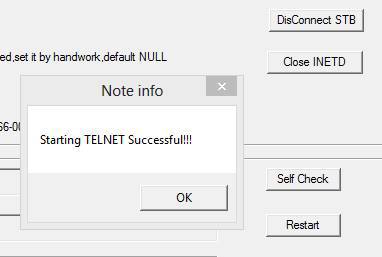
Fine! I thought that a pair of idt: idt, well, or root with an empty password would probably work. Hmm, well, in extreme cases, ldt: ldt or root: root, plus a couple of other options on Chinese sites. Eh, not so simple. Really brute? Let there be three letters in the username and password, and if there are more than six, and not only letters? Damn it, because otherwise it’s a dead end, I won’t knock on the keys myself. I turned on the software and decided to look towards the update server, the address of which was found on the settings tab.
The prefix is updated from the provider's server, and as it became clear from the settings, it does this automatically after turning on and receiving the IP address if there is a new firmware on the server. By the way, the auto-update feature can be turned off, no one also prohibits specifying any address of the update server. So where is the firmware? What is she like?
Let's go to the update directory on the server. We see a bunch of jpg files and several cfg. Looking at zteSTBVer.cfg and zteSTBVer2.cfg the picture becomes clearer. Below you can see some of the contents of these files related to the ZXV10 B600 V4C.
zteSTBVer.cfg
[Model=ZXB600V4C(STBSG-BCM7466-00000)]
AppName=Safe Version=403035 Location="safe_40332817.jpg" Destination="/dev/mtd1" Rules={Y(!403035)}
AppName=StbCfgInfo Version=32810 Location="stb_32808.cfg" Destination="/etc/stb.cfg" Rules={Y(!32810)}
AppName=logo Version=403003 Location="logo_B600v4c_403003.jpg" Destination="/dev/mtd4" Rules={Y(!403003)}
AppName=allmtd Version=40332822 Location="allmtd_40332822.jpg" Rules={Y(<40332822)}
zteSTBVer2.cfg
[Model=ZXB600V4C(STBSG-BCM7466-00000)]
AppName=allmtd Version=40332822 Location="allmtd_40332822.jpg" Destination="/dev/mtd6" Rules={Y(=999999)}
I pick up the files for my model of the console, according to the above configs. I recall that I saw some information about the composition of the firmware from the Chinese, looking again at them, I come across a mention of some utility SplitFile.exe cleaning 16 ECC bytes after every 512 bytes in the file and breaking the composite firmware into parts. The search for the utility yielded absolutely nothing. "Clamped!" - I thought in my hearts, and with the help of a Swiss knife TextPipe cleaned the firmware. We set binwalk.
DECIMAL   	HEX       	DESCRIPTION
-------------------------------------------------------------------------------------------------------
96        	0x60      	gzip compressed data, was "vmlinux", from Unix, last modified: Tue Oct 11 15:16:16 2011
2621440   	0x280000  	JFFS2 filesystem, little endian
6815744   	0x680000  	CramFS filesystem, little endian size 18268160 version #2 sorted_dirs CRC 0x5a011db9, edition 0, 9846 blocks, 584 files
With the addressing that was mentioned on the Internet, it coincides, however. I continue with WinHex, which helps to split the whole thing into three files in accordance with the necessary addresses, named them trivially: kernel.bin, jffs2.bin and cramfs.bin. Where to now? That's right, in the jffs2.bin image in the / etc / passwd file. The New TuxBox Flash Tool for the Windows platform that came into my hands successfully managed to connect and view the contents of two images of the jffs2 and cramfs file systems. So what about passwd?
root:x:0:0:root:/root:/bin/sh
bin:*:1:1:bin:/bin:/dev/null
daemon:*:2:2:daemon:/sbin:/dev/null
adm:*:3:4:adm:/var/tmp:/dev/null
ftp:*:14:50:FTP User:/var/tmp:/dev/null
nobody:*:99:99:Nobody:/:/dev/null
rpcuser:x:29:29:RPC Service User:/var/tmp:/dev/null
nfsnobody:x:65534:65534:Anonymous NFS User:/var/tmp:/dev/null
Or maybe / etc / shadow? There is no it ... I do not want to change and rebuild the firmware. Again a dead end.
Switching activities from one to another sometimes gives excellent results. I open the browser and seemingly spend aimlessly about an hour in search of any useful information on the subject of my interest. Link by link, transition by transition. I am looking for the version of Linux, the model of the processor and its manufacturer. It's getting late, I want to sleep, the content you are viewing is somewhat removed even from the processor model, and now, stop, and how is that? "To get a root prompt, you have to press Control-C and login with" root "and now password." I start pytty, try to connect. Of course it won’t work, there is a selection of passwords for the root login. I stop enumerating passwords, I save the enumeration session to continue in the morning. I run putty again, go in:
login:root
password:ctrl+c
What?! I did not believe my own eyes:
encrypted:null, unencrypted:здесь_пароль
Yes, I didn’t follow the clearly described method, I pressed the ctrl + c combination at the wrong time, but firstly, the pieces of iron are different, like the connection method, and secondly, I, in my time, are not really pioneers either in a hurry.
My interest in the set-top box died out literally the next morning after receiving the password, leaving behind the process of changing the firmware, possibly adding functionality, as well as testing and installing the firmware in the set-top box. I do not like to do what most do.