April 1, 2014 at 11:28
SSD: subspecies and prospects

Everyone remembers how the first truly massive SSD products came about. Enthusiasm, performance growth, beautiful tens of thousands of IOPS performance. Almost an idyll.
Naturally, for the server (we do not consider single computers) market, this was a huge step forward - after all, magnetic media has long been a bottleneck for building a high-performance solution. The norm was considered several disk cabinets, which in total mastered two or three thousand IOPS, and here such an opportunity to increase productivity by a hundred or more times from one drive (compared to SAS 15K).
There was a lot of optimism, but in reality everything turned out to be not so smooth.
There are compatibility problems, and resource problems, when everything was put into the server from the cheapest lines, and problems of performance degradation - the issues of TRIM support in RAID controllers are still being raised.
The development of SSD technology went in stages. At first, everyone worked on the speed of linear operations to reach the limit of interfaces. With SATA II, this happened almost immediately, it took some time to conquer SATA III. The next step was to increase the productivity of random access operations; here, too, a decent growth was achieved.
The next point that was highlighted was performance stability:

Adapted from Anandtech review
On average, it is, of course, a lot, but jumps from 30K to a couple of tens of iops are strong, the spindle gives its performance stably.
The first to say so loudly was Intel with its DC S3700 line.

Adapted from the Anandtech review.
If you approximate the right side of the graph, the spread will be within 20%. Why is it important?
- The behavior of a disk in a RAID array is much more predictable, it is much easier for the controller to work when all participants in the array have approximately the same performance. Few people would think of building arrays of 7.2K and 15K disks at the same time, and an array of SSDs with a spread of instantaneous performance is hundreds of times worse.
- Applications that need to consistently and quickly receive or write data randomly will work more predictably.
SAS drives appeared long ago on SLC (Single Level Cell) memory with space cost and almost unlimited resource. Naturally, they were designed to work as part of a storage system - two-port access is a prerequisite for a drive there. Over time, more affordable products on eMLC memory appeared. The resource, of course, fell, but still remains very impressive due to the large reserve volume of memory inaccessible to the user. An example of a modern SAS SSD drive

Since they were originally designed to work in corporate systems, the stability of productivity was immediately on top. Since the approaches of hard drives to SSD performance tests are of little use, a special SNIA Solid State Storage Performance Test was developed by the industry consortium Storage Networking Industry Association (SNIA). The main feature of the technique is that the disk is “prepared” at first, the goal of the preparation is to hammer all available memory, because a particularly smart controller writes data not only to the allocated disk capacity, it spreads the data across all available memory. In order to get the result of a disk in a real environment after a long continuous operation in a synthetic test - it must be deprived of access to “fresh” memory, where there has never been data.

Random read Random write Random write shows a significant advantage from 12G SAS, but the CPU load on the flow processing increases two or more times. Current market position SAS / SATA SSD Drives are divided into several groups, each of which is successfully used for certain tasks.

- Household drives for reading tasks. A very popular option with Russian Internet holdings that use software arrays. This group also includes disks of the Toshiba HG5d type, which are positioned for entry-level enterprise workloads (excellent for installing the OS or tasks with primary reading). They live under such loads for a long time, cost little, what else is needed for happiness?
- Corporate discs with 1-3 full dubs per day. They are positioned in storage with a small percentage of writing, intensive reading, or for read caching. They work well with RAID controllers, some are made for storage and have a SAS interface, the disk cache is necessarily protected by capacitors. Slightly more expensive than the first group.
- Discs with 10 full dubs per day. A universal workhorse both in servers (where SATA drives are mainly used) and in storage systems. Noticeably more expensive than the first group.
- Discs with 25 full dubs per day. The most expensive and fastest, a lot of memory for reserve sets a high price tag per gigabyte of available capacity.
Now let's talk about SSD in an unusual design, because a flash (unlike magnetic plates) can be placed as you like.
SATA SSD in DIMM format
Due to the increase in the volume of memory modules and the efforts of Intel / AMD to increase the number of supported memory slots on the processor, few servers use all the slots on the board.
In our experience, even 16 memory slots in the server are not too common, while the RS130 / 230 G4 models offer 24 slots per system. A lot, a lot of memory. When such a part of the platform’s capabilities is idle, it’s deeply disappointing and annoying. What can be done with this? Empty slots can be occupied by SSD drives! For example, such as: SSD in DIMM format


Now we are validating several of these drives, whose capacity reaches 200GB on SLC memory and 480GB on MLC / eMLC.
Technically, this is a regular SSD based on the SandForce SF-2281 controller, familiar from many 2.5 "disks and very popular in low-cost disks for reading-dominated tasks (from the first group). The interface is standard SATA, only power is taken from the memory slot. It is used Toshiba flash (MLC NAND Toggle Mode 2.0, 19nm) TH58TEG8DDJBA8C, 3K P / E cycles, with a total capacity of 256 gigabytes. The promised Bit Error Rate (BER) is less than 1 in 10 ^ 17 bits read (what this gives was discussed in the previous article on hard drives ). View of the controller

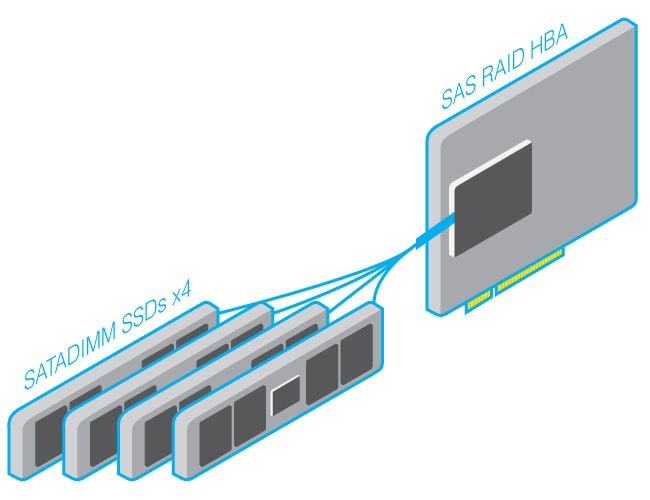
Installation in the server is simple and convenient - just insert it into the memory slot (it takes power) and pull the cable to the port: View in the server Original solutions Current SSDs use the usual SATA connector, which is not found on all boards. For example, on our RS130 G4 there are only two such connectors. If necessary, you can make a cable that combines four SSDs in mini-SAS or mini-SAS HD. mini-SAS cable Using this option, you can make various interesting products, for example: 32 SSDs in a 1U case About SSDs with standard SAS / SATA interfaces, perhaps that's all. In the next article, we will consider PCIe SSDs and their future, but for now, a little about the method of determining the SSD resource for recording. Record Resource


At home use, few people care about the resource of a disc for recording, while for more serious tasks this value can be critical. The indicator of the number of disk rewrites per day Disk Writes Per Day (DWPD), which is defined as the total amount of data recorded by Total Terabyte Written, divided by the period of work (usually 5 years), has become traditional. The best SATA drives have a rating of 10 DWPD, the best SAS SSDs reach 45 DWPD.
How is this magic figure measured? You need to delve into the theory of flash memory.
The main feature of the flash - to record (program) data, the cell must first be erased (erase). Unfortunately, you cannot just erase a cell; such operations are performed on blocks (Erase block), the minimum amount of memory to be erased, consisting of several pages. A page is the smallest memory area that can be read or written in a single read / write operation.
This is how the concept of the Programming / Erasing Cycle - the Program / erase cycle. Writing data to one or more pages in a block and erasing a block, in any order.
In a logical way, the concept of a write amplification factor (WAF) arose. The amount of data written to disk divided by the amount of data sent by the system for writing.
What affects WAF?
The nature of the load:
- sequential or random;
- large or small blocks;
- Is there data alignment by block sizes?
- data type (especially for compression supported SSDs).
For example, if the system sends 4KB for recording, and 16KB (one block) is written to the flash, then WAF = 4.

One flash memory
block This shows one NAND block consisting of 64 pages. Suppose each page has a size of 2KB (four sectors), resulting in 256 sectors in a block. All pages of the block are occupied with useful data. Suppose a system overwrites only a few sectors in a block.

Pages to rewrite
To record 8 sectors, we need:
- Read the entire block into RAM.
- Change the data in pages 1, 2 and 3.
- Erase a block from NAND.
- Write a block from RAM.
A total of 256 sectors have been erased and rewritten to change only 8, WAF is already 32. But this is all the horrors of small blocks and non-optimized algorithms for working with flash, when recording with large blocks, WAF will be equal to one.
JEDEC (an industrial consortium for all microelectronics) identified a bunch of factors that affect the life cycle of SSD drives and derived the dependency function as f (TBW) = (TBW × 2 × WAF) / C, where C is the disk capacity and a factor of 2 is introduced for prevent the effect of flash wear on storage reliability.
Total, TBW Flash capacity * PE cycles / 2 * WA
As a result, the survivability of each SSD is determined by the type of load that will have to be determined manually. The case of linear recording is the simplest, for random operations, the NAND memory reserve, which is not used by the user, will still strongly influence.
If you take a disk with 3K P / E cycles per memory cell, then with linear recording TBW = 384 or about 1 DWPD for a capacity of 256GB for 5 years.
Enterprise workload, according to JEDEC, gives WA approximately 5, or about 0.2 DWPD for 5 years.