Sea Battle on Google Sheets
Many people use tables to organize statistics, perform calculations, and build graphs or charts. In addition, in Google Sheets, you can also play a game in a naval battle.
Implemented in an online editor that allows you to create and format tables, the game is familiar to everyone since childhood, certified Google teacher Eric Kurtz (Eric Curts). In his post, Eric calls for “shooting at enemies” aptly, so that the cries of “Wounded, killed!” Were heard all over the Internet.

To start playing, you must enter the Google Drive service , create a personal copy of the template for naval combat from Eric Kierz and share it with your prospective opponent. On the first tab of the sample for the game you can find detailed instructions for further actions in English.
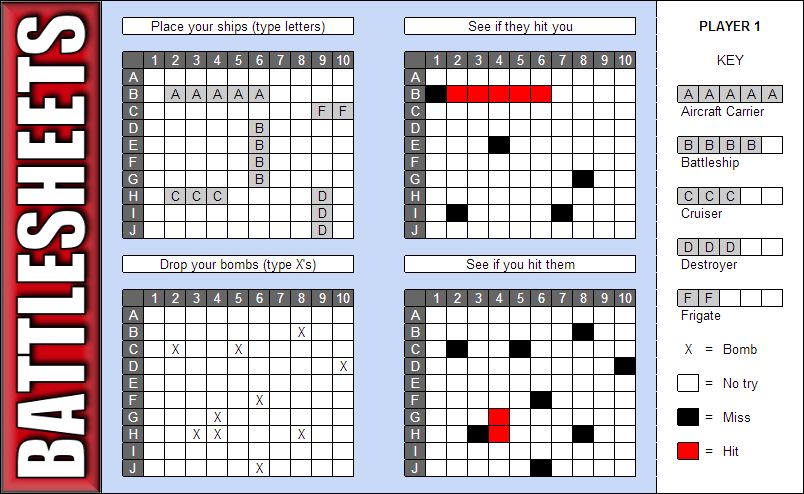
In general, this is an online game, each of the participants of which maintains its own sheet of the table in the general document. You can place 5, 4, 3, and 2-deck ships on the field using the letters A, B, C, D, F. To shoot at the enemy, use the letter X.
The applied formulas and conditions in the Table will automatically paint the field, if your ship is shot, or you get into an enemy ship. The game continues until one naval army is completely sunk.
To start the game again, just clear the cells from the data of the previous batch.
To learn more about the capabilities of Google Sheets that were used to create Table Fight, refer to the Help articles on conditional formatting rules , a list of Google Sheets functions, and especially the IF logical function .
Implemented in an online editor that allows you to create and format tables, the game is familiar to everyone since childhood, certified Google teacher Eric Kurtz (Eric Curts). In his post, Eric calls for “shooting at enemies” aptly, so that the cries of “Wounded, killed!” Were heard all over the Internet.
To start playing, you must enter the Google Drive service , create a personal copy of the template for naval combat from Eric Kierz and share it with your prospective opponent. On the first tab of the sample for the game you can find detailed instructions for further actions in English.
In general, this is an online game, each of the participants of which maintains its own sheet of the table in the general document. You can place 5, 4, 3, and 2-deck ships on the field using the letters A, B, C, D, F. To shoot at the enemy, use the letter X.
The applied formulas and conditions in the Table will automatically paint the field, if your ship is shot, or you get into an enemy ship. The game continues until one naval army is completely sunk.
To start the game again, just clear the cells from the data of the previous batch.
To learn more about the capabilities of Google Sheets that were used to create Table Fight, refer to the Help articles on conditional formatting rules , a list of Google Sheets functions, and especially the IF logical function .









