 February 23, 2014 at 02:07
NetBeans IDE 8.0 Beta Released
Just as a couple of months ago, the Beta version of the wonderful NetBeans IDE was released quietly and without fuss .
Let me remind you that NetBeans is an advanced development environment that allows you to develop applications in languages such as: PHP, C / C ++, Python, JavaScript and even Ada.
Although the NetBeans IDE is a free development environment and the project is developed by a community of enthusiastic developers, its quality and capabilities are not inferior to commercial IDEs.
It should be noted that installers for OS Solaris are no longer supported. However, you can run the IDE on this OS using zip archives instead of binary installers.
Although this is only the Beta version (the release is expected only in April), but now you can try out the new version of the IDE. As for the PHP version, I actively used it at work as the main IDE for a week and did not notice any problems.
PS Do not judge strictly, this is my second article in a couple of years, I will be glad to accept the corrections in PM.
Let me remind you that NetBeans is an advanced development environment that allows you to develop applications in languages such as: PHP, C / C ++, Python, JavaScript and even Ada.
Although the NetBeans IDE is a free development environment and the project is developed by a community of enthusiastic developers, its quality and capabilities are not inferior to commercial IDEs.
Out of the box supported:
- refactoring and profiling
- color syntax highlighting
- auto completion on the fly
- management of all popular version control systems
What's New in NetBeans 8.0 Beta?
- Java SE 8 Support
- Java ME 8 Support
- Enhanced HTML5 Support
- Tomcat 8.0 Support
- PHP 5.5 support
- Many improvements throughout the IDE
Editor
- indentation lines
finally appear dashed lines to better distinguish between code blocks separated by tabs. They are displayed by default. Color can be changed in the IDE settings.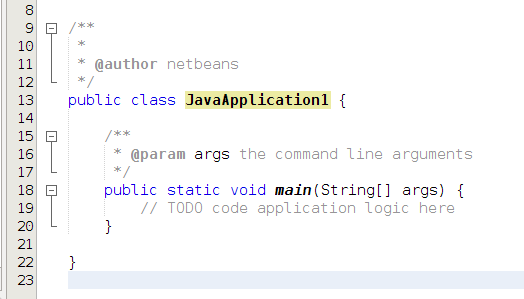
- new code hints
- link to external documentation, in the documentation viewing window is now active
Java
- JDK8 support
- Support for Java SE Embedded and Java ME Embedded 8
- Java editor enhancements: many new code hints; Javadoc as tooltips
- improved integration with JavaFX Scene Builder
Java EE
- new PrimeFaces code generators
- integration with Tomcat 8.0
- integration with TomEE
- various improvements
Php
- PHP 5.5 support
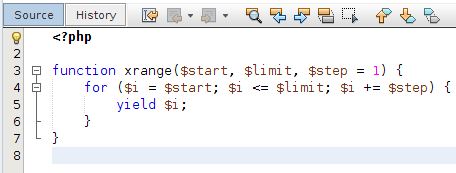
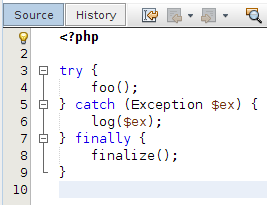
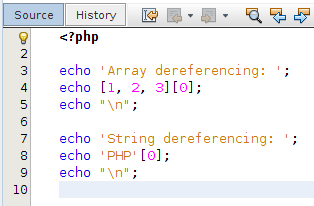
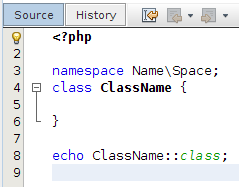
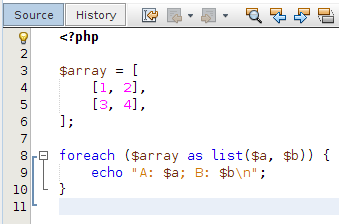
- PSR-0 and PSR-1 standards support
- PHP CS Fixer support
- improvements for Twig, Latte and Neon
- Composer support in the Project Creation Wizard
C / C ++
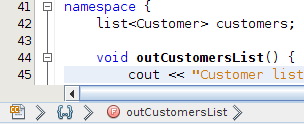
- bread crumbs added
- GDB debugger console can now be used in command line mode. IDE will process commands and reflect debugger changes
Platform
- new editor for customizing editor tabs for Windows systems
- new design team management user interface
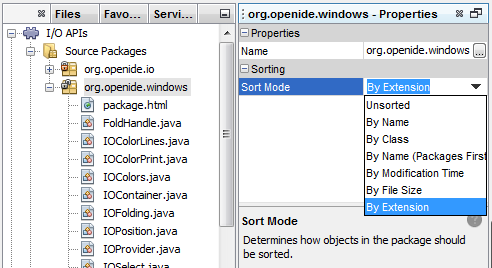
- files in folders can now be sorted by extension
Miscellaneous
- improved profiler. It is now available for embedded systems such as the Raspberry Pi.
- Subversion 1.8 support and various enhancements to Git and Mercurial support
- design changes in the Project Groups interface
- various speed improvements
- Improvements in the pop-up menu of search results: “Copy File Path” for several selected files, support for basic file operations, support for “Select in>”
HTML5
- Added support for remote debugging of Android 4.4 WebKit for Cordova 3.3+
- Grunt support added
- plugins available Avatar.js. After installing the plugin, you can create projects with Avatar.js
Javascript
- improved support for AngularJS
- code completion support in Knockout templates
- support for a new editor for creating jQuery widgets and plugins
- JavaScript code debugging is now done in Nashorn (JDK 8+)
It should be noted that installers for OS Solaris are no longer supported. However, you can run the IDE on this OS using zip archives instead of binary installers.
Although this is only the Beta version (the release is expected only in April), but now you can try out the new version of the IDE. As for the PHP version, I actively used it at work as the main IDE for a week and did not notice any problems.
Useful links:
- NetBeans 8.0 Beta Download Page
- Official information about the release of the IDE 8.0 Beta the NetBeans (to EN)
- Details on the innovations of the 8th version (EN)
PS Do not judge strictly, this is my second article in a couple of years, I will be glad to accept the corrections in PM.









