How to transfer encrypted parameters to DataStage
It is no secret that encrypted parameters (that is, of the Encrypted type) used in IBM DataStage in versions prior to 8.7 are very easy to decrypt. These encrypted settings are often used to transfer the passwords needed to connect to databases.
When building corporate ODS (and, in some cases, even in the case of data warehouses), it makes sense to create universal jobs - the so-called generic ones, which are fully configurable from the outside and do not contain information specific to each table, and therefore they can be used for many ETL processes. This is especially necessary when extracting data from source databases (Extraction). In this case, passwords for each data source must be stored in the configuration files. And you have to bend under the security policies of various enterprises, pretend that it is a reliable encryption algorithm and store passwords for corporate data in an encrypted DataStage form.
But problems arise if you want to pass such parameters to the job. What problems and how to solve them I will write in this article.
Suppose you have a configuration file in which you describe your ETL process. It does not matter in what form it is stored. For example, we use XML. In this config you want to save the password to the database in encrypted form, for example like this:
You read the configuration, extract the necessary parameters to the generic. Well, if you try to pass this password as an Encrypted parameter to a job, DataStage will regard it as an unencrypted password and re-encrypt it. Moreover, it doesn’t matter how you pass: in the sequencer through JobActivity or through the Basic DSSetParam function.
DSXchange and other StackOverflow contain some information on how to do this. But all this somehow is very mediocre. Options like using external encryption / decryption tools and subsequent passing parameters in an open (String) form will not suit us, since the passwords will glow in the DataStage Director log (we remember that we are silent about the reliability of the internal algorithm and keep an open secret).
Briefly: none of these methods work. Well, or we are not happy. And that's why.
I found only one way to solve this problem. There may be another, more obvious solution. But I don’t know about him.
I drew attention to the Values tab in the ParameterSets configuration dialog.

I have never used this tab before and I dare to assume that few people used it and generally know why it is needed. In this tab, you can specify the name of the text file in which the values of the set of parameters you created are stored.
This file is stored in a directory.
I could not believe that the Encrypted parameters would be stored in this file in open form. And if this is not so, then DataStage will not re-encrypt them. We test the hypothesis.
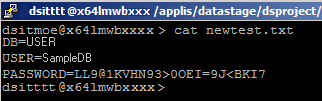
Excellent! If we replace now the contents of this file with other parameters (substituting the encrypted password we need) and check the workability of the job with this set of parameters, then we will see that everything works as it should.
Now, in order to pass parameters for several independent instances of one job (if it is Multiple Instance), you will need to perform the following steps:
The above method was not tested by us in versions> 8.5, but in theory it should work, since we did not use anything supernatural here. It is better to declare the parameter values themselves at the project level in the DataStage Administrator and receive them at run time. In DSParams, all Encrypted parameters are also stored in encrypted form, so all of the above considerations apply to this case as well. For example, we use this method of configuring our processes:
where SOURCE_ * are the project variables.
When building corporate ODS (and, in some cases, even in the case of data warehouses), it makes sense to create universal jobs - the so-called generic ones, which are fully configurable from the outside and do not contain information specific to each table, and therefore they can be used for many ETL processes. This is especially necessary when extracting data from source databases (Extraction). In this case, passwords for each data source must be stored in the configuration files. And you have to bend under the security policies of various enterprises, pretend that it is a reliable encryption algorithm and store passwords for corporate data in an encrypted DataStage form.
But problems arise if you want to pass such parameters to the job. What problems and how to solve them I will write in this article.
And what, in fact, is the problem?
Suppose you have a configuration file in which you describe your ETL process. It does not matter in what form it is stored. For example, we use XML. In this config you want to save the password to the database in encrypted form, for example like this:
You read the configuration, extract the necessary parameters to the generic. Well, if you try to pass this password as an Encrypted parameter to a job, DataStage will regard it as an unencrypted password and re-encrypt it. Moreover, it doesn’t matter how you pass: in the sequencer through JobActivity or through the Basic DSSetParam function.
DSXchange and other StackOverflow contain some information on how to do this. But all this somehow is very mediocre. Options like using external encryption / decryption tools and subsequent passing parameters in an open (String) form will not suit us, since the passwords will glow in the DataStage Director log (we remember that we are silent about the reliability of the internal algorithm and keep an open secret).
Possible solutions to the problem
- Use DataStage C API;
- Create a parameter file and use it with dsjob -run -paramfile;
- Decrypt the password before sending it to the job;
- Create a ParameterSet for each data source.
Briefly: none of these methods work. Well, or we are not happy. And that's why.
- Indeed, the API contains a DSPARAM structure described as follows
typedef struct _DSPARAM {
int paramType;
union {
   char *pString;
   char *pEncrypt;
   int pInt;
   float pFloat;
   char *pPath;
   char *pListValue;
   char *pDate;
   char *pTime;
} paramValue;
} DSPARAM;
which contains a pointer to an encrypted parameterchar *pEncrypt. The fieldparamTypemust contain the type of parameter, in this case -DSJ_PARAMTYPE_ENCRYPTED.
I have not tried this method. The fact is that, in my opinion, this is too unreasonably costly way to just launch a jobin addition, you will have to implement the whole logic of working with a job: start, transfer all parameters, monitor its status and return status to the sequencer with reverse propagation of emergency termination in which case (Error Handler will not catch an exception in this case). The readability of the ETL process will fall and only a rather skilled pepper will be able to support such a project (yes, not everyone can hire seniors who, in addition to knowledge of DataStage, also have knowledge of C). Among other things, the client will not always grant you the right to write the Server / PXEngine / lib directory (Server / PXEngine / user_lib) where you will need to put the compiled object.
Summing up: it looks like this steam train will fly, but trying doesn't always make sense - This option does not work. At all. DataStage also encrypts the parameters again, as it does in the case of DSSetParam. And again, launching a job outside the sequencer is a rather unpleasant thing in terms of solution supportability. We also note this option.
- Yes, we can easily and easily decrypt passwords and then they can also be easily encrypted if necessary. But IBM has changed the encryption algorithm in versions starting from 8.7, changing it to a more robust AES. Those. if we migrate our solution (and, believe me, this will happen sooner or later), it will stop working in new versions of DataStage. We note this option as well.
- The first thing that comes to mind: it's ugly. The second thing that comes: it is inconvenient. In a combat environment, you will have to release a new ParameterSet each time you add another data source. And thirdly, this will not work, because we cannot dynamically change the name of the parameter set when starting the job.
Solution
I found only one way to solve this problem. There may be another, more obvious solution. But I don’t know about him.
I drew attention to the Values tab in the ParameterSets configuration dialog.
I have never used this tab before and I dare to assume that few people used it and generally know why it is needed. In this tab, you can specify the name of the text file in which the values of the set of parameters you created are stored.
This file is stored in a directory.
${PROJECT_DIR}/ParameterSets/ИМЯ_НАБОРА_ПАРАМЕТРОВ/I could not believe that the Encrypted parameters would be stored in this file in open form. And if this is not so, then DataStage will not re-encrypt them. We test the hypothesis.
Excellent! If we replace now the contents of this file with other parameters (substituting the encrypted password we need) and check the workability of the job with this set of parameters, then we will see that everything works as it should.
Now, in order to pass parameters for several independent instances of one job (if it is Multiple Instance), you will need to perform the following steps:
- Create a ParameterSet for with the required fields. We do not need to create many sets. Only one. One set can use several files for the values of its fields.
- Specify a file name in the Values tab of the ParameterSets configuration. Any. This is necessary for DataStage to create a directory for the parameter
- Add this parameter set to the job parameters
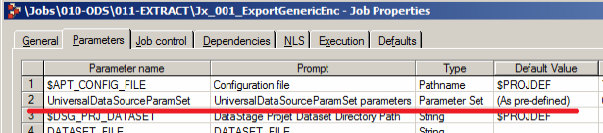
- Before starting a job with an encrypted parameter, create a process that adds (and overwrites, if necessary) a file with a unique name for each instance of the job. Let me remind you that the file must be written to the directory
${PROJECT_DIR}/ParameterSets/ИМЯ_НАБОРА_ПАРАМЕТРОВ/ - To start the job, you must specify the file name as the parameter value of your ParameterSet.
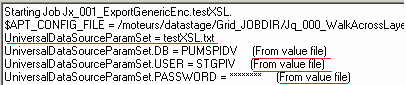
Please note that when the job starts, the DataStage marks the applied parameters as From value file.
Instead of a conclusion
The above method was not tested by us in versions> 8.5, but in theory it should work, since we did not use anything supernatural here. It is better to declare the parameter values themselves at the project level in the DataStage Administrator and receive them at run time. In DSParams, all Encrypted parameters are also stored in encrypted form, so all of the above considerations apply to this case as well. For example, we use this method of configuring our processes:
where SOURCE_ * are the project variables.