 December 5, 2013 at 12:29
3D acceleration of VDI in practice. Part 1
3D acceleration of VDI in practice.
Part 1 - vSGA and vDGA
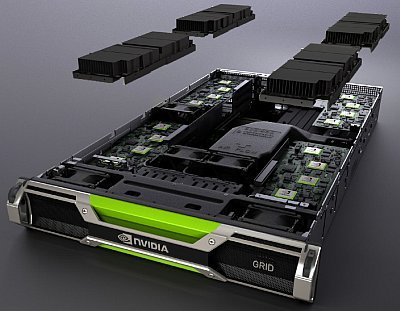
The lack of hardware acceleration of graphics is a significant obstacle to the implementation of virtualization technologies in companies working in the field of design, engineering, design development, etc. Consider what new opportunities have appeared with the release of NVIDIA GRID.
Virtualization of workplaces (VDI) has already firmly entered our lives, primarily in the corporate segment of the market, and is confidently making its way to other segments, including in the form of public cloud services ( Desktop as a Service ). The lack of hardware graphics acceleration hinders the use of this technology in those industries that could appreciate the advantages of using VDI such as remote accessibility, data security and simplified outsourcing of personnel.
The first steps to using 3D acceleration in VDI were made a long time ago and consisted of forwarding PCI devices to virtual machines, which made it possible to output video cards for VDI installed in the server or connected to the server using external PCIe baskets, for example, such as Dell PowerEdge C410x. The disadvantages of this solution are obvious - increased use of electricity, rack space and high cost.
NVIDIA GRID Technology Brief
With the announcement of NVIDIA GRID technology (NVIDIA VGX at the time of the announcement) last year, interest in using 3D accelerated VDIs increased significantly. The essence of GRID technology, which was originally designed specifically for 3D acceleration in virtual environments , is quite simple and includes the following principles:
- Aggregation on the basis of one PCIe card of several graphic accelerators;
- The ability to virtualize graphics accelerators at the hypervisor level;
- The ability to virtualize graphics accelerators using GRID Virtual GPU technology.
Currently, NVIDIA has released two video cards based on the NVIDIA Keppler architecture - NVIDIA GRID K1 and K2. The characteristics of these cards are as follows:
| GRID K1 | GRID K2 | |
| GPU Number | 4 entry-level Kepler GPUs | 2 high-end Kepler GPUs |
| CUDA Kernels | 768 | 3072 |
| Total memory size | 16 GB DDR3 | 8 GB GDDR5 |
| Maximum power | 130 watts | 225 watts |
| Card Length | 26.7 cm | 26.7 cm |
| Card Height | 11.2 cm | 11.2 cm |
| Card Width | Dual slot | Dual slot |
| Display input / output data | Not | Not |
| Supplementary food | 6-pin connector | 8-pin connector |
| PCIe | x16 | x16 |
| PCIe Generation | Gen3 (compatible with Gen2) | Gen3 (compatible with Gen2) |
| Cooling | Passive | Passive |
| Technical specifications | GRID K1 Board Specifications | GRID K2 Board Specifications |
In fact, GRID K1 represents four QUADRO K600 cards integrated on one PCIe card, GRID K2 cards - two QUADRO K5000 cards. This allows even without the use of virtualization to significantly increase the density of graphics cards in servers.
The inclusion of various vendor servers providing the installation of up to 4 GRID cards in one server in the GRID platform eliminates the need to use external PCIe baskets.
GRID-enabled software includes VMware, Citrix and Microsoft hypervisors, as well as VMware and Citrix workstation virtualization systems (and Microsoft, if you consider server sharing options).
Description of our test bench
For our testbed, we decided to use the 1U SuperMicro 1027GR-TRFT server.
Its main features:
- Dual socket R (LGA 2011) supports Intel® Xeon® processor E5-2600 and E5-2600 v2 family
- Up to 512GB ECC DDR3, up to 1866MHz; 8x DIMM sockets
- 3x PCI-E 3.0 x16 slots (support GPU / Xeon Phi cards), 1x PCI-E 3.0 x8 (in x16) low-profile slot
- Intel® X540 10GBase-T Controller
- 4x Hot-swap 2.5 "SATA3 Drive Bays
- 1800W Redundant Power Supplies Platinum Level (94% +)
This choice was due to the high density (up to 3 GRID cards in 1U) and the presence of built-in 10GBase-T network interfaces.
SATA basket allows you to use inexpensive SSD disks for Host Based caching of data access, so useful for VDI loads, with characteristic peaks of disk activity at the beginning and end of the working day.
At modern prices for memory modules, eight DIMM-slots are quite enough in a situation where the density of the VM per server is limited by the CPU and GPU resources.
In this server we installed the NVIDIA GRID K1 card . Here is a photo server with a video card ready for installation: VMware vSphere
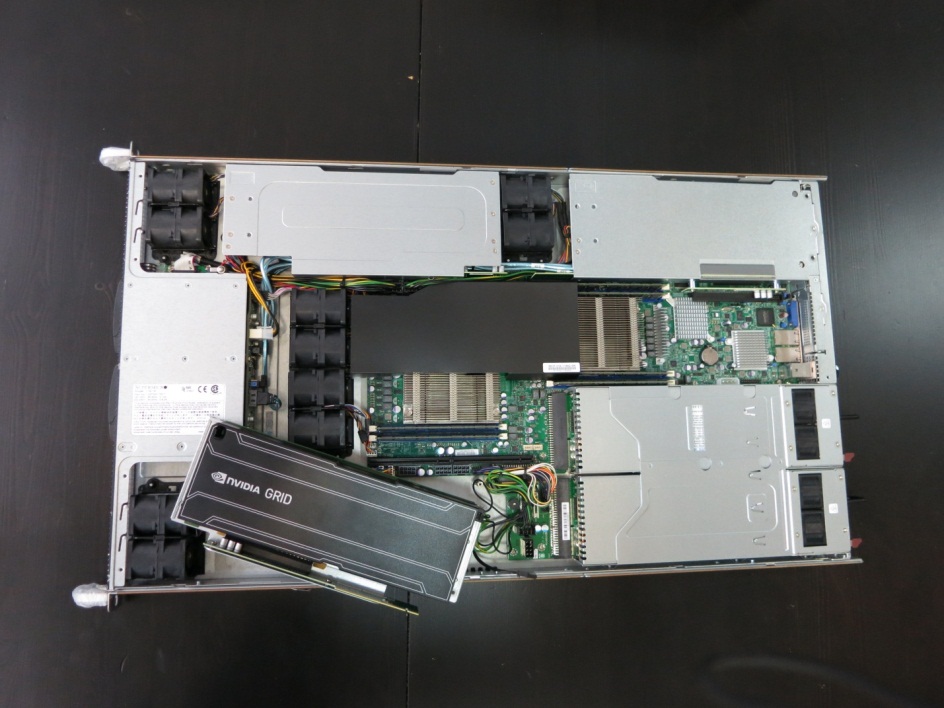
, familiar to us, was chosen as a virtualization platform. Looking ahead, I note that in the second part of this article we will have to use Citrix XenServer , since at the moment only he and only in the status of Tech Preview supports GRID Virtual GPU technology.
The ESXi hypervisor defines the video card as 4 NVIDIAGRID K1 devices connected via PCI / PCI bridge, which makes the accelerators available for separate use as passthrough devices connected to the VM, or as the basis for virtualization at the hypervisor level.
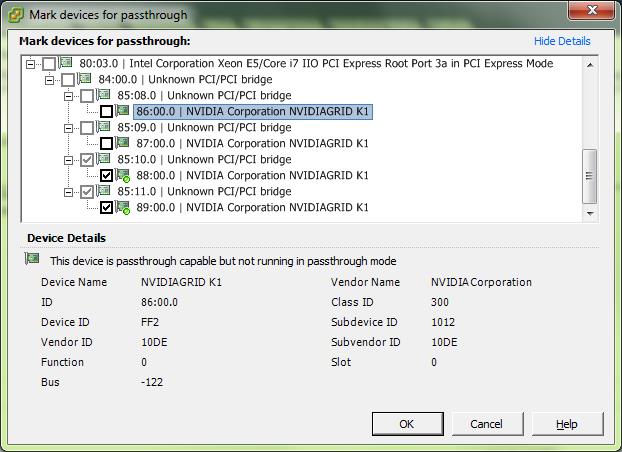
The driver from NVIDIA is installed in the hypervisor:
~ # esxcli software vib list | grep NVIDIANVIDIA-VMware_ESXi_5.1_Host_Driver 304.76-1OEM.510.0.0.802205 NVIDIA VMwareAccepted 2013-03-26All devices that are not in passthrough mode are initialized and used by the driver from NVIDIA during boot:
2013-10-28T06:12:42.521Z cpu7:9838)Loading module nvidia ...2013-10-28T06:12:42.535Z cpu7:9838)Elf: 1852: module nvidia has license NVIDIA2013-10-28T06:12:42.692Z cpu7:9838)module heap: Initial heap size: 8388608, max heap size: 684769282013-10-28T06:12:42.692Z cpu7:9838)vmklnx_module_mempool_init: Mempool max 68476928 being used for module: 772013-10-28T06:12:42.693Z cpu7:9838)vmk_MemPoolCreate passed for 2048 pages2013-10-28T06:12:42.693Z cpu7:9838)module heap: using memType 22013-10-28T06:12:42.693Z cpu7:9838)module heap vmklnx_nvidia: creation succeeded. id = 0x4100370000002013-10-28T06:12:42.943Z cpu7:9838)PCI: driver nvidia is looking for devices2013-10-28T06:12:42.943Z cpu7:9838)PCI: driver nvidia claimed device 0000:86:00.02013-10-28T06:12:42.943Z cpu7:9838)PCI: driver nvidia claimed device 0000:87:00.02013-10-28T06:12:42.943Z cpu7:9838)PCI: driver nvidia claimed 2 devicesNVRM: loading NVIDIA UNIX x86_64 Kernel Module 304.76 Sun Jan 13 20:13:01 PST 20132013-10-28T06:12:42.944Z cpu7:9838)Mod: 4485: Initialization of nvidia succeeded with module ID 77.2013-10-28T06:12:42.944Z cpu7:9838)nvidia loaded successfully.After loading the hypervisor
Citrix XenDesktop 7 is used as a platform for creating VDI infrastructure, which is currently also used in our production infrastructure, which provides VDI services for our customers. The test machines use HXD 3D Pro technology, which effectively packs and forwards the rendered GPU image to the client. The test virtual server has the following configuration: 4vCPU 2GHz, 8GB RAM, 60GB HDD.
VSGA testing
vSGA is a VMware technology that provides virtualization of GPU resources installed on a server running the VMware ESXi hypervisor and subsequent use of GPU data to provide 3D acceleration for virtual graphics cards issued to a virtual server.
The technology has many limitations on the performance and functionality of virtual video cards, however, it allows you to maximize the density of virtual machines per GPU.
In fact, we were able to start machines with close to twice the amount of virtual video memory in comparison with the amount of physical video memory on the GPU used.
The functionality of the virtual video card is as follows:
- Supported APIs: DirectX 9, OpenGL 2.1
- maximum video memory capacity: 512MB
- GPU performance: dynamic, not controlled.
In the case of using VMware View, such a configuration of virtual machines can be carried out directly from the View management interface, in our case, to activate hardware acceleration for a virtual video card, two actions must be performed:
- enable 3D support,
- set the size of the video memory in the properties of the video card in the editing machine:
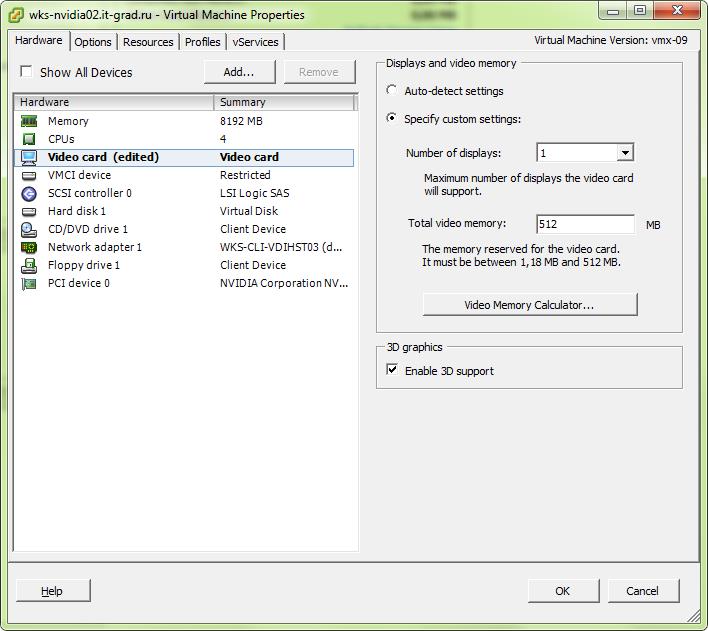
and add the mks.use3dRenderer = hardware parameter to its parameters:
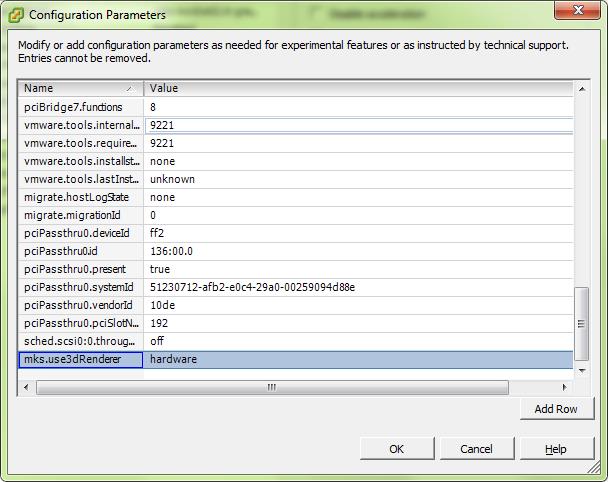
In a guest OS, such a virtual video card is defined as “VMware SVGA 3D”. It differs from a conventional virtual video card only in memory capacity and support for hardware acceleration of the above APIs.
The results of the FurMark test on such a VDI machine clearly say that you won’t have to play on it (it should be noted that during testing the physical video card used one virtual machine, that is, all the computing resources of the video card, taking into account the overhead of virtualization, were available to the test ):

From the point of view of AutoCad 2014, the capabilities of the video card are as follows:
Enhanced 3D Performance: Available and onSmooth display: Available and offGooch shader: Available and using hardwarePer-pixel lighting: Available and onFull-shadow display: Available and onTexture compression: Available and offAdvanced material effects: Available and onAutodesk driver: Not CertifiedEffect support:Enhanced 3D Performance: AvailableSmooth display: AvailableGooch shader: AvailablePer-pixel lighting: AvailableFull-shadow display: AvailableTexture compression: AvailableAdvanced material effects: AvailableAs you can see, formally all the parameters of hardware accelerationare supported by the driver . It is assumed that we can only see support problems when using heavier products that use, for example, the CUDA architecture.
Cadalyst Benchmark test
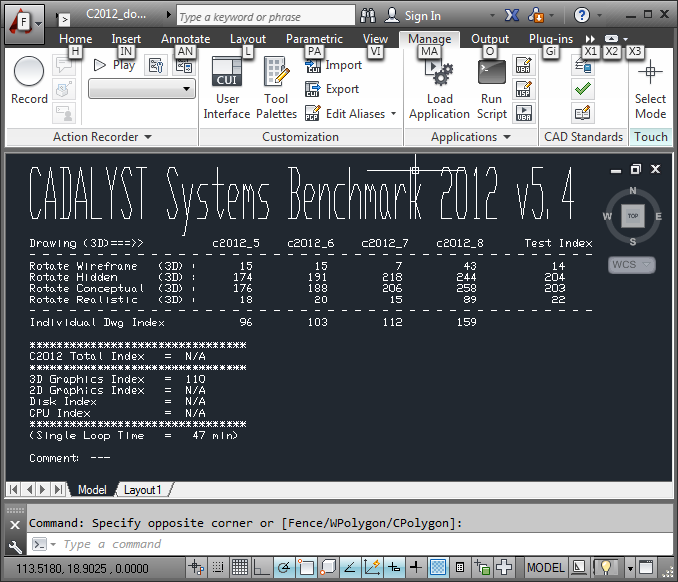
results : I ’m not impressing with the results, but you can use this software, and if you don’t need high performance and work with complex models — for example, in a classroom, then high density and low cost of such machines can be useful.
VDGA testing
vDGA is the name used by VMware to indicate the forwarding of a physical video card to a virtual machine.
In fact, for this technology, NVIDIA GRID gave one single advantage - the high density of the GPU , which eliminates the need for external PCIe baskets.
For example, in the server used on the test bench, it is possible to install three NVIDIA GRID K1 video cards, which will give us 12 independent QUADRO K600 class accelerators . This allows you to run 12 virtual servers on the server, which allows you to load server capacities, and depending on the load profile, it gives a reserve of GPU resources compared to CPU resources.
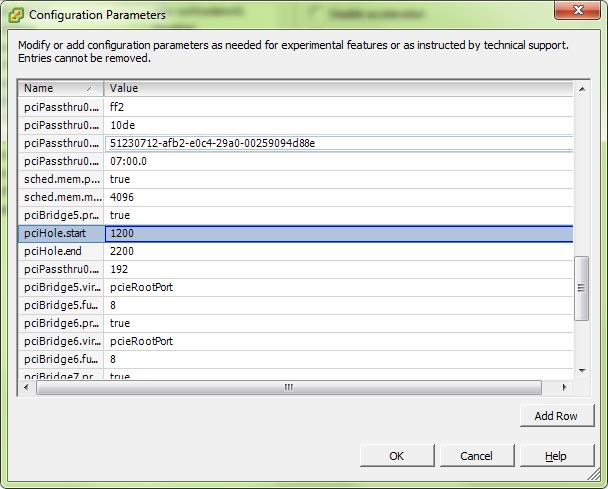
To forward a video card to a virtual server, you need to enable passthrough mode for a given PCIe device in the host configuration and add a PCI device to the virtual machine configuration:
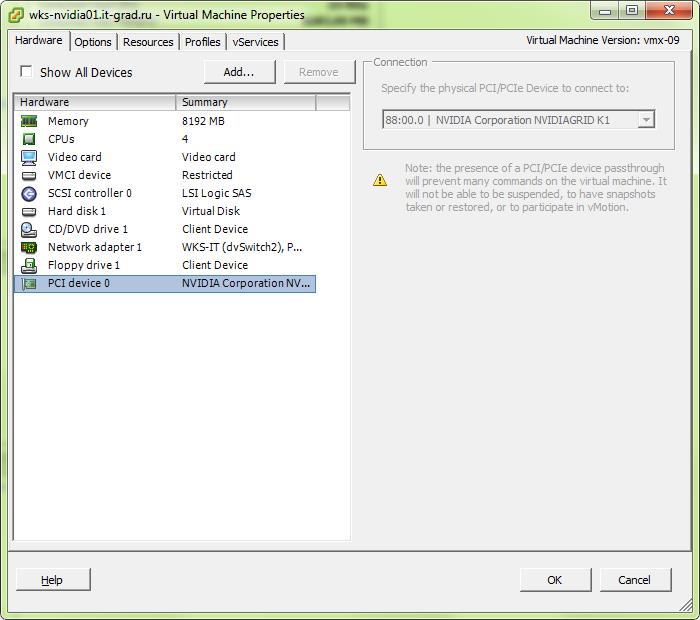
You also need to install full memory backup for this virtual machine
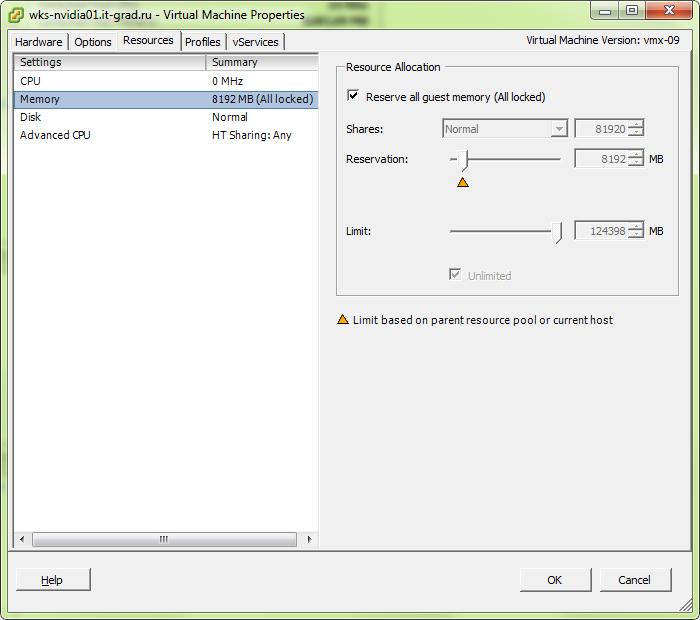
and configure the pci hole. There are different opinions on this subject, we have chosen values from 1200 to 2200:
In the guest OS, in this case, the video card is seen as a full-fledged device from NVIDIA and requires the installation of drivers for the GRID video card family.
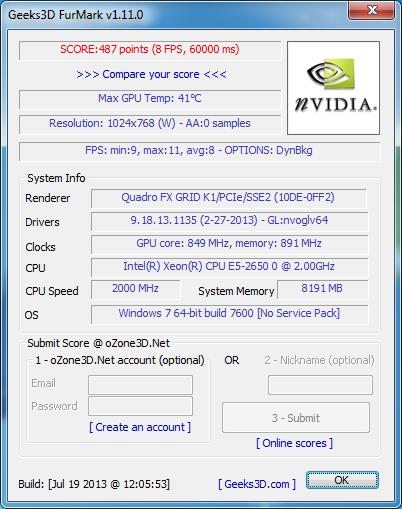
The FurMark results are close to the results obtained in the vSGA test, which indicates the relative effectiveness of the virtualization level for this test:
When using AutoCad 2014, the picture is as follows:
Current Effect Status:Enhanced 3D Performance: Available and on Smooth display: Available and offGooch shader: Available and using hardwarePer-pixel lighting: Available and onFull-shadow display: Available and onTexture compression: Available and offAdvanced material effects: Available and onAutodesk driver: Not CertifiedEffect support:Enhanced 3D Performance: AvailableSmooth display: AvailableGooch shader: AvailablePer-pixel lighting: AvailableFull-shadow display: AvailableTexture compression: AvailableAdvanced material effects: AvailableAll features are also expectedly supported, but the card is not certified. Of the GRID series for AutoCad, only K2 is certified.
Cadalyst 2012 benchmark results:
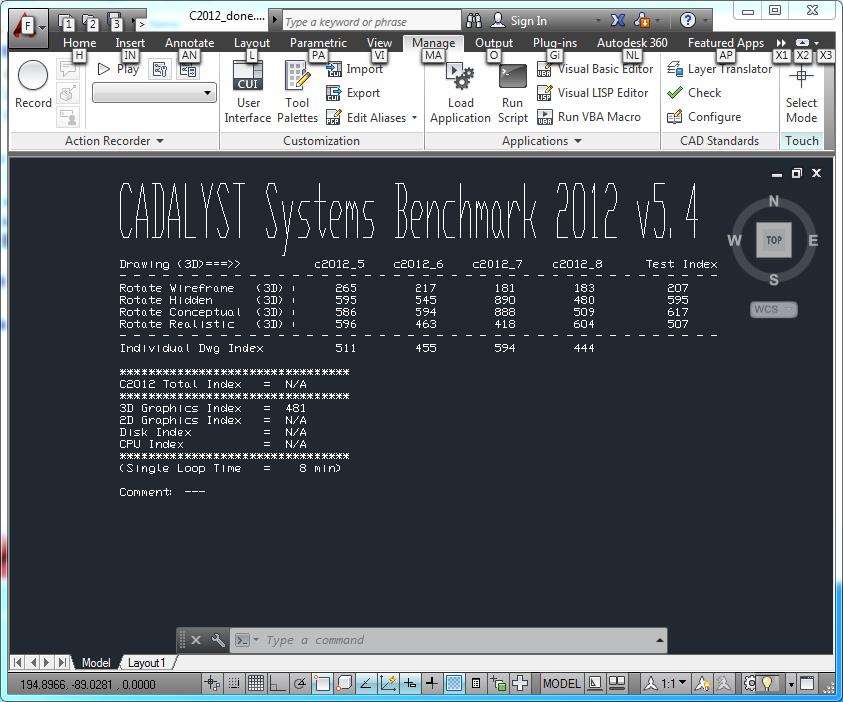
As we can see, the forwarded video card actually shows results 4 times larger than virtualized . In this case, it is already possible to use such a machine for the designer.
If the performance of the K1 card is not enough, you can install K2 and get the top range video card inside the virtual server.
In the second part of the article
We will talk in detail about the possibility of GPU virtualization using NVIDIA technologies, which promise us support for all available physical API cards and sufficient performance to work with CAD confidently, show a test bench, measure the performance of such video cards and summarize. To be continued.









